The highest-value control for any AI coding agent is a hook that refuses reads of credential files. Here is the path list, the working script, the exit code that blocks, and the three gaps a path blocklist leaves open.
If you add exactly one control to an AI coding agent, add this one. A hook that refuses reads of credential files takes an afternoon, cannot be argued out of by the model, and removes the single largest category of accidental exposure.
This page is the tactical version: the paths, the script, the exit code, and honest coverage of what it does not solve. The wider threat model is on AI coding agent security.
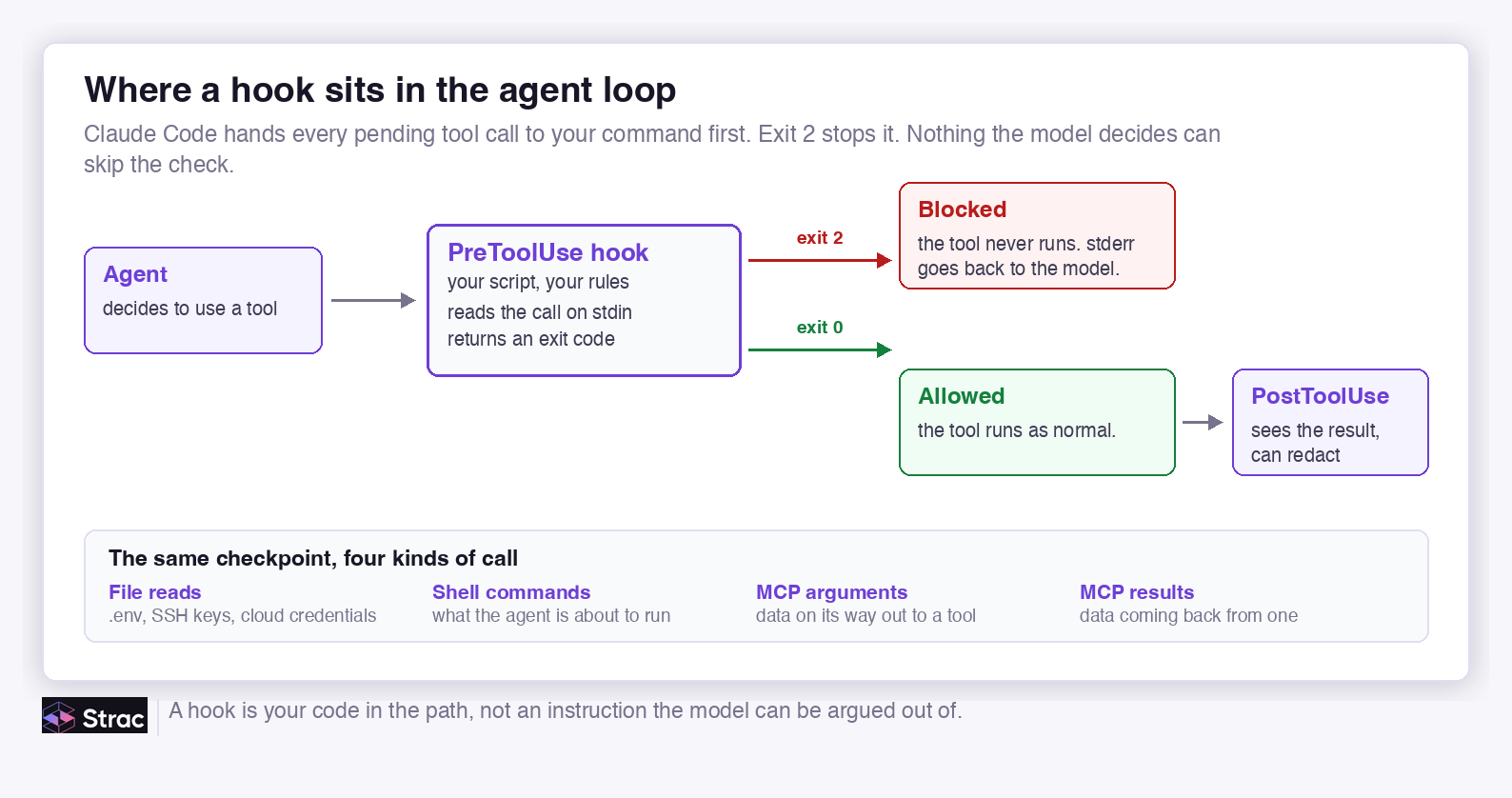
✨ Where the hook sits
The agent asks, your script decides, the call runs or it does not. Exit 2 is the only code that blocks.
The paths worth blocking
Grouped by what they hand over if read. Start with all of them and subtract what your stack does not use, rather than the other way round.
The agent pipes a JSON description of the pending call into your command on stdin. Pull the path out and decide:
#!/usr/bin/env bash
# ~/.claude/hooks/block-secrets.sh
set -euo pipefail
path=$(jq -r '.tool_input.file_path // .tool_input.path // empty')
[ -z "$path" ] && exit 0

case "$path" in
  *.env|*.env.*)
    echo "Blocked: $path holds credentials. Read .env.example instead." >&2
    exit 2 ;;
  */.ssh/id_*|*/.ssh/config|*/.netrc)
    echo "Blocked: $path is an SSH or login credential." >&2
    exit 2 ;;
  */.aws/credentials|*/.config/gcloud/*|*/.kube/config)
    echo "Blocked: $path is a cloud credential." >&2
    exit 2 ;;
  */.npmrc|*/.pypirc|*/.git-credentials|*/.docker/config.json)
    echo "Blocked: $path grants publish or registry access." >&2
    exit 2 ;;
esac
exit 0
The stderr message matters more than it looks. It goes back to the model, so a good message makes the agent route to the example file by itself instead of asking a human what to do.
Exit 2, and only exit 2
Exit code
Effect
0
No objection. The call proceeds.
2
Block. The call never runs; stderr goes to the model.
anything else
Treated as a broken hook, not a block. The call proceeds.
A script that exits 1 on failure, which is the normal shell convention, blocks nothing. This catches almost everyone once.
✨ Gap one: the secret is in the agent's own config
A path blocklist assumes you know where secrets live. Frequently the credential is not in a file the agent reads at all. It is in the MCP server definition the agent loads at startup.
A production database password in plain text in an agent's own MCP config, found on an engineering laptop and masked on the device.
No read happens, so no hook fires. This needs something that inspects agent configuration rather than tool calls.
✨ Gap two: secrets arrive through MCP, not the filesystem
An agent can query a production database through an MCP server and pull back keys, tokens or customer records without touching a sensitive file. Path matching is structurally blind to this.
Every MCP server the fleet's agents can call, approved or disallowed, with the agents using each one.
Condition
Action
Sensitive data in the tool arguments
Block the call. It is on its way out.
Sensitive data in the tool results
Redact the matches. The agent gets the shape, not the values.
Result larger than 1MB
Pass it and flag it. Bulk movement is worth recording even when nothing matched.
Gap three: you cannot see who still has the hook
The script lives on a laptop. Anyone with a shell can remove it, and nothing tells you. For one team that is acceptable. For an audit answer about 400 machines it is not, which is where an agent that reports state centrally earns its place.
For the three gaps above, Strac's coding agent security integration covers the agent's own config, MCP arguments and results, and per-machine proof that the control is still installed.
🌶️ Spicy FAQs
How do I stop an AI agent reading my .env file?
Register a PreToolUse hook matched to the file tools that exits with code 2 when the target path matches a credential pattern. Exit 2 is the block signal: the call never runs and your stderr message goes back to the model so it adapts. Anything else, including the conventional exit 1, is treated as no objection. The full script is on this page.
Is adding the file to .gitignore enough?
No, and this is the most common mistake. .gitignore controls what gets committed. It has nothing to do with what a process on your machine can read, and a coding agent reads the filesystem, not the git index. The same goes for .cursorignore and friends, which scope an index rather than enforce a read.
Which paths should the blocklist cover?
At minimum: .env and its variants, SSH private keys, AWS, GCP and Kubernetes credentials, .netrc, .npmrc and .pypirc, Git credential stores, Docker config, and the OS keychains. The full list is in the table above. Start there and add what your stack actually uses.
What if the agent genuinely needs a value from .env?
Give it the example file. Most tasks that look like they need the secret only need the variable name and shape, which .env.example provides. Put that in the stderr message your hook returns, and the agent routes to the example file on its own without a human in the loop.
Can a developer just remove the hook?
Yes. It is a file on their laptop, and anyone with a shell can edit settings.json or delete the script, usually not maliciously but because something broke late at night. That is the real limitation of a DIY rollout: there is no server-side signal telling you the control is still intact on every machine.
Does this cover secrets that arrive through MCP?
No, and that is the largest gap. A path blocklist works on files. An MCP server can return a result set full of keys or customer records without any sensitive file being read. Closing that needs inspection on the tool arguments and results, not on the path.
Last updated: November 24, 2026
Customer story
“Don’t just alert on problems, fix them.”
Scott Roberts, Chief Information Security Officer, UiPath
Register a PreToolUse hook matched to the file tools that exits with code 2 when the target path matches a credential pattern. Exit 2 is the block signal: the call never runs and your stderr message goes back to the model so it adapts. Anything else, including the conventional exit 1, is treated as no objection. The full script is on this page.
Is adding the file to .gitignore enough?
No, and this is the most common mistake. .gitignore controls what gets committed. It has nothing to do with what a process on your machine can read, and a coding agent reads the filesystem, not the git index. The same goes for .cursorignore and friends, which scope an index rather than enforce a read.
Which paths should the blocklist cover?
At minimum: .env and its variants, SSH private keys, AWS, GCP and Kubernetes credentials, .netrc, .npmrc and .pypirc, Git credential stores, Docker config, and the OS keychains. The full list is in the table above. Start there and add what your stack actually uses.
What if the agent genuinely needs a value from .env?
Give it the example file. Most tasks that look like they need the secret only need the variable name and shape, which .env.example provides. Put that in the stderr message your hook returns, and the agent routes to the example file on its own without a human in the loop.
Can a developer just remove the hook?
Yes. It is a file on their laptop, and anyone with a shell can edit settings.json or delete the script, usually not maliciously but because something broke late at night. That is the real limitation of a DIY rollout: there is no server-side signal telling you the control is still intact on every machine.
Discover & Protect Data on SaaS, AI, MCP, Endpoints & Cloud
Strac provides end-to-end data loss prevention for all SaaS and Cloud apps. Integrate in under 10 minutes and experience the benefits of live DLP scanning, live redaction, and a fortified SaaS environment.