




Claude DLP

Claude DLP

Data Loss Prevention (DLP) for Claude Cowork, Claude Code and Claude Chat

ChatGPT
Perplexity
Grok
Google AI
Claude
Summarize and analyze this article with:

✨Why You Need DLP for Claude

Claude is one of the most capable AI models available — and one of the most widely adopted in enterprise. But every Claude interaction is a potential data leak.

Employees paste customer records into Claude Chat. Developers send proprietary codebases through Claude Code. Teams connect Claude to Slack, SharePoint, and databases via MCP. Claude processes all of it without filtering.

Anthropic's built-in safety controls what Claude outputs. It does not protect what you input. That gap is your responsibility.
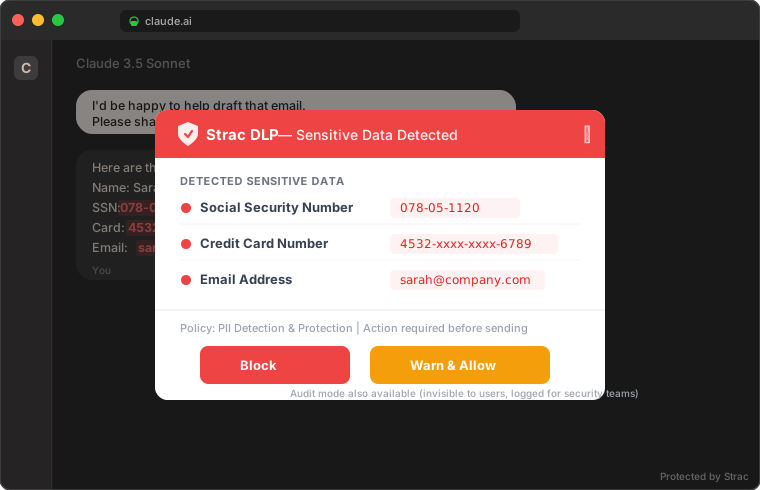
Strac detecting sensitive data in a Claude prompt — block or warn
Strac detects SSNs, credit cards, and PII before they reach Claude — with configurable block, warn, or audit modes

Strac's Claude DLP closes this gap across every surface where your team interacts with Claude.

✨Claude Chat DLP — Browser Protection

Claude Chat at claude.ai is where the majority of enterprise Claude interactions happen. Employees copy-paste from internal tools, CRMs, support tickets, and spreadsheets directly into Claude's web interface.

Strac's browser extension (Chrome and Edge) monitors every interaction with claude.ai in real time:

What Gets Detected

Strac identifies 100+ sensitive data types in Claude Chat interactions:

Zero Friction Deployment

The browser extension deploys in minutes through Chrome Enterprise or Edge Group Policy. No proxy. No TLS interception. No network changes. Users see no performance impact — Strac's detection engine runs locally in the extension.
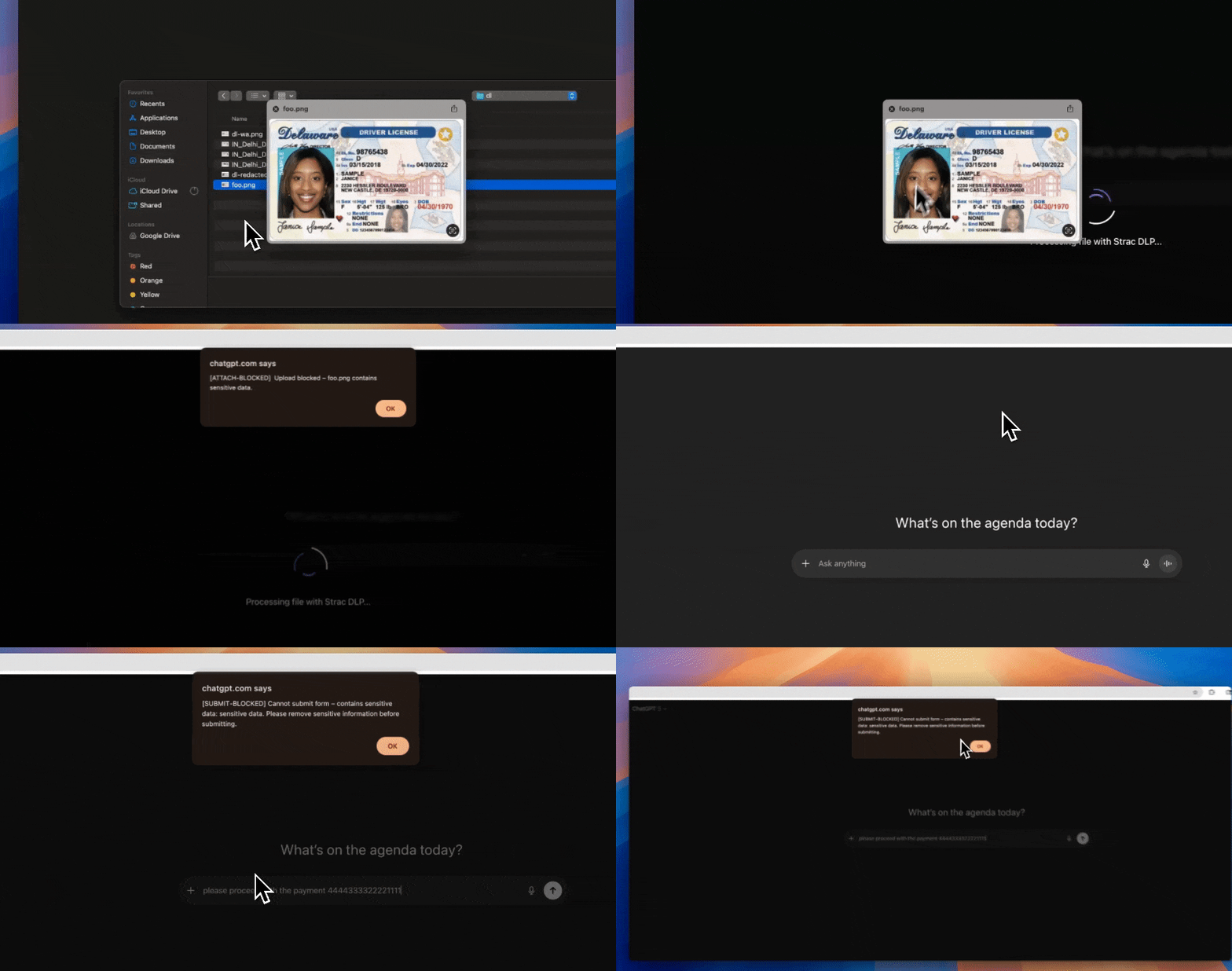
Strac Browser DLP for Claude and GenAI tools
Strac's browser extension detects and redacts sensitive data across Claude, ChatGPT, Gemini, and every AI-powered web app

🎥 Claude Desktop DLP — Endpoint Protection

Claude Desktop is a native application for Mac and Windows. It bypasses every browser-based security control — your browser extension, your web proxy, your CASB. Employees can drag files from Finder or Explorer directly into Claude Desktop, paste clipboard content, and interact with Claude completely outside your browser DLP's visibility.

Strac's endpoint DLP agent provides OS-level protection:

Claude Desktop also supports MCP connectors — when a user configures MCP servers in Claude Desktop, the endpoint agent works alongside MCP DLP for layered protection.

Claude Code DLP — Developer Security

Claude Code is Anthropic's command-line AI agent that runs in your terminal with full filesystem access. It reads and writes source code, runs shell commands, interacts with git, and can access any file your user account can reach.

For development teams, the primary risks are:

Strac's endpoint DLP agent monitors Claude Code sessions:

The same endpoint agent that protects Claude Code also covers Cursor, Windsurf, GitHub Copilot, and any other terminal-based AI coding tool — one agent, all AI developer tools.

✨Claude Cowork DLP — Workspace Protection

Claude Cowork (Claude for Work) is Anthropic's collaborative AI workspace. Teams share projects, documents, and Claude conversations in a persistent environment. The collaboration features that make Cowork productive also amplify data security risks:

Strac protects Claude Cowork through browser DLP (for web-based Cowork access) and MCP DLP (for connected data sources):

Here is how Strac's MCP DLP intercepts sensitive data before it reaches Claude in a Cowork workspace:
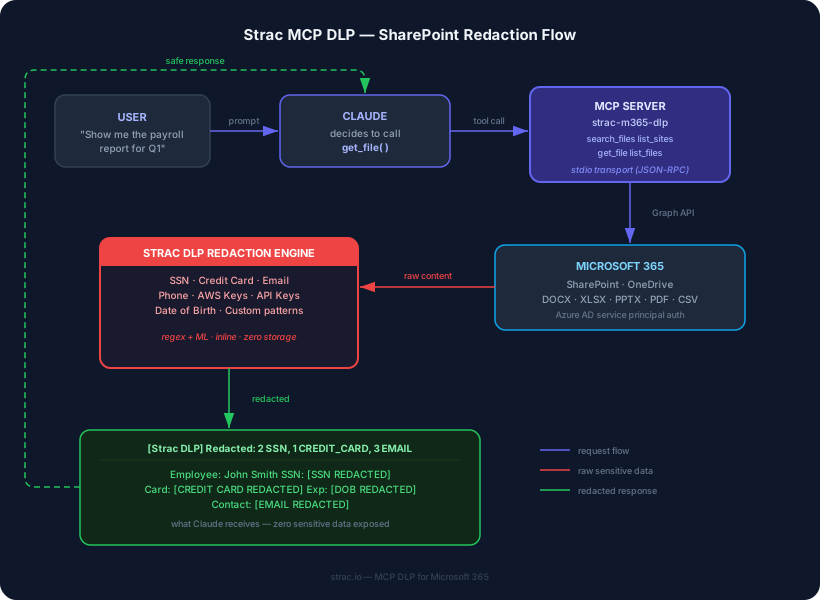
Strac MCP DLP SharePoint Redaction Flow
Strac's MCP DLP redacts SSNs, credit cards, and PII inline before Claude processes connected data sources

Claude MCP DLP — Connector Security

The Model Context Protocol (MCP) lets Claude connect directly to your organization's SaaS tools and databases, pulling data autonomously based on user prompts. This is the newest and most dangerous data leak vector — traditional DLP cannot see machine-to-machine traffic flowing through MCP.

Claude can connect to:

When an employee asks Claude "pull the Q1 payroll report from SharePoint," Claude calls get_file() through an MCP server, retrieves the raw document via Microsoft Graph API, and loads the full contents — SSNs, salaries, bank accounts — into its context window.

Strac's MCP DLP sits between Claude and every connected data source. When Claude calls a tool through an MCP server, Strac intercepts the raw content, detects and redacts sensitive data, and returns the clean version to Claude. The redaction is inline and zero-storage — sensitive data never reaches Claude's context window.

See the full MCP DLP architecture and live demo →

For the complete guide to MCP security: MCP DLP: How to Prevent Data Leaks in AI Agent Workflows →

How Strac Protects Claude: Block, Warn, and Audit

Every Claude surface uses the same detection engine with three configurable enforcement modes:

Mode

What the User Sees

What Security Sees

When to Use

Block

Submission is stopped. Popup shows which sensitive data was detected and why it was blocked.

Full event log: user, timestamp, data types, policy triggered.

Regulated data (HIPAA, PCI). Zero-tolerance policies.

Warn

Warning popup with detected data types. User can choose to go back or proceed.

Full event log plus the user's decision (proceeded or cancelled).

Medium-risk data. Security awareness. User education.

Audit

Nothing — completely invisible to the user.

Full event log with all detected sensitive data types and context.

Shadow AI discovery. Baseline measurement. Low-risk monitoring.

Policies are configurable per data type, per user group, and per Claude surface. Your engineering team might get Warn on Claude Code while your finance team gets Block on Claude Chat for PCI data. Audit mode is ideal for rolling out Claude DLP without disrupting workflows — security teams get full visibility before turning on enforcement.

MCP DLP adds a fourth capability: inline redaction. When Claude pulls data from connected SaaS tools through MCP, Strac replaces sensitive values with safe placeholders ([SSN REDACTED], [CREDIT CARD REDACTED]) before the data enters Claude's context window. This is server-side redaction that happens between the MCP server and the data source — distinct from browser enforcement modes.

Sensitive Data Types for Claude DLP

Strac detects and protects 100+ sensitive data types across every Claude surface:

Category

Data Types

PII

SSN, Driver's License, Passport, Name, DOB, Address, Phone, Email

PCI

Credit Card, CVV, Bank Account, Routing Number, IBAN

PHI

Medical Record Number, Health Plan ID, Diagnosis Code, Prescription

Secrets

AWS Keys, API Tokens, OAuth Tokens, Private Keys, Database Strings

Financial

Tax ID, EIN, Account Numbers, Salary Data

Custom

Regex patterns for internal IDs, project codes, proprietary formats

Detection uses regex + ML classification for high accuracy with minimal false positives. New patterns can be added through the Strac console without engineering work.

Strac Claude DLP Features

Real-Time Detection

Every interaction with Claude — prompt, file upload, MCP tool call, clipboard paste — is scanned in real time before data reaches Claude's context window.

Configurable Policies

Set different enforcement modes (Block, Warn, Audit) per data type, user group, and Claude surface. Fine-grained control without blanket blocking.

Complete Audit Trail

Every detection, block, warning, and audit event is logged with full context: user, timestamp, data type, Claude surface, and enforcement action. Export to your SIEM or SOAR platform.

Compliance Ready

Pre-built policy templates for HIPAA, PCI DSS, SOC 2, GDPR, and CCPA. Deploy a compliant Claude DLP policy in minutes.

Image and Document OCR

The only DLP that detects sensitive data inside images (JPEG, PNG, screenshots) and documents (PDF, DOCX, XLSX) uploaded to Claude — not just plain text prompts.

Zero-Storage Architecture

Strac never stores the sensitive data it detects. Detection metadata is logged for audit, but raw content is never retained. MCP redaction is inline — sensitive values are replaced in transit, never stored by Strac.

🎥 Strac Claude DLP Demo

See Strac's endpoint DLP protecting Claude Desktop, Cursor, and native AI apps:

For the full Strac DLP platform demo covering SaaS, endpoint, and GenAI:
Strac integrations — 50+ SaaS, cloud, and endpoint connectors
Strac protects 50+ integrations including Claude, ChatGPT, Gemini, Copilot, Slack, Google Drive, Microsoft 365, and more

Book a Demo to see how Strac secures every Claude surface in a single 15-minute call.

Frequently Asked Questions

What is Claude DLP?

Claude DLP (Data Loss Prevention) detects and prevents sensitive data from being exposed through any Claude AI interaction. It covers Claude Chat (browser), Claude Desktop, Claude Code, Claude Cowork, and MCP connectors. Strac's Claude DLP scans prompts, file uploads, and connected data sources in real time — blocking, warning, or silently auditing sensitive data before it reaches Claude's context window. MCP DLP adds inline redaction for data pulled from connected SaaS tools.

Does Strac work with all Claude plans?

Yes. Strac's browser DLP, endpoint DLP and MCP DLP work with Claude Free, Pro, Team, and Enterprise plans. MCP DLP works with any Claude surface that supports MCP connectors (Claude Desktop and Claude for Work). The DLP protection is independent of Anthropic's plan — it intercepts data before it reaches Claude regardless of your subscription tier.

How does Claude DLP differ from ChatGPT DLP?

The core detection and redaction engine is the same. The key difference is surface coverage. Claude has more interaction surfaces than ChatGPT: Claude Desktop (native app), Claude Code (terminal agent with full filesystem access), Claude Cowork (shared workspaces), and MCP connectors to SaaS tools and databases. Strac covers all of these. See our ChatGPT DLP →

Can Strac protect Claude's MCP connectors?

Yes. Strac's MCP DLP sits between Claude and every connected data source — Slack, Google Drive, Microsoft 365, Notion, Jira, Confluence, and databases. When Claude calls a tool through an MCP server, Strac intercepts the raw content, redacts sensitive data, and returns the clean version. See the full MCP DLP architecture →

Does Claude DLP slow down Claude?

No. Browser DLP runs locally in the Chrome/Edge extension. MCP DLP runs inline in the MCP server. Endpoint DLP runs as a lightweight OS agent. All detection adds single-digit milliseconds. Users experience zero perceptible delay.

Is Claude DLP compliant with HIPAA, PCI, and SOC 2?

Yes. Strac includes pre-built policy templates for HIPAA, PCI DSS, SOC 2, GDPR, and CCPA. Every detection and enforcement action is logged with full audit trails. Strac's zero-storage architecture means sensitive data is never retained by the DLP layer.

Can I set different policies for different Claude surfaces?

Yes. Strac supports per-surface, per-data-type, and per-user-group policies. For example: Block PCI data in Claude Chat for your finance team, Warn for secrets in Claude Code for your engineering team, and Audit mode across the board for shadow AI discovery. MCP connectors use inline redaction by default.

How long does it take to deploy Claude DLP?

Under 10 minutes for browser DLP (Chrome/Edge extension deployment). Endpoint DLP (Mac/Windows agent) deploys through your MDM or manually in minutes. MCP DLP requires configuring Strac's MCP server as the intermediary — typically under 30 minutes with the setup guide.

Does Strac detect sensitive data in images uploaded to Claude?

Yes. Strac is the only DLP that performs OCR on images (JPEG, PNG, screenshots) uploaded to Claude and detects PII, PCI, and PHI within them. This covers screenshots of customer records, photos of documents, and any other image-based sensitive data.

Can I use Strac Claude DLP alongside Strac's SaaS DLP?

Yes. Strac is a unified data security platform. Claude DLP, SaaS DLP (Slack, Google Drive, M365, Zendesk, etc.), Cloud DLP (AWS, Azure), and Endpoint DLP all run from a single console with unified policies, detection, and audit trails. See all 50+ integrations →

Trusted by enterprises
Discover & Remediate PII, PCI, PHI, Sensitive Data

Sharepoint DLP Use Cases

Practical Scenario

A hospital’s billing and administrative teams use SharePoint Online to store patient invoices, medical reports, and insurance forms. While collaborating with external insurance providers, a staff member accidentally updates the permissions on a SharePoint document library to “Anyone with the link,” exposing potentially thousands of patient files containing PHI.

Industry Challenge

Healthcare organizations must meet HIPAA requirements for patient privacy. Even a single unauthorized access to PHI can trigger non-compliance, steep fines, and damage to the hospital’s reputation.

How Strac Helps

  • Continuous Data Discovery: Strac automatically scans existing and newly uploaded documents, identifying PHI (e.g., medical record numbers, Social Security Numbers).
  • Classification & Labeling: Once identified, files are labeled (e.g., “HIPAA Sensitive”), ensuring that administrators know which documents require the highest level of protection.
  • Visibility into Access: Strac provides real-time insight into who has access to these sensitive documents. Administrators can instantly see if unauthorized users or broad groups have viewing rights.
  • Revoke Public Links: If a file is publicly accessible, Strac immediately revokes those links and restores restricted access.
  • Alerts & Quarantines: When someone attempts to share PHI externally, Strac can alert admins, quarantine the file for review, or completely block the action.
  • Audit-Ready Reports: All actions are logged, enabling quick incident response and demonstrating HIPAA compliance for audits.
Screenshot of an email draft in Superhuman showing a message with sensitive personal data including an SSN and a PDF attachment, with a person visible in the bottom corner during a screen share
Seamless Integration & Scalability Showcase
Machine Learning & Customization Showcase
This is some text inside of a div block.

Practical Scenario

A hospital’s billing and administrative teams use SharePoint Online to store patient invoices, medical reports, and insurance forms. While collaborating with external insurance providers, a staff member accidentally updates the permissions on a SharePoint document library to “Anyone with the link,” exposing potentially thousands of patient files containing PHI.

How Strac's Sharepoint DLP Helps

  • Continuous Data Discovery: Strac automatically scans existing and newly uploaded documents, identifying PHI (e.g., medical record numbers, Social Security Numbers).
  • Classification & Labeling: Once identified, files are labeled (e.g., “HIPAA Sensitive”), ensuring that administrators know which documents require the highest level of protection.
  • Visibility into Access: Strac provides real-time insight into who has access to these sensitive documents. Administrators can instantly see if unauthorized users or broad groups have viewing rights.
  • Revoke Public Links: If a file is publicly accessible, Strac immediately revokes those links and restores restricted access.
  • Alerts & Quarantines: When someone attempts to share PHI externally, Strac can alert admins, quarantine the file for review, or completely block the action.
  • Audit-Ready Reports: All actions are logged, enabling quick incident response and demonstrating HIPAA compliance for audits.

Practical Scenario

A mid-sized investment firm uses SharePoint to collaborate on various client files, including:
  • Credit card statements (subject to PCI-DSS)
  • ID documents (Driver’s Licenses, Passports, etc.) used for KYC (Know Your Customer) verification
  • Banking information such as account and routing numbers
An associate accidentally shares a SharePoint folder containing these files with a newly onboarded client who does not require access to all confidential documents. This folder is also accessible to several internal teams outside the immediate project, creating multiple potential exposure points.

Industry Problem

Financial organizations must adhere to strict regulations like PCI-DSS for payment card data and various KYC/AML (Anti-Money Laundering) standards that mandate secure handling of personally identifiable information (PII). Exposing client ID documents, bank details, or credit card data can lead to fraud, legal liabilities, and erode customer trust.

How Strac Helps

  • Comprehensive Data Discovery: Strac scans both existing and newly uploaded documents in SharePoint for sensitive information such as credit card numbers, bank account details, and ID documents (Driver’s License, Passport formats).
  • Classification & Automated Labeling: Once identified, Strac applies meaningful labels (e.g., “PCI-DSS Sensitive,” “PII – ID Documents,” “Banking Info”) to ensure these files stand out and are subject to stricter security rules.
  • Visibility into Access: Strac provides an immediate view of who currently has access to these sensitive files. This allows admins to spot situations where external clients or internal teams unnecessarily have permissions.
  • Public Access Revocation: If a labeled document (e.g., containing card data or ID scans) is found to be publicly shared or too broadly accessible, Strac automatically revokes these links or permissions, aligning access with the principle of least privilege.
  • Alerts, Quarantines, and Blocks: When a user attempts to share a labeled document with outside domains—or with an entire department—Strac alerts administrators or quarantines/blocks the file share, depending on policy settings.
    In cases where the share is intentional but needs review, admins can approve or deny the request within Strac’s dashboard.
  • Audit & Compliance: Every sharing event, label assignment, and access revocation is logged, creating a detailed audit trail. This helps demonstrate compliance with PCI-DSS, KYC, AML, and other regulatory requirements.
    Automatic reporting simplifies any regulatory or internal compliance audit, reducing the administrative burden on security and compliance teams.
Screenshot of an email draft in Superhuman showing a message with sensitive personal data including an SSN and a PDF attachment, with a person visible in the bottom corner during a screen share
Seamless Integration & Scalability Showcase
Machine Learning & Customization Showcase
This is some text inside of a div block.

Practical Scenario

A mid-sized investment firm uses SharePoint to collaborate on various client files, including:
  • Credit card statements (subject to PCI-DSS)
  • ID documents (Driver’s Licenses, Passports, etc.) used for KYC (Know Your Customer) verification
  • Banking information such as account and routing numbers
An associate accidentally shares a SharePoint folder containing these files with a newly onboarded client who does not require access to all confidential documents. This folder is also accessible to several internal teams outside the immediate project, creating multiple potential exposure points.

How Strac's Sharepoint DLP Helps

  • Comprehensive Data Discovery: Strac scans both existing and newly uploaded documents in SharePoint for sensitive information such as credit card numbers, bank account details, and ID documents (Driver’s License, Passport formats).
  • Classification & Automated Labeling: Once identified, Strac applies meaningful labels (e.g., “PCI-DSS Sensitive,” “PII – ID Documents,” “Banking Info”) to ensure these files stand out and are subject to stricter security rules.
  • Visibility into Access: Strac provides an immediate view of who currently has access to these sensitive files. This allows admins to spot situations where external clients or internal teams unnecessarily have permissions.
  • Public Access Revocation: If a labeled document (e.g., containing card data or ID scans) is found to be publicly shared or too broadly accessible, Strac automatically revokes these links or permissions, aligning access with the principle of least privilege.
  • Alerts, Quarantines, and Blocks: When a user attempts to share a labeled document with outside domains—or with an entire department—Strac alerts administrators or quarantines/blocks the file share, depending on policy settings.
    In cases where the share is intentional but needs review, admins can approve or deny the request within Strac’s dashboard.
  • Audit & Compliance: Every sharing event, label assignment, and access revocation is logged, creating a detailed audit trail. This helps demonstrate compliance with PCI-DSS, KYC, AML, and other regulatory requirements.
    Automatic reporting simplifies any regulatory or internal compliance audit, reducing the administrative burden on security and compliance teams.

Practical Scenario

A software company keeps source code, product roadmaps, and design specs in SharePoint. Several teams—including external contractors—use the same SharePoint site. A developer accidentally grants a large group, including some non-disclosure–exempt contractors, access to a folder containing patent-pending code.

Industry Problem

Leaking IP can destroy a firm’s competitive advantage, trigger legal disputes, and cause immense reputational harm.

How Strac Helps

  • Holistic File Scanning: Strac inspects documents, PDFs, and archives for code snippets, system designs, and proprietary business terms to detect potential IP.
  • Intelligent Labeling: Documents identified as containing IP or trade secrets are automatically classified (e.g., “Proprietary IP”), reinforcing the need for restricted sharing.
  • Real-Time Access Insights: With Strac, administrators can instantly see who has access to IP-tagged files, enabling them to remove unauthorized users or reduce permission scopes.
  • Immediate Link Removal: If a contractor or external partner is mistakenly granted access to IP, Strac revokes public or unauthorized sharing before the files can be downloaded.
  • Alerts & Blocking: Strac’s policies can be configured to alert security teams or block external sharing attempts for files containing proprietary content.
  • Incident Response & Auditing: Detailed logs of every share request, label change, and access revocation aid in quick incident resolution and help prove due diligence if legal issues arise.
Screenshot of an email draft in Superhuman showing a message with sensitive personal data including an SSN and a PDF attachment, with a person visible in the bottom corner during a screen share
Seamless Integration & Scalability Showcase
Machine Learning & Customization Showcase
This is some text inside of a div block.

Practical Scenario

A software company keeps source code, product roadmaps, and design specs in SharePoint. Several teams—including external contractors—use the same SharePoint site. A developer accidentally grants a large group, including some non-disclosure–exempt contractors, access to a folder containing patent-pending code.

How Strac's Sharepoint DLP Helps

  • Holistic File Scanning: Strac inspects documents, PDFs, and archives for code snippets, system designs, and proprietary business terms to detect potential IP.
  • Intelligent Labeling: Documents identified as containing IP or trade secrets are automatically classified (e.g., “Proprietary IP”), reinforcing the need for restricted sharing.
  • Real-Time Access Insights: With Strac, administrators can instantly see who has access to IP-tagged files, enabling them to remove unauthorized users or reduce permission scopes.
  • Immediate Link Removal: If a contractor or external partner is mistakenly granted access to IP, Strac revokes public or unauthorized sharing before the files can be downloaded.
  • Alerts & Blocking: Strac’s policies can be configured to alert security teams or block external sharing attempts for files containing proprietary content.
  • Incident Response & Auditing: Detailed logs of every share request, label change, and access revocation aid in quick incident resolution and help prove due diligence if legal issues arise.