GitHub Copilot CLI runs commands and reads files on your machine, which is a different risk surface from inline completions. What to block, how its hook layer works, and the repository blind spot.
There are two Copilots and conflating them causes most of the confusion here. Inline completion in the editor suggests code. Copilot CLI is an agent: it reads files, runs commands and calls tools. Only the second needs the controls on this page.
The mechanism itself, including the exit codes and a working script, is on Claude Code hooks and runs in GitHub Copilot CLI with the same logic. This page covers what is specific to GitHub Copilot CLI.
What is different about GitHub Copilot CLI
What is specific to Copilot CLI is its gravity toward the repository and the GitHub account. It is the agent most likely to be reaching for repo context, running git operations and touching CI configuration, which puts two paths near the top of the blocklist that matter less elsewhere: ~/.git-credentials and the Docker config, because together they are push access and registry access.
It also means the interesting question is often not what the agent read but what it was about to push. The command checkpoint is where that gets caught.
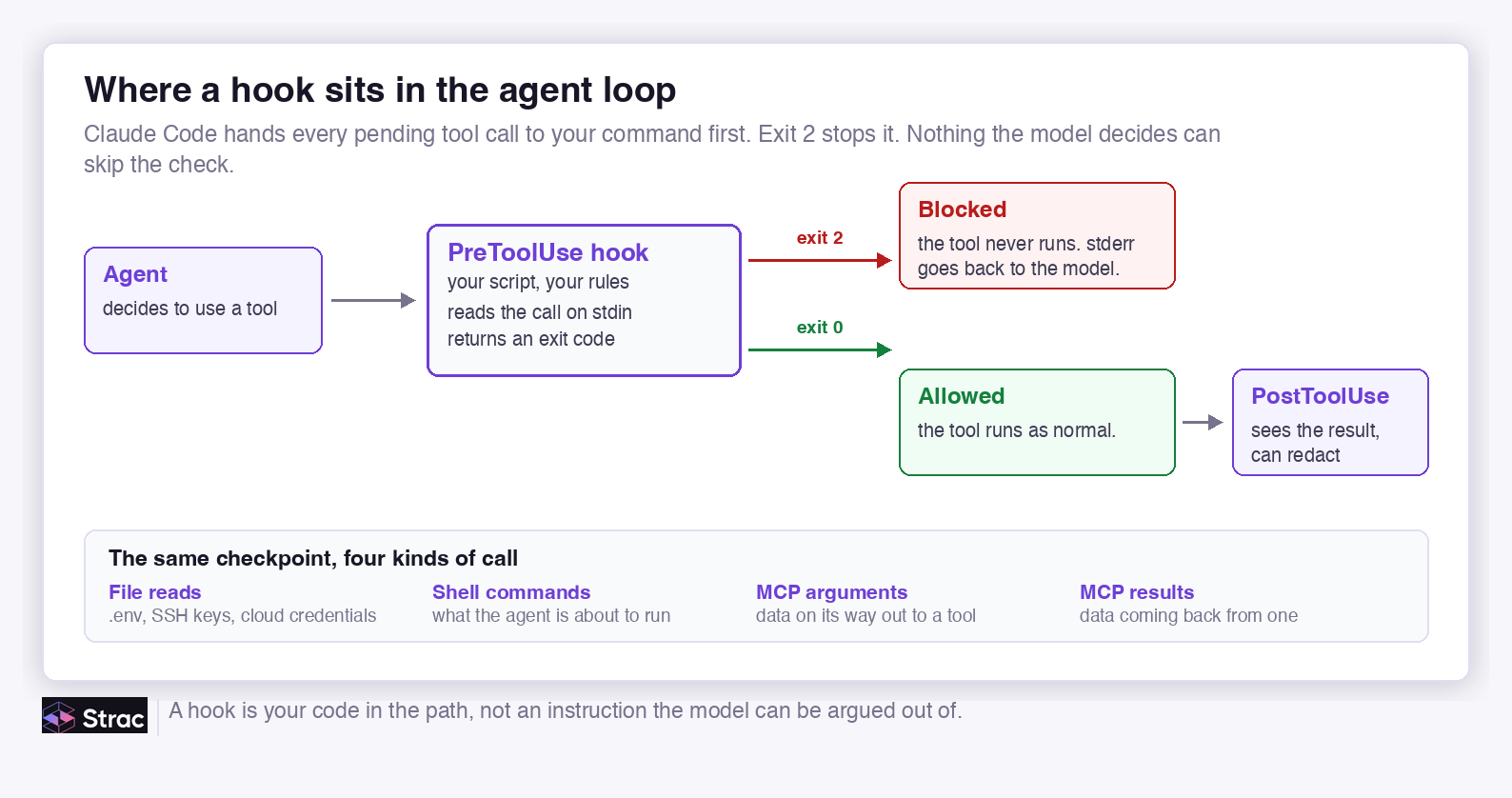
✨ Where the checkpoint sits
The same checkpoint in GitHub Copilot CLI: the agent asks, your code decides, the call runs or it does not.
GitHub Copilot CLI supports this from version 1.0.57. The event names and the config file differ between agents; the decision point does not.
Agent
Minimum version
Notes
Claude Code
2.1.296
The reference implementation. PreToolUse, PostToolUse, UserPromptSubmit and the rest.
Cursor
1.7.0
Reads Claude Code's hook format and maps it onto its own events.
Codex
0.145.0
Its own hook layer with equivalent before and after points.
GitHub Copilot CLI
1.0.57
Hook support on the CLI surface.
Gemini CLI
0.27.0
Hook support on the CLI surface.
Windsurf
3.5.17
Ships a hook layer that is off by default.
✨ What the GitHub Copilot CLI admin surface cannot tell you
GitHub's enterprise audit log is genuinely good at what it covers, which is activity against GitHub. It does not see the agent read a local file, run a local command, or call a local MCP server, because none of that reaches GitHub. That is not a deficiency in the audit log; it is a statement about where the events happen.
GitHub Copilot CLI alongside the other coding agents on the fleet, with the devices, users and MCP servers attached to each.
✨ The MCP side
GitHub Copilot CLI can call MCP servers, which means its reach is whatever is in the config rather than just the repository. A server pointed at production is a production credential sitting on a laptop, and a file-path control never sees it.
Every MCP server the fleet's agents can call, approved or disallowed, with the agents using each one.
Where GitHub Copilot CLI keeps its configuration
Copilot CLI keeps its own configuration in the user profile and picks up repository context from the working tree. Rather than hunt for a path, the useful inventory question is which identities it is carrying: a GitHub token with push rights, whatever is in ~/.git-credentials, and anything in the Docker config if the workflow touches images.
Those three together are write access to your source and your registry. For most other agents the worst case of a credential read is data exposure; here it is also a supply-chain path, which changes the severity you assign the same finding.
A worked example
Copilot CLI is asked to fix a failing build. It reads the workflow file, notices the job needs a registry login, and helpfully reaches for the Docker config to work out which registry. Then it proposes a workflow change and offers to commit it.
The read is mundane. The commit is the part worth a checkpoint: an agent editing CI configuration with push credentials available is modifying the thing that runs with your deployment secrets. Match the command tool and treat workflow files as a protected path.
Three mistakes teams make with GitHub Copilot CLI
Conflating the two Copilots. Inline completion and the CLI are different products with different reach. Policies written for the first do nothing for the second.
Trusting the audit log to cover local activity. It covers activity against GitHub, which is most of what you care about until the agent starts reading local files and running local commands.
Treating a credential read as a data finding only. With push and registry access in scope it is also a supply-chain finding, and it should be severity-rated that way.
✨ What you can actually evidence
GitHub's audit log is strong evidence for anything that touched GitHub. The gap is everything local: the file the agent read, the command it ran, the MCP server it called. Those produce no GitHub event, so a complete answer needs a second source.
Findings typed by data class rather than arriving as undifferentiated alerts, which is the difference between a log and an answer.
For the local half that GitHub's audit log cannot see, Strac's coding agent security integration records the file reads, the commands and the MCP calls that never reach GitHub.
🌶️ Spicy FAQs
Is GitHub Copilot CLI a security risk?
It is a new path to things you already protect. The CLI reads files and runs commands on the machine, so it inherits whatever that user can reach. Scope it with a hook that blocks credential reads and the exposure drops sharply.
Is Copilot CLI different from Copilot in my editor?
Yes, and it is the distinction that matters. Inline completion suggests code. The CLI is an agent that reads, runs and calls tools. The controls on this page are for the CLI.
Does GitHub's audit log cover what the agent does locally?
No. It records activity against GitHub. A local file read, a local shell command and a local MCP call never reach GitHub, so they are not in the log. Local visibility needs an endpoint-side source.
Which paths matter most for Copilot CLI?
The usual credential set, plus ~/.git-credentials and ~/.docker/config.json specifically. Those two are push access and registry access, which is a supply-chain concern rather than only a data one.
Does Copilot CLI support hooks?
Yes, from version 1.0.57 on the CLI surface. The decision point is the same as every other agent; the registration differs.
Last updated: November 24, 2026
Customer story
“Don’t just alert on problems, fix them.”
Scott Roberts, Chief Information Security Officer, UiPath
It is a new path to things you already protect. The CLI reads files and runs commands on the machine, so it inherits whatever that user can reach. Scope it with a hook that blocks credential reads and the exposure drops sharply.
Is Copilot CLI different from Copilot in my editor?
Yes, and it is the distinction that matters. Inline completion suggests code. The CLI is an agent that reads, runs and calls tools. The controls on this page are for the CLI.
Does GitHub's audit log cover what the agent does locally?
No. It records activity against GitHub. A local file read, a local shell command and a local MCP call never reach GitHub, so they are not in the log. Local visibility needs an endpoint-side source.
Which paths matter most for Copilot CLI?
The usual credential set, plus ~/.git-credentials and ~/.docker/config.json specifically. Those two are push access and registry access, which is a supply-chain concern rather than only a data one.
Does Copilot CLI support hooks?
Yes, from version 1.0.57 on the CLI surface. The decision point is the same as every other agent; the registration differs.
Discover & Protect Data on SaaS, AI, MCP, Endpoints & Cloud
Strac provides end-to-end data loss prevention for all SaaS and Cloud apps. Integrate in under 10 minutes and experience the benefits of live DLP scanning, live redaction, and a fortified SaaS environment.