Cursor Security: Stop Secrets Leaving Your Machine
What Cursor actually sends off your machine, what codebase indexing stores, what Privacy Mode does and does not cover, and how to use Cursor's own hook layer to block secrets before the agent reads them.
Cursor is an IDE with an agent in it, which makes its security story different from a chat tool and different again from a CLI agent. Three things decide your exposure: what leaves the machine, what the index covers, and what the agent is allowed to reach locally.
This page is Cursor-specific. The generic threat model for coding agents is on AI coding agent security.
✨ What actually leaves your machine
Transmission and retention are separate controls in Cursor, and Privacy Mode only acts on the third column.
The useful distinction is between transmission and retention, because the settings control them separately and people routinely conflate the two.
Thing
Leaves the machine?
Retained?
The code in your request
Yes. It has to, for the model to answer.
Not with Privacy Mode on.
Codebase index
Embeddings, rather than raw files.
Stored so the agent can answer across the repo.
Shell command output
Only if it goes into the context, which it usually does.
Follows the same retention setting.
MCP tool results
Into the context, then to the model.
Follows the same retention setting.
Local file reads
Into the context first, so effectively yes.
Follows the same retention setting.
Privacy Mode is a retention control, not a transmission control. It is the right setting and you should turn it on for the whole organisation, but reading it as "nothing leaves" sets a expectation the product was never going to meet.
Codebase indexing is the scope question
Indexing is what makes Cursor good: the agent can answer about code it was never shown. It also means the blast radius is the indexed repository rather than the open file. Keep the wrong things out of it with .cursorignore:
.cursorignore

# credentials and local config
.env
.env.*
**/credentials
**/*.pem
**/*.key

# anything with real customer data in it
fixtures/production-*
seeds/customers*
**/*.sql.gz
An ignore file is a scoping control, not an enforcement one: it keeps material out of the index, and it does not stop the agent reading a file you hand it directly. For that you need a hook.
✨ Cursor reads Claude Code's hooks, which is the cheap win
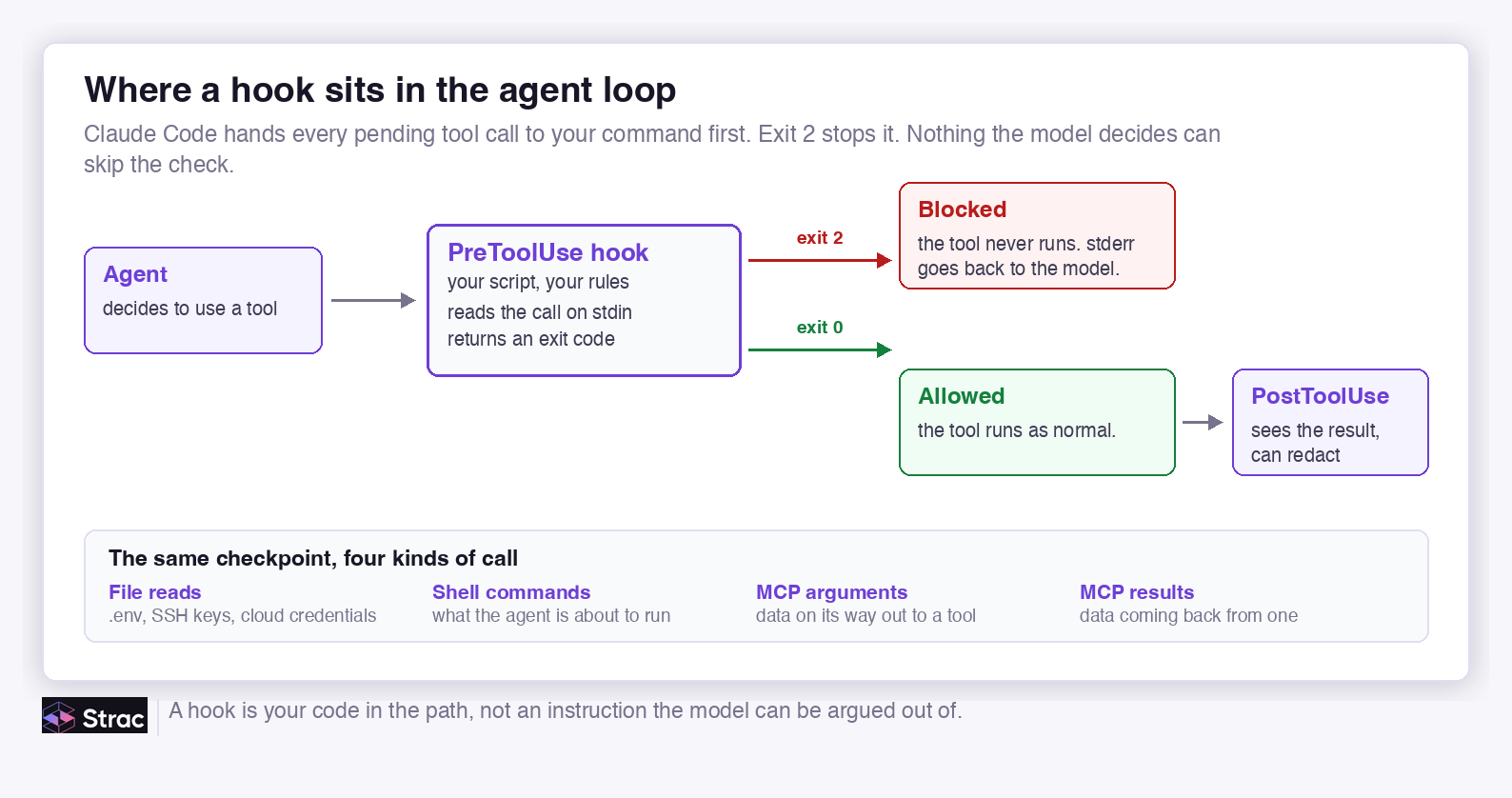
From 1.7.0, Cursor reads hooks from .claude/settings.json and maps PreToolUse, PostToolUse and Stop onto its own events when third-party configs are enabled. One script covers both agents.
// .claude/settings.json - read by Claude Code AND Cursor
{
  "hooks": {
    "PreToolUse": [
      {
        "matcher": "Read|Edit|Write",
        "hooks": [
          { "type": "command", "command": "~/.claude/hooks/block-secrets.sh" }
        ]
      }
    ]
  }
}
Where the hook sits. Cursor maps its own events onto these, so the same script decides in both agents.
The blocking script, the exit codes and the full event list are on Claude Code hooks. Exit 2 blocks; anything else, including exit 1, does not.
✨ The part Cursor's admin console cannot show you
Cursor's admin surface sees the accounts in your organisation. It does not see an engineer who installed Cursor on a work laptop under a personal account, and it does not see which MCP servers they wired into it.
Cursor alongside the other agents on the fleet, with the devices, users and MCP servers attached to each.
That gap matters more for Cursor than for a CLI agent, because an IDE is the tool people install for themselves first and ask about second.
✨ MCP servers are the other half of Cursor's reach
Cursor supports MCP, so the agent's reach is whatever servers are configured, not just the repo. A server pointed at a production database is a production credential sitting in a config file on a laptop.
Every MCP server the fleet's agents can call, approved or disallowed, with the agents using each one.
A rollout that engineers will accept
Step
What to do
Why this order
1
Turn on Privacy Mode for the organisation.
One setting, no friction, removes the retention question.
2
Ship a .cursorignore in every repo template.
Scopes the index before anyone has to think about it.
3
Add the credential-read hook in monitor mode.
You learn what it would have caught before anything breaks.
4
Promote the hook to block.
By now the false-positive rate is known, not guessed.
Cursor is covered by the same agent as the rest: Strac's Claude Code security integration discovers Cursor installs, inspects its MCP calls and enforces the same rules without a per-agent script to maintain.
🌶️ Spicy FAQs
Is Cursor safe to use at work?
For most teams, yes, with two conditions: turn on Privacy Mode organisation-wide so code is not retained for training, and add a hook that blocks reads of credential files. Cursor itself is a well-behaved client. The exposure comes from what you let it reach on the machine, which is the same question you would ask of any tool with filesystem and shell access.
What does Cursor's Privacy Mode actually do?
It stops your code being retained or used for model training. It is a retention control, not a transmission control: with Privacy Mode on, code still travels to the model to answer a request, because that is how the product works. Teams that read it as "nothing leaves" are surprised later, so set the expectation correctly up front.
Does Cursor support hooks like Claude Code?
Yes, from version 1.7.0. Cursor reads the Claude Code hook format from .claude/settings.json and maps PreToolUse, PostToolUse and Stop onto its own events, when third-party configs are enabled. That means one script can cover both agents, which is the cheapest way to get coverage across a mixed team.
What is codebase indexing and should I worry about it?
Cursor builds an index so it can answer questions about code it has not been shown directly. The practical consequence is that the scope of what the agent can surface is the indexed repository, not just the open file. Use .cursorignore to keep credential directories, customer data fixtures and anything regulated out of the index.
How do I stop Cursor reading .env files?
A PreToolUse hook matched to the file tools that exits with code 2 when the path looks like a credential file. Exit 2 is the block signal and anything else, including exit 1, is treated as no objection. The working script is on the Claude Code hooks page and runs unchanged in Cursor.
How do I know which of my engineers are running Cursor?
Not from Cursor's admin console alone, which sees the accounts in your organisation rather than the installs on your machines. Personal-account installs on work laptops are the common gap, and finding those needs endpoint-side discovery.
Last updated: November 24, 2026
Customer story
“Don’t just alert on problems, fix them.”
Scott Roberts, Chief Information Security Officer, UiPath
For most teams, yes, with two conditions: turn on Privacy Mode organisation-wide so code is not retained for training, and add a hook that blocks reads of credential files. Cursor itself is a well-behaved client. The exposure comes from what you let it reach on the machine, which is the same question you would ask of any tool with filesystem and shell access.
What does Cursor's Privacy Mode actually do?
It stops your code being retained or used for model training. It is a retention control, not a transmission control: with Privacy Mode on, code still travels to the model to answer a request, because that is how the product works. Teams that read it as "nothing leaves" are surprised later, so set the expectation correctly up front.
Does Cursor support hooks like Claude Code?
Yes, from version 1.7.0. Cursor reads the Claude Code hook format from .claude/settings.json and maps PreToolUse, PostToolUse and Stop onto its own events, when third-party configs are enabled. That means one script can cover both agents, which is the cheapest way to get coverage across a mixed team.
What is codebase indexing and should I worry about it?
Cursor builds an index so it can answer questions about code it has not been shown directly. The practical consequence is that the scope of what the agent can surface is the indexed repository, not just the open file. Use .cursorignore to keep credential directories, customer data fixtures and anything regulated out of the index.
How do I stop Cursor reading .env files?
A PreToolUse hook matched to the file tools that exits with code 2 when the path looks like a credential file. Exit 2 is the block signal and anything else, including exit 1, is treated as no objection. The working script is on the Claude Code hooks page and runs unchanged in Cursor.
Discover & Protect Data on SaaS, AI, MCP, Endpoints & Cloud
Strac provides end-to-end data loss prevention for all SaaS and Cloud apps. Integrate in under 10 minutes and experience the benefits of live DLP scanning, live redaction, and a fortified SaaS environment.