Data exfiltration prevention

Data exfiltration prevention for every way data leaves a laptop

Strac knows which files are sensitive before anything moves, then audits, warns or blocks on USB, AirDrop, browser uploads, clipboard, cloud sync, print and AI tools. One agent on Mac and Windows.

Why data exfiltration prevention is harder than it used to be

Data used to leave through email and a USB stick. Today a single laptop has a dozen exits, and two of them are new:

NewAI chatsAn employee pastes a customer list into an AI assistant to get a summary.
NewAI coding agentsTools such as Claude Code and Cursor open files on their own, including .env files and customer exports.
ClassicThe classic exits
USB drivesAirDropPersonal cloud foldersBrowser uploadsPrintScreenshots

Most tools watch one or two of these. Strac covers them from one policy.

How Strac handles data exfiltration detection and prevention

Data exfiltration detection that starts on the device

Strac scans and classifies every file on the laptop, locally. It knows that customers.csv holds 412 Social Security numbers before anyone tries to move it. That is why the decision at the moment of exit takes milliseconds, and why nothing has to be sent to the cloud to be inspected.
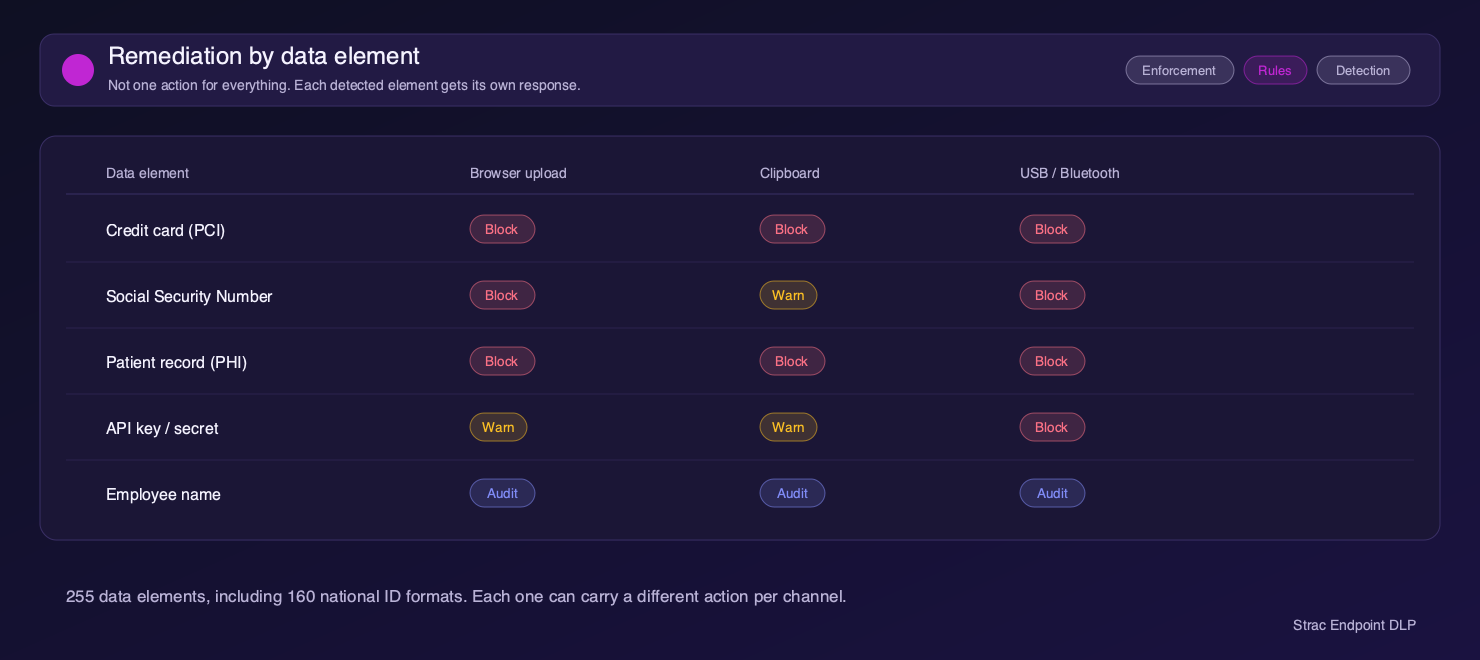
On-device data exfiltration detection: each sensitive data element, such as credit card, SSN, PHI and API keys, gets its own action per channel

Audit, warn or block on each channel

Pick a mode per channel. Audit records the action without interrupting anyone. Warn shows the user a prompt and lets them decide. Block stops the action. Most teams start in audit to see what is leaving, then tighten.
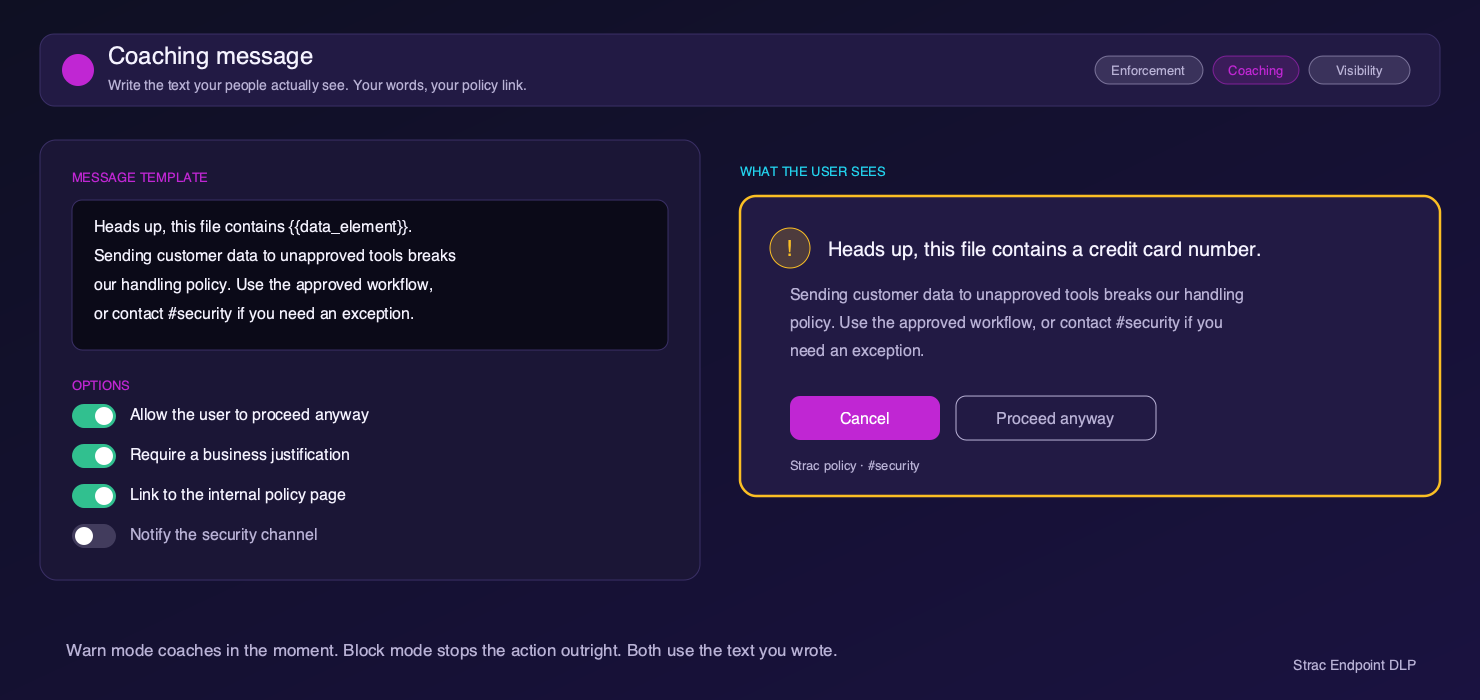
Data leakage prevention in warn mode: the coaching prompt a user sees before a sensitive file leaves

Prevent data leakage into AI chats and AI agents

A paste of customer data into an AI chat is blocked before it reaches the app. An AI coding agent can read ordinary source files, but is stopped when it tries to open a secrets file or a customer export. This runs in the same agent as everything else, so there is no separate AI tool to deploy.
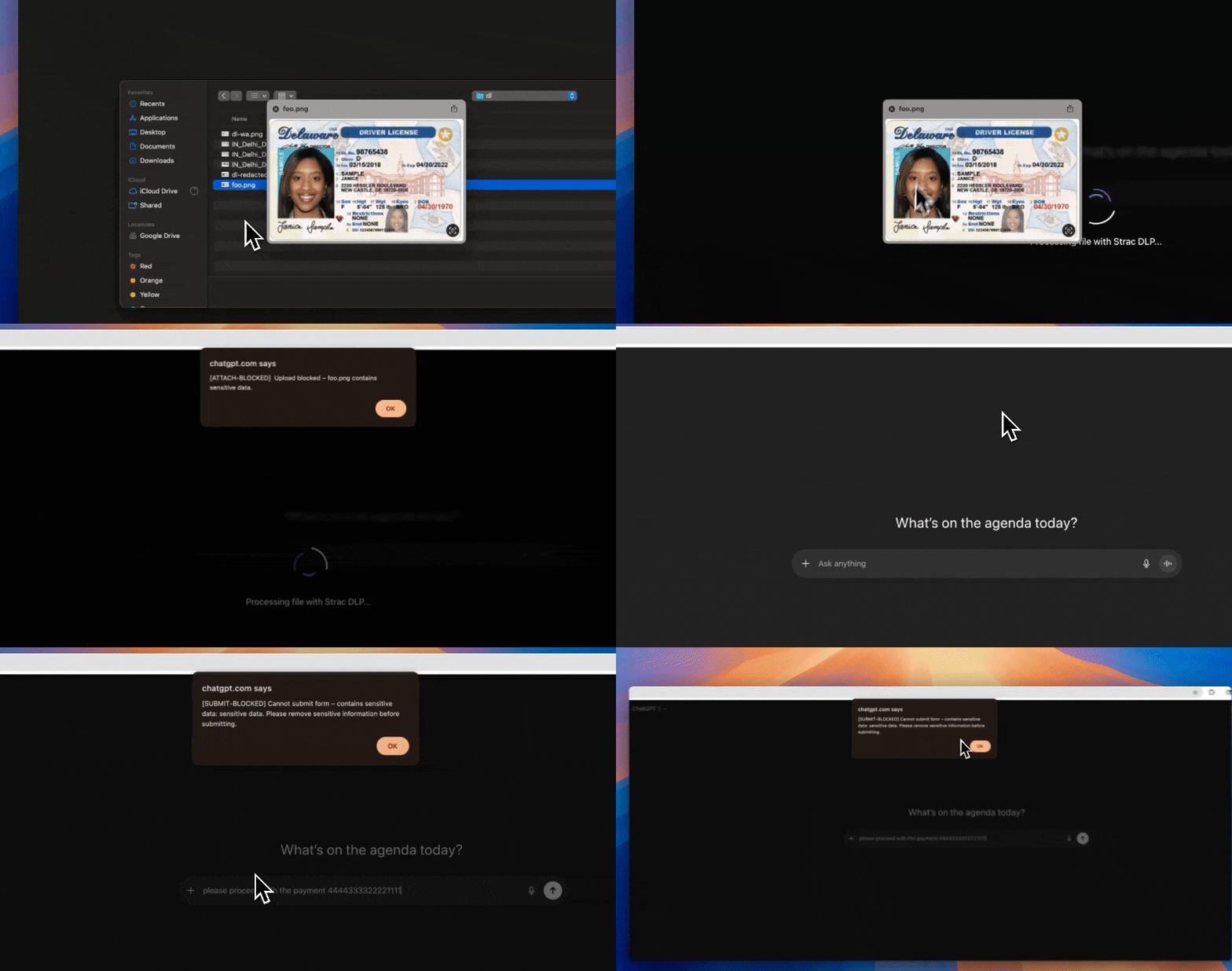
Prevent data leakage into AI chats: Strac blocks a file containing a driver license from being uploaded to ChatGPT

Proof of every attempt

Each event records who, which device, which channel, what kind of data, and what Strac did. When legal or HR asks what a departing employee took, the answer is one filtered view.

WhoThe user
DeviceWhich laptop
ChannelUSB, AirDrop, upload, AI app…
Data typeSSN, card number, PHI, secret…
ActionAudited, warned or blocked
WhenTime of the attempt

Data exfiltration prevention across 13 channels

FilesApps and browserNetwork
  • File open
  • Download
  • USB write
  • Print
  • Screenshot
  • AirDropmacOS
  • Cloud syncmacOS
  • App access (including AI agents)
  • Browser upload
  • Clipboard
  • Typed text
  • Upload
  • Site block

AirDrop and cloud sync blocking are macOS only today. Every other channel works on Mac and Windows.

Data exfiltration prevention beyond the laptop

The laptop is one exit. Sensitive data also leaves through SaaS apps, the browser and AI agents connected over MCP. Strac uses the same detectors and the same audit, warn or block choices on all of them.

SaaS DLP

Stop data leaking out of SaaS apps

Strac connects to Slack, Google Drive, Microsoft 365, Gmail, Zendesk, Salesforce and more through their APIs. It finds sensitive data in messages, tickets and files, redacts or removes it, and fixes risky sharing such as public links. There is no agent to install.

Explore SaaS DLP
SaaS DLP redaction: Strac automatically removes a driver’s license image shared in Slack and moves it to a secure vault
Real product: Strac redacting a driver’s license shared in Slack
Browser DLP

Stop uploads, pastes and form posts in the browser

The Strac browser extension inspects file uploads, pastes and form submissions on ChatGPT, Claude, Gemini, Copilot and any other site, then audits, warns or blocks before the data is sent. It covers unmanaged web apps that no API integration reaches.

Explore Browser DLP
MCP DLP

Stop AI agents pulling data out through MCP

Strac MCP connectors sit inline between agents such as Claude, ChatGPT, Cursor and Copilot and apps such as Salesforce, Slack, Snowflake and GitHub. Every tool call is logged, an agent’s access can be limited or blocked, and sensitive data in responses is redacted, masked or vaulted before the model sees it.

Explore MCP DLP

Data leakage prevention: Strac compared with the usual options

NeedNetwork or email DLPEDRStrac
See USB, AirDrop and printNoPartlyYes
Stop a paste into an AI chatNoNoYes
Stop an AI agent opening a sensitive fileNoNoYes
Know which files are sensitiveOnly in transitNoYes, classified on the device
Cover SaaS apps, the browser and MCP agents tooPartlyNoYes
Coach the user instead of only blockingRarelyNoYes, warn mode

Data exfiltration prevention built on data security

Blocking every USB drive is easy and makes everyone miserable. The useful version blocks only the files that matter. Strac has classified sensitive data in SaaS apps, cloud storage and endpoints for years, and the same detectors decide what gets stopped on the laptop. The result is fewer interruptions for employees and fewer alerts for your team.

Further reading: data exfiltration prevention tools compared and top data exfiltration detection tools.

What our customers say

Hear from companies who leveraged Strac to secure and accelerate their business

Read more on G2

“Strac protects our customer support communication channels”

To protect our clients as well as ourselves, we needed a secure way to protect our communication channels for security and compliance reasons. We used Strac's Email Redaction solution where Strac protects all our employee inboxes. The redaction experience is beautiful, easy, and secure. It catches all kinds of sensitive pdfs, jpegs, images, word docs, and even in email bodies. The integration was up and running in a few minutes. The service offered by Strac's team is the best I have seen as we work with a lot of SaaS providers.

We Highly Recommend Strac to all businesses who want to protect their SaaS apps.

Nathan Seifert
Head of IT at Trivium
Nathan Seifert Portrait

“Strac secures our PII on customer support and on backend servers”

On our Intercom customer support, anyone can send sensitive data to a business and a business is liable even if they did not ask for it. Strac solves that huge problem by automatically redacting sensitive data that is shared over Intercom with their accurate machine learning technology. We also leveraged Strac's Zero Data architecture via tokenization & proxy APIs so that we don't have to worry about touching sensitive data and documents on our backend servers. Strac dramatically reduces security and SOC compliance risks for us while significantly improving security posture for Seis. Strac's solutions were extremely easy to integrate (literally in few minutes) and scaled to meet our needs.

Josh Howland
CTO and Co-Founder at Seis
Josh Portrait

“Loved Strac's Interceptor Solution”

We leverage Strac's tokenization & interceptor solution so that we don't have to worry touching sensitive SSNs and can leverage Strac's security expertise in building hundreds of security controls.

We could also detect identity fraud using Strac's unique tokenization solution which we are really happy with. That saved us a ton of financial losses and headaches. We are looking forward to integrating with various other Strac solutions deep into our tech stack.

Kevin Hopkins
CTO at Zeta
Kevin Hopkins Logo

Data exfiltration prevention FAQ

What is data exfiltration prevention?

It is the set of controls that stop sensitive data being copied out of a company without permission, whether by an employee, a contractor, an attacker or an automated tool.

What is the difference between data exfiltration detection and prevention?

Detection tells you it happened. Prevention stops it. Strac does both: audit mode detects, warn and block modes prevent.

Is data exfiltration prevention the same as DLP?

DLP is the product category. Exfiltration prevention is the outcome most buyers want from it. Strac Endpoint DLP is how Strac delivers it on laptops.

Can Strac stop data going into ChatGPT, Claude or Cursor?

Yes. Pastes and typed text into AI apps can be warned on or blocked, and AI coding agents can be stopped from opening sensitive files.

Does Strac stop data exfiltration outside the laptop too?

Yes. The same detectors cover SaaS apps such as Slack, Google Drive and Microsoft 365 through API integrations, the browser through the Strac extension, and AI agents through Strac MCP connectors. One set of rules covers every exit.

Will it slow down laptops or annoy employees?

Files are classified in the background, so the decision at the moment of exit is fast. Start in audit mode, where nobody is interrupted, and move channels to warn or block once you see what is leaving.

Does it work on Mac and Windows?

Yes. A few channels, AirDrop and cloud sync, are macOS only today.

How long does deployment take?

Most teams push the agent through their MDM in a day.

See what is leaving your laptops

Deploy Strac in audit mode to a pilot group and see every exit in use, with no interruption to employees.

Book a Demo