Gemini CLI reads files, runs commands and calls MCP servers on your machine. The paths worth blocking, how its hook layer works, and what Google Workspace admin visibility does not extend to.
Gemini CLI is a terminal coding agent with filesystem, shell and MCP access. The controls are the same family as every other agent on this list, and there is one thing genuinely specific to it worth knowing.
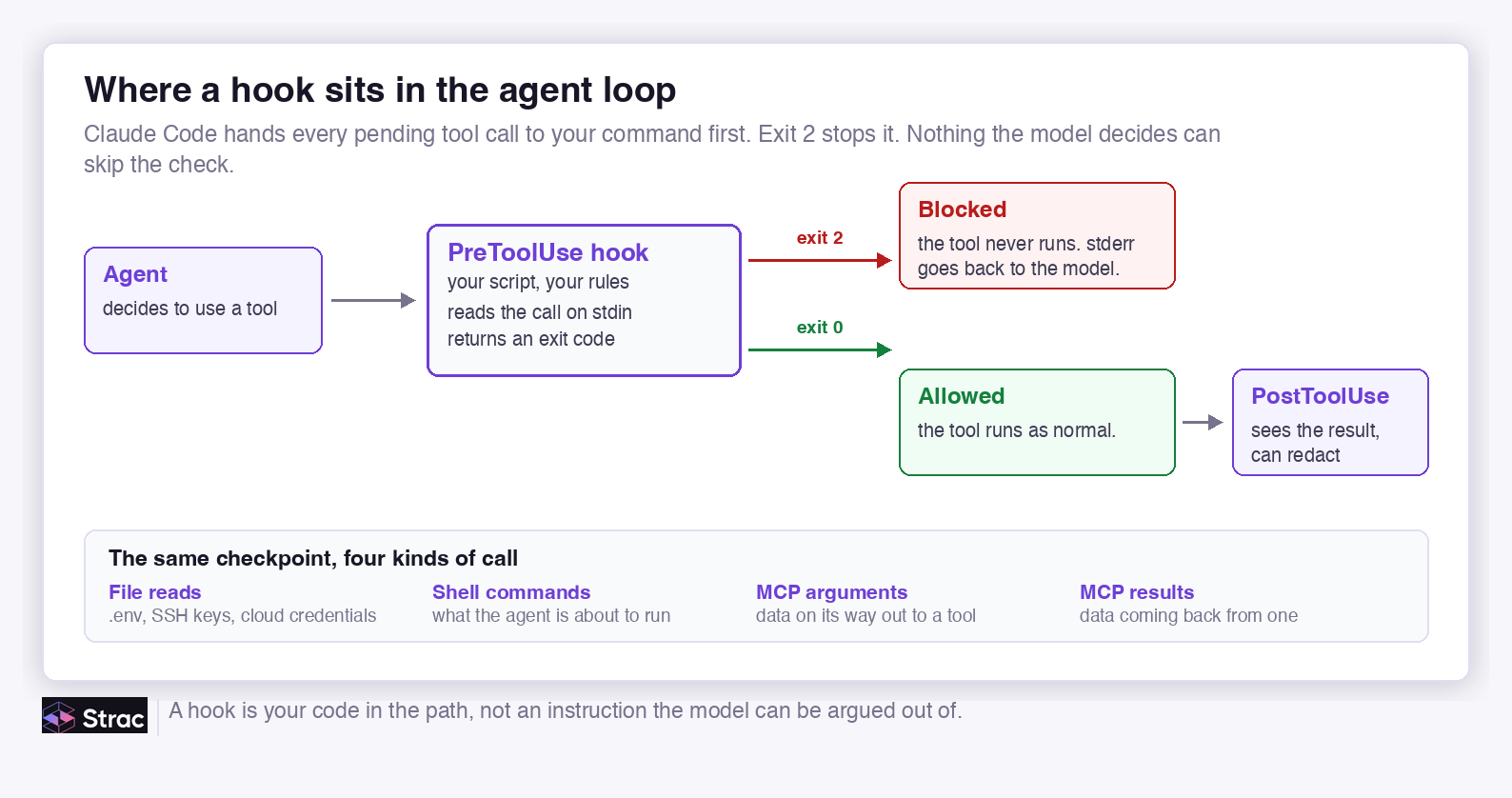
The mechanism itself, including the exit codes and a working script, is on Claude Code hooks and runs in Gemini CLI with the same logic. This page covers what is specific to Gemini CLI.
What is different about Gemini CLI
Gemini CLI tends to sit on machines that are already deep in Google Workspace, which creates a particular shape of risk: ~/.config/gcloud/ is very often populated with credentials that reach real projects, and an agent with filesystem access on that machine is one read away from them. Put the gcloud config directory at the top of the blocklist rather than halfway down it.
The second consequence is that Workspace admins often assume their existing visibility covers this. It does not, for the reason in the next section.
✨ Where the checkpoint sits
The same checkpoint in Gemini CLI: the agent asks, your code decides, the call runs or it does not.
Gemini CLI supports this from version 0.27.0. The event names and the config file differ between agents; the decision point does not.
Agent
Minimum version
Notes
Claude Code
2.1.296
The reference implementation. PreToolUse, PostToolUse, UserPromptSubmit and the rest.
Cursor
1.7.0
Reads Claude Code's hook format and maps it onto its own events.
Codex
0.145.0
Its own hook layer with equivalent before and after points.
GitHub Copilot CLI
1.0.57
Hook support on the CLI surface.
Gemini CLI
0.27.0
Hook support on the CLI surface.
Windsurf
3.5.17
Ships a hook layer that is off by default.
✨ What the Gemini CLI admin surface cannot tell you
Google Workspace admin gives you OAuth token inventory and audit for things that authenticate to Google. A CLI agent reading a local file, running a local command or calling a local MCP server produces no Workspace event, because nothing touches Google. The coverage is real but it stops at the network boundary.
Gemini CLI alongside the other coding agents on the fleet, with the devices, users and MCP servers attached to each.
✨ The MCP side
Gemini CLI can call MCP servers, which means its reach is whatever is in the config rather than just the repository. A server pointed at production is a production credential sitting on a laptop, and a file-path control never sees it.
Every MCP server the fleet's agents can call, approved or disallowed, with the agents using each one.
Where Gemini CLI keeps its configuration
Gemini CLI reads ~/.gemini/settings.json for user settings and .gemini/settings.json inside a project. Both are worth inventorying, and the project-level file is the one that gets missed, because it travels with the repository and can arrive on a machine without anyone deciding to put it there.
A project-level settings file committed by a well-meaning colleague can add MCP servers to every clone of that repo. That is a supply-chain shaped problem wearing configuration clothes, and it is specific enough to Gemini CLI and its peers to be worth a line in your review checklist.
A worked example
A data engineer asks Gemini CLI to explain why a pipeline is failing in a Google Cloud project. The agent reads the repo, then reads ~/.config/gcloud/ to understand which project is configured. Those files hold refresh tokens for a principal that can read production buckets.
Nothing in Workspace audit records this, because nothing authenticated to Google: the agent read local files. The gcloud directory belongs at the top of the blocklist on exactly the machines where Gemini CLI is most popular.
Three mistakes teams make with Gemini CLI
Assuming Workspace coverage extends to the laptop. OAuth inventory and audit are good, and they stop where the network stops. Local reads and local commands are invisible to them.
Leaving the gcloud directory off the list. It is frequently populated with live credentials and is often ranked below .env out of habit. On these machines it should be above it.
Ignoring project-level settings files. They travel with the repo and can introduce MCP servers nobody on your team chose.
✨ What you can actually evidence
Workspace admin answers "what touched Google". A complete answer to "what did the agent reach" needs local evidence as well, typed by data class rather than arriving as a flat stream of events.
Findings typed by data class rather than arriving as undifferentiated alerts, which is the difference between a log and an answer.
Yes, with the same scoping every coding agent needs: block credential reads, decide which MCP servers it may call, and know which machines it is on. The agent is not the risk; the unscoped filesystem and shell access is.
What should I block first in Gemini CLI?
The gcloud configuration directory, ~/.config/gcloud/, before anything else. On machines where Gemini CLI is popular it is usually populated with credentials that reach live projects. Then the normal set: .env, SSH keys, kube config.
Does Google Workspace admin show me what the agent did locally?
No. Workspace audit covers what authenticates to Google. Local file reads, local shell commands and local MCP calls generate no Workspace event. Local activity needs an endpoint-side source.
Does Gemini CLI support hooks?
Yes, from version 0.27.0 on the CLI surface. Same decision point as the other agents, different registration.
Can I use one script across Gemini CLI and Claude Code?
The deciding logic ports cleanly, since both hand you the pending call and read an exit code. The registration does not, so each agent needs its own config entry pointing at the same script.
Last updated: November 24, 2026
Customer story
“Don’t just alert on problems, fix them.”
Scott Roberts, Chief Information Security Officer, UiPath
Yes, with the same scoping every coding agent needs: block credential reads, decide which MCP servers it may call, and know which machines it is on. The agent is not the risk; the unscoped filesystem and shell access is.
What should I block first in Gemini CLI?
The gcloud configuration directory, ~/.config/gcloud/, before anything else. On machines where Gemini CLI is popular it is usually populated with credentials that reach live projects. Then the normal set: .env, SSH keys, kube config.
Does Google Workspace admin show me what the agent did locally?
No. Workspace audit covers what authenticates to Google. Local file reads, local shell commands and local MCP calls generate no Workspace event. Local activity needs an endpoint-side source.
Does Gemini CLI support hooks?
Yes, from version 0.27.0 on the CLI surface. Same decision point as the other agents, different registration.
Can I use one script across Gemini CLI and Claude Code?
The deciding logic ports cleanly, since both hand you the pending call and read an exit code. The registration does not, so each agent needs its own config entry pointing at the same script.
Discover & Protect Data on SaaS, AI, MCP, Endpoints & Cloud
Strac provides end-to-end data loss prevention for all SaaS and Cloud apps. Integrate in under 10 minutes and experience the benefits of live DLP scanning, live redaction, and a fortified SaaS environment.