AI Coding Agent Security: Controls That Actually Hold
Coding agents read your whole repo, run shell commands and call MCP servers. Here is the threat model, the four control layers that hold, and the order to roll them out across a fleet of engineers.
An AI coding agent reads your whole repository, runs shell commands, and calls whatever MCP servers are configured on the machine. Each of those is a capability you granted a human once and are now granting to something that works at machine speed and has no idea which file is sensitive.
That is the entire problem, and it is a scoping problem rather than a model problem. This page covers the threat model, the four layers of control that actually hold, and the order to roll them out so engineers do not route around you.
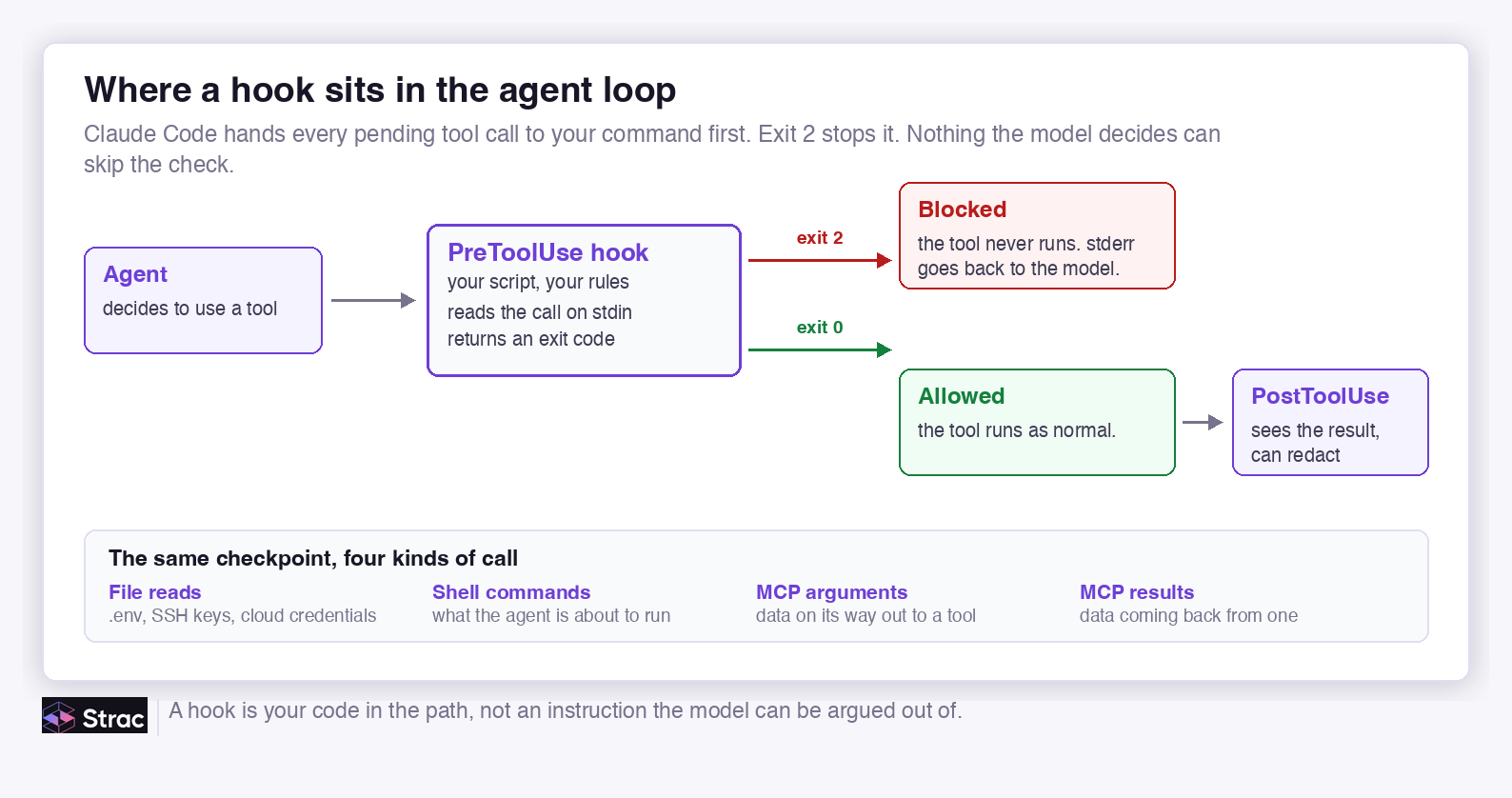
The checkpoint every control in this article runs at: the agent asks, your code decides, the call runs or it does not.
🎥 What this looks like running
An agent reaches for something it should not have, and the call is stopped before it executes rather than reported afterwards.
The threat model, in four reaches
Every incident involving a coding agent so far reduces to one of four reaches. Build your controls against these rather than against a list of scary scenarios.
The reach
What goes wrong
Where it is caught
Files
The agent reads .env, SSH keys or cloud credentials because they sit in a directory it was given.
PreToolUse hook on the file tools.
Shell
The agent runs a command that moves data somewhere you cannot see, or destroys something.
PreToolUse hook on the command tool.
MCP arguments
Sensitive data leaves in a tool call the agent composed itself.
Inspection on the outbound arguments.
MCP results
A production query returns card numbers or customer records into the context.
Redaction on the inbound results.
Notice that only the first two are about files. A control built purely on path matching covers half the surface and reads as complete, which is the most expensive kind of half-measure.
✨ The reach nobody scopes: the agent's own config
Before any of the four, there is a zeroth case. The credential is often not in a file the agent reads at all. It is sitting in the agent's own MCP server configuration, in plain text, inherited by every session on that machine.
A production database password in plain text in an agent's MCP config, found on an engineering laptop and masked on the device.
No file read happens, so no file-path hook fires. Finding this needs something that inspects agent configuration, which is a different job from inspecting tool calls, and it is usually the first thing a real audit turns up.
The four control layers, in the order they pay off
Roughly in descending value per hour spent.
Layer
What it does
Effort
1. Block credential reads
A PreToolUse hook that refuses reads of .env, SSH keys, cloud credential files and keychains.
An afternoon. Do this first.
2. Allowlist MCP servers
Decide which servers an agent may call at all, rather than inheriting whatever a developer installed.
A day, mostly deciding.
3. Inspect MCP traffic
Block sensitive data in outbound arguments, redact it in inbound results.
Needs a product. DIY gets stale fast.
4. Inventory and attest
Know which agents are installed where, and that the controls are still intact on every machine.
Needs a product. This is the audit answer.
Layers 1 and 2 you can build yourself today, and you should, even if you later replace them. The mechanics are in Claude Code hooks, including a working script and the exit code that does the blocking.
✨ Why layers 3 and 4 stop being a weekend project
A hook is a file on a laptop. It works perfectly and tells you nothing. Three things break the moment you go past your own machine.
You cannot see who still has it. Anyone with a shell can edit settings.json, usually not maliciously but because something broke at 11pm. There is no server-side signal that the control is intact on 400 machines.
You cannot see which agents are installed. Hooks only protect agents you knew to configure. The ones that arrived by personal download are exactly the ones you most want covered.
Every coding agent and MCP server discovered across the fleet, with the devices and users attached to each.
There is no record for anyone else. A blocked call prints to stderr in one developer's terminal. When a customer security questionnaire asks what prevents a coding agent reaching production credentials, a shell script is a hard thing to evidence.
✨ The MCP decision you have to make once
MCP is where layer 2 and layer 3 meet. Every server an agent can call is a path to a system, and most teams have never enumerated them.
MCP servers discovered across the fleet, each approved or disallowed, with the agents and devices using it.
Once the list exists the decisions are quick. What takes the time is discovering that 26 local MCP servers were running on 19 workstations that no provider API could see.
Rolling it out without a revolt
Per rule, not all at once.
Mode
The developer sees
Promote when
Monitor
Nothing. The event is recorded.
You are still learning what normal looks like.
Ask
A prompt, with the option to proceed and a reason.
The rule is right most of the time but edge cases exist.
Block
The call is stopped and the agent is told why.
The rule is unambiguous. Production credentials belong here.
Which agents this applies to
All of them, at these versions. The mechanism is the same everywhere; the config file and the event names are not, which is the part that makes a hand-rolled rollout expensive to keep alive.
Agent
Minimum version
Notes
Claude Code
2.1.296
The reference implementation. PreToolUse, PostToolUse, UserPromptSubmit and the rest.
Cursor
1.7.0
Reads Claude Code's hook format and maps it onto its own events.
Codex
0.145.0
Its own hook layer with equivalent before and after points.
Layers 3 and 4 are what Strac's coding agent security integration exists for: MCP traffic inspection, a fleet inventory of which agents are installed where, and evidence that the control is still intact on each machine.
🌶️ Spicy FAQs
What is AI coding agent security?
It is the practice of controlling what an AI coding agent can read, run and send, as opposed to controlling what it writes. Code scanning asks whether the output is safe. Coding agent security asks whether the agent should have been able to reach production credentials, run that command, or hand a result set to a model in the first place. The two are complementary and most teams only have the first.
Is an AI coding agent a security risk?
It is a new path to data you already care about, which is a different statement. The agent reads the repo you gave it, runs in the shell you gave it and calls the MCP servers you configured. The risk is that those grants were never scoped for an automated actor working at machine speed with no sense of which file is sensitive. Scope the grants and the exposure drops sharply.
What is the single highest-value control to add first?
A PreToolUse hook that blocks reads of credential files. It takes an afternoon, it cannot be argued out of by the model, and it removes the largest category of accidental exposure. Everything else in this article is worth doing after that one.
Do these controls slow engineers down?
Only if you start in blocking mode. Run every new rule in monitor first, read a week of what it would have caught, then promote the rules whose false-positive rate is near zero. Strac's agent also waits a bounded 1.5 seconds before a tool call and 3 seconds after one, then gets out of the way, because a control that hangs a session gets uninstalled.
How is this different from an AI gateway or an LLM firewall?
A gateway sits on the network path to the model and sees prompts and completions. It does not see the agent read a file, run a command, or call a local MCP server, because none of that crosses the network to the model provider. Both layers are useful; only the endpoint layer sees local tool use.
Which coding agents support this?
Claude Code, Cursor, Codex, GitHub Copilot CLI, Gemini CLI and Windsurf all ship a hook or policy layer now, at the versions listed above. The shape is the same in each; the config file and the event names are not.
Last updated: November 24, 2026
Customer story
“Don’t just alert on problems, fix them.”
Scott Roberts, Chief Information Security Officer, UiPath
It is the practice of controlling what an AI coding agent can read, run and send, as opposed to controlling what it writes. Code scanning asks whether the output is safe. Coding agent security asks whether the agent should have been able to reach production credentials, run that command, or hand a result set to a model in the first place. The two are complementary and most teams only have the first.
Is an AI coding agent a security risk?
It is a new path to data you already care about, which is a different statement. The agent reads the repo you gave it, runs in the shell you gave it and calls the MCP servers you configured. The risk is that those grants were never scoped for an automated actor working at machine speed with no sense of which file is sensitive. Scope the grants and the exposure drops sharply.
What is the single highest-value control to add first?
A PreToolUse hook that blocks reads of credential files. It takes an afternoon, it cannot be argued out of by the model, and it removes the largest category of accidental exposure. Everything else in this article is worth doing after that one.
Do these controls slow engineers down?
Only if you start in blocking mode. Run every new rule in monitor first, read a week of what it would have caught, then promote the rules whose false-positive rate is near zero. Strac's agent also waits a bounded 1.5 seconds before a tool call and 3 seconds after one, then gets out of the way, because a control that hangs a session gets uninstalled.
How is this different from an AI gateway or an LLM firewall?
A gateway sits on the network path to the model and sees prompts and completions. It does not see the agent read a file, run a command, or call a local MCP server, because none of that crosses the network to the model provider. Both layers are useful; only the endpoint layer sees local tool use.
Discover & Protect Data on SaaS, AI, MCP, Endpoints & Cloud
Strac provides end-to-end data loss prevention for all SaaS and Cloud apps. Integrate in under 10 minutes and experience the benefits of live DLP scanning, live redaction, and a fortified SaaS environment.