Codex Security: Block Secrets Before the Agent Runs
Codex runs with shell and filesystem access on your machine. What that actually reaches, how Codex's own hook layer blocks a tool call before it executes, and what its admin surface will not show you.
Codex is a CLI coding agent, which means it arrives with shell access by default and the terminal is its native surface. That makes it more capable than an IDE assistant and gives it a wider reach on the machine from the first run.
The mechanism itself, including the exit codes and a working script, is on Claude Code hooks and runs in Codex with the same logic. This page covers what is specific to Codex.
What is different about Codex
Two things set Codex apart in practice. First, it has its own hook layer rather than borrowing Claude Code's file, so a script shared across agents needs registering separately here. Second, because it is terminal-native, shell commands are a first-class part of normal use rather than an occasional escape hatch, so the command checkpoint carries more of the load than the file one.
The practical consequence: do not port a file-only blocklist from an IDE agent and consider Codex covered. Match the command tool as well as the file tools.
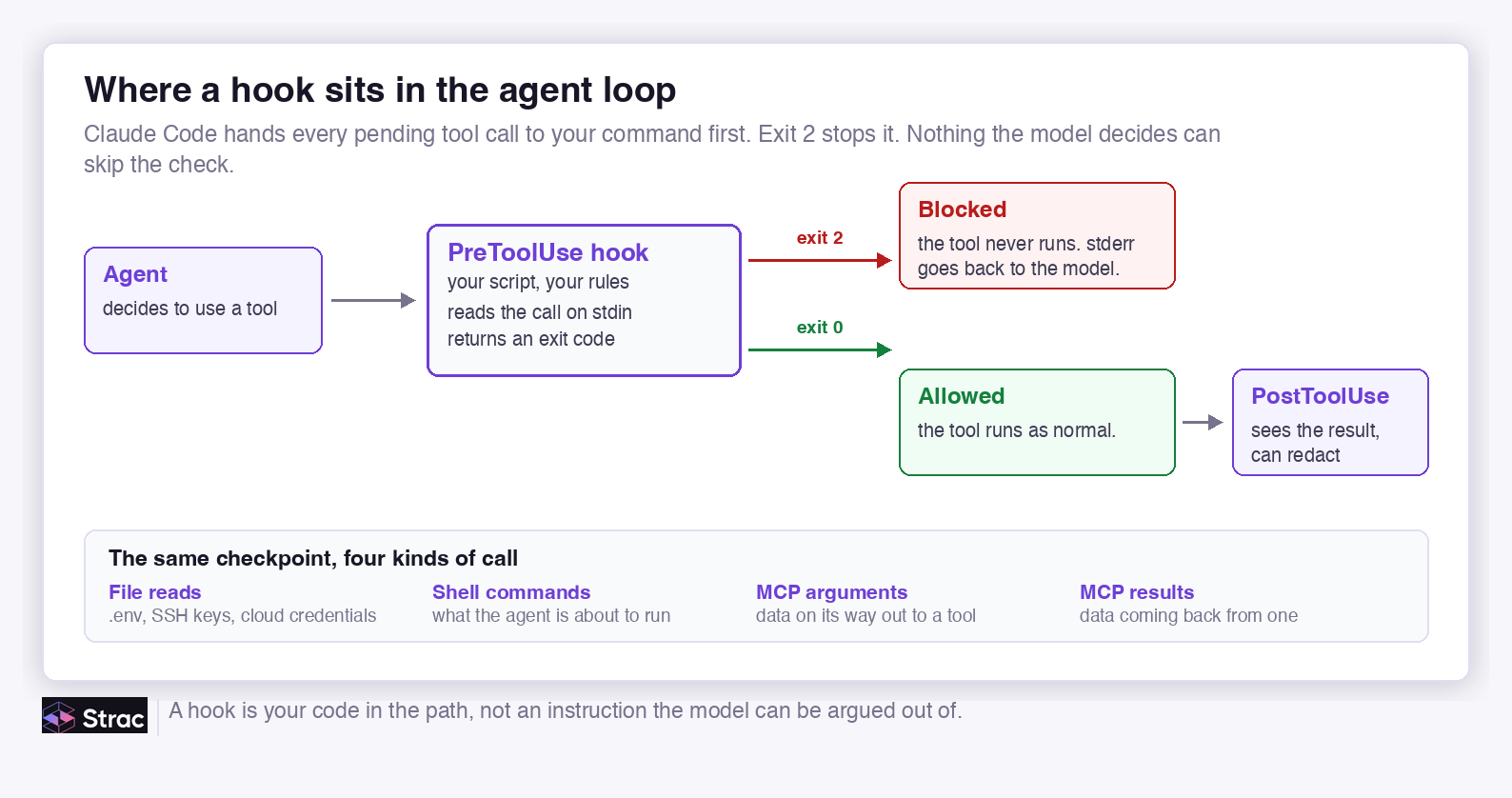
✨ Where the checkpoint sits
The same checkpoint in Codex: the agent asks, your code decides, the call runs or it does not.
Codex supports this from version 0.145.0. The event names and the config file differ between agents; the decision point does not.
Agent
Minimum version
Notes
Claude Code
2.1.296
The reference implementation. PreToolUse, PostToolUse, UserPromptSubmit and the rest.
Cursor
1.7.0
Reads Claude Code's hook format and maps it onto its own events.
Codex
0.145.0
Its own hook layer with equivalent before and after points.
GitHub Copilot CLI
1.0.57
Hook support on the CLI surface.
Gemini CLI
0.27.0
Hook support on the CLI surface.
Windsurf
3.5.17
Ships a hook layer that is off by default.
✨ What the Codex admin surface cannot tell you
An admin console shows the accounts in your organisation. It does not show an engineer who installed the CLI under a personal account on a work laptop, and it does not enumerate the MCP servers they wired into it. For a CLI agent that gap is wider than for an IDE, because installing one is a single command nobody needs to ask about.
Codex alongside the other coding agents on the fleet, with the devices, users and MCP servers attached to each.
✨ The MCP side
Codex can call MCP servers, which means its reach is whatever is in the config rather than just the repository. A server pointed at production is a production credential sitting on a laptop, and a file-path control never sees it.
Every MCP server the fleet's agents can call, approved or disallowed, with the agents using each one.
Where Codex keeps its configuration
Codex reads ~/.codex/config.toml on macOS and Linux, and the .codex folder in the user profile on Windows. The location moves if CODEX_HOME is set, which matters more than it sounds: a blocklist that hard-codes the default path misses every machine where someone relocated it.
Two consequences for a rollout. First, that file is worth reading during an audit, because MCP server definitions live there and they frequently carry credentials in their arguments. Second, if you distribute configuration centrally, resolve CODEX_HOME rather than assuming the default.
A worked example
An engineer asks Codex to work out why a staging job is failing. Codex reads the repo, finds a connection string referenced in config, and runs a shell command to test connectivity. The command embeds the credential it just read, and the output, including an error that echoes the connection string, goes into context and then to the model.
Nobody did anything wrong. A file-only blocklist would have stopped the first step; without one, the credential took three hops in under a minute. This is why the command checkpoint matters as much as the file one on a terminal-native agent.
Three mistakes teams make with Codex
Porting a file-only blocklist. Teams copy the rules that worked for an IDE agent and consider Codex covered. Codex runs commands as a matter of routine, so a rule set that does not match the command tool covers the smaller half of its reach.
Hard-coding the config path.CODEX_HOME relocates it, and the machines where someone set it are usually the machines belonging to the most advanced users.
Assuming the org console lists installs. It lists accounts. A CLI install is one command and needs nobody's permission.
✨ What you can actually evidence
"We block credential reads" is a claim. What an auditor or a customer questionnaire wants is which machines ran the control, what it stopped, and when. A hook writes to stderr in one terminal, which evidences nothing outside that session.
Findings typed by data class rather than arriving as undifferentiated alerts, which is the difference between a log and an answer.
Codex is discovered and enforced by the same agent as Claude Code and Cursor. See Strac's coding agent security integration for the fleet inventory and the MCP findings.
🌶️ Spicy FAQs
Is Codex safe to use on a work machine?
Yes, with the same two conditions as any CLI coding agent: block reads of credential files with a hook, and decide which MCP servers it may call. The agent is well behaved. The exposure comes from the shell and filesystem access you grant it, which was scoped for a human.
Does Codex support hooks?
Yes, from version 0.145.0, through its own hook layer with before and after points equivalent to PreToolUse and PostToolUse. The logic is portable from Claude Code; the registration is not, so it needs configuring separately.
What should I block first in Codex?
Reads of .env, SSH keys and cloud credentials, and then shell commands that move data off the machine. Because Codex is terminal-native, the command checkpoint matters more here than on an IDE agent.
How do I find which engineers are running Codex?
Not reliably from the provider console, which sees organisation accounts rather than installs. Personal-account installs on work laptops are the usual blind spot and need endpoint-side discovery.
Does blocking slow the agent down?
Marginally, and it is bounded. Strac's agent waits up to 1.5 seconds for a verdict before a tool call and 3 seconds after one, then lets the call through rather than hanging the session.
Last updated: November 24, 2026
Customer story
“Don’t just alert on problems, fix them.”
Scott Roberts, Chief Information Security Officer, UiPath
Yes, with the same two conditions as any CLI coding agent: block reads of credential files with a hook, and decide which MCP servers it may call. The agent is well behaved. The exposure comes from the shell and filesystem access you grant it, which was scoped for a human.
Does Codex support hooks?
Yes, from version 0.145.0, through its own hook layer with before and after points equivalent to PreToolUse and PostToolUse. The logic is portable from Claude Code; the registration is not, so it needs configuring separately.
What should I block first in Codex?
Reads of .env, SSH keys and cloud credentials, and then shell commands that move data off the machine. Because Codex is terminal-native, the command checkpoint matters more here than on an IDE agent.
How do I find which engineers are running Codex?
Not reliably from the provider console, which sees organisation accounts rather than installs. Personal-account installs on work laptops are the usual blind spot and need endpoint-side discovery.
Does blocking slow the agent down?
Marginally, and it is bounded. Strac's agent waits up to 1.5 seconds for a verdict before a tool call and 3 seconds after one, then lets the call through rather than hanging the session.
Discover & Protect Data on SaaS, AI, MCP, Endpoints & Cloud
Strac provides end-to-end data loss prevention for all SaaS and Cloud apps. Integrate in under 10 minutes and experience the benefits of live DLP scanning, live redaction, and a fortified SaaS environment.