






SharePoint has become the largest unstructured data graveyard inside most organizations — decade-old project folders, HR documents, customer records, PHI, PCI, financial exports, screenshots, secrets, contracts, and engineering docs… all buried across sites, subsites, Teams-backed libraries, and document folders with unknown access.
And here’s the uncomfortable truth:
You can’t protect what you can’t see.
That’s exactly where SharePoint DSPM (Data Discovery) comes in.
This is the guide you wish existed years ago — tactical, real-world, and written specifically for SharePoint in Microsoft 365.
TL;DR (Numbered)
- SharePoint DSPM (Data Discovery) gives full visibility into sensitive data across all existing SharePoint content — not just new uploads.
- Most SharePoint risk comes from historical files, permission inheritance, public links, external users, and abandoned sites.
- DSPM identifies what data exists, where it lives, who has access, and how exposed it is.
- Remediation includes removing public access, removing external users, revoking sharing links, labeling, redacting, deleting, and fixing inherited permissions.
- DSPM is critical before enabling AI like Microsoft Copilot or other AI assistants.
- Strac provides automated scanning, risk scoring, access mapping, and bulk remediation for SharePoint, Teams, OneDrive, and Microsoft 365.
What Is SharePoint DSPM (Data Discovery)?
SharePoint DSPM (Data Discovery) is the process of:
- Discovering all sensitive data stored in SharePoint
- Classifying it (PII, PHI, PCI, secrets, IP, confidential docs)
- Mapping access (internal, external, public, inherited, guest)
- Assessing exposure and risk
- Remediating access and oversharing
In short:
DSPM = Visibility + Understanding + Action
✨ SharePoint DSPM (Data Discovery) vs SharePoint DLP — Why You Need Both
Think of it as:
✅ DSPM = X-ray
✅ DLP = Treatment
Once DSPM uncovers where sensitive data lives and how exposed it is, companies need SharePoint DLP to prevent future risky uploads, shares, downloads, or exfiltration.
Together, DSPM + DLP create closed-loop protection.
✨ Why Companies Need SharePoint DSPM (Data Discovery)
SharePoint has become the default home for:
- HR onboarding docs
- Finance folders
- Legal and M&A archives
- Contracts and invoices
- Product design docs
- Support exports and logs
- Engineering specs
- Shared vendor workspaces
- Teams file uploads (which land in SharePoint)
And these problems make SharePoint high-risk:
✅ 1. Unstructured Data Sprawl
Employees:
- Upload
- Sync
- Share
- Copy
- Clone
- Move
…across countless sites and libraries.
Nobody knows what’s stored where.
✅ 2. Public Link Exposure
SharePoint still allows:
"Anyone with the link"
These links show up in:
- Teams
- Slack
- Ticketing tools
- AI prompts
- Browser history
One link = unlimited access.
✅ 3. External Users
Agencies, vendors, freelancers, contractors, interns — all get access and rarely lose it.
Many companies have hundreds of forgotten external users in SharePoint.
✅ 4. Departed Employees
Files owned by former employees remain:
- Accessible
- Unmonitored
- Unmanaged
Ownership goes stale. Risk doesn’t.
✅ 5. Compliance Gaps
SOC 2, HIPAA, PCI, GDPR all require:
- Data inventory
- Access control
- Retention governance
- Risk reduction
Without DSPM, SharePoint fails all four.
✅ 6. AI Risk
If SharePoint contains sensitive data, AI tools like Copilot can access it, ingest it, and surface it.
More on that shortly.
✨ Historical Scanning in Sharepoint DSPM (Data Discovery)

Most companies only think about what’s happening today.
The real danger lives in files from years ago across:
- Old sites and subsites
- Abandoned Teams libraries
- Archived project folders
- PDFs and scanned docs
- Screenshots and images
- ZIPs and document bundles
- Duplicates and versions
Historical scanning answers:
- What sensitive data already exists?
- Where is it stored?
- How old is it?
- How exposed is it?
- Who has access?
- Is it public?
- Is it shared externally?
- Is it inherited via permissions?
Without historical scanning, you're blind to 90% of SharePoint risk.
✨ Access Visibility in SharePoint DSPM (Data Discovery)

Finding sensitive data is only half the story.
You must know:
Who can see it?
SharePoint DSPM (Data Discovery) identifies:
- Files shared publicly
- Files shared externally
- Files accessible via inherited permissions
- Files owned by departed employees
- Files accessible to broad groups (e.g., “Everyone”)
- Files shared with guest accounts
- Files with orphaned or unknown ownership
This is the difference between:
“This site contains PCI data.”
and
“This site contains PCI data and is externally accessible.”
Only the second is an emergency.
✨ Remediation in Strac SharePoint DSPM (Data Discovery)
Visibility without action is useless.
SharePoint DSPM remediation includes:
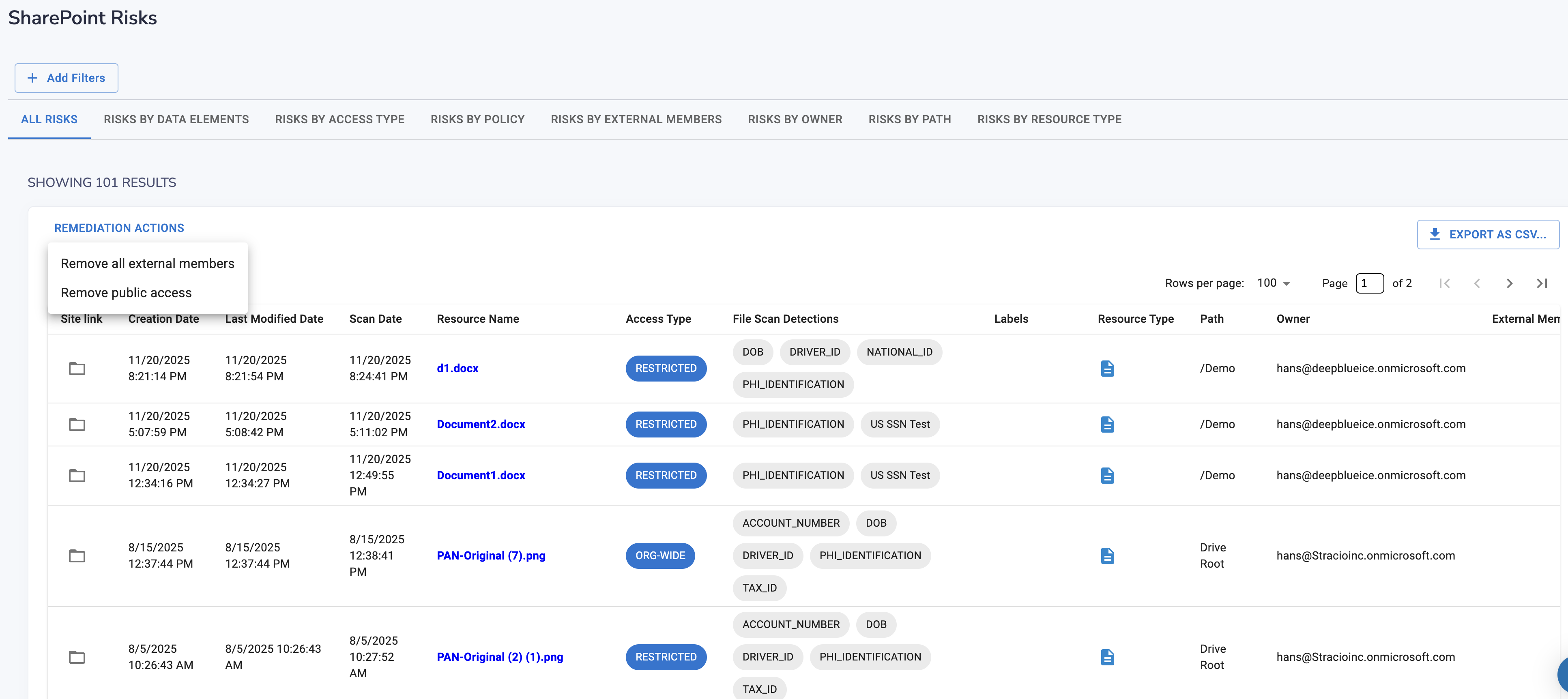
✅ Removing Public Access
Turn “Anyone with the link” → Restricted
✅ Removing External Users
Remove contractors, vendors, former partners
✅ Revoking Shared Links
Kill stale and risky links instantly
✅ Fixing Inherited Permissions
Stop parent sites from oversharing thousands of files
✅ Labeling Files
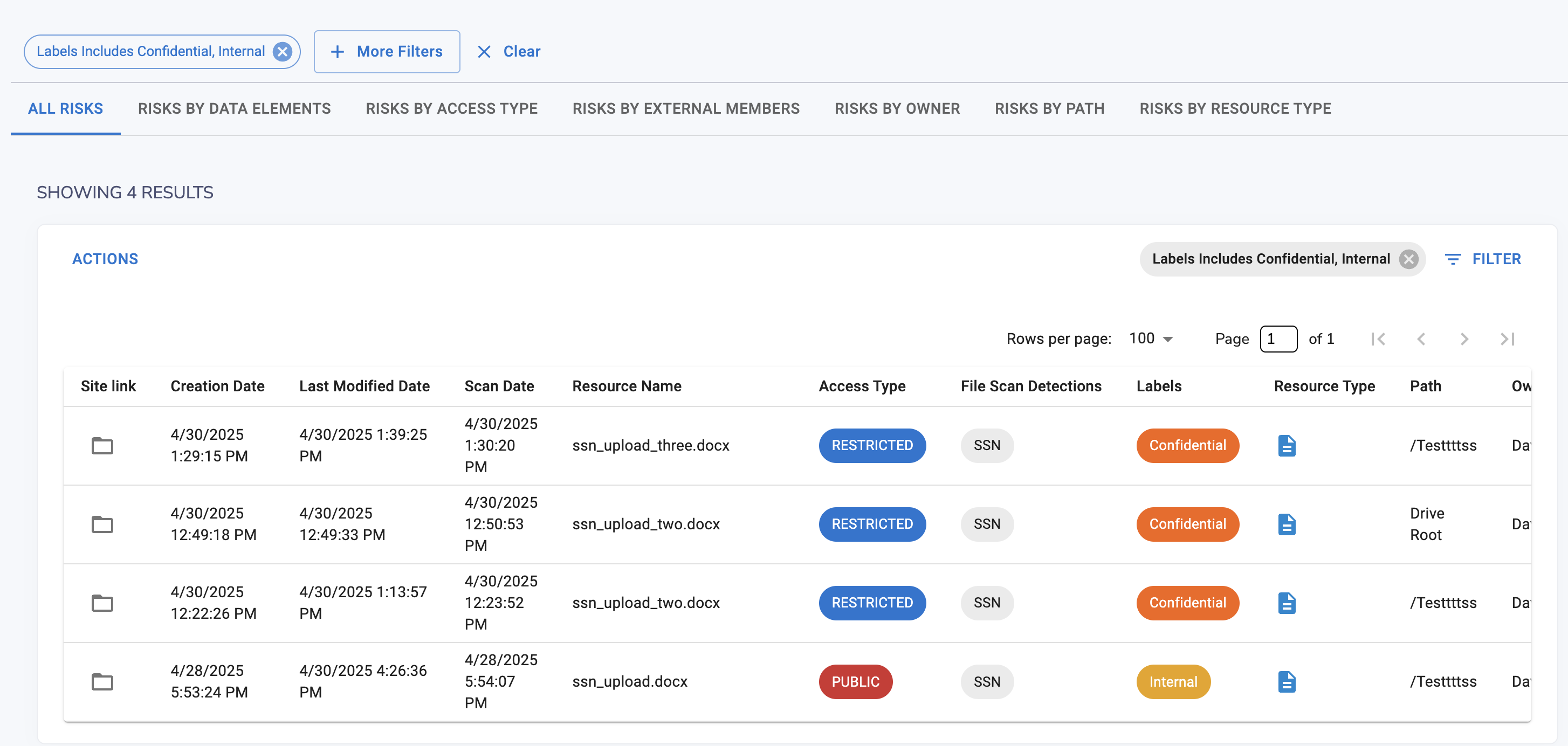
Apply sensitivity labels:
- Confidential
- Restricted
- Internal
✅ Reassigning Ownership
Move files from former employees to real owners
✅ Archiving or Deleting
Reduce long-term risk
✅ Bulk Remediation
Fixing hundreds or thousands of files in one action
With Strac, admins can:
- Remove public access
- Remove external users
- Apply labels
- Delete or quarantine
- Fix inheritance issues
This reduces SharePoint risk in hours — not months.
How SharePoint DSPM (Data Discovery) Protects Against AI & Copilot Risk
AI isn’t just a productivity tool — it’s a data amplifier.
When AI systems like Microsoft Copilot and other assistants connect to SharePoint, they can:
✅ Index
✅ Analyze
✅ Summarize
✅ Reference
✅ Generate content from
✅ Retain embeddings of
…the data stored inside SharePoint.
This creates four massive risks:
✅ AI RISK #1: Accidental Exposure Through AI Responses
If SharePoint contains sensitive data, AI can:
- Surface salary data in a summary
- Reveal PHI in a response
- Pull secrets into generated content
- Include customer PII in a draft
AI doesn’t understand confidentiality — only relevance.
✅ AI RISK #2: AI Training & Memory Risk
Depending on the system:
- Prompts
- Files
- Context
- Embeddings
…may be retained or used for improvement.
If SharePoint stores:
- PHI
- PCI
- Employee data
- Contracts
- Source code
- Secrets
You could lose control permanently.
✅ AI RISK #3: “Privilege Escalation by AI”
AI often sees more data than any single human.
Meaning:
Copilot may have broader visibility than the actual user querying it.
AI becomes the most privileged user in the company.
✅ AI RISK #4: Shadow AI Workflows
Employees now:
- Paste SharePoint links into AI tools
- Upload files for summarization
- Share screenshots or exports with AI
Sensitive SharePoint data leaves Microsoft 365 instantly.
✅ Why SharePoint DSPM Is Step Zero for AI
Before enabling Copilot or any AI system, you MUST know:
- What sensitive data exists
- Where it lives
- Who can access it
- Whether it's public or external
- Whether AI should have visibility
DSPM creates:
✅ An AI-safe dataset
✅ Least-privilege access baseline
✅ A governed perimeter for AI visibility
DSPM → Fix historical exposure
DLP → Prevent new leaks
AI Governance → Control what AI can see or use
Without DSPM, AI governance is blind.
How Strac Solves SharePoint DSPM (Data Discovery)
Strac provides:
✅ Historical scanning
✅ OCR for PDFs & images
✅ Real-time monitoring
✅ Sensitive data classification (PII, PCI, PHI, secrets, IP)
✅ Access visibility
✅ Public link detection
✅ Risk scoring
✅ Bulk remediation
✅ Labels & restrictions
✅ Alerts to Slack/Teams/SIEM
✅ Compliance reporting (SOC2, HIPAA, PCI, GDPR)
Strac supports:
- SharePoint
- Teams
- OneDrive
- O365 Email
- Slack
- Salesforce
- Zendesk
- Jira
- AWS
…and dozens more.
🔗 Explore all integrations: https://www.strac.io/integrations
🌶️ Spicy FAQs on SharePoint DSPM (Data Discovery)
Does SharePoint already protect sensitive data, so why do we need DSPM?
SharePoint protects storage — not exposure.
DSPM identifies sensitive data, maps access, and fixes risks Microsoft will never surface.
Can SharePoint DSPM help reduce AI/Copilot leakage?
Yes — by removing sensitive exposure before AI is enabled.
Can SharePoint DSPM find sensitive data in PDFs, images, or screenshots?
Only if it includes OCR. Strac does.
What’s the difference between SharePoint DSPM and SharePoint DLP?
DSPM finds historical risk.
DLP enforces real-time policy.
You need both.
Can SharePoint DSPM automatically remove public access or external users?
With Strac — yes, and in bulk.
Does SharePoint DSPM help with SOC2, HIPAA, PCI, GDPR?
Absolutely. DSPM creates the inventory, access controls, and evidence auditors require.
