Claude Code Hooks: Block Secrets Before the Agent Reads
Claude Code hooks run your own code before and after every tool call. Here is the hook that stops an agent reading .env, how the same pattern works in Cursor, Codex, Copilot CLI and Gemini CLI, and what breaks when you roll it out to a fleet.
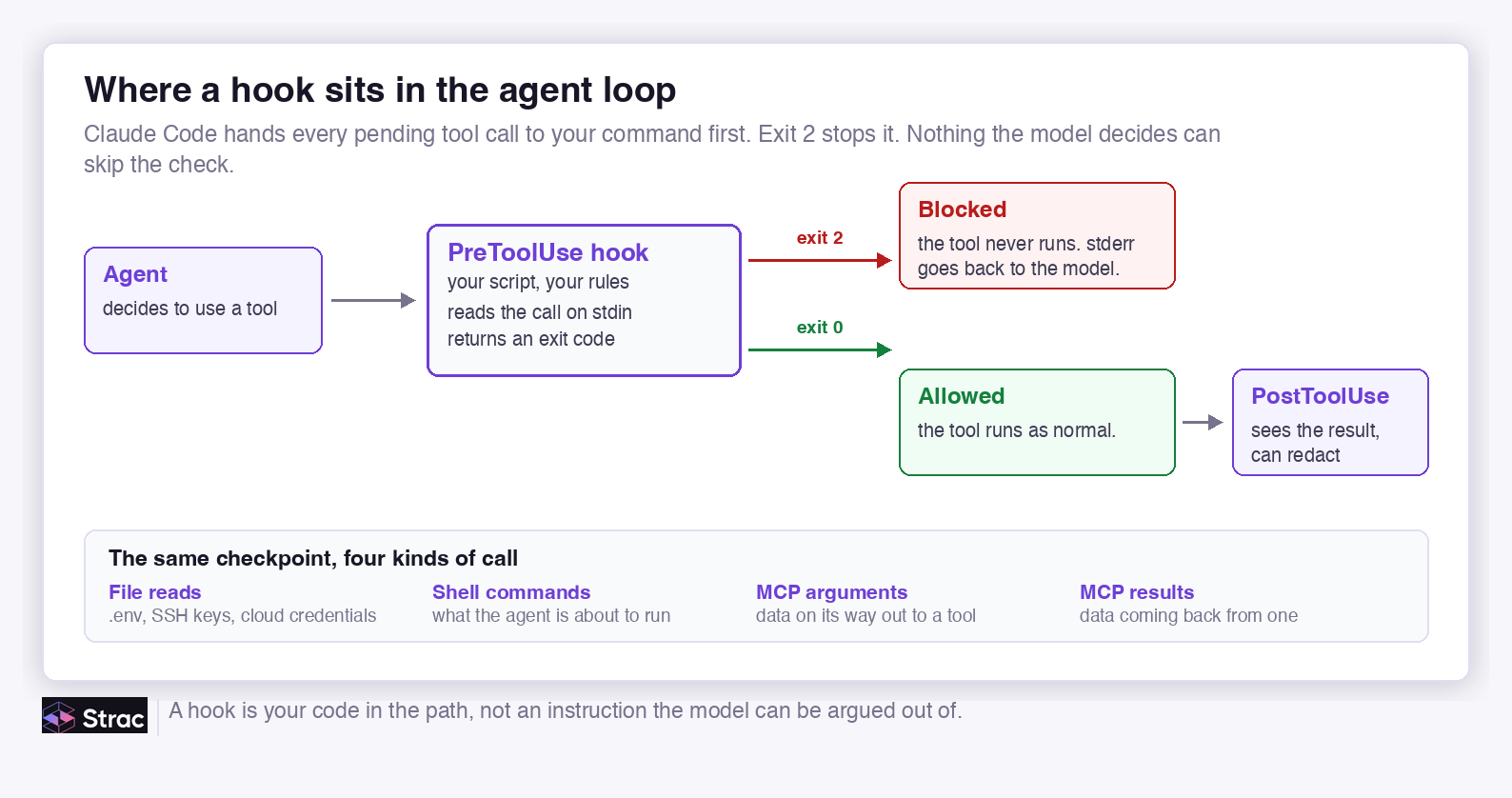
A Claude Code hook is a shell command that Claude Code runs at a fixed point in its own loop, before or after it uses a tool. You register it once in settings.json. From then on it runs on every matching tool call, and nothing the model decides can skip it.
That property is why hooks matter more than they first look. Everything else you can tell a coding agent is a request. A line in CLAUDE.md saying never read the .env file is a request. A hook is not: it is your code, in the path, with a veto. This page covers the hook worth installing first, the exit code that does the blocking, how the same pattern carries over to Cursor, Codex, Copilot CLI and Gemini CLI, and the three things that break when you try to run it across more than your own laptop.
Where a PreToolUse hook sits in the agent loop: every pending tool call goes to your command first, and exit 2 stops it.
🎥 Watch it stop an action before it runs
Two minutes, no narration needed: an agent reaches for something it should not have, and the call is stopped before it executes rather than reported after.
The five events, and the one that enforces
Claude Code fires hooks at several points in a session. In practice security work lives almost entirely in the first two.
Event
Fires
Can it block?
PreToolUse
Before a tool call runs
Yes. Exit 2 stops the call.
PostToolUse
After a tool call returns
No, but it sees the result and can feed a message back.
UserPromptSubmit
When the user sends a prompt
Yes. Useful for scanning what goes into the context.
SessionStart
At the start of a session
No. Usually used to load context or log the session.
Stop
When the agent finishes responding
No. Usually used for audit or notification.
PreToolUse is the one that enforces. Everything below uses it.
The first hook to install: stop the agent reading secrets
The single highest-value hook blocks reads of credential files. A coding agent has a legitimate reason to read almost every file in a repo, and no legitimate reason to read your AWS credentials. Register this against the file tools:
Claude Code pipes a JSON object describing the pending call into your command on stdin. The script reads the path out of it and decides:
#!/usr/bin/env bash
# ~/.claude/hooks/block-secrets.sh
path=$(jq -r '.tool_input.file_path // .tool_input.path // empty')

case "$path" in
  *.env|*.env.*|*/.aws/credentials|*/.ssh/id_*|*/.netrc|*/.npmrc|*/.pypirc)
    echo "Blocked: $path holds credentials. Read the example file instead." >&2
    exit 2
    ;;
esac
exit 0
Exit codes are the whole API
There is no return value to learn. The exit code is the verdict, and only one of them blocks.
Exit code
What Claude Code does
0
No objection. The tool call proceeds. Anything on stdout is shown in the transcript.
2
Block. The tool call never runs, and stderr is fed back to the model so it can adapt.
anything else
Treated as a hook error, not a block. The call proceeds. This is the mistake people make.
That last row catches most first attempts. A script that exits 1 on failure, which is the normal shell convention, is not blocking anything. It has to be 2.
✨ What the agent can actually reach
A path blocklist assumes you know where the secrets are. On a real engineering laptop that assumption fails quickly, because the credential is often not in a file the agent reads at all. It is in the agent's own configuration.
A database password sitting in plain text in an agent's MCP server config, found on an engineering laptop and masked on the device.
An MCP server entry with a connection string in its arguments is a live production credential that every session on that machine inherits. No file read is involved, so no file-path hook sees it. Finding this class of exposure needs something that inspects the agent configuration itself, which is a different job from inspecting tool calls.
The same pattern in Cursor, Codex, Copilot CLI and Gemini CLI
Hooks are not a Claude Code idea any more. Every major coding agent now ships some version of the same checkpoint, which is good news for the concept and awkward news for anyone maintaining it, because the config file and the event names differ in each one.
Agent
Minimum version
Notes
Claude Code
2.1.296
The reference implementation. PreToolUse, PostToolUse, UserPromptSubmit and the rest.
Cursor
1.7.0
Reads Claude Code's hook format and maps it onto its own events.
Codex
0.145.0
Its own hook layer with equivalent before and after points.
GitHub Copilot CLI
1.0.57
Hook support on the CLI surface.
Gemini CLI
0.27.0
Hook support on the CLI surface.
Windsurf
3.5.17
Ships a hook layer that is off by default.
Writing one script is an afternoon. Writing six, keeping each one current as the agents ship breaking changes, and getting all of them onto every laptop is not an afternoon. It is the reason DIY hook rollouts tend to cover the security team's own machines and nobody else's.
✨ Three things that break at fleet scale
The hook itself is sound. What breaks is everything around it.
You cannot see who still has it. A hook lives in a file on a laptop. Anyone with a shell can edit settings.json or delete the script, usually not maliciously but because something broke at 11pm. There is no server-side signal that tells you the control is still installed and intact on 400 machines.
You cannot see which agents are installed. Hooks only protect agents you knew to configure. The ones that arrived through a personal download are the ones you most want covered.
Every AI agent and MCP server discovered across the fleet, with the devices and users attached to each.
There is no record for anyone else. A blocked call prints a line to stderr inside one developer's terminal. When an auditor or a customer security questionnaire asks what stops a coding agent from reading production credentials, a shell script on a laptop is a hard answer to evidence.
✨ The gap a file-path hook cannot close: MCP
Path matching works on files. It does nothing about MCP, where the sensitive data moves through tool arguments and tool results rather than through the filesystem. An agent can query a production database through an MCP server and pull back a result set full of card numbers without reading a single sensitive file.
MCP servers discovered across the fleet, each one approved or disallowed with the agents and devices using it.
Closing that needs inspection on both directions of the call, and a different verdict for each direction:
Condition
Action
Sensitive data in the tool arguments
Block the call. The data is on its way out.
Sensitive data in the tool results
Redact the matches. The agent gets the shape of the answer without the values.
Result larger than 1MB
Pass it through and flag it. Bulk movement is worth knowing about even when nothing matched.
The detectors that run on that path cover card numbers, SSNs, IBANs, AWS access keys, GitHub and Slack tokens, Anthropic and OpenAI API keys, JWTs and database connection strings. More detail on that layer is in the MCP DLP writeup.
Monitor, ask, block
A control that blocks on day one gets uninstalled by day three. The rollout that survives moves through three modes, per rule rather than all at once.
Mode
What the developer sees
Use it when
Monitor
Nothing. The event is recorded.
You are still learning what normal looks like.
Ask
A prompt, with the option to proceed and a reason.
The rule is right most of the time but you expect edge cases.
Block
The call is stopped and the agent is told why.
The rule is unambiguous. Production credentials belong here.
Start every new rule in monitor, read a week of what it would have caught, then promote the ones where the false-positive rate is near zero. The timing matters too: Strac's agent waits up to 1.5 seconds for a verdict before a tool call and 3 seconds after one, then gets out of the way. A security control that hangs a session is a security control with a short life.
✨ Where this sits in the rest of the stack
Hooks cover the coding agent on the laptop. The same sensitive data moves through other surfaces on the same day, and the policy should not change depending on which one it took.
Agent activity flowing into the same policy and evidence layer as the rest of the environment.
If you would rather not maintain hook scripts across a fleet, Strac's Claude Code security integration installs the same checkpoint centrally, reports which machines still have it, and covers Cursor, Codex and Claude Desktop from the same agent.
🌶️ Spicy FAQs
What is a Claude Code hook?
A hook is a shell command Claude Code runs at a fixed point in its own loop. You register it in settings.json against an event such as PreToolUse, and Claude Code pipes a JSON description of what it is about to do into your command on stdin. Your command decides. It is enforcement in the literal sense, because it runs whether or not the model agreed to the rule.
How do I stop Claude Code reading my .env file?
Register a PreToolUse hook matched to Read, Edit and Write that exits with code 2 when the target path looks like a secret. Exit code 2 is the block signal: the tool call never runs and whatever your script printed to stderr is handed back to the model, so it learns why and routes around. Anything else, including exit 1, is treated as no objection. The full script is in the section above.
Do hooks work in Cursor and Codex, or only Claude Code?
All of them, with different maturity. Cursor reads Claude Code's hook format and maps PreToolUse, PostToolUse and Stop onto its own events. Codex, GitHub Copilot CLI and Gemini CLI each have their own hook or policy layer. Windsurf ships one that is off by default. The shape is the same everywhere, the config file and the event names are not, which is the part that makes a DIY rollout expensive.
Can a hook be bypassed?
By the model, no, which is the point. A hook is not an instruction the model can be argued out of. But the file that defines it is just a file on a laptop, so a person with shell access can edit settings.json or delete the script. That is the real gap in a DIY rollout: you cannot tell from the server whether a given machine still has the hook installed and intact.
Do hooks slow the agent down?
A little, and you control how much. Strac's agent waits up to 1.5 seconds for a verdict before a tool call and up to 3 seconds after one, then lets the call through rather than hanging the session. If the agent is not installed at all, nothing is blocked. The design decision there is deliberate: a security control that stops people working gets uninstalled.
What about MCP tool calls rather than file reads?
That is the part a path-matching hook misses entirely. An MCP server can return a result set full of card numbers or customer records without any sensitive file ever being read. Inspection has to happen on the tool arguments going out and the tool results coming back, not on the file path. See the MCP section above.
Last updated: November 24, 2026
Customer story
“Don’t just alert on problems, fix them.”
Scott Roberts, Chief Information Security Officer, UiPath
A hook is a shell command Claude Code runs at a fixed point in its own loop. You register it in settings.json against an event such as PreToolUse, and Claude Code pipes a JSON description of what it is about to do into your command on stdin. Your command decides. It is enforcement in the literal sense, because it runs whether or not the model agreed to the rule.
How do I stop Claude Code reading my .env file?
Register a PreToolUse hook matched to Read, Edit and Write that exits with code 2 when the target path looks like a secret. Exit code 2 is the block signal: the tool call never runs and whatever your script printed to stderr is handed back to the model, so it learns why and routes around. Anything else, including exit 1, is treated as no objection. The full script is in the section above.
Do hooks work in Cursor and Codex, or only Claude Code?
All of them, with different maturity. Cursor reads Claude Code's hook format and maps PreToolUse, PostToolUse and Stop onto its own events. Codex, GitHub Copilot CLI and Gemini CLI each have their own hook or policy layer. Windsurf ships one that is off by default. The shape is the same everywhere, the config file and the event names are not, which is the part that makes a DIY rollout expensive.
Can a hook be bypassed?
By the model, no, which is the point. A hook is not an instruction the model can be argued out of. But the file that defines it is just a file on a laptop, so a person with shell access can edit settings.json or delete the script. That is the real gap in a DIY rollout: you cannot tell from the server whether a given machine still has the hook installed and intact.
Do hooks slow the agent down?
A little, and you control how much. Strac's agent waits up to 1.5 seconds for a verdict before a tool call and up to 3 seconds after one, then lets the call through rather than hanging the session. If the agent is not installed at all, nothing is blocked. The design decision there is deliberate: a security control that stops people working gets uninstalled.
Discover & Protect Data on SaaS, AI, MCP, Endpoints & Cloud
Strac provides end-to-end data loss prevention for all SaaS and Cloud apps. Integrate in under 10 minutes and experience the benefits of live DLP scanning, live redaction, and a fortified SaaS environment.