








Last updated: July 2026
Edge DLP (data loss prevention for Microsoft Edge) inspects what employees paste, upload, and type into websites and AI tools in the Edge browser — detecting PII, PHI, PCI, and secrets, and redacting, warning, or blocking them before the data ever leaves the browser.
- What it protects: sensitive data entered into any site or GenAI tool (ChatGPT, Copilot, Claude) in Edge.
- How it acts: redact in-field, block, or warn inline — with a full audit trail.
- Part of the platform: the same policy also covers Chrome, SaaS, cloud, endpoint, and the MCP agent layer.
TL;DR:
- Edge DLP is a browser-based data loss prevention strategy for protecting sensitive information.
- It helps prevent data leakage, unauthorized sharing, and ensures compliance with regulations.
- Strac Edge Browser DLP offers advanced capabilities like policy enforcement, user behavior analysis, and seamless integration.
- It addresses risks such as data leakage via web applications and unauthorized sharing of sensitive information.
- Strac's solution is user-https://calendly.com/strac-sensitive-personal-data/30minfriendly, easy to deploy, and reduces the administrative burden on IT and security teams.
What is Edge DLP?
Edge DLP as Part of Full Browser & Data Coverage
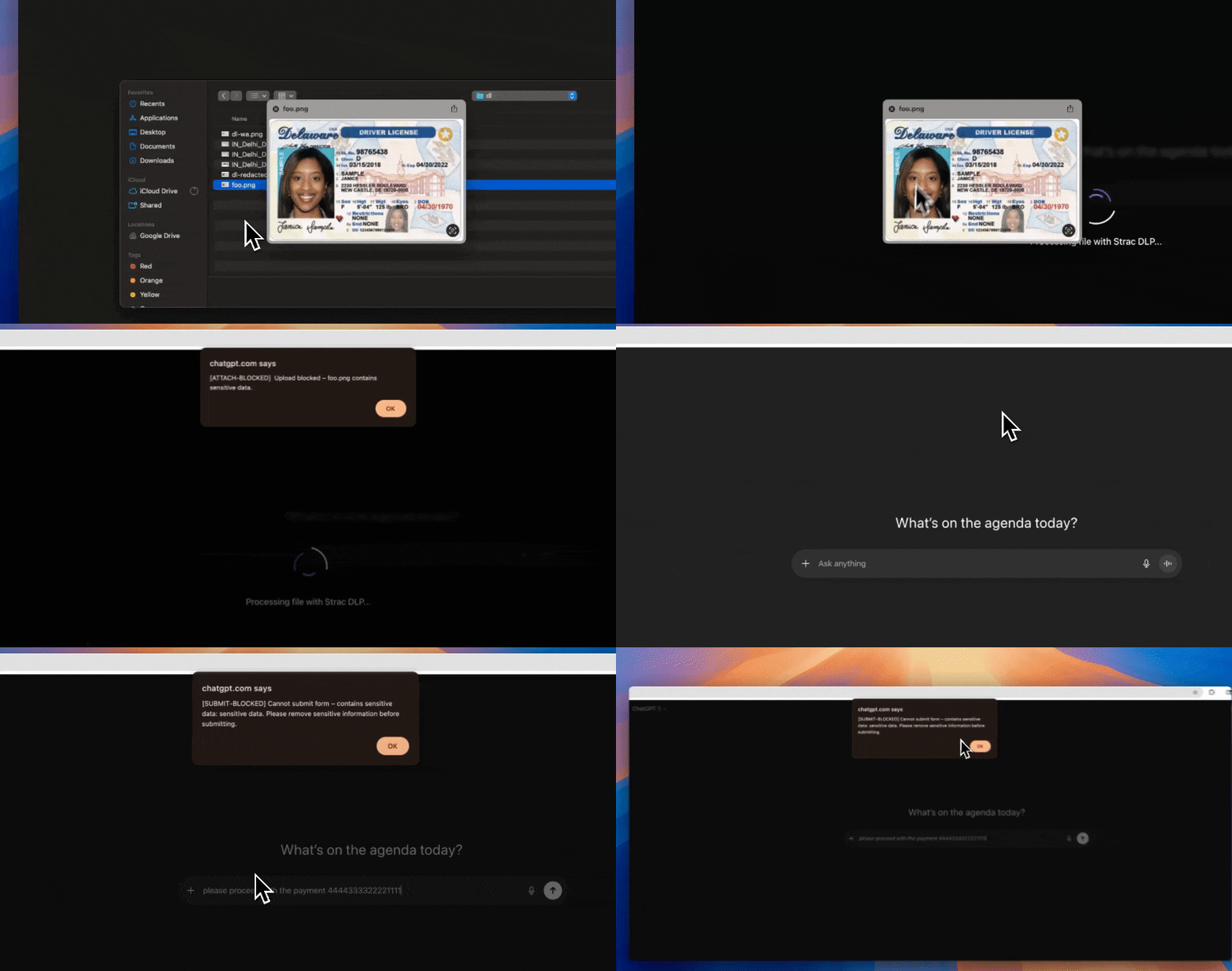
Edge DLP is one surface of Strac's platform. A policy set once protects the Edge browser and extends to every other place sensitive data moves — with both a historical discovery scan and real-time enforcement.
| Surface | What Strac inspects | Remediation actions |
|---|---|---|
| Edge browser | Text and files entered into websites and AI prompts | Redact in-field, block, warn, alert |
| Other browsers (Chrome, Firefox) | The same protection via the Strac extension | Redact, block, warn, alert |
| SaaS apps (50+) | Data shared or stored across connected apps | Redact, mask, delete, revoke sharing, alert |
| Cloud & endpoint | Data at rest and in motion | Redact, mask, quarantine, block, encrypt, alert |
| MCP / AI agents | Data agents read through MCP | Redact in-transit, block, revoke, alert |
Edge Data Loss Prevention (Edge DLP) refers to the practice of implementing DLP capabilities directly within web browsers. This approach ensures that data transmitted through web applications is monitored and protected at the point of interaction. By integrating DLP functionality into the browser, organizations can effectively control and secure data flows from endpoints, particularly in environments where remote work and cloud applications are prevalent.
Examples of Edge DLP:
- Browser-Based DLP for Webmail: Consider a healthcare organization that needs to prevent unauthorized sharing of patient records. By implementing Edge DLP within the browser, the organization can monitor and control data transmitted via webmail services like Gmail or Outlook.com. This ensures that sensitive health information is not inadvertently or maliciously shared outside the organization.
- Cloud Application Security: A financial institution using cloud-based applications such as Google Drive or Microsoft OneDrive can leverage Edge DLP to monitor file uploads and downloads. This prevents employees from uploading confidential financial data to personal or unauthorized cloud storage accounts.
- Social Media Protection: An educational institution might use Edge DLP to prevent staff and students from posting sensitive information on social media platforms. For instance, the browser-based DLP can detect and block attempts to share confidential academic records or personal information on platforms like Facebook or Twitter.
👉 Download Strac Browser DLP for Edge Add on
What Risks or Problems Does Edge DLP Solve?
Edge DLP addresses several critical risks and problems associated with data security in modern, distributed work environments. Here are a few examples:
- Data Leakage via Web Applications:
- Problem: Employees frequently use web applications for communication and collaboration, making it challenging to control data leakage.
- Solution: Edge DLP monitors data transfers within the browser, ensuring that sensitive information is not transmitted to unauthorized destinations. For instance, an employee trying to upload a confidential document to a personal cloud storage account would be blocked by the Edge DLP solution.
- Unauthorized Sharing of Sensitive Information:
- Problem: With the rise of remote work and cloud-based applications, there is an increased risk of unauthorized data sharing.
- Solution: Edge DLP can enforce policies that prevent users from sharing sensitive information through webmail, social media, and other web applications. For example, an employee attempting to email a list of customer contacts to a personal email address would be detected and blocked.
- Compliance with Data Protection Regulations:
- Problem: Organizations must comply with various data protection regulations, such as GDPR, HIPAA, and PCI DSS, which require stringent controls over sensitive data.
- Solution: Edge DLP helps organizations meet compliance requirements by providing real-time monitoring and control of data transfers within the browser. This ensures that sensitive information is handled in accordance with regulatory standards.
- Web Security and User Behavior:
- Problem: Employees may visit blacklisted sites, download files from blacklisted domains, or use insecure HTTP sites, posing significant security risks.
- Solution: The Edge DLP can detect and block access to blacklisted sites, downloads from blacklisted domains, and visits to insecure HTTP sites. It also monitors web searches for blacklisted keywords, blocks attempts to upload files to non-whitelisted domains, and controls clipboard operations, ensuring that sensitive data is not copied or pasted inappropriately.
How Does Strac Edge DLP Solve Above Problems?
Strac Browser DLP addresses the challenges of browser-based data loss prevention with a robust and comprehensive solution. Here's how Strac Browser DLP effectively tackles browser DLP issues:
- Strac Browser Extension Capabilities: Strac's Browser Extension provides enhanced visibility and control over browser events. It detects visits to blacklisted sites, blocks downloads from blacklisted domains, monitors searches for blacklisted keywords, prevents file uploads to non-whitelisted domains, and controls clipboard operations.

- Advanced Policy Enforcement: With Strac, organizations can define and enforce detailed data protection policies, ensuring compliance with regulatory requirements and internal standards.
- User Behavior Analysis: Strac includes advanced user behavior analytics to detect suspicious activities and potential insider threats, enhancing overall security.
- Seamless Integration: Strac integrates seamlessly with existing security tools, including endpoint security, SIEM systems, and cloud security platforms, creating a unified security environment.
- Support for Various Web Applications: Strac supports a wide range of web applications, providing comprehensive protection across different platforms and services.
- Ease of Use: Strac's solution is designed for easy deployment and management, reducing the administrative burden on IT and security teams.
Gen AI DLP for Browser-Based AI Usage
GenAI is now the fastest growing data exfiltration channel; and it happens in the browser.
Employees paste customer lists into ChatGPT. Developers test prompts with real production data. Support teams copy tickets into AI tools to summarize conversations. It happens every day.
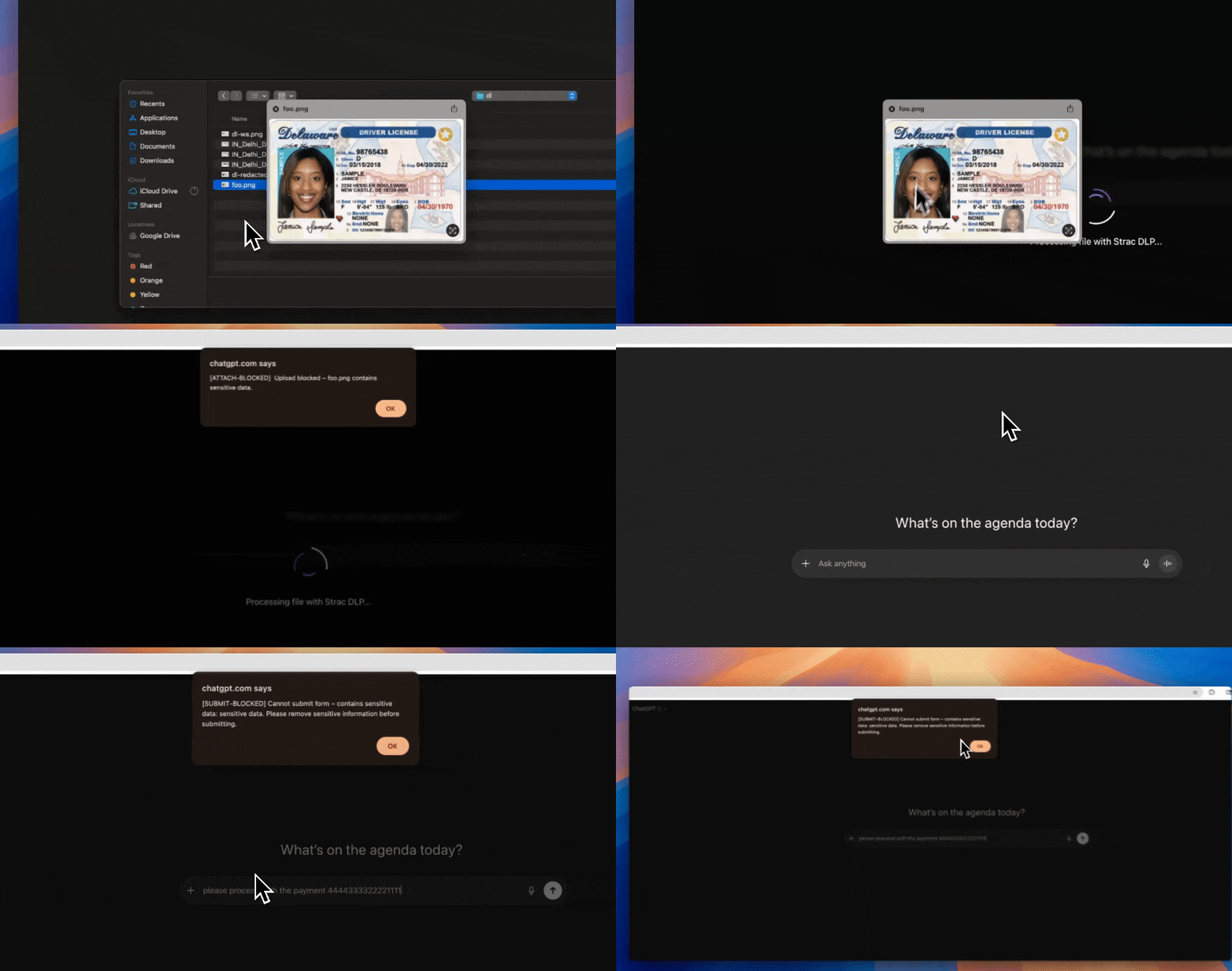
Strac’s Gen AI DLP monitors those prompt and response flows in real time:
- Inspect prompts before they leave the browser
If PII, PHI, PCI, or secrets are detected; they are blocked or redacted. - Control what data types are allowed in AI tools
Policy-driven; not manual policing. - Monitor AI responses
Prevent sensitive data from being reintroduced downstream.
Example: a user pastes a spreadsheet with SSNs into ChatGPT. Strac detects it instantly and stops it before it leaves the organization. No alert-only mode. Actual enforcement.
Legacy DLP was not built for prompt-based workflows. Strac is.
Learn more:
https://www.strac.io/integration/chatgpt-dlp
Is Strac Edge DLP published on Microsoft Edge Add-Ons?
Yes, it is published here: https://microsoftedge.microsoft.com/addons/detail/strac-browser-dlp/hbplojlogakmcaogfnklnhiokojjjoao
FAQs on Edge DLP
1. What is Edge DLP and how is it different from traditional DLP?
Edge DLP operates directly at the browser level. Instead of only monitoring email servers or network gateways, it inspects data as users interact with web applications like Google Drive, Slack, Salesforce, or ChatGPT. Traditional DLP often focuses on endpoints or email; Edge DLP protects modern SaaS and browser workflows where most sensitive data now moves.
2. Does Edge DLP block uploads in real time?
Yes. A properly implemented Edge DLP solution can inspect uploads, copy-paste actions, and web form submissions before the data leaves the browser. If sensitive data like PII, PHI, PCI, or API keys are detected, the action can be blocked or redacted instantly; not just flagged with an alert.
3. What is Data Lineage DLP and why does it matter?
Data Lineage DLP goes beyond blocking a single event. It tracks where sensitive data originated, how it moved across SaaS apps, and who accessed it along the way. This is critical during investigations and compliance audits; because security teams need context, not just alerts. Without lineage, you only see the last action; not the full journey of the data.
4. How does Gen AI DLP protect tools like ChatGPT?
Gen AI DLP monitors AI prompt and response flows inside the browser. If an employee pastes customer data, payroll information, or internal documents into ChatGPT, the system can detect and block or redact that content before it is submitted. It can also monitor responses to prevent sensitive data from being reintroduced into internal systems.
5. Can Edge DLP help with GDPR, HIPAA, or PCI DSS compliance?
Yes. Edge DLP supports compliance by enforcing real-time controls over sensitive data handling. It prevents unauthorized sharing, logs user actions, and provides visibility into data exposure events. When combined with Data Lineage DLP, it also helps demonstrate how data was accessed, shared, and remediated during audits.
6. Is browser-based DLP enough to secure SaaS and AI workflows?
On its own; no. Browser-based DLP is a strong control point, but it should be combined with data discovery, classification, and remediation across SaaS apps and cloud storage. A unified DSPM + DLP approach ensures you protect both where data is created and where it moves.
Sensitive Data Types for Edge DLP
Checkout all the sensitive data elements and file formats supported by Strac: https://www.strac.io/blog/strac-catalog-of-sensitive-data-elements


.avif)


