







TL;DR
Strac Google Chrome Extension DLP
- Strac Chrome Extension DLP helps businesses protect against security and compliance risks.
- It monitors specified websites and prevents transmission of sensitive data.
- Strac provides insightful reporting for administrators to enforce security controls effectively.
- It safeguards against accidental data leaks and insider threats.
- Strac offers an additional layer of security against browser-based threats.
- Checkout our video demo below to learn about how Strac Google Chrome Extension DLP works
👉 Download Strac Chrome DLP Extension
Why should businesses have Google Chrome Extension DLP?
Data Loss Prevention (DLP) solutions are tools that are designed to detect potential data breach or exfiltration transmissions, and prevent them by monitoring, detecting, and blocking sensitive data while it is in-use (endpoint actions), in-motion (network traffic), and at-rest (data storage). With regards to browser extensions, they primarily help in the in-use and in-motion aspects.
Here are some key reasons why businesses should have a DLP solution on their browsers:
- Monitor and Control Web-Based Data Transfer: A lot of data exchange today happens via web-based applications like email, cloud storage, or collaboration platforms. A DLP browser extension can monitor these exchanges and prevent unauthorized transfer of sensitive information.
- Ensure Compliance: For businesses operating in regulated industries such as healthcare, finance, and others, ensuring compliance with data protection laws is paramount. DLP solutions can help maintain compliance by enforcing data security policies across all web browsing activities.
- Prevent Accidental Data Leaks: Even well-intentioned employees can make mistakes and accidentally send sensitive data to the wrong recipient. With a DLP browser extension, rules can be set to scan for such sensitive data and prevent it from being sent.
- Protect Against Insider Threats: Not all data leaks are accidental. Sometimes, they can be the result of a malicious insider trying to steal data. A DLP solution can help detect unusual patterns of data access or transfer, and stop them.
- Visibility and Reporting: DLP solutions often provide reporting features, allowing businesses to monitor all data transactions, identify trends, and even pinpoint potential areas of vulnerability.
- Uniform Policy Application: A DLP solution can ensure that policies related to data usage and transfer are uniformly applied across all the devices in an organization, regardless of the location of the user.
- Browser-Based Threat Protection: With the increasing number of browser-based threats, such as phishing and malware, a DLP solution can also provide an additional layer of security.
What Data Risks Exist on Browser Extensions and Cloud Apps?
Browser extensions and cloud apps introduce silent, high-frequency data risks because sensitive information moves through them constantly; modern teams rely on dozens of tools that interact with each other, sync data, auto-fill fields, and transmit content behind the scenes. This creates blind spots where traditional network DLP cannot see or enforce policies. Chrome DLP fills this visibility gap by monitoring the flow of sensitive data across form fields, uploads, downloads, copy/paste actions, and AI tools; all areas where data leakage commonly occurs. As organizations scale their SaaS footprint and adopt GenAI tools rapidly, Chrome DLP becomes a critical control point for preventing accidental and malicious exposure.
Key risk categories include:
- Sensitive data exfiltration through extensions; password managers, productivity plug-ins, note-taking apps, AI assistants, and file converters can read or transmit content unexpectedly.
- Auto-fill and auto-sync exposures; Chrome syncing data between devices or extensions inadvertently capturing PII or PHI inserted into online forms.
- Unmonitored file uploads or downloads; users dragging files into SaaS apps, cloud storage, ticketing systems, or collaboration tools without oversight.
- GenAI prompt leakage; employees pasting proprietary, regulated, or customer data into ChatGPT, Bard, or Copilot prompts without realizing the compliance consequences.
- Shadow IT and unauthorized SaaS usage; employees connecting personal extensions or unapproved apps that silently capture or move sensitive data.
These risks are amplified in remote and hybrid teams, where browser-based workflows replace traditional corporate networks. Chrome DLP secures the last-mile user layer, ensuring sensitive data cannot leave your environment through the browser or any extension without real-time detection and automatic remediation.
Chrome DLP Use Cases for Modern Teams
Chrome DLP solves real-world data leakage challenges for teams that operate in SaaS, cloud, and AI-powered environments; today most work is performed inside the browser, making endpoint-centric and network-centric controls insufficient. Modern teams need data classification, monitoring, and remediation that activate at the moment of user interaction. Chrome DLP provides this by inspecting text fields, page content, uploads, downloads, and clipboard actions, enabling proactive protection rather than reactive alerts.
Here are the strongest Chrome DLP use cases across industries:
1. Preventing Sensitive Data from Entering GenAI Tools
Employees often paste customer data, source code, tokens, credentials, or financial information into ChatGPT or Copilot to speed up workflows. Chrome DLP automatically detects and redacts sensitive fields before the request is sent.
2. Blocking Unauthorized File Uploads to Cloud Apps
When users drag-and-drop a file containing PII, PHI, or PCI data into tools like Notion, Trello, Dropbox, or Jira, Chrome DLP can block, mask, or redact sensitive content in real time.
3. Detecting Secrets, Tokens, and Source Code Leaks
Engineering teams frequently copy secrets or code snippets into browsers (issue trackers, Git tools, AI models, collaboration platforms). Chrome DLP identifies exposed secrets instantly and prevents them from leaving the device.
4. Enforcing Zero-Trust Data Boundaries in Remote Workflows
Remote and hybrid workers rely on unmanaged SaaS, personal extensions, and productivity tools. Chrome DLP ensures sensitive data never crosses into unauthorized apps, even if IT never approved them.
5. Protecting Regulated Data in Support and Operations
Support teams working in Intercom, Zendesk, Salesforce, or HubSpot may unintentionally expose PII or payment data when responding to tickets. Chrome DLP automatically redacts regulated fields before messages are sent.
6. Controlling Screenshot, Copy/Paste, and Clipboard Leakage
Chrome DLP can detect when employees attempt to copy sensitive content from internal dashboards, customer systems, or admin panels, blocking or masking it before it is pasted elsewhere.
7. Enforcing Compliance for PCI, HIPAA, GDPR, and SOC 2
By identifying sensitive data patterns in real time, Chrome DLP helps organizations prevent non-compliant actions inside browsers, reducing audit risks and protecting regulated workflows.
How Strac Chrome Extension DLP protects businesses from security and compliance risks?
- File Upload To Cloud: Protect sensitive file upload to unauthorized cloud locations. You can define sensitivity of files, unauthorized cloud locations.
- File Protection On The Device: Provide Clipboard protection, print protection, save to USB or saving to unauthorized network location.
- Website Monitoring: Strac oversees activities on specified websites where the extension is activated. It continuously monitors these platforms to ensure that the information exchange remains secure and within company policy.
- Shadow IT: Strac can detect which unsanctioned SaaS apps the user is visiting, how much are they using, what information is being submitted to those SaaS apps
- Prevent Transmission of Sensitive Data: Strac safeguards against unauthorized sharing or leakage of sensitive data. Strac identifies and blocks the transmission of sensitive information types like Personally Identifiable Information (PII), Payment Card Industry (PCI) data, and Protected Health Information (PHI) when users attempt to submit such data over website forms or similar communication methods.
- Awareness for End Users: Strac has WARN and AUDIT modes which educate end users if they are submitting sensitive data over email or other websites like ChatGPT, Google Gemini, Jira, Zendesk etc.
- Insightful Reporting for Administrators: Strac provides an in-depth audit trail, along with timely alerts to system administrators. This feature ensures that admins are kept in the loop regarding any attempted data transmissions involving sensitive information. This reporting mechanism includes details on what sensitive data was involved, who attempted to transmit it, and the context of the interaction. This comprehensive visibility aids in enforcing security controls more effectively and contributes to the overall cybersecurity posture of the organization.
Gen AI DLP (ChatGPT Integration)
Chrome DLP already monitors what users type and upload inside the browser. Gen AI DLP extends that control specifically to AI tools like ChatGPT and other LLM platforms.
When a user enters a prompt, Strac inspects the content before it is sent. If sensitive information such as PII, PCI, PHI, credentials, or proprietary data is detected, Strac can block, redact, or warn in real time.
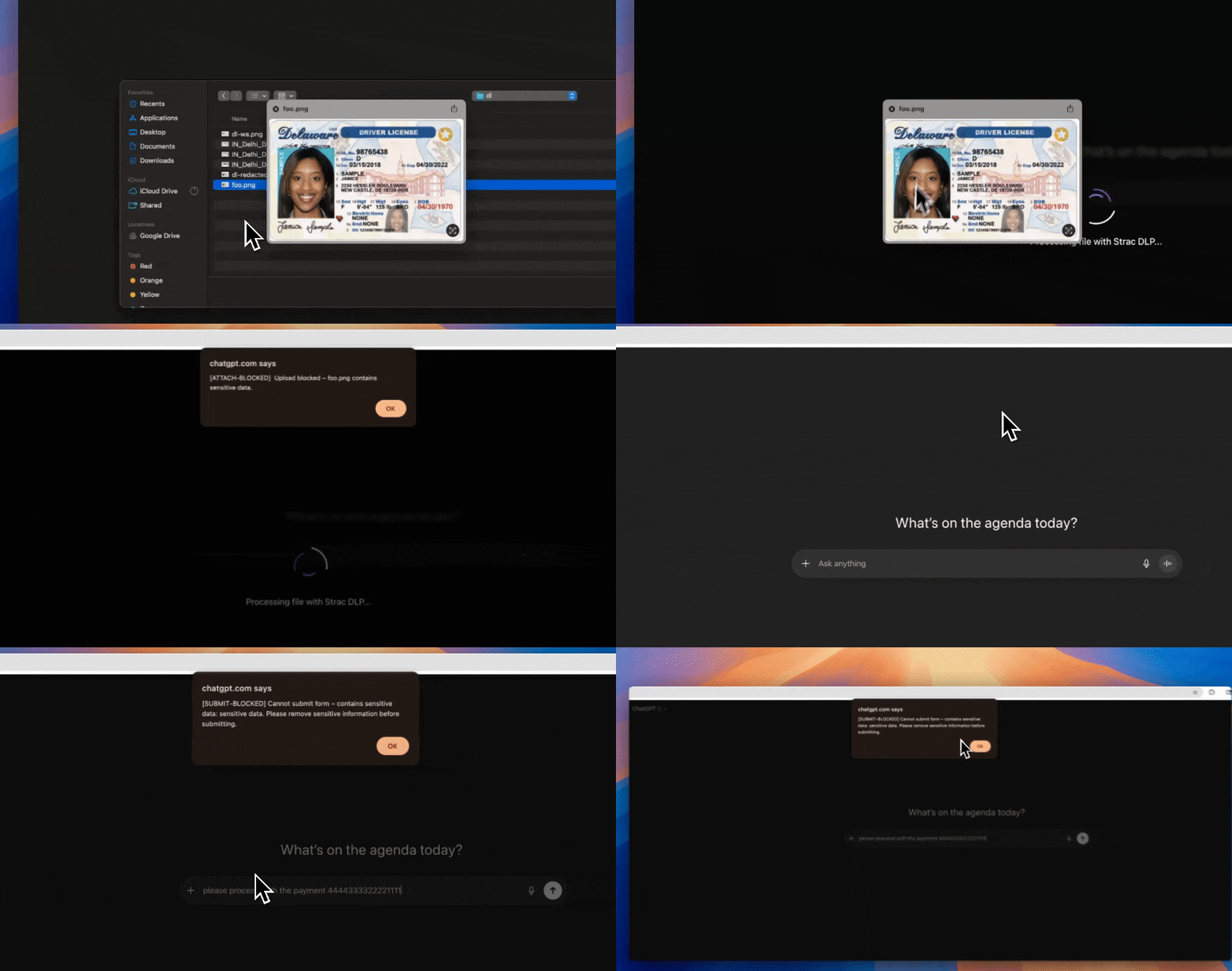
This ensures that regulated or confidential data does not get submitted to AI systems unintentionally.
Gen AI DLP provides:
- Real-time prompt inspection
- Policy-based blocking or redaction
- Detection of regulated and confidential data types
- Audit visibility into AI usage
As AI adoption increases across teams, Gen AI DLP adds an additional control layer inside the browser, allowing organizations to enable AI tools while maintaining governance over sensitive data.
Is Strac Chrome DLP published on Chrome Web Store?
Yes, it is published here: https://chromewebstore.google.com/detail/strac-dlp-data-leak-preve/gclaopgdekbeakgcjpbdondnpgopmifg
Spicy FAQs on Chrome DLP
Can Chrome DLP block employees from copying data into ChatGPT?
Chrome DLP can be configured to inspect what users type or paste into GenAI tools like ChatGPT, Bard, or Copilot; this is one of the most important use cases for browser-based data loss prevention. When Chrome DLP is active, it scans prompts for sensitive patterns such as PII, PHI, PCI, secrets, and source code before the request is sent to the model. If the content violates a policy, Chrome DLP can block the action, redact the sensitive parts, or warn the user so that regulated or proprietary data never leaves the browser.
Typical Chrome DLP policies for GenAI include:
- Blocking regulated identifiers; credit card numbers, social security numbers, national IDs, and health identifiers in prompts.
- Preventing source code and secrets exposure; API keys, access tokens, private repository URLs, config files, and SSH keys.
- Restricting customer or employee data; names, emails, phone numbers, addresses, account numbers, and ticket references.
- Limiting export of confidential documents; copying entire internal reports, contracts, or roadmaps into ChatGPT for summarization.
With these policies in place, Chrome DLP lets security teams safely allow GenAI productivity while keeping sensitive data governed, auditable, and compliant.
Does Strac Chrome DLP affect browser performance?
Strac Chrome DLP is designed to run as a lightweight browser control; not a heavy endpoint agent; so its impact on performance is minimal in typical deployments. Instead of proxying all network traffic, it inspects specific user interactions such as text fields, page content, uploads, and downloads. This targeted approach allows Chrome DLP to enforce data loss prevention policies in real time while keeping the browsing experience fast and responsive.
Performance characteristics of Strac Chrome DLP include:
- Local evaluation of content; sensitive data checks happen in the browser, reducing latency.
- Focused inspection scope; only relevant elements like forms, inputs, clipboards, and file events are analyzed.
- No kernel drivers or full EDR agents; easier on CPU, memory, and battery than traditional endpoint security tools.
- Configurable policies; teams can tune what is inspected to balance coverage and performance.
The end result is that employees can keep working normally in SaaS and cloud apps while Chrome DLP quietly enforces security policies in the background.
What happens if the user is offline?
When a user is offline, Chrome DLP can still apply core data loss prevention rules based on policies that have already been synchronized to the extension. The browser continues to evaluate text input and file actions locally, which means it can still identify obvious PII, PCI, PHI, or secrets even without an active connection. Some advanced analytics and centralized logging will queue until the device is back online, at which point events are synced so security teams maintain visibility into risky behavior. This offline capability ensures that protection does not fully disappear whenever a laptop is temporarily disconnected from the network.
How is Chrome DLP different from CASB or EDR?
Chrome DLP operates at the user interaction layer inside the browser; it focuses on what users type, paste, upload, download, or copy in SaaS, cloud, and GenAI tools. CASB and EDR address different layers of the security stack; CASB typically works at the cloud or network edge, and EDR lives at the operating system level watching processes, files, and system behavior. Together they form a complementary set of controls, but Chrome DLP is the only one that sees and controls sensitive content at the exact moment it is handled in the browser.
Key differences between Chrome DLP, CASB, and EDR include:
- Granularity of control; Chrome DLP can block a single sensitive field in a form, while CASB often works at the app or session level.
- Visibility into GenAI and browser extensions; browser DLP sees prompts and extension interactions that CASB and many EDR tools miss.
- Deployment and scope; Chrome DLP uses a browser extension; CASB relies on proxies or SSO integrations; EDR uses full endpoint agents.
- Primary goal; Chrome DLP is optimized for content-aware, real-time data protection in SaaS and cloud apps; EDR focuses on threats and malware; CASB focuses on access control and governance across cloud services.
By combining Chrome DLP with CASB and EDR, security teams can achieve layered defense that covers devices, networks, and real-time browser activity where most work actually happens.
Is Strac Chrome DLP agentless?
Strac’s platform is agentless for SaaS, cloud, and GenAI surfaces, connecting via APIs instead of heavy endpoint agents, and Chrome DLP follows the same philosophy with a lightweight browser extension rather than a full EDR-style agent. The extension is easy to deploy through standard enterprise mechanisms such as Google Workspace, MDM, or browser management policies. This gives organizations fine-grained Chrome DLP controls; including real-time redaction, blocking, and masking of sensitive data; without introducing the operational overhead, performance impact, or maintenance complexity associated with traditional endpoint agents.


.avif)


