Outlook DLP: How to Detect & Redact Sensitive Data in Outlook Email (2026)
A practical guide to Data Loss Prevention for Microsoft Outlook. Detect and redact PII, PHI, and PCI in emails and attachments, block risky external forwarding, and pass HIPAA/PCI/GDPR audits.
Outlook is one of the biggest exit doors for sensitive data in any company. Employees email SSNs, card numbers, patient records, and credential-laden attachments every day. Microsoft's native Outlook/Purview DLP can flag some of it, but it does not truly redact the data, it is gated behind expensive E5 licensing, and it is noisy. Strac adds a data layer to Outlook: it detects PII, PHI, and PCI inside message bodies and attachments, redacts or masks the sensitive values, blocks forwarding to unauthorized external addresses, and logs every access for your HIPAA, PCI, and SOC 2 auditors. It is agentless and installs as a Microsoft 365 app in minutes.
Outlook DLP: How to Detect & Redact Sensitive Data in Outlook Email (2026)
Email is still where sensitive data goes to leak. A support rep pastes a customer's Social Security Number into a reply. A nurse forwards a patient intake PDF to a personal Gmail account. A finance analyst attaches a spreadsheet of card numbers "just to get it approved fast." None of it is malicious. All of it is a reportable incident.
For most companies, that email runs through Microsoft Outlook. This guide covers what Data Loss Prevention (DLP) for Outlook actually needs to do in 2026, where Microsoft's native controls stop short, and how Strac detects and remediates sensitive data in Outlook emails and attachments.
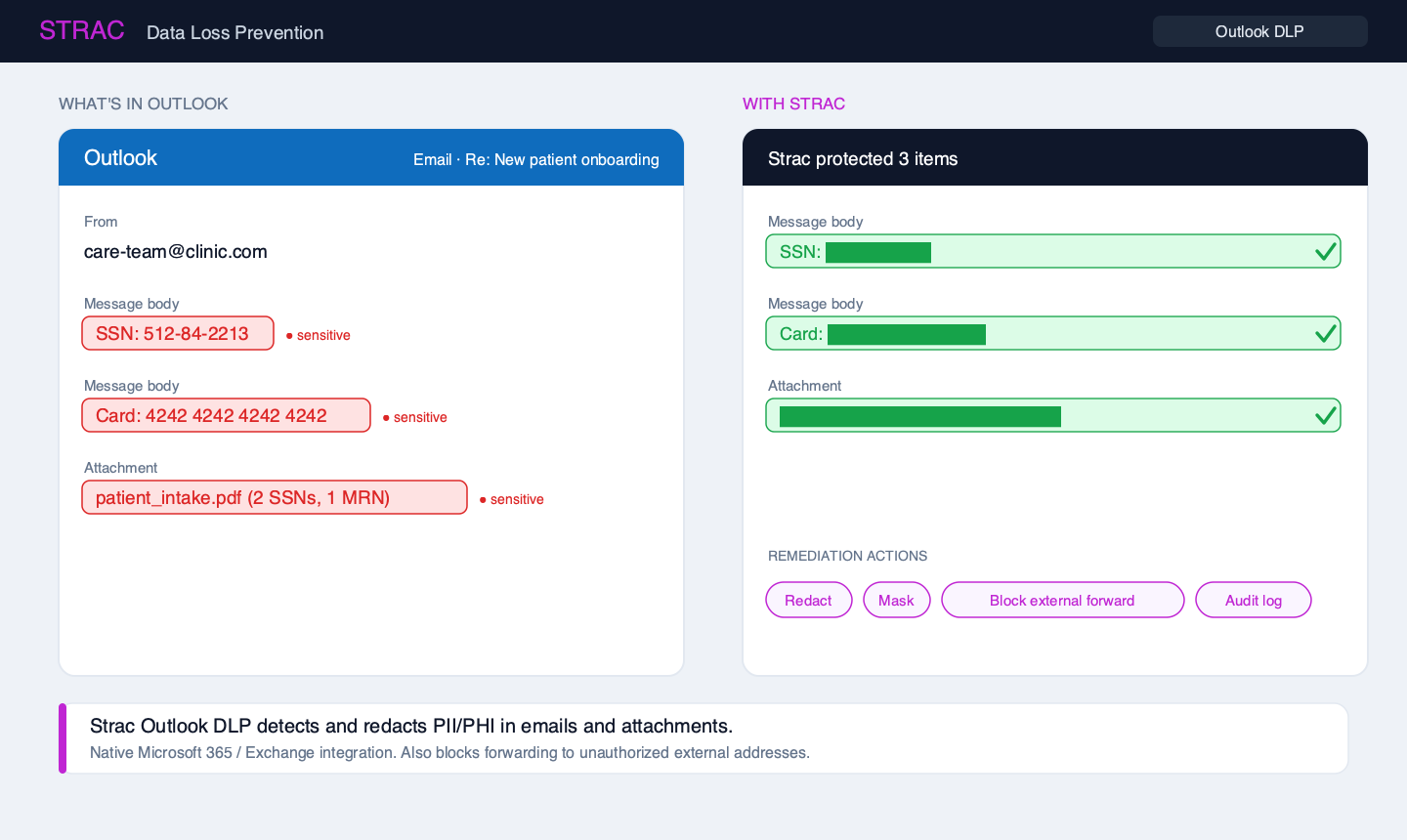
✨ What Strac Outlook DLP looks like
Strac inspects the email body and every attachment, identifies PII/PHI/PCI, and redacts the sensitive values before the message is delivered or read. The original stays in an encrypted vault for authorized access, and every action is logged.
🎥 Watch Strac redact a Microsoft 365 email
✨ M365 email redaction, live in the inbox
This is the real Strac Microsoft 365 app redacting sensitive data directly in an Outlook email. Detection and redaction happen automatically against the Office 365 integration, with no gateway and no change to how your team uses email.
📥 What sensitive data actually flows through Outlook
Outlook is not just a chat surface. It carries structured, high-value regulated data, usually inside attachments that native tools never open:
Data type
Real examples in Outlook
PII
SSNs, dates of birth, addresses, driver's license numbers in email bodies and signatures
Credit card numbers, CVVs, and full-track data pasted into replies or invoices
Secrets
API keys, passwords, and connection strings sent to contractors "to unblock them"
Attachments
PDFs, XLSX, DOCX, and images (screenshots) that hide the real payload from keyword scanners
The attachment problem is the one that gets companies breached. A message body can look clean while a 12-page PDF attached to it contains dozens of SSNs. Any Outlook DLP worth deploying has to open and inspect the attachment, not just the text.
⚠️ Where native Outlook / Microsoft Purview DLP falls short
Microsoft does ship DLP for Outlook through Microsoft Purview. It is real, and for some organizations it is a reasonable first layer. But teams consistently hit the same walls:
It warns, it doesn't redact. Purview's default action is a policy tip or a block. It does not surgically redact the SSN and let the rest of the legitimate email through, so users either get blocked entirely or the sensitive data sails through with a warning nobody reads. See our breakdown of Office 365 DLP limitations.
The good controls need E5. The strongest Purview DLP capabilities sit behind the top-tier E5 / compliance licensing. Many mid-market companies are on Business Premium or E3 and simply don't have them.
It is noisy. Regex-heavy policies generate a flood of false positives, which trains employees and admins to ignore alerts. Our guide to Microsoft Purview DLP covers the tuning burden in detail.
Attachments and images are weak spots. Scanned PDFs and screenshots frequently slip through because native OCR coverage is inconsistent.
The result: sensitive data is detected sometimes, but rarely remediated, and the burden of tuning falls on an already-stretched security team.
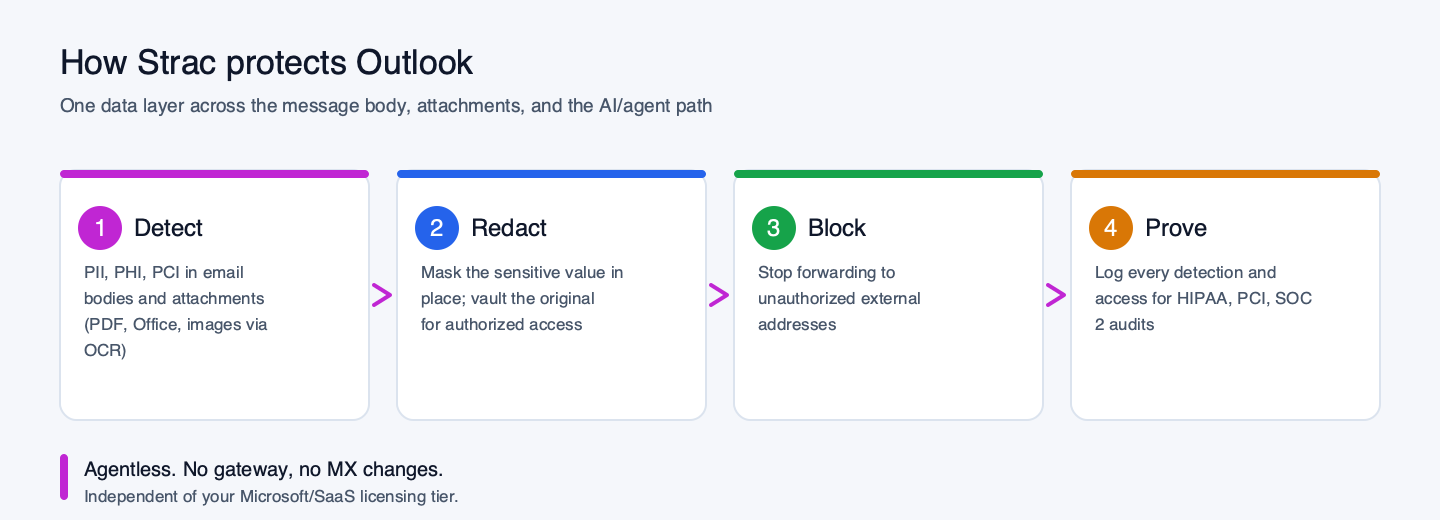
🛡️ How Strac protects Outlook: detect, redact, block, prove
Strac adds the missing data layer to Outlook. It installs as a native Microsoft 365 app (agentless, no gateway, no MX record changes) and runs four jobs:
1. Detect PII, PHI, and PCI in bodies and attachments
Strac's classifiers scan the message body and open every attachment, including PDFs, Office files, and images via built-in OCR. It ships with hundreds of prebuilt detectors and lets you define your own custom data elements for company-specific identifiers.
2. Redact or mask the sensitive values
This is the difference that matters. Instead of blocking the whole email, Strac redacts the SSN or card number in place and keeps the rest of the message intact and useful. The original sensitive value is tokenized and stored in an encrypted vault, retrievable only by authorized roles. Read more on why we lead with remediation, not just detection.
3. Block forwarding to unauthorized external addresses
Strac can prevent a sensitive email from being forwarded to personal or unapproved external domains, closing the most common exfiltration path, without stopping legitimate internal collaboration.
4. Audit and prove it
Every detection, redaction, and access event is logged. When an auditor asks "show me you control PHI in email," you have the evidence instead of a policy document.
🌐 The human path vs the agent path: covering both
Outlook data does not only leak through the Outlook client. In 2026 there are two paths to worry about:
The human path — someone pastes sensitive data into Outlook Web in a browser, uploads a file, or downloads an attachment to a personal device. Strac's browser DLP and endpoint DLP cover this, detecting and blocking sensitive data at the point of paste, upload, and download.
The agent path — Microsoft 365 Copilot and MCP-connected AI agents can now read a user's entire mailbox to answer a prompt, which means an over-shared inbox becomes an AI data-leak surface. Strac's AI DLP governs what sensitive data flows into and out of those assistants.
A DLP tool that only watches the Outlook client misses both of these. Strac watches the data wherever it moves.
🤖 The 2026 risk: Copilot for Outlook and AI assistants
Microsoft 365 Copilot is now embedded directly in Outlook. It drafts replies, summarizes threads, and pulls context from across the mailbox. That is genuinely useful, and it is also a new way for PHI and PII to be surfaced, summarized, and copied into places your DLP policies never covered.
Copilot respects existing permissions, but most mailboxes are over-permissioned and full of years of unredacted sensitive data. If that data was never cleaned up, Copilot can now surface it instantly. Strac's approach is to redact the sensitive data at the source so that whatever Copilot (or a human) retrieves is already clean. This is the same data-layer wedge we apply across AI data security.
🔒 M365 Mail MCP DLP: protecting Outlook from AI agents
The bigger shift in 2026 is the Model Context Protocol (MCP). AI agents now connect to Outlook and Exchange through the Microsoft 365 MCP server, which lets an assistant read the mailbox to answer a prompt. That is powerful, and it is also a direct pipe from your most sensitive email into a third-party model.
The problem is structural: an MCP tool call reads raw email and attachments. Without a data layer in the middle, every SSN, patient record, and card number in that mailbox is handed straight to the agent, and from there into logs, prompts, and downstream tools you do not control.
Strac sits in that path and applies DLP to the MCP response itself:
Inspect the MCP response from the M365 mail tool call before it reaches the agent.
Redact PII, PHI, and PCI in transit, so the agent receives a clean summary instead of raw regulated data.
Enforce per-user identity, so an agent can only ever retrieve what that specific employee is allowed to see.
Log every tool call for a complete audit trail of what agents read from email.
This is the agent-path complement to the human-path controls above, and it is the same model we apply across MCP DLP and the broader MCP security program. The advantage is coverage: Strac redacts the sensitive data inside the MCP response and sees the human path, the browser and endpoint, that an agent-only gateway never touches.
📋 Outlook DLP and compliance (HIPAA, PCI, GDPR, SOC 2)
Email is explicitly in scope for every major framework:
HIPAA — emailing PHI without safeguards is one of the most common OCR-reported violations. Strac's redaction plus access logging gives you the technical safeguard and the audit trail.
PCI DSS 4.0 — card data in email puts your whole environment in scope. Redacting it at the point of send is scope reduction.
GDPR / CCPA — personal data emailed to the wrong recipient is a reportable breach; redaction and forwarding controls reduce that risk materially.
SOC 2 — CC6.x controls around confidential data handling map directly to detect-and-redact evidence.
🔍 Native Outlook DLP vs Strac at a glance
Capability
Native Outlook / Purview DLP
Strac Outlook DLP
Detect PII/PHI/PCI in email body
Yes (policy-based)
Yes (hundreds of prebuilt + custom detectors)
Open and scan attachments (PDF/Office/images)
Limited / inconsistent OCR
Yes, including OCR on images and scans
True redaction of the sensitive value
No (warns or blocks the whole email)
Yes, redacts in place and vaults the original
Block forwarding to external addresses
Partial, E5-gated
Yes
Licensing
Best features require E5
Independent of Microsoft tier
False-positive tuning burden
High
Low, ML-based classifiers
Setup
Policy configuration in Purview
Agentless M365 app, minutes
🚀 Deploying Strac for Outlook
Because Strac is agentless, there is nothing to install on endpoints for the email use case. You connect the Microsoft 365 / Outlook app, choose which sensitive data elements to detect, and pick the action per data type (redact, mask, block external forward, or audit-only). Most teams are live the same day. Pair it with Strac's endpoint and browser DLP to cover the human path across every other app, and you have one console for your whole data loss prevention program.
🌶️ Spicy FAQs on Outlook DLP
Does Microsoft Outlook have built-in DLP?
Yes, through Microsoft Purview DLP, which can detect sensitive data and apply policy tips or blocks in Outlook. The catch is that its strongest capabilities require E5-tier licensing, it warns rather than truly redacting the sensitive value, and its attachment/image coverage is inconsistent. Most teams use it as a baseline and add a dedicated tool like Strac for redaction and attachment inspection.
Can Strac redact sensitive data inside an Outlook email and its attachments?
Yes. Strac detects PII, PHI, and PCI in the message body and inside attachments (PDF, Office files, and images via OCR), then redacts or masks the sensitive values in place while keeping the rest of the email usable. The original is stored encrypted for authorized retrieval.
Do I need Microsoft E5 to use Strac for Outlook?
No. Strac connects as a Microsoft 365 app and works independently of your Microsoft licensing tier, so you get redaction and attachment scanning without upgrading to E5.
Does Strac stop employees from forwarding sensitive emails externally?
Yes. Strac can block a sensitive email from being forwarded to unauthorized external addresses while still allowing legitimate internal collaboration, closing one of the most common exfiltration paths.
What about Microsoft 365 Copilot reading sensitive email?
Copilot can surface any sensitive data already sitting in an over-permissioned mailbox. Strac reduces that risk by redacting sensitive data at the source, so what Copilot retrieves is already clean. See our Microsoft Copilot DLP guide.
How is this different from Gmail DLP?
The data-protection model is the same, the surface differs. If you run Google Workspace instead, see Gmail DLP and Google Workspace DLP.
Customer story
“Don’t just alert on problems, fix them.”
Scott Roberts, Chief Information Security Officer, UiPath
Yes, through Microsoft Purview DLP, which can detect sensitive data and apply policy tips or blocks in Outlook. The catch is that its strongest capabilities require E5-tier licensing, it warns rather than truly redacting the sensitive value, and its attachment/image coverage is inconsistent. Most teams use it as a baseline and add a dedicated tool like Strac for redaction and attachment inspection.
Can Strac redact sensitive data inside an Outlook email and its attachments?
Yes. Strac detects PII, PHI, and PCI in the message body and inside attachments (PDF, Office files, and images via OCR), then redacts or masks the sensitive values in place while keeping the rest of the email usable. The original is stored encrypted for authorized retrieval.
Do I need Microsoft E5 to use Strac for Outlook?
No. Strac connects as a Microsoft 365 app and works independently of your Microsoft licensing tier, so you get redaction and attachment scanning without upgrading to E5.
Does Strac stop employees from forwarding sensitive emails externally?
Yes. Strac can block a sensitive email from being forwarded to unauthorized external addresses while still allowing legitimate internal collaboration, closing one of the most common exfiltration paths.
What about Microsoft 365 Copilot reading sensitive email?
Copilot can surface any sensitive data already sitting in an over-permissioned mailbox. Strac reduces that risk by redacting sensitive data at the source, so what Copilot retrieves is already clean. See our Microsoft Copilot DLP guide.
Discover & Protect Data on SaaS, AI, MCP, Endpoints & Cloud
Strac provides end-to-end data loss prevention for all SaaS and Cloud apps. Integrate in under 10 minutes and experience the benefits of live DLP scanning, live redaction, and a fortified SaaS environment.


.webp)











.webp)




.avif)


.gif)
