Figma DLP: Detect & Block Sensitive Data in Figma (2026)
Data Loss Prevention for Figma. Detect PII, secrets, and customer data pasted into design files and comments, and block it at the point of paste and upload with browser and endpoint DLP.
Designers move fast, and real data ends up in Figma: production customer lists dropped into mockups, screenshots full of PII, API keys pasted into comments, and CSV exports attached to files. Figma has no native DLP for any of this. Strac detects sensitive data in Figma files and comments in real time and blocks it at the point of paste and upload, using its browser and endpoint DLP. Detection with user alerting keeps designers productive without leaking data into a tool that was never built to hold it.
Figma DLP: Detect & Block Sensitive Data in Figma (2026)
Figma is where product gets designed, and increasingly where real production data gets pasted in for realism. A designer drops a live customer list into a table component. A PM screenshots a dashboard full of names and emails. An engineer pastes an API key into a comment to reproduce a bug. None of it belongs in a design file, and Figma has no Data Loss Prevention to stop it.
This guide covers DLP for Figma and how Strac detects and blocks sensitive data before it lands in a design.
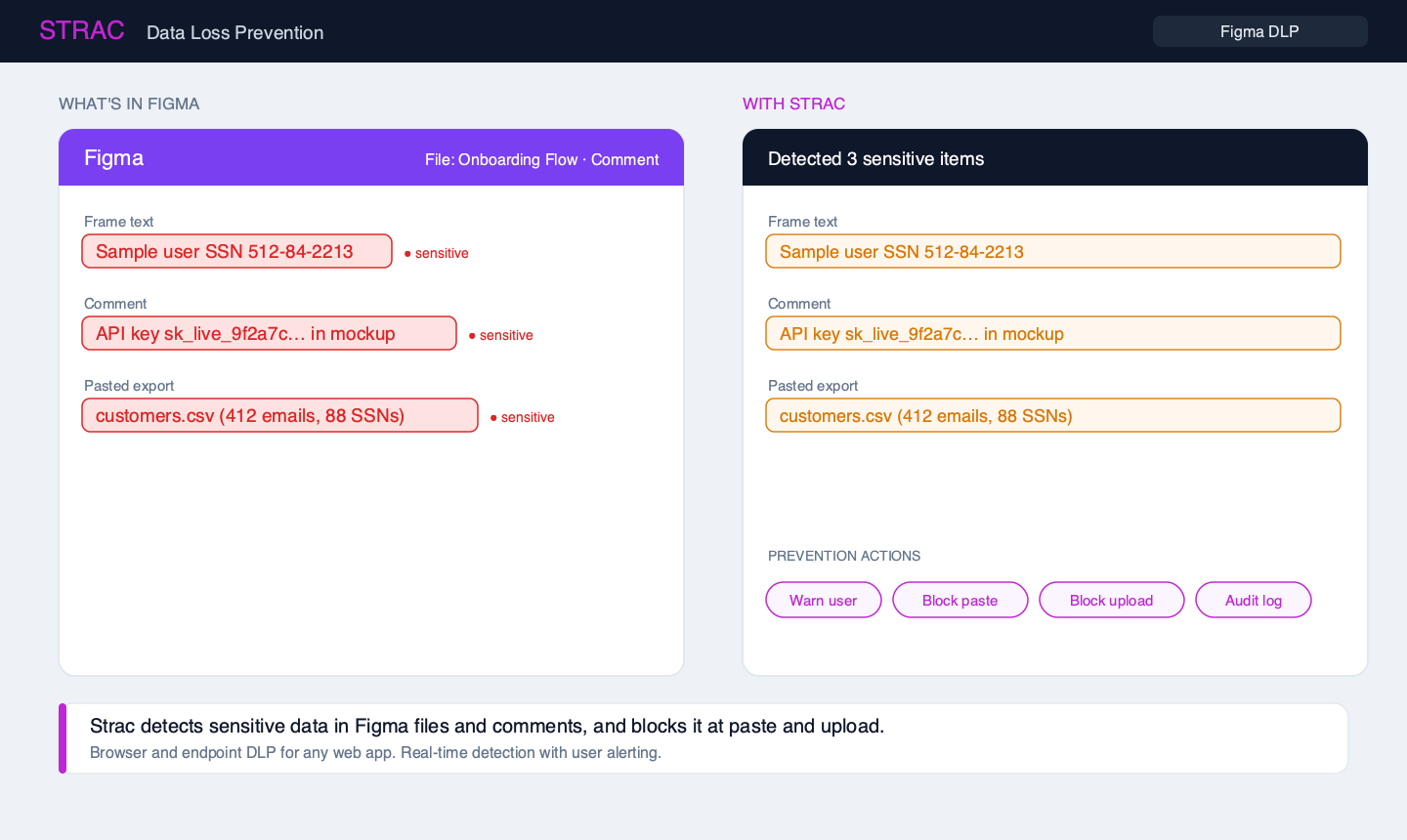
✨ Strac Figma DLP in action
Because Figma runs in the browser and as a desktop app, Strac inspects content at the point of use and blocks or warns before sensitive data enters a file or comment.
🎨 What sensitive data ends up in Figma
Customer PII in mockups — real names, emails, and addresses pasted into tables and prototypes instead of dummy data.
Screenshots — images of dashboards, tickets, and spreadsheets that carry PII the eye skips but classifiers catch via OCR.
Secrets in comments — API keys, tokens, and passwords shared "just to reproduce this."
Exports — CSVs and design assets containing regulated data attached to files or shared via links.
🚧 How Strac protects Figma: detect and block at the source
Figma is a browser-and-desktop app, so the right control is prevention at the point of entry, not after-the-fact cleanup. Strac's browser DLP and endpoint DLP do exactly that:
Detect PII, secrets, and financial data in text pasted into frames and comments, and in images via OCR.
Warn or block the paste and the upload in real time, before the sensitive data is saved to the file.
Cover the desktop app as well as the browser, so the Figma desktop client is protected too.
Audit every detection so security has evidence, not guesses.
This detection-and-blocking model is how Strac delivers DLP for any web app that has no native controls, including design and whiteboard tools like Figma and Miro.
🕵️ Figma and shadow IT
Design tools are a classic shadow IT blind spot: they are adopted bottom-up, connected to dozens of plugins, and rarely covered by the security team's DLP policies. Strac gives you visibility into what sensitive data is flowing into Figma and the ability to stop it, without banning a tool your designers rely on.
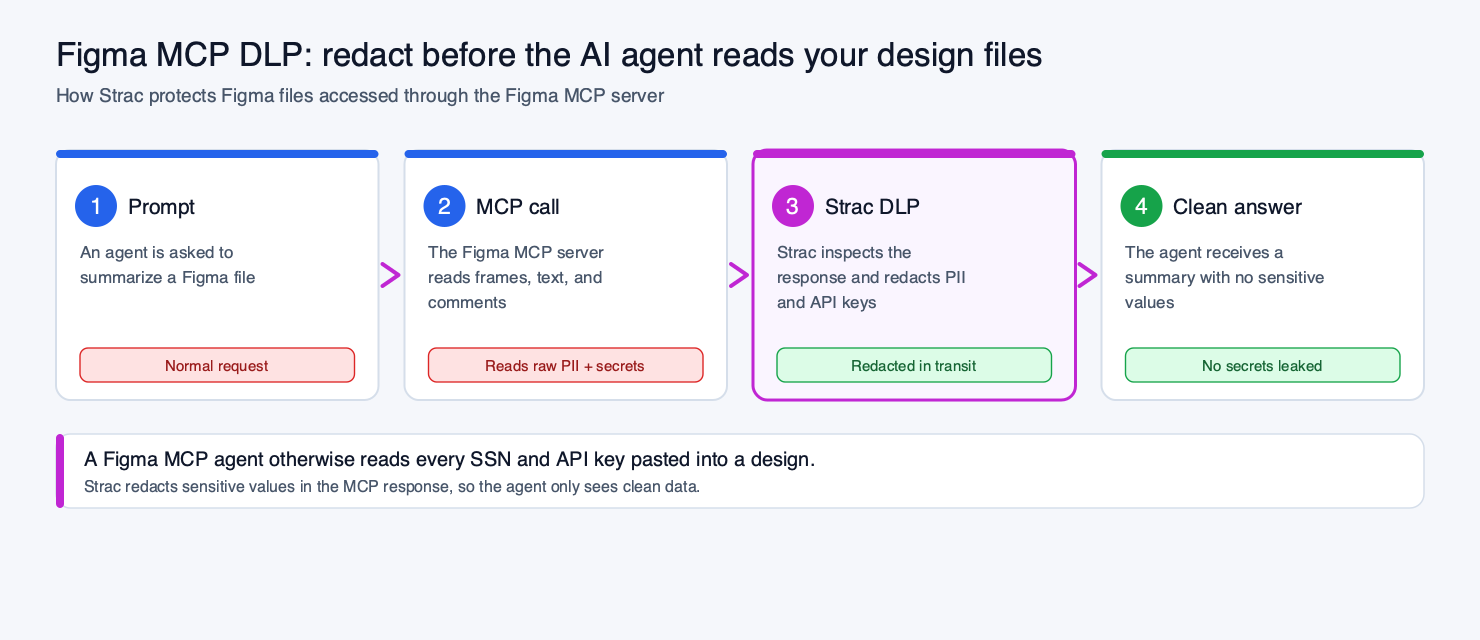
🤖 Figma MCP DLP: protecting design files from AI agents
Figma's plugin ecosystem, AI features, and the Figma MCP server can all read file content, which means any PII or secret sitting in a design is now reachable by third-party code and AI agents. An MCP tool call returns the raw frames, text, and comments, so an SSN in a mockup or an API key in a comment flows straight into the model.
Strac covers both paths: it detects and blocks sensitive data at the point of entry for humans, and, in the MCP path, it inspects the Figma tool response and redacts PII and secrets before they reach the agent. The same model runs across MCP DLP and our broader AI DLP approach.
📋 Figma and compliance
GDPR / CCPA — real personal data in design files is regulated data in an unmanaged location; blocking it at entry reduces exposure.
SOC 2 — CC6.x controls expect you to prevent confidential data from landing in unapproved tools.
Secrets hygiene — API keys in comments are a breach waiting to happen; Strac flags and blocks them.
🌶️ Spicy FAQs on Figma DLP
Does Figma have built-in DLP?
No. Figma offers organization and access controls, but it has no data classification or DLP to detect and stop PII, secrets, or customer data from being pasted into files and comments. That is the gap Strac fills.
How does Strac protect Figma if it can't edit my design files?
Strac protects Figma at the point of entry. Its browser and endpoint DLP detect sensitive data as it is pasted or uploaded and block or warn in real time, so the data never lands in the file. This is detection-and-prevention rather than after-the-fact redaction, which is the right model for a design tool.
Can Strac catch sensitive data inside screenshots pasted into Figma?
Yes. Strac runs OCR on images, so PII inside a pasted dashboard screenshot or exported image is detected, not missed.
Does it cover the Figma desktop app or just the browser?
Both. Strac's endpoint DLP covers the desktop client and its browser DLP covers Figma in the browser, so designers are protected wherever they work.
Will this slow my designers down?
No. Strac defaults to real-time detection with user alerting, so designers get a warning to remove sensitive data rather than a hard wall, and security still gets the audit trail. Compare approaches in our best DLP solutions guide.
Customer story
“Don’t just alert on problems, fix them.”
Scott Roberts, Chief Information Security Officer, UiPath
No. Figma offers organization and access controls, but it has no data classification or DLP to detect and stop PII, secrets, or customer data from being pasted into files and comments. That is the gap Strac fills.
How does Strac protect Figma if it can't edit my design files?
Strac protects Figma at the point of entry. Its browser and endpoint DLP detect sensitive data as it is pasted or uploaded and block or warn in real time, so the data never lands in the file. This is detection-and-prevention rather than after-the-fact redaction, which is the right model for a design tool.
Can Strac catch sensitive data inside screenshots pasted into Figma?
Yes. Strac runs OCR on images, so PII inside a pasted dashboard screenshot or exported image is detected, not missed.
Does it cover the Figma desktop app or just the browser?
Both. Strac's endpoint DLP covers the desktop client and its browser DLP covers Figma in the browser, so designers are protected wherever they work.
Will this slow my designers down?
No. Strac defaults to real-time detection with user alerting, so designers get a warning to remove sensitive data rather than a hard wall, and security still gets the audit trail. Compare approaches in our best DLP solutions guide.
Discover & Protect Data on SaaS, AI, MCP, Endpoints & Cloud
Strac provides end-to-end data loss prevention for all SaaS and Cloud apps. Integrate in under 10 minutes and experience the benefits of live DLP scanning, live redaction, and a fortified SaaS environment.


.webp)











.webp)




.avif)


.gif)
