Microsoft Copilot DLP: Stop Data Leaks in Microsoft 365 Copilot
Microsoft Copilot DLP controls what Copilot can surface (oversharing) and what users paste into it. What Purview’s Copilot DLP does and doesn’t cover, and how Strac closes both gaps automatically.
Microsoft Copilot DLP means controlling the sensitive data that Microsoft 365 Copilot can see (and surface to users) and the sensitive data users put into Copilot prompts.
Copilot inherits each user’s existing permissions, so its biggest risk is oversharing — it instantly surfaces sensitive files people technically can access but shouldn’t.
Microsoft Purview now offers DLP for Microsoft 365 Copilot, but it only acts on content you’ve already labeled — and labeling everything is the hard part.
Strac discovers and classifies the sensitive data across Microsoft 365 automatically (labeled or not), helps right-size access to cut oversharing, and redacts PII, PHI, and secrets in Copilot prompts.
✨ What Is Microsoft Copilot DLP?
Microsoft Copilot DLP is data loss prevention applied to Microsoft 365 Copilot. It has two jobs: control what Copilot can retrieve and surface from your tenant, and control what sensitive data users enter into Copilot prompts and chats. Because Copilot is grounded in your Microsoft 365 data (SharePoint, OneDrive, Teams, Exchange) and generates new content from it, both directions are exposure paths. DLP is how you keep Copilot productive without turning it into a fast way to leak regulated data.
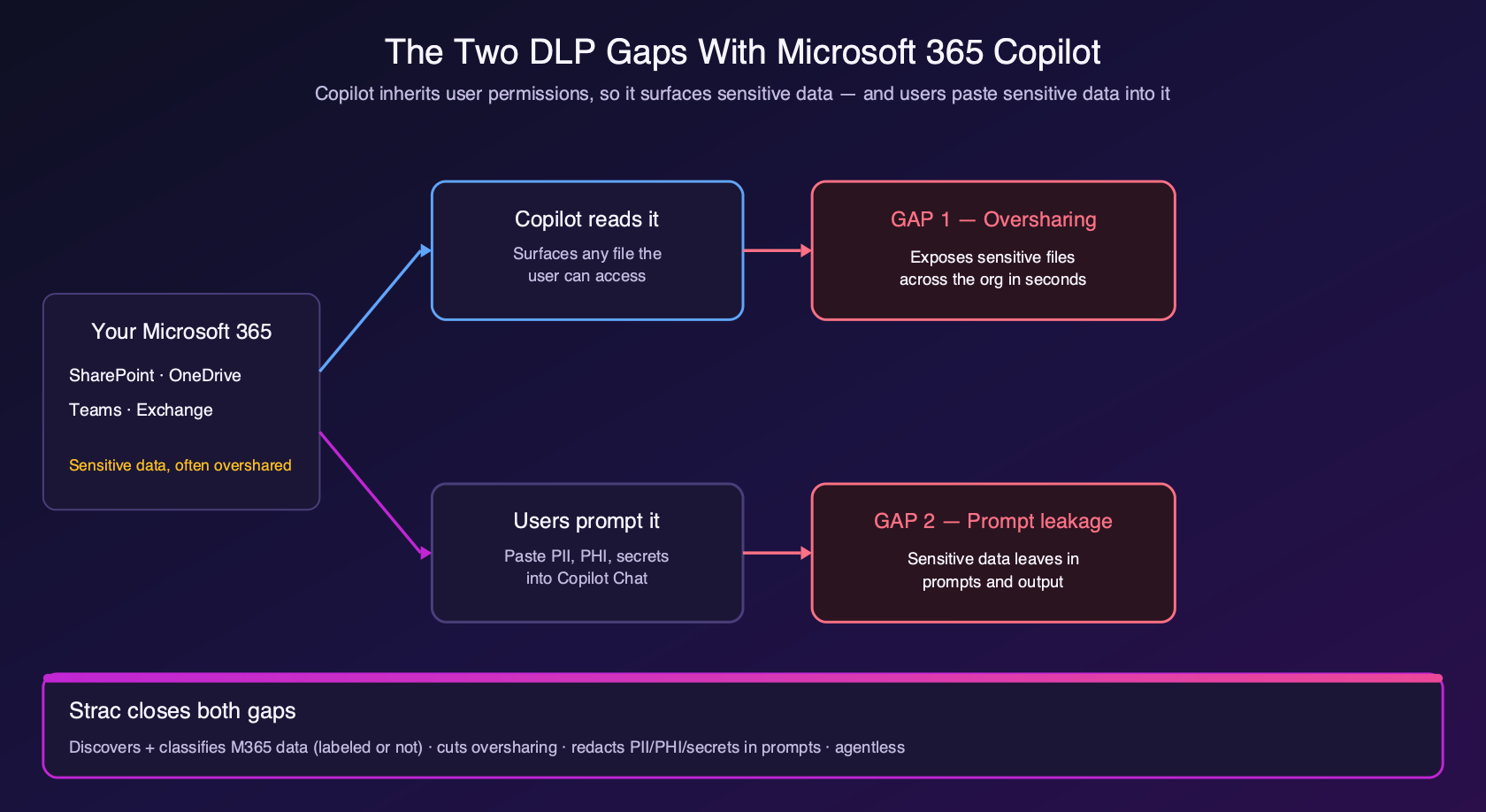
The two DLP gaps with Microsoft 365 Copilot: what it surfaces (oversharing) and what users paste into it — and how Strac closes both.
Why Copilot Creates a New DLP Problem
Copilot doesn’t break your permissions — it respects them, which is exactly the problem. It inherits each user’s access and can retrieve anything they’re allowed to open. In most tenants, years of loose sharing mean employees can technically access far more than they should. Before Copilot, that latent oversharing was low-risk because nobody went looking. Copilot makes it trivial: a single prompt can surface a salary spreadsheet, an unredacted contract, or a file full of customer PII in seconds.
Copilot exposure path
What can leak
Oversharing / retrieval
Sensitive files a user can access but shouldn’t — surfaced instantly in a response
User prompts & Copilot Chat
PII, PHI, secrets, and client data employees paste in
Generated output
New documents and summaries that inherit sensitive content
External web grounding
Sensitive prompt data sent to external search for web-grounded answers
What Microsoft Purview DLP for Copilot Does (and Doesn’t)
Microsoft has responded with Microsoft Purview DLP for Microsoft 365 Copilot. With it you can create a DLP policy that stops Copilot and Copilot Chat from using files and emails carrying certain sensitivity labels when generating responses, and a policy that detects sensitive information types (like SSNs or credit card numbers) in prompts and prevents that data from being sent to external web search. That is real progress. But note the dependency:
Purview Copilot DLP
The catch
Excludes labeled content from Copilot
Only works on content you’ve already labeled — unlabeled sensitive data is still fair game
Requires the right licensing
Tied to Microsoft 365 E5 / Copilot and Purview tiers
Blocks SITs in prompts from web grounding
Focused on the external-search path, not full prompt remediation
The hard part isn’t writing the DLP rule — it’s labeling every sensitive file first. Purview’s Copilot protection is only as good as your labeling coverage, and manual labeling never keeps up. (Microsoft is also bringing oversharing visibility and Copilot DLP controls into the Microsoft 365 admin center — a sign of how central this problem has become.)
✨ How Strac Handles Copilot DLP
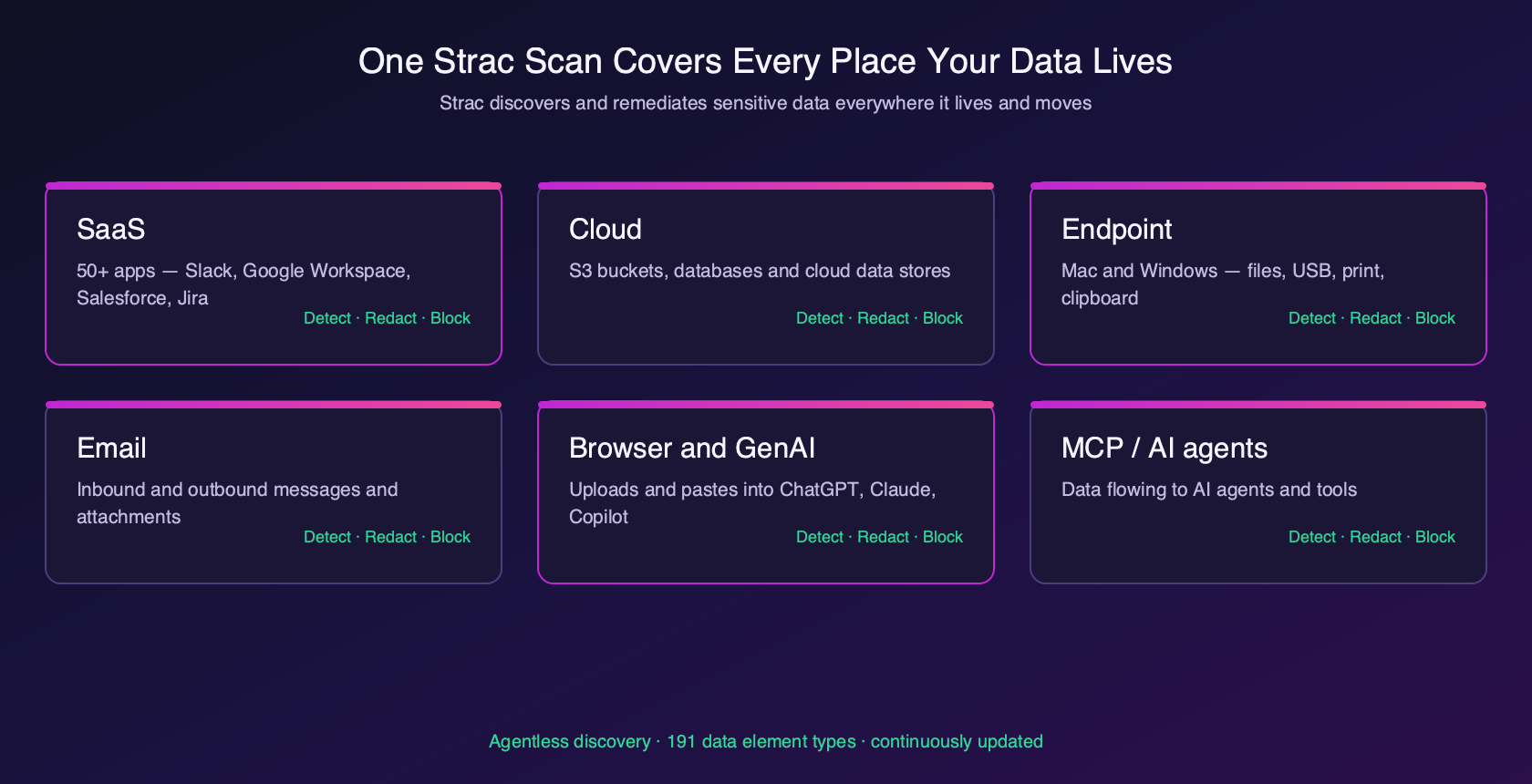
Strac closes both gaps without depending on a fully-labeled tenant. It discovers and classifies the sensitive data across SharePoint, OneDrive, Teams, and Exchange — labeled or not — so you can see exactly what Copilot could surface. It helps you right-size access to cut oversharing at the source. And on the ingress side, Strac’s browser DLP redacts PII, PHI, and secrets in Copilot prompts in real time, before they leave. One agentless platform covers the Microsoft 365 estate and every other place your data lives.
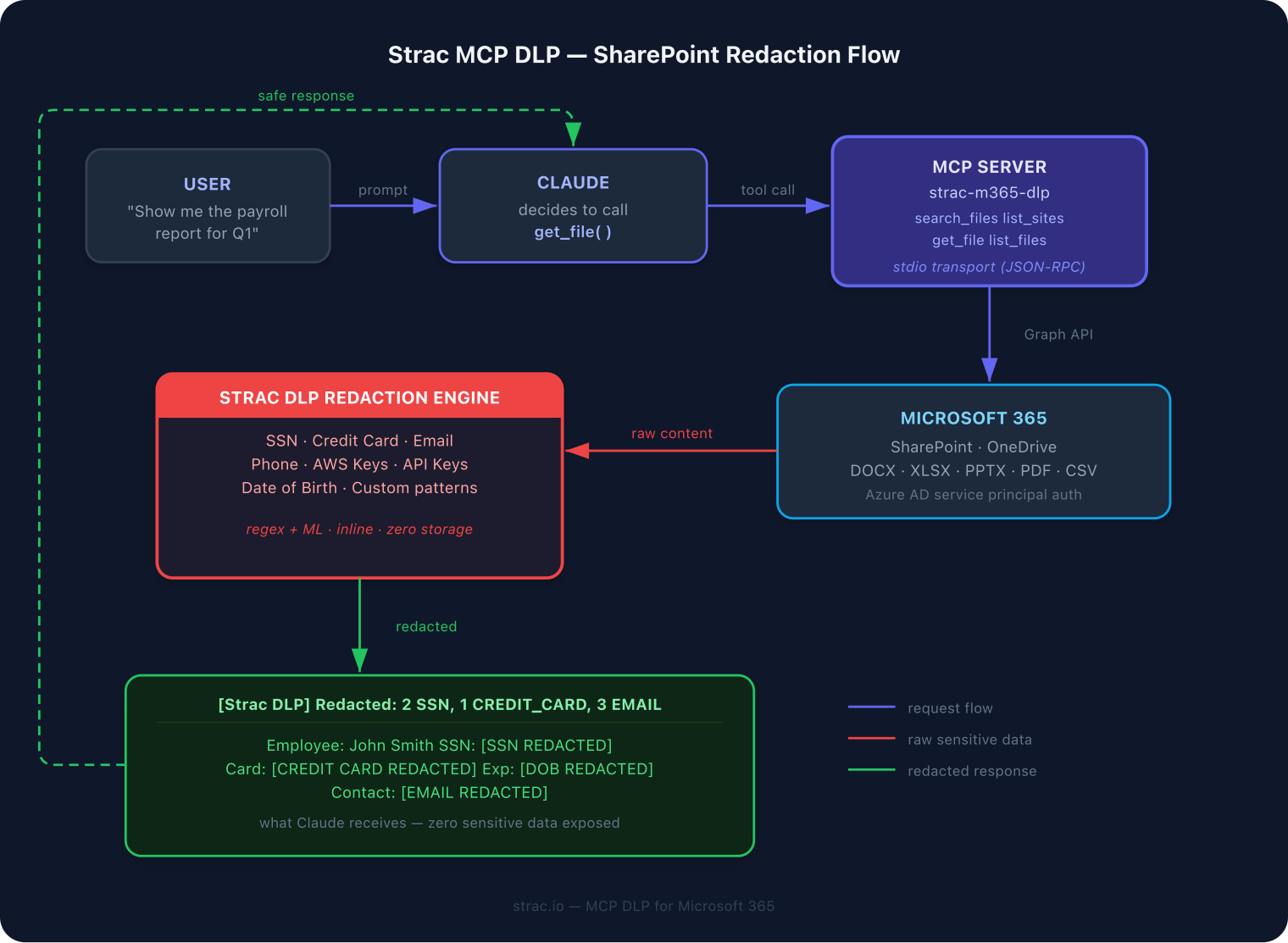
Strac redacts sensitive data in the agent / MCP data flow before it reaches the model.
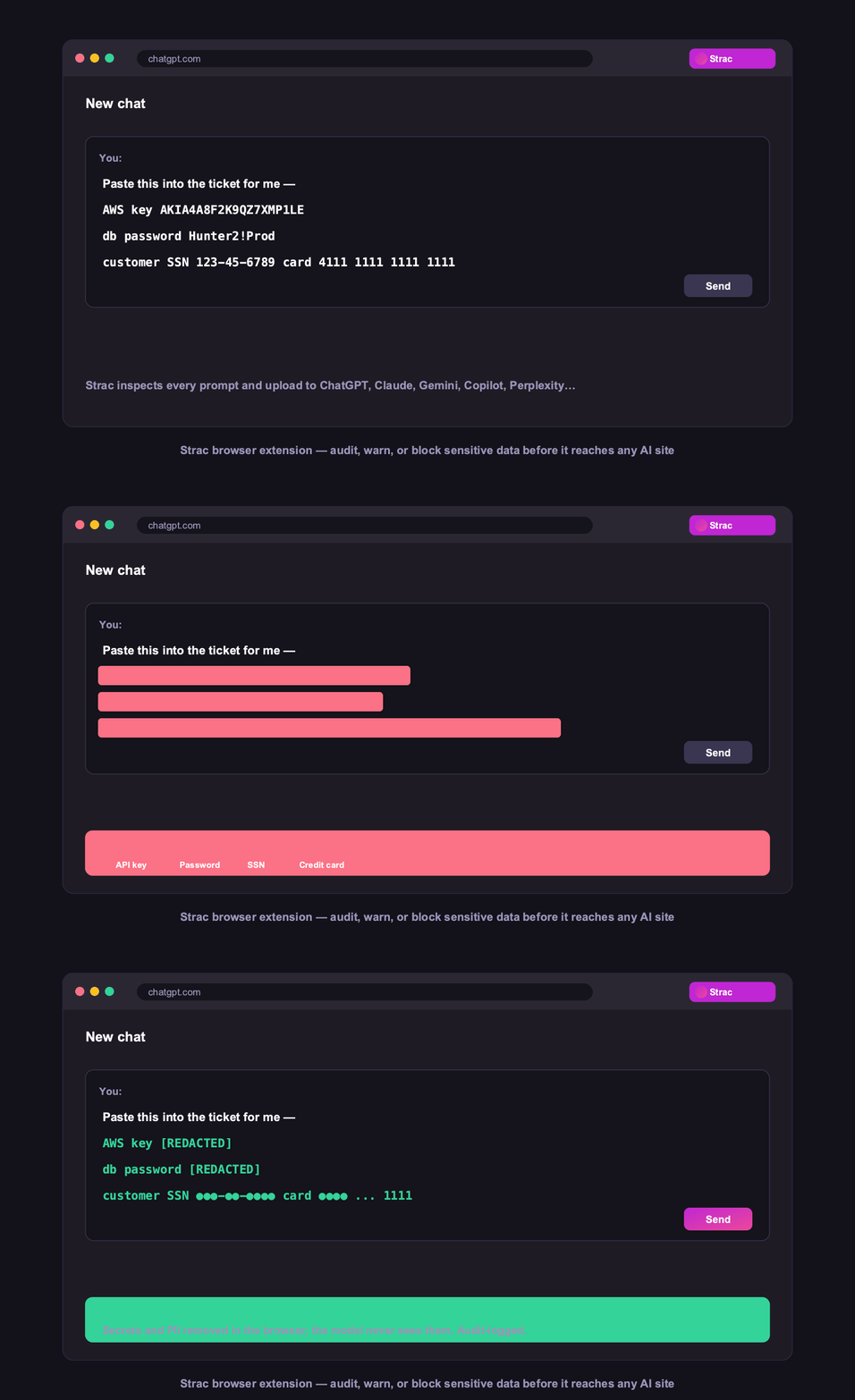
Strac’s browser DLP warns and blocks sensitive data before it’s pasted into Copilot Chat.
Strac discovers and remediates sensitive data across Microsoft 365 and every other surface — not just the files you’ve labeled.
Discover before you deploy. Find the sensitive data across Microsoft 365 that Copilot could surface — don’t assume labels are complete.
Fix oversharing. Right-size permissions and sharing so Copilot can’t retrieve what users shouldn’t see.
Label + apply Purview Copilot DLP to exclude your most sensitive labeled content from Copilot.
Redact the prompt path. Stop PII, PHI, and secrets from being pasted into Copilot Chat.
Extend beyond Copilot. Employees use ChatGPT and Claude too — cover every AI tool, not just Copilot.
Copilot is one agent path; the same risk exists across every MCP-connected tool. See MCP DLP for how Strac redacts sensitive data on every tool call before it reaches the model.
Strac also governs Google Gemini, Perplexity, xAI Grok, DeepSeek, and Mistral Le Chat, because its browser extension and endpoint agent are tool-agnostic and cover any AI tool on day one.
🌶️ Spicy FAQs on Microsoft Copilot DLP
What is Microsoft Copilot DLP?
It’s data loss prevention for Microsoft 365 Copilot - controlling both the sensitive data Copilot can retrieve and surface, and the sensitive data users put into Copilot prompts. The goal is to keep Copilot useful without letting it leak regulated data.
Does Microsoft 365 Copilot have built-in DLP?
Yes, partially. Microsoft Purview offers DLP for Microsoft 365 Copilot that can stop Copilot from using labeled files/emails and can detect sensitive information types in prompts. But it only acts on content you’ve already labeled, so unlabeled sensitive data isn’t protected.
What is the biggest Copilot data risk?
Oversharing. Copilot inherits each user’s permissions, so it instantly surfaces any sensitive file that user can technically access - exposing years of loose sharing that used to sit unnoticed.
Does Purview Copilot DLP require sensitivity labels?
Largely, yes - the file/email exclusion policy works on sensitivity labels, so its coverage depends on how completely your content is labeled. That labeling gap is why teams add discovery-based tools like Strac that classify data automatically.
How does Strac help with Copilot DLP?
Strac discovers and classifies sensitive data across Microsoft 365 (labeled or not), helps right-size access to cut oversharing, and redacts PII/PHI/secrets in Copilot prompts in real time - agentless, and across every other AI tool your team uses.
See the product in action: Strac Copilot DLP — deploy DLP for Microsoft 365 Copilot across your tenant.
The Bottom Line
Copilot is only as safe as the data it can reach and the prompts users type. Purview’s Copilot DLP helps, but it protects only what you’ve labeled. Strac finds and remediates the sensitive data automatically — cutting oversharing and cleaning prompts — so Copilot stays productive without leaking. Book a demo to see it on your Microsoft 365 tenant.
It’s data loss prevention for Microsoft 365 Copilot - controlling both the sensitive data Copilot can retrieve and surface, and the sensitive data users put into Copilot prompts. The goal is to keep Copilot useful without letting it leak regulated data.
Does Microsoft 365 Copilot have built-in DLP?
Yes, partially. Microsoft Purview offers DLP for Microsoft 365 Copilot that can stop Copilot from using labeled files/emails and can detect sensitive information types in prompts. But it only acts on content you’ve already labeled, so unlabeled sensitive data isn’t protected.
What is the biggest Copilot data risk?
Oversharing. Copilot inherits each user’s permissions, so it instantly surfaces any sensitive file that user can technically access - exposing years of loose sharing that used to sit unnoticed.
Does Purview Copilot DLP require sensitivity labels?
Largely, yes - the file/email exclusion policy works on sensitivity labels, so its coverage depends on how completely your content is labeled. That labeling gap is why teams add discovery-based tools like Strac that classify data automatically.
How does Strac help with Copilot DLP?
Strac discovers and classifies sensitive data across Microsoft 365 (labeled or not), helps right-size access to cut oversharing, and redacts PII/PHI/secrets in Copilot prompts in real time - agentless, and across every other AI tool your team uses.
Discover & Protect Data on SaaS, AI, MCP, Endpoints & Cloud
Strac provides end-to-end data loss prevention for all SaaS and Cloud apps. Integrate in under 10 minutes and experience the benefits of live DLP scanning, live redaction, and a fortified SaaS environment.


.webp)






.avif)




.gif)
