Best DLP Software: Top 13 Data Loss Prevention Tools & Solutions (2026)
Compare the 13 best DLP tools of 2026 — Strac, Purview, Forcepoint, Proofpoint, Netskope, Cyera, Varonis & more — on coverage, deployment time and remediation.
Modern DLP software vendors must go beyond detection; real value comes from real-time remediation (redaction, blocking, quarantine) across SaaS, cloud, endpoints, and GenAI tools.
Legacy DLP tools are slow, agent-heavy, and limited to email or network; cloud-native, agentless DLP is now the standard for fast deployment and full SaaS coverage.
The biggest risk shift in 2026 is GenAI data leakage; sensitive data is now exposed through prompts, uploads, and AI workflows; requiring DLP that covers ChatGPT, Copilot, and similar tools.
The best platforms unify DSPM + DLP; combining data discovery, classification, and enforcement in one system instead of fragmented tools.
Strac stands out with agentless deployment, broad SaaS + API coverage, and inline redaction; making it a practical choice for companies that need protection without slowing operations.
A data loss prevention tool is software that discovers sensitive data across your SaaS apps, cloud, endpoints, and AI tools, then stops it from leaking — redacting, masking, blocking, or removing it inline instead of only raising an alert.
What a DLP tool does: finds regulated data (PII, PHI, PCI, secrets, source code) and enforces policy the moment it moves.
What separates a modern one: coverage of GenAI (browser, endpoint, MCP) and real remediation, not alert-only monitoring.
Two jobs, not one: real-time DLP on new data and historical discovery of data already sitting in your systems.
TL;DR: The Best DLP Software in 2026
✨ What a Complete Data Loss Prevention Tool Must Cover
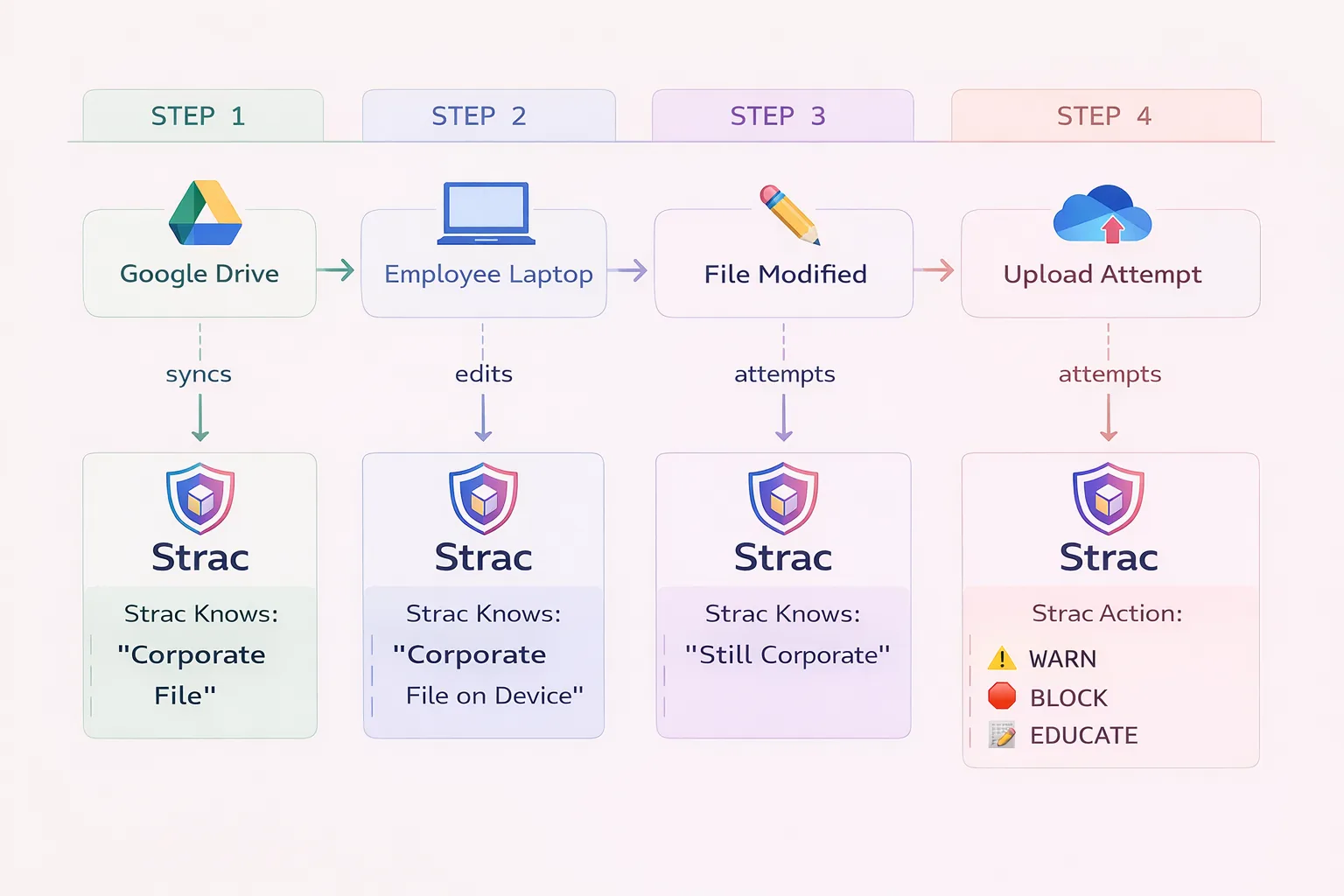
A DLP tool is only as good as the surfaces it reaches. The strongest ones run two engines on every surface — a historical discovery scan for data already at rest, and real-time inspection for data in motion — then remediate with the action that fits each surface. Here is the full picture Strac delivers.
One Strac DLP tool covering SaaS, cloud, endpoint, and GenAI (browser, endpoint, and MCP) surfaces.
The best data loss prevention tool depends on where your sensitive data actually moves. Short answers:
Best overall for SaaS, cloud, GenAI and MCP: Strac — agentless, API-based, deploys in minutes, and remediates (redact, mask, tokenize, vault) rather than only alerting.
Best for large regulated enterprises with on-prem estates: Symantec DLP (Broadcom) or Forcepoint.
Best if you are all-in on Microsoft 365: Microsoft Purview DLP — native, but weaker outside the Microsoft boundary.
Best for email-centric data loss: Proofpoint.
Best for inline cloud and SASE enforcement: Netskope or Zscaler.
Best for insider risk: Teramind or Code42 Incydr.
Best for cloud data posture (DSPM): Cyera. Best for access governance: Varonis.
The dividing line in 2026 is remediation. Most DLP tools detect and alert. Fewer act on the data itself — redacting a card number out of a support ticket, vaulting an SSN out of a CRM record, or stripping a secret out of an AI prompt before it is submitted.
When companies search for DLP software vendors, they are not looking for another long comparison chart. They are trying to figure out one thing: Who will actually protect our data without slowing us down?
The problem is the market is noisy. Some vendors are heavy, agent-based, and take months to deploy. Others only send alerts but do not fix the issue. Meanwhile, sensitive data is no longer just in email. It is in Slack threads, Salesforce tickets, Google Drive files, Endpointsand AI prompts.
At Strac, we built our platform around how data actually moves today. We combine DSPM and DLP in one agentless solution that discovers, classifies, and automatically redacts sensitive data in real time across SaaS, cloud, endpoints, and AI tools.
In this guide, we break down the leading types of DLP software vendors, what truly separates them, and how to evaluate them based on deployment speed, remediation depth, AI coverage, and overall practicality. If you are comparing vendors, this will help you cut through the noise and make a decision that holds up in production.
Last updated: June 2026
✨ What is Data Loss Prevention (DLP) Software?
Data Loss Prevention (DLP) software detects, monitors, and protects sensitive data from unauthorized access, sharing, or exfiltration. DLP solutions identify sensitive information — such as personally identifiable information (PII), payment card data (PCI), protected health information (PHI), intellectual property, and credentials — and enforce policies to prevent data leaks.
Modern DLP solutions operate across multiple channels:
Endpoint DLP — Monitors data on laptops, desktops, and mobile devices
Network DLP — Inspects data in motion across network traffic
Cloud DLP — Protects data in SaaS applications and cloud storage
Email DLP — Scans email content and attachments for sensitive data
The best DLP platforms combine multiple approaches for comprehensive coverage across the entire data lifecycle.
🎥 What to Look for in DLP Software
When you’re evaluating DLP software vendors, it’s easy to get distracted by feature lists and bold claims. What really matters is simple: will this tool protect your data in the way your business actually operates?
Look beyond basic detection. Does the vendor only send alerts, or can it automatically redact, block, or fix the issue? Is deployment going to take months and heavy agents, or can you get up and running quickly? And does it protect just email and endpoints, or the full SaaS stack where your data actually lives today; Slack, Salesforce, Google Drive, cloud storage, even AI tools?
The right DLP vendor should reduce risk without creating friction. In the next section, we break down exactly what to look for before making your decision.
Here are the most important elements you need to search for:
Data Discovery and Classification
Effective DLP starts with knowing where sensitive data exists. Look for solutions that:
Strac Data Discovery and Data Classification
Automatically discover sensitive data across endpoints, cloud, and SaaS
Classify data by type (PII, PCI, PHI) and sensitivity level
Support custom data patterns specific to your organization
Use machine learning for context-aware classification
Policy Creation and Enforcement
DLP policies define what actions are allowed or blocked. Evaluate:
Pre-built policy templates for HIPAA, PCI-DSS, GDPR
Flexibility to create custom policies
Granular controls by user, group, application, or data type
Options to warn, block, encrypt, redact, or quarantine
Real-Time Monitoring and Protection
DLP must act in real time to prevent breaches:
Strac Intercom DLP
Inline scanning before data leaves endpoints or networks
The 13 Best Data Loss Prevention (DLP) Tools and Solutions
✨ Strac DLP: Best Overall DLP Software for SaaS, Cloud, GenAI and MCP
Best for: Organizations needing unified DLP across SaaS, Cloud, Endpoint, and GenAI
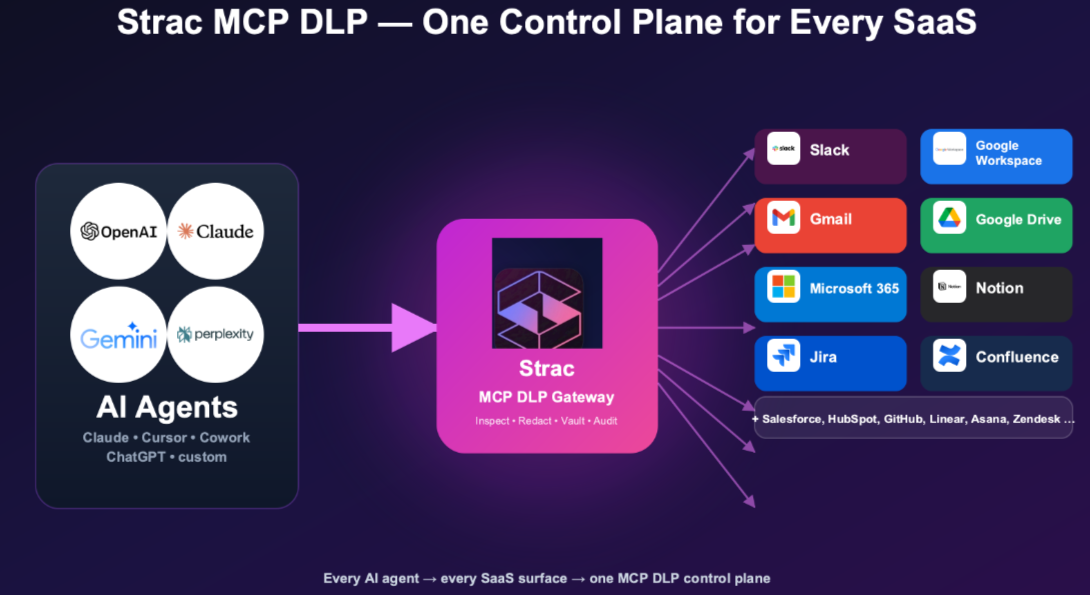
Strac also covers the data path most vendors miss: AI agents and MCP connectors. Its MCP connector directory lets you see, control, and redact what agents read and write.
Overview: Strac is a modern, AI-native DLP platform that protects sensitive data across SaaS applications (Slack, Google Workspace, Salesforce, Zendesk), cloud storage (Google Drive, OneDrive, Box), endpoints (Mac, Windows, Linux), and GenAI tools (ChatGPT, Claude, Gemini). Unlike legacy DLP vendors that focus primarily on network or endpoint, Strac provides agentless SaaS protection with real-time detection and remediation.
👉 Read our blog on AI DLP to learn how AI DLP prevents sensitive data exposure in ChatGPT, Claude, Copilot, Gemini, and other AI applications.
MCP DLP: Detects, redacts, or blocks sensitive data flowing between AI agents (ChatGPT, Claude, Copilot, Cursor) and connected SaaS applications through MCP servers before data reaches the AI model.
Endpoint protection — Mac, Windows, Linux with USB, clipboard, and browser upload controls
Historical scanning — Retroactively scans existing data, not just new content
Accurate Detection and Redaction: Strac's custom machine learning models trained on sensitive PII, PHI, PCI, and confidential data provide high accuracy and low false positives and false negatives.
Pros:
Broadest SaaS integration coverage
Real-time redaction (not just alerting)
Unified platform for SaaS + endpoint + GenAI
Fast deployment (minutes, not months)
Competitive pricing for mid-market
Cons:
Newer vendor (founded 2021)
Network DLP not a focus (SaaS-first approach)
Best Use Cases:
Companies using multiple SaaS applications
Organizations concerned about GenAI data leakage
Mid-market companies needing enterprise DLP without enterprise complexity
Compliance: SOC 2 Type II, HIPAA, PCI-DSS, GDPR, ISO 27001
The Other 12 Leading DLP Vendors, Compared
1. Symantec DLP (Broadcom)
Best for: Large enterprises with established on-premise infrastructure
Overview: Symantec DLP, now owned by Broadcom, is one of the oldest and most established DLP platforms. It offers comprehensive coverage across endpoint, network, storage, and cloud. Symantec is particularly strong in regulated industries that require on-premise deployment options and have dedicated security teams to manage complex policies.
Key Features:
Endpoint, network, storage, and cloud DLP modules
Advanced content detection with 300+ built-in policies
Fingerprinting for exact data matching
Integration with Symantec endpoint protection suite
On-premise and cloud deployment options
Pros:
Mature, battle-tested platform
Comprehensive coverage across all vectors
Strong in highly regulated industries
Extensive policy library
Cons:
Complex deployment and management
Legacy architecture (not cloud-native)
Broadcom acquisition created customer uncertainty
Expensive licensing and professional services
Limited SaaS application coverage
Best Use Cases:
Large enterprises with existing Symantec infrastructure
Organizations requiring on-premise deployment
Financial services and healthcare with strict compliance requirements
2. Microsoft Purview DLP
Best for: Organizations heavily invested in Microsoft 365
Overview: Microsoft Purview (formerly Microsoft Information Protection and Compliance) provides native DLP capabilities for Microsoft 365 applications including Exchange, SharePoint, OneDrive, and Teams. For organizations already using Microsoft E5 licenses, Purview offers integrated DLP without additional vendor costs.
Key Features:
Native integration with Microsoft 365 apps
Endpoint DLP for Windows devices
Sensitive information types with trainable classifiers
Integration with Microsoft Defender and Sentinel
Included in Microsoft 365 E5 licensing
Pros:
No additional cost for E5 customers
Seamless Microsoft 365 integration
Unified admin experience in Microsoft compliance center
Good for Microsoft-centric environments
Cons:
Limited coverage outside Microsoft ecosystem
Weak SaaS DLP for non-Microsoft apps (Slack, Salesforce)
Complex licensing tiers
Mac and Linux support is limited
No GenAI protection for non-Copilot tools
Best Use Cases:
Microsoft-centric organizations
Companies already paying for E5 licenses
Windows endpoint environments
3. Forcepoint DLP
Best for: Organizations prioritizing user behavior analytics
Overview: Forcepoint DLP combines traditional content-aware DLP with user and entity behavior analytics (UEBA). This approach helps identify risky user behavior patterns, not just sensitive content. Forcepoint is strong in environments where insider threat detection is a primary concern.
Key Features:
Risk-adaptive DLP based on user behavior
Endpoint, network, cloud, and email coverage
Incident risk ranking to prioritize alerts
Integration with Forcepoint CASB and web gateway
On-premise and cloud deployment
Pros:
Strong behavioral analytics
Risk-based policy enforcement
Good network DLP capabilities
Flexible deployment options
Cons:
Complex to configure and tune
User interface feels dated
Limited modern SaaS integrations
GenAI protection requires additional products
Best Use Cases:
Insider threat programs
Organizations with network-centric security architecture
Overview: Proofpoint DLP evolved from the company's email security heritage, making it particularly strong at protecting data in email communications. Proofpoint offers endpoint and cloud DLP, but its differentiation is deep email content analysis and user-centric security based on attack likelihood.
Key Features:
Advanced email DLP with content analysis
People-centric security model (VAP scoring)
Cloud application protection via CASB
Endpoint DLP for Windows and Mac
Integration with Proofpoint email security
Pros:
Excellent email DLP capabilities
Strong threat intelligence integration
Good for organizations with email-centric data flows
User risk scoring
Cons:
Less comprehensive SaaS coverage than specialists
Primarily email-focused
Limited GenAI protection
Can be expensive for full platform
Best Use Cases:
Organizations where email is the primary data leak vector
Companies using Proofpoint for email security
Legal, financial services with document-heavy email
5. Netskope
Best for: Cloud-first organizations with SASE architecture
Overview: Netskope is a Security Service Edge (SSE) and SASE leader that includes cloud DLP as part of its platform. Netskope excels at protecting data in cloud applications through its inline proxy architecture. It's particularly strong for organizations adopting zero trust network access.
Key Features:
Inline cloud DLP with SSL inspection
CASB functionality for SaaS visibility
Cloud-native architecture
Zero trust network access (ZTNA)
Integration with SIEM and SOAR platforms
Pros:
Strong cloud and SaaS DLP
Modern cloud-native architecture
Good GenAI protection capabilities
Part of comprehensive SASE platform
Cons:
Requires network architecture changes
No endpoint DLP (network-focused)
Complex pricing
Can introduce latency for users
Best Use Cases:
Cloud-first organizations
Companies implementing SASE architecture
Environments prioritizing inline cloud DLP
6. Zscaler
Best for: Zero trust architecture with integrated DLP
Overview: Zscaler provides cloud DLP as part of its Zero Trust Exchange platform. Like Netskope, Zscaler takes a network-centric approach, inspecting traffic inline to detect sensitive data moving to cloud applications and the internet. Zscaler is strong for organizations pursuing zero trust initiatives.
Key Features:
Inline DLP via cloud proxy
Exact data matching and fingerprinting
Integration with Zscaler Internet Access (ZIA)
Cloud-delivered architecture
Browser isolation for sensitive data
Pros:
Scalable cloud architecture
Good integration with zero trust strategy
Strong SSL inspection capabilities
GenAI application controls
Cons:
Network-dependent (no offline protection)
No true endpoint DLP
Requires Zscaler platform adoption
Can impact network performance
Best Use Cases:
Zero trust network implementations
Organizations with distributed workforce
Cloud-first enterprises
7. Trellix DLP
Best for: Organizations with legacy McAfee DLP deployments
Overview: Trellix DLP (formerly McAfee DLP) provides endpoint, network, and cloud data protection. After the McAfee Enterprise spin-off and merger with FireEye, Trellix has been modernizing the platform while maintaining backward compatibility for existing customers.
Key Features:
Endpoint DLP for Windows and Mac
Network DLP with email gateway
ePolicy Orchestrator (ePO) management
Device control and encryption
Integration with Trellix XDR
Pros:
Mature endpoint DLP capabilities
Good device control features
Familiar for McAfee customers
Integration with broader Trellix platform
Cons:
Legacy architecture being modernized
Complex management interface
Limited cloud-native SaaS protection
No GenAI-specific capabilities
Best Use Cases:
Existing McAfee/Trellix customers
Organizations prioritizing endpoint control
Environments with ePO infrastructure
8. Digital Guardian (Fortra)
Best for: Intellectual property protection
Overview: Digital Guardian, now part of Fortra, focuses on protecting intellectual property and sensitive data from insider threats and external attacks. The platform offers both agent-based and agentless approaches, with particular strength in manufacturing, technology, and pharmaceutical industries where IP protection is critical.
Key Features:
IP-focused data classification
Endpoint and network DLP
User behavior analytics
Managed DLP service option
Strong forensics and investigation tools
Pros:
Strong intellectual property focus
Good behavior analytics
Managed service option available
Detailed forensics capabilities
Cons:
Complex deployment
Limited SaaS application coverage
No GenAI protection
Can be resource-intensive on endpoints
Best Use Cases:
Manufacturing and technology IP protection
Pharmaceutical R&D data security
Organizations wanting managed DLP services
9. Teramind
Best for: User activity monitoring with DLP
Overview: Teramind combines user activity monitoring (UAM) with DLP capabilities. The platform records user actions, detects policy violations, and can block data exfiltration. Teramind is particularly strong for insider threat programs where understanding user behavior is as important as protecting data.
Key Features:
Comprehensive user activity monitoring
Screen recording and playback
Endpoint DLP and device control
Productivity analytics
Pros:
Strong insider threat capabilities
Detailed user activity visibility
Good for compliance investigations
Flexible deployment options
Cons:
Privacy concerns with extensive monitoring
Limited SaaS DLP coverage
No GenAI-specific protection
Can impact user trust if not communicated properly
Overview: Code42 Incydr focuses specifically on insider risk detection and response. Rather than traditional content-based DLP, Incydr monitors file movements and user behavior to detect data exfiltration. The platform is designed to identify risky data exposure without blocking productivity.
Key Features:
File activity monitoring across endpoints and cloud
Risk indicators for insider threats
Departing employee monitoring
Integration with HR and SOAR platforms
Response workflows
Pros:
Purpose-built for insider risk
Less intrusive than traditional DLP
Good departing employee use case
Fast time to value
Cons:
Not traditional content-based DLP
Limited sensitive data classification
Primarily detection-focused (less prevention)
No GenAI protection
Best Use Cases:
Departing employee data theft prevention
Insider risk programs
Organizations wanting visibility without blocking
11. Cyera
Cyera is a DSPM-first platform: it scans cloud data stores and SaaS agentlessly to build a map of where sensitive data lives and how exposed it is. Its strength is posture — discovery, classification, and risk scoring across large cloud estates. Its limit is that posture tools tell you where the problem is rather than fixing the data itself; enforcement at the point of use (a prompt, a ticket, a Slack message) sits outside the model. Teams that need both typically pair DSPM with a DLP layer that remediates. See DSPM vs DLP.
Best for: cloud data posture and classification at scale.
12. Varonis
Varonis built its reputation on data access governance — who can reach which file, which permissions are over-broad, and which accounts behave anomalously. It is strong on on-premises file shares, Microsoft 365, and permissions remediation, and it is the incumbent many enterprises already own. Its center of gravity is access and activity rather than content-level remediation in modern SaaS and AI surfaces, and deployment leans on collectors and agents. See Varonis competitors and alternatives.
Best for: permissions governance and insider activity in Microsoft-heavy estates.
✨ DLP Market Trends for 2026
GenAI Data Protection is Now Critical
The rise of ChatGPT, Claude, Gemini, and Copilot has created new data leak vectors that traditional DLP doesn't address. Employees paste sensitive data into AI prompts, upload documents to AI assistants, and use AI-powered coding tools that may expose source code. Modern DLP must include GenAI protection.
Cloud-Native Beats On-Premise
Organizations are abandoning complex on-premise DLP deployments in favor of cloud-native solutions that deploy in hours, not months. SaaS-first DLP platforms that protect where data actually lives — in cloud applications — are gaining market share from legacy network DLP vendors.
Unified Platforms Over Point Solutions
Security teams don't want separate tools for endpoint DLP, email DLP, cloud DLP, and GenAI protection. Platforms that provide unified visibility and policy management across all vectors are becoming the preferred choice.
Behavior Analytics Enhance Content Detection
Pure content-based DLP generates too many false positives. Leading solutions combine content analysis with user behavior to understand context — is this a departing employee? An unusual data access pattern? Risk-based approaches reduce alert fatigue.
Privacy and User Experience Matter
Heavy-handed DLP that blocks legitimate work creates friction and workarounds. Modern DLP emphasizes user education, just-in-time notifications, and contextual blocking that protects data without destroying productivity.
Best DLP by Use Case: Quick Verdicts
Best DLP for GenAI and AI prompts
Strac. The exposure is an employee pasting PHI, card data, or a secret into ChatGPT, Claude, Gemini, or Copilot. Browser-level detection redacts, warns, or blocks before submission — which works even on personal accounts IT does not manage. See AI DLP.
Best DLP for healthcare and patient data
Strac, for the same reason PHI shows up where nobody classified it — support tickets, Slack messages, scanned attachments. OCR-based scanning plus true remediation is what shrinks HIPAA scope rather than documenting it.
Best DLP for reducing false positives
Contextual ML detection with Luhn validation for card numbers, rather than bare regex, is the difference between a policy teams enforce and a policy teams mute.
Best DLP for MCP and AI agents
Strac. When an AI agent connects to Salesforce, Slack, or a database over the Model Context Protocol, the data it can pull is the new egress path. See MCP DLP.
Best DLP for Microsoft-only shops
Microsoft Purview, with the caveat that it blocks and labels more than it redacts, and its coverage stops at the edge of the Microsoft estate. See Microsoft Purview DLP.
How to Select the Best DLP Solution for Your Organization
Step 1: Map Your Data Landscape
Before evaluating vendors, understand where your sensitive data exists:
Which SaaS applications contain sensitive data?
What endpoints (Windows, Mac, Linux) need protection?
Where is cloud storage used (Google Drive, OneDrive, Box)?
Are employees using GenAI tools?
Step 2: Define Your Primary Use Cases
Different DLP products excel at different scenarios:
SaaS, GenAI & MCP data protection → Strac
Endpoint control → Symantec, Forcepoint, Trellix
Email protection → Proofpoint
Network/zero trust → Netskope, Zscaler
Insider threat → Teramind, Code42
Microsoft environments → Microsoft Purview
Step 3: Evaluate Integration Requirements
List the applications and infrastructure the DLP must integrate with:
SaaS applications (Slack, Salesforce, Zendesk)
Cloud platforms (AWS, Azure, GCP)
Identity providers (Okta, Azure AD)
SIEM/SOAR platforms
Existing security tools
Step 4: Consider Deployment Complexity
Ask vendors about typical deployment timelines:
How long until basic policies are enforced?
What resources are required from your team?
Is professional services engagement required?
Cloud-native solutions typically deploy in days; legacy platforms may take months.
Step 5: Test with a Proof of Concept
Never buy DLP without a POC that tests:
Detection accuracy on your actual data
False positive rates in your environment
User experience and notification quality
Administrative ease of policy management
Reporting and compliance capabilities
Step 6: Evaluate Total Cost of Ownership
DLP pricing varies significantly:
Per-user licensing vs. per-integration vs. per-API call
Evaluating posture and discovery too? See our comparison of the best DSPM vendors for 2026.
✨ Shadow AI Discovery & AI Data Governance
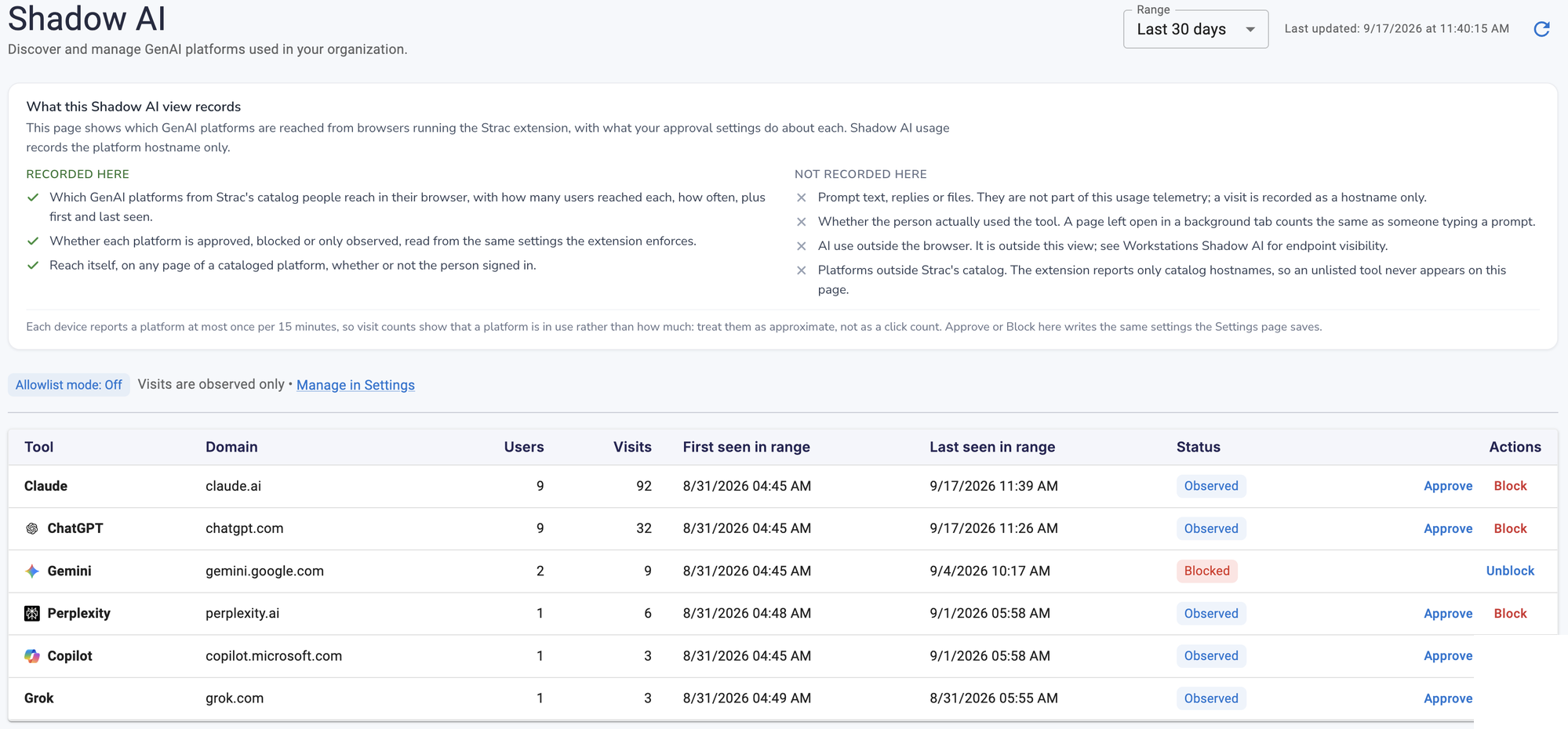
A modern DLP tool has to cover the fastest-growing leak path: employees using unsanctioned AI. Strac includes Shadow AI discovery and AI data governance out of the box, so the same platform that stops data loss across SaaS, cloud, and endpoints also shows you every GenAI tool in use and lets you approve or block each one. See Shadow AI and AI data governance.
Strac Shadow AI discovery: every GenAI tool employees use, with users, visits, and approve / block controls
✨ Enforcement depth: a buying criterion most miss
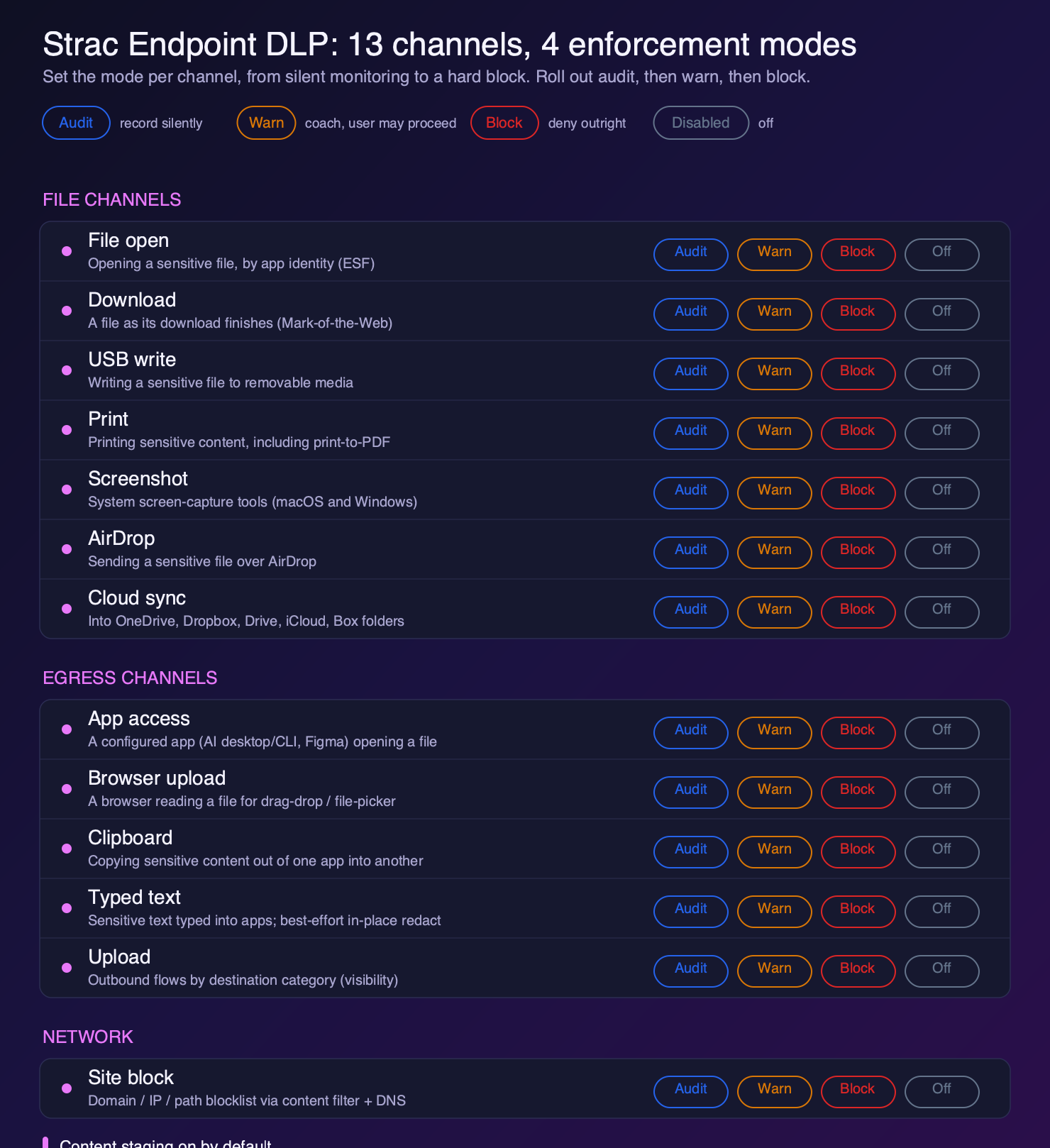
When comparing DLP tools, detection gets the attention and enforcement gets assumed. It should not be. The real question is how many exit paths a tool can act on, and how precisely. Strac governs 13 endpoint channels, from file open and download to screenshot, AirDrop, cloud sync, clipboard, typed text, and app access for desktop AI tools, each set to audit, warn, block, or disabled.
That depth is a differentiator worth scoring on your shortlist: a tool that can only block downloads and USB leaves the screenshot, print-to-PDF, clipboard, and AI-app paths wide open.
Enforcement depth as a DLP buying criterion: Strac governs 13 channels, four modes each
🌶️ Spicy FAQs on Top DLP Software Vendors in 2026
What are the best DLP solutions in 2026? The best DLP solutions this year are Strac, Microsoft Purview, Forcepoint, Symantec (Broadcom), Zscaler, Netskope, and Nightfall — each strong in a different lane. Strac leads for teams whose data lives in SaaS, cloud, GenAI/MCP, and on endpoints, because it both detects and remediates (redact, mask, vault) sensitive data rather than only alerting. The full comparison is above.
What is the difference between a DLP tool and a DLP solution? A DLP tool typically covers one channel (endpoint, email, or network); a DLP solution unifies detection and remediation across every channel under one policy and one audit trail. Modern data loss prevention solutions increasingly converge on this platform model — see the channel coverage in the comparison table above.
What is the best DLP software?
The best DLP software depends on your environment and requirements. For SaaS and GenAI protection, Strac offers the broadest coverage. For Microsoft-centric organizations, Microsoft Purview provides native integration. For network-based zero trust, Netskope or Zscaler are strong choices. Enterprises with legacy infrastructure often choose Symantec or Forcepoint.
What are the three types of DLP?
The three main types of DLP are:
Endpoint DLP — Protects data on laptops, desktops, and mobile devices
Network DLP — Monitors data in transit across network traffic
Cloud DLP — Protects data in SaaS applications and cloud storage
Modern platforms often combine all three types for comprehensive coverage.
How much does DLP software cost?
DLP pricing varies widely:
Microsoft Purview — Included in Microsoft 365 E5
Enterprise DLP platforms are typically priced per user per month, with wide variance by module and seat count
SaaS-first DLP — Often priced per integration or API usage
Legacy on-premise — Significant upfront licensing plus maintenance
Total cost of ownership should include deployment, management, and training.
Does DLP protect against GenAI data leaks?
Traditional DLP solutions do not protect against GenAI data leaks. Employees can paste sensitive information into ChatGPT prompts or upload documents to AI tools without detection. Modern DLP platforms like Strac, Netskope, and Zscaler now include GenAI application controls. If GenAI protection is important, verify the vendor specifically supports ChatGPT, Claude, Gemini, and similar tools.
What is the difference between DLP and CASB?
DLP (Data Loss Prevention) focuses on identifying and protecting sensitive data content — detecting SSNs, credit cards, and confidential documents regardless of where they exist.
CASB (Cloud Access Security Broker) focuses on visibility and control over cloud application usage — who is using which apps, with what permissions, and from where.
Many modern platforms combine DLP and CASB capabilities. DLP provides the content inspection; CASB provides the application context.
How long does DLP take to deploy?
Deployment time varies dramatically:
Cloud-native SaaS DLP — Hours to days for basic protection
Endpoint DLP — Days to weeks depending on fleet size
Enterprise on-premise DLP — Weeks to months for full deployment
Start with monitoring mode to understand data flows before enabling blocking.
What compliance regulations require DLP?
While no regulation explicitly mandates "DLP," many require data protection controls that DLP helps achieve:
HIPAA — Requires safeguards for protected health information (PHI)
PCI-DSS — Requires protection of cardholder data
GDPR — Requires appropriate security for personal data
SOC 2 — Requires access controls and monitoring
CCPA — Requires reasonable security for consumer data
DLP provides technical controls and audit evidence for these requirements.
Can DLP prevent insider threats?
DLP is one component of insider threat prevention, but not a complete solution. DLP can:
Detect sensitive data exfiltration attempts
Block unauthorized transfers
Alert on policy violations
For comprehensive insider threat programs, combine DLP with user activity monitoring (UAM), identity analytics, and security awareness training.
The best DLP software depends on your surfaces. Strac leads for teams that need SaaS, cloud, and GenAI/MCP coverage with built-in remediation; Microsoft Purview is strong for Microsoft 365 shops; Forcepoint and Proofpoint suit large enterprises with heavy email and endpoint needs. The differentiator in 2026 is whether the tool remediates data or only alerts.
What should I look for in DLP software?
Coverage across the surfaces you actually use (SaaS, cloud, endpoint, browser, and AI), accurate classification with low false positives and OCR on images and documents, remediation options beyond blocking (redact, mask, tokenize, vault), and fast time-to-value — agentless connectors get you protected in minutes rather than months.
What's the difference between DLP tools and DSPM?
DLP protects data in motion — stopping sensitive data from leaving through email, SaaS, browser, or AI. DSPM protects data at rest — finding and reducing exposure across your stores. They overlap, and platforms like Strac deliver both from one classification engine. See DSPM vs DLP.
How much does DLP software cost?
Pricing varies widely — legacy enterprise suites (Forcepoint, Symantec) often run six figures with professional services, while modern agentless platforms are usage- or connector-based and far faster to deploy. Get a scoped quote based on the SaaS apps, cloud accounts, and endpoints you need covered.
Do DLP tools work for SaaS, cloud, and AI/GenAI?
Modern ones do. Legacy network and endpoint DLP was built before SaaS and GenAI, so it misses data moving inside cloud apps and into tools like ChatGPT. Strac is built for those surfaces — SaaS, cloud, browser, and GenAI/MCP — with remediation at each.
Discover & Protect Data on SaaS, AI, MCP, Endpoints & Cloud
Strac provides end-to-end data loss prevention for all SaaS and Cloud apps. Integrate in under 10 minutes and experience the benefits of live DLP scanning, live redaction, and a fortified SaaS environment.


.webp)











.avif)



.gif)
