MCP Server Discovery: Find Every MCP Server in Use
How to discover MCP servers across your estate: why CASBs and proxies miss stdio transport, what a complete MCP server inventory contains, and the four risk patterns worth alerting on.
MCP servers are processes, not purchases, so they do not appear in SaaS inventories, SSO logs or expense reports.
A stdio-transport server talks over standard input and output on one machine, so there is no network traffic for a CASB or proxy to see.
A useful inventory covers transport, user, device, process, call and data volume, exposed tools, path scope and connected clients.
The risk is rarely the server itself. It is the combination of what it can reach, which client is attached, and whether anything inspects what comes back.
✨ Why MCP servers are invisible to the tools you already own
Your SaaS discovery works by watching OAuth grants, network traffic and expense data. All three assume a vendor relationship. An MCP server has none: an engineer adds a few lines to a config file and a process starts on their laptop, exposing tools that an AI client can call.
Transport decides how visible it is. A server using stdio is spawned by the client and communicates over standard input and output, entirely on-device. There is no port, no TLS session and nothing for a proxy to intercept. A server using SSE does bind a port, which is more detectable, and is also the configuration most likely to be exposed further than intended.
The MCP Servers view in Strac: servers detected across the estate, tool invocation volume, and the servers flagged for review.
✨ What a complete MCP server inventory contains
An inventory that lists server names is a start and will not answer the questions you get asked. These are the fields that do.
Field
Why it decides anything
Transport and port
stdio means on-device and invisible to the network. SSE on a bound port means reachable, and possibly reachable from more interfaces than intended.
User and device
An MCP server belongs to a person and a machine. Without that, you have a process list rather than an accountable inventory.
Process and uptime
A server running for months is part of someone's workflow. One that appeared yesterday is a different conversation.
Call and data volume
Call count shows use. Data volume shows exposure. A few hundred calls returning gigabytes is the pattern worth looking at.
Exposed tools
The unit of risk. A server offering read-only search is not the server offering write_file across a home directory.
Path or scope limits
Whether the server is confined to a project directory or can reach anything the user can.
Connected clients
A desktop chat client and an autonomous coding agent carry very different blast radius through the same server.
Last seen and risk
Lets you triage rather than read the whole list.
Each server resolved to a person, a device and a transport, with activity and risk alongside.
✨ The detail that matters: tools, scope and connected clients
Server-level visibility tells you something exists. Tool-level visibility tells you what it can do, and that is where the actual decisions are.
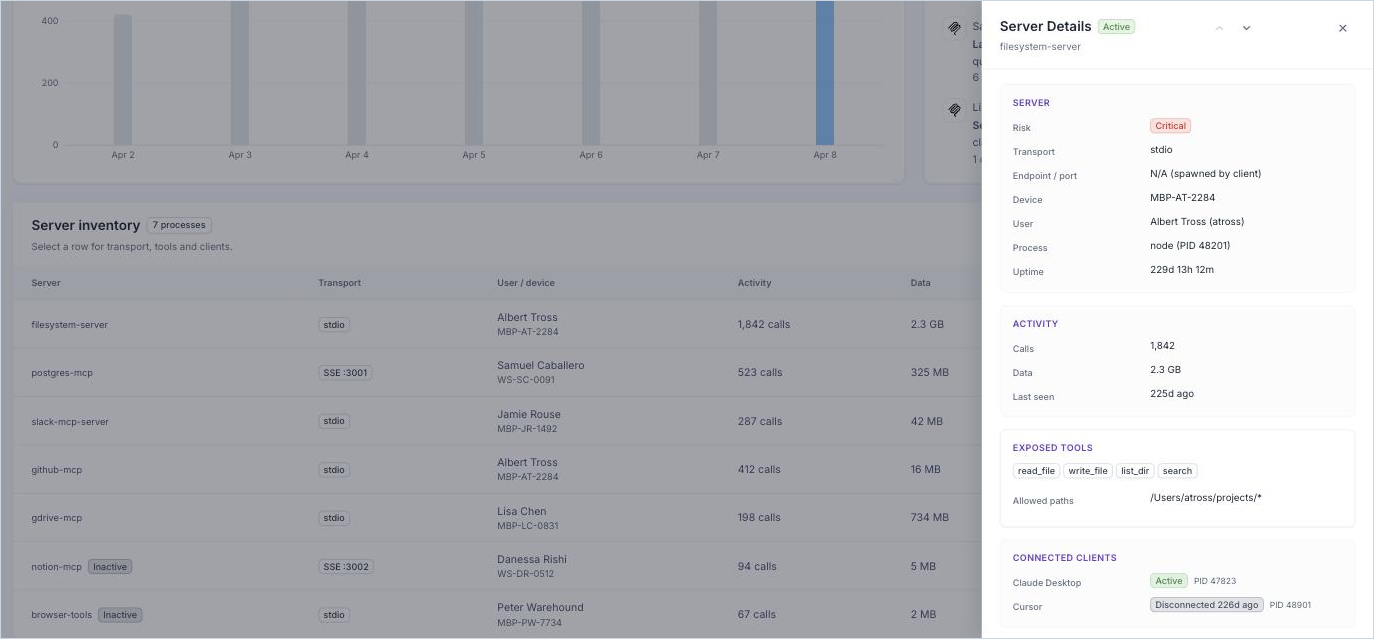
A filesystem server might expose read_file, write_file, list_dir and search. Those are four different permissions wearing one name. Narrowing the allowed paths to a project directory changes the exposure completely, and so does knowing whether the attached client is a desktop chat app a human drives turn by turn, or a coding agent making calls on its own.
Drilling into one server: the tools it exposes, the paths it is allowed, and which clients are attached.
This is also where the connection to shadow AI detection becomes obvious. The same agent that enumerates AI applications enumerates MCP servers and coding agents, because they are all processes on a managed device rather than vendors in a procurement system.
The four risk patterns worth alerting on
Across real deployments the same handful of patterns recur, and none of them is an attack.
Pattern
What it looks like
Why it matters
Sensitive file access
A filesystem tool reads SSH keys, .env files or credential stores because a tool call asked it to.
Secrets enter a model's context. Nothing was breached; the server did exactly what it was configured to do.
Network-exposed server
An SSE server bound to all interfaces rather than localhost.
Reachable beyond the machine it was meant to serve, usually by accident.
Large data transfer
A single session returns hundreds of megabytes from database queries.
Result-set size nobody scoped. The data has left the database and is in a model's context.
Sensitive document access
A drive server reads files carrying classification markers.
Regulated content moving into AI context through a path no DLP policy covers.
🎥 Discovery is half the job
An inventory changes nothing on its own. What turns it into governance is being able to act on what it found, which is the subject of blocking MCP connectors, and inspecting the data these servers return, which is MCP DLP.
Where this sits in an AI governance programme
MCP server discovery is one of four capabilities that separate a tool which governs AI usage from one that governs AI models. The others are usage monitoring, enforcement, and content inspection in both directions. AI governance tools covers how to score vendors across all four, and endpoint DLP covers the agent that makes on-device discovery possible.
🌶️ Spicy FAQs on MCP server discovery
What is MCP server discovery?
It is the process of finding every Model Context Protocol server running across your estate, including the ones nobody registered. An MCP server is usually a process on a developer's machine rather than a product someone bought, so it does not appear in your SaaS inventory, your SSO logs or your expense reports. Discovery means enumerating the running processes, their transport, the tools each exposes and the clients connected to them.
Why do CASBs and network tools miss MCP servers?
Because there is often no network traffic to inspect. A stdio-transport MCP server is spawned by the client and talks over standard input and output on the same machine, so nothing crosses a proxy or a gateway. Servers using SSE do open a port, which is more visible, but the default local case is invisible to anything watching the network. Finding them requires presence on the endpoint.
What should an MCP server inventory show?
At minimum: the server, its transport and port, the user and device it runs on, the process and uptime, call volume and data volume, when it was last seen, and a risk rating. Then one level deeper, the tools the server exposes, any path restrictions, and which clients are connected to it, because a server attached to a coding agent is a different exposure from one attached to a desktop chat app.
What does an MCP audit log need to contain?
Enough to answer a question after the fact. Which tool was invoked, by which client, on whose behalf, against what, and how much data came back. Call counts alone will not survive an incident review, and neither will a log that records the server but not the individual tool.
How does data get exfiltrated through MCP?
Usually without anyone intending it. A filesystem server with broad path access reads credentials or environment files because a tool call asked it to. A database server returns a far larger result set than anyone expected. A drive server pulls documents carrying classification markers into a model's context. None of this is an attack; it is the server doing what it was configured to do, at a scale nobody reviewed.
Is an MCP server a security risk by default?
No, and treating every one as a threat is how governance programmes lose credibility with engineering. The risk is a function of what the server can reach, what tools it exposes, which client is attached and whether anything inspects the data coming back. A narrowly scoped server feeding a desktop client is unremarkable. A filesystem server with home-directory access attached to an autonomous coding agent is worth a conversation.
Customer story
“Don’t just alert on problems, fix them.”
Scott Roberts, Chief Information Security Officer, UiPath
It is the process of finding every Model Context Protocol server running across your estate, including the ones nobody registered. An MCP server is usually a process on a developer's machine rather than a product someone bought, so it does not appear in your SaaS inventory, your SSO logs or your expense reports. Discovery means enumerating the running processes, their transport, the tools each exposes and the clients connected to them.
Why do CASBs and network tools miss MCP servers?
Because there is often no network traffic to inspect. A stdio-transport MCP server is spawned by the client and talks over standard input and output on the same machine, so nothing crosses a proxy or a gateway. Servers using SSE do open a port, which is more visible, but the default local case is invisible to anything watching the network. Finding them requires presence on the endpoint.
What should an MCP server inventory show?
At minimum: the server, its transport and port, the user and device it runs on, the process and uptime, call volume and data volume, when it was last seen, and a risk rating. Then one level deeper, the tools the server exposes, any path restrictions, and which clients are connected to it, because a server attached to a coding agent is a different exposure from one attached to a desktop chat app.
What does an MCP audit log need to contain?
Enough to answer a question after the fact. Which tool was invoked, by which client, on whose behalf, against what, and how much data came back. Call counts alone will not survive an incident review, and neither will a log that records the server but not the individual tool.
How does data get exfiltrated through MCP?
Usually without anyone intending it. A filesystem server with broad path access reads credentials or environment files because a tool call asked it to. A database server returns a far larger result set than anyone expected. A drive server pulls documents carrying classification markers into a model's context. None of this is an attack; it is the server doing what it was configured to do, at a scale nobody reviewed.
Discover & Protect Data on SaaS, AI, MCP, Endpoints & Cloud
Strac provides end-to-end data loss prevention for all SaaS and Cloud apps. Integrate in under 10 minutes and experience the benefits of live DLP scanning, live redaction, and a fortified SaaS environment.