October 1, 2026

6
min read
Best Shadow AI Detection Tools (2026 Comparison)
The best shadow AI detection tools discover unsanctioned AI use and can redact, block, or warn. See how Strac compares across SaaS, browser, endpoint, GenAI, and MCP.
AI-usage sprawl is now a board-level concern, and a crowded market has appeared to address it. The tools vary widely in what they can actually see and do. Before comparing names, fix the criteria that separate a real shadow-AI tool from a dashboard that only counts web visits.
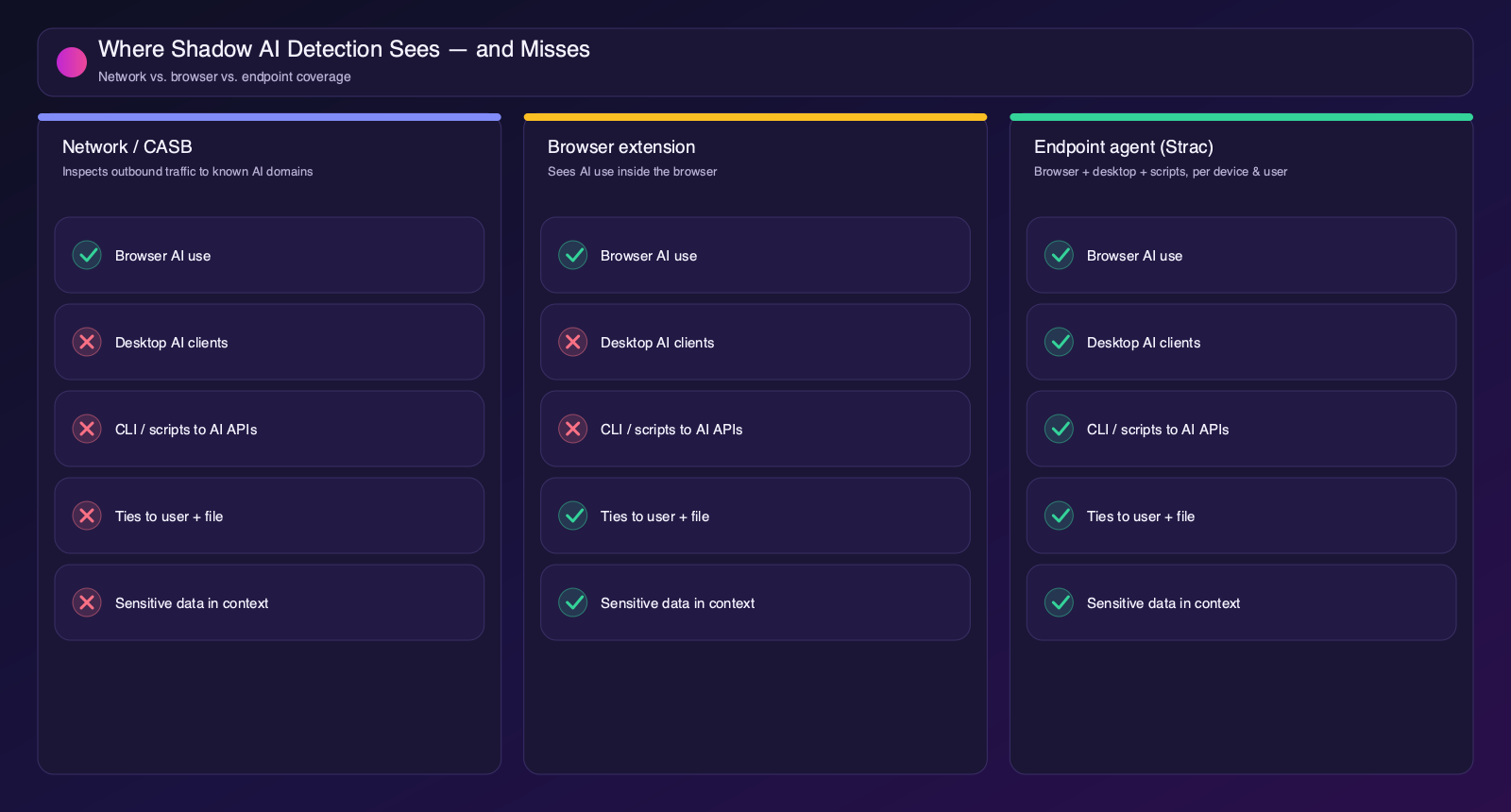
Most tools fall into one of two camps. Observe-only tools build an inventory and dashboards — useful for a first audit, but they leave enforcement to something else. Act tools can also stop the risky part: redact a sensitive value, block a file heading to an unmanaged AI tool, or warn the user in the moment. The strongest programs pair discovery with the ability to act, ideally in one agent so there is one policy and one audit trail.
| Tool | Vantage point | Ties to user + file | Acts (redact/block/warn) | No keystroke logs |
|---|---|---|---|---|
| Strac | Endpoint — browser, desktop & CLI | Yes | Yes — redact, block, warn | Yes |
| Microsoft Purview | M365 / Edge browser | Partial | Yes, within Microsoft | Yes |
| Zscaler | Network / SSE | Limited | Yes, at the network layer | Yes |
| Palo Alto Networks | Network / SASE | Limited | Yes, at the network layer | Yes |
| CrowdStrike | Endpoint security telemetry | Yes | Visibility-first | Yes |
Strac is the only option that pairs endpoint-complete shadow-AI visibility with content-aware DLP across every place your data lives. It sees AI use in the browser and from desktop clients, IDE plugins, and CLI scripts; names managed versus unmanaged; ties each connection to a device and user; and flags when a sensitive file or piece of text comes near an AI tool — then remediates the data, all without reading prompts, logging keystrokes, or taking screenshots.
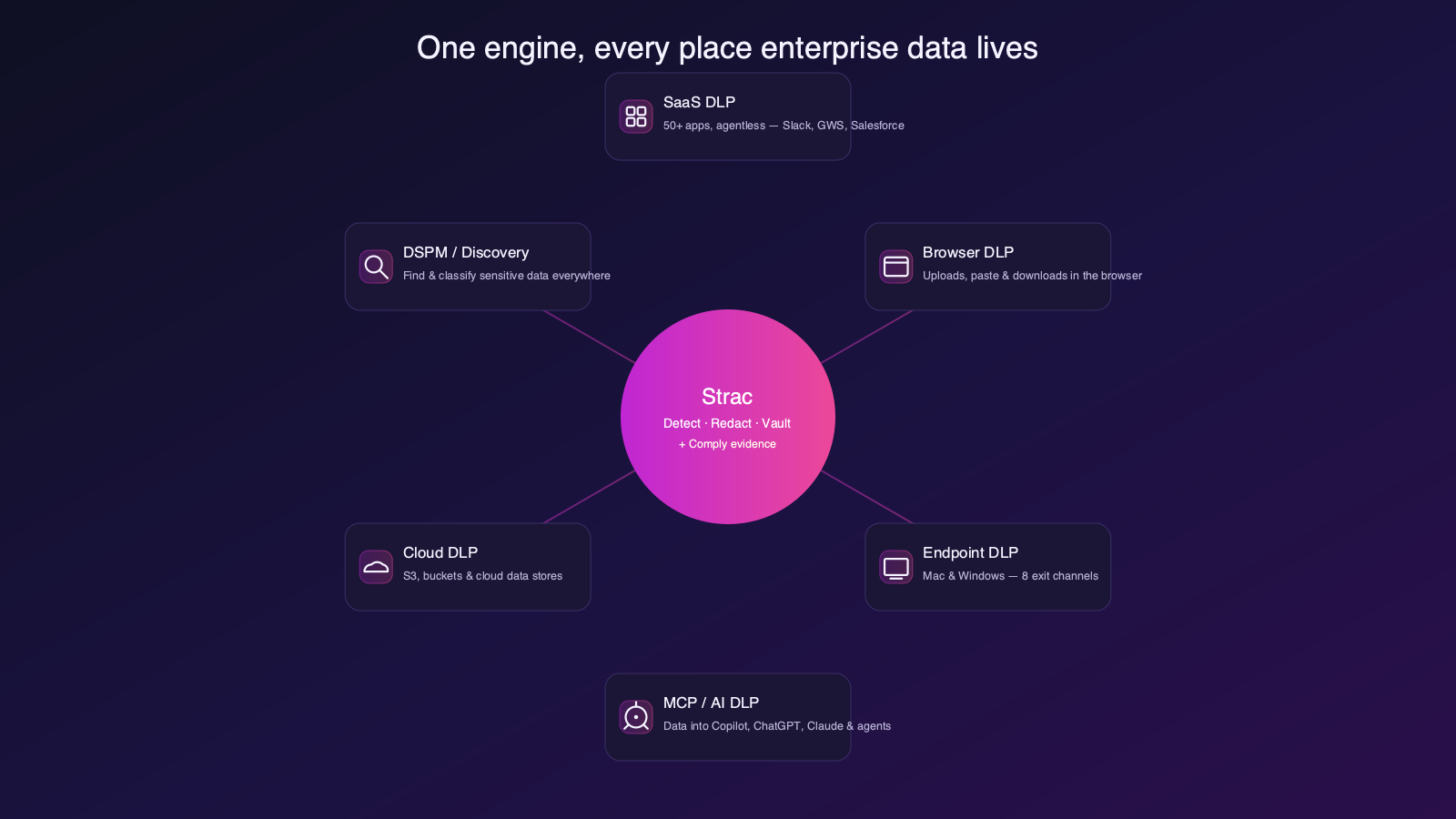
That single engine means shadow AI isn’t a point tool bolted on — it’s one facet of a data-security platform that covers every path regulated data can take:
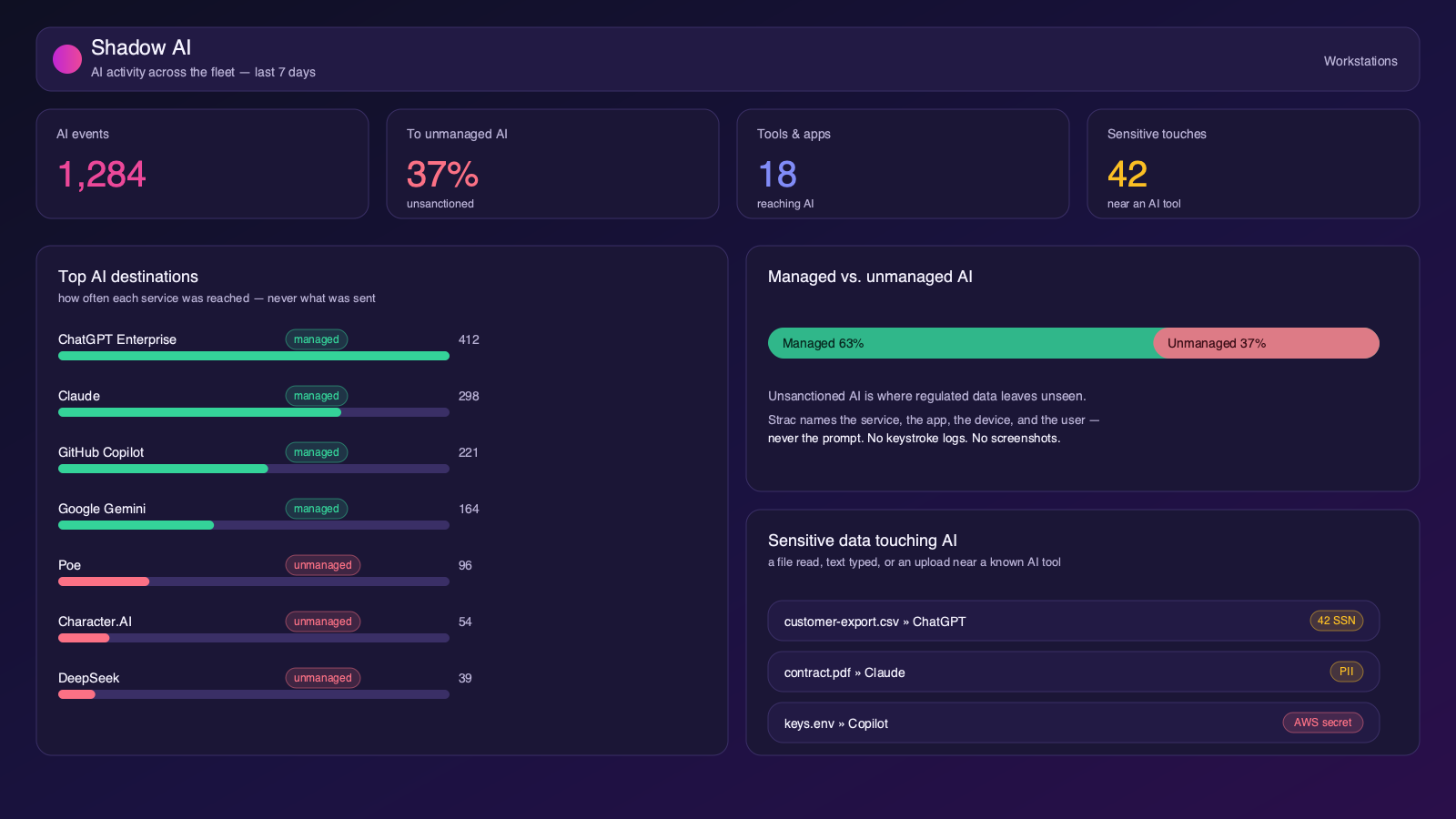
And because detection and DLP are the same product, discovery flows straight into remediation. The moment Strac sees sensitive data heading to an unsanctioned AI tool, it can redact the value, block the action, or warn the user — in the browser, on the endpoint, or on the MCP path.
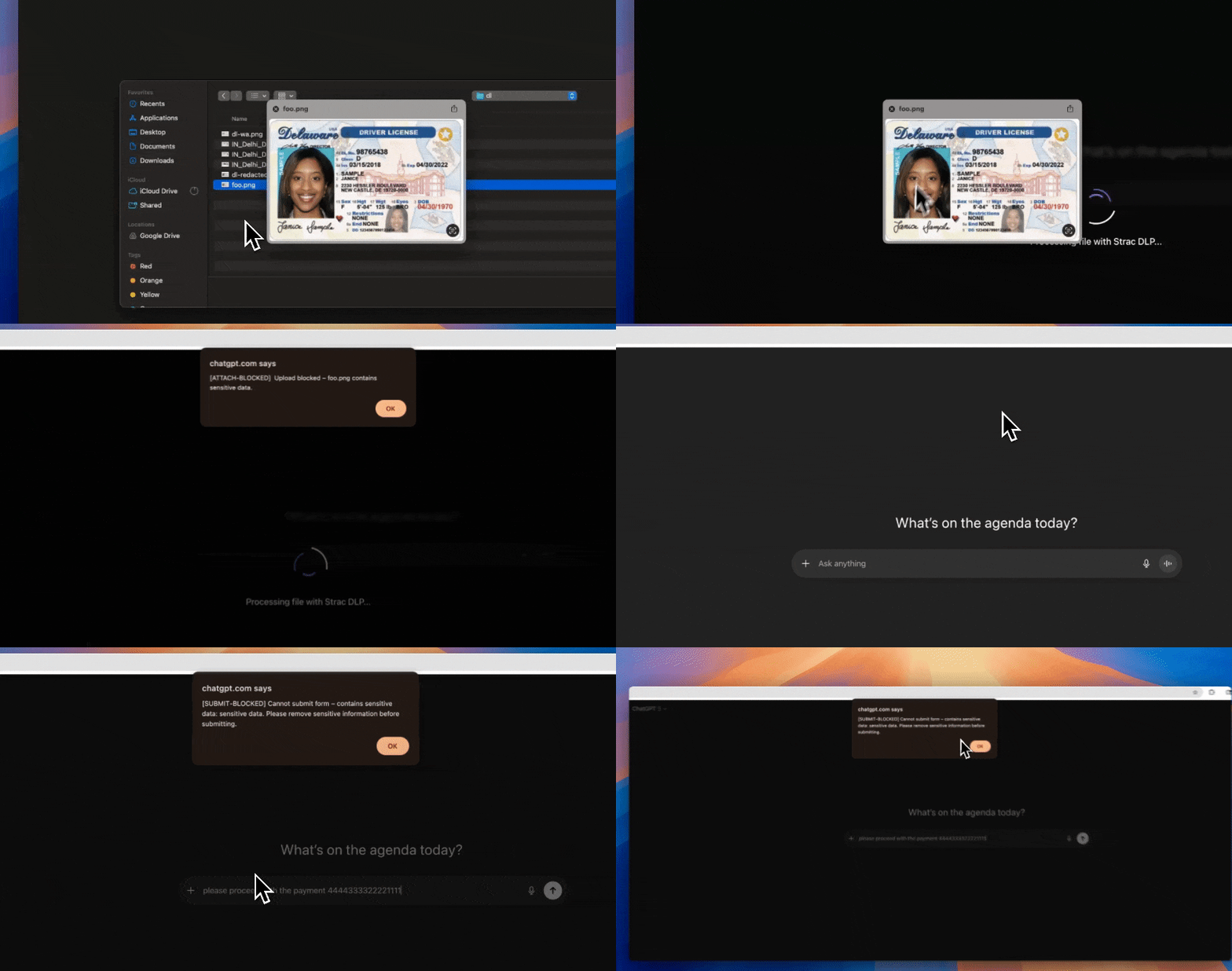
Remediation isn't one action — it's the right one per surface: redact the value in place, block or warn/coach on the browser and endpoint, or revoke access on Google Drive, SharePoint, and Box so an AI agent can't reach the file at all.

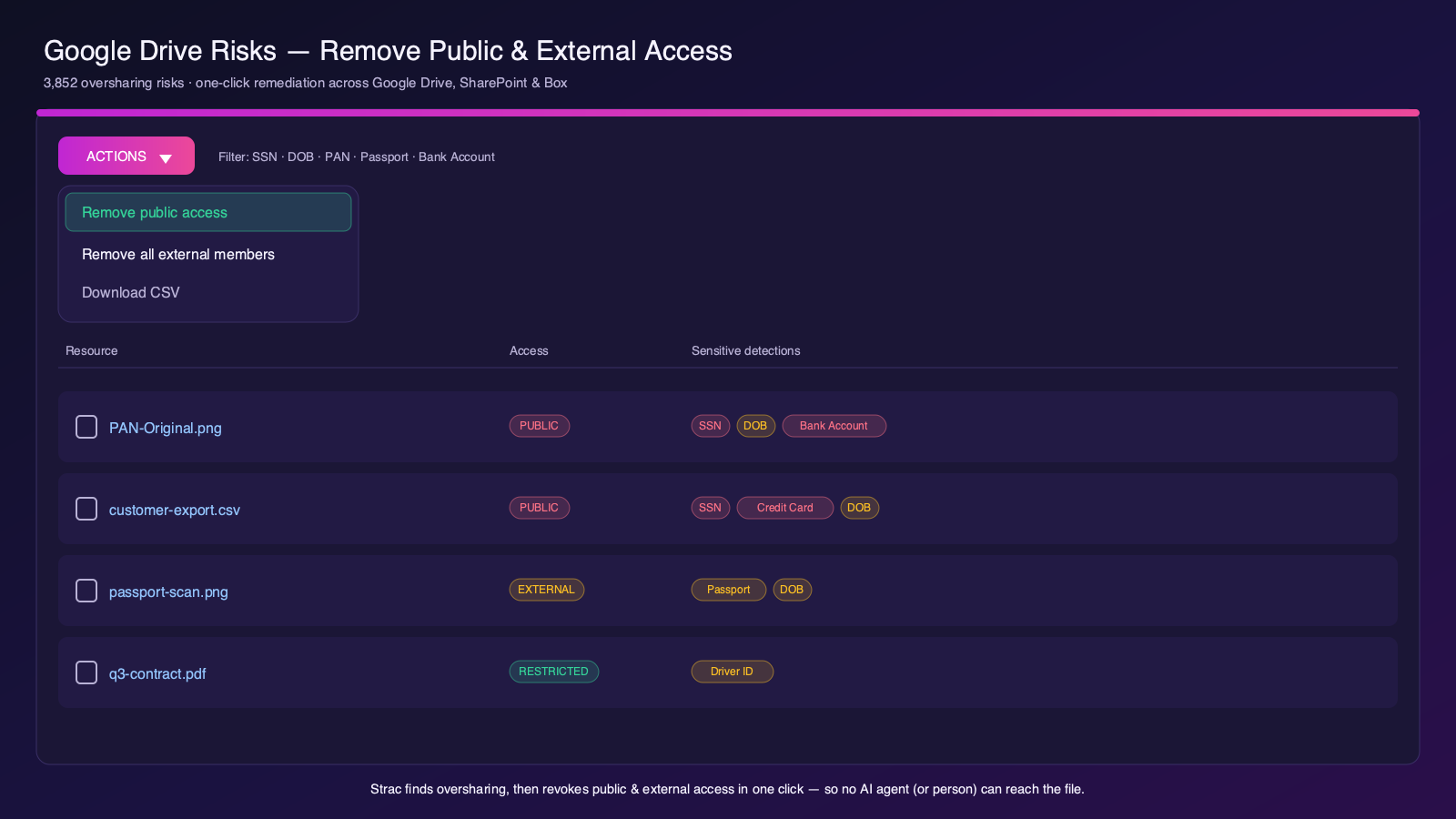
That breadth is why teams standardize on Strac rather than stitching together a discovery tool, a browser tool, and an endpoint tool. See SaaS DLP, GenAI DLP, Endpoint DLP, and MCP DLP.
Purview brings AI-usage visibility and DLP within the Microsoft ecosystem — Edge, Microsoft 365, and Copilot. If your world is Microsoft-first it is worth evaluating. The limiting factors are coverage of non-Microsoft browsers, third-party desktop AI clients, and tools outside the Microsoft estate.
Zscaler detects and controls AI use at the network layer as part of its SSE platform — a natural fit for organizations already routing traffic through it. The trade-off is the classic network blind spot: desktop clients and scripts on paths that don’t traverse the proxy, and weaker attribution to a specific user and file.
Palo Alto offers AI-access controls across its SASE and security platform, strong for enterprises standardized on Palo Alto. Like other network-centric approaches, it is best at gateway enforcement and less able to see endpoint desktop/CLI AI use or tie activity to a specific file.
CrowdStrike provides shadow-AI visibility as part of its endpoint security platform, leveraging its agent’s telemetry. It is visibility-first and a natural add-on for existing CrowdStrike customers; content-aware data enforcement on AI paths — redacting or blocking the sensitive data itself — is where dedicated data-security tooling goes deeper.
See Strac detect AI activity and redact the sensitive data that comes near it, from the endpoint and the browser:
Strac is the endpoint-complete shadow-AI tool that also remediates across every surface. Start at the Shadow AI hub, or read how to detect shadow AI and shadow AI governance.
For device-level coverage, Strac’s endpoint DLP agent adds Shadow AI discovery on Mac and Windows alongside its data loss prevention.
Related reading:
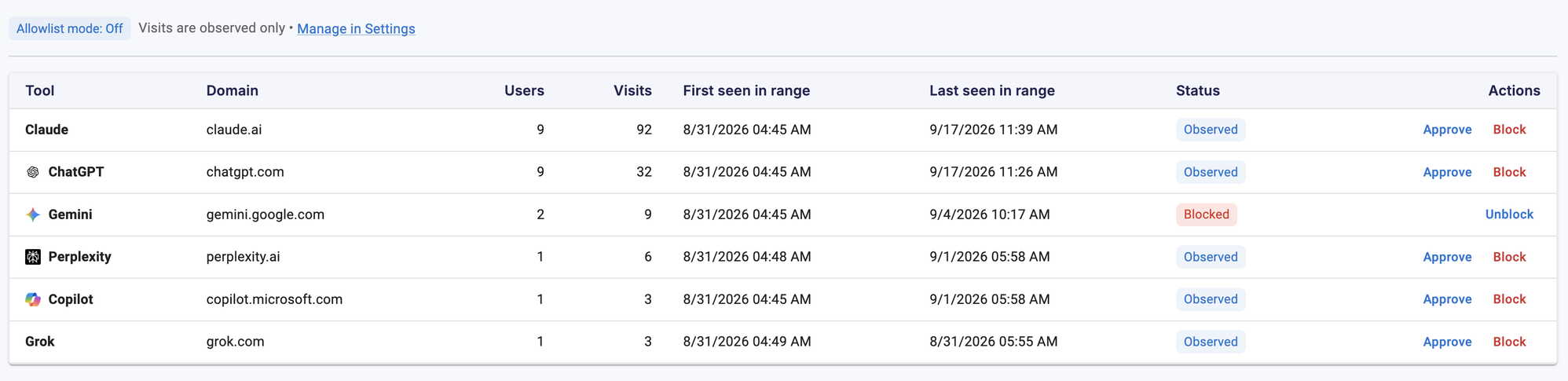
What is the best shadow AI detection tool? For endpoint-complete visibility (browser, desktop, and CLI) plus the ability to redact, block, or warn across SaaS, browser, endpoint, GenAI, and MCP, Strac stands out. Network tools like Zscaler and Palo Alto suit perimeter-first teams; Purview fits Microsoft-centric shops.
Do shadow AI detection tools read prompts? Good ones don't. Strac records which AI service was reached and whether sensitive data was involved, never the prompt, and keeps no keystroke logs or screenshots.
How is shadow AI detection different from a CASB? A CASB inspects network traffic to known apps; endpoint shadow-AI detection also sees desktop clients, IDE plugins, and scripts, and ties activity to a user and a file.
Can a shadow AI tool also stop the leak? Yes. Strac not only detects AI use but can redact, block, or warn when a sensitive file or upload heads to an unsanctioned AI tool, staged Audit → Warn → Block.
Do I need a dedicated shadow AI tool or can DLP do it? The strongest option is DLP that is AI-aware. Strac's endpoint agent does both — content-aware DLP and shadow-AI visibility — from one deployment across every surface.
.avif)


.gif)


.webp)