Is ChatGPT Safe? Enterprise Security & Data Guide (2026)
Is ChatGPT safe to use at work? Here's what OpenAI protects, where it falls short with your regulated data, and how to make ChatGPT safe across the browser, endpoints, SaaS, and MCP connectors with Strac.
ChatGPT is reasonably safe for general use — and risky for regulated or confidential data unless you add a control layer. OpenAI encrypts data, lets you turn off training, and offers enterprise controls. None of that stops an employee from pasting a customer's SSN, a patient record, an API key, or source code into the prompt box.
The real exposure isn't OpenAI's security — it's your data leaving your control: typed into the browser, dropped into the ChatGPT desktop app, sitting in the SaaS apps ChatGPT can reach, or pulled in automatically through MCP connectors.
Strac makes ChatGPT safe by inspecting and redacting sensitive data at every one of those surfaces — in the browser before a prompt is sent, on the endpoint, across your SaaS, and at the MCP layer where AI agents pull data in — and logging every event as compliance evidence.
Deployment is agentless and takes under 10 minutes.
Is ChatGPT Safe? The Short Answer
How Do You Prevent Data Leaks in ChatGPT?
To prevent data leaks in ChatGPT, put a DLP control between the employee and the prompt — inspecting what is typed or uploaded before it is sent. Strac's browser extension does exactly this: it detects PII, PHI, PCI, and secrets in ChatGPT prompts and uploads in real time and redacts or blocks them inline, so employees keep using ChatGPT while sensitive data never leaves your environment.
Yes, for everyday tasks. Not by default for regulated or confidential data. ChatGPT itself is built with strong infrastructure security — encryption in transit and at rest, SOC 2 compliance, and enterprise admin controls. The risk almost never comes from OpenAI being breached. It comes from what your people put into it: customer PII, PHI, payment data, secrets, and source code that should never leave your environment.
So the honest answer to "is ChatGPT safe?" is: the model is safe enough; your data flowing into it is the problem you have to govern. That's a solvable problem — and the rest of this guide shows how. The same logic applies to Claude · Is DeepSeek Safe?, Gemini, and Copilot.
How ChatGPT Protects Your Data: OpenAI's Built-In Controls
OpenAI does provide a meaningful security baseline:
Encryption in transit (TLS) and at rest (AES-256).
SOC 2 Type 2 compliance and a published security program.
Training opt-out — on ChatGPT Enterprise, Team, and the API, your prompts are not used to train models by default; on Plus/Free you can disable chat history and training.
Admin controls on Enterprise/Team: SSO/SAML, SCIM provisioning, retention controls, and workspace management.
This is genuinely solid. If your only concern were "will OpenAI leak my data from their side," ChatGPT Enterprise is a defensible choice.
Where ChatGPT's Built-In Safety Falls Short
Every one of those controls protects data once it's already inside OpenAI. None of them inspects what leaves your environment in the first place. That gap is where real incidents happen:
Employees paste regulated data into the prompt. Customer SSNs as "context" for a support reply, a patient summary to draft a note, a card number to debug a payment, a .env file to fix a bug. Training opt-out doesn't un-expose it — it's already left your perimeter.
Shadow ChatGPT use. People use personal accounts on unmanaged browsers where your Enterprise controls don't apply. See shadow AI.
The desktop app and connectors reach further. ChatGPT's desktop app and its growing connector ecosystem can read files and, increasingly, pull data straight from your SaaS and databases.
MCP changes the threat model entirely. With MCP connectors, ChatGPT doesn't wait for a human to paste anything — it pulls data in from Snowflake, Salesforce, Jira, and Google Drive on its own.
Making ChatGPT safe means controlling all four surfaces. Here's how Strac does each one.
✨ Make ChatGPT Safe in the Browser — Strac Browser DLP
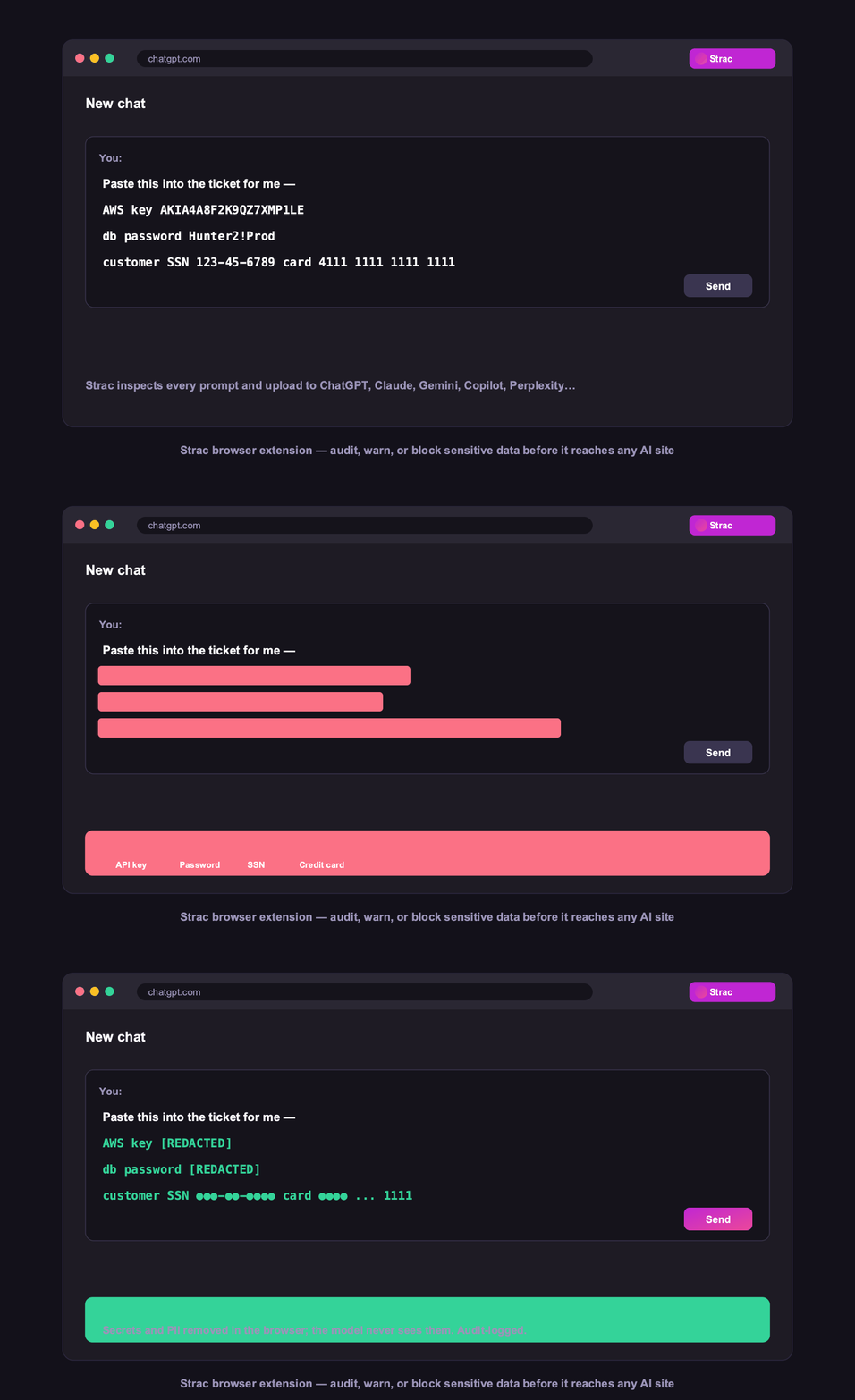
Most ChatGPT use happens in a browser tab. Strac's browser DLP inspects every prompt and upload before it reaches the model — redacting or blocking SSNs, card numbers, PHI, API keys, and source code in real time, on managed and unmanaged browsers alike. The employee still gets their answer; the sensitive data never leaves.
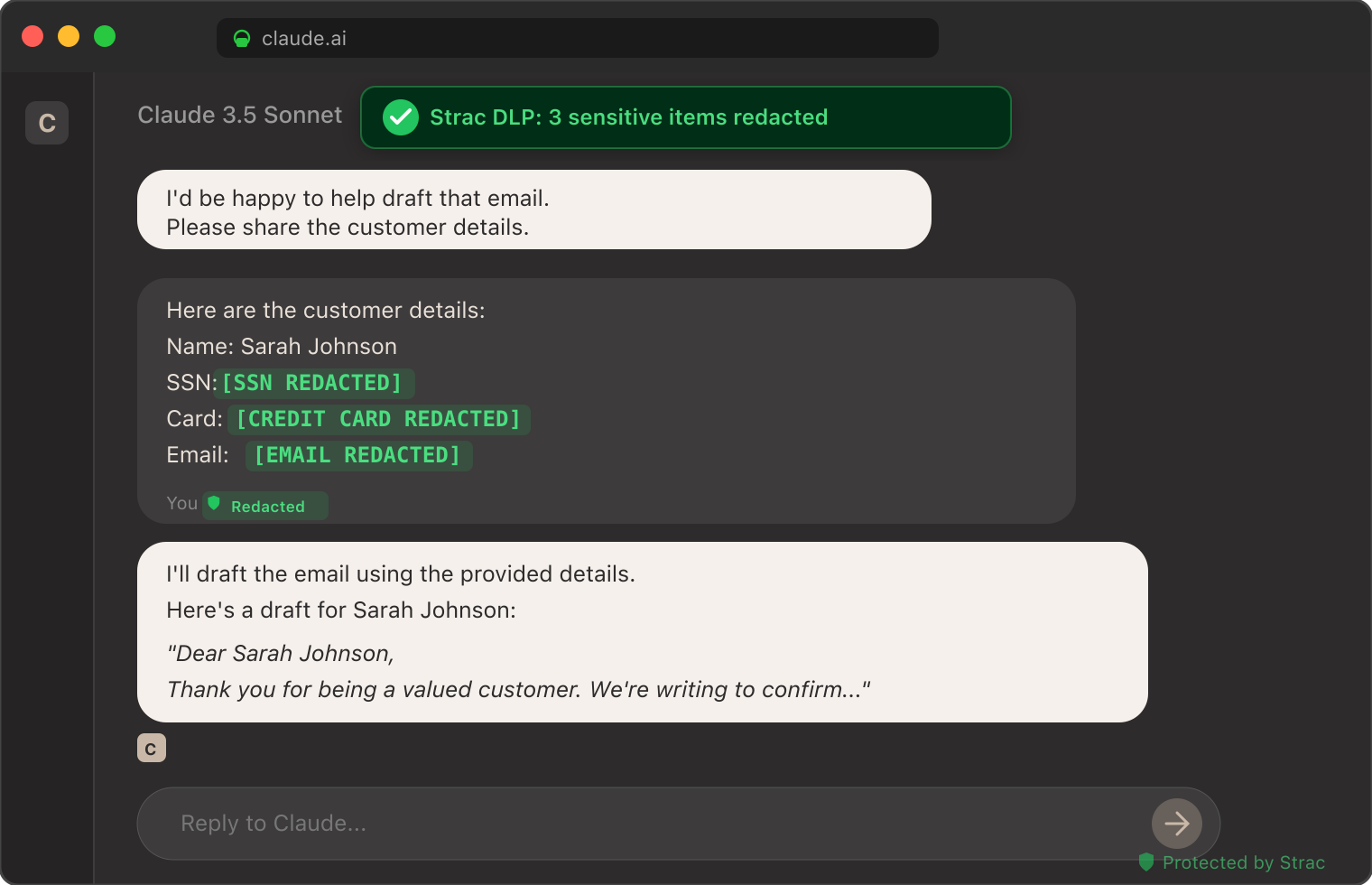
Strac inspects every prompt before it reaches ChatGPT — secrets and PII are redacted in the browser, so the model never sees them.
This is the front line for "is ChatGPT safe to use at work" — it makes the answer yes, because the risky paste is neutralized at the source. More in GenAI DLP.
✨ Redact Sensitive Data Before ChatGPT Sees It
Strac's detection runs on the actual content, not just keywords — PII, PHI, PCI (Luhn-checked cards), 48+ secret patterns, and source code, including text inside images via OCR. Sensitive elements are tokenized inline; everything else passes through untouched.
Sensitive elements tokenized inline before the model sees them. The same inspection runs on ChatGPT prompts through the [ChatGPT DLP integration](https://www.strac.io/integration/chatgpt-dlp).
✨ ChatGPT on the Desktop & Endpoint — Plus Monitoring
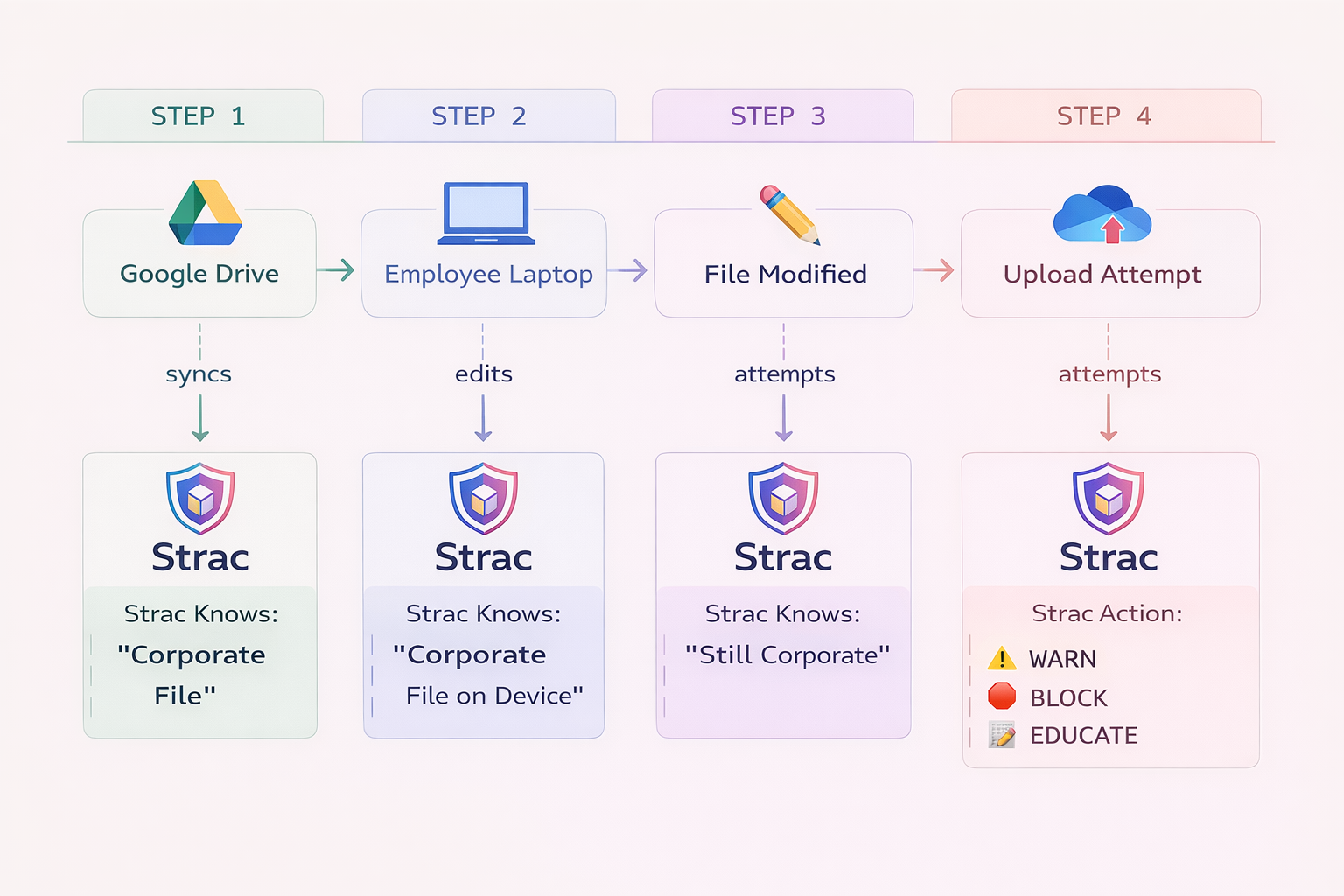
The ChatGPT desktop app and other local AI tools live on endpoints, where browser controls don't reach. Strac's endpoint DLP protects data in desktop AI apps and coding agents, and monitors every interaction — who used which AI tool, what data classes were involved, and what was blocked or redacted — so you have a continuous record, not a blind spot.
Strac traces and monitors sensitive-data movement on the endpoint, including desktop AI apps. Per-user, per-action visibility — see [monitor AI agents](https://www.strac.io/blog/monitor-ai-agents).
✨ The Bigger Risk: ChatGPT Pulling Data IN via MCP
This is the part most "is ChatGPT safe" guides miss. Data protection used to be an egress problem — stopping people from copying data out. With the Model Context Protocol, it's now an ingress problem: ChatGPT and other AI agents pull data in from your SaaS apps, databases, and warehouses automatically, with no human pasting anything.
One MCP query — "summarize the Acme account" — can pull a Salesforce record full of PII, a Snowflake table of transactions, and a Jira ticket with pasted secrets straight into the model's context. None of your existing DLP sits in that path.
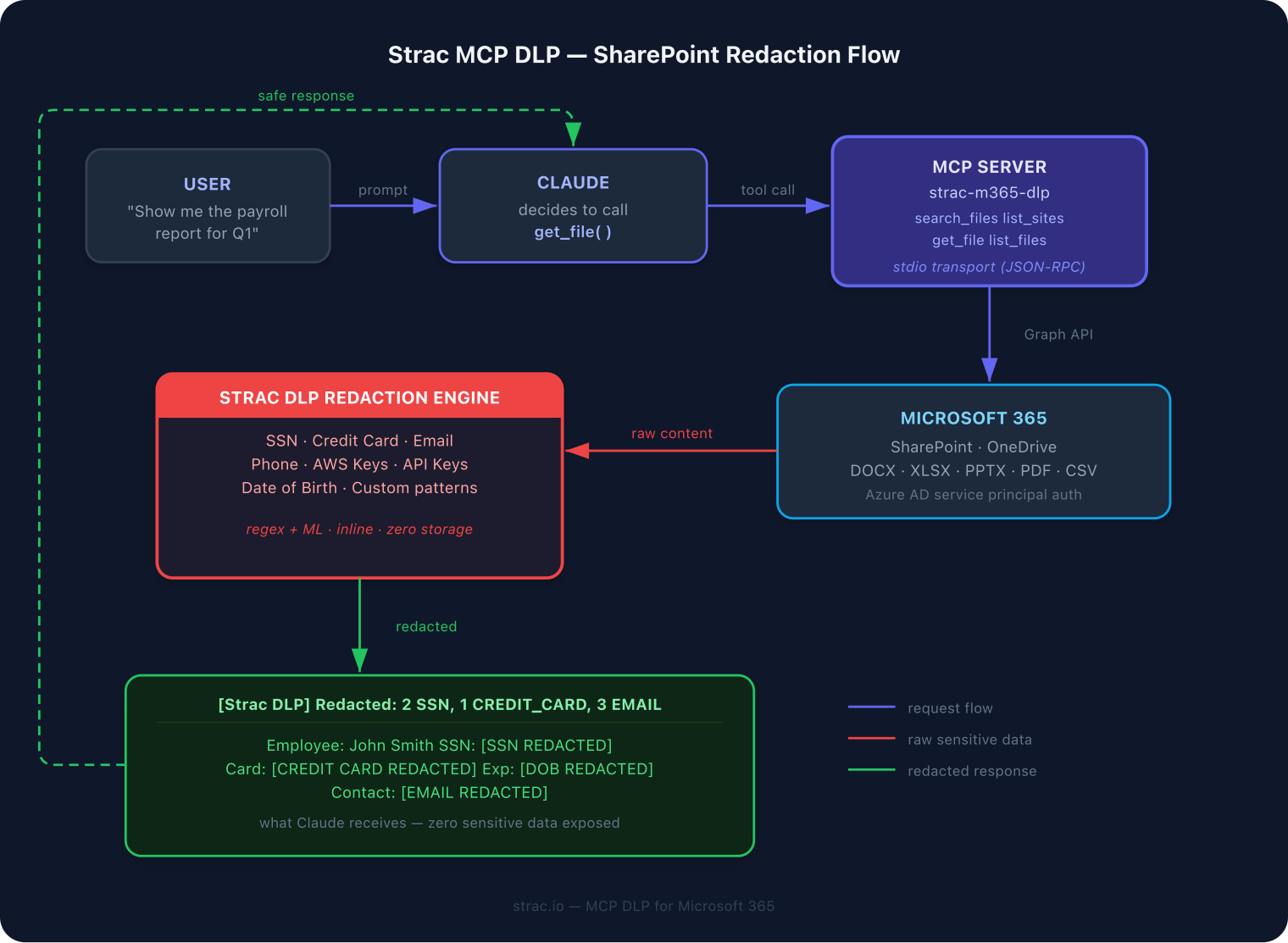
Strac sits as a gateway on every MCP tool call: it sees the call, controls what the agent can reach, redacts sensitive content in the response, and logs it — before anything reaches ChatGPT.
Strac's MCP DLP governs every tool call between an AI agent and your systems — See, Control, Protect, Prove. It works across the whole connector ecosystem: Snowflake, Salesforce, Jira, Slack, Google Drive, and more in the MCP connector directory.
The Strac MCP DLP gateway across an example suite — every tool call inspected and redacted before the agent reads it. The same pattern covers every connector in [strac.io/mcp-integrations](https://www.strac.io/mcp-integrations).
If your team is connecting ChatGPT to internal systems via MCP, this is the single most important control to put in place.
✨ SaaS DLP: Protect the Data ChatGPT Can Reach
ChatGPT is only as safe as the data sitting in the SaaS apps it (and its connectors) can touch. Strac's SaaS DLP discovers and redacts sensitive data at rest across 50+ apps — Slack, Google Workspace, Microsoft 365, Salesforce, Zendesk, and more — so when an AI agent or an employee reaches into those systems, the regulated data is already classified and protected.
Strac covers data across SaaS, cloud, GenAI, browser, and endpoints — one control plane. Browse [all integrations](https://www.strac.io/integrations).
✨ Discover Shadow ChatGPT Use
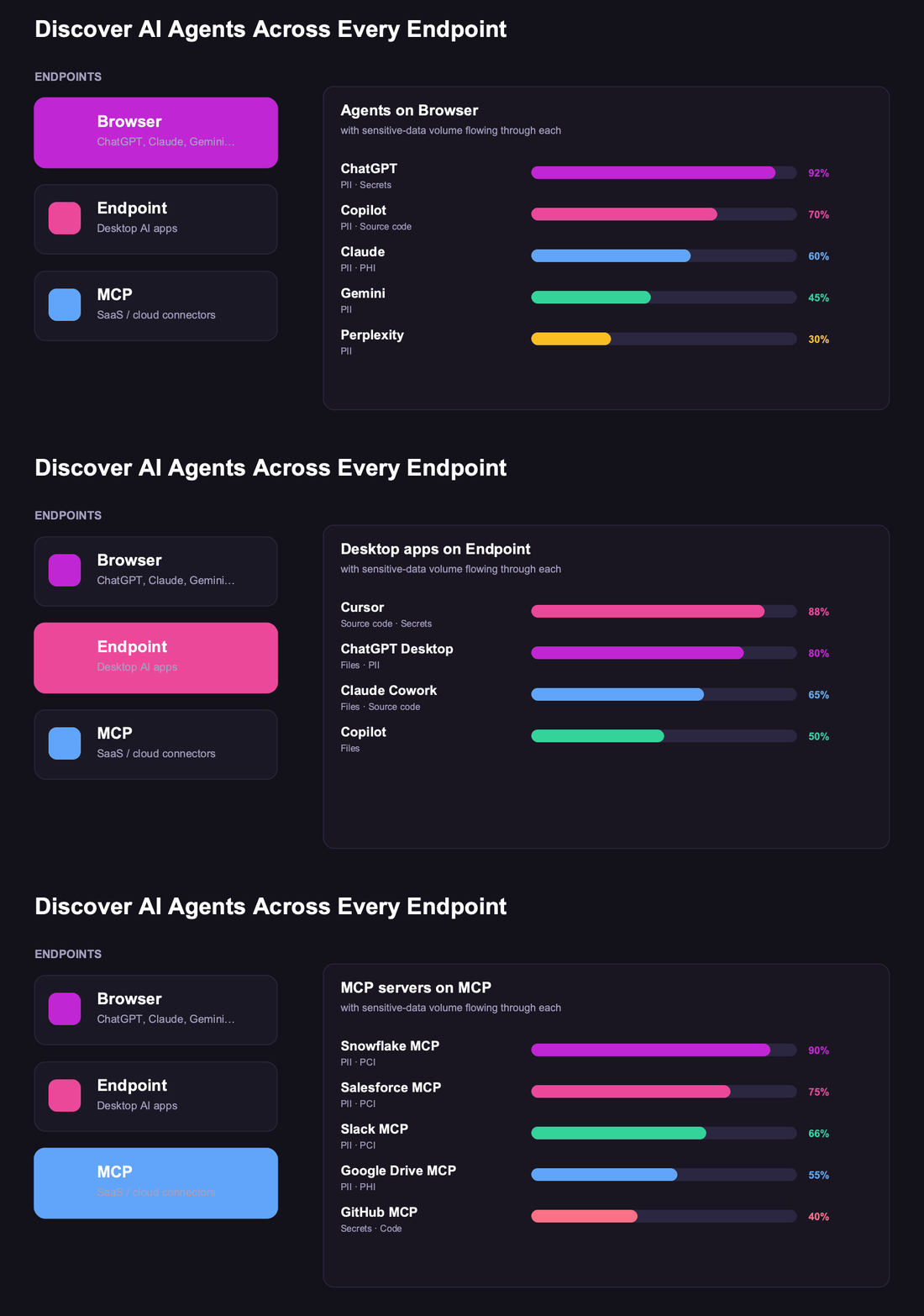
You can't protect what you can't see. Strac discovers unmanaged AI usage — including personal ChatGPT accounts — across the browser, endpoints, OAuth grants, and SaaS logs, and quantifies the sensitive-data exposure flowing through each.
Strac surfaces shadow ChatGPT and other AI usage across every surface. More in [discover AI agents](https://www.strac.io/blog/discover-ai-agents).
ChatGPT Data Leaks and Breaches: What Has Actually Happened
When people search "ChatGPT data breach," there is exactly one confirmed platform incident: in March 2023, a bug in an open-source Redis library briefly exposed other users' chat titles — and, for roughly 1.2% of ChatGPT Plus subscribers, partial payment details (name, email, and the last four digits of a card) — for a few hours before OpenAI patched it. It was real, but rare, and OpenAI's platform security has hardened considerably since.
The far bigger and ongoing risk to your data security is not OpenAI being breached — it is your own data leaking out through ChatGPT. An employee pastes source code, a customer list, or PHI into a prompt, and it is gone. Samsung famously restricted ChatGPT in 2023 after engineers pasted confidential source code into it. Every prompt is a potential egress point, and ChatGPT's own settings do nothing about what your team chooses to type.
That internal leak is the one that matters, and it is exactly what Strac's ChatGPT DLP prevents: it inspects every prompt before it reaches the model and redacts PII, PHI, PCI, and secrets in real time — so a careless paste never becomes a breach notification.
ChatGPT Safety by Use Case
Coding (engineering). Risk: secrets, .env files, and proprietary source pasted in or pulled via MCP. Strac redacts secrets and source-code fingerprints before they reach the model.
Customer support. Risk: customer PII pasted as context. Strac redacts SSNs, emails, and account numbers in the browser.
Healthcare (PHI). Risk: patient data in prompts. Strac redacts PHI and produces HIPAA audit evidence — see is ChatGPT HIPAA compliant.
Finance (PCI). Risk: card numbers and statements. Strac masks PANs (Luhn-checked) and logs the disposition.
One inline pass before anything reaches the model — five actions, your policy:
Detect — finds the customer SSN or API key someone pastes into a prompt: PII, PHI, PCI, secrets, and source code, including text inside screenshots via OCR.
Redact or mask — replaces the sensitive elements inline so ChatGPT still answers and never sees the raw data.
Block or warn — stops the prompt, or warns the user before it is sent, by policy.
Alert — notifies your security team and streams the event to your SIEM (Splunk, Microsoft Sentinel, Datadog).
Audit — logs the user, the AI tool, the data involved, and the action taken — evidence for SOC 2, HIPAA, PCI DSS, and GDPR.
Bottom Line
Is ChatGPT safe? Yes for everyday work, and yes for regulated data once you add a data-control layer. OpenAI secures its own infrastructure; you're responsible for what leaves yours. Put Strac in front of ChatGPT — in the browser, on the endpoint, across your SaaS, and at the MCP layer — and the sensitive data never reaches the model, while you keep the productivity. That's how you turn "is ChatGPT safe?" into a confident yes.
✨ Is ChatGPT Safe for Confidential Information?
Not on the free or Plus tiers — by default, OpenAI may use those conversations to improve its models, and anything you paste (customer records, contracts, source code) can be retained and reviewed. ChatGPT Enterprise and Team don't train on your data, but even there the confidential information still travels to and is processed by the model, so how “safe” it is depends entirely on what your employees type in.
The reliable control isn't a policy telling people not to paste confidential data — it's a technical one that stops them. Strac's browser DLP inspects every ChatGPT prompt and redacts PII, PHI, PCI, and secrets in real time, before they reach the model. See does ChatGPT save your data for the full retention picture.
And redaction isn't the only option: Strac can also warn the employee before they hit send or block the prompt outright when it contains regulated data — so a confidential paste is stopped at the keyboard, not discovered in an audit later.
Strac warns the user — or blocks the prompt entirely — before sensitive data is submitted.
Digging into the privacy specifics — what OpenAI collects, keeps, and trains on? See ChatGPT data privacy.
🌶️ Spicy FAQs for Is ChatGPT Safe
Has ChatGPT ever had a data breach?
Yes — one confirmed platform incident. In March 2023 a Redis library bug briefly exposed some users' chat titles and partial payment data for about 1.2% of ChatGPT Plus subscribers before OpenAI patched it. The more common "ChatGPT data leak" is internal: employees pasting sensitive data into prompts, like the 2023 Samsung source-code incident. Strac's ChatGPT DLP stops that by redacting sensitive data before it reaches the model.
Is ChatGPT HIPAA compliant?
Not on its own — OpenAI does not sign a BAA for the consumer or standard API tiers, so pasting PHI into ChatGPT is a HIPAA violation unless that data is protected first. See our full breakdown in Is ChatGPT HIPAA compliant?
Is ChatGPT safe to use at work?
For general tasks, yes. For regulated or confidential data, only with a DLP layer in front of it. ChatGPT secures its own infrastructure, but it won't stop an employee from pasting PII, PHI, payment data, or secrets into a prompt. Strac browser DLP inspects every prompt before it's sent, which is what makes ChatGPT safe for workplace use.
Is ChatGPT safe for sensitive or confidential data?
Not by default. Even with training turned off, the data has already left your environment the moment it's submitted. To use ChatGPT safely with sensitive data, redact it before it reaches the model — Strac does this inline across the browser, endpoints, SaaS, and MCP connectors.
Does ChatGPT train on or save my data?
On Enterprise, Team, and the API, OpenAI does not train on your data by default; on Plus/Free you can disable history and training. But "not trained on" isn't "never exposed" — see does ChatGPT save data. Strac ensures the sensitive content is never submitted in the first place.
Is ChatGPT Enterprise safe enough on its own?
ChatGPT Enterprise adds SSO, retention controls, and no-training guarantees — strong infrastructure security. What it doesn't include is content-level DLP that stops regulated data from being entered or pulled in via connectors. That's the gap Strac fills.
What's the biggest ChatGPT security risk most companies miss?
MCP. With MCP connectors, ChatGPT pulls data in from your SaaS and databases automatically — no human pastes anything, and traditional DLP isn't in that path. Strac's MCP DLP inspects and redacts every tool call before content reaches the model.
How does Strac make ChatGPT safe?
Strac sits in front of ChatGPT on every surface — browser, endpoint, SaaS, and MCP — and redacts, masks, tokenizes, or blocks sensitive data before it reaches the model, logging every event as compliance evidence. It's agentless and deploys in under 10 minutes. See the ChatGPT DLP integration.
For general tasks, yes. For regulated or confidential data, only with a DLP layer in front of it. ChatGPT secures its own infrastructure, but it won't stop an employee from pasting PII, PHI, payment data, or secrets into a prompt. Strac browser DLP inspects every prompt before it's sent, which is what makes ChatGPT safe for workplace use.
Is ChatGPT safe for sensitive or confidential data?
Not by default. Even with training turned off, the data has already left your environment the moment it's submitted. To use ChatGPT safely with sensitive data, redact it before it reaches the model — Strac does this inline across the browser, endpoints, SaaS, and MCP connectors.
Does ChatGPT train on or save my data?
On Enterprise, Team, and the API, OpenAI does not train on your data by default; on Plus/Free you can disable history and training. But "not trained on" isn't "never exposed" — see does ChatGPT save data. Strac ensures the sensitive content is never submitted in the first place.
Is ChatGPT Enterprise safe enough on its own?
ChatGPT Enterprise adds SSO, retention controls, and no-training guarantees — strong infrastructure security. What it doesn't include is content-level DLP that stops regulated data from being entered or pulled in via connectors. That's the gap Strac fills.
What's the biggest ChatGPT security risk most companies miss?
MCP. With MCP connectors, ChatGPT pulls data in from your SaaS and databases automatically — no human pastes anything, and traditional DLP isn't in that path. Strac's MCP DLP inspects and redacts every tool call before content reaches the model.
Discover & Protect Data on SaaS, AI, MCP, Endpoints & Cloud
Strac provides end-to-end data loss prevention for all SaaS and Cloud apps. Integrate in under 10 minutes and experience the benefits of live DLP scanning, live redaction, and a fortified SaaS environment.


.webp)









.avif)



.gif)
