Is AI Safe to Use at Work? The Enterprise Guide (2026)
Is AI safe to use at work? The honest answer: the models are secure enough — your data flowing into them is the risk. Here's how to make AI safe across browser, endpoint, SaaS, and MCP with Strac.
The honest answer: the AI models are secure enough; your data flowing into them is the risk. Whether it's ChatGPT, Claude, Copilot, Gemini, Grok, DeepSeek, or Perplexity, the incidents that hurt companies come from sensitive data leaving their control — not from the vendor being breached.
That data leaves through four surfaces: the browser (pasted prompts), the endpoint (desktop AI apps), your SaaS (what AI can reach), and MCP connectors (agents pulling data in automatically).
Strac makes AI safe at work by discovering AI usage, redacting sensitive data before it reaches any model, and governing every agent call — across all four surfaces — with audit evidence for compliance.
Agentless, deploys in under 10 minutes.
Is AI Safe to Use at Work? The Short Answer
Yes — if you control what your data does, not just which tool you pick. Most enterprise AI vendors run strong infrastructure security: encryption, SOC 2, enterprise no-training guarantees, signable DPAs and BAAs. The risk almost never comes from the vendor's side. It comes from an employee pasting a customer SSN, a patient record, an API key, or source code into a prompt — or an AI agent quietly pulling regulated data from your systems.
The Real Risk Isn't the Model — It's the Data Path
Every AI tool creates the same four exposure surfaces. Making AI safe means covering all of them:
The browser — where most AI use happens, and where people paste sensitive data into prompts.
The endpoint — desktop AI apps and coding agents that browser controls don't reach.
Your SaaS and cloud — the data AI tools and their connectors can read.
MCP connectors — the new frontier, where agents pull data in automatically with no human pasting anything.
✨ See It First: Discover AI Usage
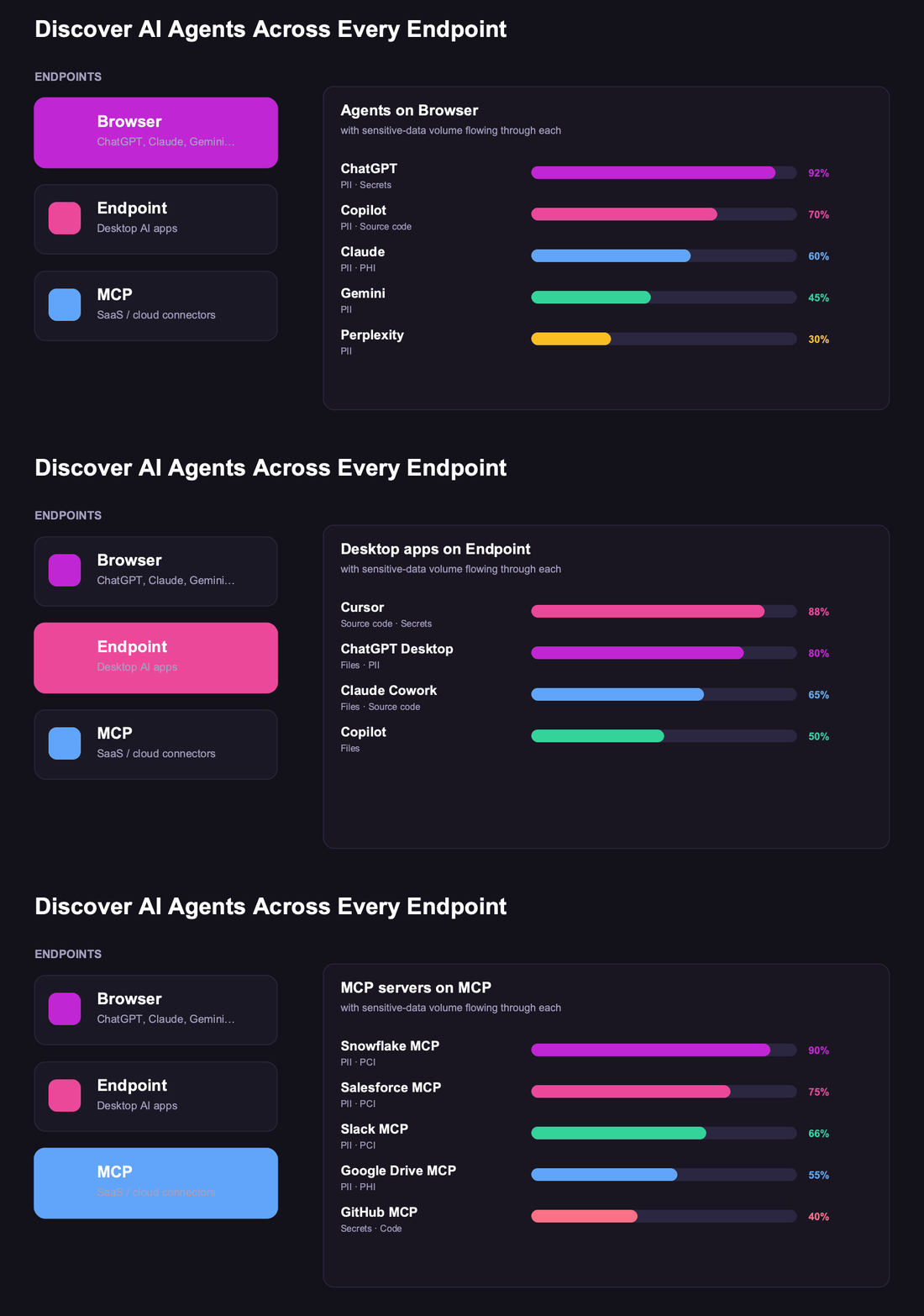
You can't make AI safe if you don't know who's using what. Strac discovers AI usage — including shadow AI on personal accounts — across the browser, endpoints, OAuth grants, and SaaS logs, and quantifies the sensitive data flowing through each.
Strac surfaces every AI tool in use and the data exposure behind it. See [discover AI agents](https://www.strac.io/blog/discover-ai-agents) and [shadow AI](https://www.strac.io/blog/shadow-ai).
✨ Make AI Safe in the Browser
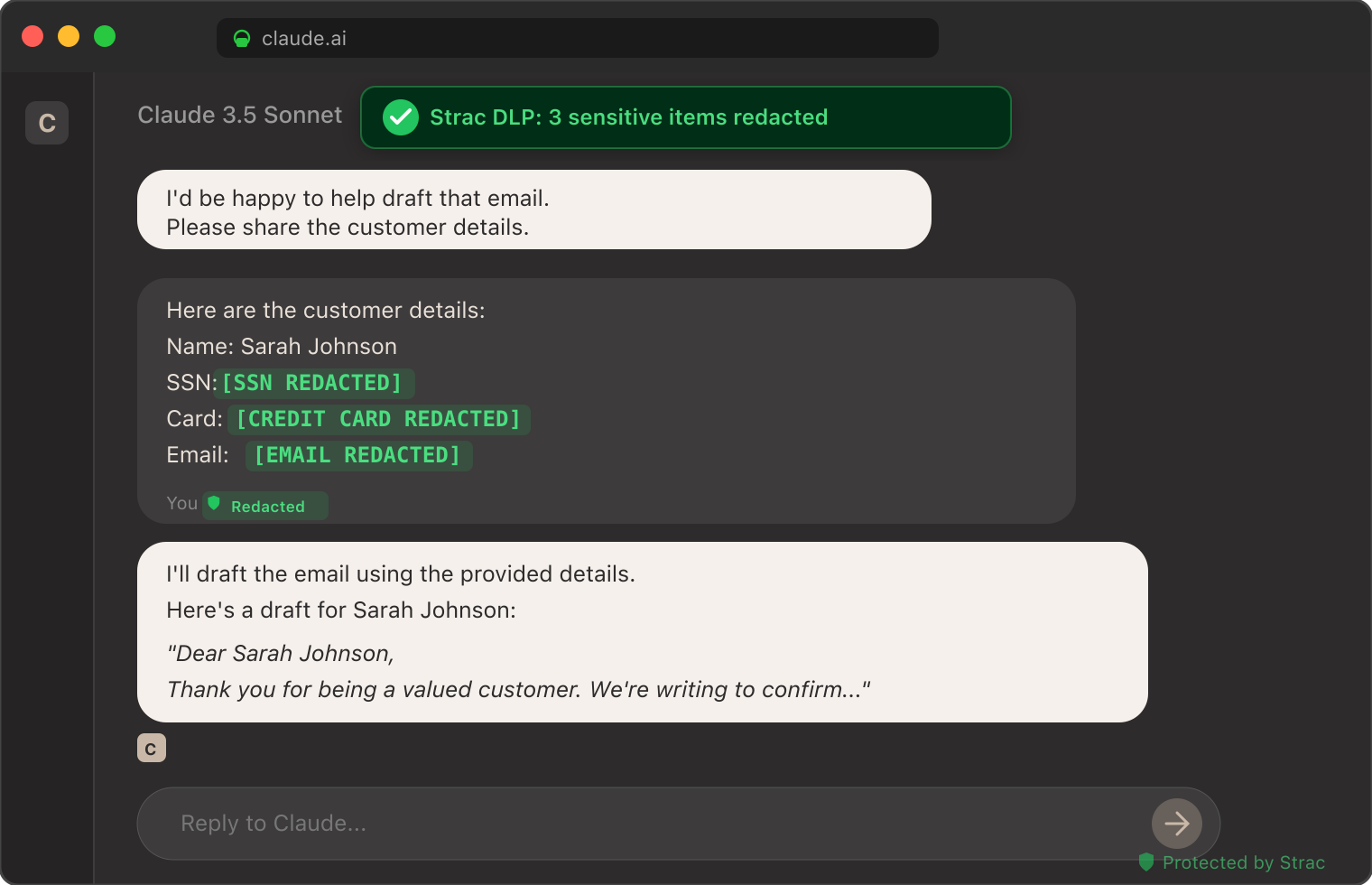
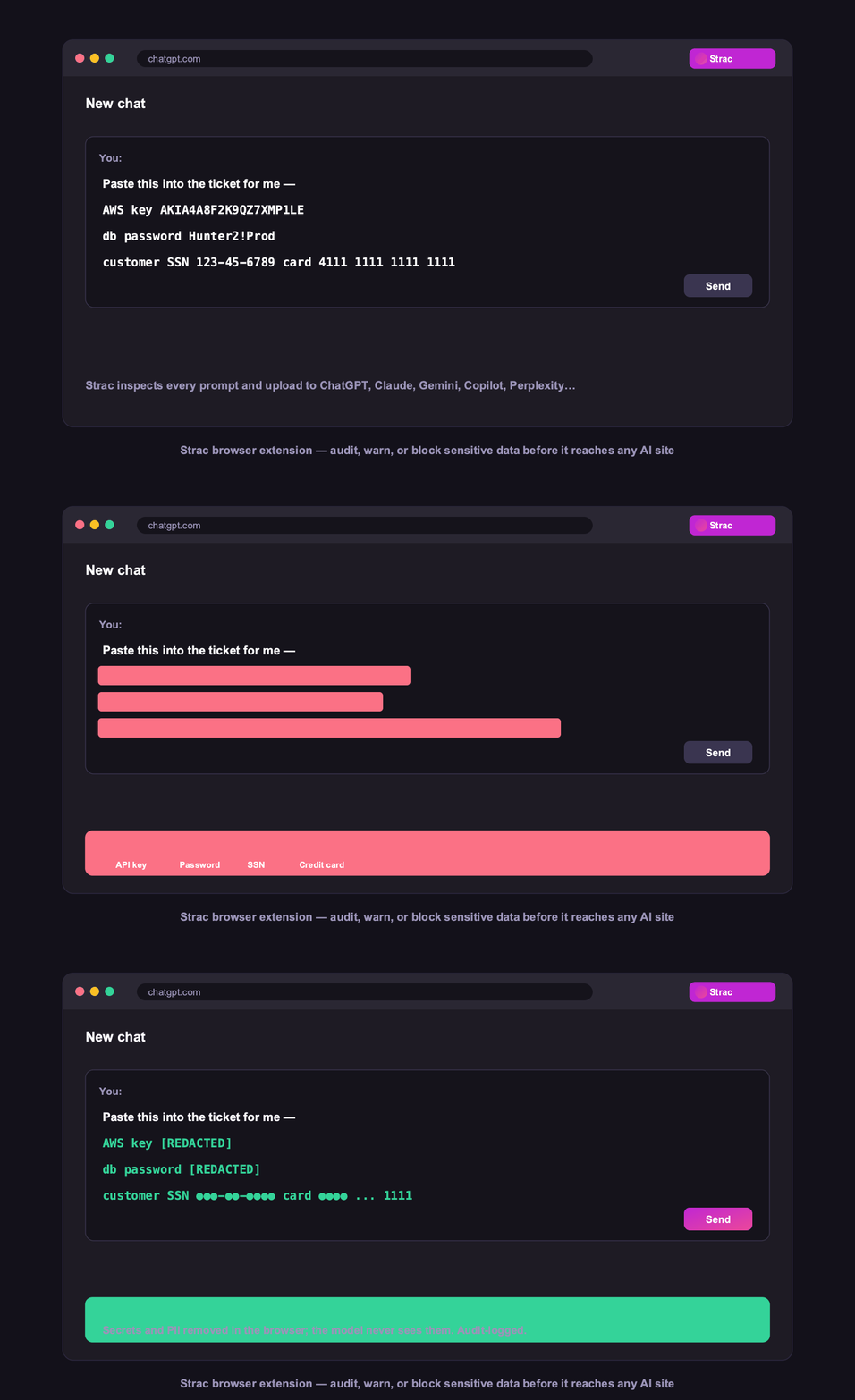
Strac [browser DLP](https://www.strac.io/integration/browser-dlp) inspects every prompt and upload before it's sent — across ChatGPT, Claude, Gemini, Copilot, Perplexity, and more — redacting or blocking PII, PHI, secrets, and source code. More in [GenAI DLP](https://www.strac.io/blog/ai-dlp).Content-level detection — PII, PHI, PCI, 48+ secret patterns, source code, and text inside images via OCR — tokenized inline before the model sees it.
✨ Cover the Endpoint, SaaS, and MCP
AI safety can't stop at the browser. Strac covers every surface AI touches:
Endpoint:endpoint DLP protects desktop AI apps and coding agents, with monitoring of who used what.
Per-user, per-action visibility on the endpoint — see [monitor AI agents](https://www.strac.io/blog/monitor-ai-agents).
SaaS & cloud:SaaS DLP discovers and redacts sensitive data across 50+ apps, so it's protected before any AI reaches it.
One control plane across SaaS, cloud, GenAI, browser, and endpoints. Browse [all integrations](https://www.strac.io/integrations).
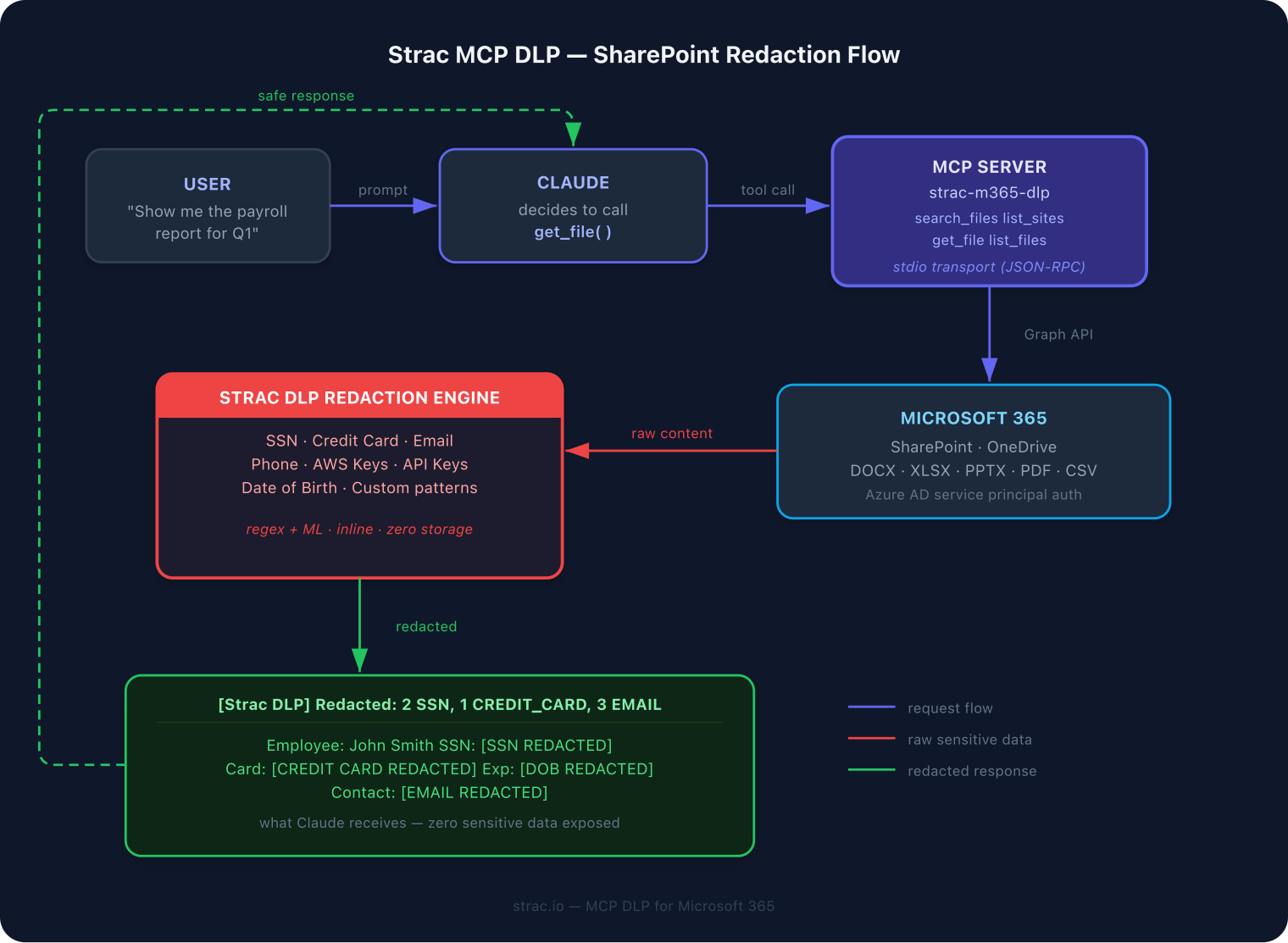
MCP — the ingress frontier:MCP DLP governs every tool call between an agent and your systems.
Strac inspects and redacts every MCP tool call across the [MCP connector directory](https://www.strac.io/mcp-integrations) — before any data reaches the model.
Strac: One Control Plane to Make AI Safe at Work
Strac governs AI across every surface with the See → Control → Protect → Prove model:
See — discover every AI tool and agent touching your data.
Control — allow, block, or require approval per tool, agent, and action.
Protect — redact, mask, tokenize, or vault sensitive data in the browser, on endpoints, across SaaS, and on every MCP call.
Prove — log every event as audit evidence mapped to SOC 2, HIPAA, PCI, GDPR, the EU AI Act, and ISO 42001.
One inline pass before anything reaches the model — five actions, your policy:
Detect — finds the PII, PHI, or secrets typed into any AI tool: PII, PHI, PCI, secrets, and source code, including text inside screenshots via OCR.
Redact or mask — replaces the sensitive elements inline so AI still answers and never sees the raw data.
Block or warn — stops the prompt, or warns the user before it is sent, by policy.
Alert — notifies your security team and streams the event to your SIEM (Datadog, Splunk, Chronicle).
Audit — logs the user, the AI tool, the data involved, and the action taken — evidence for SOC 2, HIPAA, GDPR, and ISO 42001.
Bottom Line
Is AI safe to use at work? Yes — when you govern your data, not just trust the tool. The models are secure enough; the exposure is sensitive data leaving through the browser, the endpoint, your SaaS, and MCP connectors. Put Strac across all four, and your team gets the productivity of AI while the sensitive data never reaches a model it shouldn't — provable to any auditor.
✨ Is AI Safe for Confidential (and Client) Information?
Across every AI tool the answer rhymes: consumer tiers may retain or train on what you type, enterprise tiers are more conservative, but in all cases the confidential information you enter still reaches the model — and no AI vendor stops your own employees from pasting a client's SSN, a signed contract, or source code into a prompt. That's the exposure regulators and security teams actually care about.
The only reliable safeguard for confidential and client information is to redact it before it reaches the AI — automatically, not by policy. Strac's AI DLP inspects prompts across ChatGPT, Claude, Gemini, Copilot, and any AI surface and removes PII, PHI, PCI, and secrets in real time.
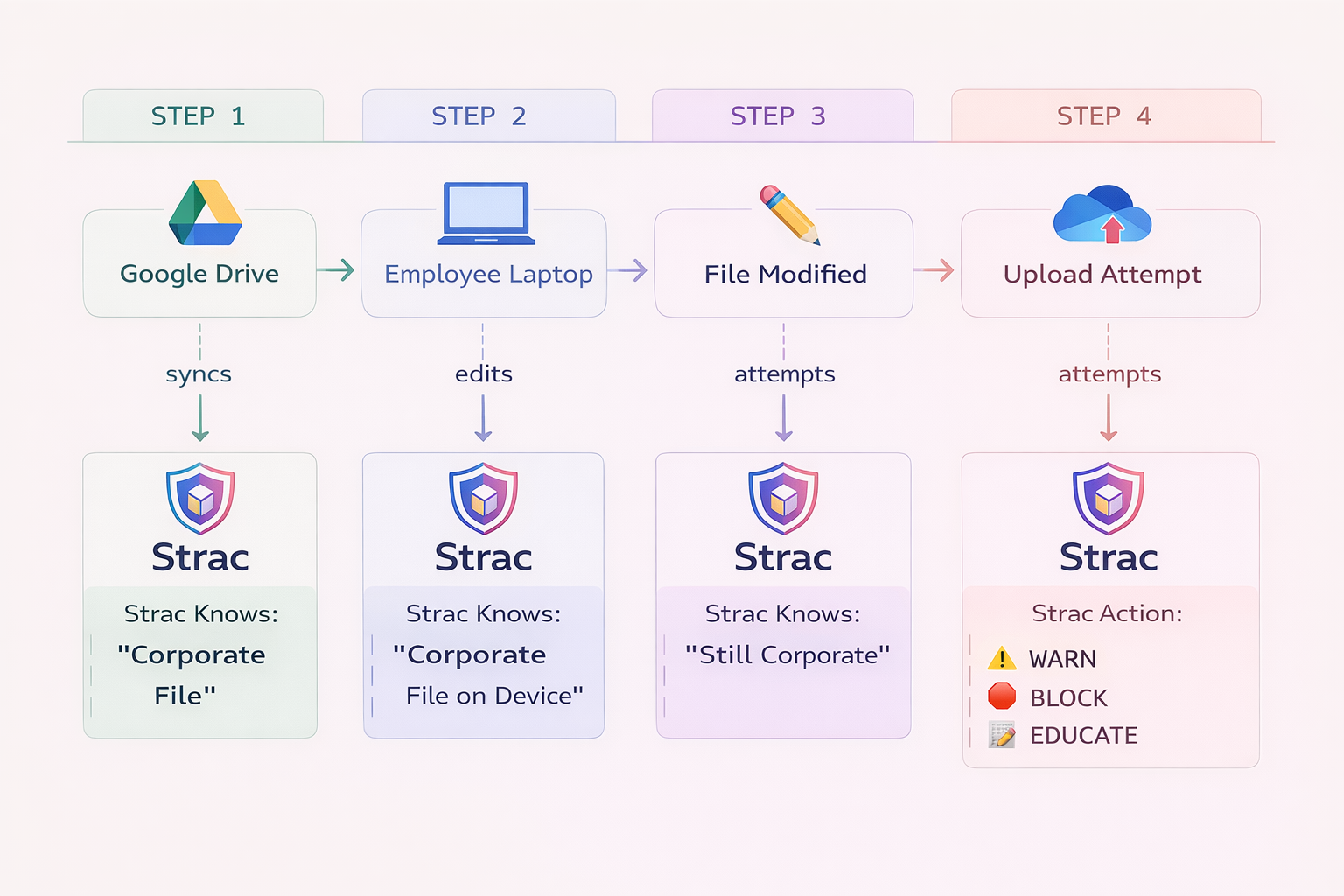
The strongest deployments don't stop at redaction: Strac can warn the employee before they submit a sensitive prompt or file, or block it entirely — enforcing the confidential-data rule instead of trusting people to follow it.
Strac warns the user — or blocks the prompt entirely — before sensitive data is submitted.
For the per-tool privacy policies behind these answers, see AI data privacy.
🌶️ Spicy FAQs for Is AI Safe to Use at Work
Is AI safe to use at work?
Yes, if you control your data. The major AI vendors secure their infrastructure; the risk is sensitive data being pasted into prompts or pulled in by agents. Strac redacts that data before it reaches any model, across browser, endpoint, SaaS, and MCP.
What is the biggest risk of using AI at work?
Sensitive data leaving your control — customer PII, PHI, payment data, secrets, and source code entering prompts, or AI agents pulling regulated data from your systems via MCP. The model is rarely the breach point; the data path is.
Which AI tools are safe for enterprise use?
Reputable enterprise tiers (ChatGPT Enterprise, Claude for Work, Microsoft Copilot, Workspace Gemini, Perplexity Enterprise) offer strong baselines; newer or consumer tools like Grok and DeepSeek warrant more caution. Either way, add a data-control layer — compare them via is ChatGPT safe, is Claude AI safe, and is DeepSeek safe.
How do I let employees use AI without leaking data?
Discover what's being used, then redact sensitive data before it's submitted and govern what agents can reach. Strac does this across the browser, endpoints, SaaS, and MCP — without blocking the productivity.
How does Strac make AI safe at work?
Strac is one control plane across every surface AI touches: it discovers usage, redacts or blocks sensitive data before it reaches any model, governs agent calls at the MCP layer, and logs every event as compliance evidence. Agentless, under 10 minutes.
Yes, if you control your data. The major AI vendors secure their infrastructure; the risk is sensitive data being pasted into prompts or pulled in by agents. Strac redacts that data before it reaches any model, across browser, endpoint, SaaS, and MCP.
What is the biggest risk of using AI at work?
Sensitive data leaving your control — customer PII, PHI, payment data, secrets, and source code entering prompts, or AI agents pulling regulated data from your systems via MCP. The model is rarely the breach point; the data path is.
Which AI tools are safe for enterprise use?
Reputable enterprise tiers (ChatGPT Enterprise, Claude for Work, Microsoft Copilot, Workspace Gemini, Perplexity Enterprise) offer strong baselines; newer or consumer tools like Grok and DeepSeek warrant more caution. Either way, add a data-control layer — compare them via is ChatGPT safe, is Claude AI safe, and is DeepSeek safe.
How do I let employees use AI without leaking data?
Discover what's being used, then redact sensitive data before it's submitted and govern what agents can reach. Strac does this across the browser, endpoints, SaaS, and MCP — without blocking the productivity.
How does Strac make AI safe at work?
Strac is one control plane across every surface AI touches: it discovers usage, redacts or blocks sensitive data before it reaches any model, governs agent calls at the MCP layer, and logs every event as compliance evidence. Agentless, under 10 minutes.
Discover & Protect Data on SaaS, AI, MCP, Endpoints & Cloud
Strac provides end-to-end data loss prevention for all SaaS and Cloud apps. Integrate in under 10 minutes and experience the benefits of live DLP scanning, live redaction, and a fortified SaaS environment.


.webp)







.avif)



.gif)
