Is Claude AI Safe? Enterprise Security Guide (2026)
Is Claude AI safe for business use? We break down Claude's built-in protections, the gaps they leave (MCP, browser, endpoint), and how to enforce real DLP across every Claude surface.
Claude has strong built-in safety: Constitutional AI, encryption at rest and in transit, opt-out training controls, and SOC 2/HIPAA compliance on Enterprise plans
But Claude's own safety features cannot protect the data you paste, upload, or connect to it — that is your responsibility
The real risk is not Claude itself — it is the five surfaces where sensitive data flows into Claude: browser tabs, Claude Desktop, MCP connectors, API calls, and file uploads
MCP connectors are the newest and most dangerous vector — Claude can now pull data directly from Slack, Google Drive, Microsoft 365, Notion, Jira, Confluence, and databases
Enterprise-grade DLP that intercepts data before it reaches Claude's context window is the only way to use Claude safely with regulated or sensitive data
Yes — with caveats. Claude is safe to use for most general tasks, but whether Claude is safe for your business depends entirely on what data your employees are sending to it.
Strac makes Claude safer to adopt at work: it integrates with the Claude Compliance API to give security teams real-time visibility into the sensitive data flowing through Claude Enterprise, and redacts it inline.
Claude is one of the safest large language models available today. Anthropic, the company behind Claude, was founded specifically to build safe AI. Their research on Constitutional AI, interpretability, and alignment is among the most rigorous in the industry. How safe is Claude AI compared to alternatives? On the model safety front, it leads the industry.
But "Is Claude safe?" is the wrong question for any enterprise security team. The right question is: "Is the data flowing into Claude safe?"
Claude does not go looking for your sensitive data. Your employees send it there. They paste customer records into prompts. They upload spreadsheets with PII. They connect Claude to SharePoint via MCP and ask it to summarize a payroll report. Claude processes whatever it receives — faithfully and without filtering.
That is the gap this guide covers: where Claude's built-in safety ends, and where your organization's data protection must begin.
How Claude Protects Your Data: Anthropic's Built-In Safety
Credit where it is due — Claude's safety architecture is substantial. Here is what Anthropic provides natively.
Constitutional AI
Claude is trained using Constitutional AI (CAI), a framework where the model evaluates its own outputs against a set of principles before responding. Unlike competitors that rely primarily on human feedback loops, CAI gives Claude an internal reasoning layer for safety decisions. This means Claude will refuse to generate harmful content, flag potentially sensitive outputs, and decline requests that violate its usage policy — without needing a human in the loop for every edge case.
Data Retention and Training Policies
Anthropic's data handling depends on which plan you use:
Feature
Free / Pro
Team
Enterprise / API
Conversations used for training
Opt-out available
Not by default
Never
Data retention
Up to 5 years
Shorter retention
Customer-controlled
Encryption at rest
AES-256
AES-256
AES-256
Encryption in transit
TLS 1.2+
TLS 1.2+
TLS 1.2+
SOC 2 Type II
Shared environment
Yes
Yes
HIPAA BAA available
No
No
Yes
SSO / SCIM
No
Yes
Yes
Admin audit logs
No
Limited
Full
The critical distinction: If your team is using Claude Free or Pro accounts for business work, Anthropic may retain conversations for up to five years and use them for model training (unless each user individually opts out). Enterprise and API plans give you contractual data protection guarantees that the consumer plans do not.
Encryption and Access Controls
All Claude plans include AES-256 encryption at rest and TLS 1.2+ encryption in transit. Anthropic employees cannot access your conversations by default — access requires explicit consent or a policy violation investigation, with strict internal controls.
Anthropic holds SOC 2 Type II certification. HIPAA Business Associate Agreements are available on Enterprise plans. Claude's infrastructure runs on AWS and GCP with standard cloud security controls.
Where Claude's Built-In Safety Falls Short
Here is what Anthropic's safety features do not cover — and what most "Is Claude safe?" articles ignore.
Claude Cannot Filter What You Send It
Claude's safety mechanisms are designed to control what Claude outputs. They do not inspect, classify, or redact what you input. If an employee pastes a customer's Social Security number, credit card number, or medical record into a Claude prompt, Claude will process it. The data enters Claude's context window, gets transmitted to Anthropic's servers, and is subject to whatever retention policy applies to your plan.
Anthropic's safety features are a seatbelt. Your DLP is the brake.
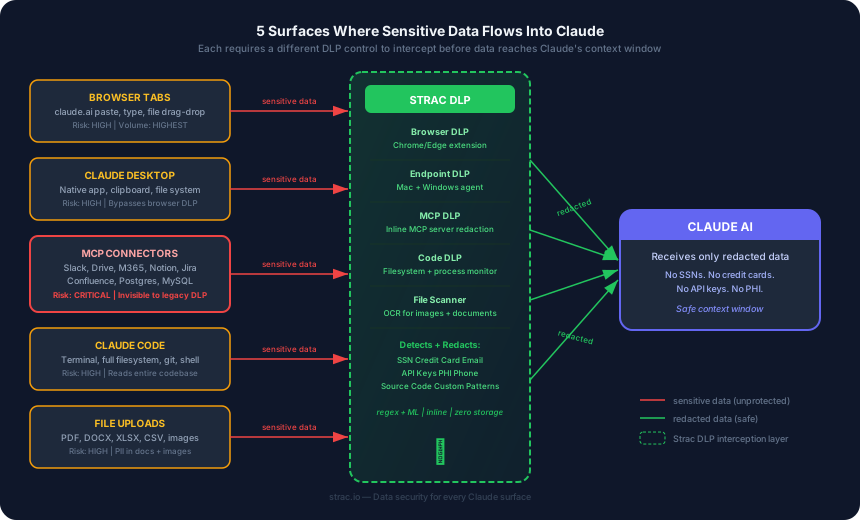
The Five Surfaces Where Data Leaks Into Claude
Every interaction with Claude happens through one of five surfaces. Each has a different risk profile, and each requires a different protection mechanism.
Each surface requires a different DLP control to intercept data before it reaches Claude's context window
1. Browser tabs (claude.ai, Claude in third-party apps)
The most common surface. Employees type or paste sensitive data directly into Claude's web interface. Copy-paste from internal tools, customer databases, support tickets, code repositories — all of it goes straight to Claude. Browser DLP is the only control that can intercept this at the point of entry.
On managed devices, Strac’s content-aware endpoint agent for Mac and Windows extends the same control to every desktop app, including the Claude desktop app: it can block, warn, allow, or audit when sensitive or customer data is pasted, uploaded, or screenshotted (read via OCR), across every file format Strac supports. For Claude in the browser, the Strac browser extension (Chrome, Firefox, Edge, and Safari) enforces the same policies at the point of input.
Strac's browser extension redacts sensitive data in real time before it reaches Claude
2. Claude Desktop application
Claude's native desktop app for Mac and Windows bypasses browser-based controls entirely. Employees can drag files, paste clipboard content, and interact with Claude outside any browser extension's reach. Endpoint DLP with OS-level clipboard and file monitoring is required to cover this surface.
3. MCP connectors (the newest and most dangerous vector)
This is the risk that no other "Is Claude safe?" article covers — because it is new, and most security vendors have not caught up.
Claude Desktop and Claude for Work now support the Model Context Protocol (MCP). MCP lets Claude connect directly to your organization's SaaS tools and pull data autonomously:
Slack — read channels, search messages, pull conversation history containing customer data
Google Drive — open and read documents, spreadsheets, and presentations
Microsoft 365 — access SharePoint files, OneDrive documents, Outlook emails, Teams messages
Notion — query pages, databases, and workspace content
Jira — read tickets, comments, attachments, and project metadata
Confluence — search and retrieve wiki pages and internal documentation
Databases — connect to Postgres, MySQL, SQLite and run queries directly
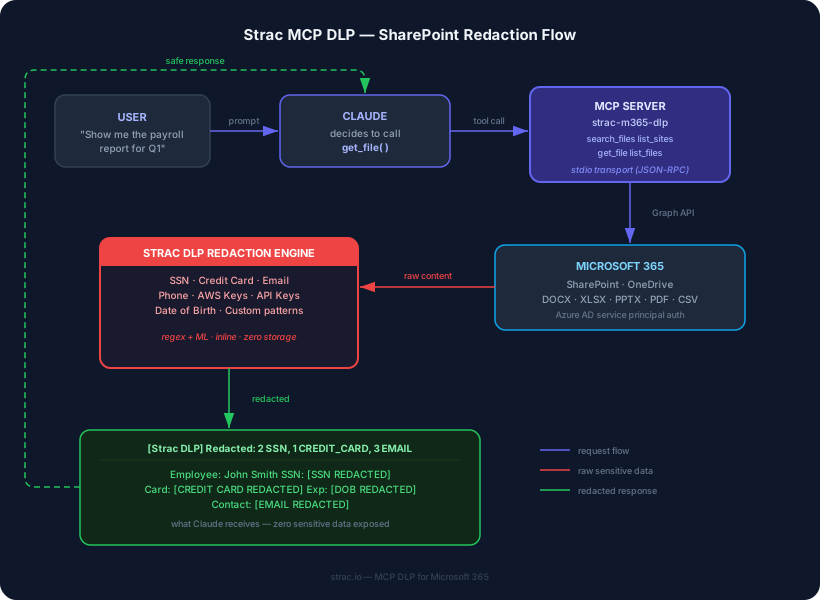
When an employee asks Claude "pull the Q1 payroll report from SharePoint," Claude calls get_file() through an MCP server, retrieves the raw document via Microsoft Graph API, and loads the full contents — SSNs, salaries, bank accounts, everything — into its context window.
Traditional DLP cannot see this traffic. It is not a browser upload, not an email, not a file download. It is a machine-to-machine API call inside the user's local environment. Your proxy, your CASB, and your endpoint agent are all blind to it.
MCP DLP that sits between Claude and every connected data source — intercepting and redacting sensitive content before it reaches the model — is the only protection that works here.
Developers using Claude's API send prompts programmatically — often with dynamic content pulled from databases, user inputs, or internal systems. A poorly scoped API call can send thousands of customer records to Claude in a single request. API-level DLP scans payloads before they leave your infrastructure.
5. File uploads
Claude accepts PDF, DOCX, XLSX, CSV, and image uploads. Employees routinely upload documents containing PII, financial data, or protected health information for Claude to summarize or analyze. File-level scanning with OCR (including inside images — most DLP tools miss this) is required.
Is Claude Code Safe?
Claude Code is Anthropic's command-line coding agent that operates directly in your terminal. It can read, write, and modify files across your entire codebase, run shell commands, interact with git, and make API calls — all autonomously based on natural language instructions.
Is Claude Code safe to use? For open-source side projects, yes. For proprietary enterprise codebases, it requires the same caution as giving a contractor full access to your repository.
Here is what makes Claude Code different from using Claude in a browser:
Full filesystem access. Claude Code reads any file in your project directory (and sometimes beyond). Proprietary source code, configuration files with secrets, .env files with API keys, database connection strings — all of it flows into Claude's context window.
Shell command execution. Claude Code can run arbitrary commands in your terminal. This includes curl calls, database queries, package installations, and any other command your user account has permissions to run.
Git operations. Claude Code can commit, push, and create pull requests. A poorly scoped session could push sensitive data to a public repository.
No browser extension coverage. Since Claude Code runs in the terminal, browser DLP is irrelevant. Endpoint DLP with file-level and process-level monitoring is the only control surface.
Is Claude Code safe for work on production codebases? Only with proper guardrails: endpoint DLP to scan files before they enter Claude's context, restricted directory scoping, and audit logging of every file Claude Code reads.
For teams using Claude Code alongside Cursor, Windsurf, or GitHub Copilot — endpoint DLP covers all of them from a single agent.
Is Claude Cowork Safe?
Claude Cowork (now branded as Claude for Work) is Anthropic's collaborative AI workspace where teams can share projects, documents, and Claude conversations. Think of it as a shared Claude environment with persistent context.
Is Claude Cowork safe to use? The collaboration features that make Cowork powerful also amplify the data security risks:
Shared context. When one team member uploads a document or shares a conversation, that data becomes accessible to everyone in the workspace. A finance team member's payroll upload is now in the same context as the marketing intern's brainstorming session.
Persistent files. Unlike standard Claude conversations that eventually expire, Cowork workspaces persist files and context long-term. This increases the window of exposure for any sensitive data uploaded to the workspace.
MCP connectors in shared workspaces. When MCP connectors are configured in a Cowork environment, every workspace member potentially gains access to data pulled from Slack, Google Drive, SharePoint, and other connected sources — regardless of their individual access permissions in those source systems.
The Cowork file exfiltration vulnerability. As documented in the security incidents section below, researchers found a vulnerability in Cowork that allowed malicious file content to trigger data exfiltration — reported three months before launch and not patched in time.
Here is how Strac's MCP DLP intercepts sensitive data before it reaches Claude in a Cowork workspace — using a SharePoint payroll report as an example:
Strac's MCP DLP redacts SSNs, credit cards, and PII inline before Claude processes SharePoint documents
The same redaction flow applies across every MCP connector — Slack, Google Drive, Notion, Jira, Confluence, and databases. See the full MCP DLP architecture →
For organizations evaluating Claude Cowork: use Enterprise plans only, restrict file uploads to non-sensitive content, and deploy DLP that scans both uploads and MCP-sourced data before they enter the shared workspace.
Real-World Claude Security Incidents
Claude's safety is not theoretical. Here are documented incidents and vulnerabilities that enterprise security teams should know about.
The Three-Vulnerability Attack Chain (2025)
Security researchers discovered three high-risk vulnerabilities in Claude.ai that, chained together, formed a complete attack path for data exfiltration. An attacker could extract sensitive information from a user's Claude session without their knowledge. Anthropic patched one vulnerability immediately; fixes for the remaining two were in progress.
The Cowork File Exfiltration Vulnerability (2026)
When Anthropic launched Claude Cowork (now Claude for Work), researchers disclosed a file exfiltration vulnerability that had been reported three months before Cowork launched — and was not patched in time. The vulnerability allowed malicious content in shared files to trigger Claude to exfiltrate data from the user's workspace.
Prompt Injection Across MCP Connectors
As Claude gains access to more external data via MCP, prompt injection attacks become more dangerous. A malicious instruction hidden in a Confluence page, a Jira ticket description, or a shared Google Doc could manipulate Claude's behavior when it reads that content through an MCP connector — potentially causing it to exfiltrate data from other connected sources.
The Samsung Precedent (2023)
While not a Claude-specific incident, Samsung's repeated ChatGPT · Is DeepSeek Safe? data leaks remain the most cited enterprise AI security failure. Samsung engineers pasted proprietary semiconductor source code into ChatGPT three separate times within 20 days. Samsung's response was to ban ChatGPT entirely — destroying AI productivity to protect data security. Browser DLP would have prevented all three incidents without a blanket ban.
Claude AI Safety by Use Case
Not every use of Claude carries the same risk. Here is a practical risk matrix:
Use Case
Risk Level
Claude's Built-In Safety
Additional Protection Needed
Casual questions, writing help
Low
Sufficient
None
Summarizing public documents
Low
Sufficient
None
Analyzing internal business docs
Medium
Insufficient
Browser DLP + file scanning
Processing customer data
High
Insufficient
Browser DLP + data classification
Regulated data (HIPAA, PCI, SOC 2)
Critical
Insufficient
Full DLP stack + audit logging
MCP connectors to SaaS apps
Critical
None
MCP DLP with inline redaction
Claude Desktop with sensitive files
High
Insufficient
Endpoint DLP
API integrations with customer data
High
Insufficient
API-level DLP + payload scanning
Claude Code with proprietary repos
High
Insufficient
Endpoint DLP + code scanning
Claude Cowork shared workspaces
High
Insufficient
DLP + access controls + file scanning
How to Make Claude AI Safe for Your Organization
Claude's built-in safety is a foundation, not a complete solution. Here is what to layer on top.
Step 1: Enforce the Right Claude Plan
Move every employee off Free/Pro and onto Team or Enterprise. This is non-negotiable for any organization handling sensitive data. Enterprise gives you: no training on your data (contractual), HIPAA BAA, SSO, SCIM, admin audit logs, and shorter data retention.
Step 2: Deploy Browser DLP for Claude
Every paste, every keystroke, every file drag-and-drop into claude.ai or any Claude-powered web app should be scanned in real time. Browser DLP detects sensitive data (SSNs, credit cards, API keys, PHI, custom patterns) and either redacts it inline or blocks the submission — before the data ever leaves the browser.
This is the highest-impact control because the browser is where the majority of Claude interactions happen.
Real-time redaction in any AI-powered web app — no proxy, no TLS interception
No proxy. No TLS interception. A Chrome, Edge, Firefox, and Safari extension that deploys in minutes.
Step 3: Deploy MCP DLP for Claude's Connectors
If your organization uses Claude Desktop or Claude for Work with MCP connectors, this is your most critical control. MCP DLP sits between Claude and every connected data source — Slack, Google Drive, Microsoft 365, Notion, Jira, Confluence, databases — and redacts sensitive content before it enters Claude's context window.
Here is how it works: when Claude calls get_file() through an MCP server, Strac's DLP redaction engine intercepts the raw content, detects SSNs, credit cards, emails, API keys, and custom patterns using regex + ML, and returns the redacted version to Claude. The model never sees the sensitive data. Zero storage. Zero latency impact.
Claude Desktop is a native application that bypasses all browser-based controls. Endpoint DLP monitors clipboard operations, file system access, and application-level data flows at the OS level — catching sensitive data before it reaches Claude Desktop, Cursor, or any other AI application.
Step 5: Audit and Monitor
Every DLP action — every detection, every redaction, every block — should feed into your SIEM or SOAR platform. Build dashboards that show: which employees are sending sensitive data to Claude, what types of data are being caught, which MCP connectors are the highest risk, and whether your policies need adjustment.
Strac: Enterprise-Grade Data Security for Claude
Strac is the only data security platform that protects all five Claude surfaces from a single console:
Browser DLP — real-time redaction of sensitive data in claude.ai and every AI-powered web app. Chrome, Edge, Firefox, and Safari extension, deploys in under 10 minutes
MCP DLP — inline redaction across every MCP-connected data source. Sensitive data is detected and masked before it enters Claude's context window
Endpoint DLP — OS-level protection for Claude Desktop, Cursor, and native AI apps on Mac and Windows
SaaS DLP — protection across 50+ integrations including Slack, Google Drive, Microsoft 365, Zendesk, Jira, Salesforce, and more
File and image scanning — the only DLP that detects and redacts PII, PCI, and PHI inside images (JPEG, PNG) and documents (PDF, DOCX, XLSX) — not just plain text
All detection uses regex + ML classification with 100+ built-in sensitive data types plus custom patterns. All redaction is inline and zero-storage. Deployment takes minutes, not months.
Strac protects 50+ integrations from a single console
Book a demo → to see how Strac secures Claude across browser, endpoint, MCP, and SaaS — in a single 15-minute call.
Related Strac guides on Claude security
Strac has the deepest coverage of Claude (and Anthropic) data security in the market:
One inline pass before anything reaches the model — five actions, your policy:
Detect — finds the PII or source code dropped into a chat: PII, PHI, PCI, secrets, and source code, including text inside screenshots via OCR.
Redact or mask — replaces the sensitive elements inline so Claude still answers and never sees the raw data.
Block or warn — stops the prompt, or warns the user before it is sent, by policy.
Alert — notifies your security team and streams the event to your SIEM (Datadog, Splunk, Chronicle).
Audit — logs the user, the AI tool, the data involved, and the action taken — evidence for SOC 2, HIPAA, GDPR, and ISO 42001.
Bottom Line
Claude AI is safe — Anthropic has built one of the most thoughtful safety architectures in the industry. But Claude's safety protects you from Claude. It does not protect Claude from the sensitive data your employees send to it.
The browser tab, the desktop app, the MCP connectors pulling from Slack and SharePoint, the file uploads, the API calls — these are all pipelines of raw, unfiltered data flowing into Claude's context window. Claude will process whatever it receives. It is your job to make sure what it receives is safe.
Deploy DLP across every Claude surface. Redact before the model sees it. Audit everything. That is what makes Claude safe for enterprise use.
✨ Is Claude Safe for Confidential Information?
Anthropic doesn't train on your inputs by default, and Claude Enterprise adds admin controls — so Claude is more conservative with data than most consumer AI. But whether it's safe for confidential information still hinges on tier and surface: consumer plans and Claude Cowork carry no BAA, so pasting regulated data into them is a compliance problem regardless of Anthropic's training stance, and any confidential document still enters the model's context.
The fix is to keep the confidential data out of the prompt in the first place. Strac redacts PII, PHI, PCI, and secrets before they reach Claude — across chat, Claude Code, and MCP connectors. See Claude DLP and is Claude HIPAA compliant.
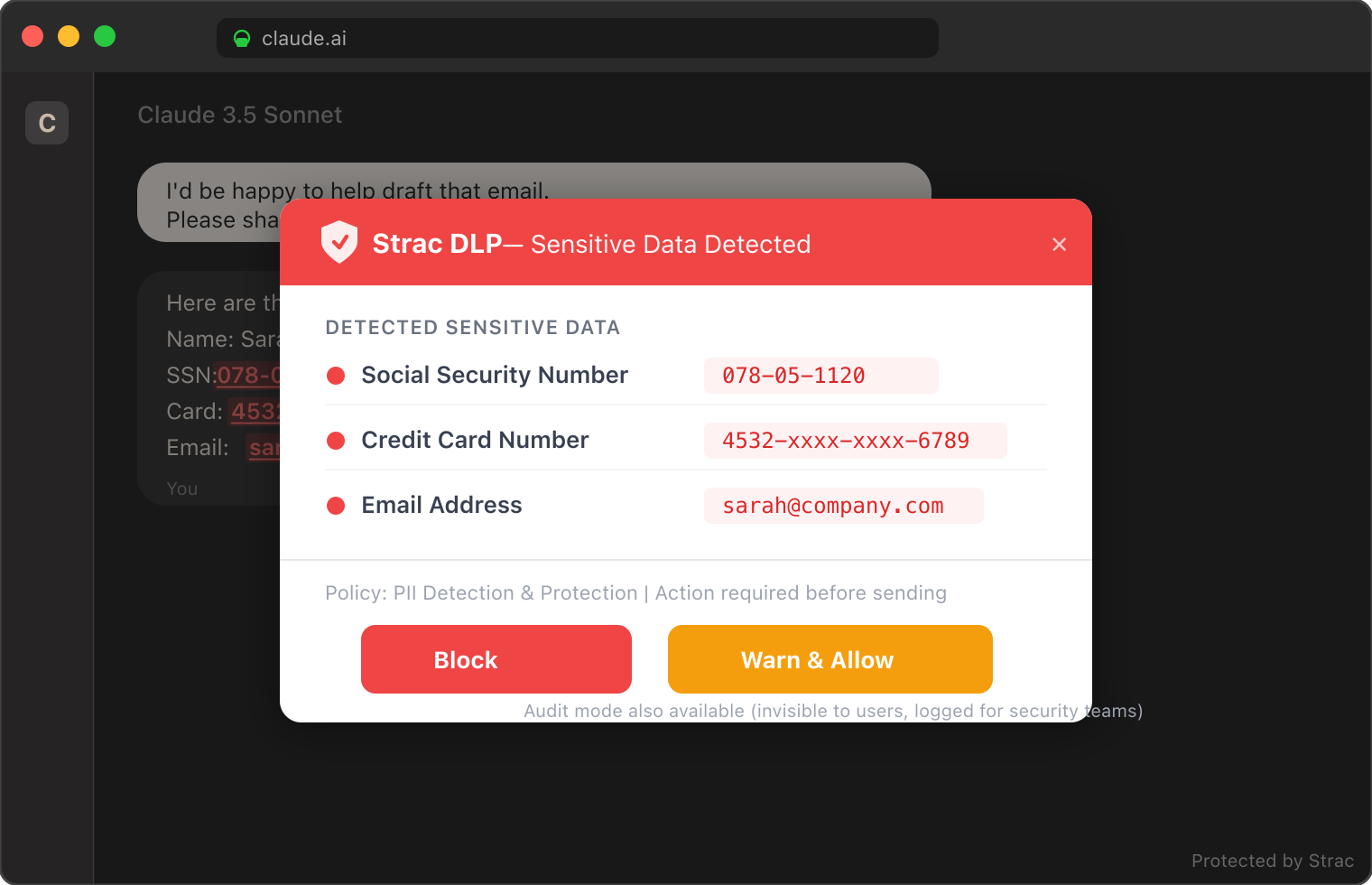
Strac doesn't only redact: it can warn the user before they submit a sensitive prompt or file, or block it entirely — the block, warn, and redact model shown below, applied to every Claude surface.
Strac's block-warn-redact model: sensitive data is caught before it reaches Claude.
Claude is safe for general business use on Team or Enterprise plans, which provide contractual guarantees that your data will not be used for training. However, "safe" does not mean "secure." Claude will process any sensitive data you send it — SSNs, credit cards, PHI, API keys — without filtering. For business use involving sensitive or regulated data, you need DLP that intercepts data before it reaches Claude.
Does Claude train on my data?
On Free and Pro plans, Claude may use your conversations for model training unless you opt out in settings. On Team, Enterprise, and API plans, your data is never used for training. This is a contractual guarantee, not just a setting.
Is Claude safer than ChatGPT?
Claude and ChatGPT have comparable enterprise safety features. Both offer encryption, SOC 2 compliance, and enterprise plans with no-training guarantees. Claude's Constitutional AI approach provides an additional layer of self-evaluation on outputs. However, neither tool protects the data you input — that requires external DLP regardless of which model you use.
Can Claude access my company's SaaS apps through MCP?
Yes. Claude Desktop and Claude for Work support the Model Context Protocol (MCP), which lets Claude connect directly to Slack, Google Drive, Microsoft 365 (SharePoint, OneDrive, Teams, Outlook), Notion, Jira, Confluence, and databases. While this enables powerful AI workflows, it creates a direct pipeline for sensitive data to enter Claude's context window without any filtering. See how MCP DLP solves this → · Is Microsoft Copilot Safe? · Is Gemini Safe? · Is Grok Safe? · Is Perplexity Safe? · Is AI Safe to Use at Work?
What data does Claude retain and for how long?
Retention depends on your plan. Free/Pro conversations may be retained for up to five years. Enterprise and API data retention is customer-controlled and contractually limited. Safety-flagged conversations (where Claude detects potential harm) may be retained for review regardless of plan.
Is Claude HIPAA compliant?
Claude Enterprise offers HIPAA Business Associate Agreements (BAAs). Free, Pro, and Team plans do not. Even with a BAA, sending unredacted PHI to Claude creates compliance risk — HIPAA requires minimum necessary disclosure, which means you should redact PHI before Claude processes it.
Can Claude be tricked by prompt injection?
Yes. Prompt injection is a risk for all LLMs, including Claude. When Claude reads external content through MCP connectors (Confluence pages, Jira tickets, shared documents), malicious instructions embedded in that content could manipulate Claude's behavior. MCP DLP with content scanning helps mitigate this risk.
Does DLP slow down Claude?
No. Inline DLP redaction adds single-digit milliseconds to each interaction. Users experience no perceptible delay. Strac's detection engine runs locally in the browser extension (for browser DLP) and inline in the MCP server (for MCP DLP), minimizing network overhead.
Is Claude Desktop safe on shared computers?
Claude Desktop stores session tokens locally. On shared or public computers, other users could access your Claude session and conversation history. Use endpoint DLP with session management, and always sign out of Claude Desktop on shared machines. Enterprise plans with SSO provide better session control.
What compliance frameworks does Claude support?
Anthropic holds SOC 2 Type II certification. HIPAA BAAs are available on Enterprise plans. Claude's infrastructure aligns with GDPR requirements (EU data processing), CCPA (California privacy), and PCI DSS (when used with appropriate DLP controls). However, compliance is a shared responsibility — Anthropic secures the model and infrastructure, but you are responsible for securing the data you send to it.
How is Claude's MCP different from ChatGPT plugins?
MCP is an open protocol that allows Claude to connect to any data source through standardized tool calls. Unlike ChatGPT's plugin ecosystem (which routes through OpenAI's servers), MCP connections are local — Claude Desktop calls MCP servers running on the user's machine, which then connect to SaaS APIs. This means the data flows through the user's environment, not through Anthropic's infrastructure, which creates different security and DLP requirements.
Is Claude Code safe to use for work?
Claude Code has full filesystem access, can run shell commands, and interacts with git directly from your terminal. For open-source or personal projects, it is safe. For proprietary enterprise codebases, it requires endpoint DLP to scan files before they enter Claude's context, directory scoping to limit what Claude Code can read, and audit logging. The same applies to Cursor, Windsurf, and GitHub Copilot — endpoint DLP covers all terminal-based AI coding tools.
Is Claude Cowork safe to use?
Claude Cowork (Claude for Work) adds collaboration risks on top of standard Claude: shared context across team members, persistent file storage, and MCP connectors that may bypass individual access permissions in source systems. Additionally, a file exfiltration vulnerability was disclosed before Cowork launched and was not patched in time. Use Enterprise plans, restrict sensitive file uploads, and deploy DLP across all workspace inputs.
Is Claude safe for sensitive data?
No — not without additional protection. Claude will process any sensitive data you send it (SSNs, credit cards, PHI, API keys, source code) without filtering or redacting. Anthropic's safety features control Claude's outputs, not your inputs. For sensitive data, you need DLP that intercepts and redacts before the data reaches Claude's context window. This applies to every Claude surface: browser, desktop app, MCP connectors, API, and file uploads.
Can I use Claude safely without any additional tools?
For casual, non-sensitive use — yes. Claude's built-in safety is sufficient for writing help, brainstorming, public research, and general knowledge questions. For anything involving customer data, regulated information (HIPAA/PCI/SOC 2), proprietary code, or internal business documents, you need external DLP. The question is not whether Claude is safe, but whether the data you are sending to Claude is protected.
Claude is safe for general business use on Team or Enterprise plans, which provide contractual guarantees that your data will not be used for training. However, "safe" does not mean "secure." Claude will process any sensitive data you send it — SSNs, credit cards, PHI, API keys — without filtering. For business use involving sensitive or regulated data, you need DLP that intercepts data before it reaches Claude.
Does Claude train on my data?
On Free and Pro plans, Claude may use your conversations for model training unless you opt out in settings. On Team, Enterprise, and API plans, your data is never used for training. This is a contractual guarantee, not just a setting.
Is Claude safer than ChatGPT?
Claude and ChatGPT have comparable enterprise safety features. Both offer encryption, SOC 2 compliance, and enterprise plans with no-training guarantees. Claude's Constitutional AI approach provides an additional layer of self-evaluation on outputs. However, neither tool protects the data you input — that requires external DLP regardless of which model you use.
Can Claude access my company's SaaS apps through MCP?
Yes. Claude Desktop and Claude for Work support the Model Context Protocol (MCP), which lets Claude connect directly to Slack, Google Drive, Microsoft 365 (SharePoint, OneDrive, Teams, Outlook), Notion, Jira, Confluence, and databases. While this enables powerful AI workflows, it creates a direct pipeline for sensitive data to enter Claude's context window without any filtering. See how MCP DLP solves this →
What data does Claude retain and for how long?
Retention depends on your plan. Free/Pro conversations may be retained for up to five years. Enterprise and API data retention is customer-controlled and contractually limited. Safety-flagged conversations (where Claude detects potential harm) may be retained for review regardless of plan.
Discover & Protect Data on SaaS, AI, MCP, Endpoints & Cloud
Strac provides end-to-end data loss prevention for all SaaS and Cloud apps. Integrate in under 10 minutes and experience the benefits of live DLP scanning, live redaction, and a fortified SaaS environment.


.webp)







.avif)


.gif)
