Data Exfiltration: Channels, Detection & Prevention (2026)
Data exfiltration explained: the channels data actually leaves through — USB, cloud sync, AI tools, email — how to detect it on the endpoint, and how to prevent each path.
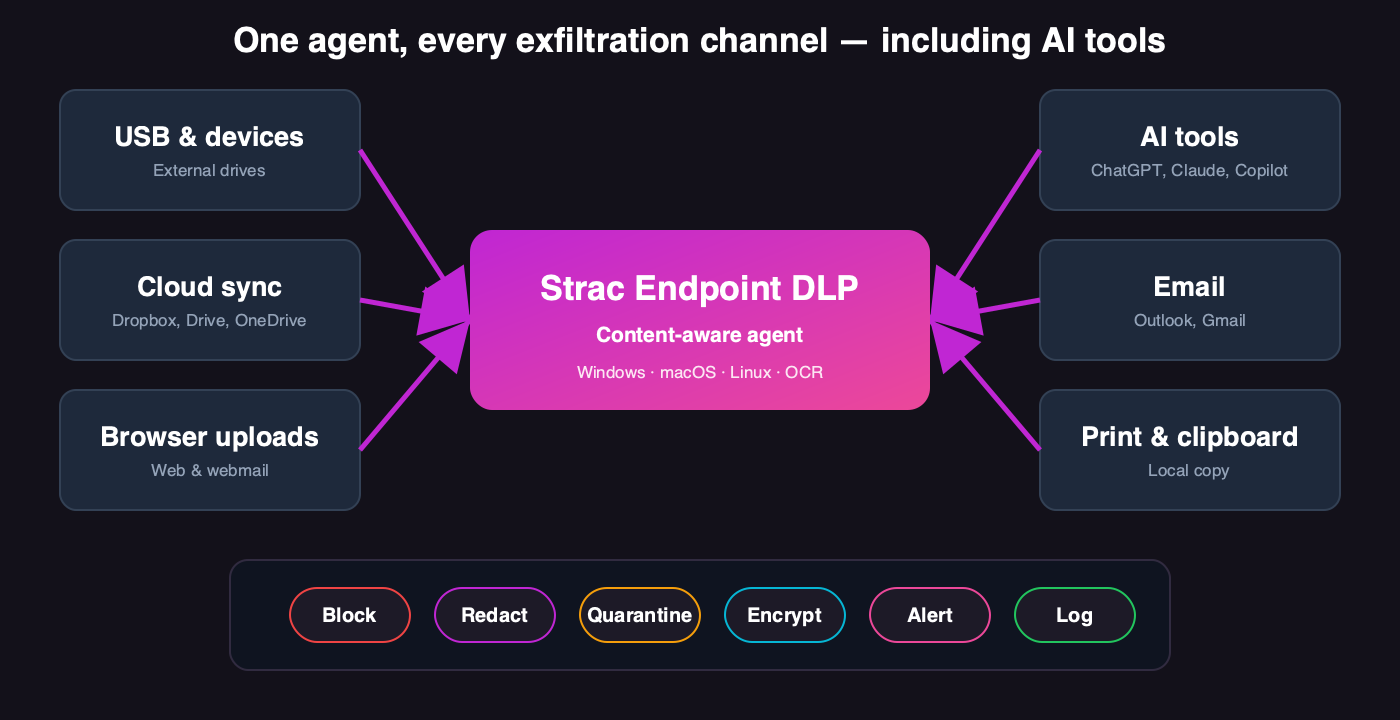
Data exfiltration is the unauthorized movement of data out of an organization — whether stolen by an attacker, taken by a departing employee, or leaked accidentally by someone doing their job. Most real-world exfiltration is not a dramatic breach; it is a file copied to a USB drive, a folder synced to personal cloud, or a customer record pasted into an AI tool. The common thread: it happens at the endpoint, often on a device that is off the corporate network, where perimeter defenses cannot see it.
The real map of data exfiltration: the paths data leaves through, and the controls that stop each one.
The Main Data Exfiltration Channels
Channel
How data leaves
How to stop it
Removable media
Copy to USB or external drive
Content-aware device control
Personal cloud sync
Drag into personal Dropbox/Drive/OneDrive
Cloud-sync monitoring on the endpoint
AI tools
Paste or upload into ChatGPT, Claude, Copilot
On-device AI detection and redaction
Web & personal email
Upload to a site or email to a personal address
Upload and email inspection
Screenshots & print
Capture or print sensitive records
Content inspection with OCR
SaaS & cloud at rest
Overshared files, exposed records
API-based DLP and DSPM
Why AI Tools Are the New Exfiltration Frontier
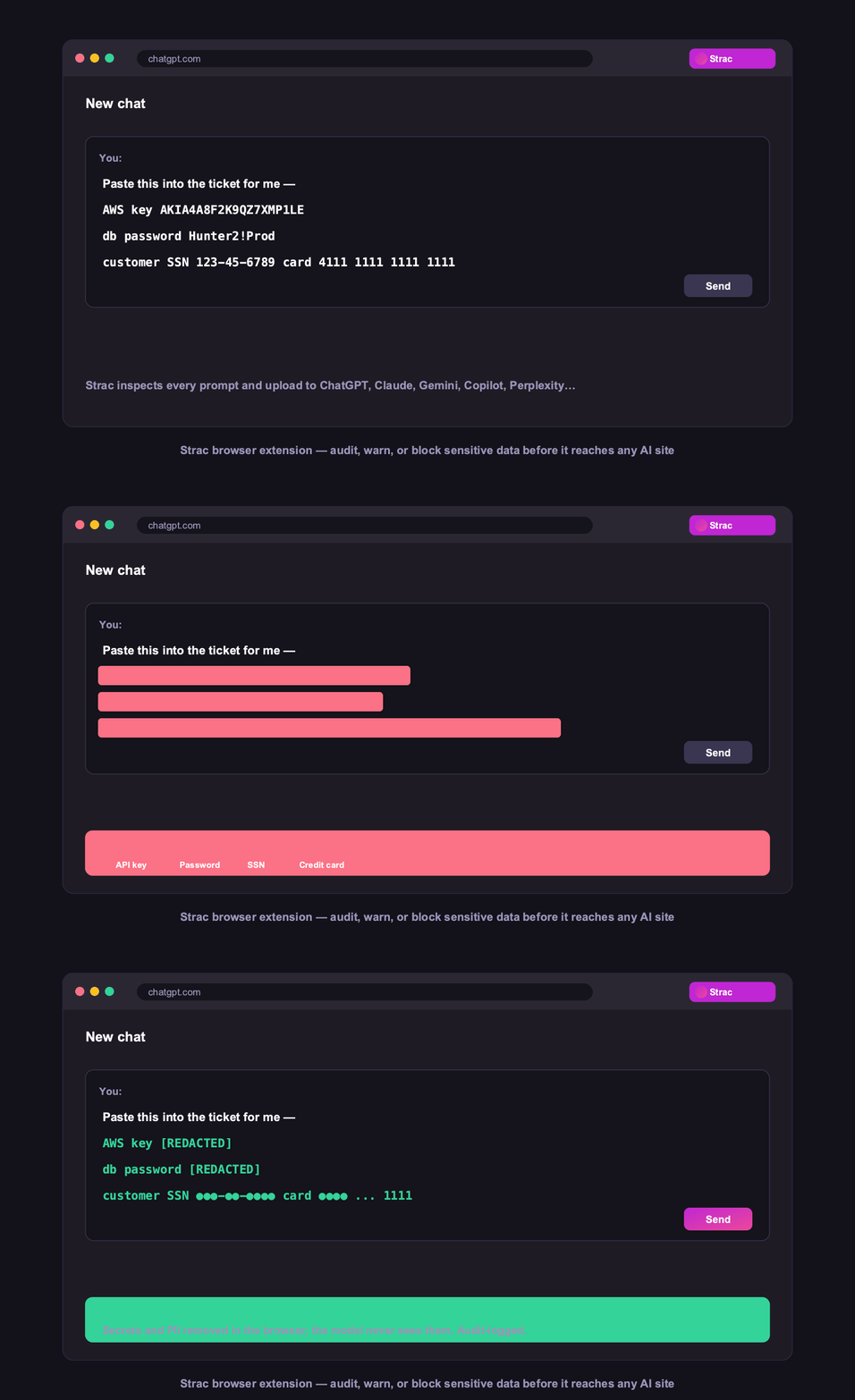
The channel growing fastest is also the one most organizations are least prepared for. Employees paste customer data, source code, and financial records into AI tools dozens of times a day to work faster — and because it feels productive rather than risky, it happens constantly and quietly. It rarely triggers a traditional DLP rule, it often happens on personal accounts, and the data is gone the instant the prompt is sent. Catching it requires detection on the device, at the moment of the prompt.
The newest exfiltration channel: a secret or customer record pasted into an AI tool, caught on the endpoint before it is submitted.
How to Prevent Data Exfiltration
Cover every channel from one agent — blocking USB alone just pushes the leak to cloud sync or an AI tool. See the endpoint DLP agent.
Inspect content, not just the action — block the sensitive transfer, allow the benign one, so controls stay on.
Redact, do not just block — let the work continue with the sensitive part removed.
Cover the data at rest too — pair endpoint control with DSPM for SaaS and cloud.
Log everything as evidence for SOC 2, HIPAA, PCI DSS, and GDPR.
Strac stops exfiltration across all of these — endpoint, SaaS, cloud, browser, and AI — detecting and remediating sensitive data at each exit rather than only alerting after it leaves.
🌶️ Spicy FAQs for Data Exfiltration
What is data exfiltration?
Data exfiltration is the unauthorized movement of data out of an organization — by an attacker, a departing employee, or an accidental leak. In practice most exfiltration is mundane: a file copied to USB, a folder synced to personal cloud, or a customer record pasted into an AI tool. It typically happens at the endpoint, often off the corporate network, which is why endpoint controls are central to preventing it.
What are the most common data exfiltration channels?
Removable media (USB), personal cloud sync (Dropbox, Drive, OneDrive), AI tools (ChatGPT, Claude, Copilot), web uploads and personal email, and screenshots or printing. Increasingly, AI tools are the fastest-growing channel because pasting data into a chatbot feels productive rather than risky. Data at rest in overshared SaaS files is a related exposure.
How do you detect data exfiltration?
The most reliable approach is content-aware detection at the point of egress: an endpoint agent inspects what is being copied, uploaded, or pasted and flags or blocks transfers containing sensitive data. Because much exfiltration never crosses the network, on-device detection catches what network monitoring misses — including prompts to AI tools on personal accounts.
Can DLP prevent data exfiltration through AI tools?
Modern DLP can. An endpoint agent that runs on the device detects sensitive data before it is pasted or uploaded into ChatGPT, Claude, Gemini, or Copilot, and redacts or blocks it — even on personal accounts IT does not manage. This is now essential, because AI tools have become one of the most common and least-monitored exfiltration channels. See AI DLP.
What is the difference between data exfiltration and a data breach?
A data breach is any unauthorized exposure of data; data exfiltration specifically refers to data being moved out of the organization. Exfiltration is often the goal of a breach, but it also happens without one — a legitimate employee accidentally leaking data through an AI tool is exfiltration without an external attacker. Preventing it means controlling data movement, not just blocking intruders.
Discover & Protect Data on SaaS, Cloud, Generative AI
Strac provides end-to-end data loss prevention for all SaaS and Cloud apps. Integrate in under 10 minutes and experience the benefits of live DLP scanning, live redaction, and a fortified SaaS environment.


.webp)







.avif)




.gif)
