October 1, 2026

6
min read
How to Detect Shadow AI (2026 Guide)
Shadow AI is any AI tool used without IT’s knowledge or approval — and you can’t govern what you can’t see.
Shadow AI detection is the practice of finding the AI tools your workforce uses without approval, mapping them to devices and users, and spotting when sensitive data comes near them. It is the first step of any shadow-AI program: you cannot write a usable AI policy, size the risk, or enforce anything until you can see what is actually happening across the fleet.
The challenge is that AI adoption is bottom-up. Employees sign up for ChatGPT, install a Copilot plugin, or paste a customer list into a niche summarizer long before IT hears about it. Detection turns that invisible sprawl into a live inventory you can act on.
Traditional shadow-IT discovery looked for unsanctioned SaaS logins and expense-report subscriptions. Shadow AI is harder for three reasons. First, it is everywhere: there are thousands of AI tools and new ones weekly, so domain blocklists are always out of date. Second, it is not just browser-based — desktop assistants, IDE plugins, and scripts calling AI APIs never touch a web login. Third, the risky action is a paste or a file pick that takes one second, so point-in-time audits miss it.
Even without a dedicated tool, a few signals hint at shadow AI: a rise in outbound traffic to known AI domains, new AI extensions appearing in browsers, employees pasting large blocks of text into unfamiliar sites, unmanaged AI desktop apps showing up in software inventories, and — the one that matters most — sensitive files being opened by AI applications. The problem is that these signals are scattered across tools; detection's job is to unify them.
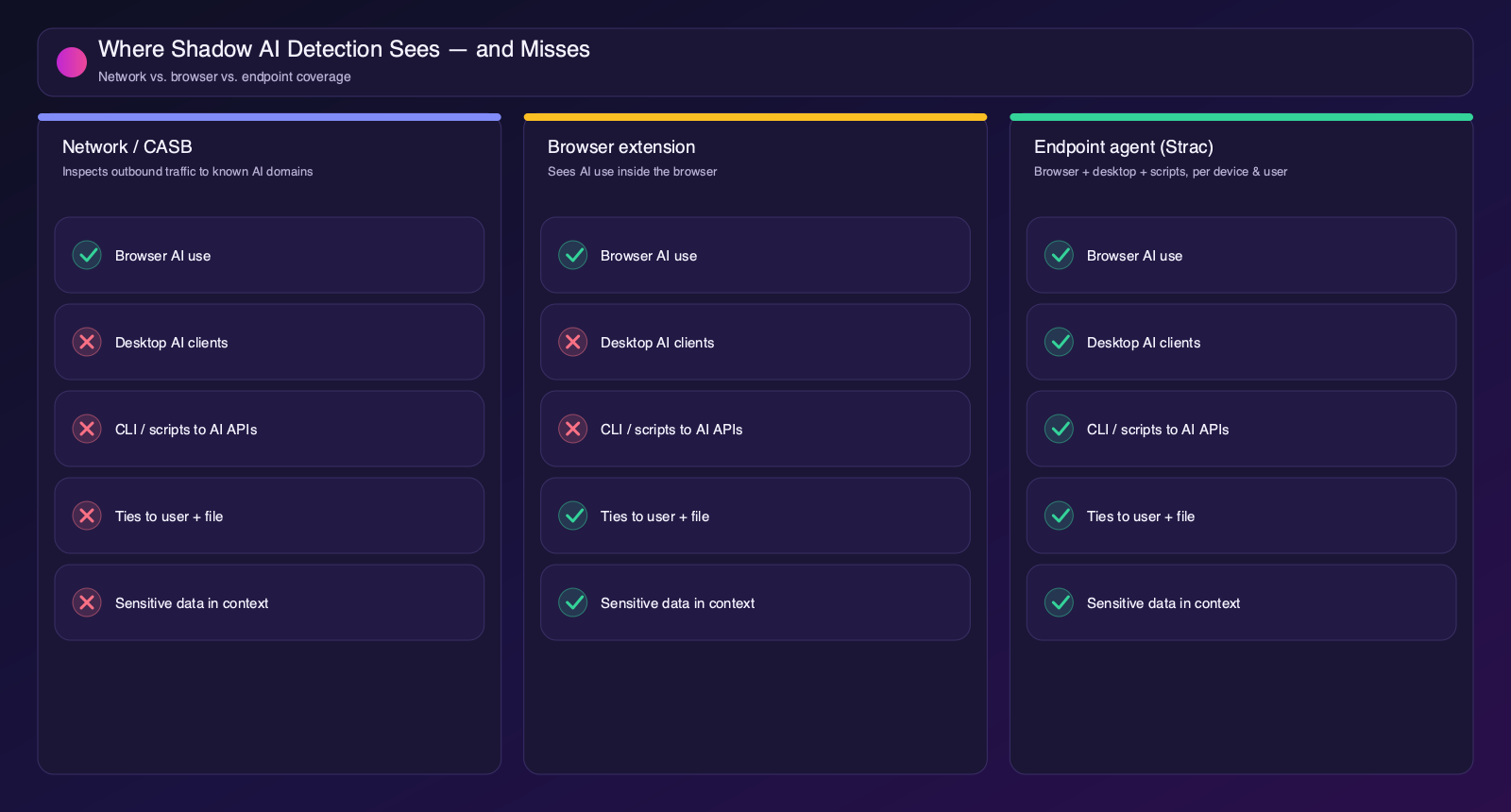
There are three places you can watch for AI use, and they see very different things. Understanding the trade-offs is the key to choosing an approach that actually covers your risk.
Network and CASB tools inspect outbound traffic and flag connections to known AI domains. This is broad and agentless, which makes it easy to start with. But it is blind to anything that does not leave through the inspected network path — desktop clients on a home network, CLI scripts, and encrypted context — and it struggles to tie a connection to a specific user, app, or file. It tells you that an AI domain was reached, rarely who did it or what data was involved.
A browser extension sees AI use inside the browser, including what was typed or pasted into a web AI tool, and can tie it to the signed-in user. That is valuable — but it only covers the browser. Every desktop assistant, IDE plugin, and script is invisible to it. For organizations where developers and power users drive AI adoption, that is a large blind spot.
An endpoint agent watches AI use from the device itself, so it covers the browser and desktop clients, plugins, and scripts. It ties each connection to the device and user, names managed versus unmanaged tools, and — critically — can tell when a sensitive file or piece of text came near an AI tool. This is why the endpoint is the recommended vantage point: it is the only one that sees every path and connects AI activity to real data.
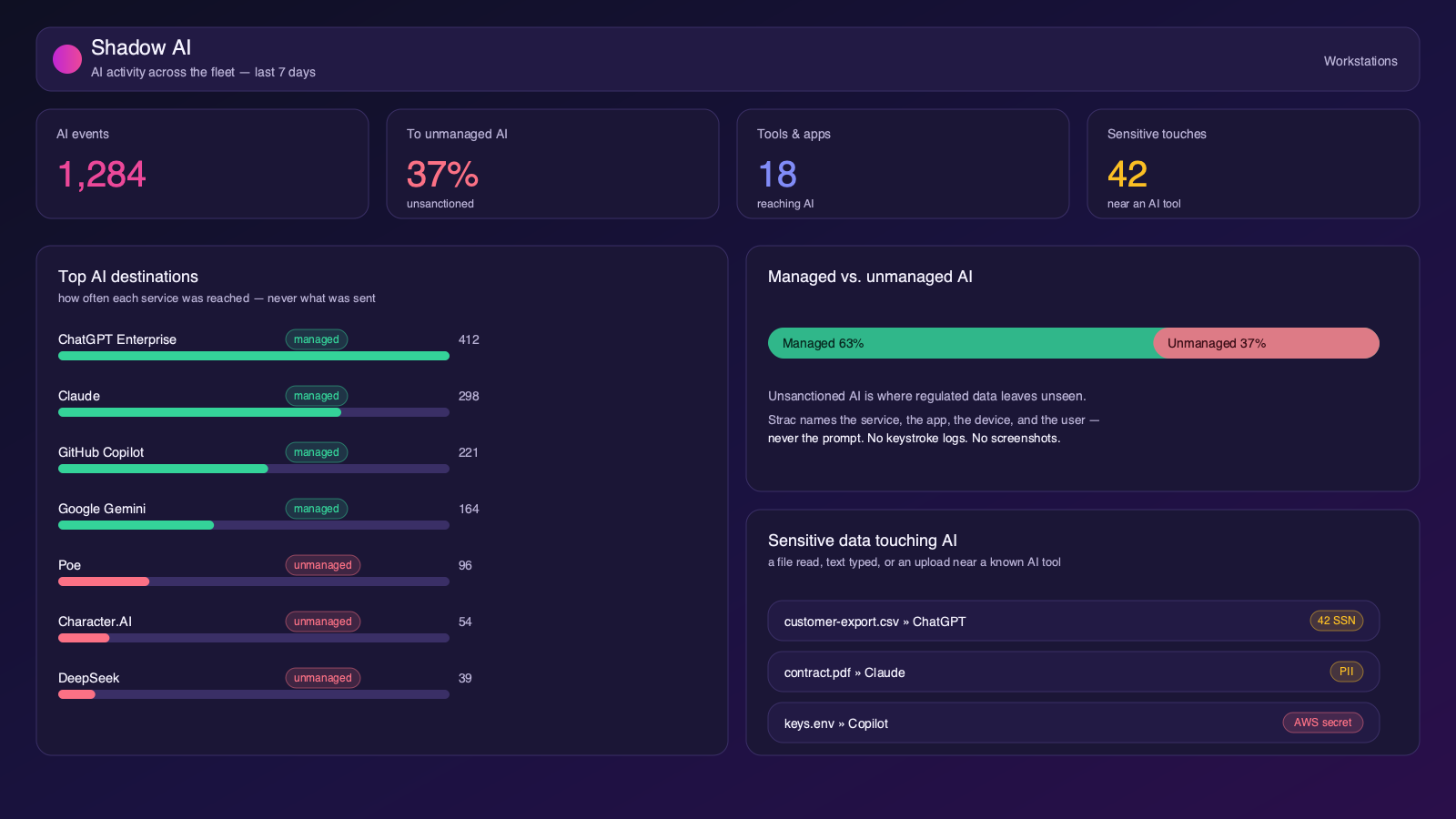
Knowing that ChatGPT was reached is useful; knowing that a file with 42 SSNs was opened by an AI app, or that a customer export was picked into an upload to an unmanaged tool, is what turns detection into risk management. Strac correlates AI activity with content classification, so a shadow-AI event carries the data classes involved — PII, PHI, PCI, secrets, source code — without ever capturing the prompt.
There is a bright line between detecting AI usage and surveilling employees. Good detection records the service, the app, the device, the user, and whether sensitive data was involved. It does not record what people type or see. Strac holds that line explicitly: no keystroke logs and no screenshots anywhere in the product. That is what makes a detection program deployable without a fight from employees or works councils.
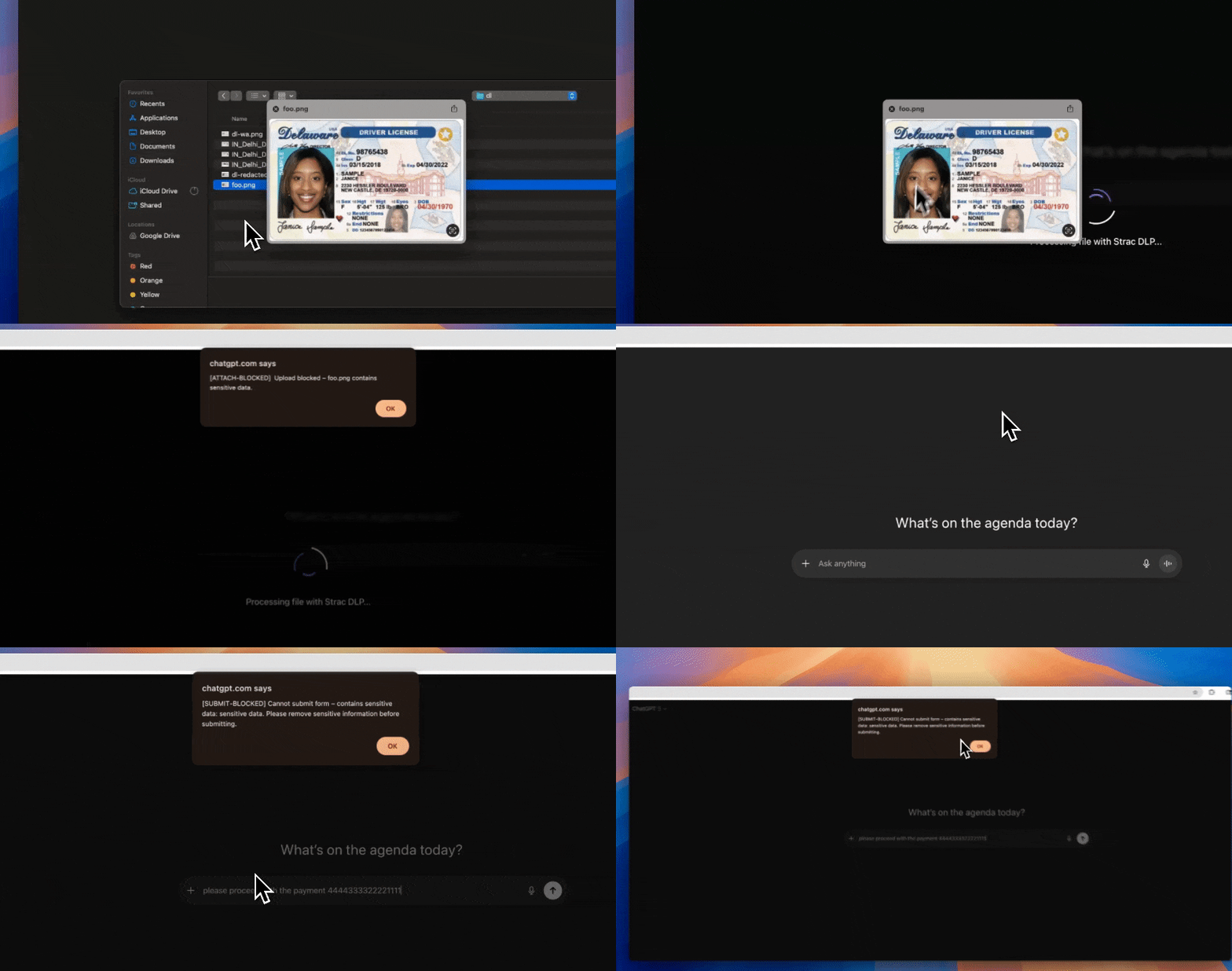
Watch how Strac surfaces AI activity and the sensitive data that comes near it, in real time, from the endpoint:
Detection tells you shadow AI is happening. DLP is what stops the leak. The moment sensitive data heads to an AI tool — pasted into a browser prompt, dragged into an upload, opened by a desktop AI app, or overshared in a file an agent can reach — Strac’s content-aware DLP remediates it in real time. This is why so many teams run Strac for web GenAI DLP: it is the remediation layer that turns “we found shadow AI” into “the data never left.”
Strac gives you the right response for each surface, set per data type:

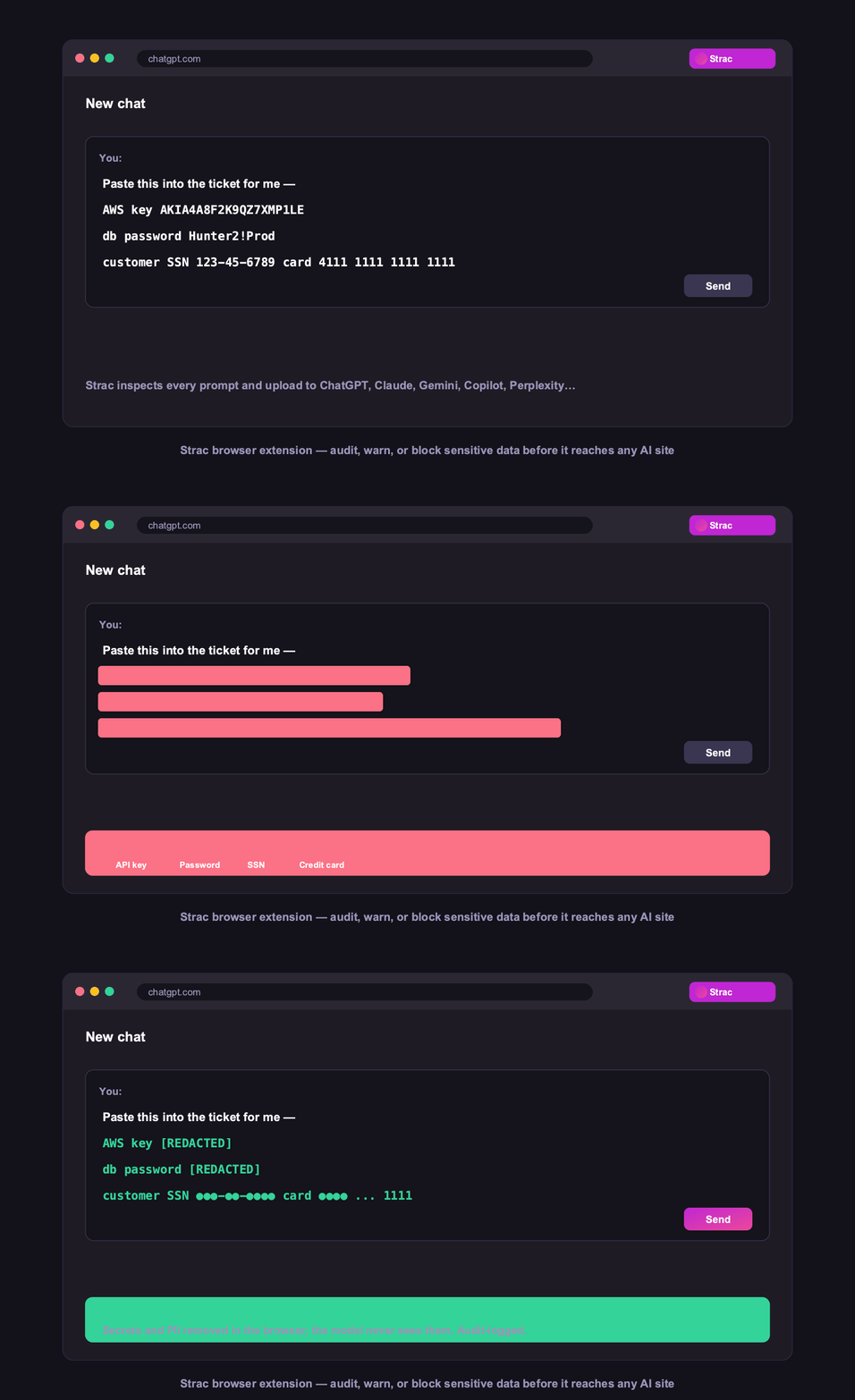

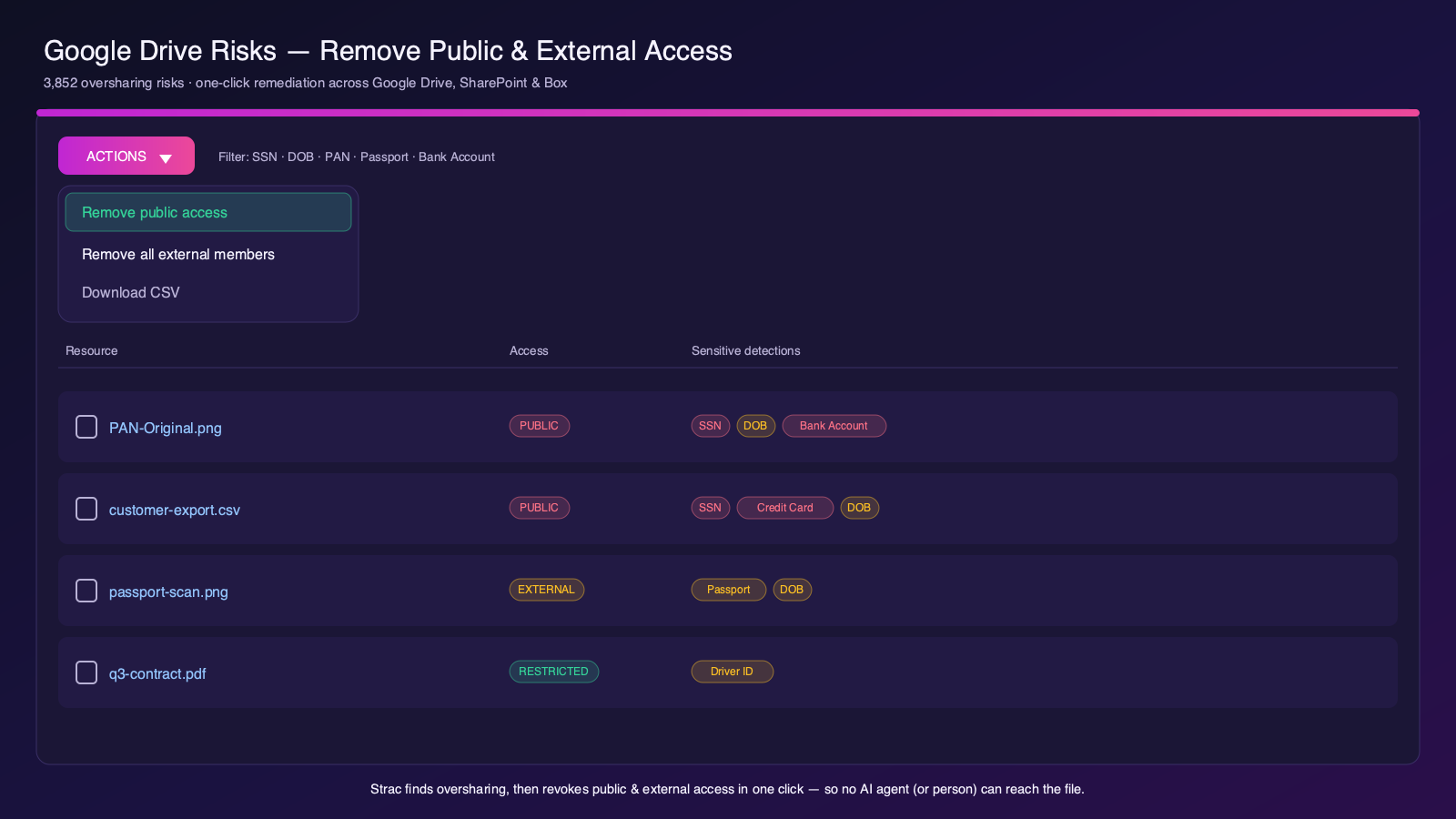
Because detection and DLP live in the same platform, you see the shadow AI and remediate the data with one policy and one audit trail — across SaaS, browser, endpoint, GenAI, and MCP.
Detection is step one; the same Strac agent lets you govern and control what you find. Explore the Shadow AI hub, learn to prevent shadow AI without banning AI, compare shadow AI detection tools, and see the broader endpoint DLP agent and GenAI DLP.
Much Shadow AI runs on the device itself, so detection has to reach the endpoint — see how Strac’s endpoint DLP agent discovers AI usage on Mac and Windows without keystroke logging or screenshots.
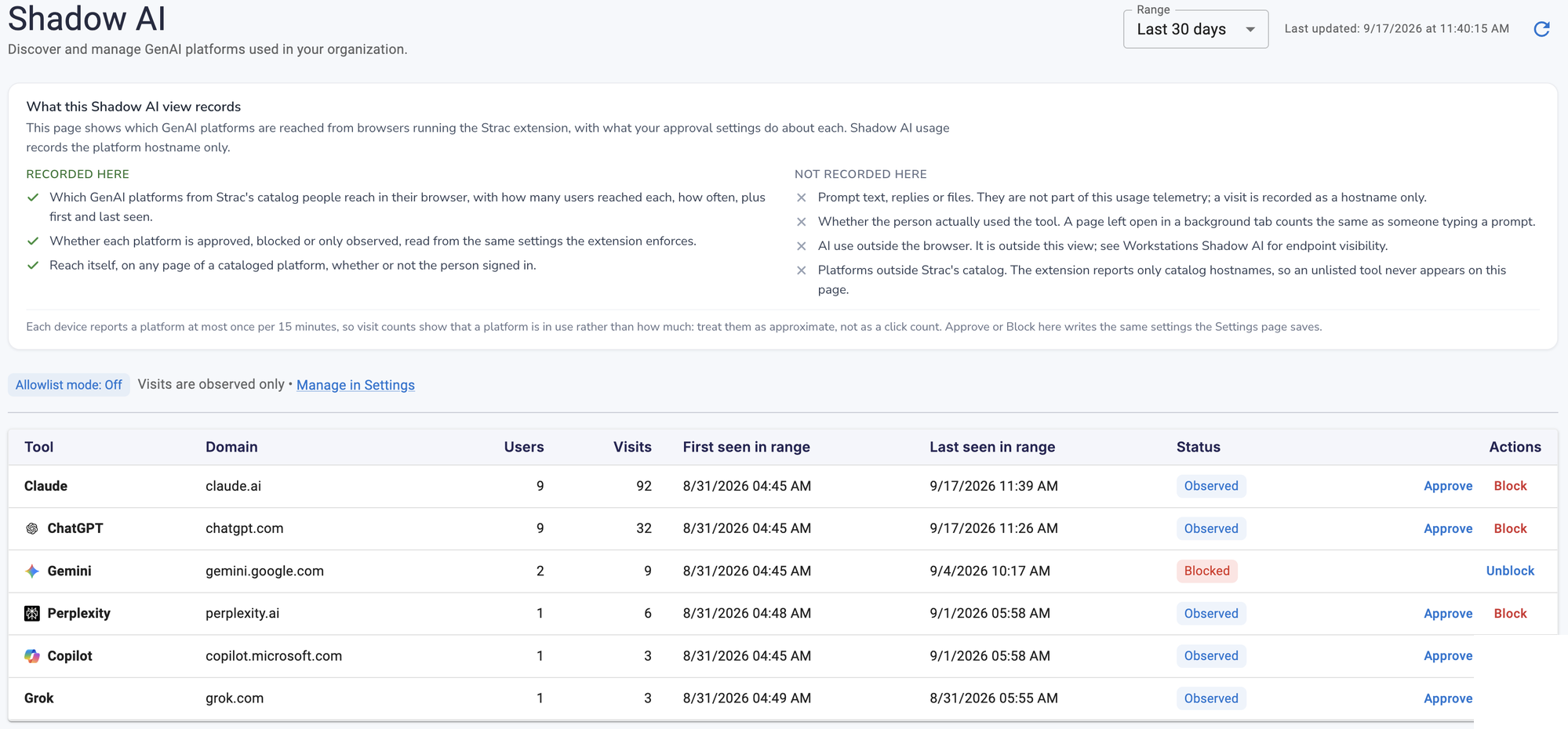
Want to block or govern a tool? See how to block ChatGPT at work and AI usage monitoring.
How do you detect shadow AI? Watch which AI services each device reaches — in the browser and from desktop clients, plugins, and scripts — name the unmanaged ones, and flag when sensitive data comes near them. Strac does this on the endpoint without reading prompts or logging keystrokes.
Can you detect shadow AI without monitoring employees? Yes. Detection should record the AI service, the app, the device, and whether sensitive data was involved — not the content people type. Strac captures no prompts, keystrokes, or screenshots.
Is network monitoring enough to find shadow AI? No. Network and CASB tools miss desktop AI clients, IDE plugins, and scripts calling AI APIs, and they can't cleanly tie a connection to a user and a file. An endpoint agent covers those paths.
What are the signs of shadow AI? Spikes in traffic to AI domains, new AI browser extensions, employees pasting large blocks of text into unknown sites, AI desktop apps installed without approval, and sensitive files opened by AI tools.
How long does it take to detect shadow AI? With an endpoint agent it's near real-time — the moment a device reaches an AI service it's recorded. Survey-based inventories, by contrast, are stale the day they're finished.
.avif)


.gif)


.webp)