AI Usage Monitoring: See Every AI Tool Your Team Uses
AI usage monitoring means knowing which GenAI tools your team uses, how many users, and how often. How Strac monitors it from the browser - privacy-respecting (hostname only), with observe/approve/block and DLP for the data going in.
AI usage monitoring is knowing which GenAI tools your employees use, how many people use each, and how often — the visibility every AI governance program starts from.
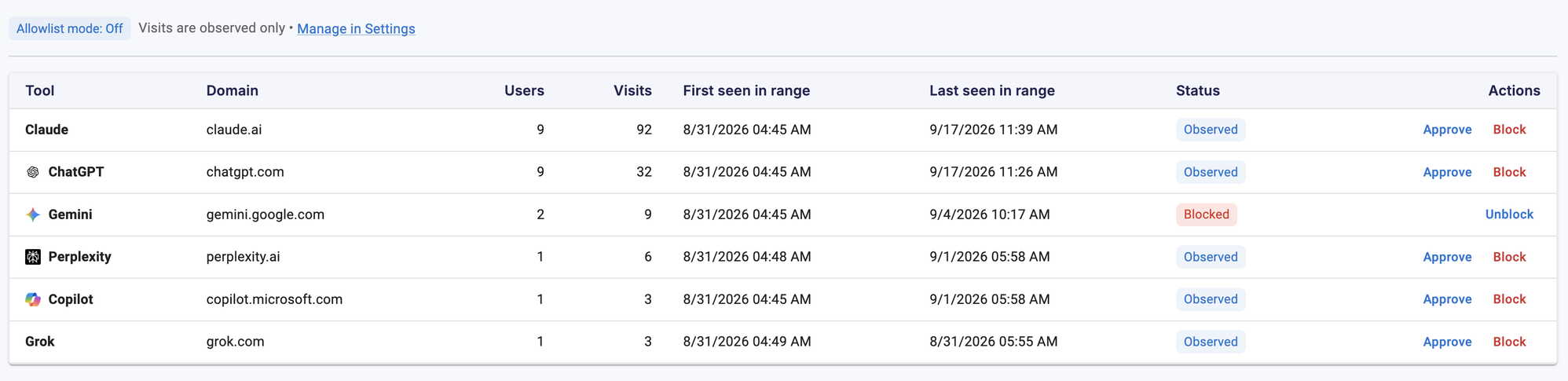
Strac monitors it from the browser: the extension reports which cataloged AI platforms are reached, with users, visits, and first/last-seen — recording the hostname only, never prompt content.
From that view you act by exception: observe most tools, approve the ones you sanction, block the ones you don’t.
Monitoring which tools are used is step one; Strac also protects the data going into them with browser DLP.
What Is AI Usage Monitoring?
AI usage monitoring is the practice of tracking how generative AI is actually used across your organization: which tools, by how many people, how frequently, and when they first and last appeared. It answers the question every security and compliance team now gets from leadership — “what AI are we actually using?” — with evidence instead of a survey. It’s the foundation for an AI acceptable-use policy, vendor review, and any decision about what to allow or block.
What You Should Actually Monitor
Signal
Why it matters
Which tools
Discover the full set in use — not just ChatGPT, but Claude, Gemini, Perplexity, Copilot, Grok, and new ones
How many users
Distinguish one curious employee from org-wide adoption
How often
Visit frequency shows whether a tool is a habit or a one-off
First / last seen
Catch newly-adopted tools and ones that have gone quiet
Sensitive-data exposure
The real risk — what data is going into those tools (a DLP question)
✨ How Strac Monitors AI Usage
Strac monitors AI usage from the browser, where the majority of GenAI activity happens. The extension reports each cataloged AI platform a user reaches, and the Shadow AI dashboard aggregates it into a live view: tools ranked by users and visits, each with its status and a one-click action. Because it’s browser-native, it works across networks and off-VPN, and deploys in minutes with no proxy.
Strac's AI usage monitoring: every GenAI tool in use, ranked by users and visits, with first/last-seen and an observe / approve / block action.
Privacy by Design: Usage, Not Content
Good AI usage monitoring shouldn’t mean surveilling employees. Strac records the platform hostname and visit only — not prompt text, replies, or files. A visit means a cataloged AI site was reached, not that anyone typed a prompt; a page left open in a background tab counts the same as active use. That keeps the view honest and privacy-respecting: you learn which tools are in play without reading anyone’s conversations.
✨ From Monitoring to Action
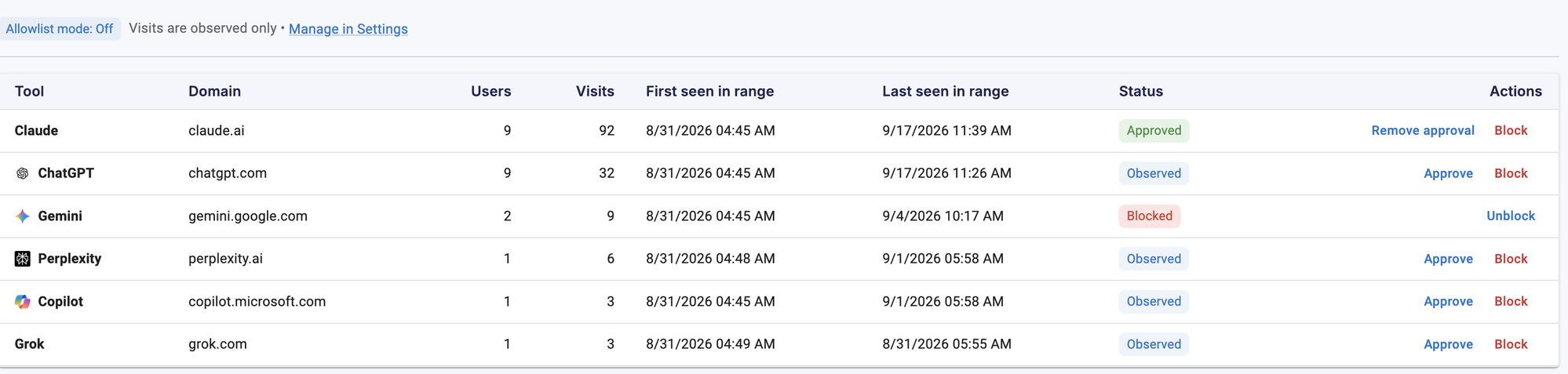
Monitoring is only useful if you can act on it. Strac turns the view into governance by exception: leave most tools observed, approve the ones you sanction, and block the ones you don’t — each action writes the same settings the extension enforces, so the decision takes effect on users’ next sync.
From monitoring to control: approve the tools you sanction (Claude here), block the ones you don't (Gemini), and keep the rest observed.
Beyond Which Tools: Monitor the Data
Knowing which AI tools are used is half the picture; the risk is what data goes into them. Pair usage monitoring with browser DLP and AI DLP to see and stop sensitive data — PII, PHI, secrets — being pasted into AI prompts, and extend the same visibility to shadow AI on the endpoint and to AI agents via MCP.
Coverage is not limited to the names above: Strac also handles DeepSeek, and Mistral Le Chat, and any new AI tool your team adopts.
🌶️ Spicy FAQs on AI Usage Monitoring
What is AI usage monitoring?
It's tracking how generative AI is used across your organization - which tools, how many users, how often, and when first/last seen. It gives security and compliance teams evidence of real AI adoption instead of a survey, and it's the foundation for any allow/block decision.
How does Strac monitor AI usage?
Through its browser extension. It reports each cataloged AI platform a user reaches, and the Shadow AI dashboard aggregates it into a live view of tools by users and visits - working across networks and off-VPN, with no proxy and no network changes.
Does AI usage monitoring read employees' prompts?
Not in Strac. It records the platform hostname and visit only - never prompt text, replies, or files. You learn which tools are in use without surveilling anyone's conversations.
How is this different from shadow AI monitoring?
They overlap - shadow AI is the unsanctioned-tool angle, AI usage monitoring is the broader visibility view. Both come from the same browser telemetry; the difference is framing and what you do with it (govern all AI vs. surface the unapproved).
Can I act on what I monitor?
Yes. From the dashboard you approve tools you sanction, block ones you don't, and leave the rest observed. Each action writes the settings the extension enforces on users' next sync - and you can layer DLP to protect data in the tools you allow.
The Bottom Line
You can’t govern AI you can’t see. Strac gives you privacy-respecting AI usage monitoring from the browser — every tool, every user, updated live — and turns it into action with observe, approve, and block, plus DLP for the data going in. Book a demo to see your organization’s AI usage.
Customer story
“Don’t just alert on problems, fix them.”
Scott Roberts, Chief Information Security Officer, UiPath
It's tracking how generative AI is used across your organization - which tools, how many users, how often, and when first/last seen. It gives security and compliance teams evidence of real AI adoption instead of a survey, and it's the foundation for any allow/block decision.
How does Strac monitor AI usage?
Through its browser extension. It reports each cataloged AI platform a user reaches, and the Shadow AI dashboard aggregates it into a live view of tools by users and visits - working across networks and off-VPN, with no proxy and no network changes.
Does AI usage monitoring read employees' prompts?
Not in Strac. It records the platform hostname and visit only - never prompt text, replies, or files. You learn which tools are in use without surveilling anyone's conversations.
How is this different from shadow AI monitoring?
They overlap - shadow AI is the unsanctioned-tool angle, AI usage monitoring is the broader visibility view. Both come from the same browser telemetry; the difference is framing and what you do with it (govern all AI vs. surface the unapproved).
Can I act on what I monitor?
Yes. From the dashboard you approve tools you sanction, block ones you don't, and leave the rest observed. Each action writes the settings the extension enforces on users' next sync - and you can layer DLP to protect data in the tools you allow.
Discover & Protect Data on SaaS, AI, MCP, Endpoints & Cloud
Strac provides end-to-end data loss prevention for all SaaS and Cloud apps. Integrate in under 10 minutes and experience the benefits of live DLP scanning, live redaction, and a fortified SaaS environment.


.webp)










.webp)




.avif)




.gif)
