How to Block ChatGPT at Work (and a Smarter Alternative)
Block ChatGPT org-wide in one click with Strac's browser extension - or, better, allow it and block the sensitive data in the prompt with ChatGPT DLP. Plus discovery, firewall vs browser blocking, and MCP DLP for agents.
To block ChatGPT for your whole org, you don’t touch the network — Strac’s browser extension blocks the domain for every user and redirects them the moment it picks up the new config.
But blocking a tool outright usually backfires: employees switch to personal accounts, phones, or an un-blocked competitor. You lose the visibility, not the risk.
The better default is allow-but-protect: let people use ChatGPT, but redact or block the sensitive data in the prompt before it’s sent (ChatGPT DLP).
Strac does all three — discover which AI tools are in use, block the ones you don’t sanction, and protect the data going into the ones you do.
✨ How to Block ChatGPT at Work (the Direct Answer)
The fastest, cleanest way to block ChatGPT across an organization is at the browser, not the firewall. With Strac’s browser extension deployed, you add chatgpt.com to Block Websites — or click Block on ChatGPT right from the Shadow AI dashboard — and every user is blocked and redirected as soon as their extension syncs. No proxy, no DNS changes, no network re-architecture, and it follows the user across networks and off-VPN.
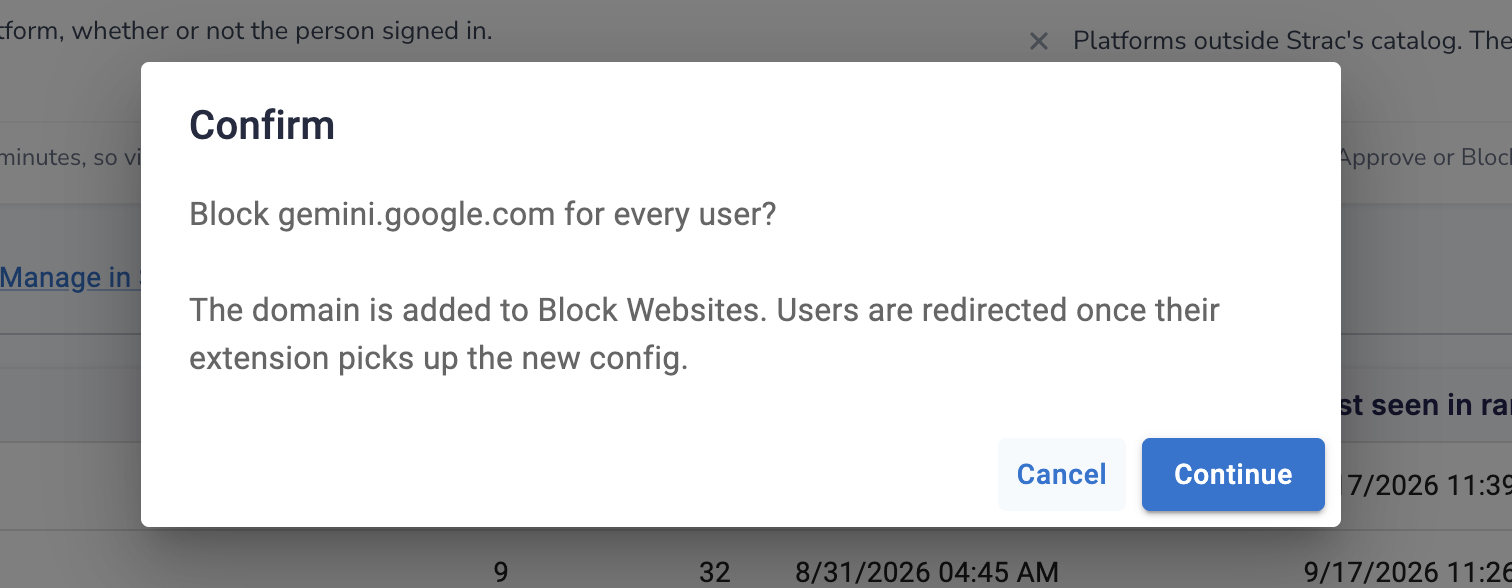
Blocking ChatGPT (or Gemini, Copilot, etc.) org-wide is one click in Strac — the domain is added to Block Websites and users are redirected once their extension picks up the config.
Firewall and DNS blocks can do this too, but they’re brittle: they break the moment someone is off the corporate network, on a phone, or behind a personal hotspot — and they’re trivial to route around. A browser-level control travels with the user.
Why Blocking ChatGPT Outright Usually Backfires
Before you block everything, know the failure mode. When you hard-block a popular tool, people don’t stop — they go around you:
Block-everything response
What actually happens
Employee wants to use ChatGPT
Switches to a personal account on their phone — now totally invisible to you
ChatGPT is blocked
They use DeepSeek, Gemini, or a niche tool you haven’t blocked yet
All big tools blocked
Sensitive data gets pasted into whatever isn’t on the blocklist
You’ve removed the visibility, not the risk. That’s the shadow-AI trap — see shadow AI and prevent shadow AI. Blocking is the right move for a few genuinely unacceptable tools; for the rest, protect instead of ban.
✨ The Better Default: Allow ChatGPT, but Block the Sensitive Data
Most teams don’t actually want to ban ChatGPT — they want to stop customer PII, PHI, source code, and secrets from being pasted into it. That’s a DLP problem, not a blocking problem. Strac’s browser DLP inspects what a user is about to submit to ChatGPT and, in real time, redacts the sensitive parts or blocks the send — while letting the harmless prompt through. People keep their productivity; the regulated data never leaves.
To block the sensitive data rather than the whole app, Strac’s content-aware endpoint agent for Mac and Windows extends the same control to every desktop app, including the ChatGPT desktop app: it can block, warn, allow, or audit when sensitive or customer data is pasted, uploaded, or screenshotted (read via OCR), across every file format Strac supports. The Strac browser extension (Chrome, Firefox, Edge, and Safari) does the same for ChatGPT on the web.
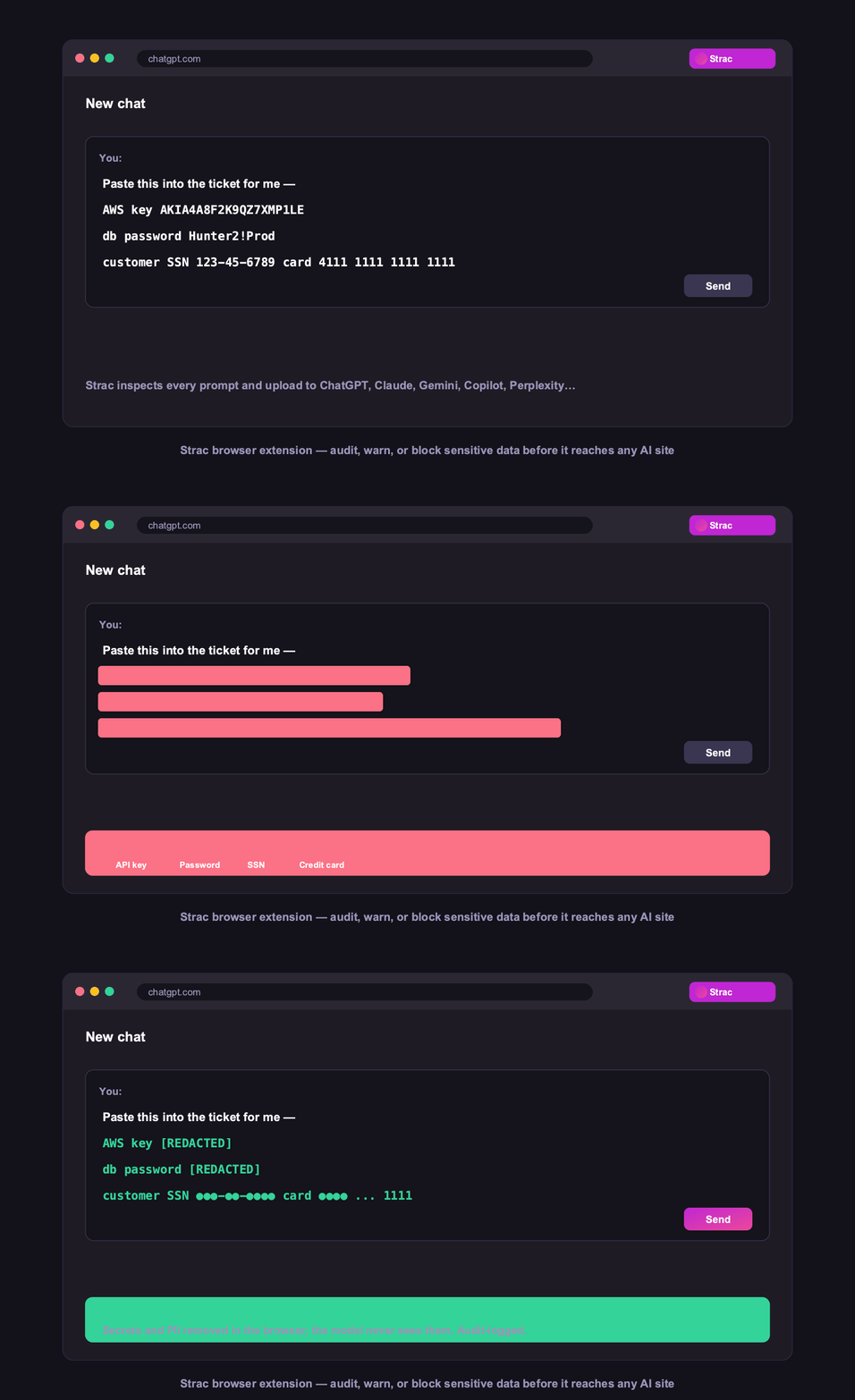
Allow-but-protect: Strac redacts sensitive data inside a ChatGPT prompt in real time — the prompt still sends, without the PII, PHI, or secrets.
This is content-aware, so the policy can differ by data type: warn on one, redact another, hard-block a third. It works the same across ChatGPT, Claude, Gemini, and Copilot. See ChatGPT DLP for the ChatGPT-specific detail and ChatGPT data privacy for what OpenAI does with your data.
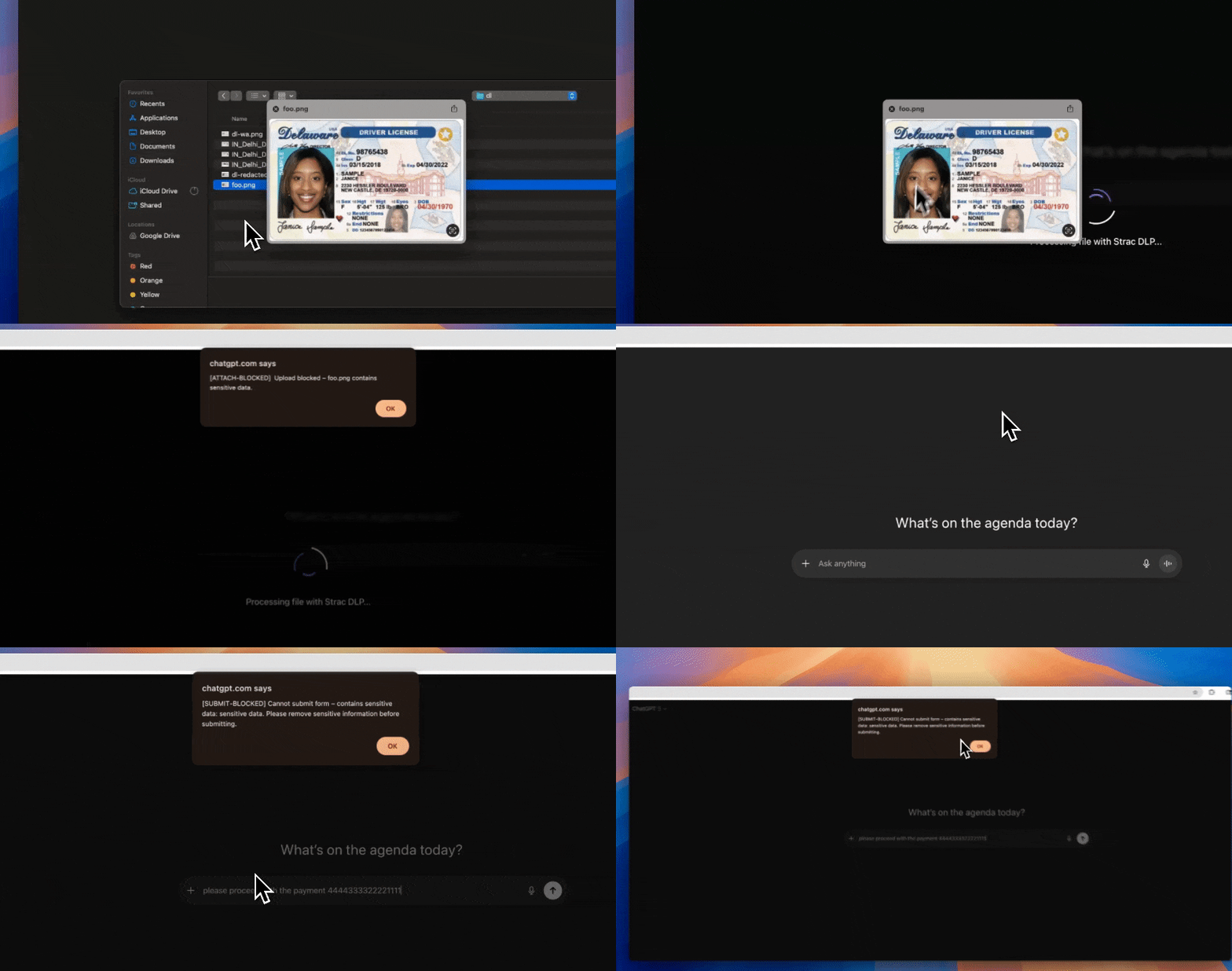
When policy requires it, Strac blocks the upload or prompt entirely — a hard stop for the highest-risk data, not just the whole tool.
✨ Discover First, Then Decide What to Block
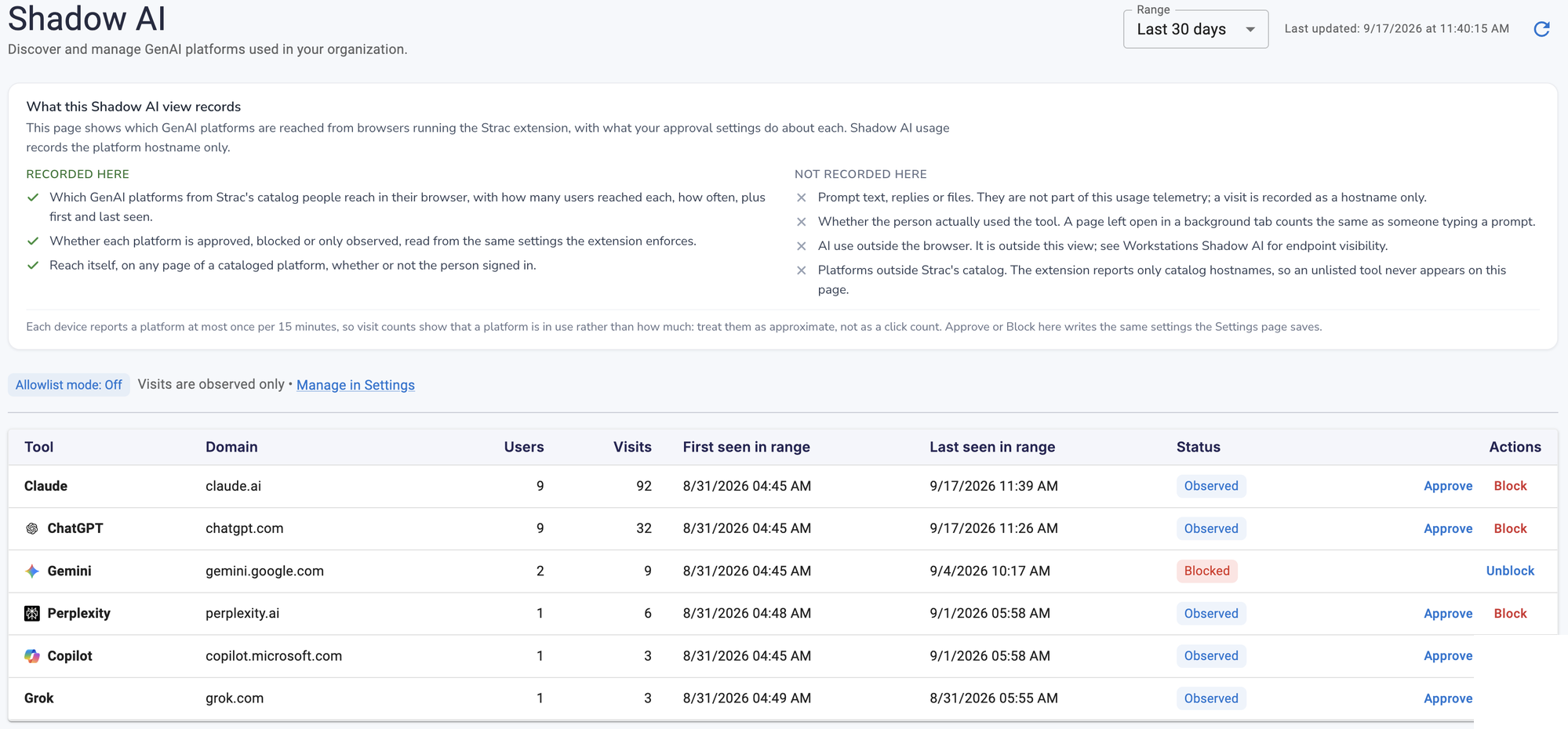
You can’t block or protect what you can’t see. Strac’s Shadow AI dashboard shows every GenAI tool employees actually reach from the browser — with how many users and how often — so you block from evidence, not guesswork. Approve the tools you sanction, block the ones you don’t, and leave the rest observed.
Strac discovers which AI tools are in use across the org before you decide what to block — users, visits, and a per-tool approve / observe / block action.
Don’t Forget AI Agents: MCP DLP
Blocking a chat window doesn’t cover AI agents. When ChatGPT, Claude, or Copilot act through the Model Context Protocol (MCP), they read from and write to your systems programmatically — a path a website block never touches. MCP DLP redacts sensitive data on those agent tool calls and lets you allow or deny which MCP servers can run at all, so the agent path is governed alongside the human one.
How to Block ChatGPT with Strac: Steps
Deploy the browser extension via Chrome Enterprise or Edge policy (minutes, no network changes).
Discover usage on the Shadow AI dashboard to see which AI tools are actually in play.
Block the tools you won’t allow — one click adds the domain to Block Websites for every user.
Protect the tools you allow — turn on DLP to redact or block PII, PHI, and secrets in prompts.
Cover agents with MCP DLP for AI tools acting on your systems.
🌶️ Spicy FAQs on Blocking ChatGPT at Work
How do I block ChatGPT for all employees?
The cleanest way is at the browser: with Strac's extension deployed, add chatgpt.com to Block Websites (or click Block on the Shadow AI dashboard) and every user is blocked and redirected once their extension syncs - no firewall or DNS changes, and it works off-network.
Is blocking ChatGPT a good idea?
Sometimes - for a few genuinely unacceptable tools. But blanket blocking usually backfires: employees switch to personal accounts or un-blocked tools, so you lose visibility without removing the risk. For most tools, allow them but block the sensitive data in the prompt instead.
Can I allow ChatGPT but stop sensitive data going in?
Yes - that's the better default. Strac's browser DLP inspects each prompt and redacts or blocks PII, PHI, source code, and secrets in real time, while letting the harmless prompt through. People stay productive; regulated data never leaves.
Does a firewall or DNS block work for ChatGPT?
Only partly. Network blocks break the moment a user is off-VPN, on a phone, or on a personal hotspot, and they're easy to route around. A browser-level control travels with the user across networks.
What about AI agents and Copilot acting on my data?
Blocking a website doesn't cover agents that act through MCP. Strac's MCP DLP redacts sensitive data on agent tool calls and lets you allow or deny which MCP servers run - governing the agent path alongside the human one.
The Bottom Line
Blocking ChatGPT org-wide takes one click in Strac — but blocking is the blunt option, and it drives usage into the shadows. The durable answer is to discover what’s in use, block the few tools you must, and protect the data going into the rest. Book a demo to see discovery, blocking, and DLP in one browser extension.
The cleanest way is at the browser: with Strac's extension deployed, add chatgpt.com to Block Websites (or click Block on the Shadow AI dashboard) and every user is blocked and redirected once their extension syncs - no firewall or DNS changes, and it works off-network.
Is blocking ChatGPT a good idea?
Sometimes - for a few genuinely unacceptable tools. But blanket blocking usually backfires: employees switch to personal accounts or un-blocked tools, so you lose visibility without removing the risk. For most tools, allow them but block the sensitive data in the prompt instead.
Can I allow ChatGPT but stop sensitive data going in?
Yes - that's the better default. Strac's browser DLP inspects each prompt and redacts or blocks PII, PHI, source code, and secrets in real time, while letting the harmless prompt through. People stay productive; regulated data never leaves.
Does a firewall or DNS block work for ChatGPT?
Only partly. Network blocks break the moment a user is off-VPN, on a phone, or on a personal hotspot, and they're easy to route around. A browser-level control travels with the user across networks.
What about AI agents and Copilot acting on my data?
Blocking a website doesn't cover agents that act through MCP. Strac's MCP DLP redacts sensitive data on agent tool calls and lets you allow or deny which MCP servers run - governing the agent path alongside the human one.
Discover & Protect Data on SaaS, AI, MCP, Endpoints & Cloud
Strac provides end-to-end data loss prevention for all SaaS and Cloud apps. Integrate in under 10 minutes and experience the benefits of live DLP scanning, live redaction, and a fortified SaaS environment.


.webp)










.webp)




.avif)




.gif)
