How Employees Leak Data Through AI Tools (and How to Stop It)
The real ways employees leak sensitive data through AI tools: pasting into ChatGPT, uploading files, desktop AI apps, and shadow AI. Plus how to stop each without banning AI.
Employees do not leak data through AI tools maliciously. They paste a customer record into ChatGPT to draft a reply, upload a spreadsheet to summarize it, use a desktop AI app that reads local files, or adopt an unsanctioned AI tool nobody approved. Each is a quiet, everyday data leak that traditional DLP misses. This guide covers exactly how employees leak data through AI tools and how Strac stops each, in the browser, on the endpoint, and across shadow AI, without banning the tools employees now depend on.
How Employees Leak Data Through AI Tools (and How to Stop It)
The biggest AI data risk in most companies is not a hacker. It is a well-meaning employee using AI to get work done. They are faster with ChatGPT, so they paste in whatever they are working on, including the sensitive data you protect everywhere else. Understanding exactly how employees leak data through AI tools is the first step to stopping it without killing the productivity.
✨ The four everyday ways employees leak data through AI
1. Pasting sensitive data into a chatbot. The most common by far. An employee pastes a customer's SSN, a block of source code, or a list of card numbers into ChatGPT, Claude, or Gemini to summarize, rewrite, or debug. The data is now in a third-party model.
2. Uploading files to AI tools. Employees attach spreadsheets, PDFs, and exports to AI tools for analysis, leaking far more than a single field, often entire datasets at once.
3. Using desktop AI apps that read local files. The ChatGPT desktop app, Claude Desktop, and AI-enabled productivity tools read whatever file you point them at, on the endpoint, where no browser or network control can see it.
4. Adopting shadow AI. Employees sign up for AI notetakers, writing assistants, and code helpers nobody approved. You cannot protect data in a tool you do not know exists.
How to stop it without banning AI
Banning AI does not work; employees route around it, which makes the leaks invisible. The answer is to cover every path they actually use:
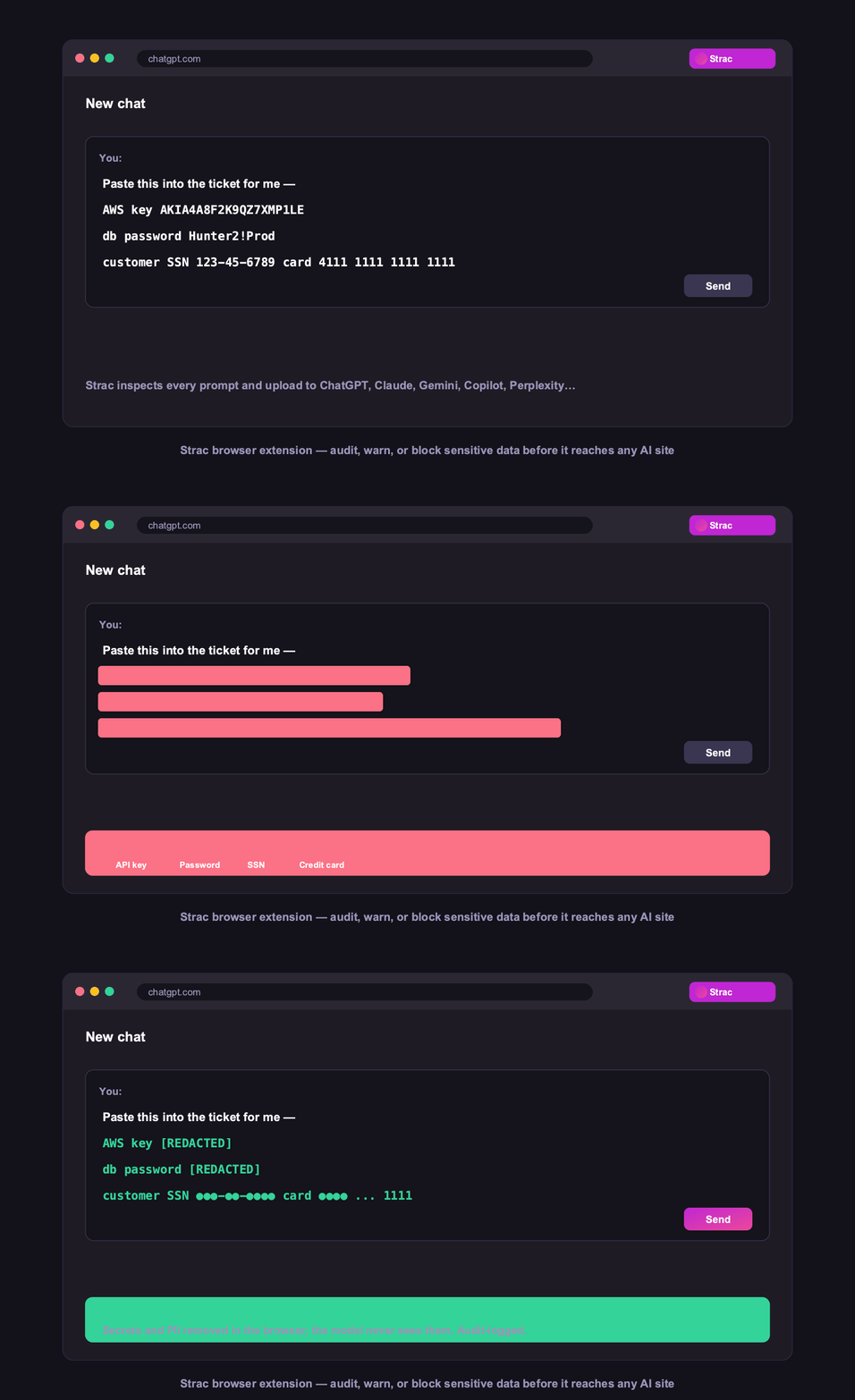
Browser DLP detects and blocks sensitive data in the prompt or upload before it reaches ChatGPT, Claude, or Gemini. See how to block ChatGPT.
Endpoint DLP covers desktop AI apps, downloads, and USB on Mac, Windows, and Linux. See endpoint DLP.
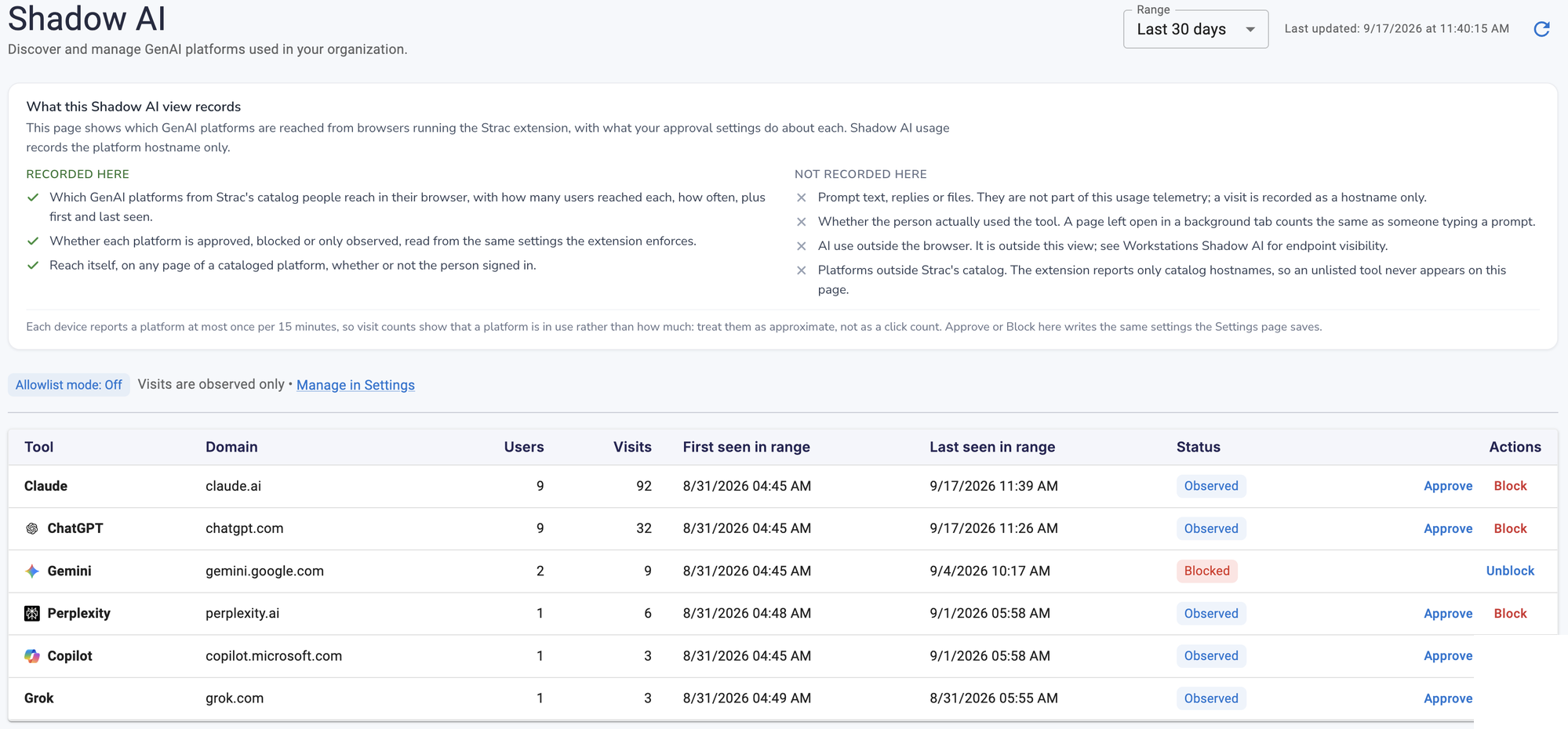
Shadow AI discovery surfaces every unsanctioned AI tool so you can observe, approve, or block it. See Shadow AI.
Strac does all three from one agentless platform, so employees keep using AI and the sensitive data stays protected. For the complete breakdown, see AI data leaks and AI DLP.
✨ Each leak path maps to an enforcement channel
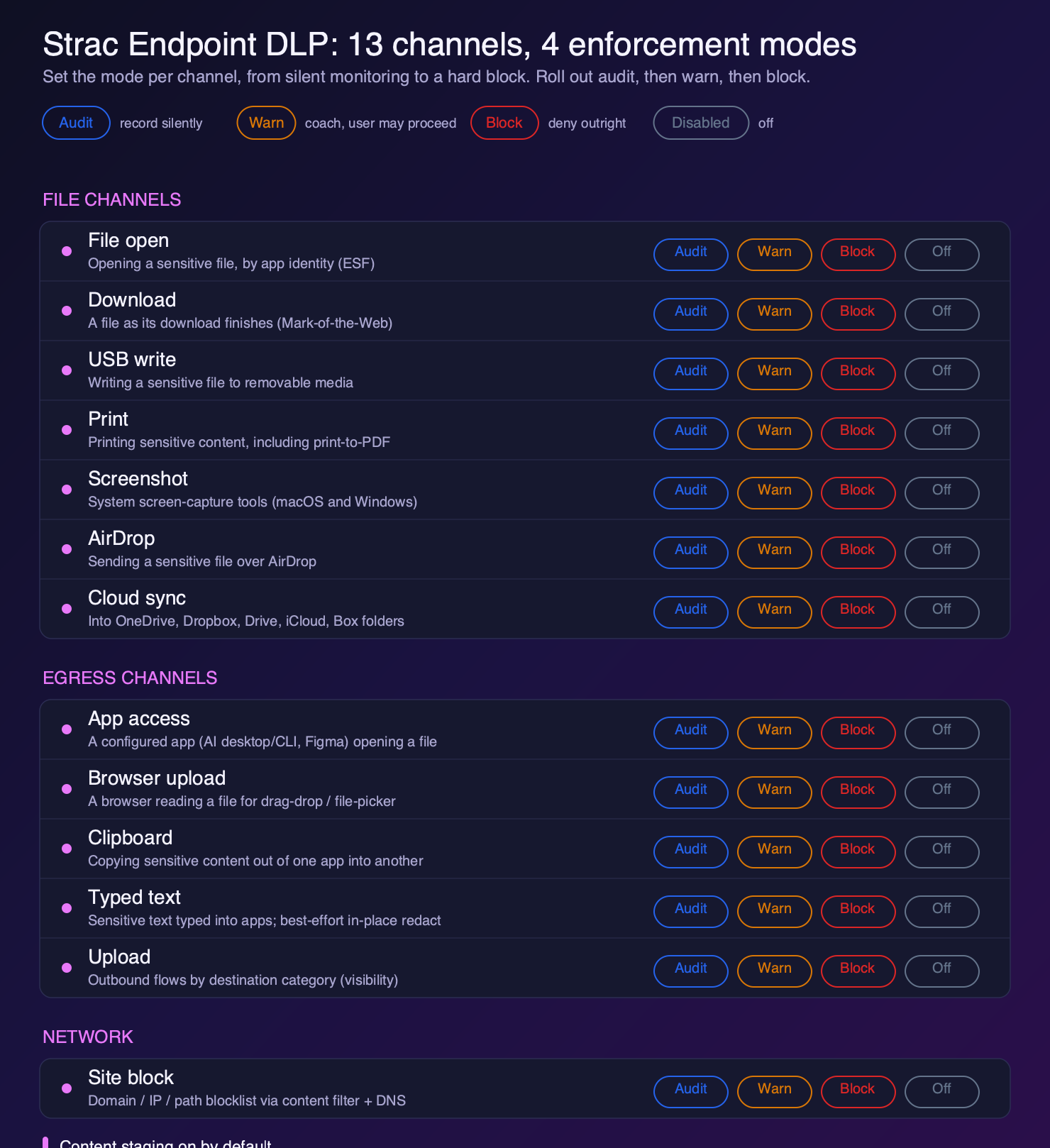
The everyday ways employees leak data through AI map cleanly onto specific endpoint channels, which is why they are stoppable without banning the tools. A paste into a chatbot is the clipboard channel. Typing a secret into an AI window is the typed-text channel, with best-effort in-place redaction. Uploading a file to an AI tool is browser upload or app access. A desktop AI app reading a local file is app access. A screenshot fed to an image model is the screenshot channel.
Because each runs in audit, warn, or block independently, you can start by simply watching, then coach, then block the highest-risk paths, keeping people productive the whole way.
Every way employees leak data through AI maps to a specific Strac enforcement channel
🌶️ Spicy FAQs
How do employees leak data through AI tools?
Four main ways: pasting sensitive data into a chatbot, uploading files to AI tools, using desktop AI apps that read local files, and adopting unsanctioned shadow-AI tools. All four are everyday, non-malicious actions that traditional DLP does not catch.
Should I just ban AI tools to stop data leaks?
No. Bans push usage underground, where leaks become invisible and you lose the productivity. The better approach is to govern AI: detect and block sensitive data at the browser and endpoint, and discover and approve shadow-AI tools, so employees can use AI safely.
What is the most common way employees leak data through AI?
Pasting sensitive data into a chatbot in the browser. An employee pastes a customer record or source code into ChatGPT, and it is instantly in a third-party model. Browser DLP that inspects the prompt before it sends is the direct fix.
How do I stop employees pasting into ChatGPT?
Use browser DLP that recognizes AI destinations and inspects the prompt and any attachment before sending, blocking or redacting the sensitive parts. Strac does this in real time across Chrome, Edge, Firefox, and Safari.
How do I find which AI tools employees are using?
Shadow AI discovery. Strac surfaces every GenAI tool employees reach in the browser, with users and visit counts, so you can decide per tool whether to observe, approve, or block.
How do employees leak data through AI tools?
Four main ways: pasting sensitive data into a chatbot, uploading files to AI tools, using desktop AI apps that read local files, and adopting unsanctioned shadow-AI tools. All four are everyday, non-malicious actions that traditional DLP does not catch.
Should I just ban AI tools to stop data leaks?
No. Bans push usage underground, where leaks become invisible and you lose the productivity. The better approach is to govern AI: detect and block sensitive data at the browser and endpoint, and discover and approve shadow-AI tools, so employees can use AI safely.
What is the most common way employees leak data through AI?
Pasting sensitive data into a chatbot in the browser. An employee pastes a customer record or source code into ChatGPT, and it is instantly in a third-party model. Browser DLP that inspects the prompt before it sends is the direct fix.
How do I stop employees pasting into ChatGPT?
Use browser DLP that recognizes AI destinations and inspects the prompt and any attachment before sending, blocking or redacting the sensitive parts. Strac does this in real time across Chrome, Edge, Firefox, and Safari.
How do I find which AI tools employees are using?
Shadow AI discovery. Strac surfaces every GenAI tool employees reach in the browser, with users and visit counts, so you can decide per tool whether to observe, approve, or block.
Discover & Protect Data on SaaS, AI, MCP, Endpoints & Cloud
Strac provides end-to-end data loss prevention for all SaaS and Cloud apps. Integrate in under 10 minutes and experience the benefits of live DLP scanning, live redaction, and a fortified SaaS environment.


.webp)






.avif)



.gif)
