Cart(
0
)
No items found.
Product is not available in this quantity.
Your people now work with ChatGPT and Claude, coding agents like Claude Code and Cursor that run commands on their laptops, and MCP servers that reach your databases. Strac discovers all of it on every Mac and Windows device, blocks what is not approved, and keeps secrets and sensitive data out of AI. One agent. Deployed by MDM in a day.





Shadow AI discovery, app and MCP blocking, guardrails for coding agents, and DLP for prompts and files. One agent on Mac and Windows.
Proxies and CASBs see browser traffic. They do not see a desktop app, a CLI agent running shell commands, or an MCP server talking to production.
Employees install ChatGPT, Claude, DeepSeek and dozens of niche tools. Most security teams cannot list which ones are on which laptop.
Claude Code, Cursor and Codex read files, run commands and call tools on their own, at the speed of a developer who never sleeps.
A Postgres or GitHub MCP server takes a minute to add, often with a password sitting in plain text in the config.
.env files, ~/.ssh keys and cloud credentials sit on every engineering laptop, one file read away from an agent.
A personal Claude Max plan and a company seat look the same to a firewall. The consumer terms are not the same.
Customer records, PHI and source code get pasted into chat tools and uploaded as files every day.
Three layers on one endpoint agent and one console. Start with visibility, turn on enforcement when you are ready.
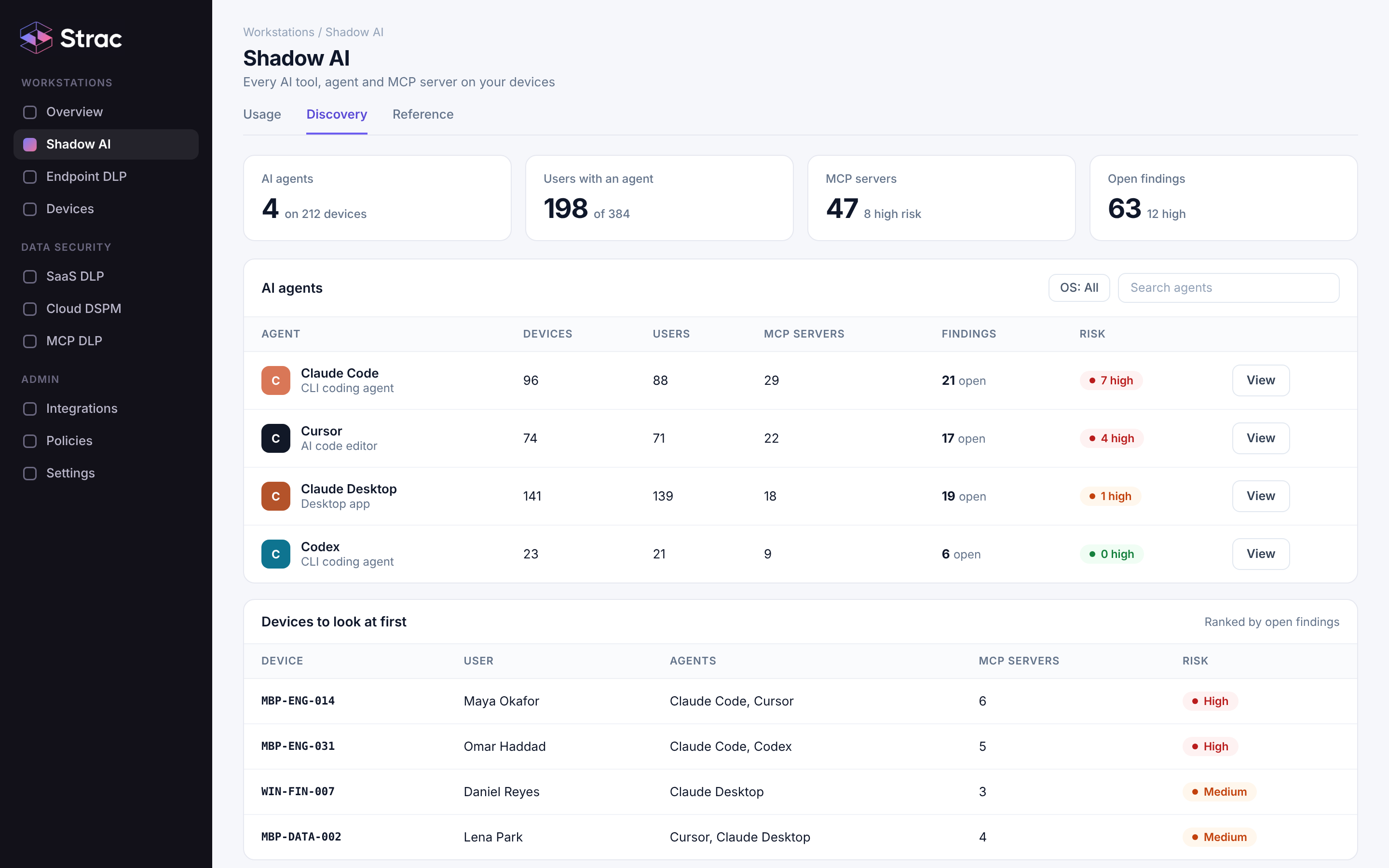
What you get: AI apps and CLI tools with version and path, MCP servers in Claude Code, Claude Desktop, Cursor and Codex, skills and plugins, configured models and signed-in accounts.
Risk: each item scored from what it connects to and how it is configured.

Block: an AI app, its CLI and its sites, or an MCP server, on macOS, Windows or both.
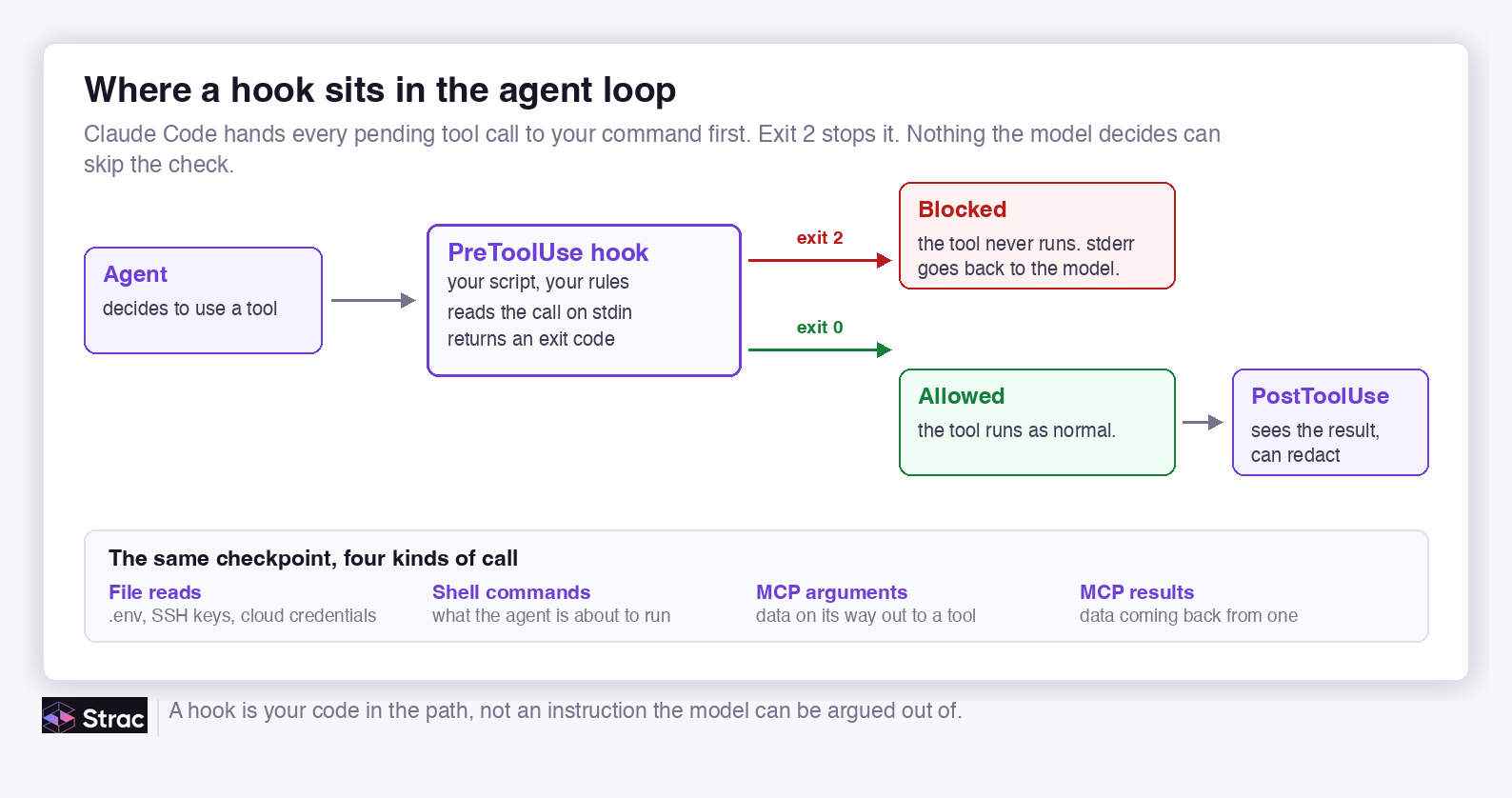
Hooks: every tool call in Claude Code, Cursor, Codex, Copilot CLI and Gemini CLI checked before it runs.
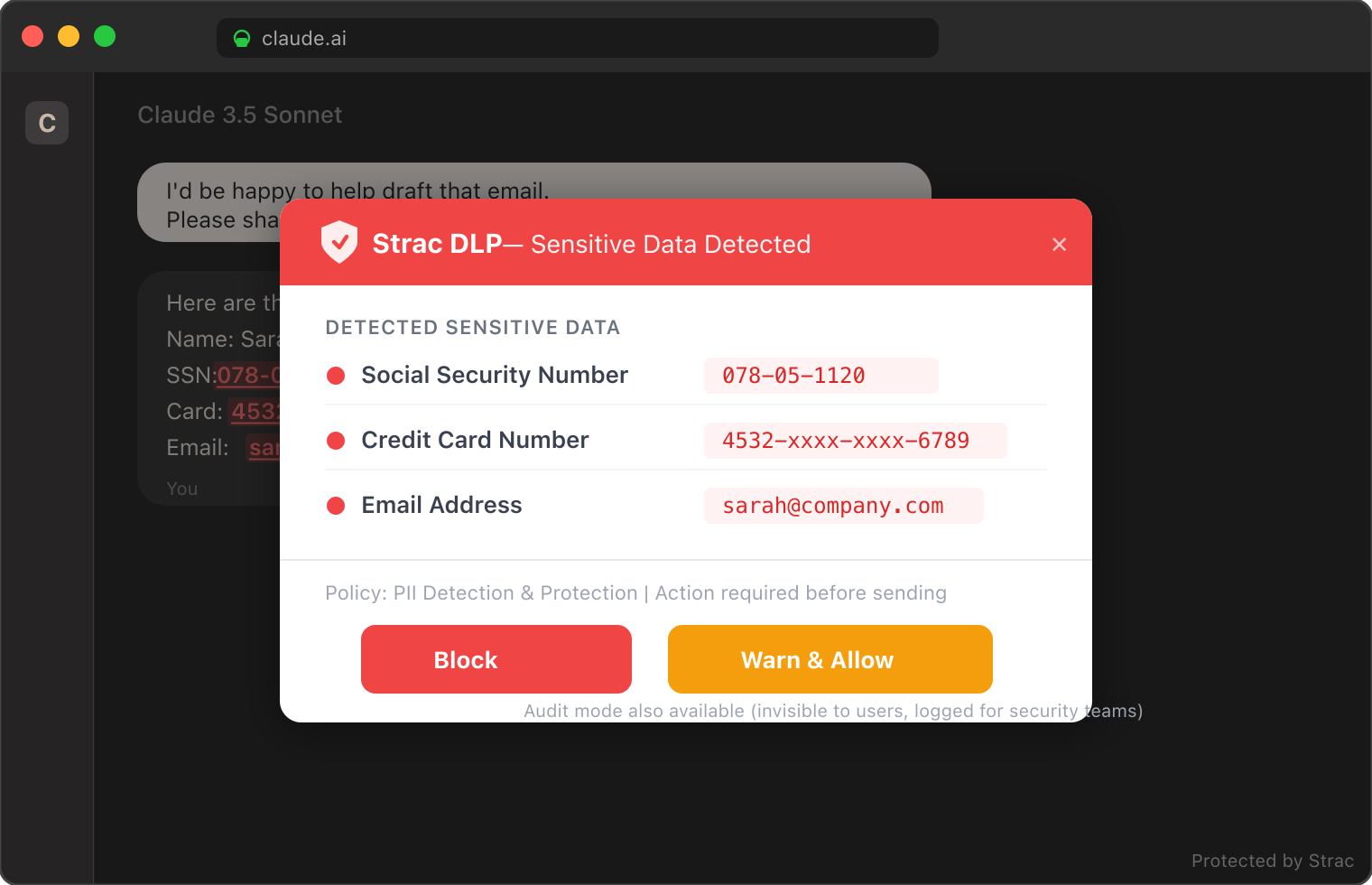
Secrets: .env, SSH keys, cloud credentials and keychains protected from agents.
DLP: redact MCP results, block sensitive prompts, pastes and uploads.
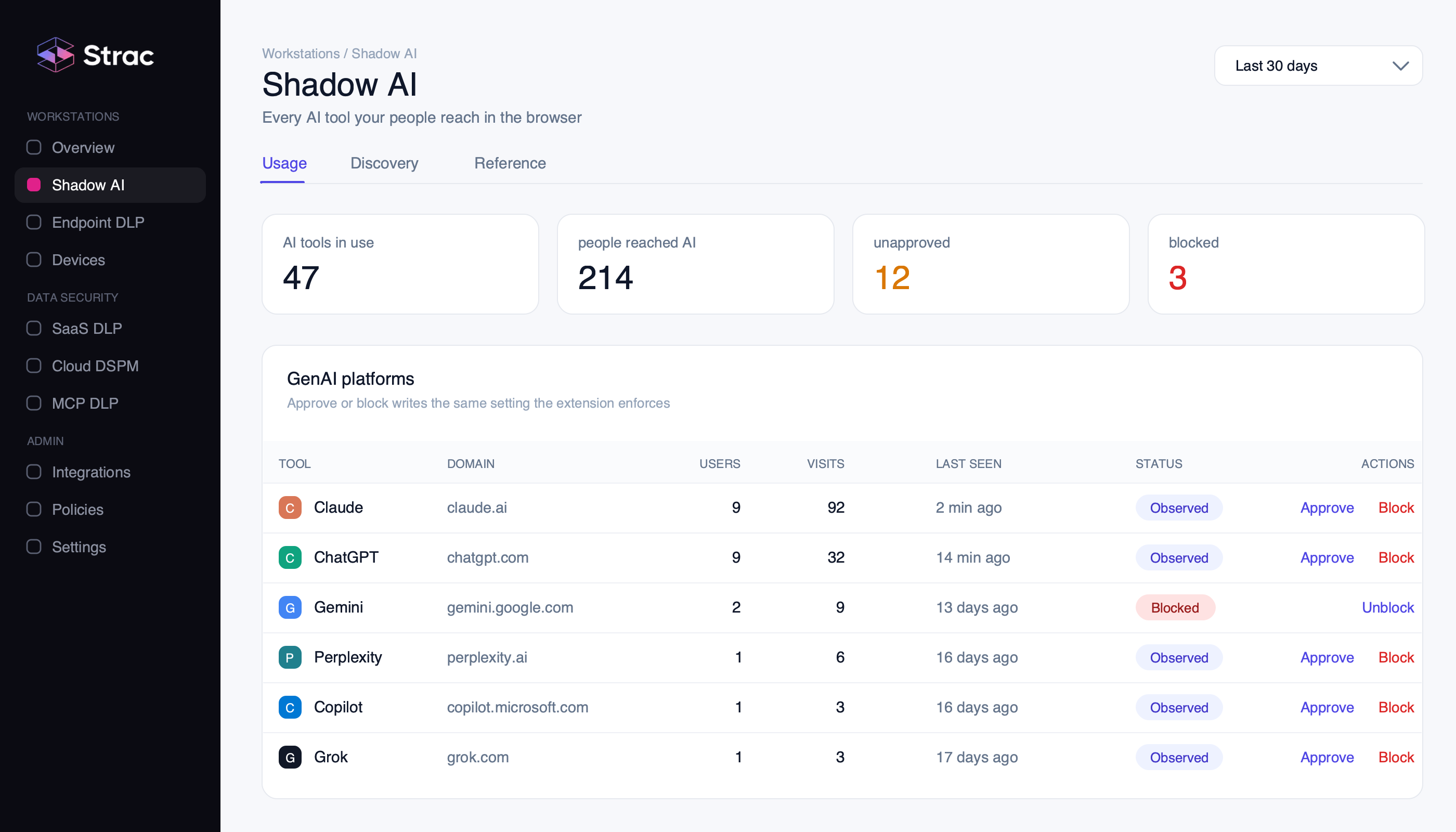
ChatGPT, Claude, Copilot, Claude Code, Codex, Cursor and more on every Mac and Windows device, with version and install path.
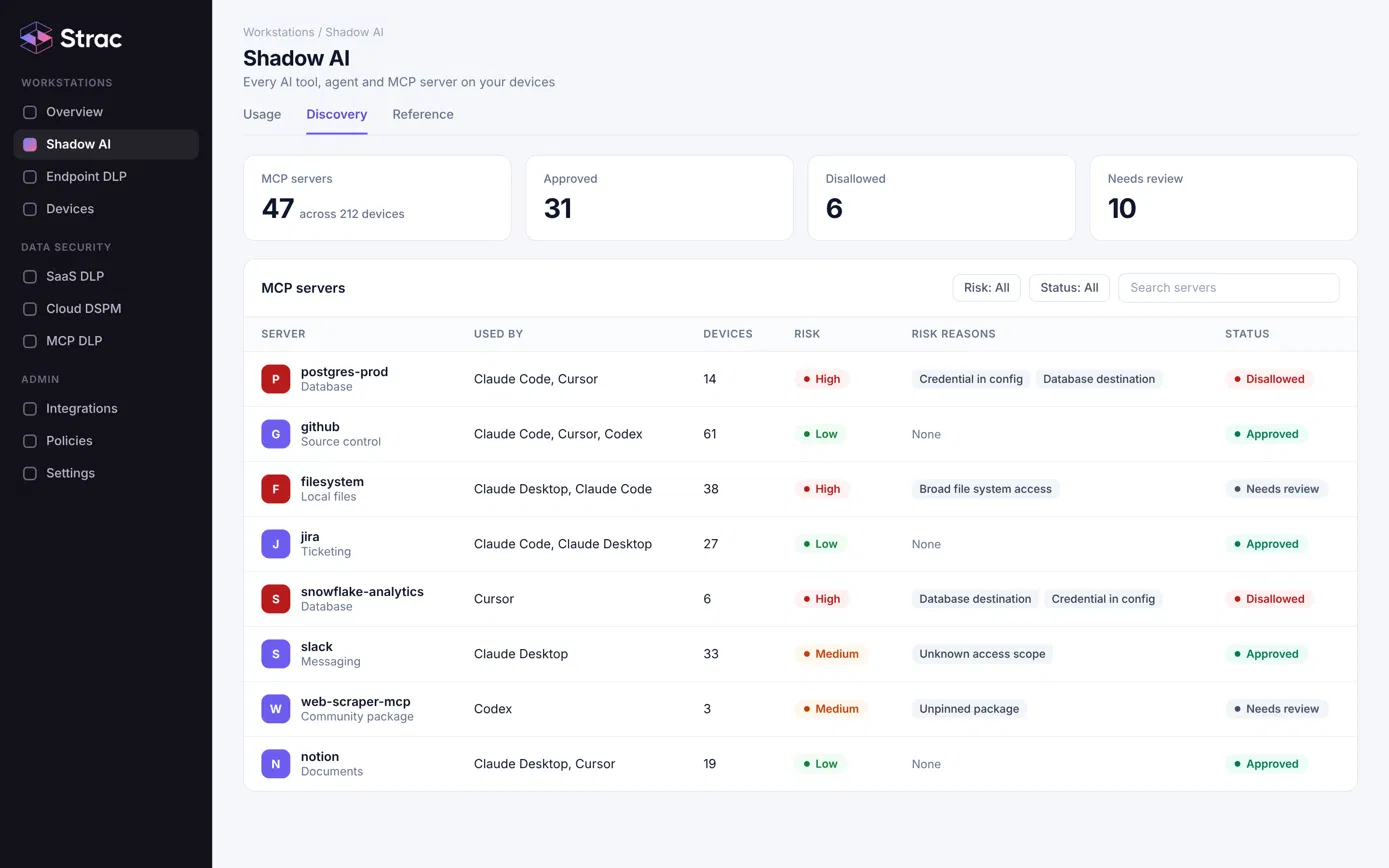
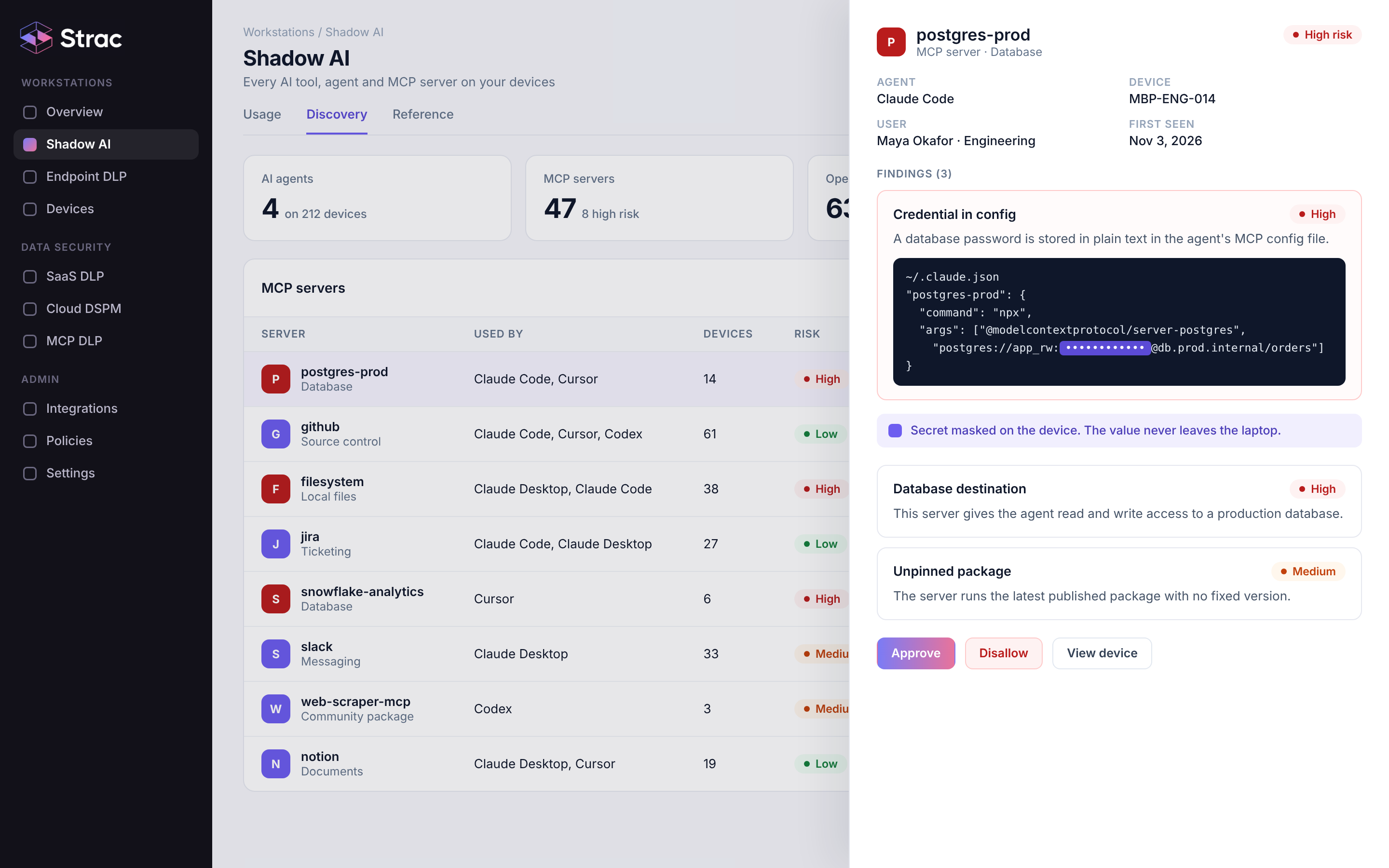
Every server configured on the device, what it runs or connects to, and who uses it. Secrets in configs are redacted on the device.
Where each skill and plugin came from, with a hash of its manifest.
High, Medium or Low, set after Strac reviews the vendor's own terms: training on inputs, enterprise controls, jurisdiction.
Which AI services people reach, from which app, how often, and who uses which tool. Export it for licensing.
Corporate, work email on a personal plan, or personal, read from the sign-in on the device.
A blocked app or CLI is refused when it starts, and its sites are blocked. Each block shows how many devices enforce it.
Block one server, or every server nobody approved. People see a window telling them who to ask.
Monitor, Ask or Block on shell commands, file reads and MCP calls in six coding agents, installed by the agent with no user action.
.env files, ~/.ssh, AWS, GCP and Kubernetes credentials, npm and PyPI tokens, Git and Docker credentials, keychains.
Card numbers, SSNs, cloud keys, API tokens and connection strings blocked in arguments and redacted in results, in milliseconds.
Block, warn or redact sensitive data typed, pasted or uploaded into ChatGPT, Claude, Gemini and Copilot.
Claude Code is asked to fix a failing deploy and tries to read ~/.aws/credentials. The Strac hook checks the call on the device and denies it with a reason the agent can act on.
Strac's inventory picks up the new server within minutes, flags it High because it connects to a database with a password in the config, and masks the password on the device.
DeepSeek is in Strac's catalog, rated High for jurisdiction and training on inputs. Security blocks it for macOS and Windows.
Your organization blocks AI tools and MCP servers it hasn't approved. Ask your admin to approve it.
What each tool lets Strac enforce today. Where a tool cannot ask or rewrite, Strac uses the stricter outcome.
| Control | Claude Code | Cursor | Codex | Copilot CLI | Gemini CLI | Windsurf |
|---|---|---|---|---|---|---|
| Block a tool call | Yes | Yes | Yes | Yes | Yes | Yes |
| Ask the person | Yes | Becomes block | Becomes block | Yes | Becomes block | Becomes block |
| Redact an MCP result | Yes | Yes | Yes | Yes | Yes | Logged only |
| Secrets paths on file tools | Yes | Yes | Best effort | Yes | Yes | Yes |
| Deployed with no user action | Yes | Yes | Yes | Yes | Best effort | Yes |
| On by default | Yes | Yes | Yes | Yes | Yes | Opt-in |
Minimum versions: Claude Code 2.1.296, Cursor 1.7.0, Codex 0.145.0, GitHub Copilot CLI 1.0.57, Gemini CLI 0.27.0, Windsurf 3.5.17.
See Strac check a coding agent's tool calls on the device and stop the ones that break policy.
Through your existing MDM, to a pilot group or the whole fleet. Mac and Windows.
Devices report AI apps, MCP servers, skills and accounts a few minutes after the agent starts.
Hooks, secrets paths and MCP rules start in Monitor, so you see what would have been blocked first.
Block unapproved MCP servers, high-risk AI apps and secrets reads. Add DLP when you are ready.
Prompts, AI replies, chat history and transcripts are never stored. No keystroke logs, no screenshots. API keys and tokens in configs are redacted on the device before anything is sent.
No. Prompts and replies are never stored. When sensitive data is typed, pasted or uploaded into an AI tool, the agent checks it on the device and records the detection: the kind of data, the app, the person and the time, with a masked sample.
What you choose to block: an AI app, its command-line tool and its sites, or an MCP server, on macOS, Windows or both. You can also block every MCP server nobody approved. Inside coding agents, hook rules can deny a tool call such as a read of ~/.aws/credentials.
Claude Code, Cursor, Codex, GitHub Copilot CLI and Gemini CLI are on by default once AI agent hooks are on. Windsurf is opt-in.
No. Many teams start with AI Security alone for inventory, blocking and agent hooks. Content checks such as redacting sensitive data in prompts and MCP results come from Strac DLP on the same agent.
Strac runs on the device, so it sees desktop apps, CLI agents and MCP servers that never cross a proxy, and it works off the corporate network. There is no TLS interception.
The agent installs through your MDM and devices report their AI inventory within minutes. Most teams run a pilot in Monitor mode within a day.
Deploy Strac to a pilot group in Monitor mode. Within 48 hours you see every AI app, coding agent, MCP server and personal account on those devices, the risky configurations, and what would have been blocked.