How to Protect AI Agents: Permissions, Least Privilege and Guardrails (2026)
How to protect AI agents: what AI agent permissions really reach, least privilege you can measure, excessive agency, guardrails and data-layer redaction.
Protecting an AI agent means right-sizing what its credential can do, then redacting the sensitive data it still legitimately reaches. Least privilege for agents is a measurement: permissions granted versus permissions exercised over a policy window, resolved through delegation and group membership to the real resources behind them. Strac maps direct and delegated permissions for every agent across Google Workspace, AWS, GitHub, Slack, Salesforce, Claude and ChatGPT, flags dangerous combinations such as secrets plus execute, applies reversible reductions where the provider offers a bounded admin API, and backstops the result with MCP and browser DLP that redact sensitive data at the boundary.
How to Protect AI Agents: Permissions, Least Privilege and Guardrails (2026)
Ask an engineer what an AI agent is allowed to do and you will get a list of scopes. Ask what it can actually reach and the conversation gets quiet. drive.readonly is a capability. The 8,214 files Alice can open, 193 of which contain SSNs, compensation data or secrets, is the reach. The agent inherits the second number the moment it is granted the first.
AI agent permissions are the capabilities an agent's credential carries, resolved through whatever identity it borrows, to the concrete resources that identity can touch. Protecting an agent starts there. Prompt filters and output guardrails have a role, and this guide covers where that role begins, but they sit downstream of a simpler fact: an agent cannot leak what it cannot read, and it cannot deploy what it cannot execute.
This is the second of three operating practices in an AI agent security program. The first is to discover every agent and resolve what identity it runs as. The third is to monitor what it did. This one sits between them: make the permissions behind the agent's identity match the work, and make the reduction safe to apply. The full framing is in the flagship guide to AI agent security.
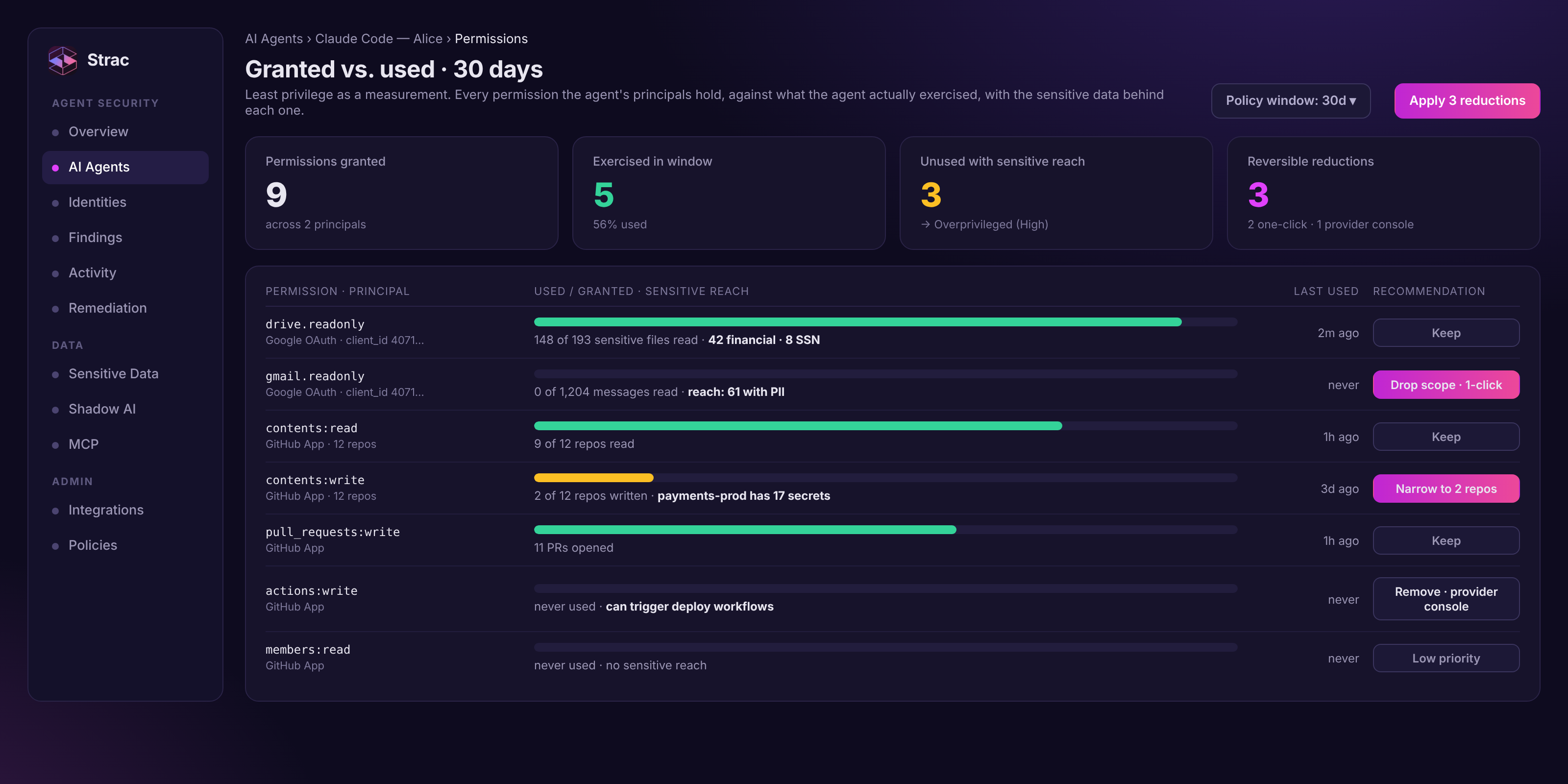
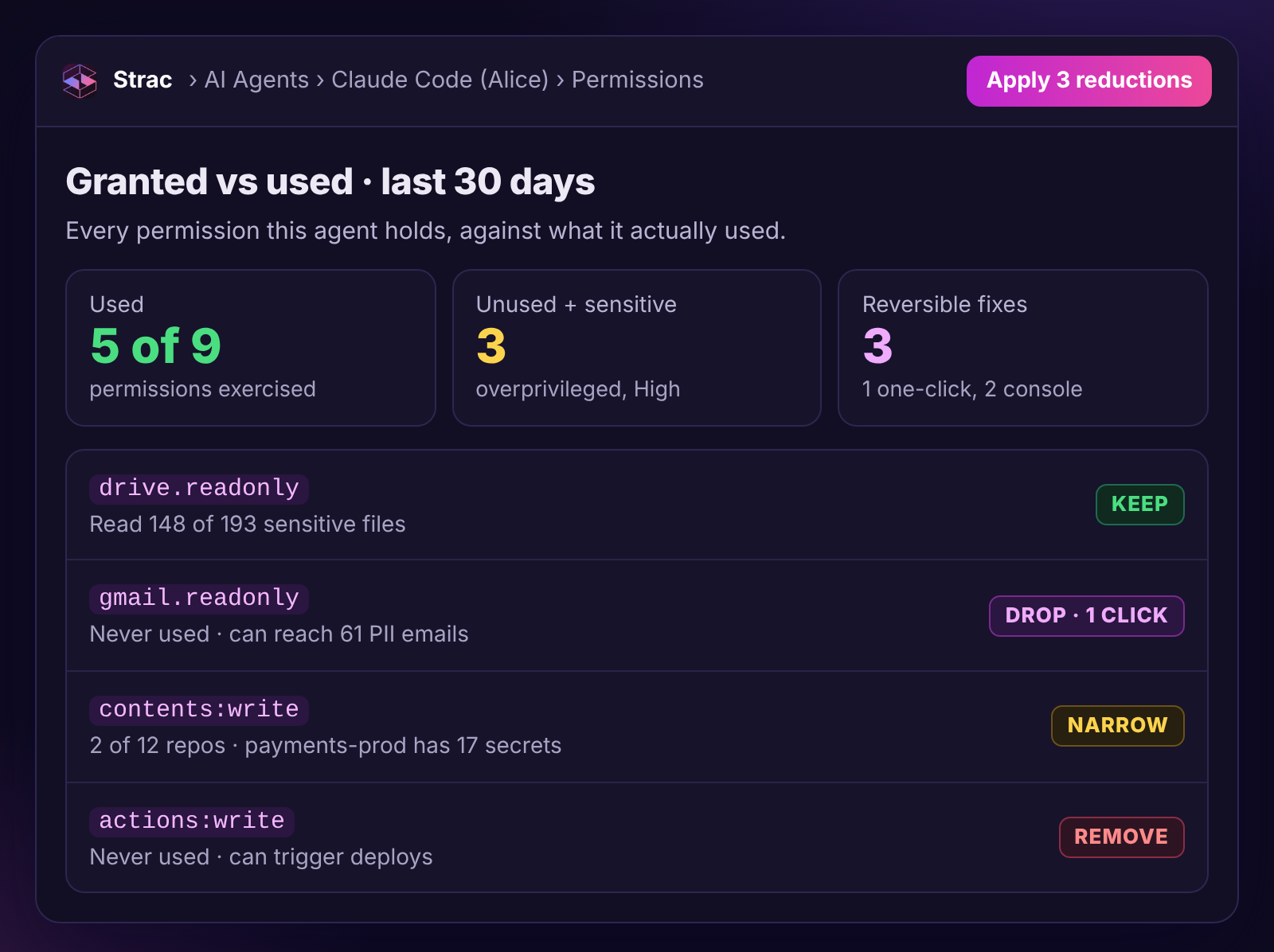
Nine permissions, five used in 30 days. The three unused ones that reach sensitive data each get a specific, reversible fix.
✨ What AI agent permissions actually are: direct, delegated and effective access
Three layers sit between "the agent has a scope" and "the agent can read payroll.xlsx."
Two grants, one agent. The Google scope borrows Alice's identity and her Finance group, so it reaches 193 sensitive files she never opened. The GitHub App has its own identity, and its write-and-run capability sits next to 17 live secrets.
Direct grants. The agent's own principal has an explicit permission: a GitHub App installation with contents:write on selected repositories, a Slack bot with channels:history on four channels, an IAM role with secretsmanager:GetSecretValue on prod/*. These are the easiest to enumerate, because the provider's admin API lists them.
Delegated grants. The agent acts on behalf of a human through an OAuth grant. Claude is authorized by Alice with drive.readonly. The scope says which API the agent may call; Alice's own file access says which files that call can return. The agent reaches exactly what the human can reach, bounded by the scope. Most SaaS agents (Claude, ChatGPT connectors, Gemini extensions, MCP servers pointed at Google or Salesforce) use this pattern.
Effective access. What the first two layers resolve to after group membership and inheritance. Alice is in Finance. Finance has Reader on the Payroll shared drive. So a Claude grant with drive.readonly for Alice can read every file in that drive, including ones Alice has never opened.
A practical program resolves access in layers and ships the first two before perfecting the rest: direct grants and delegated user access on day one; group membership and inheritance per provider as customers need it; resource policies, permission boundaries and SCPs only for targeted high-risk resources; and never a universal policy solver as a launch blocker.
For AWS, simulate targeted actions rather than the universe. For each discovered agent role, evaluate a curated high-risk set against resources Strac already classifies: s3:GetObject and PutObject, secretsmanager:GetSecretValue, kms:Decrypt, dynamodb:Scan, rds-data:ExecuteStatement, lambda:InvokeFunction, iam:PassRole, sts:AssumeRole. IAM simulation is modeled authorization, so the result is stored with the policies it evaluated and the constraints it could not resolve. That is enough to produce the finding that matters, which is almost never "this role can call 400 APIs" and almost always "this role can read production secrets and invoke Lambda."
One distinction before going further. Authorization is what could happen. Activity is what did. Keep them in separate tables and join them only through evidence.
Least privilege for AI agents is a measurement, not a policy
"Least privilege" has been on every security policy for twenty years and enforced on almost none of them, because nobody could say what "least" meant for a given identity. Agents make the gap worse: their permissions come from a consent click or a copied human role, and nobody revisits them because the agent keeps working.
The fix is to define least privilege as a number. For each permission the agent holds, over a policy window (30 days is where most teams settle), was that capability exercised? Three buckets fall out:
Granted and used. Keep it. This is the agent's real job.
Granted, unused, no sensitive reach. Review candidate. Low urgency.
Granted, unused, with sensitive reach. The overprivilege finding. Write, delete, admin or execute capability that was never exercised, sitting on a resource that contains PII, secrets, financial data or source code.
Two honesty rules make this defensible in front of an auditor. First, no observation is not proof of no use. A capability can go unused for 30 days because it is seasonal (quarter-end exports), because the telemetry that would record it is off (S3 data events are not enabled by default), or because the audit log does not cover that action. The finding states the window and the telemetry coverage behind it, and if coverage is not_configured the product says "unknown," never "unused." Second, every recommendation is a review candidate with a stated blast radius. "Remove actions:write" is a different decision when the installation serves six workflows than when it serves one.
Measured this way, least privilege stops being a slogan and becomes a backlog: a ranked list of reversible reductions, each with the evidence behind it.
✨ A worked example: right-sizing AI agent permissions for Claude Code
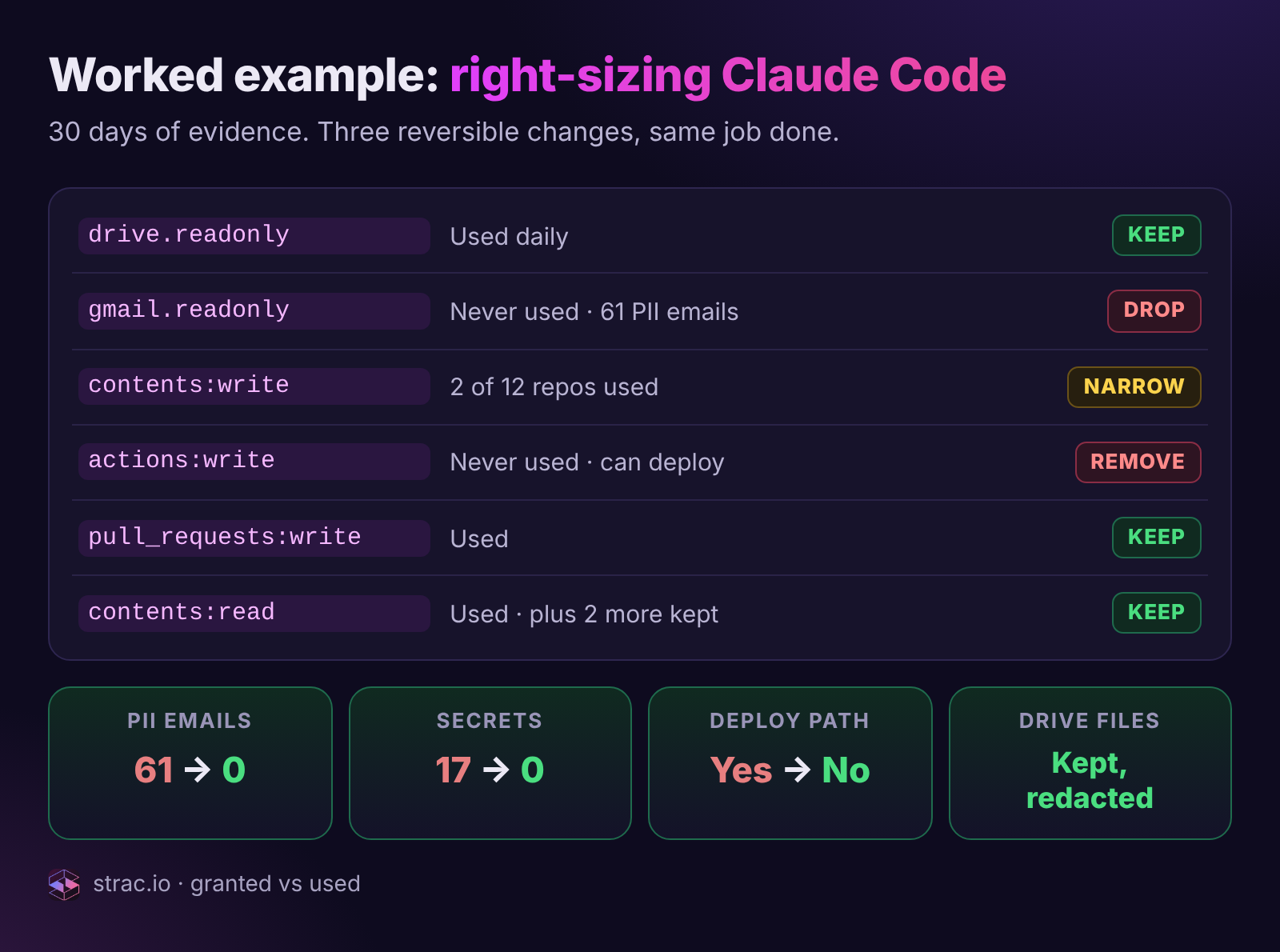
Here is the measurement for one common pattern: Claude Code on Alice's laptop, authenticated to Google through a delegated OAuth grant and to GitHub through an App installation.
Before, the agent could reach 61 PII emails, 17 secrets and a deploy path it never used. After three reversible reductions it does the same job, and Strac DLP redacts the sensitive values in the Drive files it still reads.
Walking the rows:
drive.readonly (Google, delegated). Used repeatedly. Reach is everything Alice can read, including 193 classified files. Keep. The sensitive reach here is the reason for the data-layer backstop covered below, and no reason to revoke a scope the agent uses for its job.
gmail.readonly (Google, delegated). Never used in 30 days. Reach: 61 messages containing PII. Drop the scope. In Strac this is one click, with a plan that says exactly what will happen: Google's admin API revokes the user's tokens for a client_id as a whole, it does not subtract one scope, so "drop gmail.readonly" means revoke the Claude grant for Alice and re-consent with drive.readonly only. The plan says so plainly instead of labeling a broad revocation as the removal of one permission. Reversible by re-consenting.
contents:read (GitHub App). Used. Keep.
contents:write (GitHub App). Used, on 2 of the 12 repositories the installation covers. One of the other ten is payments-prod, where Strac's repo scan found 17 active secrets. Narrow the repository selection to the two repos the agent writes to. GitHub has no verified admin write API for this authorization type, so Strac generates the exact selection and deep-links to the installation settings. Reversible by re-adding repos.
pull_requests:write (GitHub App). Used. Keep; this is what a coding agent is for.
actions:write (GitHub App). Never used. It can trigger workflow runs, which in this org means deploys. Remove via the provider console. This row would turn a High finding into a Critical one if the agent also had a path to secrets, because trigger-deploy is an execute capability.
members:read (GitHub App). Used for mention resolution. Keep.
Result: 9 granted, 5 exercised (56 percent), 3 reversible reductions, and the agent keeps doing exactly what Alice set it up to do. It never has to be "block Claude Code."
✨ Excessive agency: the AI agent permission combinations that matter
OWASP calls it excessive agency: an agent holding more capability than its job needs, so a manipulated prompt turns into a real action. A single permission is rarely the problem. The findings a CISO acts on come from combinations, and severity is computed from factors anyone can read on the finding: sensitivity × action capability × breadth × sanctioning × observed use × attribution confidence. No opaque score.
Combination
Why it is dangerous
Default severity
Typical fix
Secrets or KMS decrypt + execute
The agent can read a credential and then use it: GetSecretValue plus lambda:InvokeFunction, or repo secrets plus actions:write. One prompt injection becomes a deployment.
Critical
Split the role; move secret retrieval to a principal with no execute path; rotate
Wildcard scope + sensitive data
All repos, all channels, s3:* on a bucket holding PII. Breadth multiplies every other factor.
High
Narrow the resource selector to what is used
Unused write, delete or admin
Granted and never exercised. No work depends on it, and an injected agent can use it.
Medium to High, by blast radius
Reduce to read; remove the capability
Shared human login or borrowed browser session
The audit log attributes everything to Alice. You cannot revoke the agent without revoking Alice.
Nobody will approve or reject the reduction, so the finding never closes.
High
Assign an owner first; disable if nobody claims it
Capability across, sensitivity down. Removing unused capability moves an agent left; narrowing reach or redacting moves it down. The secrets-plus-execute corner is the one to empty first.
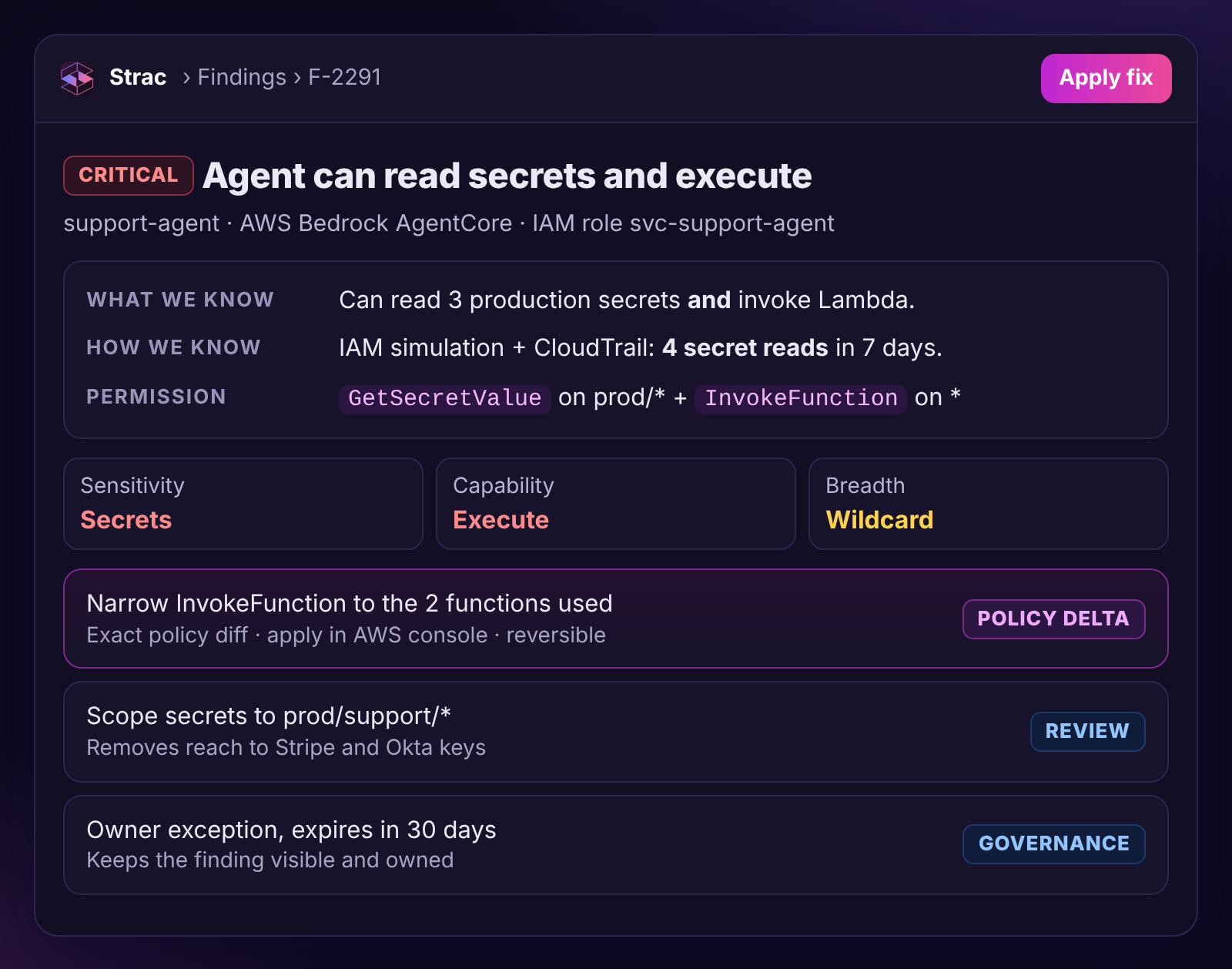
The first row is the one to find on day one. In most inventories it looks like a Bedrock AgentCore runtime running as an IAM role copied from a platform engineer: s3:GetObject on customer-exports/*, secretsmanager:GetSecretValue on prod/*, lambda:InvokeFunction on support-tools-*. CloudTrail shows the role has never retrieved a secret. It does not need to have. The capability is the finding.
Note what is missing from the table: the model. None of these combinations is a prompt-injection problem. Every one of them is the reason prompt injection has consequences. MCP prompt injection and the confused deputy are the attacks; the table is the blast radius they get to use.
✨ How to remove excessive AI agent permissions safely
Permission reviews stall because the reduction lives in someone else's console and the security team ends up filing tickets nobody closes. Automated remediation gets vetoed because nobody trusts a tool with write access to IAM on day one. The remediation model has to satisfy both.
A defensible finding: what we know, how we know it, the permission that allows it, and fixes that each state whether Strac applies them or the console does.
Four rules make it safe:
Discovery credentials are read-only and separate from remediation credentials. The inventory and the granted-versus-used measurement run on read scopes. Write access is a separate authorization, opt-in per provider and per action. Read-only onboarding never implies write.
Every option states its scope, reversibility and executor. Scope: exactly what will change, including the blast radius when a grant is shared by several workflows. Reversible: yes or no. Executor: Strac applies it through a bounded provider API, or the finding carries the exact change and a console deep link. A console recommendation is never dressed up as a button.
Plans are checked against live state before execution. The target is re-read and the plan rejected if the grant drifted or broadened. Execution is idempotent, request and response are kept as evidence, and a provider resync verifies the result. Revoking a grant does not instantly invalidate every cached token, so the result stays pending_verification until the resync confirms it.
The human side is first-class. An owner can acknowledge a finding, sanction the agent, or create an exception with an expiry date. Exceptions without expiry are how inventories rot.
Per provider, what Strac automates and what it hands to the console:
Provider
Strac applies (bounded API, reversible)
Strac recommends with a deep link
Google Workspace
Revoke a user's third-party app tokens by client_id; remove a Drive permission Strac already manages
Narrowed scope set to re-consent with; Admin console changes
Slack
Restrict or uninstall an app where Enterprise Admin APIs allow
Requested scopes and resources, with the admin link
AWS
Nothing automatic, by design
Exact policy delta, rotation, console link
GitHub
Provider workflow unless the authorization type has a verified admin write API
Repository selection, permission reduction or uninstall
Salesforce
Token revocation only where technically and administratively valid
Connected app or permission set changes
Anthropic, OpenAI, Cursor
Workspace controls only where admin write APIs are documented and bounded
Policy finding with admin deep link
The AWS row is deliberate. Autonomous IAM mutation stays off the roadmap until a customer asks for it with a safety design attached. In the meantime the policy delta is precise enough to paste.
✨ Protect AI agents at the data layer: redact what they still reach
Right-size every permission and one fact remains: some agents need sensitive data to do their job. The finance research agent has to read the revenue model. The support agent has to read the customer record. drive.readonly stays on Alice's grant because she uses it.
That is where the data layer takes over, and it is the pillar that identity-security, SSPM and NHI tools do not have. When the permission is correct and the agent still reaches sensitive data, redact at the boundary: the SSN is replaced before it leaves Drive for the model, the API key is caught in the paste before it reaches ChatGPT, the card number never appears in the MCP response.
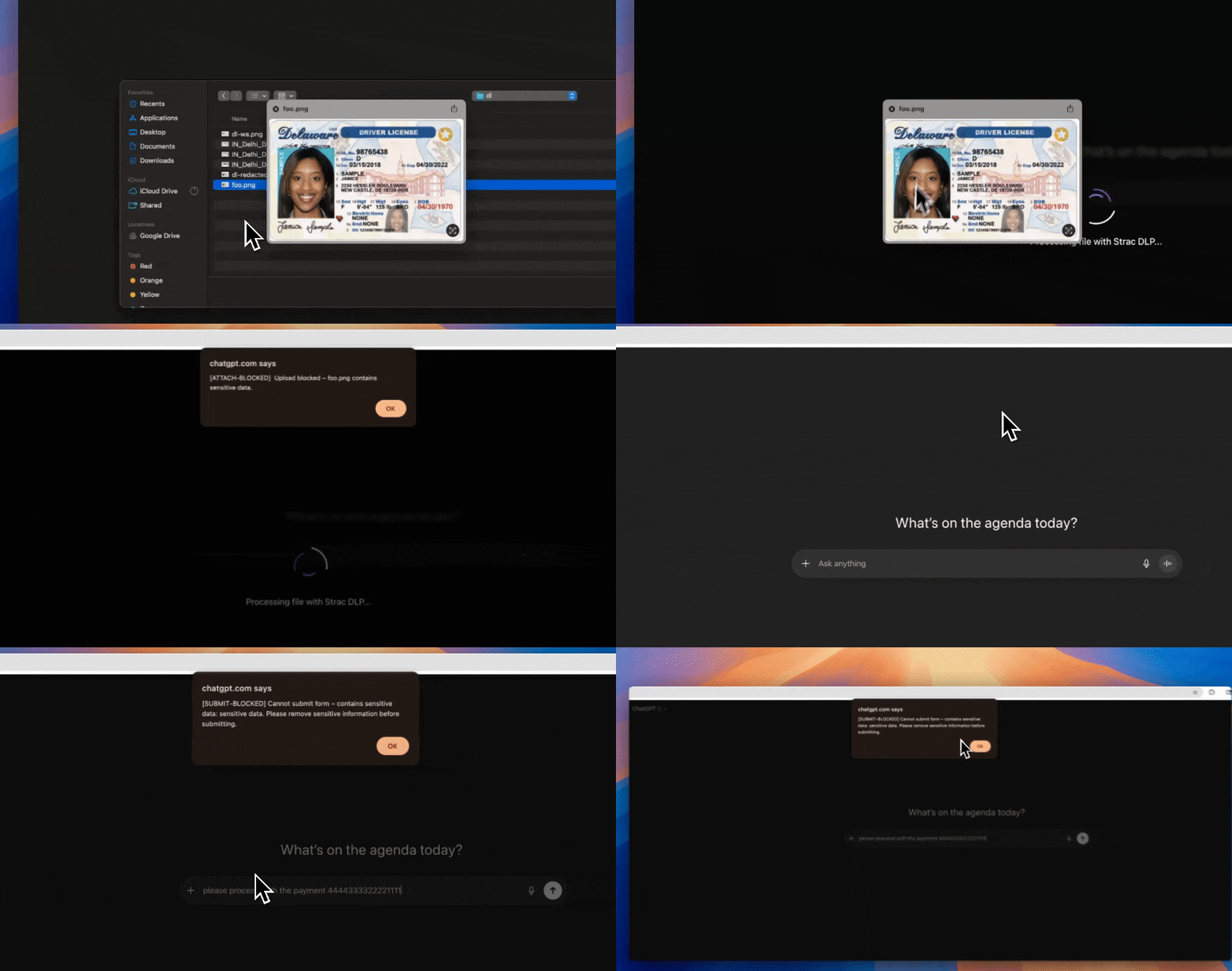
The last layer, in the browser: sensitive values are detected and redacted as the user types into an AI tool, so a correctly permissioned agent still never sees the raw data.
Two enforcement points matter most for agents:
MCP DLP. Every MCP tool call passes through a point where the server, tool, requesting session, downstream principal, action category and the sensitive data in the request and response are all visible. Redaction happens there, in both directions, and the same observation feeds the activity graph as "did" evidence.
Browser and endpoint AI DLP. For agents that drive a browser session or run locally, the sensor that sees the paste, the upload and the download is the only place a control can act. It is also the sensor that attributes browser-session agents and shared logins that no API-only product can see. For Claude, Claude DLP covers chat, Cowork and Claude Code.
AI agent guardrails: what each one stops, and in what order
"Guardrails" belong in this picture too. The word gets used for everything from a system prompt to a network policy, so here is what each type stops and in what order to deploy them:
Guardrail type
Where it sits
What it stops
What it does not stop
Layer
Permission right-sizing
Provider control plane (scopes, roles, repo selection, IAM)
Reach the job does not need; most of any attack's blast radius
Misuse of permissions the agent legitimately needs
First
Identity separation
Dedicated principal per agent
Un-revocable agents; unattributable actions
Overprivilege on the dedicated principal
First
Tool allowlists
Agent framework or MCP client config
Calls to tools the agent was never meant to use
Dangerous use of an allowed tool
Second
Human approval on risky actions
Agent runtime, before execute, delete, send or admin
Irreversible actions taken on an injected instruction
Reads; slow, high-volume leakage
Second
Data-layer redaction
MCP, browser, endpoint and SaaS boundaries
Sensitive values reaching the model or leaving in a tool response, whatever the permission
Actions with no sensitive payload
Last, always on
Prompt-injection and output filters
The model boundary
Known injection patterns; obviously harmful output
Novel injections; anything the permissions already allow
Last
Read the Layer column bottom to top and you have the common mistake: starting with the model filter, which stops the least, and never getting to the permission, which stops the most.
✨ How to protect AI agents in 30 days: a least-privilege rollout
This order produces closed findings fastest. It assumes the inventory exists.
Everything runs read-only until week 4, and every reduction is reversible. The program is measured by two numbers: agents with an accountable owner, and median days from finding to fix.
Week 1: resolve identity and assign owners. Record the principal each agent runs as and the human accountable for it. Nothing below can be approved without an owner. Flag shared logins and borrowed browser sessions for migration to dedicated identities.
Week 1: map direct and delegated permissions. Pull scopes, roles, repo selections, Slack grants and IAM policies through the provider admin APIs. Resolve delegated grants through group membership to the resources. For AWS, simulate the curated high-risk set and stop there.
Week 2: join to the sensitive-data inventory. Every permission should answer "what does this expose." If you already run DSPM or DLP, the classified-resource map exists and agents are a new set of principals pointed at it. Without it every finding reads "the agent can read 8,214 files."
Week 2: find the Critical combinations first. Secrets plus execute. Wildcard scope over sensitive data. Work those with their owners before anything else. They are few and obvious once the graph exists.
Week 3: turn on granted-versus-used. Start the 30-day window with provider audit logs; add MCP, browser and endpoint evidence where attribution needs it. Record telemetry coverage per provider so "unused" means something.
Week 4: apply the reversible reductions. One click where the provider API is bounded, console with an exact delta elsewhere. Track median time from finding to remediation and the percentage of agents with an owner. Those two numbers are the program.
Ongoing: codify it as policy. Owner required; no secrets plus execute on one principal; unused write or admin over 30 days is a finding; stale credentials revoked at 45 days; no shared human identities; unsanctioned agents monitored at the data layer. The AI agent governance guide covers making that stick, and the frameworks regulators are converging on map onto the same controls.
A permission review is a snapshot. Keep the activity layer running; it is what tells you next quarter's reductions.
How Strac protects AI agents
Strac answers all four questions for every agent in one graph: Agent → Principal → Permissions → Resources → Sensitive data, with activity joined through evidence. For the authorization pillar specifically:
Direct and delegated permissions across Google Workspace, AWS and Bedrock AgentCore, GitHub and Copilot, Slack, Salesforce and Agentforce, Claude, ChatGPT and Cursor, resolved through group membership and inheritance to the resources.
Effective sensitive reach on every permission, because the classified inventory of Drive files, repos, S3 objects, Slack channels and Salesforce records already exists in the platform.
Granted versus used over a configurable window, with telemetry coverage stated on every "unused" claim, and dangerous-combination findings with six visible severity factors.
Remediation that is read-only by default, opt-in per provider and per action, with scope, reversibility and executor on every option.
The data-layer backstop through MCP DLP, browser and endpoint AI DLP and SaaS DLP, using the same sensors that find the shadow MCP servers on developer workstations that no inventory knows about.
Deploy it read-only. The first granted-versus-used report tends to retire more standing access in a week than the previous year of access reviews.
👉 Book a demo and we will run granted-versus-used read-only against your own Google Workspace or GitHub org on the call, and show you the three reductions you can apply before it ends.
🌶️ Spicy FAQs on protecting AI agents
How do you protect AI agents?
Protect AI agents in three layers. First, right-size their permissions: map what each agent's credential can reach, compare granted with used over 30 days, and remove what is unused. Second, add guardrails such as tool allowlists and human approval on risky actions. Third, redact sensitive data at the MCP, browser and SaaS boundaries, so even a correctly permissioned agent never sees raw SSNs, card numbers or secrets.
What are AI agent permissions?
AI agent permissions are the capabilities an agent's credential carries, resolved to the resources those capabilities can reach. They come in two forms: direct grants on the agent's own principal (a GitHub App's contents:write, an IAM role's s3:GetObject) and delegated grants where the agent acts on behalf of a human through OAuth (Claude with drive.readonly for Alice). The permission that matters is the effective one, after group membership and inheritance resolve it to concrete resources.
What does least privilege mean for an AI agent?
It means every capability the agent holds was exercised in a defined policy window, and every unused capability with sensitive reach has been removed or has a documented exception with an expiry. It is measurable: granted versus used, over 30 days, with telemetry coverage stated so that "unused" is a fact rather than a guess. An agent using 56 percent of its grants, with three unused permissions over sensitive data, is overprivileged no matter how reasonable each scope looked on the consent screen.
How do I find out what an AI agent can actually access?
Resolve the permission through the identity to the resource. For a delegated OAuth agent, intersect the scope with the human's effective access, including group membership and shared-drive inheritance. For a cloud agent, simulate a curated set of high-risk actions against the resources you already classify. Then join the result to your sensitive-data inventory so the answer is "193 classified files" and not "8,214 files."
What is excessive agency in AI agents?
Excessive agency is when an AI agent holds more capability than its job needs, such as write, delete or execute permissions it never uses, or reach into data it has no reason to read. It is the reason a prompt injection has consequences. The fix is to remove unused capability, narrow reach to the resources the agent actually uses, and redact the sensitive data it still needs to read.
Are AI agent guardrails the same thing as AI agent permissions?
No. Guardrails are controls at the model or runtime boundary: prompt-injection filters, output scanning, tool allowlists, human approval on risky actions. Permissions are what the agent's credential can do regardless of what the model decides. Guardrails reduce the probability that an agent does something bad; permissions bound how bad it can be. Deploy permissions first, data-layer redaction always, model-level guardrails last.
How do you protect AI agents?
Protect AI agents in three layers. First, right-size their permissions: map what each agent's credential can reach, compare granted with used over 30 days, and remove what is unused. Second, add guardrails such as tool allowlists and human approval on risky actions. Third, redact sensitive data at the MCP, browser and SaaS boundaries, so even a correctly permissioned agent never sees raw SSNs, card numbers or secrets.
What are AI agent permissions?
AI agent permissions are the capabilities an agent's credential carries, resolved to the resources those capabilities can reach. They come in two forms: direct grants on the agent's own principal (a GitHub App's contents:write, an IAM role's s3:GetObject) and delegated grants where the agent acts on behalf of a human through OAuth (Claude with drive.readonly for Alice). The permission that matters is the effective one, after group membership and inheritance resolve it to concrete resources.
What does least privilege mean for an AI agent?
It means every capability the agent holds was exercised in a defined policy window, and every unused capability with sensitive reach has been removed or has a documented exception with an expiry. It is measurable: granted versus used, over 30 days, with telemetry coverage stated so that "unused" is a fact rather than a guess. An agent using 56 percent of its grants, with three unused permissions over sensitive data, is overprivileged no matter how reasonable each scope looked on the consent screen.
How do I find out what an AI agent can actually access?
Resolve the permission through the identity to the resource. For a delegated OAuth agent, intersect the scope with the human's effective access, including group membership and shared-drive inheritance. For a cloud agent, simulate a curated set of high-risk actions against the resources you already classify. Then join the result to your sensitive-data inventory so the answer is "193 classified files" and not "8,214 files."
What is excessive agency in AI agents?
Excessive agency is when an AI agent holds more capability than its job needs, such as write, delete or execute permissions it never uses, or reach into data it has no reason to read. It is the reason a prompt injection has consequences. The fix is to remove unused capability, narrow reach to the resources the agent actually uses, and redact the sensitive data it still needs to read.
Discover & Protect Data on SaaS, AI, MCP, Endpoints & Cloud
Strac provides end-to-end data loss prevention for all SaaS and Cloud apps. Integrate in under 10 minutes and experience the benefits of live DLP scanning, live redaction, and a fortified SaaS environment.


.webp)









.avif)


.gif)
