Salesforce MCP Server: Secure Setup for Claude & AI Agents (2026)
The Salesforce MCP server lets Claude, Cursor, ChatGPT, and AI agents read and act inside Salesforce. Here's the official setup, the real security risks, and how to deploy it with DLP-grade redaction at the MCP layer.
The Salesforce MCP server is the path for AI agents (Claude, Cursor, ChatGPT, Perplexity, custom agents) to read and act inside Salesforce via the Model Context Protocol — covering every Account, Contact, Opportunity, Case, custom object, and attachment the authorizing user can read.
Setup is documented in the official Salesforce MCP server guide; connecting from Claude Desktop requires the Enterprise/Pro/Max/Team plan plus an OAuth client ID/secret added as a custom connector.
The risk: every Salesforce MCP tool call returns the data the authorizing user can see. That data routinely contains PII, PHI, financial records, contracts, source code, secrets, and credentials. None of it is inspected before reaching the AI model's context window.
Strac Salesforce MCP DLP is the governance layer for AI-agent access to Salesforce. Strac governs every tool call between the agent and Salesforce: it controls what each agent can reach and do (allow/block, plus approval on high-risk writes and exports), protects sensitive data with redaction, masking, and vaulting, and logs every call as audit evidence — mapped to SOC 2 / HIPAA / PCI / GDPR / EU AI Act / ISO 42001. One control plane across every Account, Contact, Opportunity, Case, and attachment.
Setup is agentless and under 10 minutes per workspace. No application code changes, no agent SDK changes, no Salesforce re-permissioning.
What Is the Salesforce MCP Server?
The Salesforce MCP server is a Model Context Protocol implementation that exposes Salesforce's API as a standardized set of tools to AI agents. Once connected, an agent like Claude can perform record query, record get, SOQL run, object list, Apex action invoke on the authenticated user's behalf — turning Salesforce's API surface into AI-actionable capabilities.
Refer to the official Salesforce MCP server documentation for the current tool list, OAuth scopes, and rate-limit behavior. The setup pattern is consistent with other MCP integrations: an OAuth client ID/secret, a custom connector in Claude (or another MCP-aware AI client), and the server starts serving tool calls.
From the user's perspective, the AI agent suddenly knows their Salesforce. From the security perspective, the AI agent now has read access — and often write access — to every record the user can touch in Salesforce.
That's the value. It's also where security teams need a control layer.
What AI Agents Can Actually Do With Salesforce MCP
Start with the upside, not the risk: with the Salesforce MCP server connected, an agent like Claude or Cowork stops being a chatbot and starts operating your CRM as the authorizing user. In practice that means it can:
Answer questions across accounts and contacts — "Which enterprise accounts in the Northeast have no open opportunity?" resolves to a live SOQL query against real records, not a stale export.
Summarize pipeline and forecast risk — pull a rep's open Opportunities and summarize stage, amount, close date, and next step across dozens of records in a single prompt.
Investigate and triage Cases — read a Case, its comments, and linked Contacts, then draft a reply or flag it for escalation.
Update approved records — log a call, advance a stage, patch a field, or create a follow-up Task — write actions, scoped to exactly what you permit.
Reason over custom objects and fields — your org's real business data lives in custom objects, and the agent reads and works them like any standard object.
Every one of those actions runs through Salesforce's own API and permission model — which is what makes it genuinely useful, and exactly why the regulated data it can reach needs an inspection layer in the tool-call path.
The Real Security Risks of the Salesforce MCP Server
The risks fall into four categories that every healthcare, fintech, and enterprise security team should price into the deployment.
1. Every record is regulated data. Salesforce is a CRM — Accounts, Contacts, and Cases are PII by definition, and Opportunities and custom objects routinely hold financial data, SSNs, and card numbers. query_records and run_soql return all of it to the agent.
2. SOQL gives the agent database-level reach. A single run_soql call can return thousands of records across objects. There is no WHERE not_regulated = true clause — the agent gets the raw rows.
3. Custom objects hide sensitive data in plain sight. Most orgs store their most sensitive data in custom objects and custom fields. Standard Salesforce Shield rules often miss them; an MCP tool call returns them by default.
4. Attachments and Files are unfiltered. Contracts, IDs, signed forms, and exported reports stored as Salesforce Files flow to the agent as raw content — including text inside scanned images.
The traditional DLP a company already runs — at the network edge, on the file share, inside the SaaS-native rule engine — does not sit in the MCP path. The tool response goes straight from Salesforce into the AI agent's context window. That reach is exactly why each agent's access and actions in Salesforce must be governed: controlled (what it can reach and do), the sensitive data it touches protected, and every call audited. That is where Strac Salesforce MCP DLP lives.
Strac's Salesforce MCP DLP is the governance layer that sits between AI agents and the Salesforce MCP server. Strac governs every tool call: it sees exactly what each agent reaches in Salesforce, controls its actions (allow, block, or require approval on high-risk writes and exports), protects the sensitive data it touches by redacting, masking, or vaulting it, and logs every call as audit evidence. Non-sensitive, in-policy calls flow through untouched.
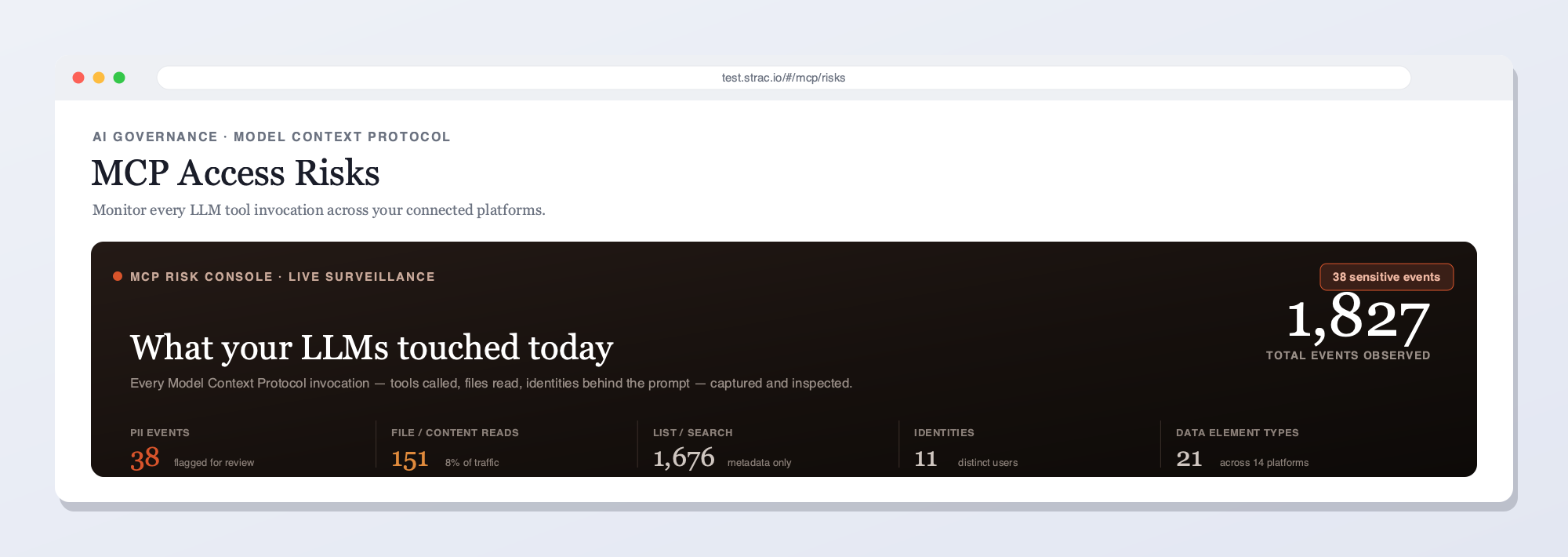
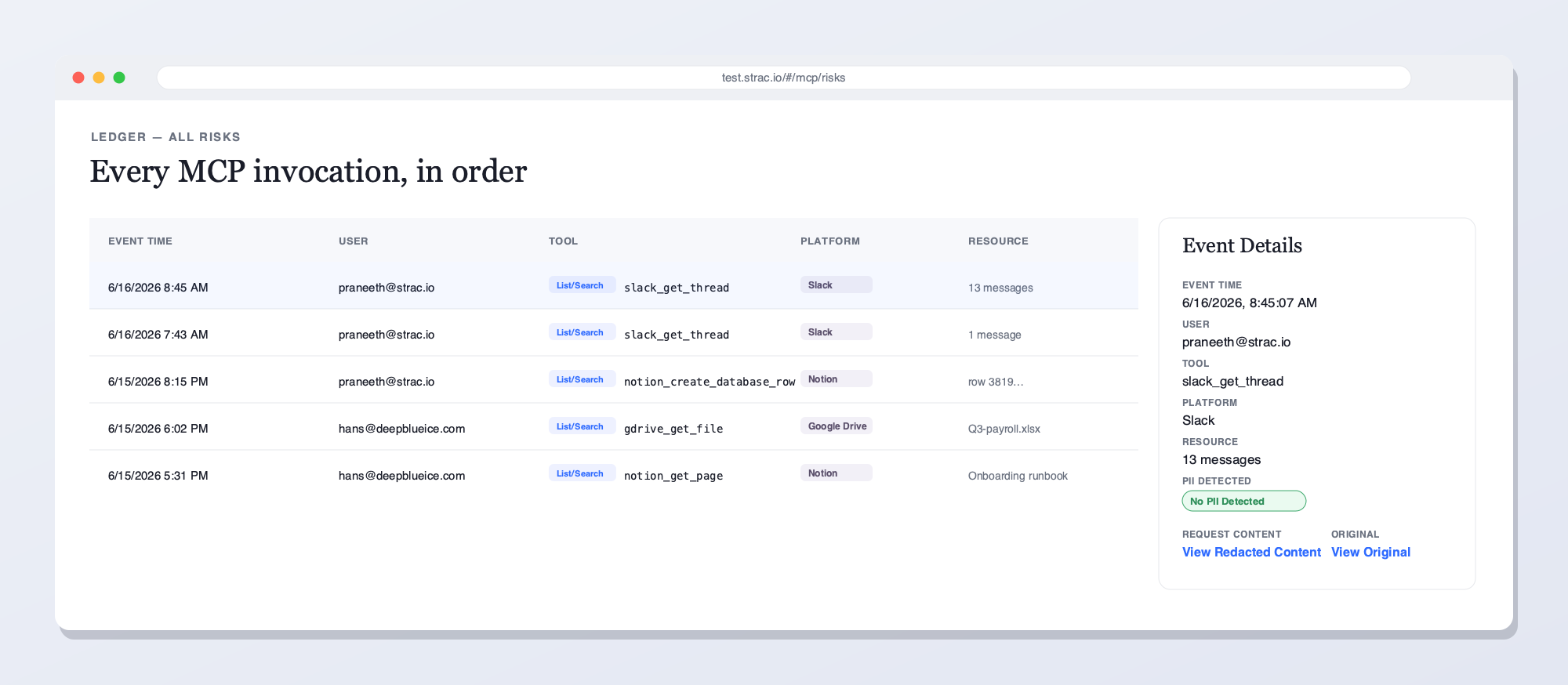
The Strac Salesforce MCP DLP gateway intercepts every tool call between any AI agent (Claude, Cursor, Cowork, ChatGPT, custom) and the Salesforce MCP server. PII, PHI, PCI, secrets, source code, and content inside images are redacted before the AI agent ever reads them.The full data flow: a user prompt triggers an AI agent tool call, the MCP server fetches from Salesforce, and the Strac DLP redaction engine strips SSNs, credit cards, emails, PHI, secrets, and source code before the redacted response ever reaches the model.Strac's live MCP Access console — every AI agent tool call touching Salesforce and your other connected platforms, captured and inspected for sensitive data in real time. See what your LLMs reached for, who prompted, and what was flagged.Every MCP invocation in order — user, tool, platform, and the sensitive data found — with redacted vs. original content and a full audit trail. This is what Strac shows on Salesforce that access-only gateways can't: the data in each call, not just the call.
Why not just an access gateway?
Access-only tools answer "who called what." They do not see the PII and payment fields inside a customer record. Strac sits inline on every Salesforce tool call: it detects and remediates the sensitive data inside — redact, mask, block, or revoke access — and approves or blocks risky actions per agent, and keeps the audit trail — the call and its contents.
What Strac does on every Salesforce tool call
One inline pass over each MCP response — five actions, enforced by your policy:
Detect — finds PII in a customer record and any PII, PHI, PCI, secrets, or source code in the payload, including text inside images via OCR.
Redact or mask — replaces the sensitive elements inline, so the agent still gets its answer and the model never sees the raw data.
Block or require approval — stops a high-risk action like a record update or bulk export, or routes it for sign-off before it runs.
Alert — notifies your team and streams the event to your SIEM (Microsoft Sentinel, Datadog, Splunk) in real time.
Audit — logs who, which agent, which tool, what data, and the action taken — evidence mapped to PCI DSS, SOC 2, HIPAA, and GDPR.
What this looks like in practice:
Read tools are filtered. When the agent calls a read tool, Strac inspects the returned payload, redacts SSNs / credit cards / emails / PHI / API keys / secrets / source code inline, and passes the clean payload to the agent. The agent still does its job; the regulated data never enters the model context. Sensitive fields can also be pseudonymized or de-identified — replaced with realistic, format-preserving stand-ins — when a team needs to keep using the data in an AI model without exposing the real PII, PHI, or PCI (see Data Pseudonymization).
Write tools are guardrailed. When the agent invokes a write/post/create tool with content that contains sensitive data, Strac inspects the outgoing payload and either redacts, vaults, or blocks depending on the channel and the data type.
Files, attachments, images, and documents are inspected at depth. PDFs, DOCX, XLSX, ZIPs, and image attachments are parsed with the same OCR and document-parser pipeline Strac uses across its DLP product line. Sensitive content inside screenshots and scanned PDFs is found and redacted.
Every invocation is logged. AI client, user, tool name, resource accessed, data classes detected, redactions applied, vault references, disposition. The log is the SOC 2 / HIPAA / PCI / GDPR audit evidence — produced automatically.
Policy is contextual. Different resources, different policies. Strac maps to your existing data classification, not an MCP-specific silo.
Enforcement is yours to define field by field — redact, mask, tokenize, or apply your own regex — with a managed classifier handling detection, so you're not maintaining a Presidio or Bedrock pipeline of your own. The same gateway scrubs the custom MCP tools you build in-house, not only the Salesforce connector.
The same Strac MCP DLP layer covers Claude Cowork, Slack MCP, and other surfaces — one control plane across every place AI agents touch your regulated data.
🎥 Strac Native Salesforce DLP — The Companion to MCP DLP
MCP DLP protects the AI-agent surface. Strac's native Salesforce DLP protects the direct-user surface — the same Salesforce workspace, but inspected at the point where humans share, upload, send, and grant access. Most enterprises run both: native DLP for the user-driven actions, MCP DLP for the agent-driven actions. Together they cover every path regulated data can take in and out of Salesforce.
What Strac's native Salesforce DLP includes:
Continuous discovery and classification of PII, PHI, PCI, and financial data across every Salesforce object — standard and custom
Field-level inspection — Strac classifies which fields hold SSNs, card numbers, health data, and customer identifiers
Attachment and file inspection at depth — PDFs, spreadsheets, and images attached to records, with OCR for scanned documents
Real-time monitoring of record edits and exports with block/warn/redact policy enforcement
Vault-redaction so sensitive field values are tokenized while the record stays usable for the sales workflow
Audit logs mapped per finding to SOC 2 CC6, HIPAA Security Rule, PCI Req. 3/4/7/10, and GDPR
For the broader integration catalog — every SaaS, cloud, browser, and endpoint surface Strac covers — see strac.io/integrations.
✨ See Strac MCP DLP in Action
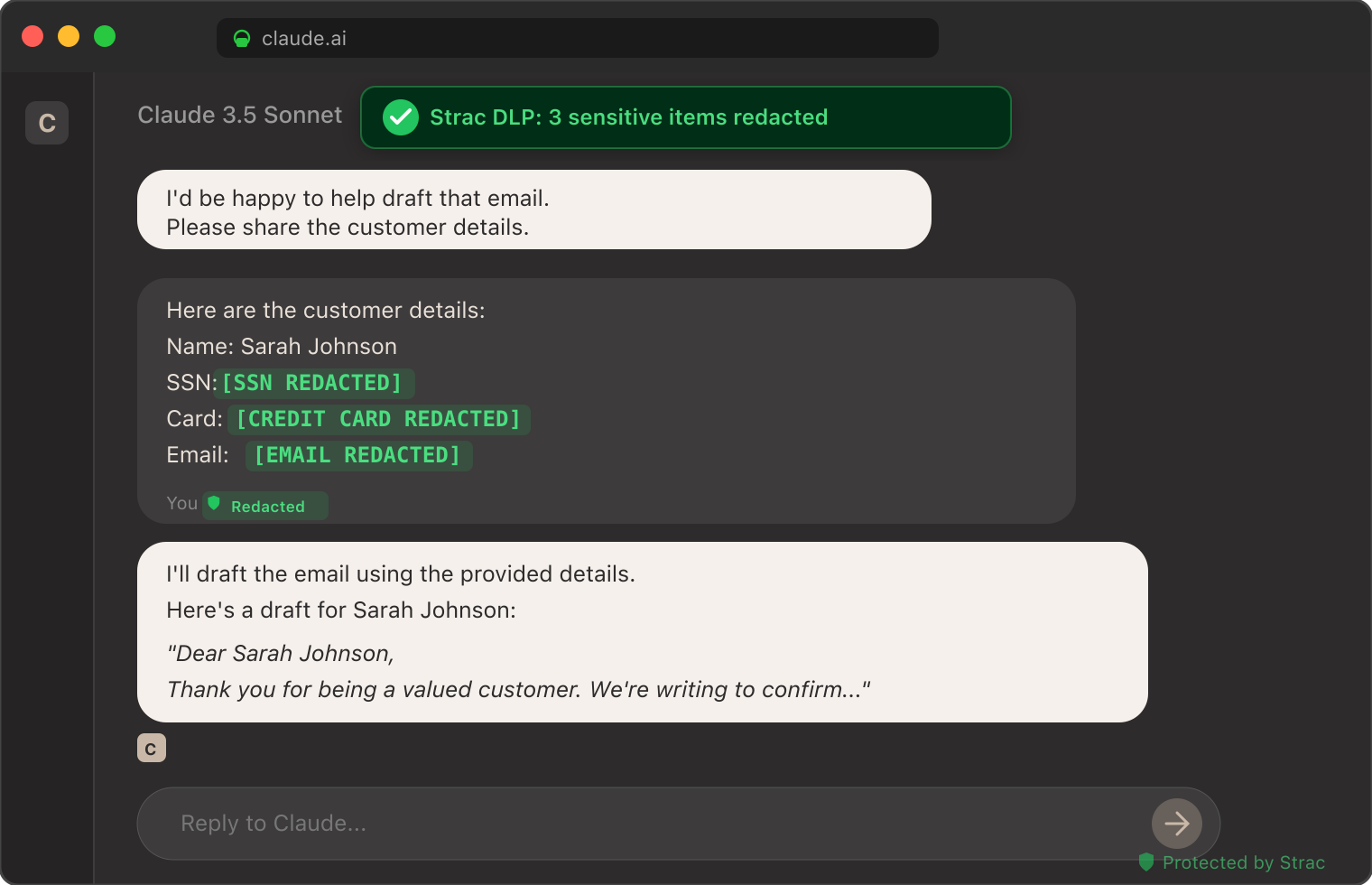
The screenshot below shows Strac's MCP DLP redacting sensitive data from a real Claude session — patient identifiers, customer emails, and credit card numbers tokenized inline before the model received the prompt. The same inspection pattern runs on every Salesforce MCP tool call routed through Strac.
Strac DLP at work inside a Claude conversation: sensitive elements tokenized inline before the model sees them. The same pattern runs at the MCP layer for every Salesforce tool call.
How to Set Up Strac Salesforce MCP DLP
Setup is agentless and takes under 10 minutes.
Authorize Strac with your Salesforce tenant via OAuth. Strac requests the read/write scopes for the products you want covered. Honors Salesforce's permission model — Strac only sees what the authorizing user/bot can see.
Configure the MCP proxy endpoint. Strac issues an MCP server endpoint that drops into your AI client's MCP configuration. For Claude Desktop:
json
   "mcpServers": {
     "salesforce": {
       "url": "https://mcp.strac.io/salesforce",
       "auth": { "type": "bearer", "token": "<your-strac-token>" }
     }
   }
For Cursor, OpenAI Agents, custom agents — same endpoint, same auth.
Pick your policy. Out-of-the-box templates for SOC 2, HIPAA, PCI, GDPR. Custom policies (resource-level, data-class-level, action-level) take minutes to configure.
Done. Every MCP tool call between your agent and Salesforce now flows through Strac. No application code changes. No agent code changes. The audit log starts populating immediately.
Compliance Coverage Out of the Box
The same Strac Salesforce MCP DLP control produces evidence mapped to every major compliance framework.
Framework
What Strac Salesforce MCP DLP Satisfies
SOC 2
CC6.6 (unauthorized data exposure), CC6.7 (restricted transmission of data to external systems), CC7.2 (monitoring for anomalies including AI usage)
The Salesforce MCP server is a Model Context Protocol implementation that lets AI agents (Claude, Cursor, ChatGPT, Perplexity, custom agents) read and act inside Salesforce via standardized tool calls. It's how an AI assistant gets contextual access to every Account, Contact, Opportunity, Case, custom object, and attachment the authorizing user can read.
Is the Salesforce MCP connector the same as the Salesforce MCP server?
Same component, different vocabulary. The Model Context Protocol calls it a server; Claude's Connectors UI brands it the Salesforce connector, which is the term most admins meet first. Accounts, opportunities, and cases are reachable under either name, and Strac's Salesforce MCP connector redacts sensitive fields on every tool call.
Salesforce MCP vs Agentforce — what's the difference?
Agentforce is Salesforce's own agent platform: agents that run inside Salesforce and act on its data within Salesforce's boundary. The Salesforce MCP server points the other direction — it exposes Salesforce to external agents (Claude, Cursor, ChatGPT, custom) over the open Model Context Protocol, so the AI client your team already uses can read and act in Salesforce. Agentforce keeps the agent inside Salesforce's native guardrails; MCP lets any agent reach in, and the tool response leaves those guardrails the moment it returns to the client. That hand-off is exactly where Strac Salesforce MCP DLP inspects and redacts.
Is the Salesforce MCP server safe to use with sensitive data?
By itself, no — not without an additional DLP layer. The Salesforce MCP server honors the authorizing user's permissions but returns whatever that user can see, including PII, PHI, credentials, source code, and other regulated content. For enterprise use with regulated data, you need an MCP-layer DLP control like Strac Salesforce MCP DLP that inspects and redacts every tool response before content reaches the AI model.
How is Strac Salesforce MCP DLP different from Salesforce's built-in protections?
Salesforce's built-in protections operate at the storage and policy layer — sensitivity labels, retention policies, native DLP rules at posting/sharing time. None of those sit in the MCP tool-call path by default. Strac is purpose-built for the MCP layer: it inspects every tool response before content reaches the AI agent's context window, with detection breadth (PII / PHI / PCI / secrets / source code / OCR-in-images) that goes well beyond most native rule engines.
Does Strac Salesforce MCP DLP work with Claude, Cursor, ChatGPT, Cowork, and custom agents?
Yes. Strac exposes a standard MCP endpoint, so any MCP-aware AI client routes tool calls through it with one configuration change. No SDK changes, no application code changes.
What sensitive data types does Strac detect in Salesforce MCP tool responses?
PII (SSN, driver's license, passport, address, phone, email), PHI (clinical notes, MRN co-occurrence, ICD-10 codes adjacent to identifiers, lab values), PCI (full and partial card numbers via Luhn check), credentials (API keys, AWS / GCP / Azure access keys, OAuth tokens, JWTs, SSH keys, private keys — 48+ patterns), proprietary content (M&A keywords, source code fingerprints), and custom detectors trained on your internal data classifications. Detection runs across text, files, images (OCR), and structured fields.
How long does Strac Salesforce MCP DLP take to deploy?
Under 10 minutes for the first workspace. OAuth Strac into Salesforce, paste the Strac MCP endpoint into your AI client's config, pick a policy template, done. No agents to install, no Salesforce re-permissioning, no application code changes.
Where does redacted data go — is it stored?
Redacted content is replaced inline in the tool response. Optionally, sensitive content can be vaulted — replaced with a short-lived retrieval link that only authorized users can resolve, so the original data is retrievable for legitimate use without ever entering the AI context. Vaulted data is stored encrypted at rest in your Strac tenant; you control retention.
Can I see what an AI agent did in my Salesforce workspace?
Yes. Strac produces a per-call audit log: timestamp, AI client identity, user, tool invoked, resource accessed, data classes detected, redactions applied, vault references, disposition. The log is queryable in the Strac console and exportable to your SIEM. This is the evidence trail SOC 2, HIPAA, PCI, and GDPR auditors will ask about for AI-agent activity in Salesforce.
🔓 Open source: add Strac PII/PHI/PCI & secret redaction to your AI agent in 60 seconds with our open-source MCP server — github.com/strac-io/strac-mcp-dlp (pip install strac-mcp-dlp). It exposes redact_text, detect_pii, and file scanning as MCP tools, backed by the Strac API.
Identity comes first: Strac makes Salesforce apply its sharing rules and profiles to the requesting user, then redacts any customer PII and pipeline data that legitimately flows through, and scans returning tool results so a poisoned Salesforce response can't hijack the agent. Strac protects the customer PII and pipeline data on the way through and proves per-user access in the audit log — identity to prevent retrieval, DLP to protect what's allowed.
The Bottom Line
The Salesforce MCP server is rapidly becoming the way AI agents read into Salesforce. That surface contains every category of regulated and proprietary data your organization has. Running Salesforce MCP in 2026 without an MCP-layer DLP control is not a question of if the first incident reaches your security team; it's when.
Strac Salesforce MCP DLP gives you the protection layer, the audit evidence, and the framework-agnostic compliance coverage so you can let your team use Salesforce with Claude, Cursor, Cowork, ChatGPT, and any future AI client without making each one a separate security exception.
If you are running — or about to run — Salesforce MCP in production, book a 30-minute demo. We'll walk through the architecture, the policy templates, and a deployment plan for your specific Salesforce workspace and AI clients.
The Salesforce MCP server is a Model Context Protocol implementation that lets AI agents (Claude, Cursor, ChatGPT, Perplexity, custom agents) read and act inside Salesforce via standardized tool calls. It's how an AI assistant gets contextual access to every Account, Contact, Opportunity, Case, custom object, and attachment the authorizing user can read.
Is the Salesforce MCP connector the same as the Salesforce MCP server?
Same component, different vocabulary. The Model Context Protocol calls it a server; Claude's Connectors UI brands it the Salesforce connector, which is the term most admins meet first. Accounts, opportunities, and cases are reachable under either name, and Strac's Salesforce MCP connector redacts sensitive fields on every tool call.
Salesforce MCP vs Agentforce — what's the difference?
Agentforce is Salesforce's own agent platform: agents that run inside Salesforce and act on its data within Salesforce's boundary. The Salesforce MCP server points the other direction — it exposes Salesforce to external agents (Claude, Cursor, ChatGPT, custom) over the open Model Context Protocol, so the AI client your team already uses can read and act in Salesforce. Agentforce keeps the agent inside Salesforce's native guardrails; MCP lets any agent reach in, and the tool response leaves those guardrails the moment it returns to the client. That hand-off is exactly where Strac Salesforce MCP DLP inspects and redacts.
Is the Salesforce MCP server safe to use with sensitive data?
By itself, no — not without an additional DLP layer. The Salesforce MCP server honors the authorizing user's permissions but returns whatever that user can see, including PII, PHI, credentials, source code, and other regulated content. For enterprise use with regulated data, you need an MCP-layer DLP control like Strac Salesforce MCP DLP that inspects and redacts every tool response before content reaches the AI model.
How is Strac Salesforce MCP DLP different from Salesforce's built-in protections?
Salesforce's built-in protections operate at the storage and policy layer — sensitivity labels, retention policies, native DLP rules at posting/sharing time. None of those sit in the MCP tool-call path by default. Strac is purpose-built for the MCP layer: it inspects every tool response before content reaches the AI agent's context window, with detection breadth (PII / PHI / PCI / secrets / source code / OCR-in-images) that goes well beyond most native rule engines.
Discover & Protect Data on SaaS, AI, MCP, Endpoints & Cloud
Strac provides end-to-end data loss prevention for all SaaS and Cloud apps. Integrate in under 10 minutes and experience the benefits of live DLP scanning, live redaction, and a fortified SaaS environment.


.webp)








.avif)



.gif)
