Slack MCP Server: Setup for Claude & Cursor + the Security Risks (2026)
Set up the Slack MCP server for Claude and Cursor — and the security risks the setup guides skip: what an AI agent can read across your Slack workspace, and how to control it.
The Slack MCP server is the official way to give AI agents (Claude, Cursor, Perplexity, Copilot, custom agents) the ability to read messages, post replies, search history, manage canvases, and act inside a Slack workspace using the Model Context Protocol.
Slack ships an official MCP server (replacing Anthropic's earlier reference implementation, which Anthropic archived in May 2025). Multiple community-maintained alternatives exist too — @slack/mcp-server, zencoderai/slack-mcp-server, piekstra/slack-mcp-server, and managed platforms like Truto.
Slack MCP servers have real, documented security risks: a public security advisory found Anthropic's Slack MCP vulnerable to data exfiltration via link unfurling. Every Slack channel and DM is now an AI-readable surface, and the data flowing through tool calls includes PII, PHI, credentials, and IP that no traditional DLP was designed to inspect.
Strac Slack MCP DLP is the governance layer that makes Slack MCP safe for enterprise: it intercepts every tool call between the AI agent and Slack so you control what each agent can reach and do in your workspace (allow/block channels and tools, require approval on high-risk actions), protect the sensitive data it touches — redact, mask, or vault SSNs, credit cards, PHI, secrets, and source code — and log every call as audit-grade evidence mapped to SOC 2, HIPAA, PCI, and GDPR. Setup in under 10 minutes.
If you are running Slack MCP in 2026 — or about to — the question is not whether to add DLP, it is which DLP, and Strac is currently the only option with category-defining MCP-layer inspection across the full Slack surface (messages, threads, files, canvases, member info).
What Is the Slack MCP Server?
The Slack MCP server is a Model Context Protocol implementation that lets AI agents securely connect to a Slack workspace and use a set of standardized tools to read messages, post replies, search channels, retrieve files, and manage canvases — on behalf of an authenticated user. It is the bridge between an AI assistant like Claude or Cursor and the conversation surface where most of your company's institutional knowledge lives.
Three options are available in 2026:
Slack's official MCP server — published and maintained by Slack itself. Honors Slack's permission model, integrates with the Real-Time Search (RTS) API, keeps data inside Slack's infrastructure.
Community-maintained MCP servers — @slack/mcp-server (the npm package), zencoderai/slack-mcp-server, piekstra/slack-mcp-server, and others on GitHub. Varying maintenance quality, varying security posture.
Managed MCP platforms — Truto, Composio, and similar services that host the MCP server for you. Convenient, but introduce a third-party data processor.
Once installed, the MCP server exposes a set of tools to the AI agent. The most common ones:
slack_list_channels — enumerate channels the authenticated user has access to
slack_read_channel — pull recent message history from a specific channel
slack_post_message — send a message as the authenticated user
slack_reply_to_thread — reply inside an existing thread
slack_add_reaction — react to a message
slack_search_messages — full-text search across messages
slack_get_user_profile — retrieve member information
slack_get_canvas — read Slack canvas content
slack_upload_file — share a file into a channel
The agent calls these tools, gets data back, and uses it to compose responses or take actions. From the user's perspective, the AI assistant suddenly "knows" their Slack — past decisions, who said what, where the docs live, which channels matter.
That's the value. It's also where the security problem starts.
What AI Agents Can Actually Do With Slack MCP
Lead with the upside — the part that gets this adopted. Once a Slack workspace is wired up over MCP, an agent like Claude or Cowork acts as an extension of the person who authorized it, scoped to exactly what that person can already reach:
Run targeted searches across channels and DMs. The agent queries the same public channels, private channels, and direct messages the authorizing user belongs to — pulling "where did we land on the renewal terms?" out of months of scattered conversation in one shot.
Condense long threads and huddle recaps. Point it at a 200-reply incident thread or a huddle wrap-up and it returns a tight summary of decisions, owners, and open items, instead of forcing a human to scroll the whole backlog.
Locate and pull down shared files. It surfaces the spreadsheet, deck, or PDF someone dropped in a channel three weeks ago, then retrieves the contents so the answer cites the actual document rather than a vague memory of it.
Compose a reply in-channel. The agent can draft and send a message or thread response as the user — answering a teammate's question or posting a status update without the person leaving their editor.
Stitch together cross-channel context to chase an incident. During a fire drill it correlates signals across #incidents, #eng-alerts, and the relevant on-call DM, assembling a single timeline from threads that would otherwise have to be reconstructed by hand.
Reach into Slack Connect channels shared with outside orgs. Because the user's footprint often includes externally-shared Slack Connect channels, the agent's reach extends past your own org's four walls and into conversations with partners, vendors, and customers.
That last point is exactly why this reach has to be governed in the tool-call path: each agent's access and actions need to be controlled (which channels and tools it can touch, and whether a high-risk write needs approval), the sensitive data those reads and writes carry needs to be protected before it reaches the model, and every call needs to be audited — because most of what flows through was never meant to leave Slack.
The Real Security Risks of the Slack MCP Server
Slack MCP is not theoretical. There is a published security advisory documenting an active data exfiltration vulnerability:
"There is a data leakage and exfiltration vulnerability in a Slack MCP Server from Anthropic that is vulnerable to 'link unfurling.' This allows an AI agent that posts to Slack or other messaging applications to leak data to third-party servers." — Security Advisory: Anthropic's Slack MCP Server
That single vulnerability is one example of a broader class of risk every Slack MCP deployment carries:
1. Sensitive data exfiltration through tool responses. When the agent calls slack_read_channel or slack_search_messages, the response routinely contains PII (customer names, emails, phone numbers), PHI (clinical notes shared internally), PCI (card numbers pasted into support threads), API keys, source code, M&A documents, and contract drafts. The raw response goes straight into the model's context window — and then anywhere the model is configured to send its output. Traditional DLP doesn't sit in this path.
2. Channel history is a goldmine of regulated data. Most enterprises have years of Slack history. The average channel contains every category of regulated data, accumulated over time, accessible via a single MCP tool call. There is no --except-regulated-data flag on slack_read_channel.
3. Files, canvases, and uploads carry the same risk. When an agent retrieves a Slack file, the file content (including text inside images and scanned PDFs) enters the model's context. Canvases — Slack's collaborative document feature — frequently contain meeting notes, customer-list excerpts, and other sensitive material.
4. The post action is a write vector, not just a read one.slack_post_message lets the agent write into Slack. An agent that received sensitive data from one source can post that data into a public Slack channel — or into a channel with external guests. This is how the link-unfurling exfiltration above worked.
5. The Slack permission model is not enough. Slack MCP servers do honor the underlying user's permissions — the agent can only see what the user can see. The problem is that what the user can see is the problem. A support engineer with access to 50 channels has 50 channels of regulated data exposed to whatever AI agent they connect.
6. Audit visibility is poor by default. The off-the-shelf MCP server returns data to the agent. The agent processes it. The agent posts a response somewhere else. Most organizations have zero visibility into what data passed through, who initiated the call, what the agent did with it, and where it ended up. That gap is a SOC 2 / HIPAA / PCI finding.
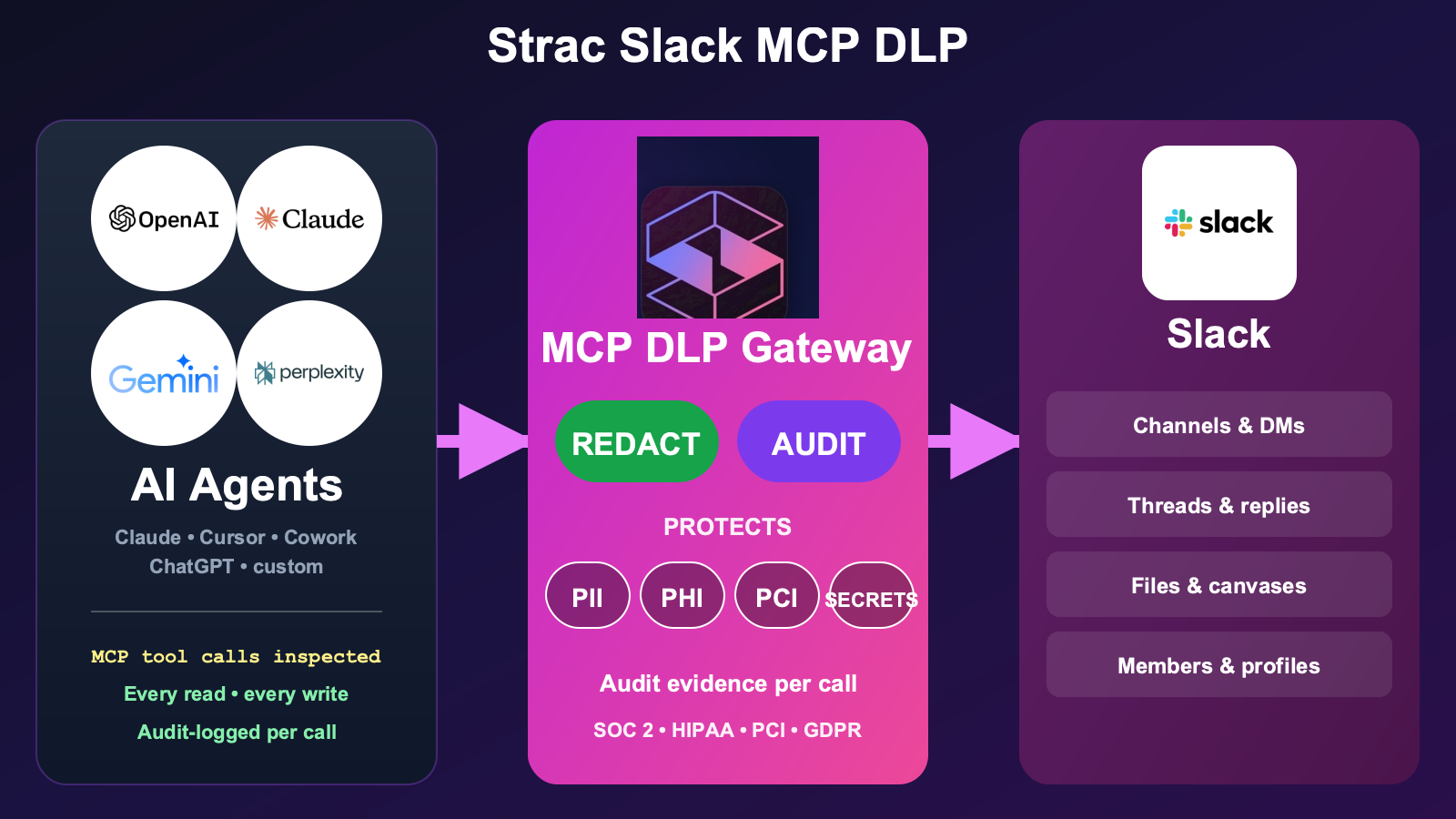
Strac's Slack MCP DLP sits between the AI agent and Slack and gives you the full governance loop: See every tool call as it happens, Control what each agent is allowed to reach and do (allow or block specific channels and tools, require approval before high-risk writes), Protect the sensitive data those calls touch (redact, mask, pseudonymize/de-identify, or vault depending on policy), and Prove it with an audit log of every invocation. Every tool call — slack_read_channel, slack_search_messages, slack_get_canvas, slack_upload_file, all of them — passes through Strac's MCP-layer inspection before content reaches the AI agent's context window, and non-sensitive content flows through untouched.
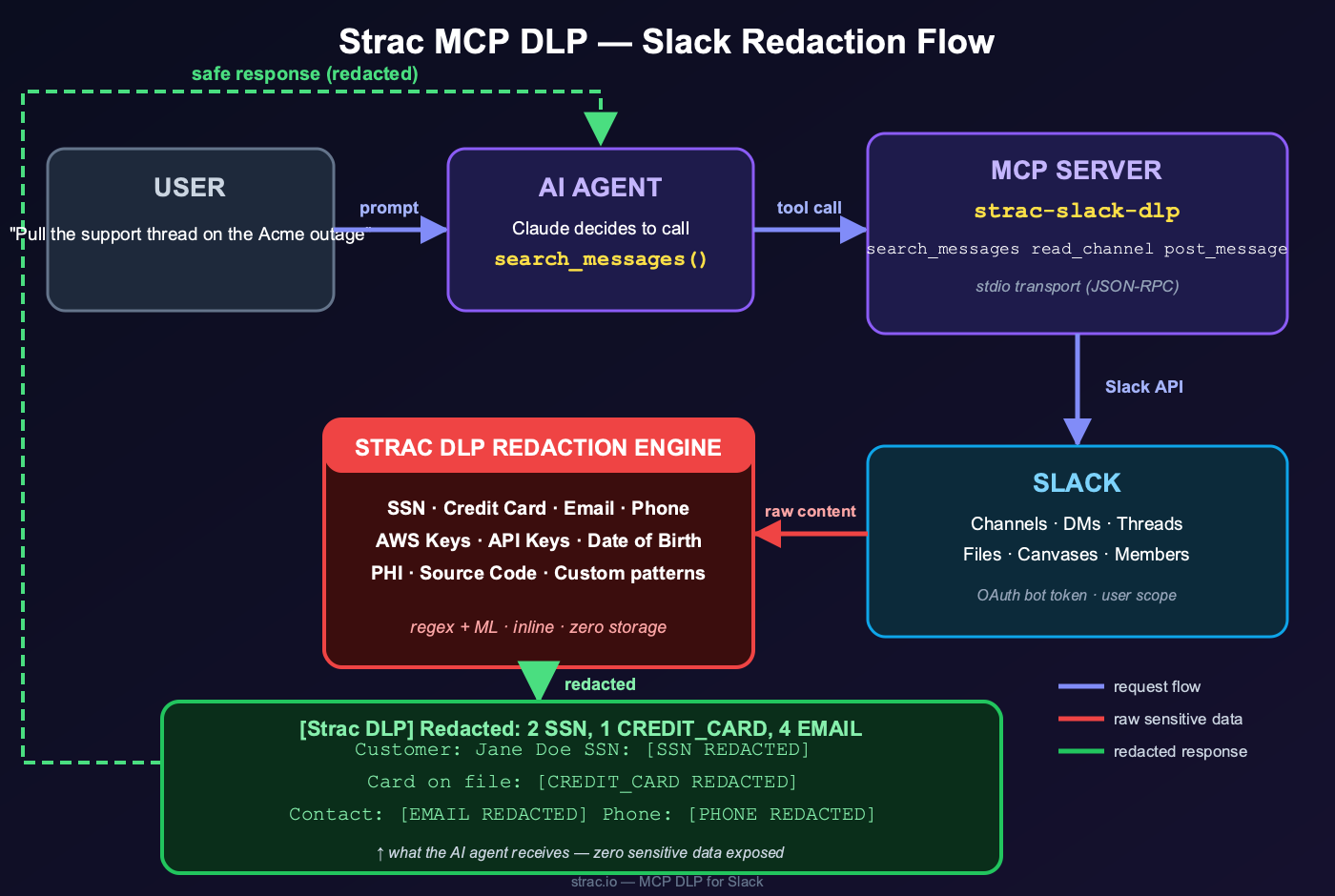
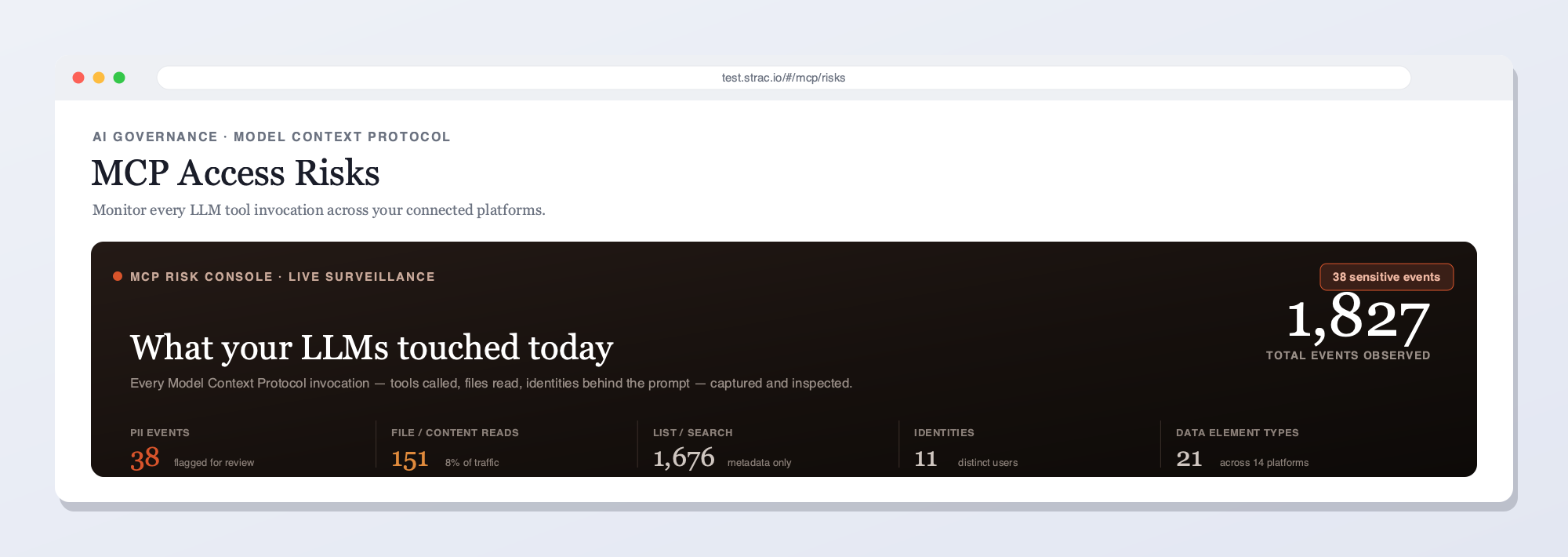
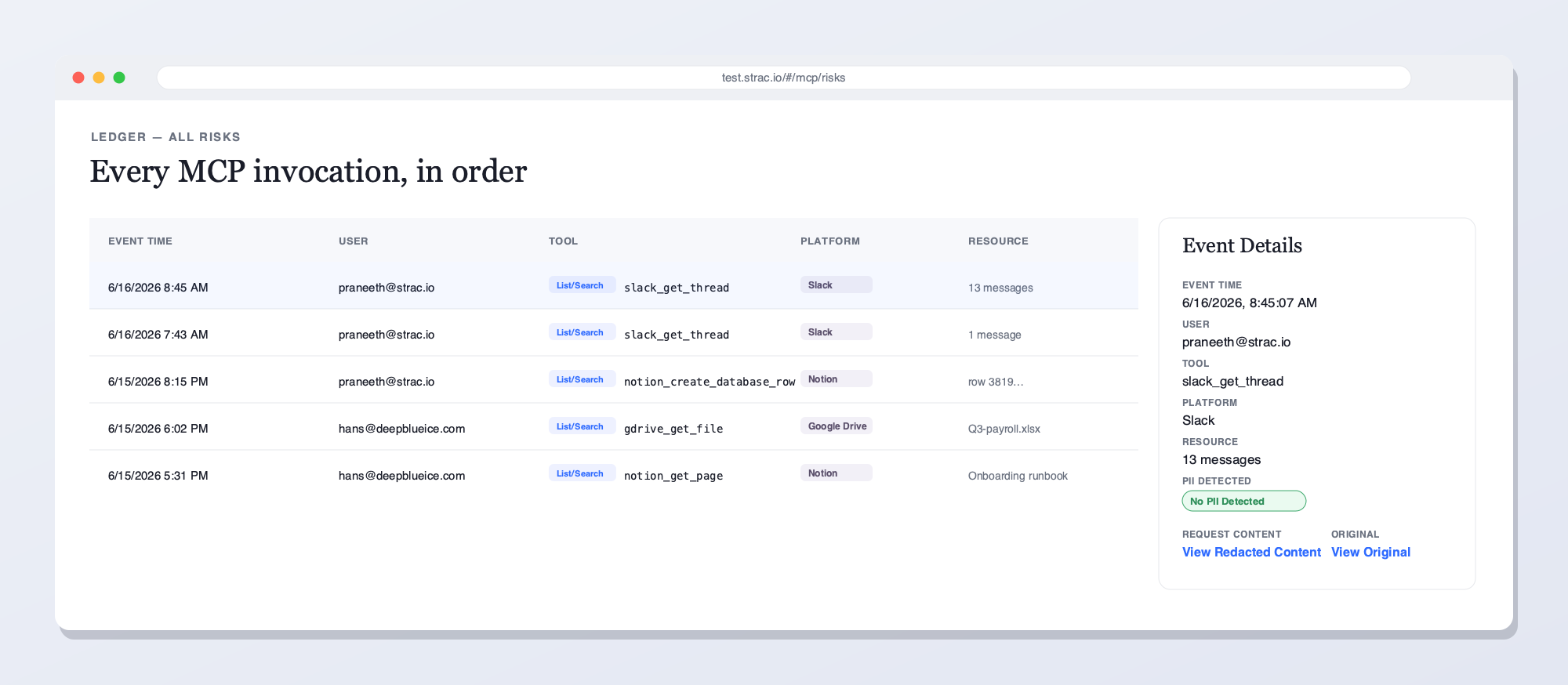
The Strac Slack MCP DLP gateway sits between any AI agent (Claude, Cursor, Cowork, custom) and the Slack workspace. Every read, search, and canvas request is inspected; sensitive content is redacted before the AI agent ever sees it.The full data flow: a user prompt triggers an AI agent tool call, the MCP server fetches from Slack, and the Strac DLP redaction engine strips SSNs, credit cards, emails, PHI, secrets, and source code before the redacted response ever reaches the model.Strac's live MCP Access console — every AI agent tool call touching Slack and your other connected platforms, captured and inspected for sensitive data in real time. See what your LLMs reached for, who prompted, and what was flagged.Every MCP invocation in order — user, tool, platform, and the sensitive data found — with redacted vs. original content and a full audit trail. This is what Strac shows on Slack that access-only gateways can't: the data in each call, not just the call.
Strac vs. access-only MCP gateways
A gateway that only governs access can tell you an agent called a Slack tool — but not that a customer SSN pasted into a support thread came back in the response. Strac inspects the content of every call, remediates the sensitive data — redact, mask, block, or delete — before the model sees it, and still logs the full access trail. You get access control and the data layer, in one place.
What Strac does on every Slack tool call
One inline pass over each MCP response — five actions, enforced by your policy:
Detect — finds a customer SSN pasted into a thread and any PII, PHI, PCI, secrets, or source code in the payload, including text inside images via OCR.
Redact or mask — replaces the sensitive elements inline, so the agent still gets its answer and the model never sees the raw data.
Block or require approval — stops a high-risk action like a message post or channel export, or routes it for sign-off before it runs.
Alert — notifies your team and streams the event to your SIEM (Datadog, Splunk, Chronicle) in real time.
Audit — logs who, which agent, which tool, what data, and the action taken — evidence mapped to SOC 2, HIPAA, GDPR, and ISO 42001.
What that looks like in practice:
Read tools are filtered. When an agent calls slack_search_messages for "customer contracts," Strac inspects the returned messages, redacts SSNs/credit cards/emails/PHI inline, and passes the now-clean payload to the agent. The agent still gets to answer the user's question — without seeing the regulated data.
Write tools are guardrailed. When an agent calls slack_post_message with a draft that contains sensitive content, Strac inspects the outgoing message. The message is either redacted, vaulted (replaced with a Strac-secured retrieval link), or blocked entirely, depending on the channel and the data type.
Files and canvases get OCR + parsing. PDFs, screenshots, scanned documents inside Slack — all inspected with the same image OCR and document parsing Strac uses across its DLP product line. Embedded sensitive content is found and redacted before the agent reads it.
Every invocation is logged. Tool name, user, channel, resource accessed, data classes detected, redactions applied, disposition. That log is the SOC 2 CC6.6, HIPAA §164.312(b), and PCI Req. 10 audit evidence — produced automatically per call.
Policy is contextual, not binary. Different channels can have different policies. An #engineering channel can allow source code; a #board-private channel can block external posting entirely. Policies map to your existing data classification, not an MCP-specific silo.
Strac is category-defining in this layer in 2026. It is the only DLP vendor inspecting at the MCP-protocol level across the full Slack toolset, with the same OCR/document depth we use across the rest of the Strac product line.
✨ Strac Native Slack DLP — The Companion to MCP DLP
MCP DLP protects the AI-agent surface. Strac's native Slack DLP protects the direct-user surface — the same Slack workspace, but inspected at the point where humans paste, upload, share, and DM. Most enterprises run both: native DLP for the user-driven actions, MCP DLP for the agent-driven actions. Together they cover every path regulated data can take in and out of Slack.
Strac Slack DLP redacting sensitive data from a Slack message in real time — the direct-user companion to MCP DLP.
What Strac's native Slack DLP includes:
Continuous discovery and classification of PII, PHI, PCI, credentials, and source code across every channel, DM, thread, and file
Real-time inspection of every message and file upload — redact, mask, delete, or replace with a vault link inline before exposure
OCR inspection of screenshots and image attachments — including text inside snipped screenshots and scanned PDFs
Automatic detection and revocation of risky external sharing (Slack Connect invites, external channel guests, public share links)
Vault-redaction flow: deleted-but-recoverable. Sensitive messages move to the Strac vault with permission-controlled retrieval, so the workflow stays productive while the regulated data stays compartmentalized
Audit logs mapped per finding to SOC 2 CC6, HIPAA Security Rule, PCI Req. 3/4/7/10, and GDPR Art. 5/25/30/32
For the broader integration catalog — every SaaS, cloud, browser, and endpoint surface Strac covers — see strac.io/integrations.
Security teams sizing up a scrubbing gateway press on two points. First is reach — the same field-level controls have to apply to the in-house MCP tools you expose to employees and customers, not only the Slack connector you adopted. Second is control over the redaction itself: redact a token, mask a phone number, or run a regex you wrote for an internal identifier, all handled by Strac's managed classifier so you never operate a Microsoft Presidio or AWS Bedrock pipeline on the side.
✨ See Strac MCP DLP in Action
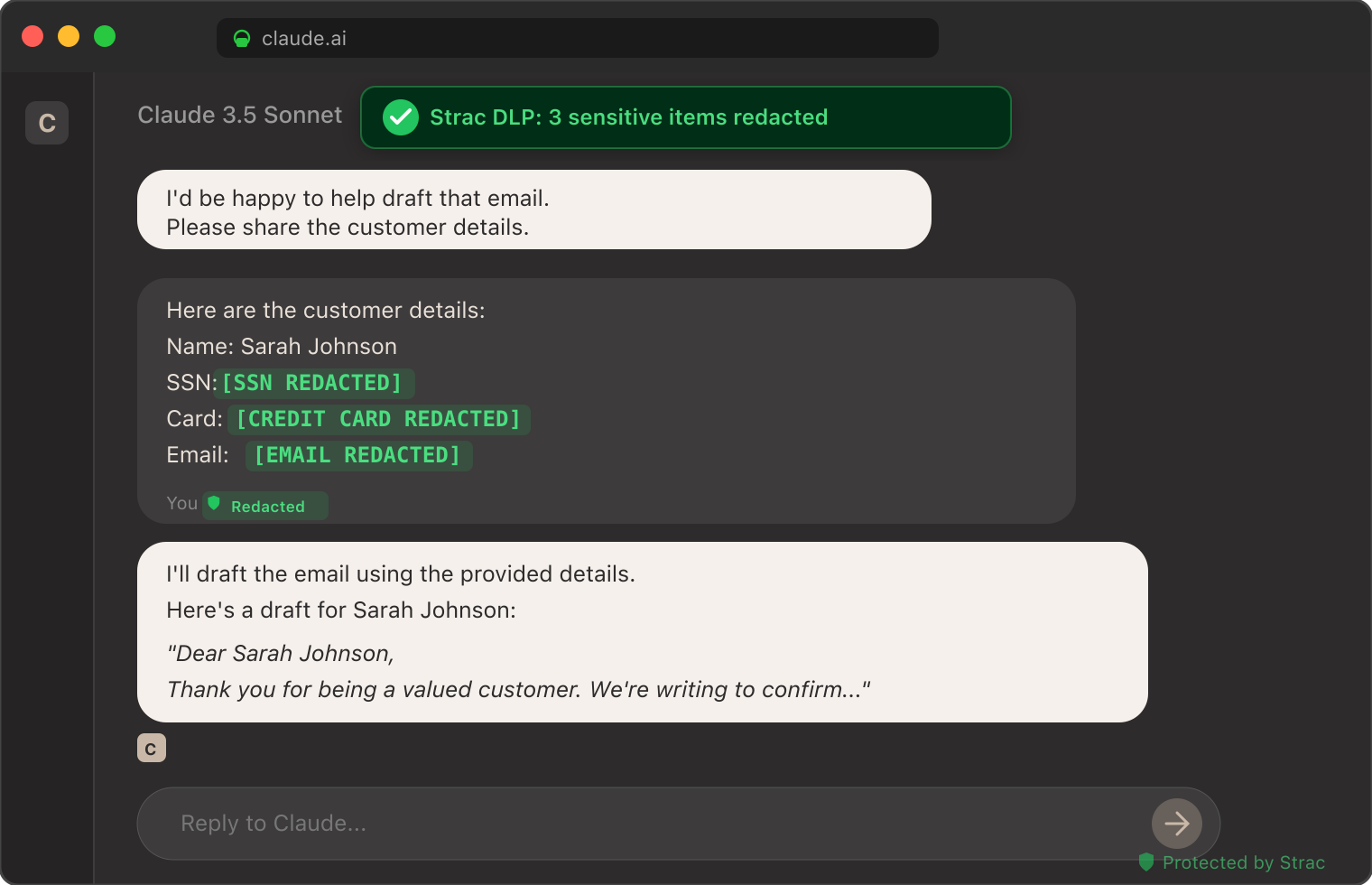
The screenshot below shows Strac's MCP DLP redacting sensitive data from a real Claude session — patient identifiers, customer emails, and credit card numbers tokenized inline before the model received the prompt. The same inspection pattern runs on every Slack MCP tool call routed through Strac.
Strac DLP at work inside a Claude conversation: sensitive elements tokenized inline before the model sees them. The same pattern runs at the MCP layer for every Slack tool call.
How to Set Up the Strac Slack MCP DLP in Under 10 Minutes
The Strac Slack MCP DLP is agentless — no agents to install on developer laptops, no Slack workspace re-permissioning. Setup is:
Authorize Strac with your Slack workspace via OAuth. Strac requests read + write scopes for the channels you want covered. Honors Slack's permission model — Strac only sees what the authorizing user/bot can see.
Configure the MCP proxy endpoint. Strac issues an MCP server endpoint that drops into your AI agent's MCP configuration. For Claude Desktop:
json
   "mcpServers": {
     "slack": {
       "url": "https://mcp.strac.io/slack",
       "auth": { "type": "bearer", "token": "<your-strac-token>" }
     }
   }
For Cursor, OpenAI Agents, custom agents — same idea, same Strac endpoint.
Pick your policy. Out-of-the-box templates for SOC 2, HIPAA, PCI, GDPR. Custom policies (channel-level, data-class-level, action-level) take minutes to configure.
Done. Every MCP tool call between your agent and Slack now goes through Strac. No application code changes. No agent code changes. Your audit log starts populating immediately.
1. Healthcare support team uses Claude to summarize patient escalations. Without DLP, every escalation thread containing PHI gets summarized into Claude's context window — HIPAA violation. With Strac Slack MCP DLP, PHI is tokenized inline; Claude still summarizes accurately, no PHI ever reaches the model. (See Is Claude HIPAA Compliant? for the full HIPAA context.)
2. Fintech engineering team uses Cursor with Slack MCP to find production incidents. Without DLP, slack_search_messages "auth token failures" returns messages with real auth tokens, customer email addresses, and API keys pasted as evidence. With Strac, the same search returns the engineering context with secrets redacted to <REDACTED:API_KEY> placeholders — the engineer still finds the incident, the secrets never enter the AI context.
3. Enterprise sales operations uses an internal agent to draft account briefs from Slack history. Without DLP, the agent pulls deal-size, customer names, contract terms, internal pricing discussions — and may post the draft to a less-restricted channel. With Strac, sensitive deal details are vaulted (replaced with retrieval links that only authorized users can resolve), keeping the workflow productive while compartmentalizing the regulated data.
Slack is one surface in a wider agent estate. For the full control plane, see the MCP gateway guide, the MCP data security discipline, and the broader MCP security overview.
🌶️ Spicy FAQs for Slack MCP Server
What is the Slack MCP server?
The Slack MCP server is a Model Context Protocol implementation that exposes Slack's API as a standardized set of tools (list_channels, read_channel, search_messages, post_message, etc.) to AI agents. It's how Claude, Cursor, Perplexity, and other MCP-aware AI assistants connect to a Slack workspace to read messages, take actions, and incorporate Slack context into their responses.
Is the Slack MCP connector the same as the Slack MCP server?
Same component, two names. The Model Context Protocol spec calls it a server, while Claude and Cursor list it in their Connectors directory as the Slack connector — so the teammate who adds it inside Claude sees "connector," and the engineer reading the MCP docs sees "server." Either label, it's the same access to channels, DMs, and Slack Connect, and Strac's Slack MCP connector governs every tool call the same way: see, control, protect, and audit.
Slack MCP vs Slack AI — what's the difference?
They solve different problems and live in different places. The Slack MCP server is an outbound doorway: it lets external agents like Claude or Cursor reach into your workspace over the Model Context Protocol, fetch messages and files, and act as the authorizing user. Slack AI is Slack's own native feature set — search, thread summaries, and recaps that run inside Slack and never hand your data to a third-party model. Put simply, Slack AI keeps the intelligence in Slack, while Slack MCP ships Slack's content out to whatever AI client you've connected. That hand-off back to the external client over the tool call is precisely the moment Strac Slack MCP DLP inspects and redacts the payload before it lands in the model's context.
Is the Slack MCP server safe to use with sensitive data?
By itself, no — not without an additional DLP layer. The Slack MCP server honors Slack's permission model but returns whatever the underlying user/bot can see, including PII, PHI, credentials, source code, and other regulated content. Anthropic's earlier Slack MCP server even had a documented data-exfiltration vulnerability via link unfurling. For enterprise use with regulated data, you need an MCP-layer DLP control like Strac Slack MCP DLP that inspects and redacts every tool response before content reaches the AI model.
What's the difference between Slack's official MCP server and Anthropic's?
Anthropic published an early reference Slack MCP server, then archived it in May 2025. Slack now publishes the official Slack MCP server — better-maintained, integrated with Slack's Real-Time Search API, and aligned with Slack's permission and enterprise-key-management model. For most teams in 2026, the right base server is Slack's official one. Strac Slack MCP DLP sits on top of either.
How does Strac Slack MCP DLP differ from Slack's native DLP?
Slack's native DLP (available on Enterprise Grid) inspects messages and files for sensitive content as they are posted, with rule-based detection. Strac Slack MCP DLP inspects every tool response that an AI agent reads via MCP — a different surface entirely. Native DLP doesn't see MCP tool calls; Strac is purpose-built for that path. Many enterprises run both: native DLP for posting-time controls, Strac for AI-agent-read controls.
Does Strac Slack MCP DLP work with Claude, Cursor, ChatGPT, and custom agents?
Yes. Strac exposes a standard MCP endpoint, so any MCP-aware AI client — Claude Desktop, Cursor, Cowork, OpenAI Agents, custom in-house agents — can route Slack tool calls through it with one configuration change. No SDK changes, no application code changes.
What sensitive data types does Strac detect in Slack MCP tool responses?
PII (SSN, driver's license, passport, address, phone, email), PHI (clinical notes, MRN, ICD-10 codes adjacent to identifiers), PCI (full and partial card numbers via Luhn check), credentials (API keys, AWS access keys, OAuth tokens, JWTs, SSH keys, private keys), proprietary content (M&A keywords, source code fingerprints), and custom detectors trained on your internal data classifications. Detection runs across text, files, images (OCR), and Slack canvases.
How long does Strac Slack MCP DLP take to deploy?
Under 10 minutes for the first workspace. OAuth Strac into Slack, paste the Strac MCP endpoint into your AI client's config, pick a policy template, done. No agents to install, no Slack workspace re-permissioning, no application code changes.
Does Strac Slack MCP DLP work for Slack Enterprise Grid?
Yes. Strac supports Slack Free, Pro, Business+, and Enterprise Grid. For Enterprise Grid, Strac honors org-level permission boundaries and integrates with Slack's enterprise key management where available.
Where does the redacted data go — is it stored?
Redacted content is replaced inline in the tool response. Optionally, sensitive content can be vaulted — replaced with a short-lived retrieval link that only authorized users can resolve, so the original data is retrievable for legitimate use without ever entering the AI context. Vaulted data is stored encrypted at rest in your Strac tenant; you control retention.
Can I see what an AI agent did in my Slack workspace?
Yes. Strac produces a per-call audit log: timestamp, AI client identity, user, tool invoked, channel/resource accessed, data classes detected, redactions applied, vault references, disposition. The log is queryable in the Strac console and exportable to your SIEM. This is the evidence trail SOC 2, HIPAA, PCI, and GDPR auditors will ask about for AI-agent activity in Slack.
Strac enforces the Slack permission model per user rather than per agent, checks tool descriptions for poisoning at registration, and — on the endpoint — surfaces unapproved Slack MCP servers the gateway would never see. The same endpoint agent that guards the browser also reads MCP client configs, so identity, prompt-injection defense, and shadow-MCP discovery all hold whether the traffic passes a gateway or not.
The Bottom Line
The Slack MCP server is rapidly becoming the way AI agents read your company's institutional memory. That memory contains every category of regulated and proprietary data you have. Running Slack MCP in 2026 without an MCP-layer DLP control is not negligence — it is just a question of how fast the first incident reaches your security team.
Strac Slack MCP DLP gives you the protection layer, the audit evidence, and the framework-agnostic compliance coverage so you can let your team use Slack with Claude, Cursor, Cowork, and any future AI client without making each one a separate security exception.
If you are running — or about to run — Slack MCP in production, book a 30-minute demo. We'll walk through the architecture, the policy templates, and a deployment plan for your specific Slack workspace and AI clients.
For the broader MCP DLP control plane across every SaaS surface, see the MCP DLP pillar. For the AI-data-governance program this sits inside, see the AI Data Governance framework.
What is the Slack MCP server?
The Slack MCP server is a Model Context Protocol implementation that exposes Slack's API as a standardized set of tools (list_channels, read_channel, search_messages, post_message, etc.) to AI agents. It's how Claude, Cursor, Perplexity, and other MCP-aware AI assistants connect to a Slack workspace to read messages, take actions, and incorporate Slack context into their responses.
Is the Slack MCP connector the same as the Slack MCP server?
Same component, two names. The Model Context Protocol spec calls it a server, while Claude and Cursor list it in their Connectors directory as the Slack connector — so the teammate who adds it inside Claude sees "connector," and the engineer reading the MCP docs sees "server." Either label, it's the same access to channels, DMs, and Slack Connect, and Strac's Slack MCP connector governs every tool call the same way: see, control, protect, and audit.
Slack MCP vs Slack AI — what's the difference?
They solve different problems and live in different places. The Slack MCP server is an outbound doorway: it lets external agents like Claude or Cursor reach into your workspace over the Model Context Protocol, fetch messages and files, and act as the authorizing user. Slack AI is Slack's own native feature set — search, thread summaries, and recaps that run inside Slack and never hand your data to a third-party model. Put simply, Slack AI keeps the intelligence in Slack, while Slack MCP ships Slack's content out to whatever AI client you've connected. That hand-off back to the external client over the tool call is precisely the moment Strac Slack MCP DLP inspects and redacts the payload before it lands in the model's context.
Is the Slack MCP server safe to use with sensitive data?
By itself, no — not without an additional DLP layer. The Slack MCP server honors Slack's permission model but returns whatever the underlying user/bot can see, including PII, PHI, credentials, source code, and other regulated content. Anthropic's earlier Slack MCP server even had a documented data-exfiltration vulnerability via link unfurling. For enterprise use with regulated data, you need an MCP-layer DLP control like Strac Slack MCP DLP that inspects and redacts every tool response before content reaches the AI model.
What's the difference between Slack's official MCP server and Anthropic's?
Anthropic published an early reference Slack MCP server, then archived it in May 2025. Slack now publishes the official Slack MCP server — better-maintained, integrated with Slack's Real-Time Search API, and aligned with Slack's permission and enterprise-key-management model. For most teams in 2026, the right base server is Slack's official one. Strac Slack MCP DLP sits on top of either.
Discover & Protect Data on SaaS, AI, MCP, Endpoints & Cloud
Strac provides end-to-end data loss prevention for all SaaS and Cloud apps. Integrate in under 10 minutes and experience the benefits of live DLP scanning, live redaction, and a fortified SaaS environment.


.webp)






.avif)



.gif)
