Is Microsoft Copilot HIPAA Compliant? 2026 Guide (M365 BAA, Copilot Studio, GitHub Copilot, Consumer Copilot)
Is Microsoft Copilot HIPAA compliant? The 2026 answer per Copilot surface — M365 Copilot, Copilot Studio, GitHub Copilot, consumer Copilot — plus the gap a BAA does not close.
Microsoft Copilot is HIPAA compliant on the Microsoft 365 Copilot surface for customers covered by the existing Microsoft 365 BAA. That is the most-deployed Copilot surface — the assistant inside Outlook, Word, Excel, PowerPoint, Teams, SharePoint, and OneDrive — and most enterprises already have the Microsoft 365 BAA in place. Microsoft has a long-standing HIPAA program through Microsoft 365 and Azure.
Other Copilot surfaces are not automatically covered. Microsoft Copilot consumer (the free copilot.microsoft.com), GitHub Copilot, Copilot Studio applications, and Copilot in non-Microsoft-365 services may need separate verification — usually under the Azure BAA — or are excluded entirely.
The right framing: which Copilot are your clinicians, analysts, or developers actually using? Microsoft 365 Copilot inside a covered E3/E5 tenant is one situation. GitHub Copilot in a private repo with PHI in test fixtures is a very different situation.
A signed Microsoft BAA only covers Microsoft's processing of the data you send. It does not stop the model from receiving PHI in the first place — pasted into a Word doc Copilot summarizes, retrieved by an AI agent from SharePoint, or pulled by Copilot Studio from a connected line-of-business system.
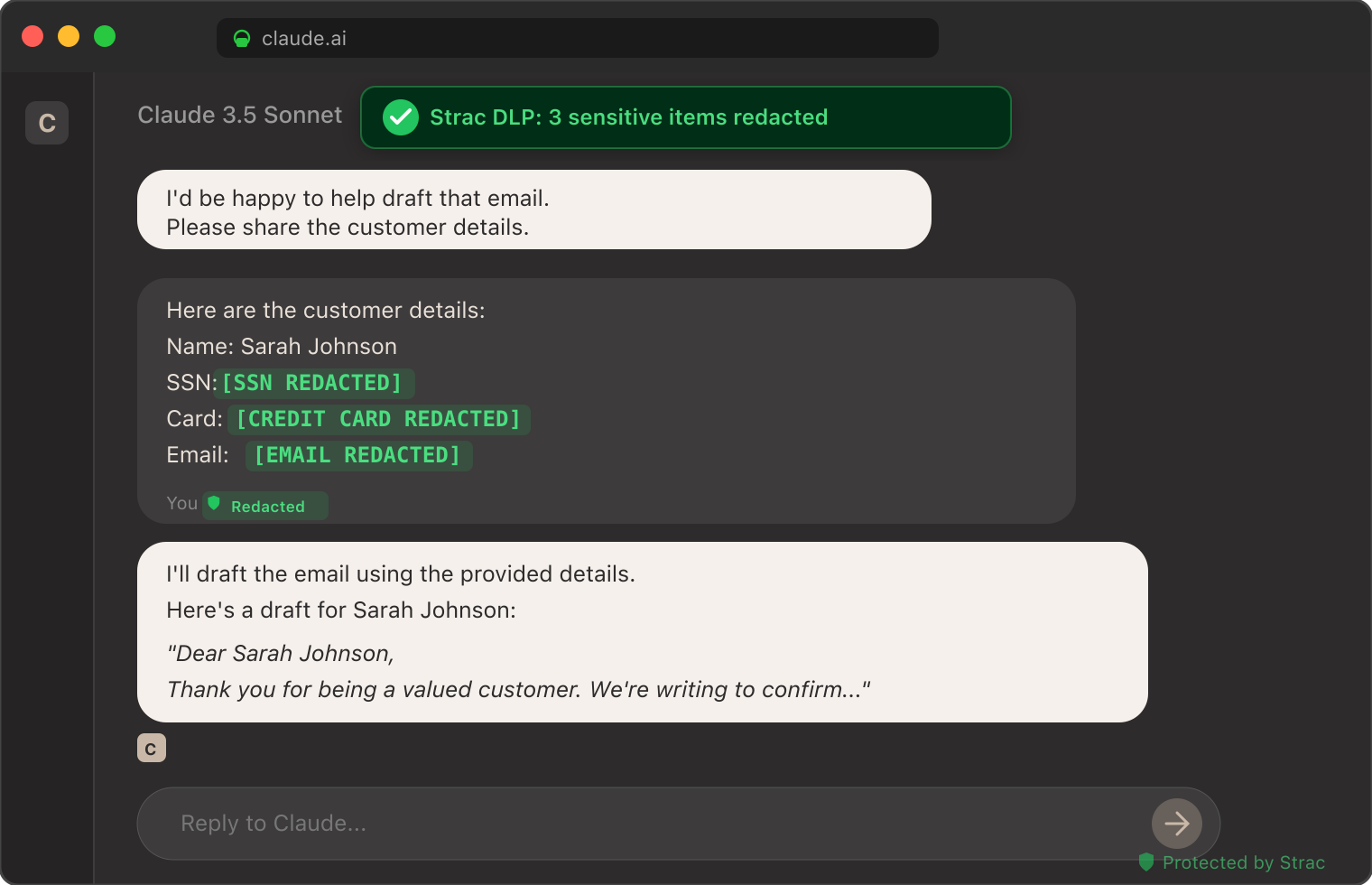
Strac closes the data-layer gap across every Copilot surface. The Strac browser extension catches PHI before it reaches consumer Copilot or any browser-based Copilot. Strac's Microsoft 365 MCP DLP redacts PHI flowing between AI agents and M365. Strac's endpoint DLP catches file-level exfil from desktop Copilot integrations. See MCP security for the broader architecture.
✨ Is Microsoft Copilot HIPAA Compliant? The Direct Answer
The right Microsoft surface (M365 Copilot on a covered SKU, or an Azure-hosted Copilot solution on a covered Azure plan).
A signed Microsoft BAA covering that surface, with the customer entity properly recorded under Microsoft's HIPAA framework — most enterprises already have this via existing Microsoft 365 or Azure agreements.
A data-layer control that keeps PHI out of any Copilot surface a BAA does not cover, and minimizes PHI exposure on the surfaces it does cover.
✨ What Microsoft's HIPAA BAA Actually Covers for Copilot
Microsoft 365 Copilot (Outlook, Word, Excel, PowerPoint, Teams, Loop, SharePoint, OneDrive)
Yes — under the Microsoft 365 BAA
The existing M365 BAA most enterprise customers already have generally covers M365 Copilot when deployed under a covered SKU. Verify against the Service Trust Portal for the current scope.
Microsoft Copilot in Azure / Azure AI / Azure OpenAI Service
Yes — under the Azure BAA
Standard Azure BAA covers Azure AI services for HIPAA workloads when configured to the documented HIPAA implementation.
Copilot Studio
Generally Yes under Azure / Power Platform BAAs
Verify the specific Power Platform and Azure services in scope are HIPAA-eligible; some adjacent connectors and previews may not be.
GitHub Copilot Business / Enterprise
Limited / context-dependent
GitHub Copilot is a code-completion service; check current GitHub HIPAA position before treating PHI in code/test fixtures as covered. Most enterprises treat GitHub Copilot as "do not paste PHI into prompts."
Microsoft Copilot consumer (copilot.microsoft.com under a personal Microsoft account, the Copilot mobile app on a personal phone)
No
Outside any Microsoft BAA.
Bing Chat Enterprise / Copilot in Bing for the enterprise
Yes under the M365 BAA when the user is signed in with their work account on a covered SKU
The same content visible to consumer Bing Chat is not covered when accessed under a personal account.
The most common mistake: assuming GitHub Copilot inherits the Microsoft 365 BAA because GitHub is owned by Microsoft. GitHub has its own BAA scope and a developer pasting PHI into a copilot.com extension prompt is not automatically covered.
Yes for customers on a covered M365 SKU with the existing Microsoft 365 BAA in place. This is the most-deployed Copilot surface for enterprises — the assistant that lives inside Outlook, Word, Excel, PowerPoint, Teams, SharePoint, and OneDrive. The Microsoft 365 BAA most enterprise customers already have generally extends to M365 Copilot when:
The tenant is on a covered SKU.
The BAA is properly executed at the enterprise agreement level.
Copilot is deployed only to users authorized to handle PHI.
Tenant-level Microsoft Purview controls are configured for PHI data handling.
That gives Microsoft's BAA-covered processing. It does not give your security team visibility into what PHI users actually paste into a Copilot prompt, what PHI Copilot retrieves from SharePoint when summarizing a document, or what PHI a Teams meeting transcript captures.
The Azure / Power Platform services your Copilot Studio app uses.
The connectors in play (some connectors and previews are not HIPAA-eligible — verify each).
The data flowing through the agent.
A custom Copilot Studio agent that pulls patient data from a connected EHR connector, runs it through an Azure OpenAI prompt, and writes a summary back to SharePoint can be deployed in a HIPAA workflow if every service in the chain is HIPAA-eligible and the BAAs are in place. The compliance failure mode is usually an adjacent service in the pipeline that is not on the HIPAA-eligible list — a Cloud Function, a third-party connector, a monitoring tool — quietly logging PHI outside the BAA boundary.
Do not paste actual PHI into Copilot prompts even in a dev environment.
De-identify any test fixtures used in repos where Copilot is active.
Use Strac's endpoint DLP on developer laptops and GitHub MCP DLP to keep PHI out of issues, PRs, and code paths Copilot can ingest.
Is Consumer Microsoft Copilot HIPAA Compliant?
No. Consumer Copilot (copilot.microsoft.com under a personal Microsoft account, the Copilot mobile app on a personal phone) is outside any Microsoft BAA. A clinician who pastes a patient note into the Copilot app on their personal phone has transmitted PHI to a non-BAA-covered service.
This is the most-overlooked Copilot exposure in healthcare orgs. The org has Microsoft 365 under BAA — but employees use personal Copilot on the side. The data flow Microsoft sees is from a personal account, not the covered M365 tenant.
✨ The Gap: What Even a Signed Microsoft BAA Doesn't Protect You From
A BAA is a contractual document. It commits Microsoft to handle PHI under HIPAA's Privacy, Security, and Breach Notification rules. It does not:
Stop a user from pasting PHI into a Copilot prompt where it shouldn't have been pasted.
Stop a Copilot-summarized Outlook thread from generating a summary that includes patient names.
Stop a SharePoint doc with PHI from being retrieved by an AI agent or Copilot Studio app as model context.
Provide your security team with a per-prompt audit log that maps cleanly to your existing SIEM and GRC pipeline (Microsoft Purview is good but is still tenant-scoped configuration, not a turnkey audit feed).
De-identify PHI before it reaches the model.
A BAA covers Microsoft's processing of the data you sent. It does not minimize, redact, or restrict the data you send. That responsibility is on the covered entity. Most healthcare organizations only realize this gap after a near-miss.
✨ How Strac Adds HIPAA-Grade Data Protection Across All Copilot Products
Strac is the data-layer control that closes the gap a BAA doesn't cover. Strac sits between users and Copilot surfaces, between AI agents and Microsoft 365 data, and between endpoints and the model.
Browser extension for Copilot in the browser — Strac's GenAI browser DLP inspects copy/paste, typed text, and file uploads to copilot.microsoft.com, Copilot in Edge, and any other browser-based Copilot surface. Modes: alert, warn, block. PHI never crosses into the model context. Even on consumer Copilot, the browser extension enforces the same controls.
MCP DLP for Copilot-driven AI agents over Microsoft 365 data — Modern AI workflows involve a Copilot-powered agent reading from SharePoint, OneDrive, Outlook, Teams, and Loop. Strac's Microsoft 365 MCP DLP intercepts those tool calls and redacts PHI inline:
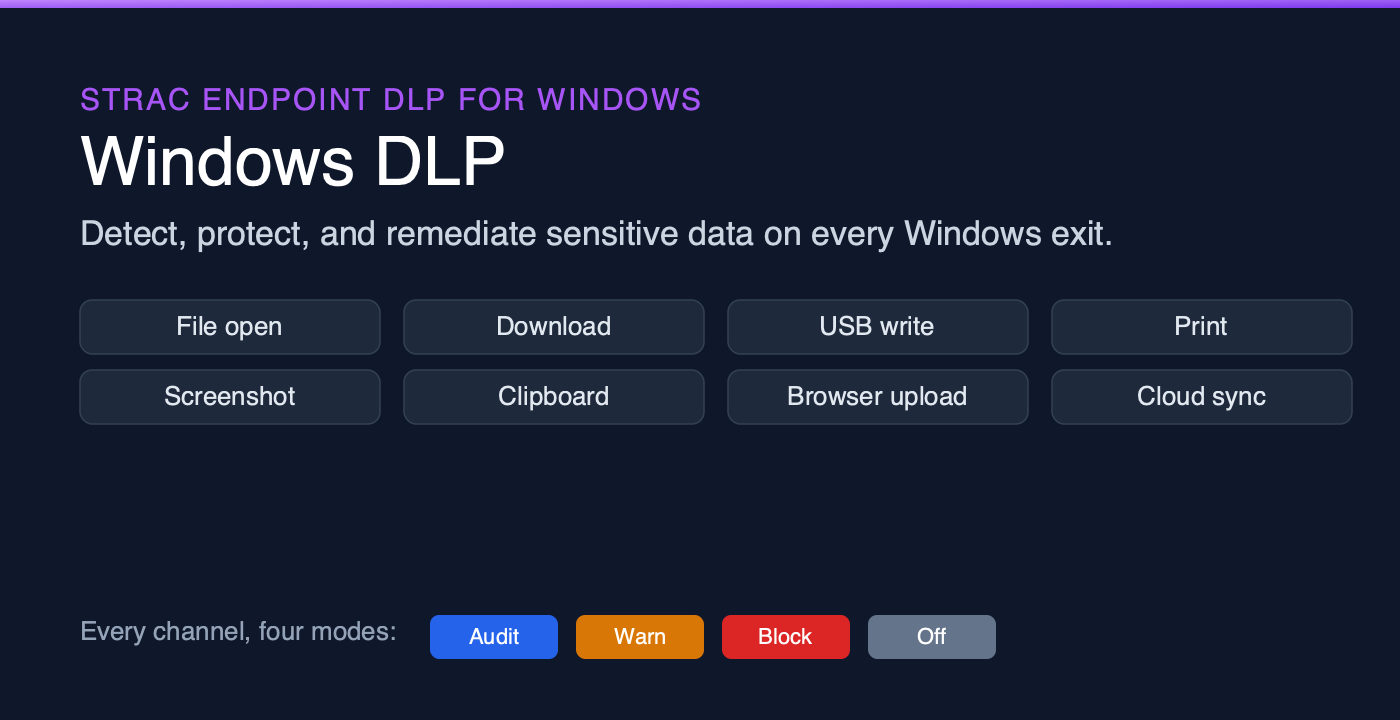
Endpoint DLP for desktop Copilot integrations — Strac's endpoint DLP on Mac and Windows catches file-level exfil that browser controls miss — a Copilot-integrated VSCode session pulling source files with PHI in test fixtures, a Copilot for desktop ingesting screenshots from the clipboard.
Cloud DSPM for Azure-hosted Copilot Studio applications — For custom Copilot Studio agents calling Azure OpenAI or Azure AI services, Strac's cloud DSPM keeps the upstream data stores classified, so engineering teams know which datasets are HIPAA-sensitive before piping them into a prompt template.
Coverage across the broader SaaS surface AI agents touch — Microsoft 365 is rarely the only surface in play. Strac's Slack MCP DLP, Salesforce MCP DLP, Zendesk MCP DLP, and the full MCP cluster extend the same redaction pattern across every AI-agent-reachable SaaS app.
Compliance evidence pre-built — HIPAA mapping, audit log export, and per-event remediation evidence ready for your auditor without a custom integration.
Setup is agentless and under 10 minutes per workspace.
✨ A Practical Microsoft Copilot HIPAA Deployment Checklist
Phase 1 — Inventory and BAA
[ ] Map every Copilot surface your org actually uses today. M365 Copilot? Copilot Studio? GitHub Copilot? Consumer Copilot on personal devices?
[ ] Verify the M365 tenant SKUs and confirm the M365 BAA is executed and current.
[ ] Execute the Azure BAA at the enterprise agreement level if any Azure OpenAI / Azure AI usage is in scope.
[ ] Block (or document the policy on) consumer Copilot access from work devices and SSO accounts.
[ ] Inventory Copilot Studio apps; verify each connected service is on Microsoft's HIPAA-eligible list.
Phase 2 — Data layer controls
[ ] Deploy Strac's browser extension across covered users for Copilot and other GenAI surfaces. See GenAI browser DLP.
[ ] Wire the Strac audit feed into your SIEM and GRC platforms.
[ ] Train clinicians, analysts, and developers: which Copilot surface to use for which data class. Document the policy.
[ ] Quarterly review: BAA status across M365 and Azure, audit log volume, top blocked-content categories.
🌶️ Spicy FAQs for Is Microsoft Copilot HIPAA Compliant
Is consumer Microsoft Copilot (copilot.microsoft.com) HIPAA compliant?
No. Consumer Copilot is outside any Microsoft BAA. Healthcare data sent to consumer Copilot is sent to a non-covered service.
Is Microsoft 365 Copilot HIPAA compliant?
Yes for customers on a covered M365 SKU with the M365 BAA executed. Most enterprises already have the M365 BAA in place and can extend it to Copilot by confirming the SKU and configuration in the Service Trust Portal.
Is Copilot Studio HIPAA compliant?
Generally yes when built on HIPAA-eligible Azure and Power Platform services with the right BAAs. Verify every connector and adjacent service used in the agent is on Microsoft's HIPAA-eligible list — that is usually where compliance failures hide.
Is GitHub Copilot HIPAA compliant?
Treat GitHub Copilot as "do not paste PHI" unless GitHub explicitly confirms BAA coverage. The practical guidance: de-identify test fixtures, use endpoint DLP, and use GitHub MCP DLP for repos that AI agents can ingest.
Does Microsoft sign a BAA for free Copilot accounts?
No. Microsoft's BAAs require a paid Microsoft 365 plan with the BAA executed, or a paid Azure agreement. Free consumer accounts are outside the program.
How is the Microsoft Copilot HIPAA situation different from Claude?
Microsoft offers BAAs for its enterprise Copilot surfaces (M365 Copilot, Azure-hosted Copilot, most Copilot Studio configurations). Anthropic does not currently offer a BAA for Claude consumer or Claude Cowork plans — see Is Claude HIPAA compliant?. Both vendors leave the same data-layer gap that a BAA alone does not close.
How is Microsoft Copilot different from Gemini for compliance purposes?
Both Microsoft and Google offer BAAs for their enterprise AI surfaces. The practical difference: Microsoft 365 is the largest enterprise productivity surface and most healthcare orgs already have the M365 BAA in place, which simplifies Copilot onboarding. Google Workspace's BAA path is similar but the SKU verification is more variable. See Is Gemini HIPAA compliant? for that comparison.
How does Strac add HIPAA protection on top of Microsoft's BAA?
Strac's browser DLP, endpoint DLP, and Microsoft 365 MCP DLP redact PHI before it reaches Copilot, regardless of which Copilot surface a user is on. A signed M365 BAA covers Microsoft's processing of the data you send. Strac controls what data gets sent in the first place. The combination — M365 BAA + Strac data-layer protection — is what most healthcare auditors want to see.
What about Microsoft Purview — is it enough on its own?
Purview is good for tenant-scoped data classification and DLP inside the Microsoft 365 environment. It is necessary. It is not sufficient. Purview struggles with non-Microsoft SaaS (Slack, Salesforce, HubSpot, Notion), with AI agent / MCP tool calls outside the M365 boundary, and with browser-side enforcement on consumer Copilot. Strac complements Purview by extending data-layer protection across every surface AI agents actually touch. See Microsoft Purview alternatives for the full breakdown.
Can I block Copilot entirely until we are compliant?
Yes. Strac's browser extension supports a block mode that prevents copy/paste and uploads into Copilot until you have the controls in place. Many healthcare orgs use a phased rollout: block in week one, warn-and-allow in week two after browser DLP is tuned, full rollout in week three.
Locking down Microsoft 365 Copilot? See Microsoft Copilot DLP — stop oversharing and prompt leakage.
The Bottom Line
Microsoft Copilot is one of the more HIPAA-friendly AI assistants for enterprises today — most enterprise customers already have the M365 BAA, and Microsoft's compliance posture is mature. But "covered under a BAA" is not the same as "safe to use with PHI." The remaining gap — what users paste, what agents retrieve, what files reach the model — is what Strac is built to close.
Is consumer Microsoft Copilot (copilot.microsoft.com) HIPAA compliant?
No. Consumer Copilot is outside any Microsoft BAA. Healthcare data sent to consumer Copilot is sent to a non-covered service.
Is Microsoft 365 Copilot HIPAA compliant?
Yes for customers on a covered M365 SKU with the M365 BAA executed. Most enterprises already have the M365 BAA in place and can extend it to Copilot by confirming the SKU and configuration in the Service Trust Portal.
Is Copilot Studio HIPAA compliant?
Generally yes when built on HIPAA-eligible Azure and Power Platform services with the right BAAs. Verify every connector and adjacent service used in the agent is on Microsoft's HIPAA-eligible list — that is usually where compliance failures hide.
Is GitHub Copilot HIPAA compliant?
Treat GitHub Copilot as "do not paste PHI" unless GitHub explicitly confirms BAA coverage. The practical guidance: de-identify test fixtures, use endpoint DLP, and use GitHub MCP DLP for repos that AI agents can ingest.
Does Microsoft sign a BAA for free Copilot accounts?
No. Microsoft's BAAs require a paid Microsoft 365 plan with the BAA executed, or a paid Azure agreement. Free consumer accounts are outside the program.
Discover & Protect Data on SaaS, AI, MCP, Endpoints & Cloud
Strac provides end-to-end data loss prevention for all SaaS and Cloud apps. Integrate in under 10 minutes and experience the benefits of live DLP scanning, live redaction, and a fortified SaaS environment.


.webp)








.avif)




.gif)
