Mac DLP: Why Data Loss Prevention Is Essential for macOS (2026)
Explore the 2026 guide for Mac Data Loss Prevention with new challenges, best practices, and advanced strategies to secure MacOS in a hybrid work environment.
Despite macOS's robust security features, the rise in sophisticated malware like DazzleSpy and KeySteal has exposed significant vulnerabilities, particularly in handling sensitive data and system security.
Traditional DLP systems often fall short for Mac users due to incompatibility with frequent macOS updates, performance issues, and system instability, making them less effective in a Mac environment.
Third-party DLP solutions enhance macOS's native capabilities by offering advanced encryption, real-time monitoring, and specialized data handling. These features are crucial for sectors needing stringent data protection, such as healthcare and finance.
Best practices for enhancing Mac security include regular software updates, strict network security policies, and third-party DLP systems to monitor and protect data even when devices are offline.
Modern DLP solutions like Strac provide SSL monitoring, proactive data cleanup, and customization options for handling sensitive data according to specific regulatory requirements, ensuring comprehensive data protection.
Mac OS devices, once considered nearly impervious to cyber threats, are facing increased vulnerability in the era of remote work. Our valued Apple devices are frequently targeted by sophisticated malware attacks. DazzleSpy and KeySteal are not just silent predators; they actively swipe session cookies and valuable data. KeySteal takes advantage of the macOS keychain—a safe haven for passwords and credentials—to siphon off user information, putting user privacy and security at risk.
✨ The Mac Exits a Content-Aware Agent Closes
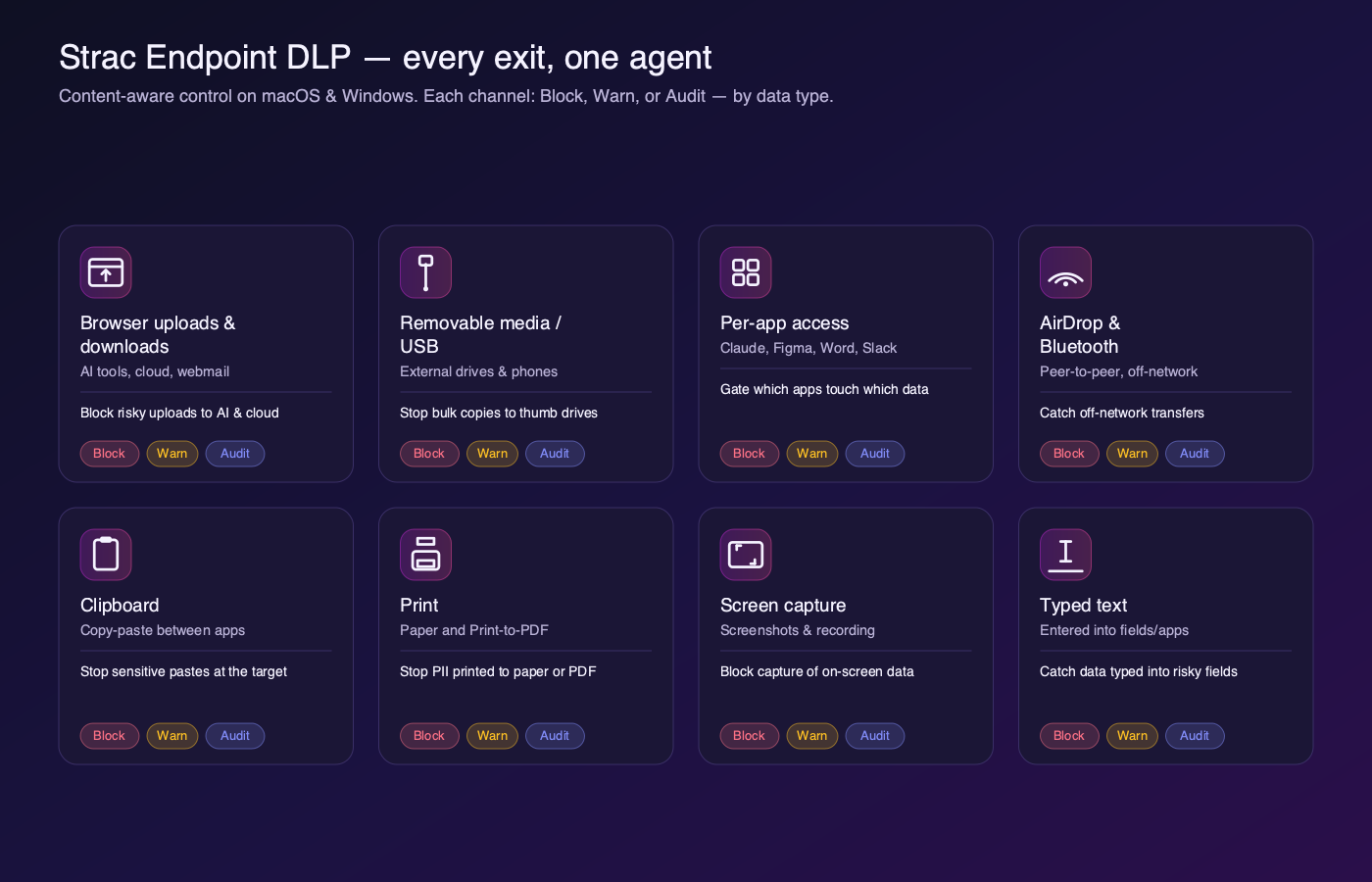
Mac-native paths — AirDrop, Universal Clipboard, iCloud, and one-click uploads to AI assistants — are exactly where regulated data slips off a Mac, and exactly where network tools are blind. Strac’s Mac agent inspects the content on each of these and enforces your policy by data type.
Strac Endpoint DLP — every exit channel governed in Block, Warn, or Audit, by data type.
AirDrop & Bluetooth transfers to personal devices — inspected, not ignored.
Browser uploads to ChatGPT/Claude and personal cloud — blocked or warned by data type.
Clipboard, screen capture, and Print-to-PDF — governed without banning the feature outright.
Block, Warn, or Audit — per data type, per channel. For all every exit channel and the Block/Warn/Audit model, see the endpoint DLP agent guide.
Researcher Thijs Alkemade exposes a major security flaw that could enable attackers to circumvent macOS's security protocols and gain access to all system files. Traditional Data Loss Prevention (DLP) solutions have failed to address the unique challenges for Mac devices, leading to a lack of adequate protection.
This new reality demands a robust data loss prevention (DLP) strategy customized to macOS to safeguard sensitive information.
Mac devices are now deeply integrated with SaaS applications, cloud storage, collaboration tools, and generative AI platforms; which means sensitive data frequently moves between endpoints and online services. Without a modern macOS Data Loss Prevention (DLP) strategy that monitors how data is accessed, downloaded, and shared, organizations risk exposing confidential information such as PII, PHI, financial records, and intellectual property. This is why implementing a purpose-built Mac Data Loss Prevention solution has become essential for securing today’s distributed work environments.
✨Why Data Loss Prevention Is Essential for macOS
Mac devices have long been perceived as more secure than traditional endpoints. But in modern SaaS-driven organizations, macOS devices now interact with dozens of cloud apps, AI tools, and collaboration platforms, dramatically expanding the surface area for sensitive data exposure.
Security incidents are no longer limited to malware infections. Today, the most common risks come from how data moves across systems; from Google Drive to laptops, from browsers to SaaS apps, and from internal tools to generative AI platforms.
Without this visibility, security teams cannot reliably detect or stop data leaks involving:
Personally identifiable information (PII)
Protected health information (PHI)
Payment card data (PCI)
Intellectual property and proprietary code
Modern DLP platforms like Strac address this challenge by combining endpoint visibility, SaaS monitoring, browser protection, and data lineage tracking into a unified security approach.
The Challenge of Data Security in the Mac Ecosystem
The growing adoption of macOS devices in enterprises has exposed gaps in traditional data protection models. Most legacy security tools were designed primarily for Windows environments and network-based monitoring, leaving macOS workflows insufficiently protected.
In modern organizations, sensitive data moves through many pathways that traditional tools struggle to monitor effectively.
1. Encryption Gaps
Encryption protects data in transit, but it does not eliminate the risk of data exposure. Sensitive data can still be leaked through authorized channels like cloud uploads, email attachments, or browser interactions. Without content-aware inspection, encryption alone cannot stop data exfiltration.
2. Uncontrolled Data Transfers
Employees regularly move files between devices, personal storage, and cloud services. Without proper monitoring, confidential files can be transferred outside corporate systems without detection.
For example, a user could download sensitive documents from Google Drive and upload them to a personal cloud account from their Mac laptop.
3. Offline data risks
Data stored locally on devices is especially dangerous in environments where there is a risk of device theft or unauthorized access. For instance, if a laptop is stolen, sensitive data can be compromised. With robust DLP software to encrypt the data at rest, the stolen information would have been protected from unauthorized access, ensuring compliance.
4. Network Exposure
When Mac devices connect to unsecured networks, data may be exposed through network traffic interception or unauthorized access to shared resources.
5. Print and Physical Data Leaks
Sensitive documents printed from Mac systems can easily become a source of accidental exposure if proper authentication and monitoring controls are not enforced.
6. Gradual Data Exfiltration
One of the hardest threats to detect is slow, incremental data leaks. Employees or compromised accounts may transfer small pieces of sensitive information over time, making it difficult for traditional rule-based systems to detect anomalies.
Modern DLP systems address this by monitoring behavior patterns and content movement, allowing security teams to detect suspicious activity before large-scale breaches occur.
Why Traditional DLP Tools Struggle with macOS
Many legacy DLP tools were not designed with macOS architecture in mind. As a result, organizations frequently encounter several challenges when trying to protect Mac environments.
First, support for macOS updates often lags behind Apple’s release cycle. When new versions of macOS are released, older security tools may become incompatible or unstable.
Second, many traditional DLP systems rely on heavy endpoint agents that consume significant system resources. This can degrade performance on Mac devices and negatively impact user productivity.
Third, poorly optimized security tools can trigger kernel panics and system instability, forcing frequent reboots and disrupting workflows.
Finally, legacy DLP systems often rely heavily on static rules and regex-based detection, which can generate excessive false positives and fail to detect complex data patterns in modern workflows.
These limitations highlight the need for modern macOS DLP solutions designed for SaaS-first environments.
✨Do You Need a Third-Party DLP for MacOS?
Apple provides strong native security features such as FileVault encryption, Gatekeeper protections, and application sandboxing. However, these capabilities focus primarily on device security, not data movement visibility.
Third-party macOS DLP solutions extend Apple’s built-in protections by introducing capabilities such as:
Real-Time Data Monitoring
Modern DLP platforms continuously monitor how data moves across systems, identifying suspicious activity such as unauthorized uploads or abnormal file access patterns.
Sensitive Data Classification
Organizations must be able to automatically detect and classify different categories of sensitive information including:
PII (personal data)
PHI (healthcare records)
PCI (payment card data)
Intellectual property
Advanced DLP tools apply machine learning and content-aware detection to classify sensitive data automatically.
Not all organizations can rely on a one-size-fits-all approach to data security. Third-party DLP solutions provide tailored data handling and classification systems. Companies can set specific criteria for organizing data according to its sensitivity level (e.g., top secret, confidential, internal use only). For example, a financial services firm could implement various security measures using a DLP solution. Strict protocols such as content inspection and data loss prevention rules may be necessary for highly confidential client financial information. In contrast, less sensitive internal documents could allow for more flexible sharing options.
5. Layered security approach for comprehensive protection
Relying only on macOS security features may create vulnerabilities in your overall security stance. Third-party DLP solutions integrate a range of security measures, such as:
Defenses at the perimeter block unauthorized access to the network from external threats.
DLP rules determine actions to be executed when sensitive data is detected, accessed, moved, or used suspiciously (for instance, blocking transfers, encrypting data, or triggering alerts).
Content inspection involves scanning data for keywords, patterns, or specific data types to flag potential security risks.
Anomaly detection technology can pinpoint unusual data access or transfer patterns that could signal a possible attack.
In a financial setting, layered security could consist of starting with firewall protection, then moving on to encrypting important financial information, and using real-time anomaly detection to spot unusual transaction behavior that could be a sign of fraud.
6. Context-aware Security
Modern solutions evaluate contextual factors such as:
user identity
device status
network environment
destination service
This allows organizations to apply adaptive security policies instead of static rules.
7. Policy enforcement and compliance management
Security teams can enforce policies that block or restrict risky actions such as:
Uploading sensitive files to external storage
Copying confidential documents to personal accounts
Sending regulated data through unauthorized channels
8. Integration with other security tools
Contrary to the built-in macOS tools, third-party DLP solutions can seamlessly connect with various security tools and systems. This enables a cohesive and synchronized security approach across various platforms and settings. This combines the DLP system with current SIEM (Security Information and Event Management) systems to boost overall security monitoring and incident response capabilities.
✨ Data Lineage: Understanding How Data Moves Across Mac Devices
One of the most important capabilities in modern endpoint security is data lineage visibility.
Data lineage tracks how a file moves across systems, applications, and devices over time. This allows security teams to understand not only where sensitive data exists, but also how it arrived there and where it may go next.
For example:
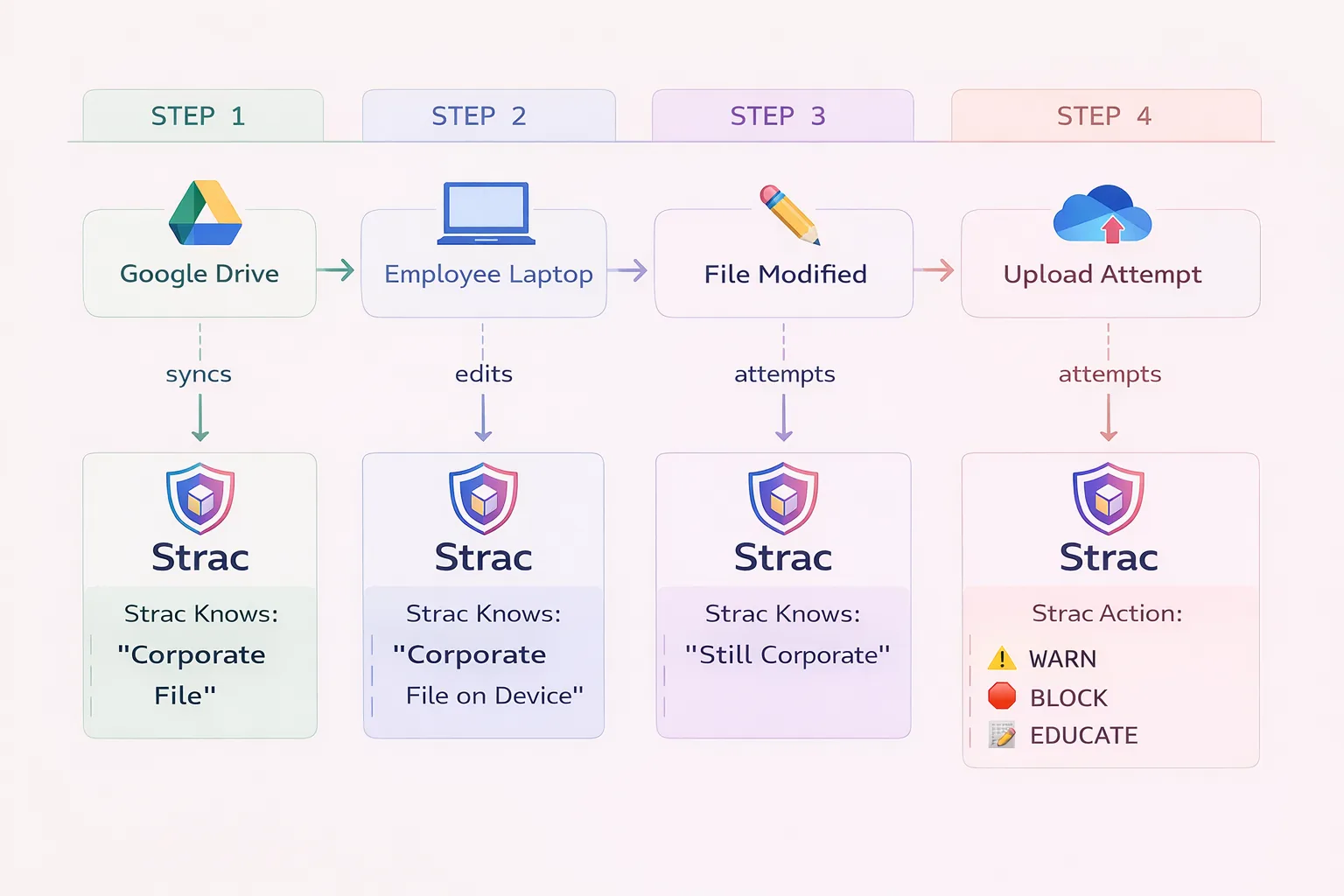
A file originates in Google Drive
The file is downloaded to an employee’s Mac laptop
The file is modified locally
The user attempts to upload the file to another platform
With lineage visibility, a DLP system can recognize that the file remains corporate data, even after being downloaded or modified.
Strac Endpoint Data Lineage
This type of tracking enables security tools like Strac to apply real-time remediation actions, including:
Warning users before risky actions
Blocking unauthorized uploads
Educating users about policy violations
The lineage model ensures that security policies follow the data itself, not just the device or application.
Your uploaded architecture illustrates this concept clearly. It shows how Strac tracks a file from its origin in Google Drive through device edits and ultimately to a potential upload attempt, allowing the platform to intervene before data is exposed.
Best Practices for macOS Data Loss Prevention
Organizations can significantly reduce their risk exposure by implementing several macOS security best practices.
First, organizations should enforce regular operating system updates across all Mac devices to ensure security patches are applied promptly.
Second, security teams should implement strict device configuration policies using tools like Apple Business Manager or MDM platforms to enforce encryption, firewall rules, and secure system settings.
Third, organizations should maintain strong application control policies to prevent unauthorized software installation and ensure all approved applications remain updated.
Fourth, remote workers should be required to use secure VPN connections, especially when accessing corporate resources over public networks.
Fifth, organizations should deploy centralized monitoring tools capable of tracking file activity, browser interactions, and SaaS usage across Mac devices.
Finally, companies should invest in security awareness training to educate employees about phishing attacks, credential theft, and accidental data sharing.
Checklist to Evaluate a macOS DLP
Modern OS architectural implementation
Visibility into file events
Visibility into browser-based events
Real-time remediation
Offline policy enforcement
1. Modern OS architectural implementation
Is the DLP solution in line with Apple's most recent development guidelines?
2. Visibility into file events
Can the DLP solution track and log every file event on the device?
How does it offer visibility into data management, such as file origins and user permissions?
Can the system distinguish between regular data management and possible data breaches by analyzing user actions and file usage trends?
3. Visibility into browser-based events
How is data transmitted over HTTPS and other web protocols monitored and controlled by the DLP solution?
Does the DLP integrate at the browser level to monitor real-time data egress to unauthorized domains or cloud services?
Can it differentiate between corporate and personal accounts on approved domains, such as distinguishing between corporate and personal Google Drive accounts?
4. Real-time remediation
Does the DLP system provide real-time remediation capabilities for policy violations?
How does the system handle just-in-time notifications and user education?
Can it deliver personalized messages guiding users toward compliant actions during everyday tasks?
5. Offline policy enforcement
Is the DLP capable of enforcing data protection policies even when devices are offline?
How does the solution ensure continuous protection irrespective of the device's connectivity status?
✨Strac for Mac Data Loss Prevention
Strac thoroughly checks the storage systems on Mac devices and network-attached storage for any sensitive data at risk. This in-depth scan helps to strengthen your defenses against potential data breaches. It offers:
SSL encryption monitoring: Strac monitors SSL communications and analyzes data flow in real-time. This helps prevent the unauthorized transmission of sensitive files, which is crucial for enforcing strict data governance policies.
Regulation watchdog: Using its knowledge of regulations, Strac can identify and protect data from potential violations of important regulations like HIPAA, GDPR, and PCI. Its advanced pattern recognition ensures that your organization stays compliant.
Smart data tracking: Thanks to its advanced algorithms, Strac can detect and block disguised attempts at stealing or leaking data, providing a strong defense for your digital assets and sensitive information.
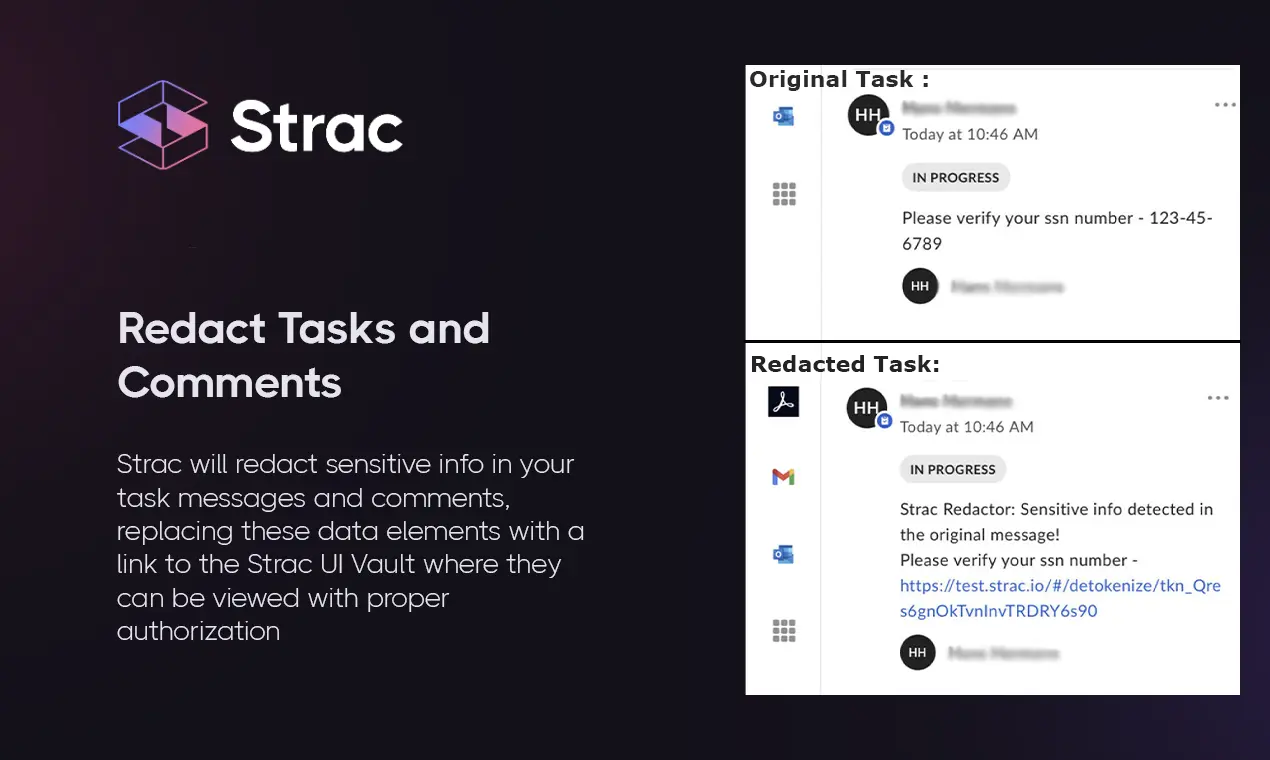
Proactive data cleanup: When policy violations are detected, Strac takes action to clean up the compromised data and replace it with secure placeholders, reducing the impact of any potential data breaches.
USB data security: With Strac, you can encrypt or block data on removable media, aligning with corporate security requirements to enhance data security.
Spotting unusual behavior: Strac is great at recognizing and addressing risks related to unusual user actions, making security measures more predictive.
Checking file types: Strac's system ensures that your data remains intact by identifying and stopping the transfer of altered file types, keeping your data safe from compromise.
Web traffic oversight: Strac controls the flow of HTTP/HTTPS data, preventing unauthorized file transfers and enhancing your cybersecurity defenses.
Drip protection: Strac's ongoing monitoring stops gradual data leaks, providing a systematic way to stop widespread data breaches.
App control: Strac limits risky actions within software systems to prevent data leaks at the application level.
Protecting offline data: Strac offers strong data protection for Mac systems, defending against copying or sharing threats even in offline environments.
Mitigating office LAN risks: Strac reduces risks in office LANs by preventing unintended sensitive data exchanges and enhancing internal network security.
Customization: Strac offers extensive customization options to configure a wide range of data elements such as social security numbers in the US, Aadhar Card numbers in India, and driver's licenses/passport information globally, as well as various types of sensitive personal and financial data.
Modern macOS environments interact constantly with SaaS platforms, browsers, and cloud storage services, which means sensitive data often moves far beyond the local device. Strac extends Mac Data Loss Prevention beyond traditional endpoint monitoring by providing visibility across browser activity, SaaS applications, and cloud storage platforms. This allows security teams to detect when sensitive data downloaded to a Mac device is later uploaded to external services, shared through collaboration tools, or transferred through browser-based workflows; ensuring organizations maintain control over their data wherever it moves.
🎥 Watch How Strac Protects Sensitive Data Across Endpoints
This short demo shows how Strac monitors sensitive data across SaaS platforms, endpoints, and collaboration tools while automatically redacting or blocking risky activity.
Bottom Line
macOS devices are now deeply integrated into modern SaaS workflows, making them a critical point of exposure for sensitive data.
Traditional endpoint security tools cannot keep up with the complexity of modern data movement across cloud applications, browsers, and AI platforms.
A modern Mac Data Loss Prevention strategy must provide:
endpoint visibility
SaaS monitoring
browser-level protection
data lineage tracking
Solutions like Strac enable organizations to monitor how sensitive data moves across systems and stop data leaks before they happen.
Running a mixed fleet? The same agent covers Windows too. See the Windows DLP guide.
🌶️Spicy FAQs About Mac Data Loss Prevention
Does macOS have built-in Data Loss Prevention (DLP)?
No, macOS does not include a full Data Loss Prevention system. Apple provides strong security features such as FileVault encryption, Gatekeeper, and application sandboxing, but these focus on protecting the device itself rather than monitoring how sensitive data moves across applications, cloud platforms, and external services.
To prevent data leaks, organizations typically deploy a third-party macOS DLP solution that can detect sensitive information, monitor file activity, and enforce policies when users attempt to move or share protected data.
Why is Mac Data Loss Prevention important for organizations?
Mac Data Loss Prevention is critical because sensitive data frequently moves between endpoints, browsers, SaaS applications, and cloud storage platforms. Without visibility into these workflows, organizations cannot detect when confidential information is downloaded, modified, or uploaded to unauthorized locations.
A modern macOS DLP solution allows security teams to monitor data activity, classify sensitive information such as PII, PHI, or PCI, and prevent accidental or malicious data leaks.
What types of data should macOS DLP protect?
A macOS DLP system should be able to detect and protect multiple categories of sensitive information, including:
Personally identifiable information (PII)
Protected health information (PHI)
Payment card data (PCI)
Financial records
Customer databases
Intellectual property and proprietary code
Protecting these data types helps organizations comply with regulations such as GDPR, HIPAA, and PCI DSS.
How does modern DLP track sensitive data on Mac devices?
Modern DLP platforms use data lineage tracking to monitor how sensitive files move across systems. This means the system can follow a file from its original location in a SaaS platform or cloud storage system to a user’s Mac device and detect any attempts to upload, copy, or share it elsewhere.
By understanding the origin, movement, and destination of data, DLP tools can apply policies that warn users, block risky actions, or automatically redact sensitive information.
What should you look for in a macOS DLP solution?
When evaluating a macOS Data Loss Prevention solution, organizations should look for capabilities such as:
Visibility into file activity and browser interactions
Real-time detection of sensitive data
Policy enforcement and automated remediation
Protection across SaaS, cloud, and endpoint environments
Support for compliance frameworks such as GDPR, HIPAA, and PCI DSS
Solutions that combine data discovery, classification, and remediation typically provide the most effective protection.
How does Strac help protect sensitive data on macOS?
Strac provides modern Mac Data Loss Prevention by monitoring sensitive data across endpoints, browsers, SaaS applications, and cloud storage platforms. The platform automatically detects regulated data types and can take real-time actions such as warning users, blocking risky uploads, or redacting sensitive information.
Because Strac combines DSPM and DLP capabilities, organizations gain full visibility into where sensitive data exists and how it moves across their environment.
Discover & Protect Data on SaaS, AI, MCP, Endpoints & Cloud
Strac provides end-to-end data loss prevention for all SaaS and Cloud apps. Integrate in under 10 minutes and experience the benefits of live DLP scanning, live redaction, and a fortified SaaS environment.


.webp)










.avif)


.gif)
