ChatGPT Connectors: Admin and Security Guide for Business and Enterprise (2026)
ChatGPT connectors bring Drive, SharePoint, Slack and custom MCP data into ChatGPT. What admin controls and RBAC cover, what they miss, how to redact data.
ChatGPT connectors, which OpenAI now calls apps, let ChatGPT read from and act on Google Drive, SharePoint, Slack, GitHub and custom MCP servers. Admins can decide which apps are enabled, which groups can use them on Enterprise, and which actions are on. None of those controls inspect the data an app returns, so an SSN in a SharePoint file or a card number in a database row lands in the conversation unchanged. Strac MCP DLP sits on the tool-call path and masks, pseudonymizes or blocks sensitive values per user and group before ChatGPT reads them, and Strac browser DLP covers what people type and upload into chatgpt.com. Strac also blocks the connection itself when the identity is not allowed, such as a personal ChatGPT account reaching company data.
ChatGPT Connectors: Admin and Security Guide for Business and Enterprise (2026)
ChatGPT connectors are integrations that let ChatGPT search, read and in some cases write to your other systems: Google Drive, SharePoint, Slack, GitHub, Gmail and custom tools built on the Model Context Protocol (MCP). OpenAI now calls them apps in ChatGPT, and the admin screens use both words. Whatever the name, every connector does the same thing: it moves your company's data into a ChatGPT conversation.
If you run IT or security for a company on ChatGPT Business or Enterprise, that raises two questions. What sensitive data will flow through these connectors, and can you stop it in the flow? And can you give a connector to the teams that need it without giving its data to everyone? This guide answers both, data first. It is part of our AI agent security series, and the companion guide for Anthropic's product is Claude connectors.
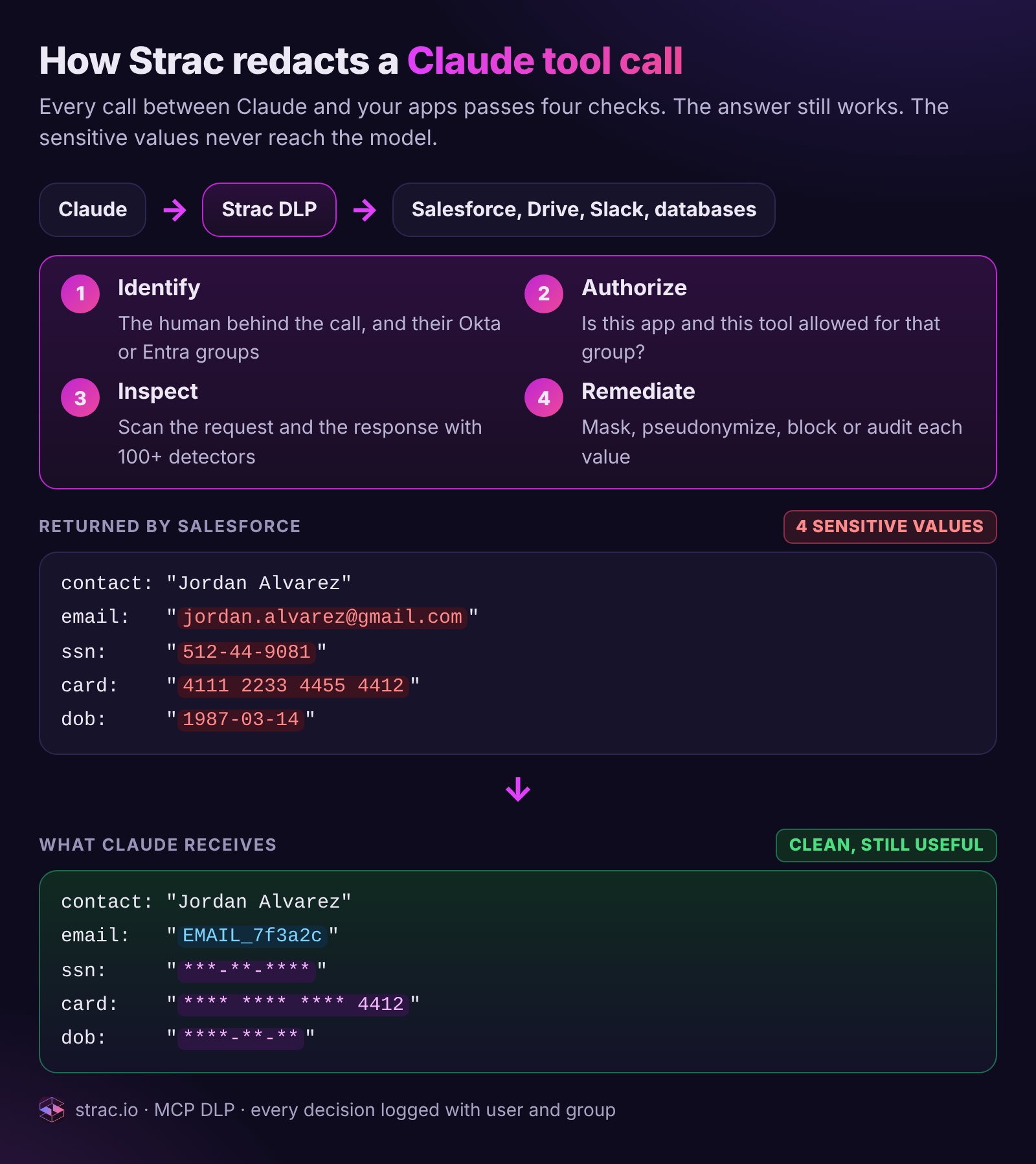
One Salesforce lookup through a ChatGPT connector. The raw record carries an SSN, a card number, a date of birth and a personal email. ChatGPT receives the same record with those values masked or replaced by a surrogate, so the answer still works.
What ChatGPT connectors are
A connector gives ChatGPT a set of tools. When a user asks "find the latest pricing deck" or "summarize the open tickets for Acme," ChatGPT picks a tool, the connector fetches the data, and the result goes into the model's context. Read tools search and fetch. Write tools create a Jira issue, post a message or update a record.
There are three kinds to keep straight:
Kind
What it is
Who sets it up
Security note
Built-in apps
OpenAI's connectors for Google Drive, SharePoint, Slack, GitHub and other popular apps
Admin enables; each member signs in
Inherits every oversharing problem in the source app
Custom MCP apps
Connectors your team or a vendor builds on an MCP server, added in developer mode
Some connectors can index content ahead of time for faster search
Admin enables sync where supported
Indexed copies widen where sensitive content lives
On availability, OpenAI's documentation says full MCP support, including write actions, is rolling out in beta to Business, Enterprise and Edu workspaces on the web. Pro users can connect MCP servers in developer mode for read and fetch only. Only admins and owners can turn on developer mode and publish custom apps.
What data flows through a ChatGPT connector
The mental model is simple: every tool result is data entering ChatGPT. If the connector can return it, ChatGPT can read it, quote it, summarize it and carry it into the next step.
SharePoint and OneDrive. HR sites, finance folders and "Everyone except external users" shares that nobody remembers creating.
Google Drive. Payroll sheets, contracts, board decks, customer exports.
Slack. Channel history where people paste API keys and card numbers.
GitHub. Config files and the secrets someone committed years ago.
Custom MCP apps. Raw database rows, billing records and support tickets, often through one shared service credential.
The risk is that sensitive data now moves into a new system through a path your existing DLP never watched. A user who could always open the HR site can now have its contents summarized into a chat, pasted into an email draft or passed to a write action in one prompt. For how OpenAI handles that data once it arrives, see ChatGPT data privacy and is ChatGPT safe. On training, OpenAI states it does not train on Business, Enterprise or Edu workspace data by default. Training is a separate question from exposure.
✨ The admin controls OpenAI gives you, and what they miss
OpenAI's admin controls are real, and Enterprise gets the most of them. Here is what each one does and does not do.
Control
What it does
What it does not do
Enable or disable apps
Turns a connector on or off for the workspace
Does not limit what data an enabled app returns
Role-based access (Enterprise)
Custom roles assigned to groups decide who can use each app
Decides access to the app, not to the data inside its results
Action controls
Admins enable or disable specific actions; new actions on a published custom app start disabled
Does not look at the payload of a read or a write
Write confirmations
ChatGPT may ask users to confirm write actions, and some risky actions are blocked
A user approves the action, not the contents
Developer mode limits
Only admins and owners publish custom MCP apps
Does not vet the server; OpenAI says customers must vet custom apps
Compliance logs (Enterprise)
Conversation and audit events for export to SIEM and eDiscovery
An after-the-fact record, not an inline control
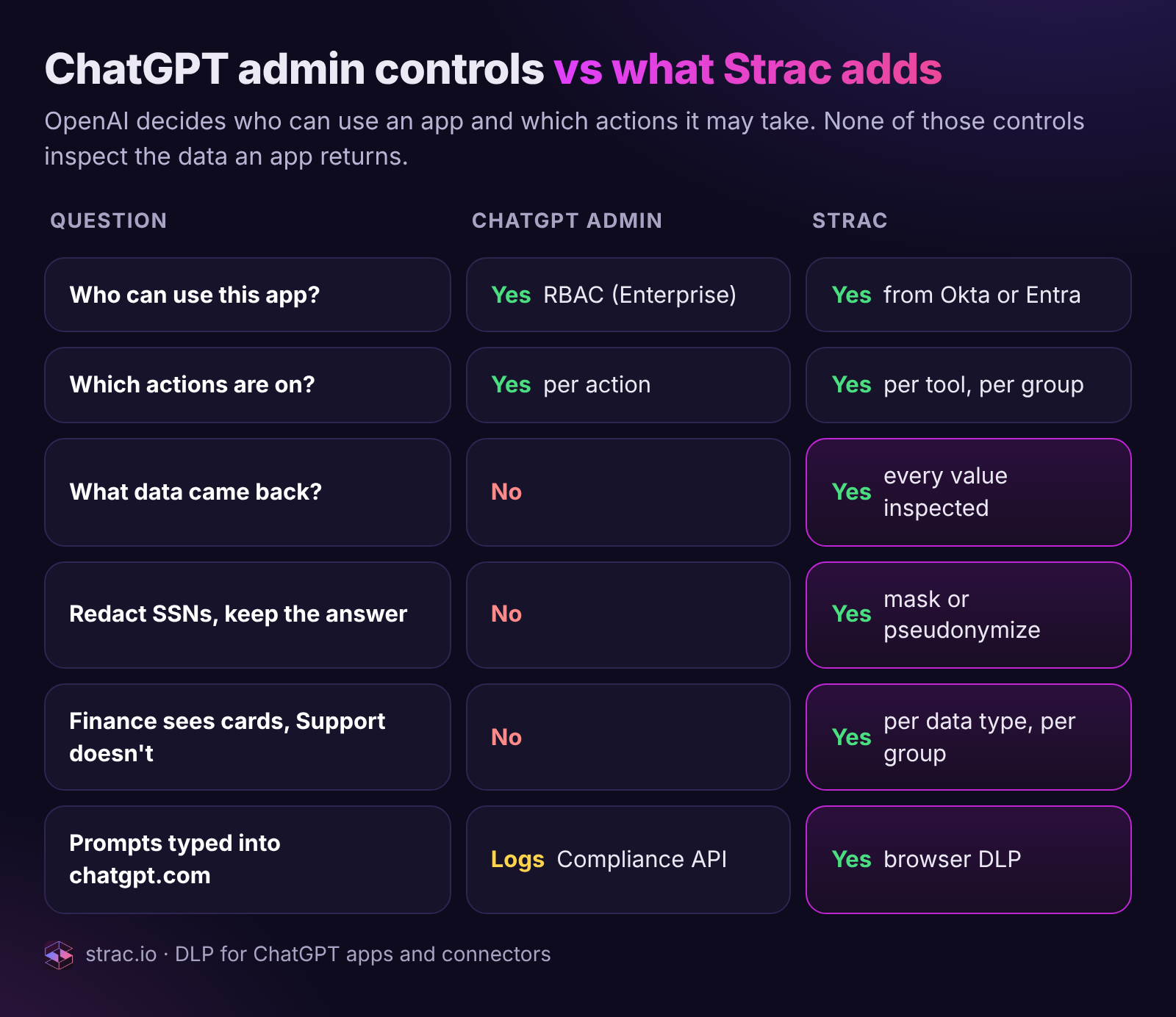
ChatGPT's controls decide who can use an app and which actions it may take. The rows in magenta are the data questions those controls leave open.
Four gaps show up in almost every rollout:
No inspection of what comes back. RBAC can keep Support off the SharePoint app. It cannot let Support use the app while stripping SSNs from the HR files it returns.
Access is per app, not per data type. Finance needs card numbers from the billing system; Support needs the last four. ChatGPT's controls cannot express that difference.
Shared service keys on custom apps. A custom MCP app that authenticates with one key gives every permitted user the same downstream access, and the database sees one principal.
Prompt injection through connector content. A shared document or a ticket from a public form can carry instructions for the model. OpenAI itself warns about this for untrusted MCP servers. MCP prompt injection explains why you cannot filter your way out entirely, and MCP rug pulls covers servers that change after approval. The defense is to make sure there is nothing sensitive in context to steal.
✨ How Strac redacts a ChatGPT connector tool call
DLP is Strac's core engine. The same detectors that find PII, PHI, PCI and secrets in Slack, Google Drive, SharePoint, browsers and endpoints run inline on connector traffic. Strac MCP DLP sits between ChatGPT and the MCP server, and the diagram at the top of this page shows its four checks.
1. Identify. Strac resolves the person behind the call and their groups from Okta, Entra ID or Google Workspace, even when the app authenticates with a shared key.
2. Authorize. Strac checks that group's policy: is this app allowed, and is this specific tool allowed? A read may pass while a write is blocked for the same group.
3. Inspect. Strac scans both directions: the arguments ChatGPT sends and the result the server returns, using 100+ built-in detectors plus your custom data elements, with OCR for images and scanned PDFs.
4. Remediate. Each sensitive value gets the action your policy sets for that data type and group.
Action
What ChatGPT receives
Use it for
Mask
***-**-****
SSNs, dates of birth, secrets
Partial mask
**** **** **** 4412
Card and account numbers where the last four help
Pseudonymize
EMAIL_7f3a2c, consistent across the chat
Names and emails, so ChatGPT can still group records; reversible in the Strac vault for authorized users
Block
A refusal ChatGPT can explain
Tools or data a group should never touch
Audit
The original value, logged
Low-risk data during a baseline period
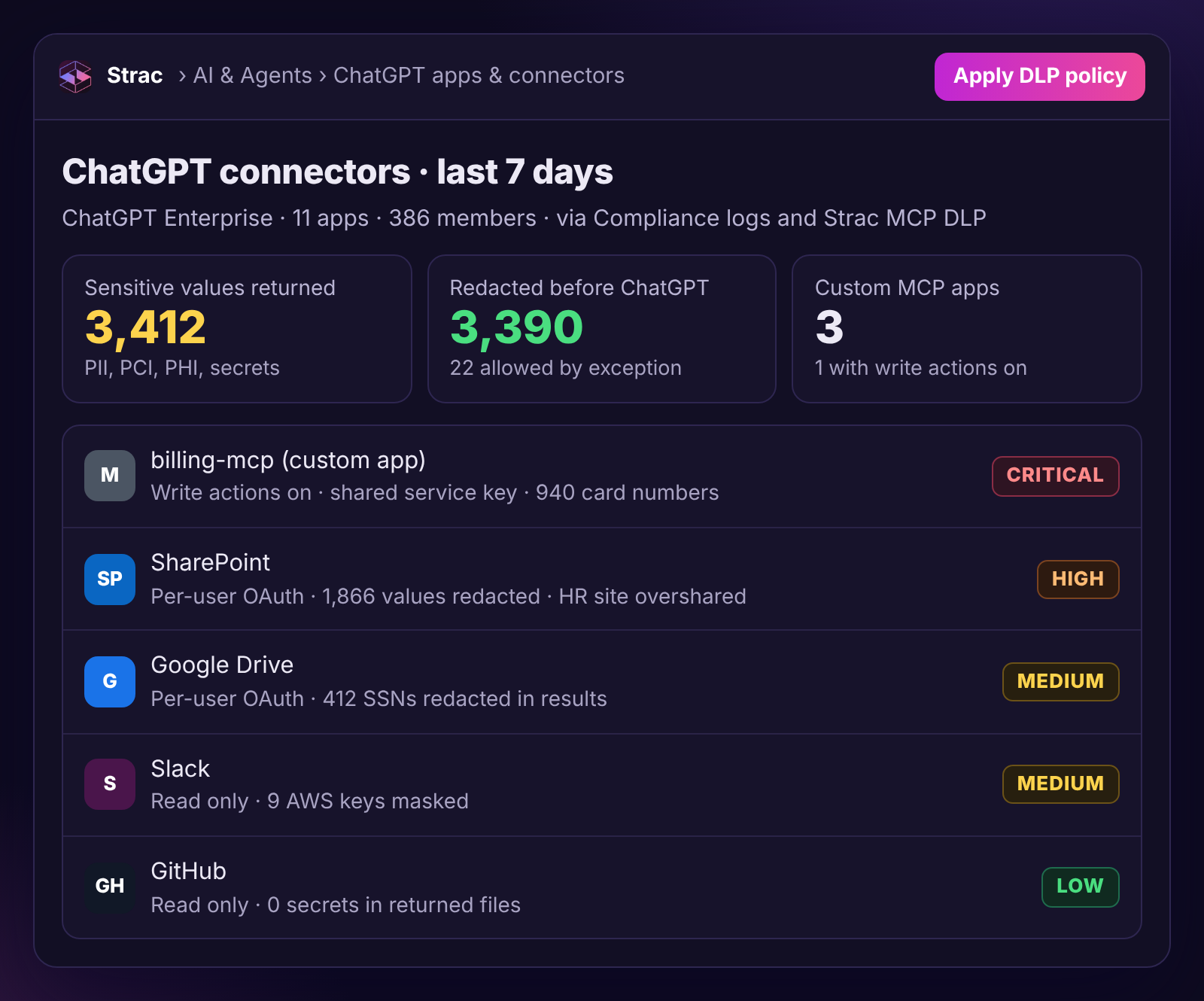
What your team sees: every ChatGPT app, how it authenticates, the sensitive data that came back through it and what Strac did. The custom billing app with write actions on a shared key is the one to fix first.
The user still gets a useful answer. ChatGPT can say "Jordan Alvarez was charged twice on the card ending 4412," and it cannot repeat the SSN, because it never saw it. Every decision is logged with user, group, app, tool, data types and action, and raw values stay in the Strac vault. The architecture is covered in depth in MCP DLP.
✨ Per-group ChatGPT connector policy: allow, redact, read-only or block
ChatGPT Enterprise RBAC answers "can this group use the app." Strac answers the next question: "what should this group see when it does."
Same request, four answers. Finance sees what it needs, Support sees the last four digits, Engineering reads with PII removed and cannot write, and contractors get a clear refusal. Nobody sees the SSN.
A Strac policy has three layers, and the strictest matching rule wins:
Layer
What you set
Example
App
Which groups can use it
Billing app: Finance and Support only
Tool
Which tools each group can call
Engineering: read tools on, write tools off
Data
What happens to each data type, per group
SSN masked for everyone; card numbers in clear for Finance, last four for Support
Patterns that work:
Contractors: block the app. They keep ChatGPT, they lose company data.
Support: allow with redaction. Answer cases from CRM and ticket data without PII ever entering a chat.
Engineering: read-only, PII redacted. Debug against real schemas, never real customers.
Finance and HR: allow, audited. The owners of the data see it, and every call is logged.
Regulated teams: stricter defaults. PHI masked on every app for anyone in a HIPAA workforce group.
Groups sync from your identity provider, so access follows people through joins, moves and departures. And because Strac applies the policy of the human who asked, a custom app on one shared key stops being a blank check.
✨ Block the connection itself: personal vs corporate ChatGPT accounts
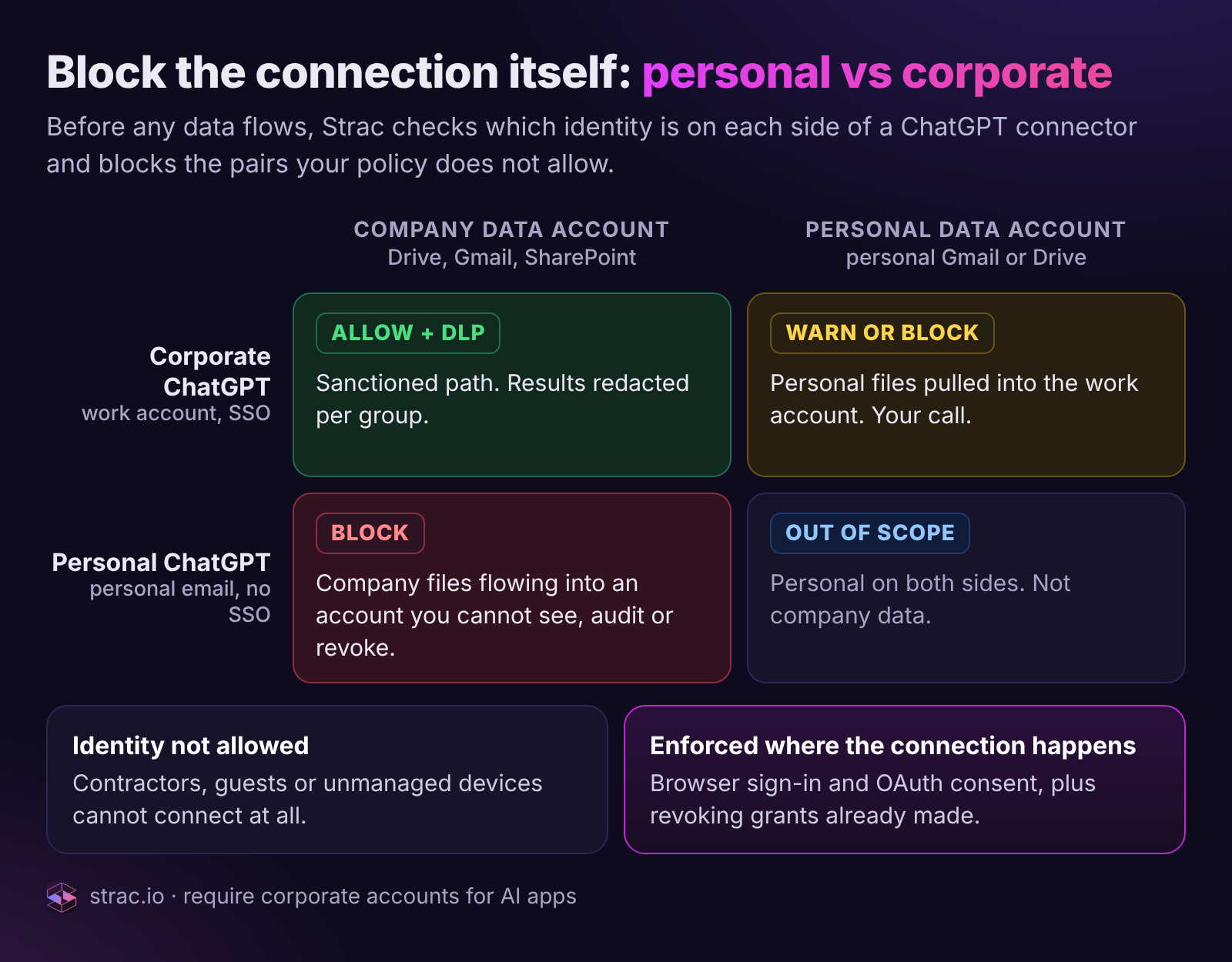
Redaction controls what flows through an approved connection. Some connections should never exist at all, and Strac blocks them before any data moves. The question is which identity sits on each side: the ChatGPT account making the request, and the account that owns the data.
The dangerous cell is bottom left: a personal ChatGPT account connected to company Drive, Gmail or SharePoint. Company files land in an account your security team cannot see, audit or revoke. Strac blocks that pair outright.
Who is connecting
To what data
Strac action
Why
Corporate ChatGPT (Business or Enterprise)
Company Drive, Gmail or SharePoint
Allow, with DLP on every result
The sanctioned path, governed by group policy
Personal ChatGPT account
Company Drive, Gmail or SharePoint
Block the connection
Company data would leave for an account outside your control
Corporate ChatGPT
A personal Gmail or Drive
Warn or block, your choice
Personal files mixed into the work account and its logs
Contractor, guest or unmanaged device
Any company app
Block the connection
The identity is not allowed, whatever the account
Strac enforces this where the connection actually happens:
At sign-in. Strac browser DLP can require a corporate account for AI apps, so a personal ChatGPT login on a managed device is stopped or redirected to the company workspace.
At OAuth consent. When someone clicks connect, Strac checks both identities in the consent flow and blocks pairs your policy does not allow, such as a personal ChatGPT account requesting access to company Drive, Gmail or SharePoint.
After the fact. Strac finds grants that already exist, for example a company Google account that authorized a personal ChatGPT client, and revokes them where the provider allows, with the user and owner notified.
Identity rules and data rules stack. An allowed identity still gets redaction on every result, and a blocked identity never gets a result at all.
Beyond connectors: the other paths into ChatGPT
Not everything reaches ChatGPT through an app, so Strac covers the other paths with the same detectors and policy.
What people type and upload.Strac browser DLP inspects prompts, pastes and file uploads on chatgpt.com and can audit, warn, block or redact per site and per data type. It also catches personal ChatGPT accounts, which no workspace setting can see. See how to block ChatGPT for the softer alternatives to a ban.
At the source. Strac finds and redacts sensitive content at rest in SharePoint, OneDrive, Google Drive and Slack, so any connector, ChatGPT or otherwise, retrieves a clean file.
For audit. Strac reads ChatGPT Enterprise compliance logs and classifies them, so every conversation that carried sensitive data is searchable by user and data type. Our ChatGPT DLP guide covers prompt-level policy in depth.
A rollout checklist for ChatGPT connectors
Start with apps off. Enable only the connectors a team has asked for, with a named owner.
Classify the source data first. Run DLP across SharePoint, Drive and Slack, and redact or restrict the files no AI tool should retrieve.
Block personal ChatGPT accounts. Require corporate accounts for AI apps and block connections from personal accounts or disallowed identities to company data.
Use RBAC on Enterprise. Give each app to the groups that need it, synced from your identity provider.
Put Strac MCP DLP in front of custom apps. Every MCP server you build or buy should have its results inspected and redacted before ChatGPT reads them.
Write per-group data rules. Decide what each group sees for SSNs, card numbers, PHI and secrets.
Keep write actions off by default. Turn them on per action, for a named group, with confirmation.
Vet custom MCP servers like vendors. Review scopes, record approved tool definitions, and watch for changes.
Replace shared keys where you can. Where you cannot, let Strac apply per-user policy on top.
Turn on browser DLP for chatgpt.com. Cover prompts, uploads and personal accounts.
Run a week in audit mode, then enforce. See real traffic first, then switch data rules to redact and group rules to block.
👉 Book a demo and we will route one of your ChatGPT connectors through Strac MCP DLP on the call and show you the redacted result for two different groups.
🌶️ Spicy FAQs on ChatGPT connectors
What are ChatGPT connectors?
ChatGPT connectors, which OpenAI now calls apps, are integrations that let ChatGPT search, read and sometimes write to other systems such as Google Drive, SharePoint, Slack, GitHub and custom MCP servers. Each tool result a connector returns goes into the ChatGPT conversation. Admins on Business and Enterprise decide which connectors are enabled.
Are ChatGPT connectors safe for company data?
They are as safe as the data they return and the permissions behind them. OpenAI gives admins controls over which apps are on, who can use them on Enterprise and which actions are enabled, but those controls do not inspect the data in results. Pair connectors with DLP that redacts sensitive values and with least-privilege access per group.
Can I stop employees connecting a personal ChatGPT account to company data?
Yes. Strac requires a corporate account for AI apps at sign-in, blocks the connection during OAuth consent when a personal ChatGPT account tries to reach company Drive, Gmail or SharePoint, and finds and revokes grants that already exist. Contractors, guests and unmanaged devices can be blocked from connecting at all.
Can I allow a ChatGPT connector for some users and block it for others?
On Enterprise, RBAC lets you decide which groups can use each app. To go further, such as letting Support use an app while masking SSNs and card numbers in what it returns, you need a data-layer policy. Strac applies per-group rules for each tool and data type, synced from Okta, Entra ID or Google.
How do I stop sensitive data reaching ChatGPT through a connector?
Put DLP in the path. Route custom MCP apps through Strac MCP DLP so PII, PHI, PCI and secrets are redacted before ChatGPT reads them, redact at the source in SharePoint, Drive and Slack for built-in apps, and use browser DLP for what people type and upload into chatgpt.com.
What is developer mode in ChatGPT?
Developer mode lets admins and owners connect and test custom MCP servers as apps before publishing them to the workspace. OpenAI warns that connecting to untrusted MCP servers increases security risks such as prompt injection, and leaves vetting custom apps to the customer.
Does OpenAI train on data from ChatGPT connectors?
OpenAI states that it does not train on Business, Enterprise or Edu workspace data by default, and that includes connector content. Training is a separate question from exposure: data a connector returns still lands in conversations, can be summarized and shared, and should be redacted if it is regulated.
What are ChatGPT connectors?
ChatGPT connectors, which OpenAI now calls apps, are integrations that let ChatGPT search, read and sometimes write to other systems such as Google Drive, SharePoint, Slack, GitHub and custom MCP servers. Each tool result a connector returns goes into the ChatGPT conversation. Admins on Business and Enterprise decide which connectors are enabled.
Are ChatGPT connectors safe for company data?
They are as safe as the data they return and the permissions behind them. OpenAI gives admins controls over which apps are on, who can use them on Enterprise and which actions are enabled, but those controls do not inspect the data in results. Pair connectors with DLP that redacts sensitive values and with least-privilege access per group.
Can I stop employees connecting a personal ChatGPT account to company data?
Yes. Strac requires a corporate account for AI apps at sign-in, blocks the connection during OAuth consent when a personal ChatGPT account tries to reach company Drive, Gmail or SharePoint, and finds and revokes grants that already exist. Contractors, guests and unmanaged devices can be blocked from connecting at all.
Can I allow a ChatGPT connector for some users and block it for others?
On Enterprise, RBAC lets you decide which groups can use each app. To go further, such as letting Support use an app while masking SSNs and card numbers in what it returns, you need a data-layer policy. Strac applies per-group rules for each tool and data type, synced from Okta, Entra ID or Google.
How do I stop sensitive data reaching ChatGPT through a connector?
Put DLP in the path. Route custom MCP apps through Strac MCP DLP so PII, PHI, PCI and secrets are redacted before ChatGPT reads them, redact at the source in SharePoint, Drive and Slack for built-in apps, and use browser DLP for what people type and upload into chatgpt.com.
Discover & Protect Data on SaaS, AI, MCP, Endpoints & Cloud
Strac provides end-to-end data loss prevention for all SaaS and Cloud apps. Integrate in under 10 minutes and experience the benefits of live DLP scanning, live redaction, and a fortified SaaS environment.


.webp)








.avif)



.gif)
