Claude Connectors: How to Secure Them on Team and Enterprise (2026)
Claude connectors pull Drive files, Slack messages and database rows into Claude. How to redact sensitive data and set connector access per user and group.
Claude connectors link Claude to Google Drive, Gmail, Slack, Salesforce, databases and internal tools, and every tool result lands in Claude's context. Anthropic gives admins real controls: who can add connectors, per-user OAuth, and per-tool Always allow, Needs approval or Blocked. None of them inspect what a connector returns, and none of them vary by user group. Strac MCP DLP sits on the tool-call path: it identifies the human behind each call, checks that group's policy, inspects the request and the response, and redacts, pseudonymizes or blocks sensitive data before Claude reads it. The same connector can be allowed for Finance, redacted for Support, read-only for Engineering and blocked for contractors. Strac also blocks the connection itself when the identity is not allowed, such as a personal Claude account reaching company data.
Claude Connectors: How to Secure Them on Team and Enterprise (2026)
Claude connectors are integrations that let Claude read from and act on your other systems, such as Google Drive, Gmail, Slack, GitHub, Salesforce or an internal database, either through prebuilt connectors or through custom connectors that talk to a remote MCP server. They are also the reason a Claude conversation can now contain a payroll spreadsheet, a customer's Social Security number, or a production API key that nobody pasted on purpose.
If you run IT or security for a company on Claude Team or Claude Enterprise, two questions land on your desk the week connectors go live. What sensitive data will flow through them, and can we stop it in the flow? And can we turn a connector on for the people who need it without giving it to everyone? This guide answers both, starting with the data. It is a spoke of our AI agent security guide, focused on one product your employees already use.
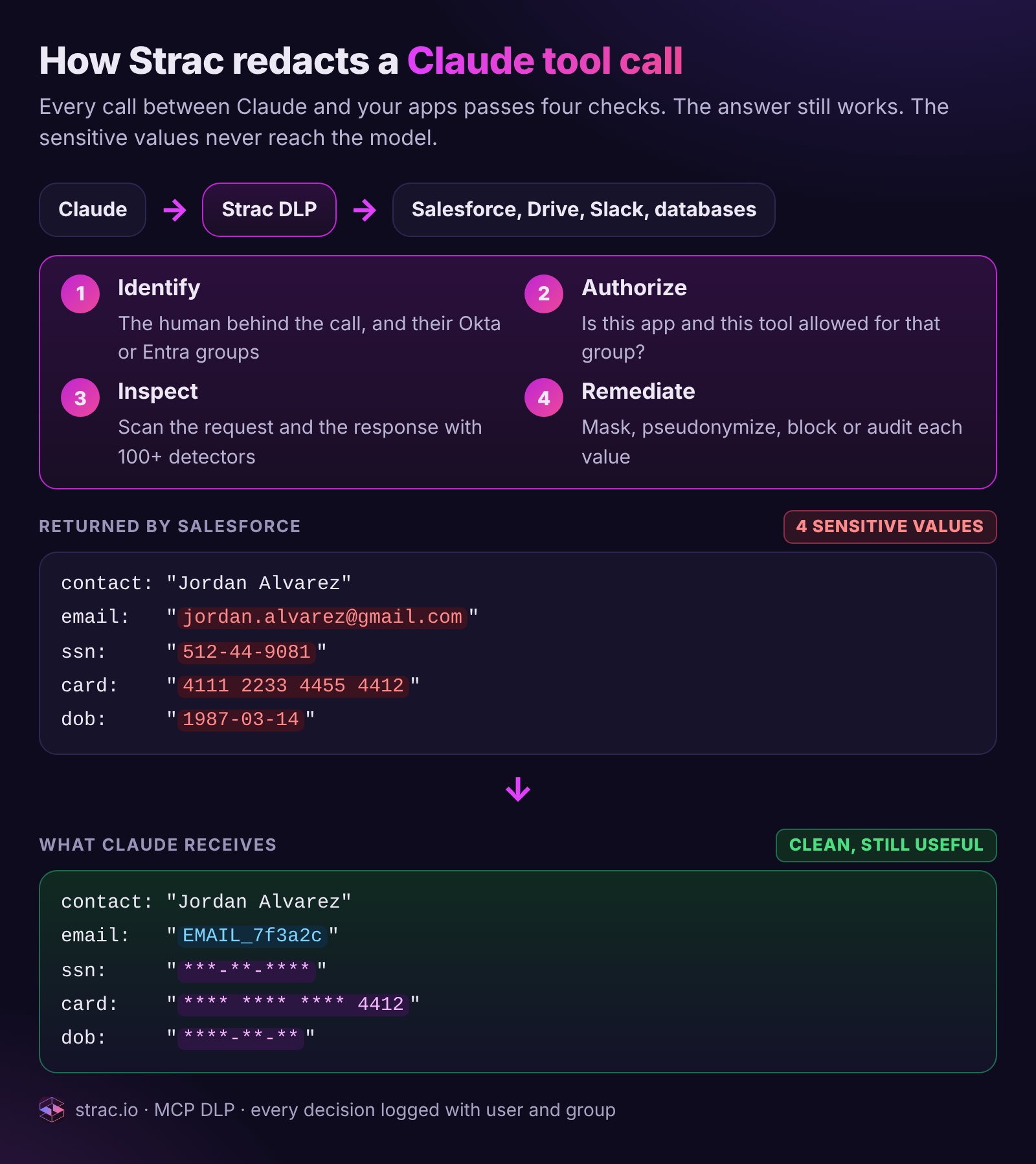
One Salesforce tool call, end to end. The raw result carries an SSN, a card number, a date of birth and a personal email. Claude receives the same record with those values masked or replaced by a surrogate, and Strac logs who asked and what was removed.
What Claude connectors are
A connector gives Claude a set of tools. When a user asks "summarize the Q3 board deck" or "find the customer who emailed about the refund," Claude decides which tool to call, the connector fetches the data, and the result is placed into Claude's context so the model can reason over it. Some tools only read. Others write: they post a Slack message, create a Jira ticket, open a pull request or update a database row.
Prebuilt connectors come from Claude's connector directory and cover popular SaaS apps. An admin enables them for the organization and each member signs in with their own account.
Custom connectors link Claude to tools and data over remote MCP servers. Anthropic makes them available on Free (one custom connector), Pro, Max, Team and Enterprise, in Claude, Claude Desktop and Cowork. A custom connector can point at a vendor's hosted MCP server or at one your own team built in front of an internal database, a ticketing system or a data warehouse. Because connections originate from Anthropic's cloud, the MCP server must be publicly reachable or allowlist Anthropic's IP ranges. Your internal MCP server is now an internet-facing service.
How a connector authenticates decides what it can reach.
Auth model
How it works
What Claude can reach
Security implication
Per-user OAuth
Each member signs in to the downstream app
Only what that user can already access
Inherits every oversharing problem in the source app
Shared fixed credential
One API key or token configured for the connector
Everything that credential can access, for every member
One identity for many people; attribution and least privilege break
Anthropic's own guidance for a shared credential is to make it a limited-access one. In practice, shared keys are where most critical findings live, and they are the main reason per-group policy matters later in this guide.
What data flows through a Claude connector
The mental model is simple: every tool result is data entering Claude's context. If a connector can return it, Claude can read it, quote it, summarize it, and pass it to the next tool in the chain.
Google Drive. Full file contents: SSNs, salary data, contracts, board materials, including the "anyone in the company with the link" files nobody remembers sharing.
Gmail. Message bodies and attachments: invoices with card numbers, patient intake forms, wire instructions.
Slack. Channel history, where people paste AWS keys and card numbers "just for a minute."
GitHub. Source code, config files and the secrets someone committed to payments-prod three years ago.
Salesforce and support tools. Customer records, contact details and case notes.
Custom database connectors. Raw rows, including the columns your data team tags as restricted.
Sensitive data now moves into a new system through a path your existing DLP was never placed on. It lands in a conversation, can be summarized into a document, or carried by a write tool to a wider audience. A user who could always open the payroll sheet can now have it flattened into a Slack post in one prompt.
For how Claude handles data once it arrives, see Claude data privacy and is Claude AI safe. On training, Anthropic's commercial terms state that it does not train models on customer content from commercial plans by default; details are in does Claude train on your data. Training is a separate question from exposure.
🛡️ The admin controls Anthropic gives you, and the gaps
Anthropic gives organization admins real controls. Use all of them, and be clear about what each one does not do.
Control
What it does
What it does not do
Who can add connectors
Team: Owners and Primary Owners. Enterprise: also custom roles with the permission
Does not limit what data an approved connector returns
Per-member connection
Each member connects individually after an admin adds the connector
Does not stop a member connecting an account that sees far more than their job needs
Per-user OAuth
Claude reaches only what the signed-in user can access
Inherits oversharing in the source app
Tool permissions
Each tool is Always allow, Needs approval or Blocked, organization-wide
Does not inspect a result's content, and applies the same setting to every member
Network reachability
Servers must be public or allowlist Anthropic's IP ranges
Does not authenticate which user is behind a call
Compliance API
Enterprise activity data for audit
An after-the-fact record, not an inline control
Those controls answer "who may turn this on" and "may this tool run without asking." They leave five gaps that show up in almost every rollout we see:
No content inspection of tool results. There is no setting that says "allow this tool, but strip SSNs from what it returns." A user approving a tool call is deciding on the action, not on a result they have not seen yet.
No per-group policy. A tool is Always allow, Needs approval or Blocked for the whole organization. Finance and a 90-day contractor get the same Salesforce connector.
Shared API keys collapse identity. The database sees one principal, svc-claude, for every member. If that key can write to production, everyone can, through Claude.
Anthropic does not audit custom MCP servers. Anthropic states that custom connectors are not verified, can hide prompt injections, and can change behavior after approval. See MCP rug pulls and the confused deputy problem.
Prompt injection rides in on connector content. A shared doc or a ticket from a public form can carry instructions for the model. MCP prompt injection explains why filtering alone cannot fix it. What you can do is make sure there is nothing sensitive in context to steal and nothing with standing write access to steal it with.
Gaps 1 and 2 are the ones the next two sections close.
How Strac MCP DLP redacts a Claude connector tool call
DLP is Strac's core engine. The detectors that find PII, PHI, PCI and secrets in Slack, Google Drive, Gmail, browsers and endpoints run on connector traffic too, inline, on every call. Strac is an Anthropic partner integrated with the Claude Compliance API, and Strac MCP DLP sits on the tool-call path between Claude and the server. The diagram at the top of this page shows the four checks; here is what each one does on a real call.
1. Identify. Strac resolves the human behind the call, not just the credential. For per-user OAuth that comes from the token. For a connector on a shared key, Strac ties the call to the Claude user and session, then looks up that person's groups in Okta, Entra ID or Google Workspace. In the example, alice@acme.com in support-t1.
2. Authorize. Strac checks the policy for that group: is this connector available to them, and is this specific tool allowed? salesforce.query is a read, so it passes; salesforce.update_record would be blocked for Support. This is where per-group access lives, covered in the next section.
3. Inspect. Strac scans both directions. The request is checked for sensitive data going out in tool arguments or uploads. The response is checked for sensitive data coming back: rows, file contents, message history. Detection uses 100+ built-in detectors plus custom data elements, with ML for context and OCR for images and scanned PDFs.
4. Remediate. Each detected value gets the action your policy sets for that data type and that group.
Action
What Claude receives
Use it for
Mask
***-**-****
SSNs, DOBs, secrets: values nobody needs in a chat
Partial mask
**** **** **** 4412
Card numbers, account numbers, where the last four help the user
Pseudonymize
EMAIL_7f3a2c, consistent across the conversation
Emails and names, so Claude can still group and reason about records; authorized users can reverse it in the Strac vault
Block the call
A refusal Claude can explain to the user
Tools or data types a group should never touch
Audit
The original value, logged
Low-risk data during a baseline period
The point of redacting instead of blocking is that the user still gets an answer. In the example, Claude can still say "case 00431877 for Jordan Alvarez is a duplicate charge on the card ending 4412, refund it." It cannot repeat the SSN, because it never saw it.
Every decision becomes an audit record: user and group, client and tool, data types found, action taken. Raw values stay in the Strac vault, never in the log line. Our MCP DLP guide covers the architecture in depth, and Claude DLP covers detection policies for Claude itself.
✨ Per-user and per-group connector policy: block for some, redact for others
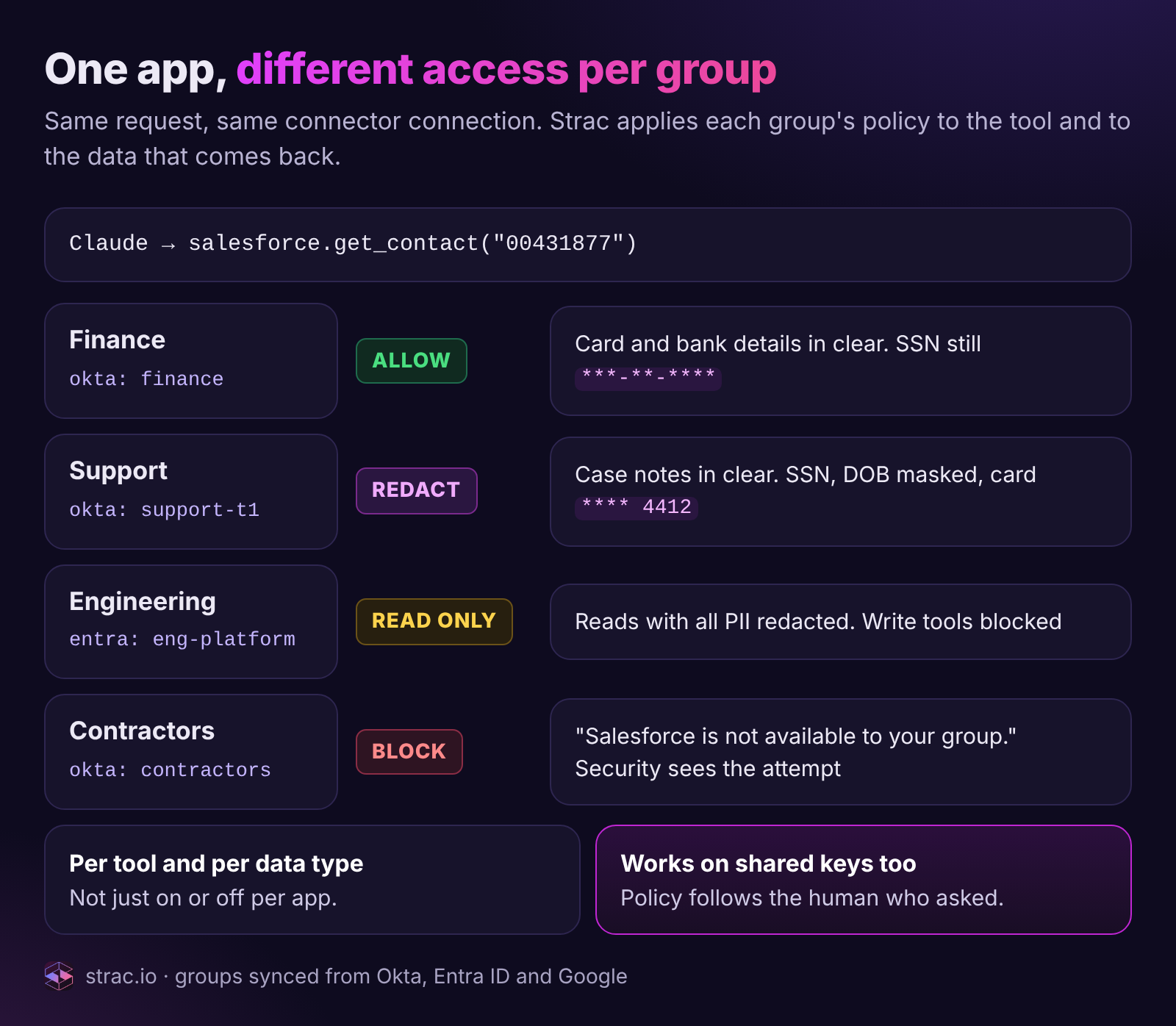
Anthropic's tool permissions are organization-wide. Real companies are not. Strac lets you set connector access by user and group, so one connector can behave four different ways for the same request.
Same call, four answers. Finance sees the card and bank details it needs, Support sees the last four digits, Engineering can read with all PII redacted but cannot write, and the contractor group gets a clear refusal. Nobody sees the SSN.
A policy has three layers, evaluated in order, and the strictest matching rule wins:
Layer
What you set
Example
Connector
Which groups can use it at all
Salesforce MCP: Finance, Support, Engineering. Not contractors.
Tool
Which tools each group can call
Engineering: get_contact and query allowed, update_record blocked
Data
What happens to each data type, per group
SSN masked for everyone; card numbers in clear for Finance, last four for Support
A few patterns we see most:
Contractors and interns: block the connector. They keep Claude, they lose Drive and Salesforce. Claude explains why instead of failing silently, and security sees the attempt.
Support: allow with redaction. Agents can answer cases from Salesforce and Zendesk without PII ever entering a chat transcript.
Engineering: read-only with PII redacted. Engineers debug a sync job against real schemas and record IDs, never real customer data, and cannot write back.
Finance or HR: allow, audited. The team that owns the data sees it, every call is logged, and secrets are still masked.
Regulated groups: stricter defaults. Anyone in a HIPAA workforce group gets PHI masked on every connector, regardless of which tool they use. See is Claude HIPAA compliant for the wider picture.
Groups come from your identity provider, so policy follows people. A joiner gets their team's access the day they start, and a leaver loses it the day their account is disabled, with no one editing connector settings by hand.
This also fixes the shared-key problem from earlier. Even when a custom connector runs on one service credential, Strac applies the policy of the human who asked, so svc-claude stops being a blank check for the whole company.
✨ Block the connection itself: personal vs corporate Claude accounts
Redaction controls what flows through an approved connection. Some connections should never exist at all, and Strac blocks them before any data moves. The question is which identity sits on each side: the Claude account making the request, and the account that owns the data.
The dangerous cell is bottom left: a personal Claude account connected to company Drive, Gmail or SharePoint. Company files land in an account your security team cannot see, audit or revoke. Strac blocks that pair outright.
Who is connecting
To what data
Strac action
Why
Corporate Claude (Team or Enterprise)
Company Drive, Gmail or SharePoint
Allow, with DLP on every result
The sanctioned path, governed by group policy
Personal Claude account
Company Drive, Gmail or SharePoint
Block the connection
Company data would leave for an account outside your control
Corporate Claude
A personal Gmail or Drive
Warn or block, your choice
Personal files mixed into the work account and its logs
Contractor, guest or unmanaged device
Any company app
Block the connection
The identity is not allowed, whatever the account
Strac enforces this where the connection actually happens:
At sign-in. Strac browser DLP can require a corporate account for AI apps, so a personal Claude login on a managed device is stopped or redirected to the company workspace.
At OAuth consent. When someone clicks connect, Strac checks both identities in the consent flow and blocks pairs your policy does not allow, such as a personal Claude account requesting access to company Drive, Gmail or SharePoint.
After the fact. Strac finds grants that already exist, for example a company Google account that authorized a personal Claude client, and revokes them where the provider allows, with the user and owner notified.
Identity rules and data rules stack. An allowed identity still gets redaction on every result, and a blocked identity never gets a result at all.
✨ What your team sees: every connector, its data and its risk
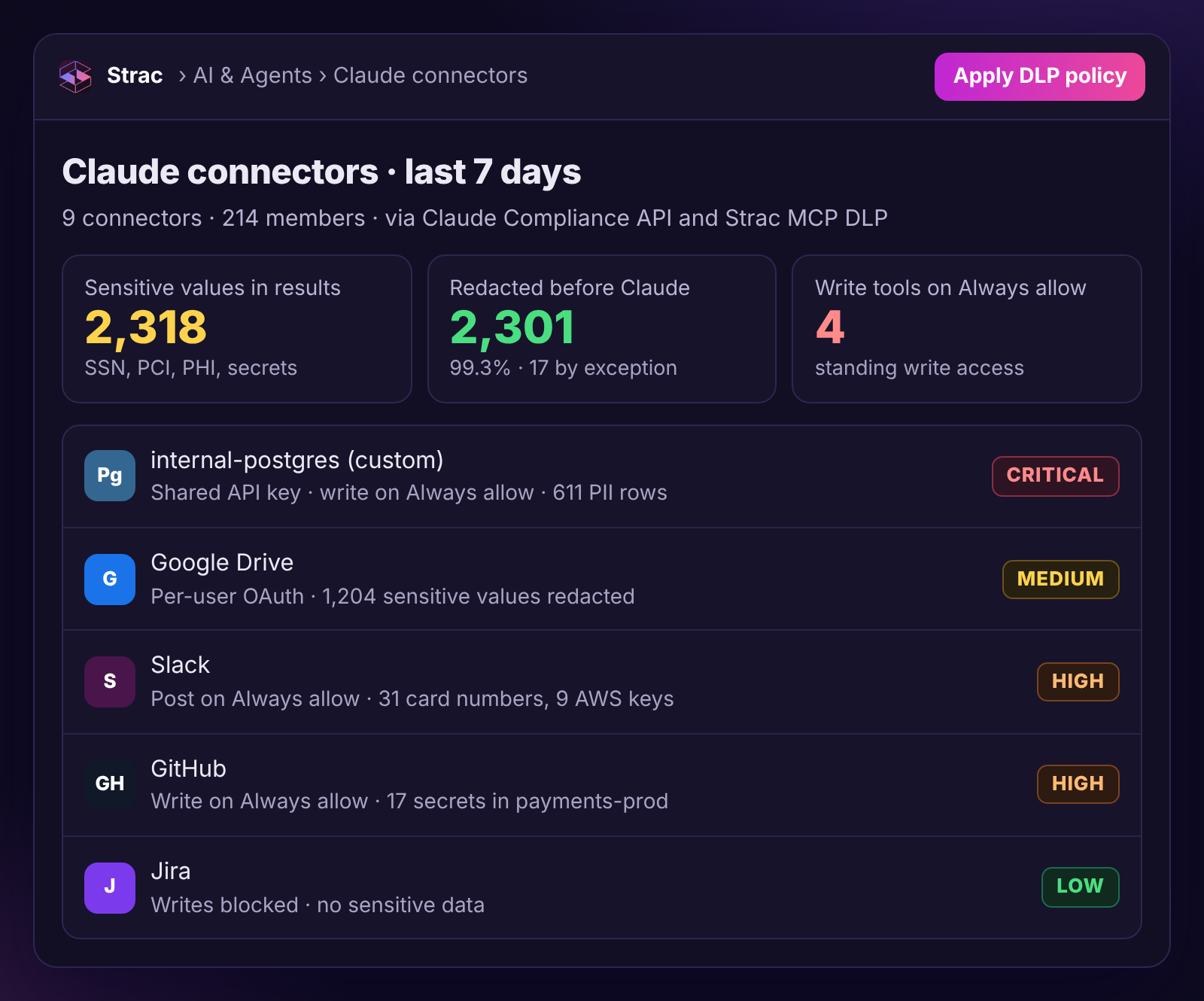
Once traffic flows through Strac, the Claude connectors view shows each connector, who uses it, how it authenticates, what sensitive data came back through it, and what Strac did about it.
Nine connectors, 214 connected members, one shared API key. The two rows that matter most are the custom Postgres connector on a shared key with write tools on Always allow (Critical) and Google Drive, which returned 1,204 sensitive values in a week.
"2,318 sensitive values in tool results, 2,301 redacted before reaching Claude" is the headline number. The 17 that were not redacted are the interesting ones: each becomes a finding with the connector, the user, the data type and the reason, usually an approved exception.
Behind the data, Strac tracks the identity each connector runs as and what it is allowed to do, the four-question model from our AI agent identity governance guide. That produces findings with deterministic severity:
Finding
Typical Claude connector example
Default severity
Shared credential used by agent
Custom Postgres connector on one API key for 214 members
Medium to High; Critical with write access to regulated data
Overprivileged agent
Write tool on Always allow, never used in 30 days
Medium to High by blast radius
Agent observed accessing sensitive data
GitHub connector reading a repo with 17 secrets
High; Critical for secrets plus execute
Sensitive data sent to external destination
Slack post tool carrying card numbers to a shared channel
Critical
Ownerless live connector
Custom MCP server added by someone who left
High
Each finding shows its severity factors (sensitivity, action capability, breadth, sanctioning, observed use, attribution confidence), gets an owner, and can carry an exception with an expiry date. Discovery is read-only by default. Local MCP servers that never appear in Claude's admin settings are found by the endpoint sensor's configuration scan, the shadow MCP problem.
🎥 Beyond MCP: the other places Strac protects Claude data
Not every byte reaches Claude through a custom MCP server, so Strac covers the other paths with the same detectors and the same policy.
At the source, for prebuilt SaaS connectors. Strac classifies and redacts sensitive content at rest in Google Drive, Gmail and Slack. A card number pasted into Slack is redacted in the message, and a Drive file full of SSNs is restricted before any AI connector can retrieve it in cleartext.
In the browser. When members use claude.ai on the web, Strac browser DLP inspects what they paste, type and upload, and can audit, warn, block or redact per domain and per data type.
For audit, through the Compliance API. Strac ingests activity from the Claude Compliance API and runs the same classifiers, so every conversation that carried sensitive data is searchable by user, data type and source.
Strac AI DLP redacting sensitive values in the flow, so the AI tool gets a usable request and the regulated data never leaves the boundary.
A rollout checklist for Claude connectors
Restrict who can add connectors. On Enterprise, use a small custom role for connector approvals.
Classify the source data first. Run DLP across Drive, Gmail and Slack. Redact secrets and card numbers at rest, and restrict files no AI tool should retrieve.
Block personal Claude accounts. Require corporate accounts for AI apps and block connections from personal accounts or disallowed identities to company data.
Route custom connectors through Strac MCP DLP. Every server you build or host should have its tool results inspected and redacted before Claude sees them.
Write per-group policy before broad rollout. Decide which groups get each connector, which tools, and what happens to each data type. Block contractors by default.
Prefer per-user OAuth. Treat a shared credential as an exception with a named owner, and let Strac apply per-user policy on top of it.
Default write tools to Needs approval or Blocked. Revisit every Always allow on send, post, delete or execute.
Review third-party MCP servers like vendors. Check permissions, limit scopes, record approved tool definitions.
Lock down network exposure. Allowlist Anthropic's IP ranges rather than opening internal servers to the internet.
Turn on the Compliance API. On Enterprise, connect it to Strac so every sensitive conversation is attributable.
Start in audit, then enforce. Run a week in audit mode to see real traffic, then switch data rules to redact and group rules to block.
👉 Book a demo and we will route one of your connectors through Strac MCP DLP on the call and show you the redacted result per group.
🌶️ Spicy FAQs on Claude connectors
What are Claude connectors?
Claude connectors are integrations that give Claude tools to read from and act on other systems, such as Google Drive, Gmail, Slack, GitHub or an internal database. Prebuilt connectors cover popular apps, and custom connectors link Claude to tools and data over remote MCP servers. Every tool result a connector returns is placed into Claude's context for that conversation.
Are Claude connectors safe?
They are as safe as the data they return and the permissions they run with. Anthropic gives admins controls over who can add connectors and whether each tool is allowed, needs approval or is blocked, but those controls do not inspect content. Pair connectors with DLP on tool results and least-privilege, per-group access.
Can I stop employees connecting a personal Claude account to company data?
Yes. Strac requires a corporate account for AI apps at sign-in, blocks the connection during OAuth consent when a personal Claude account tries to reach company Drive, Gmail or SharePoint, and finds and revokes grants that already exist. Contractors, guests and unmanaged devices can be blocked from connecting at all.
Can I allow a Claude connector for some users and block it for others?
Not with Claude's built-in tool permissions alone, which apply organization-wide. With Strac, you set policy per user and per group from Okta, Entra ID or Google: allow a connector for Finance, redact it for Support, make it read-only for Engineering and block it for contractors. The same policy applies even when the connector runs on a shared API key.
How does Strac redact data in Claude connector results?
Strac MCP DLP sits on the tool-call path. It identifies the user, checks their group's policy, scans the request and the response with 100+ detectors, and masks, partially masks, pseudonymizes or blocks each sensitive value before Claude receives the result. The user still gets a useful answer, and every decision is logged.
Can Claude connectors see all my Google Drive files?
With per-user OAuth, Claude can reach whatever the signed-in user can access in Drive, which usually includes files shared broadly across the company. Restrict oversharing and redact sensitive content in Drive before connecting, and use per-group policy to limit which teams can use the Drive connector at all.
How do I stop sensitive data reaching Claude through a connector?
Put DLP in the path. Route custom MCP connectors through Strac so PII, PHI, PCI and secrets are redacted in tool results, redact at the source in Drive, Gmail and Slack for prebuilt connectors, and use browser DLP for what people paste into claude.ai. Then set write tools to Needs approval and give each group only the connectors it needs.
What are Claude connectors?
Claude connectors are integrations that give Claude tools to read from and act on other systems, such as Google Drive, Gmail, Slack, GitHub or an internal database. Prebuilt connectors cover popular apps, and custom connectors link Claude to tools and data over remote MCP servers. Every tool result a connector returns is placed into Claude's context for that conversation.
Are Claude connectors safe?
They are as safe as the data they return and the permissions they run with. Anthropic gives admins controls over who can add connectors and whether each tool is allowed, needs approval or is blocked, but those controls do not inspect content. Pair connectors with DLP on tool results and least-privilege, per-group access.
Can I stop employees connecting a personal Claude account to company data?
Yes. Strac requires a corporate account for AI apps at sign-in, blocks the connection during OAuth consent when a personal Claude account tries to reach company Drive, Gmail or SharePoint, and finds and revokes grants that already exist. Contractors, guests and unmanaged devices can be blocked from connecting at all.
Can I allow a Claude connector for some users and block it for others?
Not with Claude's built-in tool permissions alone, which apply organization-wide. With Strac, you set policy per user and per group from Okta, Entra ID or Google: allow a connector for Finance, redact it for Support, make it read-only for Engineering and block it for contractors. The same policy applies even when the connector runs on a shared API key.
How does Strac redact data in Claude connector results?
Strac MCP DLP sits on the tool-call path. It identifies the user, checks their group's policy, scans the request and the response with 100+ detectors, and masks, partially masks, pseudonymizes or blocks each sensitive value before Claude receives the result. The user still gets a useful answer, and every decision is logged.
Discover & Protect Data on SaaS, AI, MCP, Endpoints & Cloud
Strac provides end-to-end data loss prevention for all SaaS and Cloud apps. Integrate in under 10 minutes and experience the benefits of live DLP scanning, live redaction, and a fortified SaaS environment.


.webp)







.avif)



.gif)
