Windows DLP

Windows DLP that stops data leaving every Windows laptop

Strac knows which files are sensitive before anything moves, then audits, warns or blocks on USB, browser uploads, clipboard, print and AI tools. One lightweight agent, managed alongside your Macs.

Windows endpoint DLP

Every way data leaves a Windows laptop, covered

Strac classifies files in the background, so it already knows what is sensitive when someone tries to move it.

Know what is sensitive before it moves

ML and OCR detectors find PII, PHI, PCI, credentials and secrets inside documents, spreadsheets, images and PDFs on the laptop.
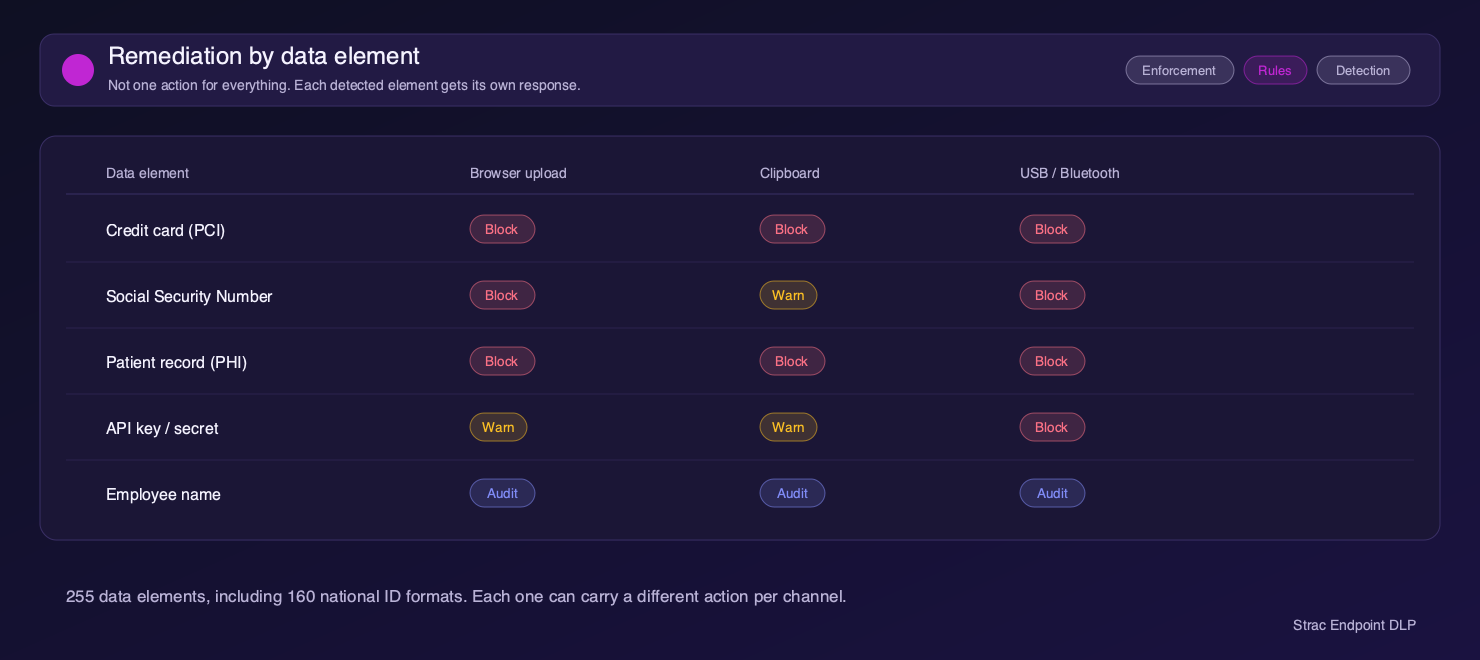
  • USB drives and other removable media
  • Browser uploads to any website or SaaS app
  • Clipboard and paste into apps and AI tools
  • Printing sensitive documents
Strac policy editor setting a different action for each sensitive data type on Windows

Coach employees instead of just blocking them

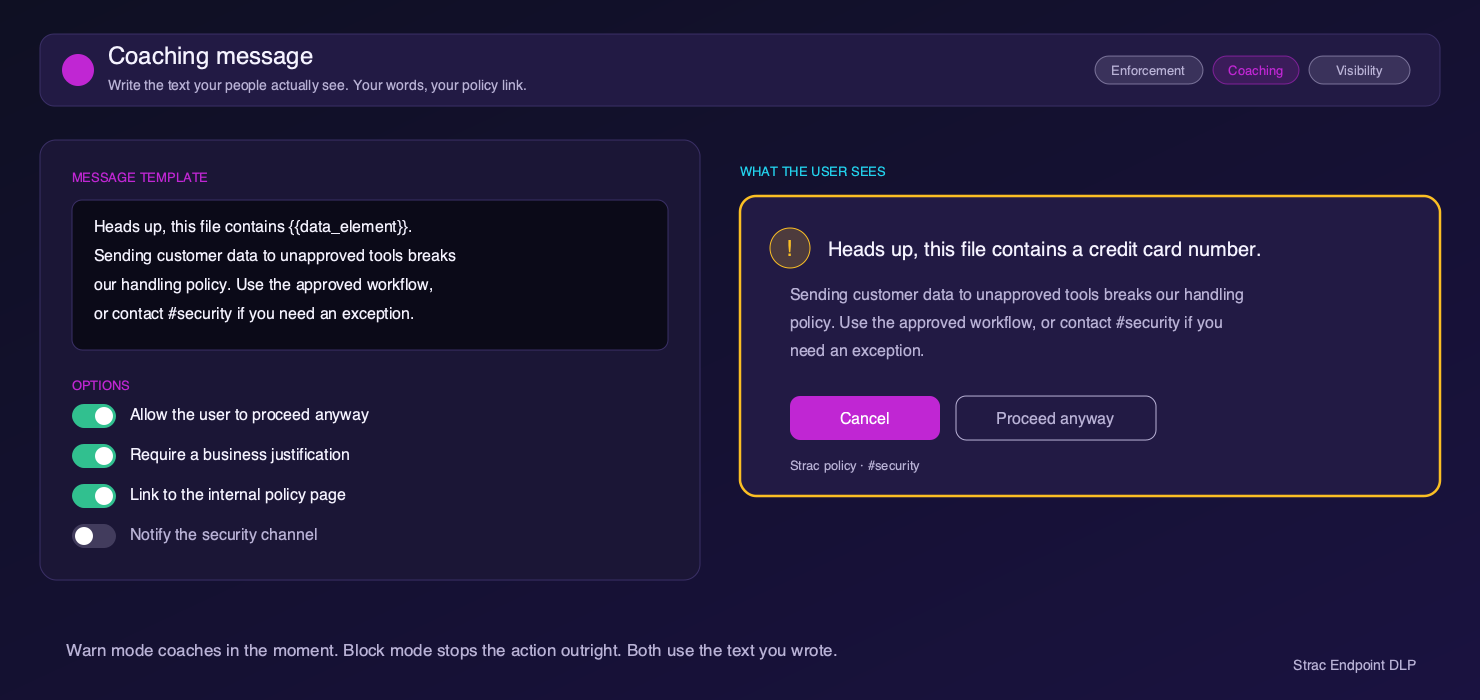
Start in audit mode, then move to warn or block. Warnings use your own words, so employees know what to do instead.
  • Audit every exit with no interruption
  • Warn with a message your team writes
  • Block high-risk data types outright, per team
Strac coaching message shown to an employee before sensitive data leaves

Stop sensitive data going into AI tools

Pastes and uploads into ChatGPT, Claude, Gemini and Copilot are checked before they are sent, so sensitive data can be redacted, warned on or blocked, and AI coding agents can be stopped from opening sensitive files.
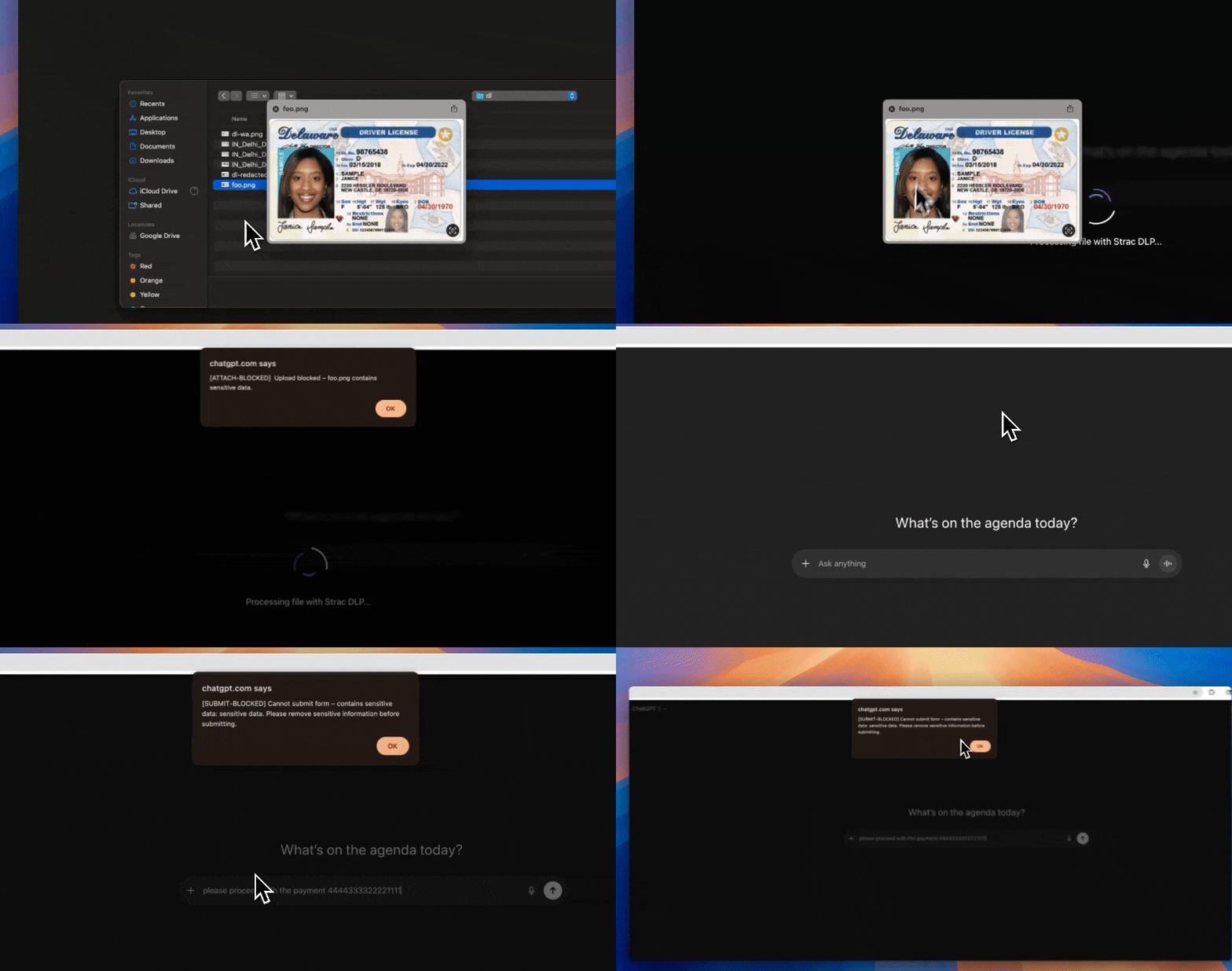
Strac blocking sensitive data shared with a generative AI tool
Deployment

Rolled out through Intune in a day

One lightweight agent, managed in the same console as your Macs, browsers and SaaS apps.

Push the agentDeploy the Strac agent to Windows laptops through Microsoft Intune or any other MDM (mobile device management) tool you already use.
Start in audit modeSee every exit in use, including USB, uploads, clipboard, print and AI tools, with no interruption to employees.
Turn on warn and blockMove each channel and data type to warn or block, with different policies for different teams.

Windows DLP FAQ

What is Windows DLP?

Windows DLP (data loss prevention) stops sensitive data such as PII, PHI, card numbers and secrets from leaving Windows laptops through USB drives, browser uploads, the clipboard, printing and AI tools.

Which channels does Strac control on Windows?

USB and removable media, browser uploads, clipboard and paste, printing and AI tools such as ChatGPT, Claude and Cursor. AirDrop and cloud sync controls are macOS-only today; see Mac DLP.

How do we deploy Strac on Windows?

Push the agent through Microsoft Intune or any other MDM (mobile device management) tool you already use. Most teams roll it out in a day and start in audit mode.

Will Windows DLP slow down laptops?

No. Files are classified in the background, so the decision at the moment data leaves is fast and employees are not interrupted.

Can we start in audit mode before blocking anything?

Yes. Audit mode records every exit with no interruption. Once you see what is leaving, move channels and data types to warn or block.

Can Strac stop employees pasting sensitive data into ChatGPT on Windows?

Yes. Pastes and uploads into ChatGPT, Claude, Gemini and Copilot are checked before they are sent and sensitive data can be redacted, warned on, blocked or audited. See ChatGPT DLP.

Do Windows and Mac laptops share the same policies?

Yes. Windows and Mac are managed from one Strac console with the same policies, alongside browser DLP, SaaS apps and AI tools.

How is Strac different from Microsoft Purview Endpoint DLP?

Strac classifies files with ML and OCR before they move, coaches employees with warnings in your own words, and covers Windows, Mac, browsers, SaaS apps and AI tools from one console. See Endpoint DLP for a full comparison.

Does Windows DLP help with HIPAA, PCI DSS and SOC 2?

Yes. Keeping PHI, card data and customer PII from leaving laptops supports HIPAA, PCI DSS, SOC 2 and GDPR controls, and every event is logged for audits.

What our customers say

Hear from companies who leveraged Strac to secure and accelerate their business

Read more on G2

“Strac protects our customer support communication channels”

To protect our clients as well as ourselves, we needed a secure way to protect our communication channels for security and compliance reasons. We used Strac's Email Redaction solution where Strac protects all our employee inboxes. The redaction experience is beautiful, easy, and secure. It catches all kinds of sensitive pdfs, jpegs, images, word docs, and even in email bodies. The integration was up and running in a few minutes. The service offered by Strac's team is the best I have seen as we work with a lot of SaaS providers.

We Highly Recommend Strac to all businesses who want to protect their SaaS apps.

Nathan Seifert
Head of IT at Trivium
Nathan Seifert Portrait

“Strac secures our PII on customer support and on backend servers”

On our Intercom customer support, anyone can send sensitive data to a business and a business is liable even if they did not ask for it. Strac solves that huge problem by automatically redacting sensitive data that is shared over Intercom with their accurate machine learning technology. We also leveraged Strac's Zero Data architecture via tokenization & proxy APIs so that we don't have to worry about touching sensitive data and documents on our backend servers. Strac dramatically reduces security and SOC compliance risks for us while significantly improving security posture for Seis. Strac's solutions were extremely easy to integrate (literally in few minutes) and scaled to meet our needs.

Josh Howland
CTO and Co-Founder at Seis
Josh Portrait

“Loved Strac's Interceptor Solution”

We leverage Strac's tokenization & interceptor solution so that we don't have to worry touching sensitive SSNs and can leverage Strac's security expertise in building hundreds of security controls.

We could also detect identity fraud using Strac's unique tokenization solution which we are really happy with. That saved us a ton of financial losses and headaches. We are looking forward to integrating with various other Strac solutions deep into our tech stack.

Kevin Hopkins
CTO at Zeta
Kevin Hopkins Logo

See what is leaving your Windows laptops

Deploy Strac in audit mode to a pilot group through Intune and see every exit in use, with no interruption to employees.

Book a Demo