Google Sheets MCP Server: Secure Setup for Claude & AI Agents (2026)
The Google Sheets MCP server lets Claude, Cursor, ChatGPT, and AI agents read and act inside Google Sheets. Here's the official setup, the real security risks, and how to deploy it with DLP-grade redaction at the MCP layer.
The Google Sheets MCP server is the path for AI agents (Claude, Cursor, ChatGPT, Perplexity, custom agents) to read and act inside Google Sheets via the Model Context Protocol — covering every spreadsheet, tab, and cell range the authorizing user can open in Google Sheets.
Setup is documented in the official Google Sheets MCP server guide; connecting from Claude Desktop requires the Enterprise/Pro/Max/Team plan plus an OAuth client ID/secret added as a custom connector.
The risk: every Google Sheets MCP tool call returns the data the authorizing user can see. That data routinely contains PII, PHI, financial records, contracts, source code, secrets, and credentials. None of it is inspected before reaching the AI model's context window.
Strac Google Sheets MCP DLP is the layer that closes the gap. Every tool call between the AI agent and Google Sheets passes through Strac's MCP-layer inspection. Sensitive content is redacted, tokenized, or vaulted before reaching the model. One control plane, full surface coverage, audit evidence per call mapped to SOC 2 / HIPAA / PCI / GDPR / EU AI Act / ISO 42001.
Setup is agentless and under 10 minutes per workspace. No application code changes, no agent SDK changes, no Google Sheets re-permissioning.
✨ What Is the Google Sheets MCP Server?
The Google Sheets MCP server is a Model Context Protocol implementation that exposes Google Sheets's API as a standardized set of tools to AI agents. Once connected, an agent like Claude can perform read cell ranges, list sheets, append rows, update values, and create spreadsheets on the authenticated user's behalf — turning Google Sheets's API surface into AI-actionable capabilities.
Refer to the official Google Sheets MCP server documentation for the current tool list, OAuth scopes, and rate-limit behavior. The setup pattern is consistent with other MCP integrations: an OAuth client ID/secret, a custom connector in Claude (or another MCP-aware AI client), and the server starts serving tool calls.
From the user's perspective, the AI agent suddenly knows their Google Sheets. From the security perspective, the AI agent now has read access — and often write access — to every record the user can touch in Google Sheets.
That's the value. It's also where security teams need a control layer.
✨ The Real Security Risks of the Google Sheets MCP Server
The risks fall into four categories that every healthcare, fintech, and enterprise security team should price into the deployment.
1. Spreadsheets are where PII and PCI accumulate. Export dumps, customer lists, employee rosters, and card numbers pasted into cells all live in Sheets. sheets_get_values returns them verbatim.
2. A range read has no row- or column-level awareness. Pull a range and every SSN, email, and salary inside it flows to the model. The tool has no concept of a sensitive column — the whole grid is returned.
3. Linked and imported data widens the scope silently. IMPORTRANGE and connected sheets pull data from other spreadsheets the user may not realize the agent can now read, extending the surface beyond the open file.
4. Append and update tools write sensitive data back. The agent can write computed or copied regulated values into new tabs or shared sheets, creating fresh exposure the original DLP scan never saw.
The traditional DLP a company already runs — at the network edge, on the file share, inside the SaaS-native rule engine — does not sit in the MCP path. The tool response goes straight from Google Sheets into the AI agent's context window. That gap is where Strac Google Sheets MCP DLP lives.
✨ Strac Google Sheets MCP DLP — Production-Ready, With Built-In Redaction
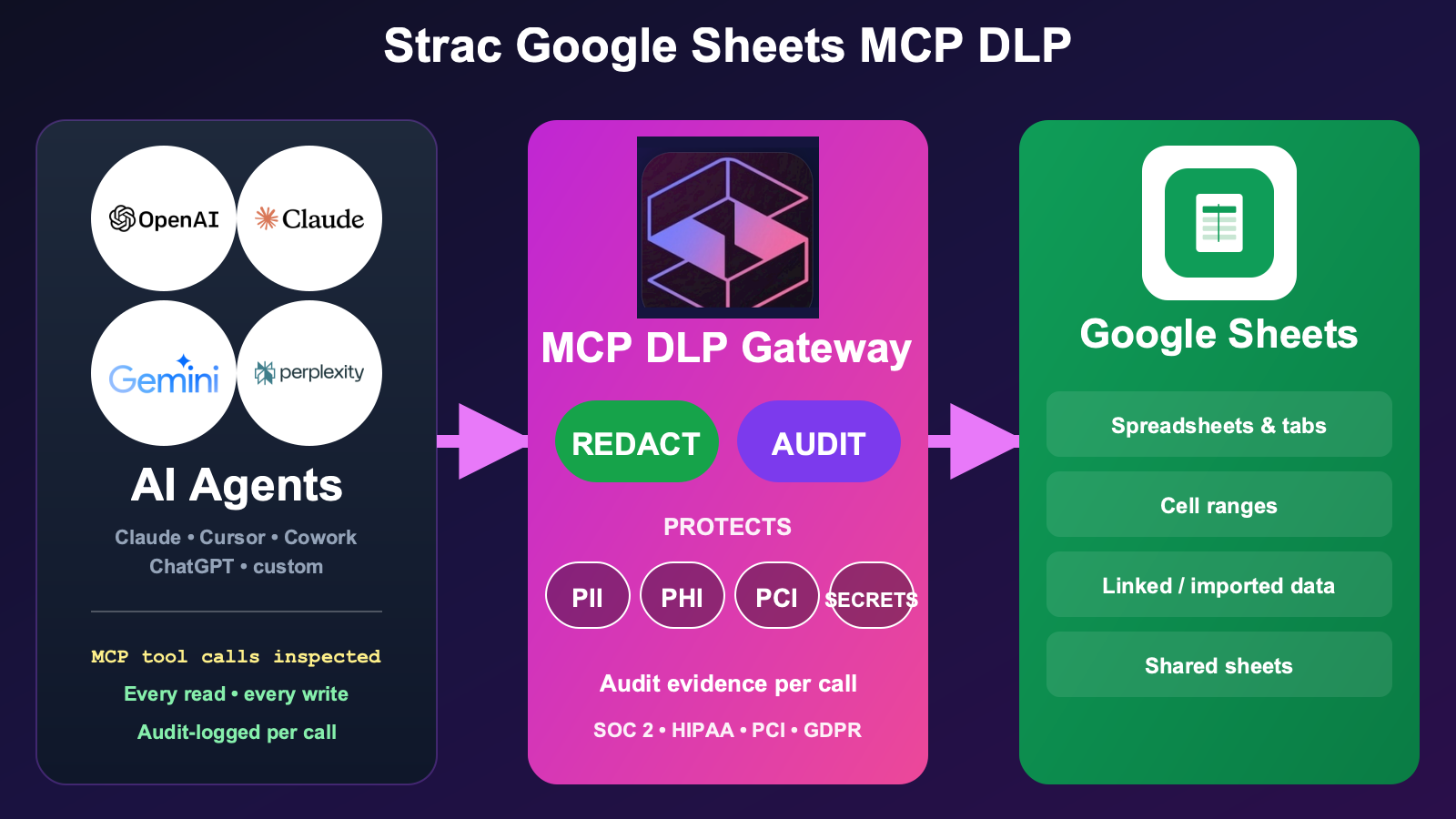
Strac's Google Sheets MCP DLP sits between AI agents and the Google Sheets MCP server. Every tool call passes through Strac's MCP-layer inspection before content reaches the AI agent's context window. Sensitive content is redacted, tokenized, pseudonymized, or vaulted depending on policy. Non-sensitive content flows through untouched.
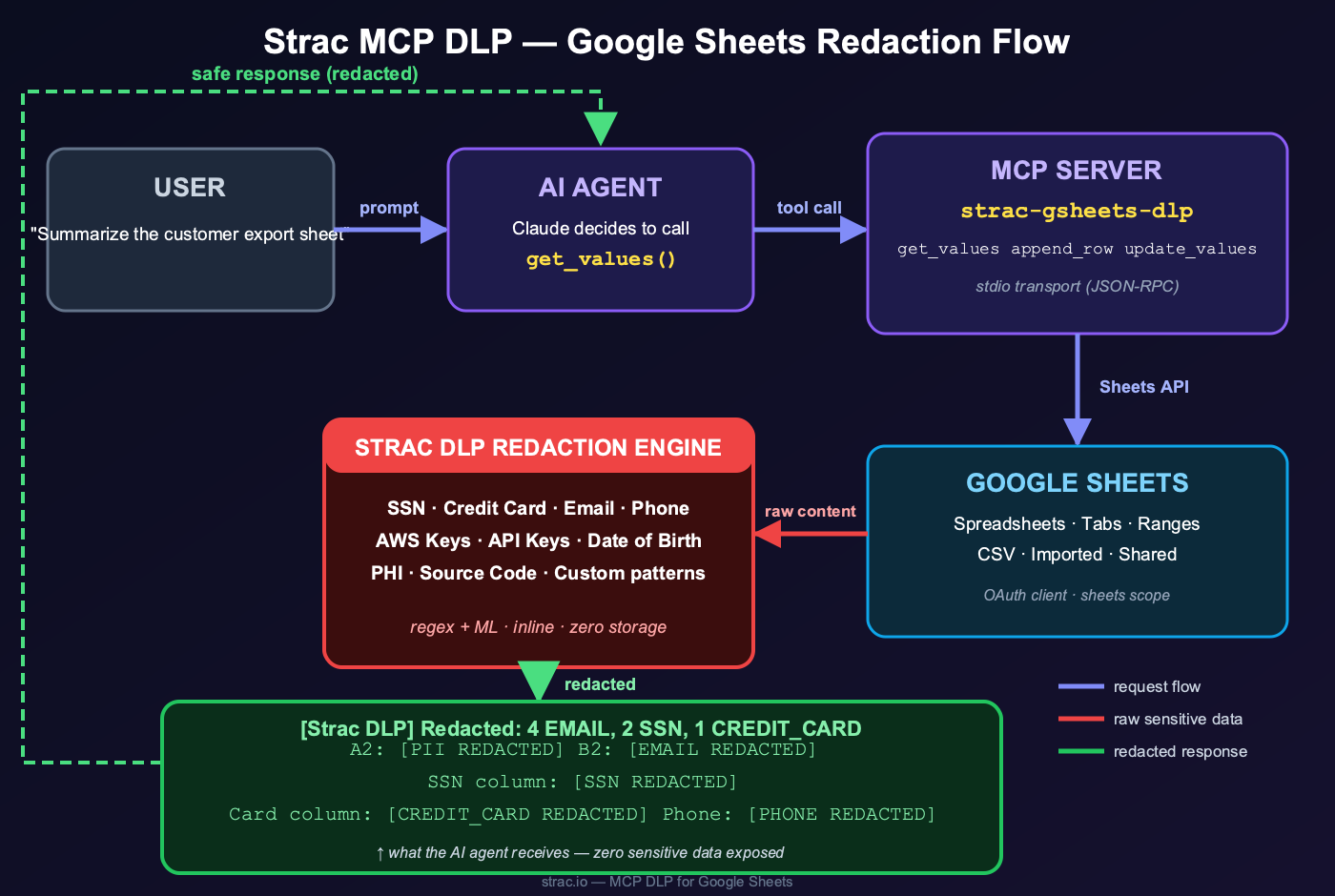
The Strac Google Sheets MCP DLP gateway intercepts every tool call between any AI agent (Claude, Cursor, Cowork, ChatGPT, custom) and the Google Sheets MCP server. PII, PHI, PCI, secrets, source code, and content inside images are redacted before the AI agent ever reads them.The full data flow: a user prompt triggers an AI agent tool call, the MCP server fetches from Google Sheets, and the Strac DLP redaction engine strips SSNs, credit cards, emails, PHI, secrets, and source code before the redacted response ever reaches the model.
What this looks like in practice:
Read tools are filtered. When the agent calls a read tool, Strac inspects the returned payload, redacts SSNs / credit cards / emails / PHI / API keys / secrets / source code inline, and passes the clean payload to the agent. The agent still does its job; the regulated data never enters the model context. Sensitive fields can also be pseudonymized or de-identified — replaced with realistic, format-preserving stand-ins — when a team needs to keep using the data in an AI model without exposing the real PII, PHI, or PCI (see Data Pseudonymization).
Write tools are guardrailed. When the agent invokes a write/post/create tool with content that contains sensitive data, Strac inspects the outgoing payload and either redacts, vaults, or blocks depending on the channel and the data type.
Files, attachments, images, and documents are inspected at depth. PDFs, DOCX, XLSX, ZIPs, and image attachments are parsed with the same OCR and document-parser pipeline Strac uses across its DLP product line. Sensitive content inside screenshots and scanned PDFs is found and redacted.
Every invocation is logged. AI client, user, tool name, resource accessed, data classes detected, redactions applied, vault references, disposition. The log is the SOC 2 / HIPAA / PCI / GDPR audit evidence — produced automatically.
Policy is contextual. Different resources, different policies. Strac maps to your existing data classification, not an MCP-specific silo.
The same Strac MCP DLP layer covers Claude Cowork, Slack MCP, and other surfaces — one control plane across every place AI agents touch your regulated data.
✨ Strac Native Google Sheets DLP — The Companion to MCP DLP
MCP DLP protects the AI-agent surface. Strac's native Google Sheets DLP protects the direct-user surface — the same Google Sheets workspace, but inspected at the point where humans share, upload, send, and grant access. Most enterprises run both: native DLP for the user-driven actions, MCP DLP for the agent-driven actions. Together they cover every path regulated data can take in and out of Google Sheets.
Strac redacting sensitive data in real time across the Google Workspace surface, including Sheets
What Strac's native Google Sheets DLP includes:
Continuous discovery and classification of PII, PHI, PCI, and secrets across every Google Sheet, tab, and cell range in the tenant — the surface where export dumps and customer lists quietly accumulate
Real-time inspection of shares and exports — a sheet full of SSNs or card numbers is caught before it is shared externally or downloaded as CSV
OCR inspection of images pasted or embedded inside Sheets, plus the linked Drive files an IMPORTRANGE or connected sheet pulls from
Automatic revocation of risky external sharing — public sheet links and over-permissive ACLs
Vault-redaction flow: replace a regulated sheet with a permission-controlled retrieval link so authorized users keep access without cleartext data sitting in Drive
Audit logs mapped per finding to SOC 2 CC6, HIPAA Security Rule, PCI Req. 3/4/7/10, and GDPR Art. 5/25/30/32
For the broader integration catalog — every SaaS, cloud, browser, and endpoint surface Strac covers — see strac.io/integrations.
✨ See Strac MCP DLP in Action
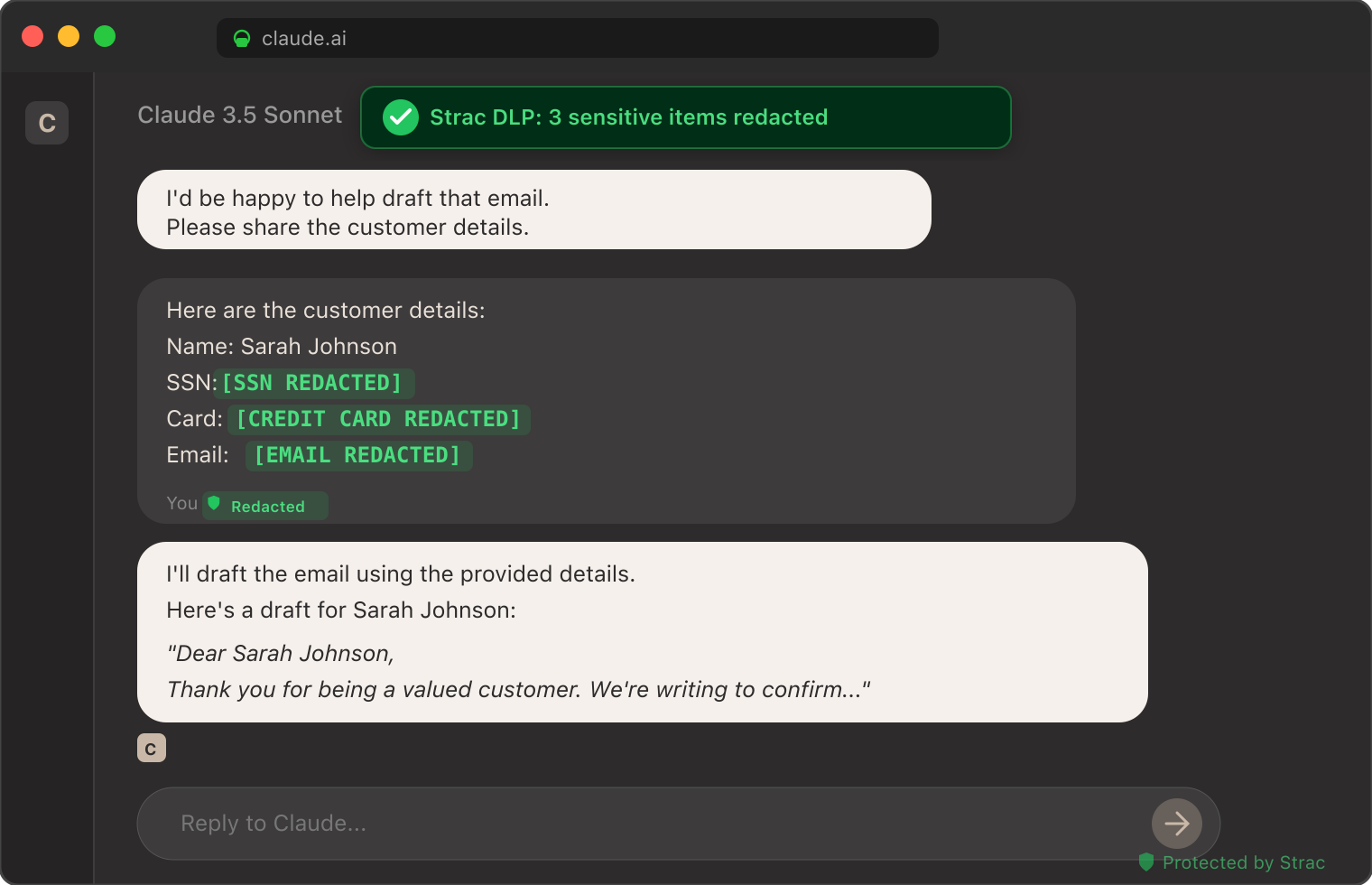
The screenshot below shows Strac's MCP DLP redacting sensitive data from a real Claude session — patient identifiers, customer emails, and credit card numbers tokenized inline before the model received the prompt. The same inspection pattern runs on every Google Sheets MCP tool call routed through Strac.
Strac DLP at work inside a Claude conversation: sensitive elements tokenized inline before the model sees them. The same pattern runs at the MCP layer for every Google Sheets tool call.
How to Set Up Strac Google Sheets MCP DLP
Setup is agentless and takes under 10 minutes.
Authorize Strac with your Google Sheets tenant via OAuth. Strac requests the read/write scopes for the products you want covered. Honors Google Sheets's permission model — Strac only sees what the authorizing user/bot can see.
Configure the MCP proxy endpoint. Strac issues an MCP server endpoint that drops into your AI client's MCP configuration. For Claude Desktop:
json
   "mcpServers": {
     "google-sheets": {
       "url": "https://mcp.strac.io/google-sheets",
       "auth": { "type": "bearer", "token": "<your-strac-token>" }
     }
   }
For Cursor, OpenAI Agents, custom agents — same endpoint, same auth.
Pick your policy. Out-of-the-box templates for SOC 2, HIPAA, PCI, GDPR. Custom policies (resource-level, data-class-level, action-level) take minutes to configure.
Done. Every MCP tool call between your agent and Google Sheets now flows through Strac. No application code changes. No agent code changes. The audit log starts populating immediately.
✨ Compliance Coverage Out of the Box
The same Strac Google Sheets MCP DLP control produces evidence mapped to every major compliance framework.
Framework
What Strac Google Sheets MCP DLP Satisfies
SOC 2
CC6.6 (unauthorized data exposure), CC6.7 (restricted transmission of data to external systems), CC7.2 (monitoring for anomalies including AI usage)
The Google Sheets MCP server is a Model Context Protocol implementation that lets AI agents (Claude, Cursor, ChatGPT, Perplexity, custom agents) read and act inside Google Sheets via standardized tool calls. It's how an AI assistant gets contextual access to every spreadsheet, tab, and cell range the authorizing user can open in Google Sheets.
Is the Google Sheets MCP server safe to use with sensitive data?
By itself, no — not without an additional DLP layer. The Google Sheets MCP server honors the authorizing user's permissions but returns whatever that user can see, including PII, PHI, credentials, source code, and other regulated content. For enterprise use with regulated data, you need an MCP-layer DLP control like Strac Google Sheets MCP DLP that inspects and redacts every tool response before content reaches the AI model.
How is Strac Google Sheets MCP DLP different from Google Sheets's built-in protections?
Google Sheets's built-in protections operate at the storage and policy layer — sensitivity labels, retention policies, native DLP rules at posting/sharing time. None of those sit in the MCP tool-call path by default. Strac is purpose-built for the MCP layer: it inspects every tool response before content reaches the AI agent's context window, with detection breadth (PII / PHI / PCI / secrets / source code / OCR-in-images) that goes well beyond most native rule engines.
Does Strac Google Sheets MCP DLP work with Claude, Cursor, ChatGPT, Cowork, and custom agents?
Yes. Strac exposes a standard MCP endpoint, so any MCP-aware AI client routes tool calls through it with one configuration change. No SDK changes, no application code changes.
What sensitive data types does Strac detect in Google Sheets MCP tool responses?
PII (SSN, driver's license, passport, address, phone, email), PHI (clinical notes, MRN co-occurrence, ICD-10 codes adjacent to identifiers, lab values), PCI (full and partial card numbers via Luhn check), credentials (API keys, AWS / GCP / Azure access keys, OAuth tokens, JWTs, SSH keys, private keys — 48+ patterns), proprietary content (M&A keywords, source code fingerprints), and custom detectors trained on your internal data classifications. Detection runs across text, files, images (OCR), and structured fields.
How long does Strac Google Sheets MCP DLP take to deploy?
Under 10 minutes for the first workspace. OAuth Strac into Google Sheets, paste the Strac MCP endpoint into your AI client's config, pick a policy template, done. No agents to install, no Google Sheets re-permissioning, no application code changes.
Where does redacted data go — is it stored?
Redacted content is replaced inline in the tool response. Optionally, sensitive content can be vaulted — replaced with a short-lived retrieval link that only authorized users can resolve, so the original data is retrievable for legitimate use without ever entering the AI context. Vaulted data is stored encrypted at rest in your Strac tenant; you control retention.
Can I see what an AI agent did in my Google Sheets workspace?
Yes. Strac produces a per-call audit log: timestamp, AI client identity, user, tool invoked, resource accessed, data classes detected, redactions applied, vault references, disposition. The log is queryable in the Strac console and exportable to your SIEM. This is the evidence trail SOC 2, HIPAA, PCI, and GDPR auditors will ask about for AI-agent activity in Google Sheets.
Strac ties every Google Sheets tool call to the individual user, so Google Sheets enforces its spreadsheet sharing exactly as it would in the UI — and Strac inspects the tool results for injected instructions before the model ever acts on them. Strac protects the tabular PII and financial data on the way through and proves per-user access in the audit log — identity to prevent retrieval, DLP to protect what's allowed.
The Bottom Line
The Google Sheets MCP server is rapidly becoming the way AI agents read into Google Sheets. That surface contains every category of regulated and proprietary data your organization has. Running Google Sheets MCP in 2026 without an MCP-layer DLP control is not a question of if the first incident reaches your security team; it's when.
Strac Google Sheets MCP DLP gives you the protection layer, the audit evidence, and the framework-agnostic compliance coverage so you can let your team use Google Sheets with Claude, Cursor, Cowork, ChatGPT, and any future AI client without making each one a separate security exception.
If you are running — or about to run — Google Sheets MCP in production, book a 30-minute demo. We'll walk through the architecture, the policy templates, and a deployment plan for your specific Google Sheets workspace and AI clients.
The Google Sheets MCP server is a Model Context Protocol implementation that lets AI agents (Claude, Cursor, ChatGPT, Perplexity, custom agents) read and act inside Google Sheets via standardized tool calls. It's how an AI assistant gets contextual access to every spreadsheet, tab, and cell range the authorizing user can open in Google Sheets.
Is the Google Sheets MCP server safe to use with sensitive data?
By itself, no — not without an additional DLP layer. The Google Sheets MCP server honors the authorizing user's permissions but returns whatever that user can see, including PII, PHI, credentials, source code, and other regulated content. For enterprise use with regulated data, you need an MCP-layer DLP control like Strac Google Sheets MCP DLP that inspects and redacts every tool response before content reaches the AI model.
How is Strac Google Sheets MCP DLP different from Google Sheets's built-in protections?
Google Sheets's built-in protections operate at the storage and policy layer — sensitivity labels, retention policies, native DLP rules at posting/sharing time. None of those sit in the MCP tool-call path by default. Strac is purpose-built for the MCP layer: it inspects every tool response before content reaches the AI agent's context window, with detection breadth (PII / PHI / PCI / secrets / source code / OCR-in-images) that goes well beyond most native rule engines.
Does Strac Google Sheets MCP DLP work with Claude, Cursor, ChatGPT, Cowork, and custom agents?
Yes. Strac exposes a standard MCP endpoint, so any MCP-aware AI client routes tool calls through it with one configuration change. No SDK changes, no application code changes.
What sensitive data types does Strac detect in Google Sheets MCP tool responses?
PII (SSN, driver's license, passport, address, phone, email), PHI (clinical notes, MRN co-occurrence, ICD-10 codes adjacent to identifiers, lab values), PCI (full and partial card numbers via Luhn check), credentials (API keys, AWS / GCP / Azure access keys, OAuth tokens, JWTs, SSH keys, private keys — 48+ patterns), proprietary content (M&A keywords, source code fingerprints), and custom detectors trained on your internal data classifications. Detection runs across text, files, images (OCR), and structured fields.
Discover & Protect Data on SaaS, AI, MCP, Endpoints & Cloud
Strac provides end-to-end data loss prevention for all SaaS and Cloud apps. Integrate in under 10 minutes and experience the benefits of live DLP scanning, live redaction, and a fortified SaaS environment.


.webp)










.webp)




.avif)


.gif)
