Dropbox MCP Server: Secure Setup for Claude & AI Agents (2026)
The Dropbox MCP server lets Claude, Cursor, ChatGPT, and AI agents read files, Paper docs, and shared links. Setup, the real security risks, the personal-vs-corporate Dropbox account problem, and how to deploy with DLP-grade redaction.
The Dropbox MCP server is the path for AI agents (Claude, Cursor, ChatGPT, Perplexity, custom agents) to read and act inside Dropbox via the Model Context Protocol — files, folders, Paper docs, shared links, and team spaces.
Dropbox is the rare SaaS that's used heavily as both a consumer app and a corporate tool — often on the same laptop, in the same browser, signed into different accounts. The personal-vs-corporate Dropbox account problem is the enterprise risk most security teams underrate.
The MCP-layer risk is real too: a Claude or Cursor user with a Dropbox MCP connector can ask "summarize the investor update doc" and have full files with PII, PHI, PCI, financials, and contracts flowing through the model context window.
Strac Dropbox MCP DLP is the governance layer for agent access to Dropbox: it intercepts every tool call between the agent and Dropbox, controls what each agent can reach and do (allow/block, approval on high-risk actions like create_shared_link), protects file content via redaction, masking, and vaulting before it reaches the model, and logs every call as audit evidence. The Strac browser extension simultaneously enforces personal-vs-corporate Dropbox account policy at the user level.
Setup is agentless and under 10 minutes per workspace.
✨ What Is the Dropbox MCP Server?
The Dropbox MCP server is a Model Context Protocol implementation that exposes Dropbox's API as a standardized set of tools to AI agents. Once connected, an agent like Claude can perform search_files, get_file, list_paper, list_shared_links, and team-space operations on the authenticated user's behalf — turning Dropbox's API surface into AI-actionable capabilities.
The setup pattern is consistent with other MCP integrations: a Dropbox OAuth app registered in the developer portal, the appropriate scopes (files.content.read, team.data.member, depending on use case), and the server starts serving tool calls.
From the user's perspective, the AI agent suddenly knows their Dropbox. From the security perspective, the AI agent now has read access to every file the user can touch in Dropbox — and depending on the account state, which Dropbox.
What AI Agents Can Actually Do With Dropbox MCP
The draw here is productivity, long before security enters the conversation. The Dropbox MCP server hands an AI agent a real working set of Dropbox tools, and the day-to-day workflows are immediately useful:
Browse and read files and folders — an agent navigates the user's Dropbox tree, opens a document, and works with its contents without anyone leaving their editor or chat window.
Read and summarize Paper docs — pull a Dropbox Paper doc (specs, meeting notes, project plans) and get a clean summary or answer questions against it.
OCR scanned PDFs and images — extract text from scanned contracts, receipts, ID images, and photographed whiteboards so the agent can reason over content that isn't natively machine-readable.
Find recently shared or modified items — surface the files that changed this week or that a teammate just shared, so the agent can pick up the latest version automatically.
Pull a file's contents to answer a question — "what's the renewal date in the MSA?" resolves by retrieving the source file and reading the relevant clause back.
That reach is exactly the point — and exactly why each agent's access and actions must be controlled, the file data itself protected, and every call audited. The same tools that make an agent useful inside Dropbox are the tools that, ungoverned, walk regulated data straight into a model context window.
The Real Security Risks of the Dropbox MCP Server
The risks fall into four categories.
1. File search returns regulated data.search_files for "investor", "contract", "patient", or "diligence" matches across every file the user can read — including files inherited, files in shared folders the user forgot about, and content from external collaborators. The agent retrieves the matches and writes them into the model context.
2. File content includes PDFs, DOCX, XLSX, images, and Paper docs.get_file and list_paper return raw content. Dropbox files routinely carry PII, PHI, PCI, contracts, IP, and credentials pasted into Paper docs. Image-based files require OCR.
3. Shared links create exfiltration paths.create_shared_link lets the agent generate a public-link for any file the user can access. A confused or compromised agent can publish sensitive data to the open web in one call.
4. Team-space sprawl. For Dropbox Business customers, the authorizing user often has access to team spaces holding department-wide content (HR, Finance, Legal). All of it reachable via MCP.
The traditional DLP a company already runs does not sit in the MCP path. The tool response goes straight from Dropbox into the AI agent's context window. That's the gap Strac Dropbox MCP DLP fills.
The Personal-vs-Corporate Dropbox Account Problem
This is the enterprise risk most security teams underrate. Dropbox is heavily used as a personal file-storage app and a corporate file-storage app. Employees commonly have both signed in on the same device.
The pattern. An employee on a work laptop opens dropbox.com. The browser auto-signs them into their personal Dropbox (the one they use for family photos and side projects). They drag a work file in — to "back it up" or "share with a friend who's helping out." The corporate Dropbox Business tenant (with retention, audit, eDiscovery, and the BAA, if applicable) sees nothing — the upload happened on the personal account.
Why this is worse than it sounds:
- No audit trail in the corporate Dropbox admin console.
- No retention or legal hold on personal-account content.
- No BAA coverage for healthcare orgs — PHI uploaded to a personal Dropbox is technically a HIPAA breach.
- No DLP — corporate Dropbox DLP rules only apply to the corporate tenant.
What enterprise teams actually want:
- Allow Dropbox on the corporate (SSO) Business account.
- Block Dropbox when signed in with a personal account — same browser, same device.
- Audit the policy decisions for compliance.
How Strac enforces this. The Strac browser extension and endpoint DLP detect the active Dropbox account identity (SSO domain match, OAuth claim, or account email pattern). Corporate-account sessions pass. Personal-account sessions are blocked or warned, per policy, with the event audit-logged.
A typical deployment:
Corporate Dropbox Business (employee@corp.com via SSO) → Allow. Standard MCP DLP redaction applies.
Personal Dropbox (employee@gmail.com) → Block. User sees an inline policy notice.
Customer or vendor external Dropbox → Warn + audit. User can proceed with one-click acknowledgement; event logged for compliance.
This is the layer that closes the practical Dropbox risk that BAA discussions and MCP DLP alone don't address.
Dropbox MCP for Claude (Claude Desktop, Claude Code, Claude Cowork)
The most common Dropbox MCP deployment in 2026 is Claude as the AI client. The setup pattern:
Register a Dropbox OAuth app with the required scopes (files.content.read at minimum).
Add the Dropbox MCP server as a custom connector in Claude Desktop, Claude Code (CLI), or Claude for Cowork.
Claude can now call search_files, get_file, list_paper, and related tools on the user's behalf.
The Claude Cowork BAA gap matters here. Anthropic does not currently offer a Business Associate Agreement (BAA) for Claude consumer or Claude Cowork plans. For healthcare orgs running Cowork against Dropbox folders containing PHI (clinical research data, EHR exports, patient correspondence), that's HIPAA exposure the moment a tool call crosses into the model context. Strac Dropbox MCP DLP redacts PHI at the tool-call boundary so the model never sees the regulated data in the first place. See Is Claude HIPAA compliant? for the full vendor breakdown, and MCP security for the broader architecture.
For Claude Code / Cursor / ChatGPT deployments, the same Strac control plane applies — the redaction happens at the MCP layer, not at the model layer, so it's vendor-independent.
Strac is the governance layer for AI-agent access to Dropbox, built on four jobs: See every tool call between the agent and Dropbox, Control what each agent can reach and do (allow/block per agent, plus approval gates on high-risk actions like create_shared_link), Protect the file content it returns by redacting, masking, or vaulting sensitive data before it reaches the model, and Prove it by auditing every call. Strac wraps the official Dropbox MCP server and intercepts every tool call from an AI agent before it reaches Dropbox — and every Dropbox response before it reaches the model. Where a team needs to keep using the data in an AI model, Strac can also pseudonymize or de-identify it — swapping PII, PHI, and PCI for realistic, format-preserving fakes (see Data Pseudonymization).
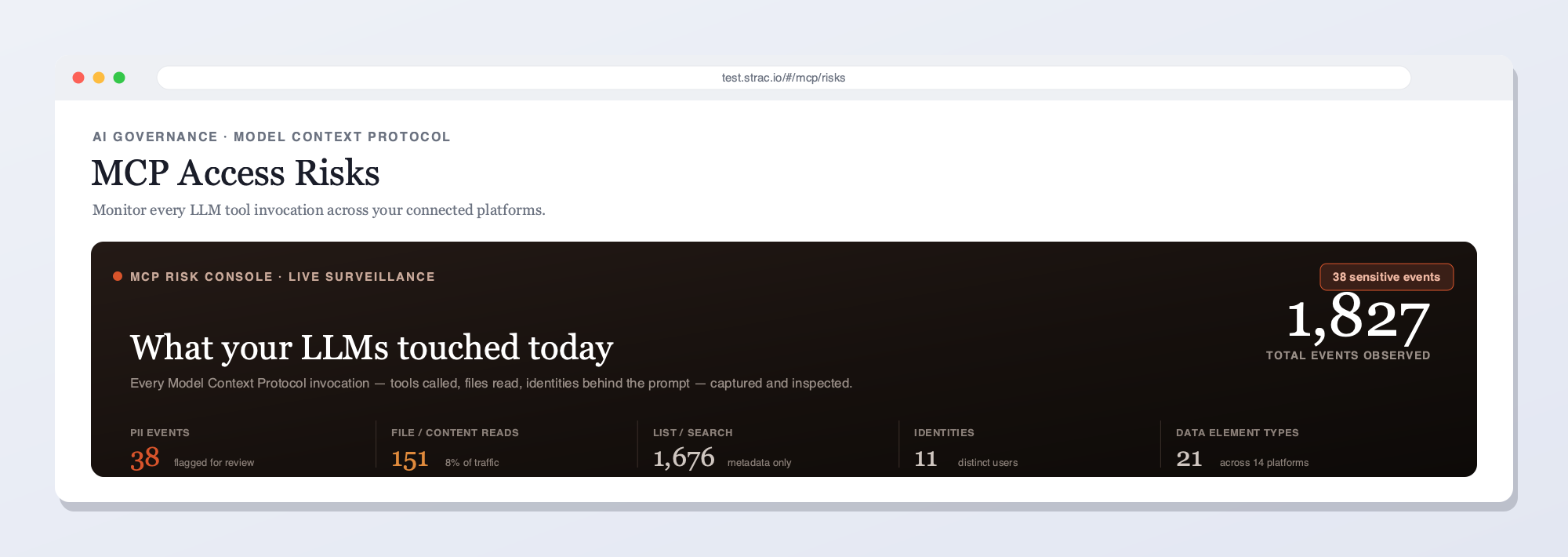
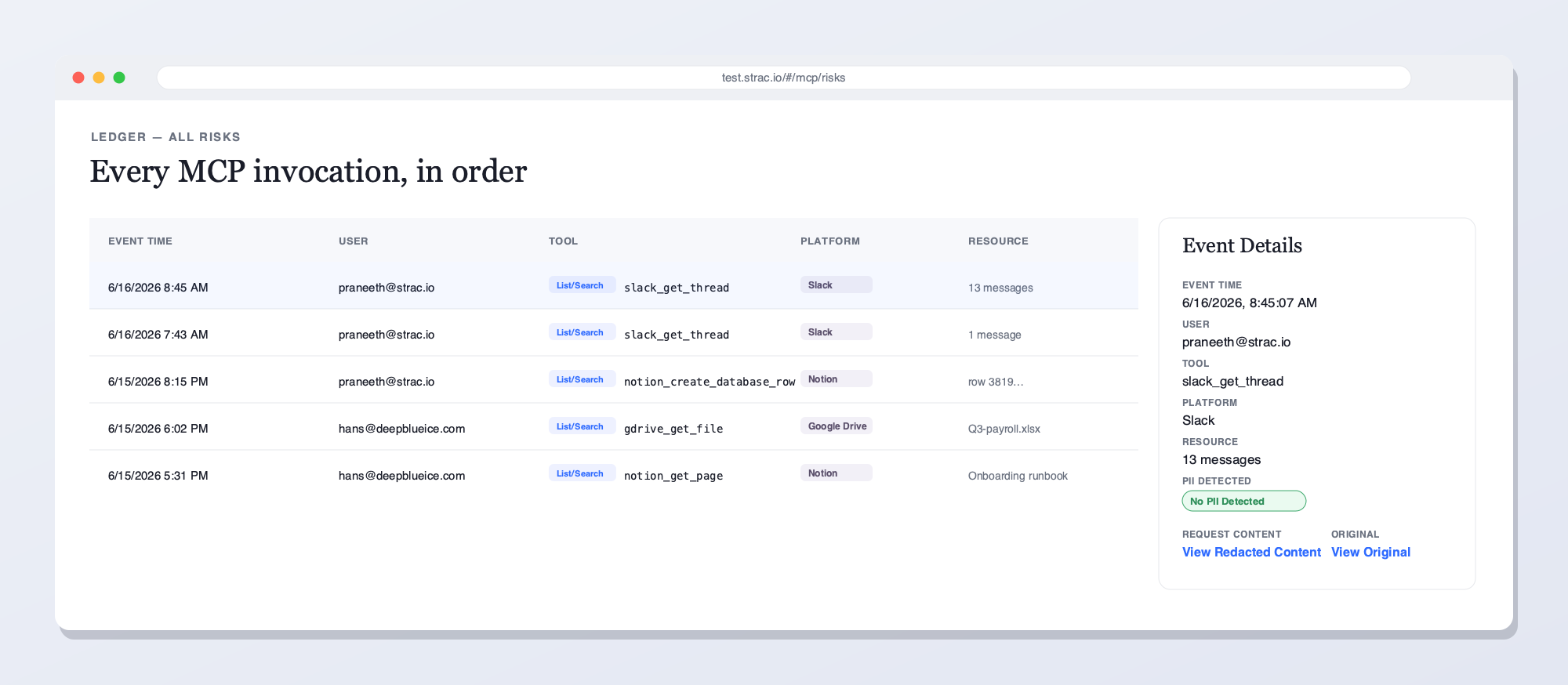
Strac's live MCP Access console — every AI agent tool call touching Dropbox and your other connected platforms, captured and inspected for sensitive data in real time. See what your LLMs reached for, who prompted, and what was flagged.Every MCP invocation in order — user, tool, platform, and the sensitive data found — with redacted vs. original content and a full audit trail. This is what Strac shows on Dropbox that access-only gateways can't: the data in each call, not just the call.
Access control alone is not enough
Knowing an agent ran a Dropbox tool does not stop the sensitive documents in a synced folder from reaching the model. Strac governs the access and the data: it remediates sensitive content in every response — redact, mask, block, delete, or revoke access — and enforces allow/block per agent, and proves it with a per-call audit log that access-only gateways cannot produce.
What Strac does on every Dropbox tool call
One inline pass over each MCP response — five actions, enforced by your policy:
Detect — finds sensitive docs in a folder and any PII, PHI, PCI, secrets, or source code in the payload, including text inside images via OCR.
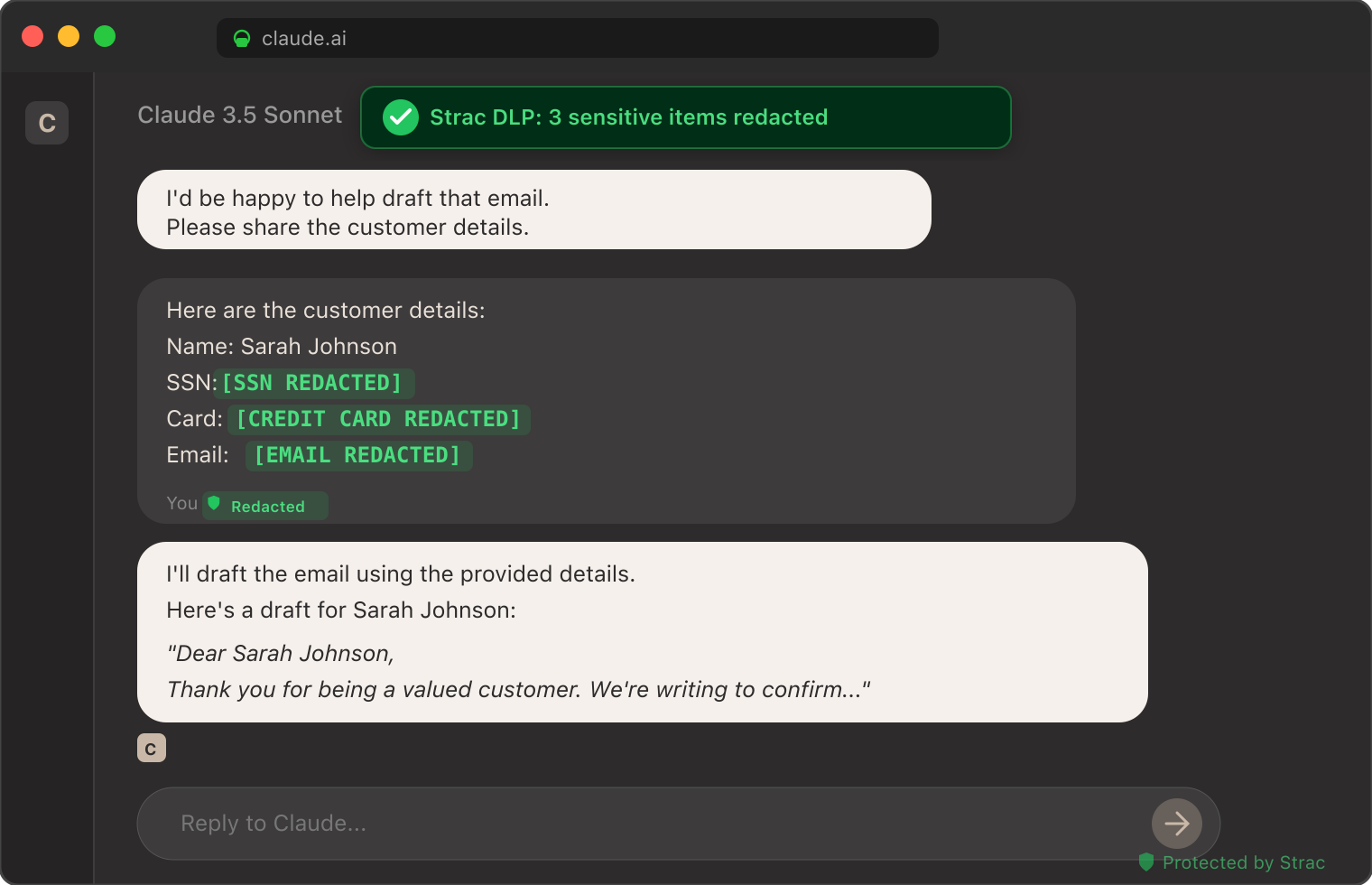
Redact or mask — replaces the sensitive elements inline, so the agent still gets its answer and the model never sees the raw data.
Block or require approval — stops a high-risk action like a shared link or external grant, or routes it for sign-off before it runs.
Alert — notifies your team and streams the event to your SIEM (Splunk, Microsoft Sentinel, Datadog) in real time.
Audit — logs who, which agent, which tool, what data, and the action taken — evidence mapped to SOC 2, HIPAA, PCI DSS, and GDPR.
Inspect every tool call payload using Strac's catalog of sensitive data elements — PII, PHI, PCI, credentials, source code, and any custom data class you define.
Redact sensitive fields inline, or tombstone entire responses based on policy. Investor docs containing financial PII are masked. Paper docs with pasted credentials are quarantined. Image-based PDFs are OCR-inspected before reaching the model.
Vault redacted content in Strac's encrypted store, with re-identification gated by RBAC.
Audit every call with full provenance: agent identity, tool name, timestamp, returned-data classification, and remediation action. The same audit feed powers compliance evidence for SOC 2, HIPAA, PCI, ISO 27001, GDPR, and the EU AI Act.
Setup is agentless and under 10 minutes per Dropbox workspace.
✨ The Strac MCP DLP Constellation
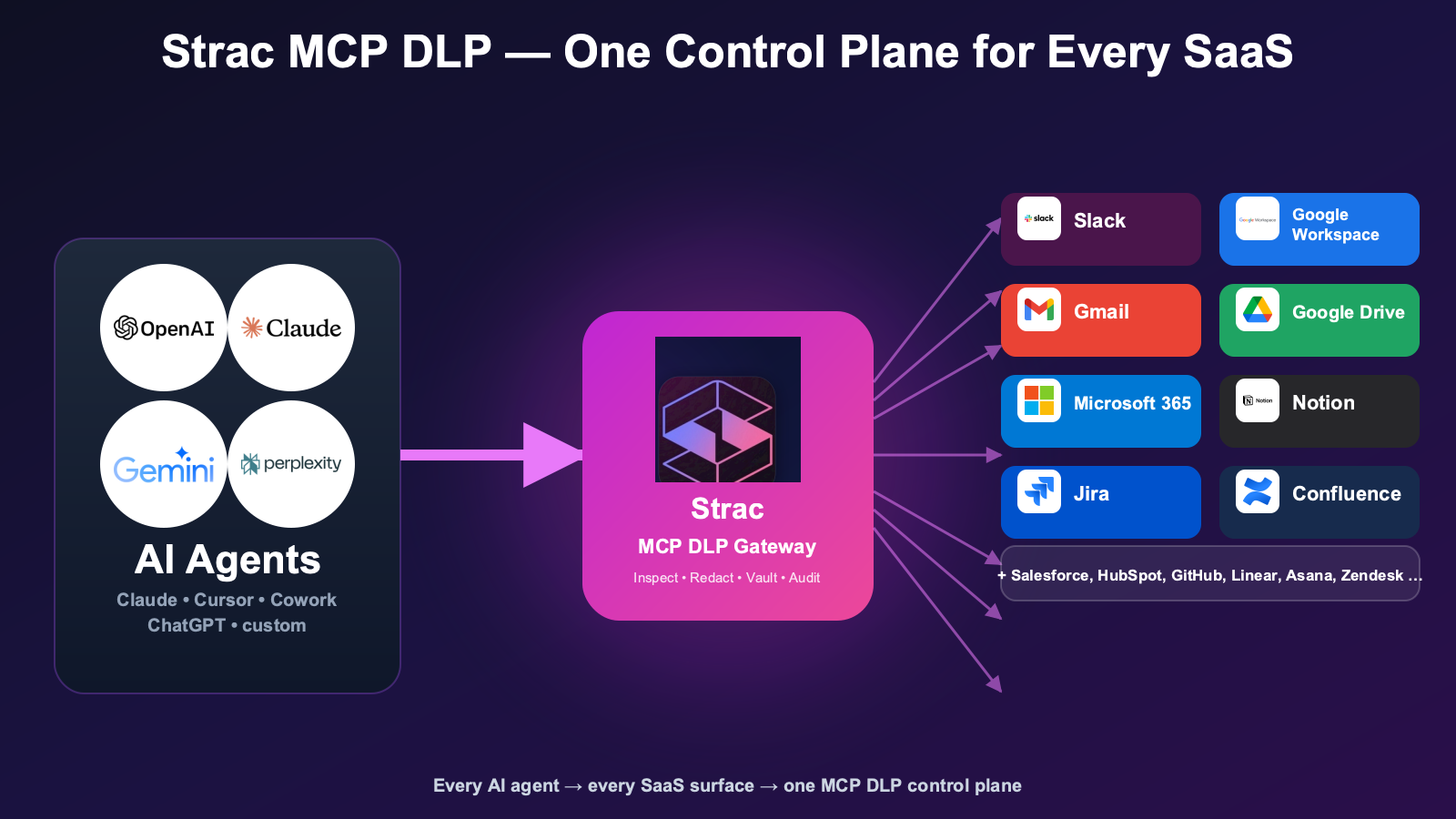
Dropbox joins Strac's MCP DLP coverage across every major SaaS surface AI agents touch:
Two things separate a usable Dropbox setup from a risky one. You control the enforcement — mask or redact PII in files, or match your own regex — through Strac's fully managed classifier versus a self-hosted Presidio/Bedrock stack. And the protection extends to the custom tools your team ships on Dropbox data, the ones internal users and customers touch, not only the stock connector.
🌶️ Spicy FAQs for Dropbox MCP Server
Can I use the Dropbox MCP server with Claude Desktop or Claude Code?
Yes. The Dropbox MCP server is set up as a custom connector in Claude Desktop, Claude Code, or Claude for Cowork — the same pattern as other MCP integrations. You register a Dropbox OAuth app, paste the client ID/secret into the Claude connector config, and Claude can call search_files, get_file, list_paper, and related tools. For HIPAA-regulated content, route the connector through Strac Dropbox MCP DLP so PHI is redacted before reaching the model context.
Is the Dropbox MCP connector the same as the Dropbox MCP server?
Same thing under two labels. Engineers see "Dropbox MCP server" in the spec; end users add the Dropbox connector in Claude. Both reach the same files, Paper docs, and shared links, and Strac's Dropbox MCP connector redacts sensitive content before it enters the agent's context.
Dropbox MCP vs Dropbox Dash — what's the difference?
Dropbox MCP is the path for external AI agents — Claude, Cursor, ChatGPT, custom agents — to reach into Dropbox over the Model Context Protocol, calling tools like search_files, get_file, and list_paper on the user's behalf. Dropbox Dash is Dropbox's own native, in-product AI search — it runs inside Dropbox's experience to find and answer across your connected content. They solve different problems: Dash is search within Dropbox; MCP is access from outside it. The key governance moment is the tool-call hand-off, where Dropbox content is handed back to the external client — and that's exactly where Strac Dropbox MCP DLP sits, controlling what each agent can reach, protecting the returned data via redaction, masking, and vaulting, and auditing every call.
How does Strac block personal Dropbox accounts while allowing corporate Dropbox?
The Strac browser extension (and the endpoint agent for the Dropbox desktop client) detects the active Dropbox account identity via SSO domain match, OAuth claim, or account email pattern. Corporate-account sessions (employee@corp.com via SSO) pass. Personal-account sessions (employee@gmail.com) are blocked or warned, per policy, with the event audit-logged for compliance review.
Does Strac inspect Dropbox Paper docs?
Yes. Strac inspects Paper documents (text, embedded tables, comments, attachments) for PII, PHI, PCI, credentials, and any custom data class. Paper is a heavy paste-from-clipboard surface for engineers and ops teams; pasted API keys and customer identifiers are common findings.
How is Dropbox MCP DLP different from Dropbox Capture / native DLP?
Dropbox's native controls cover the corporate tenant: retention, audit, eDiscovery, classification labels on Business plans. Dropbox-native controls do not sit at the MCP path — when an AI agent calls get_file, the response goes straight to the agent without inspection. Strac Dropbox MCP DLP fills that gap: every tool-call response is inspected, classified, and redacted before reaching the model. The two layer cleanly together.
Can I use the Dropbox MCP server with Cursor, ChatGPT, or Perplexity?
Yes. The MCP protocol is vendor-independent. Strac's Dropbox MCP DLP sits between any MCP-aware client (Claude, Cursor, ChatGPT, Perplexity, custom agents) and the Dropbox API.
How fast is the deployment?
Under 10 minutes per Dropbox workspace. Agentless: no application code changes, no Dropbox re-permissioning, no agent SDK rewrites.
Does Strac log every Dropbox MCP tool call?
Yes. Every tool call generates an audit event with full provenance. Audit logs export to SIEM and GRC platforms; pre-built mappings cover SOC 2 CC6, HIPAA Security Rule, PCI Req. 3/4/7/10, GDPR Art. 5/25/30/32, EU AI Act Article 12, and ISO 42001 Annex A.8.
Is the Dropbox MCP server safe for healthcare use?
The Dropbox MCP server itself is just a transport layer. Safety for healthcare depends on three things: (1) the corporate Dropbox tenant has a BAA in place (Dropbox HIPAA support is available on certain Business and Education plans); (2) the AI client has its own BAA (ChatGPT Enterprise, M365 Copilot, Gemini Workspace yes; Claude Cowork no); (3) sensitive data is redacted at the MCP tool-call boundary before reaching the model. Strac handles (3). See MCP security for the full risk landscape.
What about shared-link exposure?
The Dropbox MCP create_shared_link tool is a clear exfiltration path if abused. Strac monitors create_shared_link calls and can block link creation when the source file contains regulated data — the agent can summarize but not externally-publish.
What's the difference between Strac Dropbox MCP DLP and Strac SaaS DLP for Dropbox?
Strac SaaS DLP enforces user-facing policy at the Dropbox-tenant level — classification labels, real-time scanning of new content, automated remediation of risky shares. Strac Dropbox MCP DLP enforces agent-facing policy at the MCP tool-call layer — inspects and redacts what AI agents retrieve from Dropbox. Most enterprises deploy both for full coverage. See Dropbox DLP for the broader picture.
Identity comes first: Strac makes Dropbox apply its shared-folder permissions to the requesting user, then redacts any files and PII that legitimately flows through, and scans returning tool results so a poisoned Dropbox response can't hijack the agent. Strac protects the files and PII on the way through and proves per-user access in the audit log — identity to prevent retrieval, DLP to protect what's allowed.
The Bottom Line
Dropbox carries both personal-vs-corporate account risk and MCP-layer agent risk. Strac is the only platform shipping both controls in one plane: browser-side account policy enforcement plus MCP tool-call redaction.
Can I use the Dropbox MCP server with Claude Desktop or Claude Code?
Yes. The Dropbox MCP server is set up as a custom connector in Claude Desktop, Claude Code, or Claude for Cowork — the same pattern as other MCP integrations. You register a Dropbox OAuth app, paste the client ID/secret into the Claude connector config, and Claude can call search_files, get_file, list_paper, and related tools. For HIPAA-regulated content, route the connector through Strac Dropbox MCP DLP so PHI is redacted before reaching the model context.
Is the Dropbox MCP connector the same as the Dropbox MCP server?
Same thing under two labels. Engineers see "Dropbox MCP server" in the spec; end users add the Dropbox connector in Claude. Both reach the same files, Paper docs, and shared links, and Strac's Dropbox MCP connector redacts sensitive content before it enters the agent's context.
Dropbox MCP vs Dropbox Dash — what's the difference?
Dropbox MCP is the path for external AI agents — Claude, Cursor, ChatGPT, custom agents — to reach into Dropbox over the Model Context Protocol, calling tools like search_files, get_file, and list_paper on the user's behalf. Dropbox Dash is Dropbox's own native, in-product AI search — it runs inside Dropbox's experience to find and answer across your connected content. They solve different problems: Dash is search within Dropbox; MCP is access from outside it. The key governance moment is the tool-call hand-off, where Dropbox content is handed back to the external client — and that's exactly where Strac Dropbox MCP DLP sits, controlling what each agent can reach, protecting the returned data via redaction, masking, and vaulting, and auditing every call.
How does Strac block personal Dropbox accounts while allowing corporate Dropbox?
The Strac browser extension (and the endpoint agent for the Dropbox desktop client) detects the active Dropbox account identity via SSO domain match, OAuth claim, or account email pattern. Corporate-account sessions (employee@corp.com via SSO) pass. Personal-account sessions (employee@gmail.com) are blocked or warned, per policy, with the event audit-logged for compliance review.
Does Strac inspect Dropbox Paper docs?
Yes. Strac inspects Paper documents (text, embedded tables, comments, attachments) for PII, PHI, PCI, credentials, and any custom data class. Paper is a heavy paste-from-clipboard surface for engineers and ops teams; pasted API keys and customer identifiers are common findings.
Discover & Protect Data on SaaS, AI, MCP, Endpoints & Cloud
Strac provides end-to-end data loss prevention for all SaaS and Cloud apps. Integrate in under 10 minutes and experience the benefits of live DLP scanning, live redaction, and a fortified SaaS environment.


.webp)








.avif)




.gif)
