Discover the capabilities and limitations of Dropbox DLP. Learn how integrating a robust DLP solution can enhance data protection, ensure compliance, and improve overall security features.
Dropbox enables file storage, synchronization, and sharing across devices and users to provide secure access to files from anywhere.
The limitations of Dropbox’s native DLP capabilities focus primarily on basic access controls and lack comprehensive content inspection.
Integrating advanced DLP technologies can fill the security gaps to enforce strict access protocols and real-time monitoring.
DLP tools automate audit trail and report generation to enable compliance with laws such as GDPR and CCPA.
Strac DLP significantly improves Dropbox security through its granular control over data sharing, sensitive data detection, and early detection of threats.
Dropbox is widely used by businesses for cloud storage and file sharing. Yet, its rapid adoption comes with significant security challenges. In 2022, a breach at Dropbox exposed sensitive customer data, including names and emails, underscoring the vulnerabilities that even leading file-sharing services face..
This guide will detail Dropbox DLP’s built-in security features and highlight their shortcomings in today's security climate. We’ll also provide practical tips on enhancing your data protection strategies to ensure your information remains secure, compliant, and well-managed.
The Role Of DLP Measures In Dropbox
Dropbox’s native capabilities to manage sensitive data, such as personally identifiable information (PII), credentials, and secrets, are limited. On their own, these measures are insufficient to fully protect against unauthorized data access or breaches.
Current data protection solutions rely on rigid frameworks like regular expressions and simple rule sets. These are not flexible, accurate, or developer-friendly. Integrating modern DLP measures in cloud environments can significantly enhance Dropbox's security posture. It delivers robust, scalable, and precise data protection strategies tailored to modern data security requirements.
Enhancing Corporate Security with Dropbox DLP
Dropbox's user-friendly interface and wide accessibility make it a popular choice for businesses, but these features also bring significant security risks. A Dropbox DLP solution addresses these concerns by providing several critical benefits:
Secure Data Sharing Controls
While Dropbox makes file sharing effortless, this convenience can expose sensitive information to unauthorized parties. DLP solutions implement stringent sharing controls that restrict access to sensitive data so only authorized personnel can view or share files. This controlled sharing mechanism reduces the risk of data breaches significantly.
Regulatory Compliance Assurance
With stringent regulations like GDPR and CCPA in effect, ensuring compliance is an essential requirement for businesses. DLP solutions ensure that Dropbox data handling meets these regulatory standards to protect companies from potential compliance violations and associated penalties.
Mitigation Of Accidental Data Leaks
Simple errors, such as a misplaced click or incorrect configuration, can also lead to data exposure. DLP systems act as a safeguard, automatically detecting and correcting misconfigurations and preventing accidental exposure of sensitive information.
Insider Threat Protection
Not all security threats come from outside the organization. DLP technologies monitor internal data handling practices to identify and address risks from insiders, preventing potential data loss.
Streamlined Data Classification
Managing the sheer volume of data within a Dropbox account is challenging. DLP systems excel in automatically classifying vast datasets, distinguishing sensitive from non-sensitive information. This classification helps prioritize security efforts where they are most needed to track the location of sensitive data within the system.
✨How to implement DLP for Dropbox
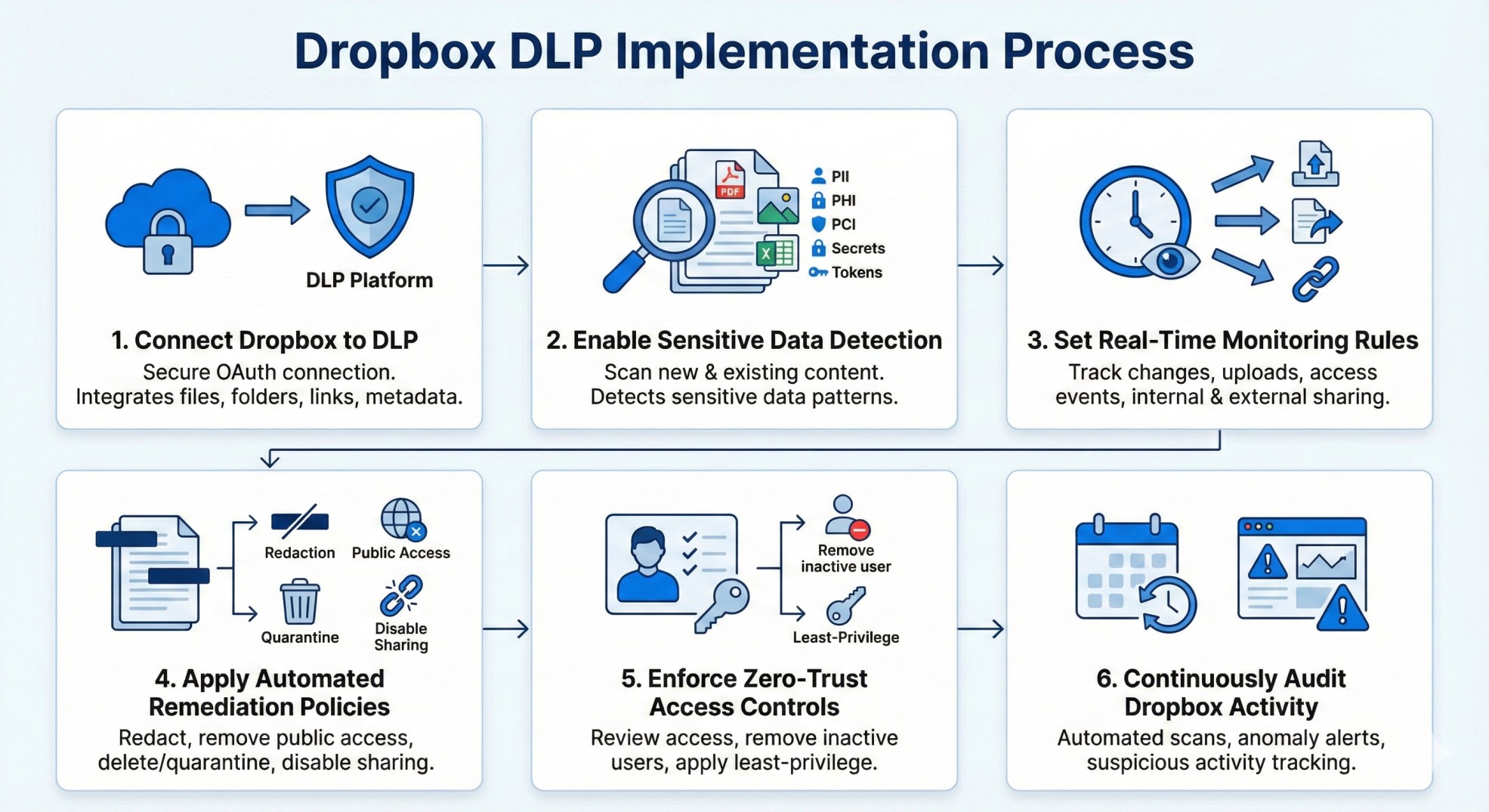
Implementing DLP for Dropbox requires a structured approach that ensures sensitive data remains protected without slowing down collaboration. Dropbox stores a large volume of files, work artifacts, and shared content; therefore, an effective Dropbox DLP strategy must deliver visibility, control, and automated remediation. With the right setup, organizations can prevent data leakage across public links, shared folders, connected apps, and team workspaces while maintaining seamless workflows.
Here’s the step-by-step process to implement Dropbox DLP effectively:
Connect Dropbox to Your DLP Platform
Use a secure OAuth connection to integrate Dropbox Business or Dropbox Enterprise.
Ensure the integration covers files, folders, shared links, and metadata.
Enable Sensitive Data Detection Across All Files
Scan both newly uploaded and existing content.
Include PDFs, images, spreadsheets, exports, and nested folders.
Track file changes, new uploads, access events, and link-sharing activity.
Monitor both external and internal sharing.
Apply Automated Remediation Policies
Redact sensitive data inside documents.
Remove public access from files containing sensitive data.
Delete or quarantine high-risk files.
Disable unauthorized sharing automatically.
Enforce Zero-Trust Access Controls
Review who has access to sensitive folders.
Remove inactive users and outdated collaborator permissions.
Apply least-privilege guidelines to Dropbox teams.
Continuously Audit Dropbox Activity
Run automated weekly or daily scans.
Receive alerts for anomalies, risky behavior, and suspicious file activity.
When implemented properly, Dropbox DLP eliminates blind spots and enforces consistent data security across the entire workspace, allowing organizations to confidently collaborate without risking exposure.
Key benefits of using DLP with Dropbox
Using DLP with Dropbox is essential because the platform is heavily used for file sharing, documentation, customer data, and operational workflows. Without DLP, organizations risk accidental exposure, public link oversharing, unauthorized external access, and compliance violations. Dropbox DLP strengthens security posture by offering real-time visibility and proactive control across every file and user action.
The biggest benefits of enabling DLP for Dropbox include:
Full Visibility Into Sensitive Data
Automatically discover sensitive content stored anywhere in Dropbox.
See what data exists, where it lives, and how it’s shared.
Understand exposure levels instantly.
Automated Risk Remediation
Remove public links from files containing PII, PHI, PCI, or secrets.
Redact sensitive information directly in documents.
Block uploads of prohibited content.
Quarantine risky files before they spread.
Protection Against Accidental Data Leakage
Prevent employees from unintentionally sharing sensitive files externally.
Identify risky folders or user behavior before it becomes an incident.
Compliance Made Easy
Enforce data controls required for GDPR, HIPAA, PCI DSS, and SOC 2.
Provide auditable reports for security assessments and certifications.
Apply standardized policies across all content.
Secure Collaboration at Scale
Allow teams to work freely without exposing confidential data.
Reduce manual checks, file reviews, and compliance overhead.
Unified Data Security Across the SaaS Stack
Integrate Dropbox DLP into your broader DSPM and DLP strategy.
Apply consistent policies across Google Drive, Slack, Salesforce, email, and more.
Dropbox becomes significantly safer when backed by strong DLP capabilities, enabling teams to innovate and collaborate without sacrificing data protection or compliance readiness.
Understanding The Limitations of Dropbox’s Offerings
Dropbox offers very basic Data Loss Prevention (DLP) capabilities through its Business API. Hence, businesses should be aware of its limitations.
Basic native DLP features: Dropbox DLP’s in-built features are relatively limited. They focus mainly on managing sharing permissions and access controls. For enterprise-level needs such as content inspection, data classification, and automated remediation actions, businesses must seek out advanced DLP services from third-party vendors. This requirement can introduce additional complexities and costs.
Dependency on third-party integrations: Achieving a robust DLP setup using Dropbox business often necessitates integrating third-party solutions. In addition to providing advanced functionality, these can also present challenges related to system compatibility, management overhead, and multiple security platforms.
Limited data usage insights: Although Dropbox offers activity logs and audit trails, it lacks the granular visibility of dedicated DLP platforms. This can hinder an organization's ability to perform detailed risk assessments and monitor sensitive data effectively across its environment.
Challenges in policy management across platforms: Organizations that utilize multiple cloud services in addition to Dropbox face the additional challenge of implementing unified DLP policies. Without a centralized DLP management platform, maintaining consistency and control over data security policies across various services can be problematic.
Compliance Risks: Depending on specific industry regulations and compliance requirements, the DLP solutions facilitated by Dropbox and its third-party integrations might not be sufficient. Data residency, encryption standards, and data sovereignty may require additional measures beyond what is readily available through Dropbox.
Managing Data Security in Dropbox Without Comprehensive DLP
Navigating data security challenges in Dropbox without a full DLP system requires a strategic approach. Here are key measures to enhance your data protection:
Enhance User Access Controls: Tighten user access by implementing strict policies that define who can access specific data types and under which conditions. Effectively using Dropbox’s permission settings can significantly reduce unauthorized data access and leaks.
Utilize Encryption for Sensitive Data: Encrypt files before uploading them to Dropbox. Encryption secures your data, making it indecipherable without the correct decryption key, thus protecting it from unauthorized access.
Employ Third-Party Security Tools: Integrate specialized third-party security solutions that provide advanced DLP features such as content inspection, data classification, and automated remediation—functions that are often beyond Dropbox’s native capabilities.
Regular Audits and Monitoring: Conduct frequent audits of your Dropbox usage to review data access patterns and manage your data usage. Set up alerts to detect unusual activities early, helping prevent potential security breaches.
Implement Endpoint Security Measures: Secure the devices that access Dropbox by employing endpoint security solutions. These can monitor data movements and block improper transfers of sensitive information, preventing data leakage.
Develop a Comprehensive Data Management Policy: Create and enforce a detailed data management policy that includes best practices for data handling, storage, and sharing within Dropbox. Ensure this policy is clearly communicated to all employees to heighten awareness and adherence to data security protocols.
Data Backup and Recovery Plan: Establish a robust backup and recovery strategy to mitigate data loss risks. Regular backups ensure that you can restore data integrity and availability in the event of a breach or accidental loss.
✨Implementing Strac DLP In The Dropbox Environment
Strac Dropbox DLP is a comprehensive Data Loss Prevention (DLP) solution tailored for businesses looking to enhance their Dropbox security. Designed to integrate seamlessly with Dropbox, Strac transforms how organizations protect, manage, and oversee their critical data. Here's how it transforms Dropbox security:
Granular Control: Strac’s Dropbox DLP capabilities allow for precise management of data-sharing permissions. Organizations can clearly define who is allowed to share specific data and with whom, ensuring sensitive information remains within trusted circles and significantly reducing the risk of unauthorized access.
Intelligent Detection: Strac’s advanced algorithms help you scan and identify sensitive data across Dropbox’s extensive database. This system can discover numerous types of sensitive information, including everything from credit card details and social security numbers to proprietary business documents.
Automated Redaction: The platform automatically redacts sensitive text within documents of various formats, including PDFs, JPEGs, PNGs, Word documents, and Excel spreadsheets. This feature helps prevent sensitive data exposure unintentionally through file sharing.
Book a demo to protect sensitive information and prevent data breaches.
Proactive, Automated Responses: Beyond merely alerting administrators about potential threats or misconfigurations, Strac DLP actively intervenes by restricting access to compromised data and taking other necessary actions to mitigate risks promptly.
Seamless integration: Strac DLP is designed to integrate smoothly with Dropbox, ensuring that security enhancements do not disrupt the user experience. This seamless integration facilitates the adoption of advanced security measures without the friction typically associated with deploying new technologies.
Continuous compliance: As regulatory requirements evolve, Strac DLP continuously updates its features to ensure that your organization's Dropbox usage complies with current data protection laws, regardless of the geographical or sector-specific regulations that may apply.
Dropbox is one of the most widely used platforms for storing, sharing, and collaborating on corporate files; however, without strong DLP controls, it becomes a high-risk vector for accidental exposure. Implementing Dropbox DLP delivers visibility, governance, and automated remediation across every file, folder, user, and public link. When paired with Strac’s advanced detection, real-time redaction, and agentless remediation, organizations get airtight protection without slowing down collaboration. The result is simple; Dropbox stays fast, secure, and compliant; at scale.
The 2026 vector: AI agents. Traditional Dropbox DLP watches files leaving via sharing and sync. AI agents add the reverse — pulling files in through the Model Context Protocol. See the Dropbox MCP server guide for that path.
How does Dropbox Data Loss Prevention (DLP) improve data security?
Dropbox DLP improves data security by identifying and controlling sensitive information stored or shared inside the platform. It helps detect PII, PHI, PCI, secrets, and confidential business data across files and folders. It also prevents unauthorized exposure by enforcing policies such as blocking public links, monitoring external sharing, and alerting security teams about risky activity. By adding automated remediation and continuous monitoring, Dropbox DLP significantly reduces the risk of breaches, misconfigurations, and accidental leaks.
What are the benefits of using Dropbox DLP for corporate data protection?
Using Dropbox DLP provides several advantages for organizations working with sensitive or regulated information. It gives full visibility into what data lives in Dropbox and how it’s being shared. It reduces human errors through automated controls like link-removal, file quarantine, and access review. Dropbox DLP also strengthens compliance with GDPR, HIPAA, PCI DSS, and SOC 2 while enabling safer collaboration across teams. With these protections in place, companies can confidently store customer data, operational files, and internal documentation without risking exposure.
How do I implement DLP in Dropbox to safeguard sensitive data?
Implementing Dropbox DLP starts with connecting Dropbox to a DLP platform that can scan, classify, and monitor all files and sharing activity. Next, configure detection rules for sensitive data types like PII, PHI, or financial information. After detection, define remediation actions such as removing public access, redacting sensitive content, or blocking risky uploads. Finally, enable continuous monitoring to catch exposure in real time and generate audit-ready reporting. This structured approach ensures Dropbox remains a secure environment for day-to-day work.
What are the limitations of Dropbox’s built-in DLP features?
Dropbox’s native DLP capabilities are limited in scope and depth compared to dedicated DLP platforms. The built-in features do not provide advanced detection for complex data types or OCR-based scanning of images and PDFs. Real-time remediation; such as redaction, automated link removal, or file deletion; is not fully available. Dropbox also lacks granular policy enforcement and broader compliance templates for PCI, HIPAA, and regulated data workflows. As a result, many organizations require additional tooling to achieve enterprise-grade protection.
How can Strac enhance Dropbox’s DLP capabilities for better data protection?
Strac enhances Dropbox DLP by providing real-time, automated, and agentless protection across all files, folders, and sharing actions. It continuously scans Dropbox using ML- and OCR-powered detection to identify PII, PCI, PHI, secrets, tokens, and sensitive business data. Strac also performs instant remediation; redacting sensitive information inside documents, removing public links, deleting high-risk files, and blocking external sharing. With unified DSPM + DLP, Strac delivers complete visibility, posture management, and compliance readiness across Dropbox and the entire SaaS stack.
Discover & Protect Data on SaaS, AI, MCP, Endpoints & Cloud
Strac provides end-to-end data loss prevention for all SaaS and Cloud apps. Integrate in under 10 minutes and experience the benefits of live DLP scanning, live redaction, and a fortified SaaS environment.


.webp)
.webp)








.avif)



.gif)
