Zoom MCP Server: Secure Setup for Claude & AI Agents (2026)
The Zoom MCP server lets Claude, Cursor, ChatGPT, and AI agents read meetings, recordings, transcripts, and chat. Setup, the real security risks, the personal-vs-corporate account problem, and how to deploy with DLP-grade redaction at the MCP layer.
The Zoom MCP server is the path for AI agents (Claude, Cursor, ChatGPT, Perplexity, custom agents) to read and act inside Zoom via the Model Context Protocol — meetings, recordings, transcripts, chat, webinars, and contact center conversations.
The biggest enterprise security risk is not the AI use case. It's the personal Zoom account problem: employees signing into Zoom with personal accounts on work laptops, joining meetings, sharing content, and downloading recordings — outside corporate visibility, audit, and BAA. Strac blocks personal Zoom while allowing corporate (SSO) Zoom in the same browser session.
The MCP-layer risk is real too: a Claude or Cursor user with a Zoom MCP connector can ask "summarize last week's customer calls" and have full transcripts with PII, PHI, and PCI flowing through the model context window — outside any traditional DLP.
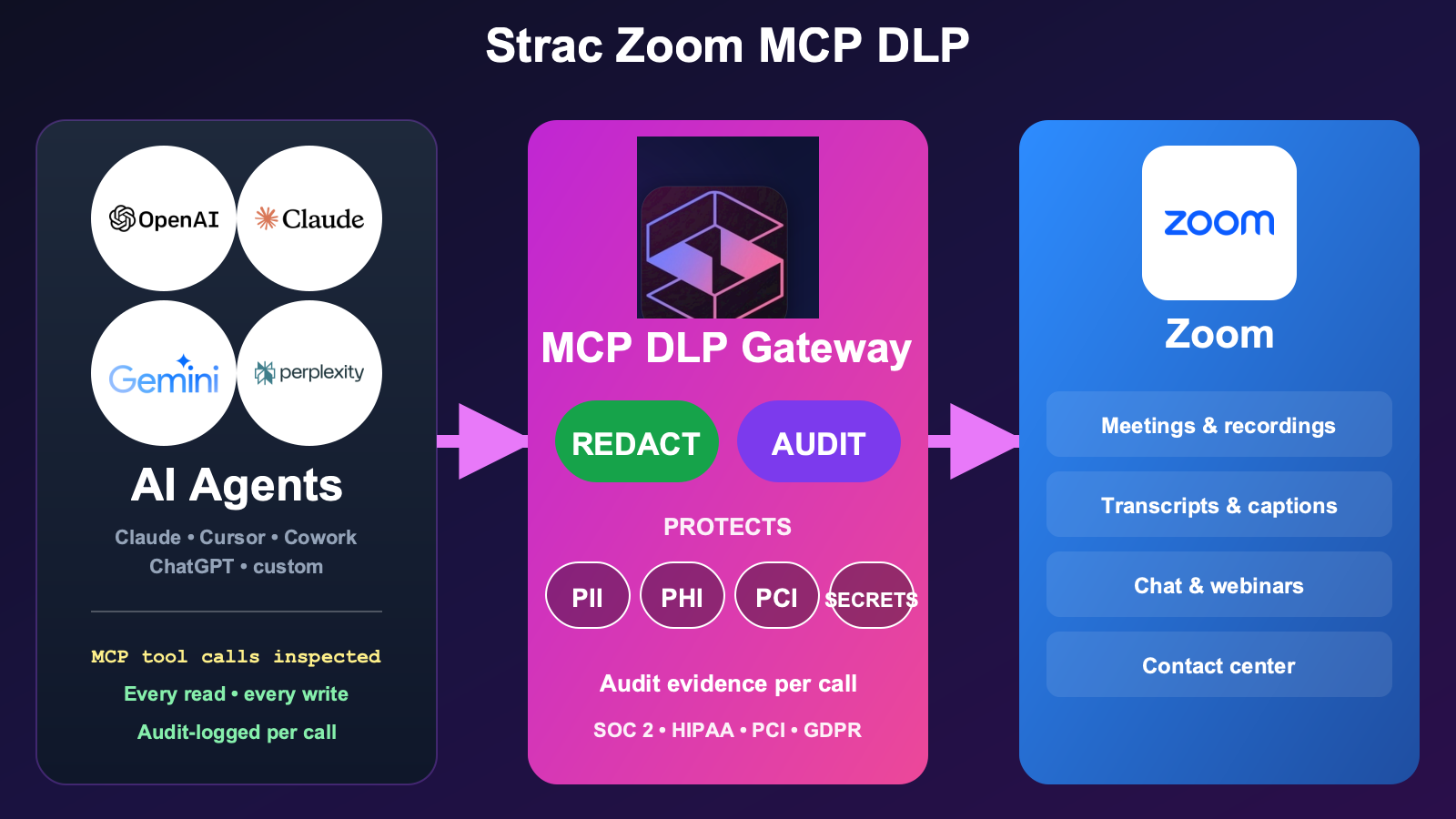
Strac Zoom MCP DLP is the governance layer for AI-agent access to Zoom. It intercepts every tool call between the AI agent and Zoom and governs it on three axes: it controls access and actions per agent (including corporate-vs-personal account enforcement, allow/block, and approval on high-risk actions), it protects PII/PHI/PCI in transcripts and recordings by redacting, masking, or vaulting it before it reaches the model, and it logs every call as audit evidence. One control plane, full surface coverage, audit evidence per call mapped to SOC 2 / HIPAA / PCI / GDPR / EU AI Act / ISO 42001.
Setup is agentless and under 10 minutes per workspace. No application code changes, no agent SDK changes, no Zoom re-permissioning.
✨ What Is the Zoom MCP Server?
The Zoom MCP server is a Model Context Protocol implementation that exposes Zoom's API as a standardized set of tools to AI agents. Once connected, an agent like Claude can perform list_meetings, get_recording, get_transcript, chat_history, and webinar lookups on the authenticated user's behalf — turning Zoom's API surface into AI-actionable capabilities.
The setup pattern is consistent with other MCP integrations: an OAuth client ID/secret registered with Zoom, a custom connector in Claude (or another MCP-aware AI client), and the server starts serving tool calls. Refer to Zoom's official developer docs for the current tool list, OAuth scopes, and rate-limit behavior.
From the user's perspective, the AI agent suddenly knows their Zoom history — what was said in which meeting, who attended, what the recording shows. From the security perspective, the AI agent now has read access to every transcript, recording, and chat the user can touch.
That's the value. It's also where security teams need a control layer.
Beyond redacting or blocking, Strac can also pseudonymize or de-identify the data on a Zoom MCP tool call — swapping PII, PHI, and PCI for realistic, format-preserving fakes — so a team can keep using the data in an AI model, analytics, or a test environment while the real records never leave your control. See Data Pseudonymization.
What AI Agents Can Actually Do With Zoom MCP
The reason this lands on roadmaps is the work it absorbs. Once an agent like Claude is wired to the Zoom MCP server, a meeting-heavy organization gets a research assistant that lives inside its call history. The concrete workflows are what sell it:
Pull meeting recordings and transcripts. Ask the agent for the recording and verbatim transcript of any past meeting — no scrubbing through the Zoom web portal.
Summarize a meeting. "Summarize yesterday's QBR with Acme" returns a tight readout in seconds, without anyone manually rewatching the recording.
Extract action items and decisions. The agent reads the transcript and pulls out who committed to what, the decisions reached, and the open questions — straight into your notes or ticketing tool.
Search across past meetings. "Find every call where we discussed the renewal pricing" works across the meeting library, not just one recording at a time.
Surface recording metadata and participants. Who attended, when the meeting ran, how long it lasted, which recordings exist — pulled directly so the agent can reason over the right call.
That reach is exactly the point — and exactly why governance has to come with it. Every one of those workflows means an agent is reading regulated meeting data on a user's behalf. So each agent's access and actions have to be controlled, the meeting data itself has to be protected, and every call has to be audited.
The Real Security Risks of the Zoom MCP Server
The risks fall into five categories that every healthcare, fintech, and enterprise security team should price into the deployment.
1. Meeting transcripts return regulated data.get_transcript returns the verbatim transcript of recorded meetings. In a customer-facing org, that routinely includes customer PII (names, account numbers, addresses), payment data spoken aloud during support calls, PHI in clinical conversations, contract terms, and internal compensation discussions.
2. Recordings carry data invisible to text DLP. Recordings include video, audio, and screen-share content. A patient record visible on a shared screen, a financial dashboard, a code editor with API keys on screen — none of it is caught by traditional DLP. OCR-inside-video frames is a different inspection problem.
3. Chat history accumulates sensitive context.chat_history.get returns the in-meeting chat — frequently containing pasted credentials, customer identifiers, links to internal dashboards, and ad-hoc PII.
4. Webinar registrant data is a goldmine.list_webinar_registrants returns full attendee lists with email, phone, and custom registration fields. For enterprise webinars these are often sales-qualified leads with regulated identity attributes.
5. Contact center conversations are PII-dense by definition. For Zoom Contact Center customers, MCP access to call data means routine exposure to caller PII, payment data, and account information — all of which is in regulatory scope by default.
The traditional DLP a company already runs — at the network edge, on the file share, inside the SaaS-native rule engine — does not sit in the MCP path. The tool response goes straight from Zoom into the AI agent's context window. That gap is where Strac Zoom MCP DLP lives.
The Personal-vs-Corporate Zoom Account Problem (The Real Enterprise Ask)
This is the use case enterprise security teams actually call us about. The MCP path matters. The personal Zoom account problem is bigger.
The pattern. An employee on a work laptop opens zoom.us. Zoom auto-signs them in with whatever account is cached — often a personal Zoom account they used for a school meeting, a side project, or a family call. They join a customer call, screen-share corporate data, and end the meeting. The corporate Zoom tenant (SSO-enforced, with retention policies, with eDiscovery enabled, under the corporate BAA) sees nothing — the meeting was on the personal account.
Why this is worse than it sounds.
- No audit trail. The corporate Zoom admin has zero visibility into what happened in the personal-account meeting.
- No retention. Recordings, if any, sit in the personal Zoom cloud — outside corporate retention and litigation hold.
- No BAA. For healthcare orgs, the corporate Zoom BAA covers the corporate tenant only. PHI shared in a personal-account meeting is technically a HIPAA breach.
- No DLP. Corporate DLP rules (channel restrictions, recording policies, attendee allowlists) only apply to the corporate tenant.
What enterprise teams actually want:
- Allow Zoom on the corporate (SSO) account.
- Block Zoom when signed in with a personal account — same browser, same device.
- Audit the policy decisions so compliance can prove the control.
How Strac enforces this. The Strac browser extension and endpoint DLP detect the active Zoom account identity (SSO domain match, OAuth claim, or account email pattern). On a corporate account, traffic passes. On a personal account, the extension blocks the session — or warns and logs, depending on policy. Same approach works for the Zoom desktop client via the endpoint agent.
The policy is configurable per organization. A typical healthcare deployment looks like:
Corporate Zoom (employee@corp.com via SSO) → Allow. Standard MCP DLP redaction applies to recordings and transcripts.
Personal Zoom (employee@gmail.com) → Block. User sees an inline policy notice.
Vendor / customer external accounts → Warn + audit. User can proceed with one-click acknowledgement; the event is logged for compliance review.
This is the policy enforcement layer that closes the practical Zoom risk that BAA discussion and MCP DLP alone don't address. It's also why most enterprises end up needing both Strac's browser/endpoint DLP and Strac's MCP DLP for full Zoom coverage.
Zoom MCP for Claude (Claude Desktop, Claude Code, Claude Cowork)
The most common Zoom MCP deployment in 2026 is Claude as the AI client. The setup pattern:
Register a Zoom OAuth app with the required scopes (meeting:read, recording:read, webinar:read, chat:read, depending on use case).
Add the Zoom MCP server as a custom connector in Claude Desktop, Claude Code (CLI), or Claude for Cowork.
Claude can now call list_meetings, get_recording, get_transcript, chat_history, and related tools on the user's behalf.
The Claude Cowork BAA gap matters here. Anthropic does not currently offer a Business Associate Agreement (BAA) for Claude consumer or Claude Cowork plans. For healthcare orgs running Cowork against Zoom transcripts containing PHI, that means HIPAA exposure the moment a transcript crosses into the model context. Strac Zoom MCP DLP redacts PHI at the tool-call boundary so the model never sees the regulated data in the first place — closing the gap without depending on Anthropic to ship a BAA. See Is Claude HIPAA compliant? for the full vendor breakdown, and MCP security for the broader architecture.
For Claude Code / Cursor / ChatGPT deployments, the same Strac control plane applies — the redaction happens at the MCP layer, not at the model layer, so it's vendor-independent.
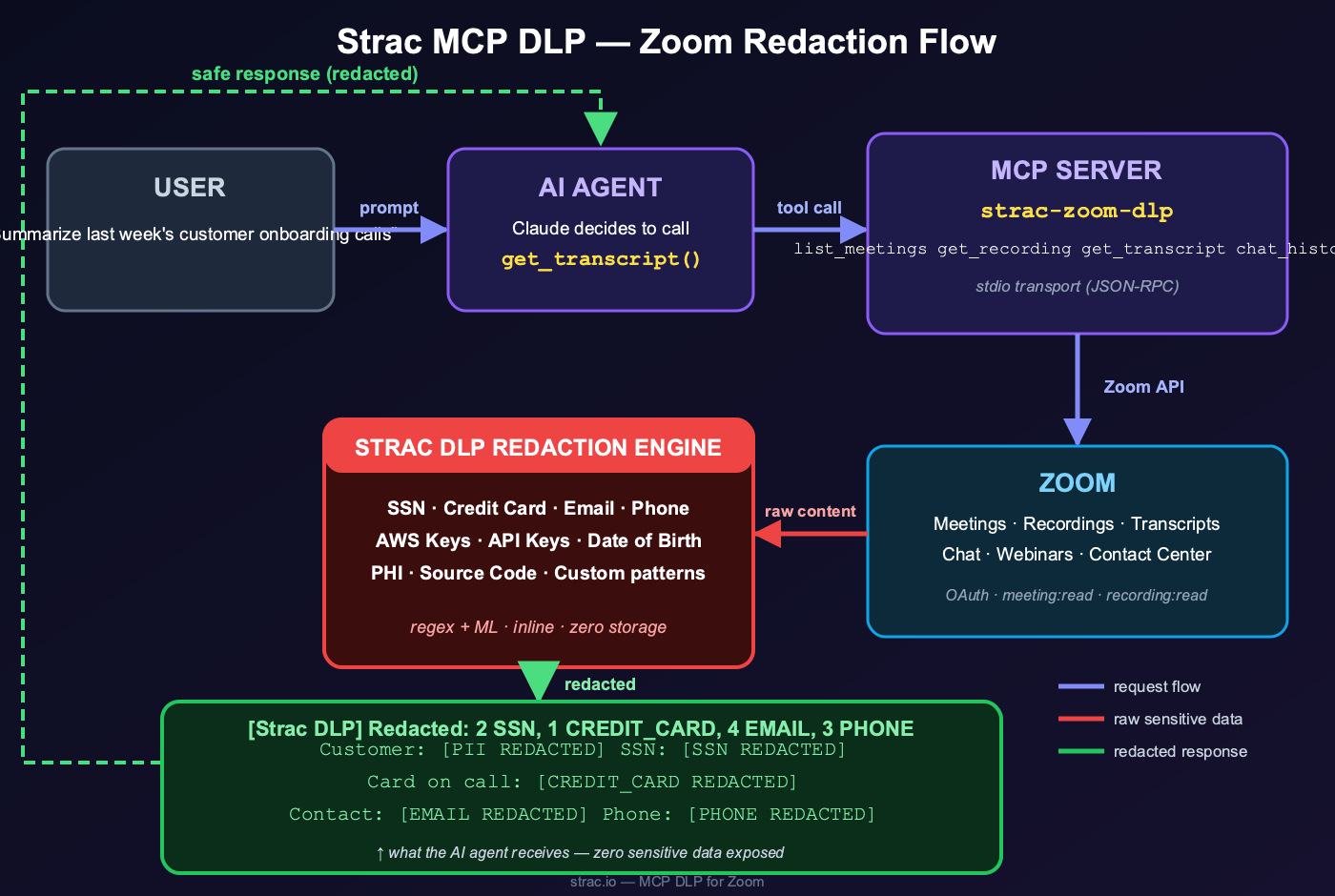
Strac is the governance layer for AI-agent access to Zoom. It sees every tool call between an AI agent and Zoom, controls what each agent can access and do (allow, block, or require approval on high-risk actions), protects the data in flight by redacting, masking, or vaulting PII/PHI/PCI before it reaches the model, and proves it with an audit record of every call. Every tool call from an AI agent passes through Strac before reaching Zoom — and every Zoom response passes through Strac before reaching the model.
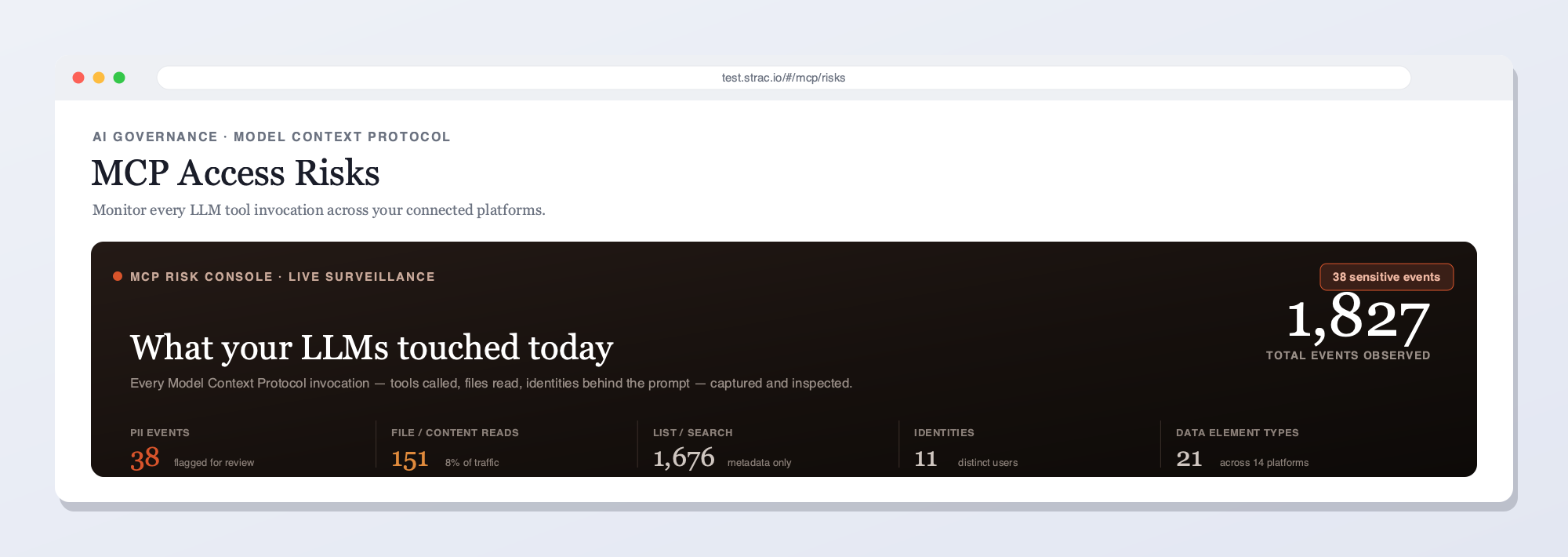
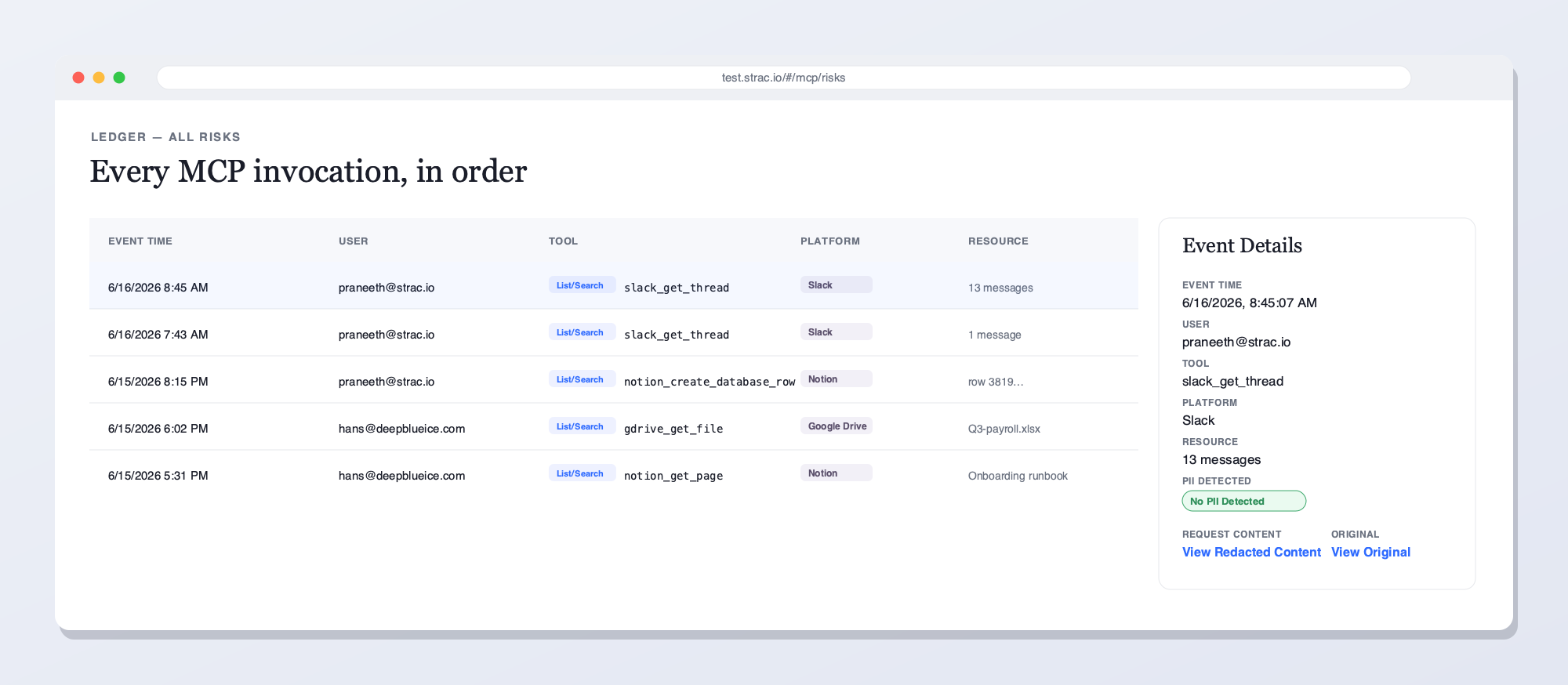
Strac's live MCP Access console — every AI agent tool call touching Zoom and your other connected platforms, captured and inspected for sensitive data in real time. See what your LLMs reached for, who prompted, and what was flagged.Every MCP invocation in order — user, tool, platform, and the sensitive data found — with redacted vs. original content and a full audit trail. This is what Strac shows on Zoom that access-only gateways can't: the data in each call, not just the call.
Why not just an access gateway?
Access-only tools answer "who called what." They do not see the PII in a meeting transcript. Strac sits inline on every Zoom tool call: it detects and remediates the sensitive data inside — redact, mask, block, or revoke access — and approves or blocks risky actions per agent, and keeps the audit trail — the call and its contents.
What Strac does on every Zoom tool call
One inline pass over each MCP response — five actions, enforced by your policy:
Detect — finds PII in a transcript and any PII, PHI, PCI, secrets, or source code in the payload, including text inside images via OCR.
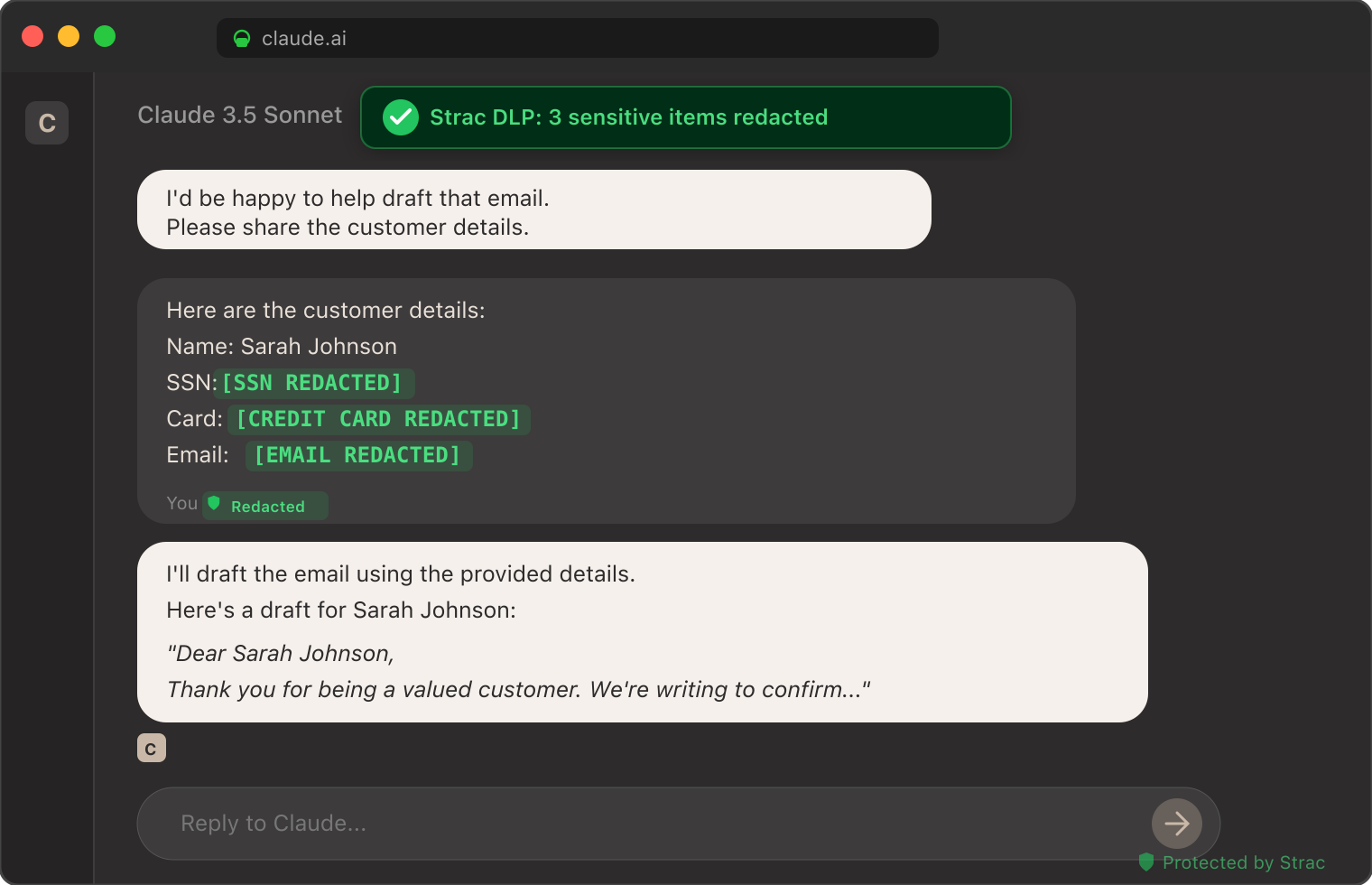
Redact or mask — replaces the sensitive elements inline, so the agent still gets its answer and the model never sees the raw data.
Block or require approval — stops a high-risk action like a transcript export or share, or routes it for sign-off before it runs.
Alert — notifies your team and streams the event to your SIEM (Microsoft Sentinel, Datadog, Splunk) in real time.
Audit — logs who, which agent, which tool, what data, and the action taken — evidence mapped to PCI DSS, SOC 2, HIPAA, and GDPR.
Inspect every tool call payload using Strac's catalog of sensitive data elements — PII, PHI, PCI, credentials, source code, and any custom data class you define.
Redact sensitive fields inline, or tombstone entire responses based on policy. Transcript chunks containing PHI are masked. Recordings flagged for sensitive screen content are quarantined. Chat history with pasted credentials is redacted.
Vault redacted content in Strac's encrypted store, with re-identification gated by RBAC for the small subset of users who need the raw value.
Audit every call with full provenance: agent identity, tool name, timestamp, returned-data classification, and remediation action. The same audit feed powers compliance evidence for SOC 2, HIPAA, PCI, ISO 27001, GDPR, and the EU AI Act.
Setup is agentless and under 10 minutes per Zoom workspace. No application code changes, no agent SDK changes, no Zoom re-permissioning.
Strac Zoom DLP and the Broader Zoom Surface
Strac's Zoom protection is not new — Strac has shipped Zoom DLP coverage across the broader Zoom surface for years. The MCP layer extends that protection into the AI agent path:
Real-time inspection of Zoom chat, in-meeting links, and shared file attachments.
OCR inspection of screen-shared images and recorded video frames for embedded sensitive data.
Automatic remediation — redact, mask, alert, or block — across messages, recordings, transcripts, and shared content.
Webinar registrant inspection to catch regulated data in registration fields.
Audit logs mapped per finding to SOC 2 CC6, HIPAA Security Rule, PCI Req. 3/4/7/10, and GDPR Art. 5/25/30/32.
The MCP layer adds: agent-aware redaction at the tool-call boundary, plus the personal-vs-corporate account enforcement covered above.
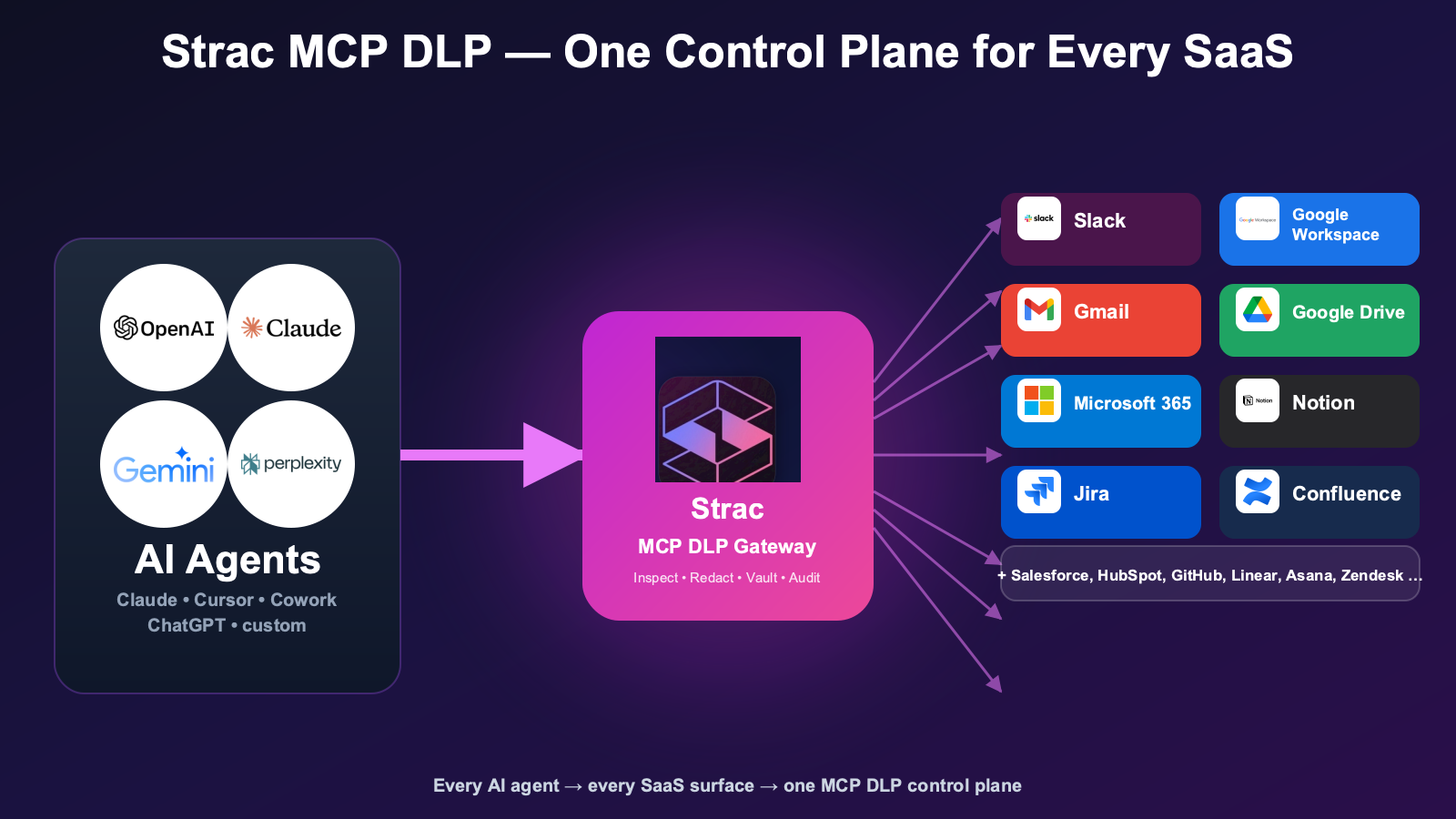
✨ The Strac MCP DLP Constellation: 15 SaaS Connectors
Zoom is the 15th MCP connector Strac ships out of the box. The full constellation covers every major SaaS surface AI agents touch in 2026:
Two requirements decide a Zoom deployment for agents. The redaction is yours to shape — mask a participant's PII, strip sensitive detail from a transcript, match a custom regex — handled by a managed contextual classifier instead of a DIY Presidio or Bedrock setup. And it applies to the MCP tools your team builds on meeting data for staff and customers, not just the off-the-shelf connector.
🌶️ Spicy FAQs for Zoom MCP Server
Can I use the Zoom MCP server with Claude Desktop or Claude Code?
Yes. The Zoom MCP server is set up as a custom connector in Claude Desktop, Claude Code, or Claude Cowork — same pattern as other MCP integrations. You register a Zoom OAuth app, paste the client ID/secret into the Claude connector config, and Claude can call list_meetings, get_transcript, get_recording, and related tools. For HIPAA-regulated content, route the connector through Strac Zoom MCP DLP so PHI is redacted before reaching the model context. See Is Claude HIPAA compliant? for the BAA picture.
Is the Zoom MCP connector the same as the Zoom MCP server?
Two names, identical thing. The MCP spec says server; Claude lists it as the Zoom connector. Both reach the same recordings, transcripts, and chat, and Strac's Zoom MCP connector redacts PII and PHI in transcripts before they enter the agent's context.
Zoom MCP vs Zoom AI Companion — what's the difference?
They sit on opposite sides of the boundary. The Zoom MCP server lets external agents — Claude, Cursor, ChatGPT, custom agents — reach into Zoom over the Model Context Protocol to call tools like list_meetings and get_transcript. Zoom AI Companion is Zoom's own native, in-product AI: it summarizes meetings and drafts chat replies inside the Zoom app itself, and the data never leaves Zoom. The distinction matters for governance because the risk lives in the hand-off: when Zoom MCP returns a tool-call result back to the external client, regulated meeting data crosses out of Zoom's boundary into the agent's context window. That tool-call hand-off back to the external client is exactly where Strac Zoom MCP DLP governs — controlling which agent can access what, protecting the data in flight (redact, mask, vault), and auditing every call.
How does Strac block personal Zoom accounts while allowing corporate Zoom?
The Strac browser extension (and the endpoint agent for the Zoom desktop app) detects the active Zoom account identity via SSO domain match, OAuth claim, or account email pattern. Corporate-account sessions (employee@corp.com via SSO) pass. Personal-account sessions (employee@gmail.com) are blocked or warned, per policy, with the event audit-logged for compliance review.
Does Strac inspect Zoom meeting recordings for sensitive data?
Yes. Strac inspects recordings, transcripts, and in-meeting chat for PII, PHI, PCI, credentials, and any custom data class. OCR runs on screen-share frames to catch sensitive data visible on shared screens. Recordings flagged as containing regulated data can be redacted, tombstoned, quarantined, or routed to a secure vault per policy.
Is the Zoom MCP server safe for healthcare use?
The Zoom MCP server itself is just a transport layer. Safety for healthcare depends on three things: (1) the corporate Zoom tenant has a BAA in place; (2) the AI client has its own BAA (ChatGPT Enterprise, M365 Copilot, Gemini Workspace yes; Claude Cowork no); (3) sensitive data is redacted at the MCP tool-call boundary before reaching the model. Strac handles (3) — the data-layer control most healthcare orgs don't have today. See MCP security for the full risk landscape.
How is Zoom MCP DLP different from Zoom's native DLP?
Zoom's native controls cover the corporate tenant: retention, archive, eDiscovery, and basic chat content filters. Zoom's native controls do not sit at the MCP path — when an AI agent calls get_transcript, the response goes straight to the agent without inspection. Strac Zoom MCP DLP fills that gap: every tool-call response is inspected, classified, and redacted before reaching the model. The two controls layer cleanly together; Strac complements Zoom-native DLP rather than replacing it. See the Zoom DLP guide for the broader picture.
Can I use the Zoom MCP server with Cursor, ChatGPT, or Perplexity?
Yes. The MCP protocol is vendor-independent. Strac's Zoom MCP DLP sits between any MCP-aware client (Claude, Cursor, ChatGPT, Perplexity, custom agents) and the Zoom API, so the same redaction and audit pipeline applies regardless of which AI client a user picks.
What about webinars and contact center?
Both are covered. Strac inspects webinar registrant data (which often contains regulated identity attributes) and Zoom Contact Center conversation data (PII-dense by definition). The same policy engine applies — redact, mask, tombstone, or vault per data class.
How fast is the deployment?
Under 10 minutes per Zoom workspace. Agentless: no application code changes, no Zoom re-permissioning, no agent SDK rewrites. Connect the Zoom OAuth app, deploy Strac's MCP gateway, and live redaction starts on the next tool call.
Does Strac log every Zoom MCP tool call?
Yes. Every tool call generates an audit event with full provenance — agent identity, tool name, timestamp, returned-data classification, and remediation action. Audit logs export to SIEM and GRC platforms; pre-built mappings cover SOC 2 CC6, HIPAA Security Rule, PCI Req. 3/4/7/10, GDPR Art. 5/25/30/32, EU AI Act Article 12, and ISO 42001 Annex A.8.
What's the difference between Strac Zoom MCP DLP and Strac Browser DLP for Zoom?
Strac Browser DLP enforces user-facing policy at the browser level — blocks personal Zoom accounts, inspects what users paste into Zoom chat, controls screen sharing of sensitive content. Strac Zoom MCP DLP enforces agent-facing policy at the MCP tool-call layer — inspects and redacts what AI agents retrieve from Zoom. Most enterprises deploy both for full coverage. See GenAI Browser DLP and MCP DLP for each.
With Strac, an agent querying Zoom inherits the user's permissions — not a service account's — so account and recording permissions govern the answer, and any recordings and transcripts inside it is redacted, masked, or blocked per policy. All of it runs from one agentless platform plus a lightweight endpoint agent, so the same controls cover Zoom on the agent path and the human path alike.
The Bottom Line
Zoom is one of the higher-leakage SaaS surfaces in any enterprise — it carries meeting transcripts, recordings, shared screen content, chat, and contact-center conversations. The 2026 risk is two-layered: personal-vs-corporate account policy at the user level, and MCP DLP at the AI agent level. Strac is the only platform shipping both.
Can I use the Zoom MCP server with Claude Desktop or Claude Code?
Yes. The Zoom MCP server is set up as a custom connector in Claude Desktop, Claude Code, or Claude Cowork — same pattern as other MCP integrations. You register a Zoom OAuth app, paste the client ID/secret into the Claude connector config, and Claude can call list_meetings, get_transcript, get_recording, and related tools. For HIPAA-regulated content, route the connector through Strac Zoom MCP DLP so PHI is redacted before reaching the model context. See Is Claude HIPAA compliant? for the BAA picture.
Is the Zoom MCP connector the same as the Zoom MCP server?
Two names, identical thing. The MCP spec says server; Claude lists it as the Zoom connector. Both reach the same recordings, transcripts, and chat, and Strac's Zoom MCP connector redacts PII and PHI in transcripts before they enter the agent's context.
Zoom MCP vs Zoom AI Companion — what's the difference?
They sit on opposite sides of the boundary. The Zoom MCP server lets external agents — Claude, Cursor, ChatGPT, custom agents — reach into Zoom over the Model Context Protocol to call tools like list_meetings and get_transcript. Zoom AI Companion is Zoom's own native, in-product AI: it summarizes meetings and drafts chat replies inside the Zoom app itself, and the data never leaves Zoom. The distinction matters for governance because the risk lives in the hand-off: when Zoom MCP returns a tool-call result back to the external client, regulated meeting data crosses out of Zoom's boundary into the agent's context window. That tool-call hand-off back to the external client is exactly where Strac Zoom MCP DLP governs — controlling which agent can access what, protecting the data in flight (redact, mask, vault), and auditing every call.
How does Strac block personal Zoom accounts while allowing corporate Zoom?
The Strac browser extension (and the endpoint agent for the Zoom desktop app) detects the active Zoom account identity via SSO domain match, OAuth claim, or account email pattern. Corporate-account sessions (employee@corp.com via SSO) pass. Personal-account sessions (employee@gmail.com) are blocked or warned, per policy, with the event audit-logged for compliance review.
Does Strac inspect Zoom meeting recordings for sensitive data?
Yes. Strac inspects recordings, transcripts, and in-meeting chat for PII, PHI, PCI, credentials, and any custom data class. OCR runs on screen-share frames to catch sensitive data visible on shared screens. Recordings flagged as containing regulated data can be redacted, tombstoned, quarantined, or routed to a secure vault per policy.
Discover & Protect Data on SaaS, AI, MCP, Endpoints & Cloud
Strac provides end-to-end data loss prevention for all SaaS and Cloud apps. Integrate in under 10 minutes and experience the benefits of live DLP scanning, live redaction, and a fortified SaaS environment.


.webp)







.avif)




.gif)
