Shadow MCP is unapproved MCP servers employees wire into AI clients - each holding a live token to a corporate system. Why cloud gateways can't see them, and how Strac's endpoint agent inventories and controls every one.
Shadow MCP is the unapproved Model Context Protocol servers your employees wire into AI clients without review — each one holding a live token to a corporate system.
It’s worse than shadow SaaS: there’s no OAuth consent screen, no admin console, and no audit trail. The configuration is a local JSON file on a laptop.
A cloud MCP gateway can’t see it — a gateway only governs traffic that flows through it, and an employee can point a client straight at any server to bypass it.
Strac’s endpoint agent reads the client config files on the machine, so it inventories every registered MCP server — and lets you allow or deny each one — whether or not its traffic ever touches a gateway.
MCP introduces a new shadow-AI surface that your AI DLP program must cover.
✨ What Is Shadow MCP?
Shadow MCP is the agent-era version of shadow IT. MCP servers are npm packages and GitHub repos — anyone can publish one, and any engineer can add one to their Claude Desktop, Cursor, or Claude Code configuration in seconds. The moment they do, that server holds a live credential to whatever it connects: corporate Slack, Google Drive, a production database, an internal API. No one approved it, security doesn’t know it exists, and it now sits inside your trust boundary. That is shadow MCP — unapproved, unmanaged MCP servers running against corporate systems.
A gateway governs only its own traffic. Point a client straight at a server and you bypass it — but Strac’s endpoint agent reads the config and sees it.
Why Shadow MCP Is Worse Than Shadow SaaS
With unsanctioned SaaS, there is usually something to catch: an OAuth grant in your identity provider, an admin console, a login your CASB can see. Shadow MCP has none of that.
Shadow SaaS
Shadow MCP
OAuth consent screen you can review
No consent screen — a token pasted into a config file
Admin console / directory
No console — nothing central to look at
Login events, audit trail
No audit trail on the machine
Discoverable via IdP / CASB
A local JSON file on a laptop
Because the whole thing lives in a config file on an endpoint, the only reliable place to see it is on the endpoint.
The Real Threats Shadow MCP Introduces
Threat
What happens
Credential harvesting
A malicious server exfiltrates the tokens it’s handed
Typosquatting
A server named to impersonate a legitimate one (slack-mcp vs slack_mcp)
An approved server later mutates its tool descriptions to do something else
Tool poisoning
Malicious instructions hidden in the tool description the model reads
These aren’t hypothetical — they follow directly from the fact that MCP servers are unvetted third-party code with standing access. See rug pull attacks and prompt injection for how two of them work in detail.
Why MCP Gateways Miss Shadow MCP
This is the crux. An MCP gateway is a real control — it inspects the traffic that passes through it and can block, redact, or mask data on MCP tool calls. But its registry only governs traffic through the gateway. If an employee configures their client to talk to a server directly, that traffic never reaches the gateway, and the gateway never knows the server exists. A cloud gateway governs the agent path it sits on; it cannot see a server it isn’t in front of. Closing that gap requires seeing the configuration on the machine, not the traffic on the wire.
How to Find Shadow MCP Servers
MCP clients register their servers in local config files. To inventory shadow MCP by hand, you’d look at:
a per-client JSON block listing each server’s command, args, and env (tokens)
Each entry names a server, its launch command, and the environment variables — often including the credential. Doing this manually across a fleet doesn’t scale, which is the whole point of automating it on the endpoint.
✨ How Strac Handles Shadow MCP
Strac closes the gap the gateway can’t. The endpoint agent reads the MCP client config files on each machine and builds a live inventory of every registered server — sanctioned or not — regardless of whether its traffic ever passes through a gateway. From there you allow or deny servers by policy, flag typosquatted and impersonating names, and get an audit trail of what’s connected where. Follow Strac’s governance model for MCP — See, Control, Protect, Prove: see every server, control which are allowed, protect the data flowing through them, and prove it for an audit.
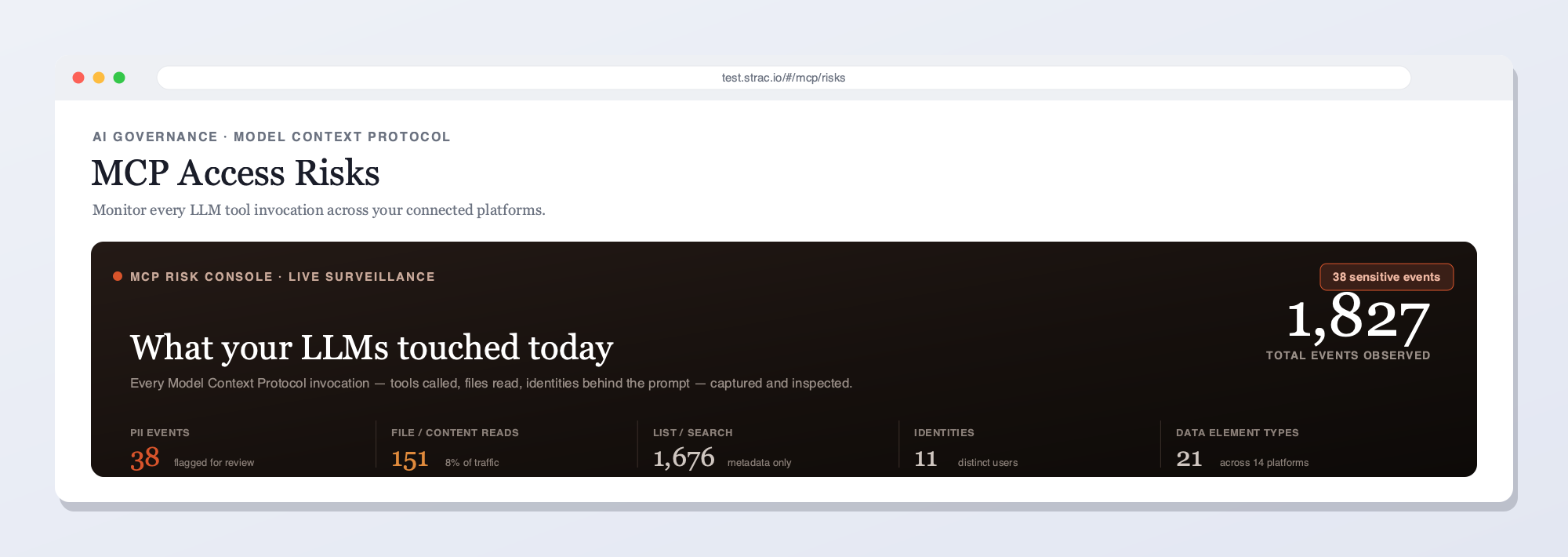
Strac’s MCP console inventories every MCP server and connected AI agent — the visibility a gateway-only tool can’t provide.
And for the servers you do sanction, Strac protects the data moving through them: it redacts PII, PHI, PCI, and secrets on MCP tool calls, and — because it also runs on the browser and endpoint — it protects the human path (what employees paste and upload) that no gateway can see. See MCP DLP, endpoint DLP, and the MCP integrations for the full picture.
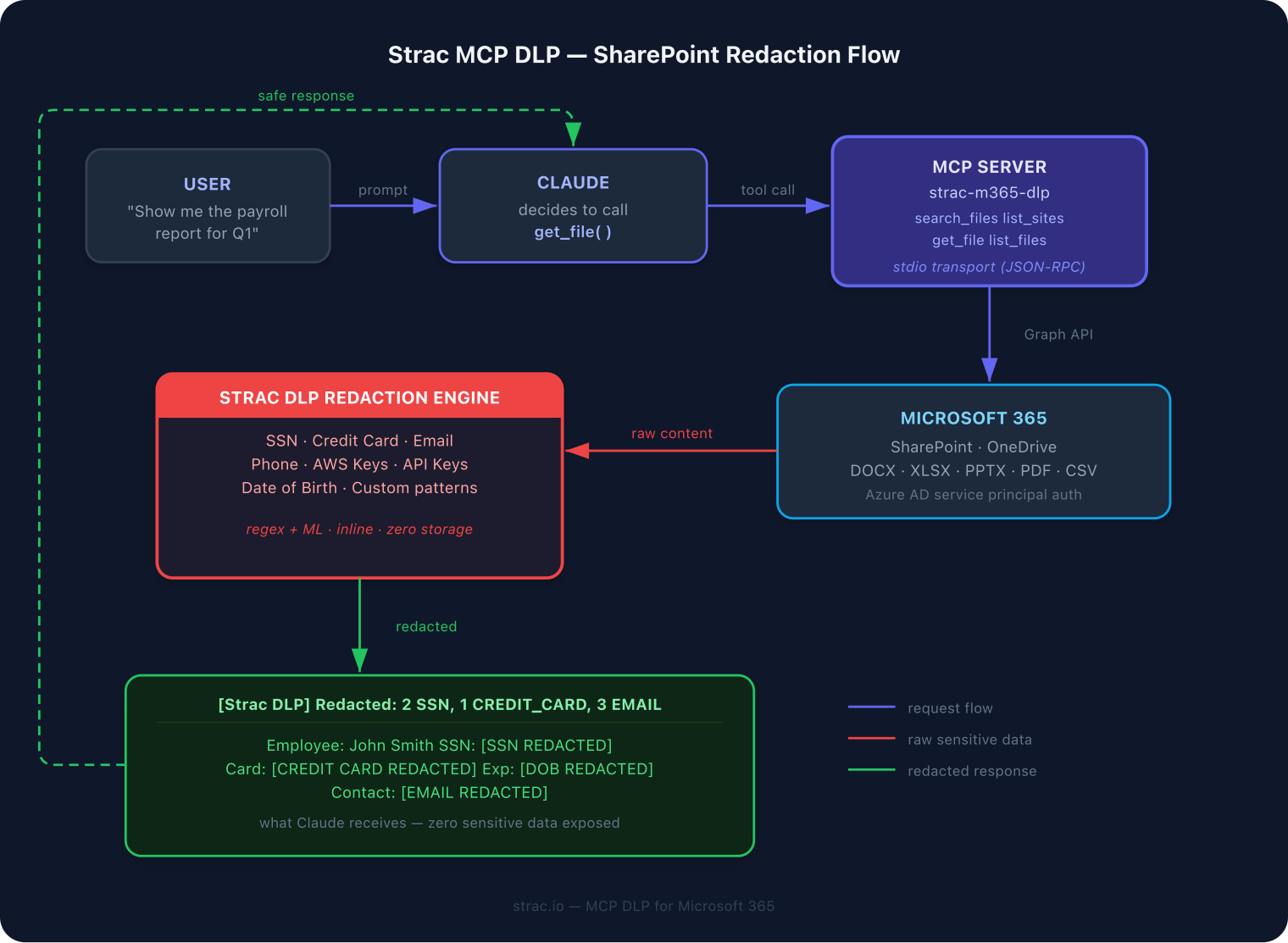
On sanctioned servers, Strac redacts sensitive data in the MCP tool-call flow before it reaches the model or leaves your systems.
What a Shadow MCP Server Actually Looks Like
Shadow MCP isn’t abstract — it’s a few lines in a JSON file. Here’s a typical entry an engineer might add to Claude Desktop to give an agent access to a database, along with an unvetted third-party server:
The second server is the problem. No one reviewed notes-sync-mcp, it runs arbitrary code with npx, and it now holds a live Slack bot token. If that package is malicious — or is compromised later — it can read and post to Slack with the access it was handed. Nothing in a cloud gateway’s registry will ever show this entry, because the traffic doesn’t pass through the gateway.
Every Client That Registers MCP Servers
MCP is exploding across desktop and IDE clients, and each keeps its own local config. To inventory shadow MCP you have to read all of them:
~/.cursor/mcp.json and per-project .cursor/mcp.json
VS Code / Cline / Roo
workspace and user settings MCP blocks
Windsurf and other IDE agents
per-client JSON listing each server’s command, args, and env
Every entry carries a launch command and environment variables — frequently the credential itself. Auditing this by hand across a fleet, on machines that change daily, is not a real control. Reading it automatically on the endpoint is.
Turning Discovery Into Policy: See, Control, Protect, Prove
Discovery is step one. Strac operationalizes shadow MCP as a governance loop:
Stage
What it means for MCP servers
See
Continuously inventory every MCP server registered in every client config across the fleet
Control
Allow or deny servers by policy — block unvetted, typosquatted, or rug pulls outright
Protect
On sanctioned servers, redact PII, PHI, PCI, and secrets on tool calls with MCP DLP
Prove
Keep an audit trail of which servers are connected where, and what data moved through them
The first two stages are pure endpoint work — they depend on seeing the config, not the traffic. The last two are where Strac’s data protection takes over. Explore the servers Strac already governs in the Strac MCP integrations, and see endpoint DLP and MCP security for how the endpoint agent fits the broader control set.
The same controls extend to ChatGPT, Microsoft Copilot, Google Gemini, Perplexity, xAI Grok, DeepSeek, and Mistral Le Chat and any other AI assistant, since Strac inspects the data layer rather than a single vendor API.
🌶️ Spicy FAQs on Shadow MCP
What is shadow MCP?
Shadow MCP is unapproved Model Context Protocol servers that employees add to AI clients (Claude Desktop, Cursor, Claude Code) without review. Each one holds a live token to a corporate system, with no OAuth consent screen, admin console, or audit trail - the config is just a local JSON file.
Can an MCP gateway detect shadow MCP?
No. A gateway only governs traffic that flows through it. If an employee points their client directly at a server, that traffic bypasses the gateway entirely and the gateway never sees the server. Detecting it requires reading the client config on the endpoint - which Strac's endpoint agent does.
Why is shadow MCP worse than shadow SaaS?
Shadow SaaS usually leaves a trail - an OAuth grant, an admin console, a login. Shadow MCP leaves none of that. A token pasted into a local config file gives a third-party server standing access with nothing central to review.
How do I find MCP servers on employee machines?
They're listed in client config files (for example claude_desktop_config.json). Manually that means auditing each machine's JSON; at scale, Strac's endpoint agent reads those configs automatically and inventories every registered server.
How does Strac stop shadow MCP?
It reads MCP client configs on the endpoint to inventory every server, lets you allow or deny each by policy, flags typosquatted and impersonating servers, and protects the data on sanctioned servers with DLP - See, Control, Protect, Prove.
The Bottom Line
Shadow MCP is app-allowlisting for the agent era, and it’s the one control a gateway-only vendor structurally cannot ship — because the servers live in config files, not in gateway traffic. Strac sees them on the endpoint, lets you allow or deny each, and protects the data on the ones you keep. Book a demo to inventory the MCP servers running in your environment.
What is shadow MCP?
Shadow MCP is unapproved Model Context Protocol servers that employees add to AI clients (Claude Desktop, Cursor, Claude Code) without review. Each one holds a live token to a corporate system, with no OAuth consent screen, admin console, or audit trail - the config is just a local JSON file.
Can an MCP gateway detect shadow MCP?
No. A gateway only governs traffic that flows through it. If an employee points their client directly at a server, that traffic bypasses the gateway entirely and the gateway never sees the server. Detecting it requires reading the client config on the endpoint - which Strac's endpoint agent does.
Why is shadow MCP worse than shadow SaaS?
Shadow SaaS usually leaves a trail - an OAuth grant, an admin console, a login. Shadow MCP leaves none of that. A token pasted into a local config file gives a third-party server standing access with nothing central to review.
How do I find MCP servers on employee machines?
They're listed in client config files (for example claude_desktop_config.json). Manually that means auditing each machine's JSON; at scale, Strac's endpoint agent reads those configs automatically and inventories every registered server.
How does Strac stop shadow MCP?
It reads MCP client configs on the endpoint to inventory every server, lets you allow or deny each by policy, flags typosquatted and impersonating servers, and protects the data on sanctioned servers with DLP - See, Control, Protect, Prove.
Discover & Protect Data on SaaS, AI, MCP, Endpoints & Cloud
Strac provides end-to-end data loss prevention for all SaaS and Cloud apps. Integrate in under 10 minutes and experience the benefits of live DLP scanning, live redaction, and a fortified SaaS environment.


.webp)








.avif)




.gif)
