



Safari DLP

Safari DLP

Detect, block & remediate PII and sensitive data in Safari on Mac - Safari DLP

ChatGPT
Perplexity
Grok
Google AI
Claude
Summarize and analyze this article with:

TL;DR: Strac Safari DLP for Mac

Safari is the default browser on every Mac, which makes it the browser your executives, designers, and Mac-first teams actually use, and the one most DLP tools ignore. Traditional browser DLP is built for Chromium, so Safari becomes the quiet blind spot where PII, PHI, and secrets slip out. Strac closes it: its Safari DLP detects, blocks, warns, and redacts sensitive data at the point of paste, upload, and download, through a Safari extension and the Mac endpoint agent, managed from the same console as Chrome, Edge, and Firefox.

Why Safari is the DLP blind spot

Two things make Safari uniquely risky. First, it is on 100% of Macs by default, so the more Mac-heavy your company, the more of your traffic runs through a browser your DLP probably does not cover. Second, the people on Macs, executives, designers, marketing, and legal, routinely handle exactly the data you care about: board materials, customer lists, contracts, and creative assets. A DLP program that covers Chrome and Edge but not Safari has a hole shaped like your leadership team. Safari also ties into the Apple ecosystem, iCloud, Handoff, and AirDrop, so data can move off the managed Mac in ways a Chromium-only tool never sees.

What sensitive data leaves through Safari

On a Mac, Safari is where most web activity happens, which means it is where most browser-based leaks happen:

Data typeWhat leaks through the browser
PIISSNs, dates of birth, driver's licenses, addresses pasted into web forms
PCICard numbers and CVVs entered into billing tools and web apps
PHIPatient names, MRNs, and intake documents pasted into portals or AI tools
SecretsAPI keys, passwords, tokens, and connection strings pasted into consoles
Source code / IPProprietary code and internal docs pasted into GenAI assistants
FilesCustomer exports, spreadsheets, and screenshots uploaded through the browser

The four ways data leaks through Safari

Safari DLP has to cover every path a Mac user takes, not just typing:

  • Paste - a designer pastes customer PII into an AI image tool, or an exec pastes deal terms into a chatbot.
  • Upload - a user attaches a spreadsheet of card numbers or a PDF of patient data to a web app.
  • Download - a sensitive export lands in Downloads, then syncs to iCloud or an unmanaged device.
  • Ecosystem - data moves via iCloud, Handoff, or a Safari extension outside your control.

✨ How Strac blocks a sensitive upload in Safari
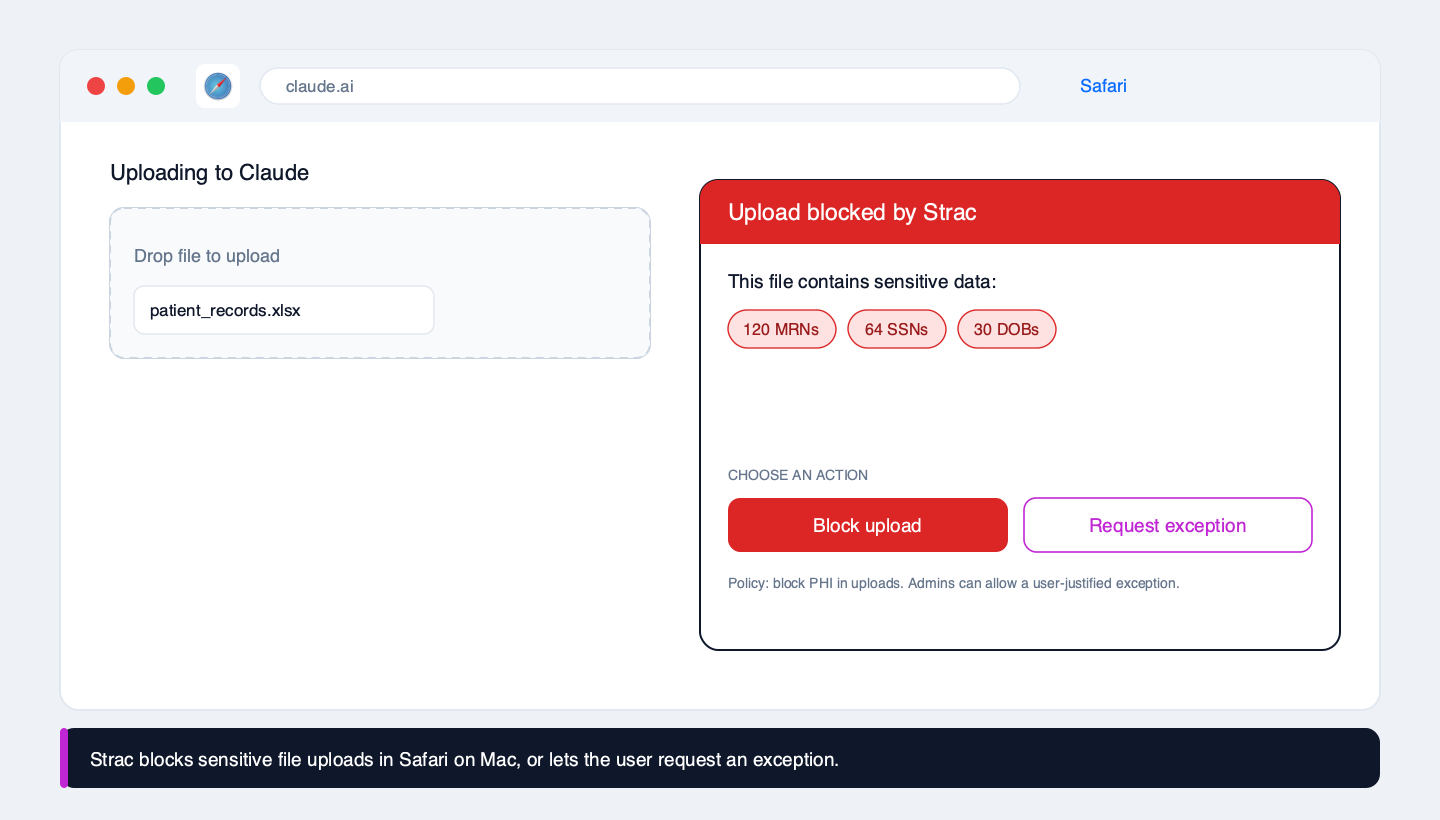
Strac blocking a spreadsheet of patient records, MRNs, and SSNs from being uploaded to Claude in Safari on Mac, with an option for the user to request an exception

When a Mac user uploads a file through Safari, Strac inspects it in the browser, including spreadsheets, PDFs, and images via OCR, and shows exactly what sensitive data it contains. You set the response per data type: block outright, warn and allow, or block with a user-justified exception that is logged. Executives and designers keep moving fast, and security keeps the evidence, without Safari being a gap.

How Strac Safari DLP works: detect, decide, act
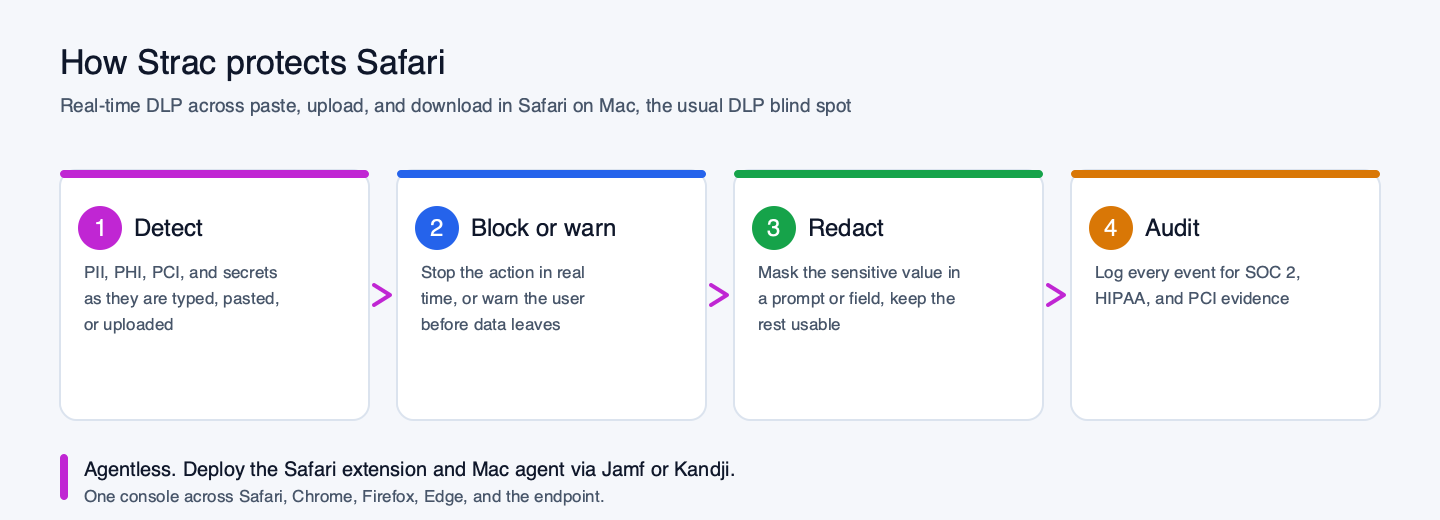
How Strac Safari DLP works on Mac: detect sensitive data, block or warn, redact, and audit
  • Detect PII, PHI, PCI, secrets, and IP as they are typed, pasted, uploaded, or downloaded in Safari. Strac ships hundreds of prebuilt detectors and supports your own; see the catalog of sensitive data elements and custom data elements.
  • Decide based on the data and the destination, so an internal note is treated differently from a customer list headed to a public AI tool.
  • Act in real time: block, warn, redact the value, or allow with a logged exception.
  • Audit every event with full context for SOC 2, HIPAA, and PCI evidence.

✨ GenAI DLP: stop leaks into ChatGPT, Claude, Gemini, and Apple Intelligence

Mac users are heavy AI users. They paste customer data and confidential documents into ChatGPT, Claude, Gemini, and increasingly Apple Intelligence and other on-device assistants. Strac's Safari coverage recognizes these AI destinations and inspects the prompt and any attached file before it is sent, blocking or redacting the sensitive parts while letting legitimate work through. See AI DLP and how we block sensitive data in ChatGPT.

Deploying Strac on Mac fleets

Strac deploys through the Safari extension plus the Mac endpoint agent, pushed with Jamf, Kandji, or your MDM of choice. The agent adds coverage the browser alone cannot give you, downloads, USB, and other exit channels, so Safari DLP and full Mac DLP come from one rollout. Start in monitor mode to tune policies against real traffic, then enable enforcement. Live the same day.

Native Safari controls vs Strac

Safari's privacy features, Intelligent Tracking Prevention and the like, protect the user from the web. They do nothing to stop sensitive company data from leaving through the browser:

CapabilityNative Safari controlsStrac Safari DLP
Detect PII, PHI, PCI, secretsNoYes, hundreds of prebuilt detectors + custom
Inspect file uploads (CSV, PDF, images/OCR)NoYes
Block a sensitive paste or upload in real timeNoYes
Redact the value instead of blocking the whole actionNoYes
User-justified exception workflowNoYes
Detect sensitive data going into ChatGPT / Claude / GeminiNoYes
Audit log mapped to SOC 2 / HIPAA / PCI / GDPRNoYes

Compliance

For any company with Macs, Safari is squarely in audit scope. Strac maps to SOC 2 CC6, HIPAA (keeping PHI from leaving through the browser), PCI DSS 4.0 (card-data scope reduction), and GDPR (personal-data transfer control), and produces the per-event evidence auditors ask for, finally including the Mac traffic they used to have to take on faith.

Safari, every browser, and the endpoint from one console

Safari is one surface. Strac covers Chrome, Edge, and Firefox from the same console, and pairs with endpoint and Mac DLP to cover every other exit channel. One policy, every browser, every device.

🌶️ Spicy FAQs on Safari DLP

Does Safari have built-in DLP?
No. Safari has strong anti-tracking and privacy features, but nothing that classifies content or stops a user from pasting or uploading sensitive company data. And because most DLP tools are Chromium-only, Safari is usually uncovered entirely, which is the gap Strac closes.

How does Strac cover Safari if Safari extensions are so restricted?
Strac uses a Safari extension together with the Mac endpoint agent, so you get in-browser detection plus OS-level coverage. That combination is more complete than a browser extension alone and is why Safari DLP and full Mac DLP deploy together.

Can it block a file upload in Safari, or only detect it?
Both, and you choose. Strac inspects the file (spreadsheets, PDFs, images via OCR) and can block, warn, redact, or allow with a logged justification, set per data type.

Why does Safari matter more than other browsers for us?
Because it is the default on every Mac, so your executives, designers, and Mac-first teams, the people handling your most sensitive data, are probably running most of their web activity through the one browser your DLP does not cover.

How do I deploy it across a Mac fleet?
Through Jamf, Kandji, or your MDM, as the Safari extension plus the Mac agent. Start in monitor mode, tune, then enforce. Most teams are live the same day.

Does the user get an option, or is it a hard block?
Your policy decides. You can hard-block, warn and allow, or block with a user-justified exception that is logged, so you stay in control without slowing people down.

Trusted by enterprises
Discover & Remediate PII, PCI, PHI, Sensitive Data

Sharepoint DLP Use Cases

Practical Scenario

A hospital’s billing and administrative teams use SharePoint Online to store patient invoices, medical reports, and insurance forms. While collaborating with external insurance providers, a staff member accidentally updates the permissions on a SharePoint document library to “Anyone with the link,” exposing potentially thousands of patient files containing PHI.

Industry Challenge

Healthcare organizations must meet HIPAA requirements for patient privacy. Even a single unauthorized access to PHI can trigger non-compliance, steep fines, and damage to the hospital’s reputation.

How Strac Helps

  • Continuous Data Discovery: Strac automatically scans existing and newly uploaded documents, identifying PHI (e.g., medical record numbers, Social Security Numbers).
  • Classification & Labeling: Once identified, files are labeled (e.g., “HIPAA Sensitive”), ensuring that administrators know which documents require the highest level of protection.
  • Visibility into Access: Strac provides real-time insight into who has access to these sensitive documents. Administrators can instantly see if unauthorized users or broad groups have viewing rights.
  • Revoke Public Links: If a file is publicly accessible, Strac immediately revokes those links and restores restricted access.
  • Alerts & Quarantines: When someone attempts to share PHI externally, Strac can alert admins, quarantine the file for review, or completely block the action.
  • Audit-Ready Reports: All actions are logged, enabling quick incident response and demonstrating HIPAA compliance for audits.
Screenshot of an email draft in Superhuman showing a message with sensitive personal data including an SSN and a PDF attachment, with a person visible in the bottom corner during a screen share
Seamless Integration & Scalability Showcase
Machine Learning & Customization Showcase
This is some text inside of a div block.

Practical Scenario

A hospital’s billing and administrative teams use SharePoint Online to store patient invoices, medical reports, and insurance forms. While collaborating with external insurance providers, a staff member accidentally updates the permissions on a SharePoint document library to “Anyone with the link,” exposing potentially thousands of patient files containing PHI.

How Strac's Sharepoint DLP Helps

  • Continuous Data Discovery: Strac automatically scans existing and newly uploaded documents, identifying PHI (e.g., medical record numbers, Social Security Numbers).
  • Classification & Labeling: Once identified, files are labeled (e.g., “HIPAA Sensitive”), ensuring that administrators know which documents require the highest level of protection.
  • Visibility into Access: Strac provides real-time insight into who has access to these sensitive documents. Administrators can instantly see if unauthorized users or broad groups have viewing rights.
  • Revoke Public Links: If a file is publicly accessible, Strac immediately revokes those links and restores restricted access.
  • Alerts & Quarantines: When someone attempts to share PHI externally, Strac can alert admins, quarantine the file for review, or completely block the action.
  • Audit-Ready Reports: All actions are logged, enabling quick incident response and demonstrating HIPAA compliance for audits.

Practical Scenario

A mid-sized investment firm uses SharePoint to collaborate on various client files, including:
  • Credit card statements (subject to PCI-DSS)
  • ID documents (Driver’s Licenses, Passports, etc.) used for KYC (Know Your Customer) verification
  • Banking information such as account and routing numbers
An associate accidentally shares a SharePoint folder containing these files with a newly onboarded client who does not require access to all confidential documents. This folder is also accessible to several internal teams outside the immediate project, creating multiple potential exposure points.

Industry Problem

Financial organizations must adhere to strict regulations like PCI-DSS for payment card data and various KYC/AML (Anti-Money Laundering) standards that mandate secure handling of personally identifiable information (PII). Exposing client ID documents, bank details, or credit card data can lead to fraud, legal liabilities, and erode customer trust.

How Strac Helps

  • Comprehensive Data Discovery: Strac scans both existing and newly uploaded documents in SharePoint for sensitive information such as credit card numbers, bank account details, and ID documents (Driver’s License, Passport formats).
  • Classification & Automated Labeling: Once identified, Strac applies meaningful labels (e.g., “PCI-DSS Sensitive,” “PII – ID Documents,” “Banking Info”) to ensure these files stand out and are subject to stricter security rules.
  • Visibility into Access: Strac provides an immediate view of who currently has access to these sensitive files. This allows admins to spot situations where external clients or internal teams unnecessarily have permissions.
  • Public Access Revocation: If a labeled document (e.g., containing card data or ID scans) is found to be publicly shared or too broadly accessible, Strac automatically revokes these links or permissions, aligning access with the principle of least privilege.
  • Alerts, Quarantines, and Blocks: When a user attempts to share a labeled document with outside domains—or with an entire department—Strac alerts administrators or quarantines/blocks the file share, depending on policy settings.
    In cases where the share is intentional but needs review, admins can approve or deny the request within Strac’s dashboard.
  • Audit & Compliance: Every sharing event, label assignment, and access revocation is logged, creating a detailed audit trail. This helps demonstrate compliance with PCI-DSS, KYC, AML, and other regulatory requirements.
    Automatic reporting simplifies any regulatory or internal compliance audit, reducing the administrative burden on security and compliance teams.
Screenshot of an email draft in Superhuman showing a message with sensitive personal data including an SSN and a PDF attachment, with a person visible in the bottom corner during a screen share
Seamless Integration & Scalability Showcase
Machine Learning & Customization Showcase
This is some text inside of a div block.

Practical Scenario

A mid-sized investment firm uses SharePoint to collaborate on various client files, including:
  • Credit card statements (subject to PCI-DSS)
  • ID documents (Driver’s Licenses, Passports, etc.) used for KYC (Know Your Customer) verification
  • Banking information such as account and routing numbers
An associate accidentally shares a SharePoint folder containing these files with a newly onboarded client who does not require access to all confidential documents. This folder is also accessible to several internal teams outside the immediate project, creating multiple potential exposure points.

How Strac's Sharepoint DLP Helps

  • Comprehensive Data Discovery: Strac scans both existing and newly uploaded documents in SharePoint for sensitive information such as credit card numbers, bank account details, and ID documents (Driver’s License, Passport formats).
  • Classification & Automated Labeling: Once identified, Strac applies meaningful labels (e.g., “PCI-DSS Sensitive,” “PII – ID Documents,” “Banking Info”) to ensure these files stand out and are subject to stricter security rules.
  • Visibility into Access: Strac provides an immediate view of who currently has access to these sensitive files. This allows admins to spot situations where external clients or internal teams unnecessarily have permissions.
  • Public Access Revocation: If a labeled document (e.g., containing card data or ID scans) is found to be publicly shared or too broadly accessible, Strac automatically revokes these links or permissions, aligning access with the principle of least privilege.
  • Alerts, Quarantines, and Blocks: When a user attempts to share a labeled document with outside domains—or with an entire department—Strac alerts administrators or quarantines/blocks the file share, depending on policy settings.
    In cases where the share is intentional but needs review, admins can approve or deny the request within Strac’s dashboard.
  • Audit & Compliance: Every sharing event, label assignment, and access revocation is logged, creating a detailed audit trail. This helps demonstrate compliance with PCI-DSS, KYC, AML, and other regulatory requirements.
    Automatic reporting simplifies any regulatory or internal compliance audit, reducing the administrative burden on security and compliance teams.

Practical Scenario

A software company keeps source code, product roadmaps, and design specs in SharePoint. Several teams—including external contractors—use the same SharePoint site. A developer accidentally grants a large group, including some non-disclosure–exempt contractors, access to a folder containing patent-pending code.

Industry Problem

Leaking IP can destroy a firm’s competitive advantage, trigger legal disputes, and cause immense reputational harm.

How Strac Helps

  • Holistic File Scanning: Strac inspects documents, PDFs, and archives for code snippets, system designs, and proprietary business terms to detect potential IP.
  • Intelligent Labeling: Documents identified as containing IP or trade secrets are automatically classified (e.g., “Proprietary IP”), reinforcing the need for restricted sharing.
  • Real-Time Access Insights: With Strac, administrators can instantly see who has access to IP-tagged files, enabling them to remove unauthorized users or reduce permission scopes.
  • Immediate Link Removal: If a contractor or external partner is mistakenly granted access to IP, Strac revokes public or unauthorized sharing before the files can be downloaded.
  • Alerts & Blocking: Strac’s policies can be configured to alert security teams or block external sharing attempts for files containing proprietary content.
  • Incident Response & Auditing: Detailed logs of every share request, label change, and access revocation aid in quick incident resolution and help prove due diligence if legal issues arise.
Screenshot of an email draft in Superhuman showing a message with sensitive personal data including an SSN and a PDF attachment, with a person visible in the bottom corner during a screen share
Seamless Integration & Scalability Showcase
Machine Learning & Customization Showcase
This is some text inside of a div block.

Practical Scenario

A software company keeps source code, product roadmaps, and design specs in SharePoint. Several teams—including external contractors—use the same SharePoint site. A developer accidentally grants a large group, including some non-disclosure–exempt contractors, access to a folder containing patent-pending code.

How Strac's Sharepoint DLP Helps

  • Holistic File Scanning: Strac inspects documents, PDFs, and archives for code snippets, system designs, and proprietary business terms to detect potential IP.
  • Intelligent Labeling: Documents identified as containing IP or trade secrets are automatically classified (e.g., “Proprietary IP”), reinforcing the need for restricted sharing.
  • Real-Time Access Insights: With Strac, administrators can instantly see who has access to IP-tagged files, enabling them to remove unauthorized users or reduce permission scopes.
  • Immediate Link Removal: If a contractor or external partner is mistakenly granted access to IP, Strac revokes public or unauthorized sharing before the files can be downloaded.
  • Alerts & Blocking: Strac’s policies can be configured to alert security teams or block external sharing attempts for files containing proprietary content.
  • Incident Response & Auditing: Detailed logs of every share request, label change, and access revocation aid in quick incident resolution and help prove due diligence if legal issues arise.