







TL;DR: Strac Firefox DLP
Firefox runs on Mac, Windows, and Linux, and it is a favorite of engineers, privacy-conscious teams, and anyone standardized on Mozilla's enterprise builds. Every one of those users pastes, uploads, and downloads data through Firefox all day: an SSN into a web form, a customer CSV into ChatGPT, a database password into a web console. Strac's Firefox DLP extension inspects that activity in real time and detects, blocks, warns, or redacts PII, PHI, PCI, and secrets before they ever leave the browser. It is agentless, deploys through your MDM, and runs from the same console as your Chrome, Edge, and Safari coverage. Get it from the Firefox Add-ons store.
Why Firefox is a data-loss surface you cannot ignore
Most DLP programs quietly assume everyone is on Chrome. In reality Firefox is on developer laptops, Linux fleets, regulated environments that mandate Mozilla ESR, and any user who chose it for privacy. Those are exactly the people who touch source code, credentials, and regulated data. A browser DLP policy that skips Firefox leaves your most technical users, and your most sensitive data, uncovered. Firefox also syncs history, logins, and open tabs across devices, so data that enters Firefox on a managed laptop can resurface on an unmanaged one.
What sensitive data leaves through Firefox
The browser is now the primary exfiltration channel, because almost every app is a web app. In Firefox that means:
| Data type | What leaks through the browser |
|---|---|
| PII | SSNs, dates of birth, driver's licenses, addresses pasted into web forms |
| PCI | Card numbers and CVVs entered into billing tools and web apps |
| PHI | Patient names, MRNs, and intake documents pasted into portals or AI tools |
| Secrets | API keys, passwords, tokens, and connection strings pasted into consoles |
| Source code / IP | Proprietary code and internal docs pasted into GenAI assistants |
| Files | Customer exports, spreadsheets, and screenshots uploaded through the browser |
The four ways data leaks through Firefox
Effective Firefox DLP has to cover all four, not just one:
- Paste - a user pastes an SSN or an API key into a web form, a ticket, or an AI prompt.
- Upload - a user attaches a customer export or a PDF full of PII to a web app.
- Download - a user pulls a sensitive report onto a personal or unmanaged device.
- Sync and extensions - data moves through Firefox Sync or a third-party extension you never vetted.
✨ How Strac blocks a sensitive upload in Firefox
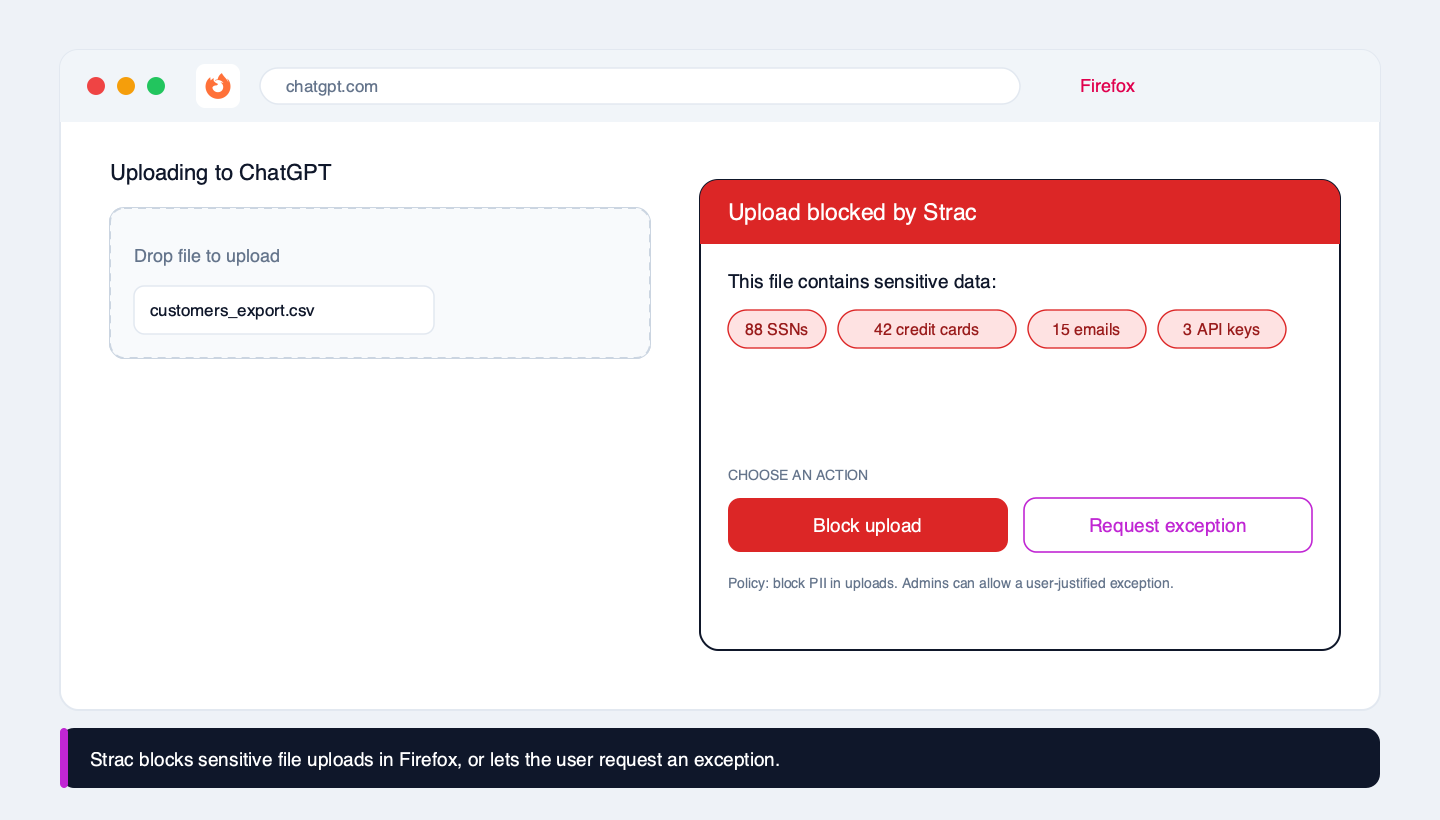
When a user tries to upload a file, Strac opens and inspects it in the browser, including CSVs, PDFs, Office files, and images via OCR. If it contains regulated data, Strac blocks the upload and shows the user exactly what was found. Because a hard block is not always the right answer, you decide the policy per data type: block outright, warn and allow, or block with a user-justified exception that is logged for review. You get control without turning security into a help-desk queue.
How Strac Firefox DLP works: detect, decide, act
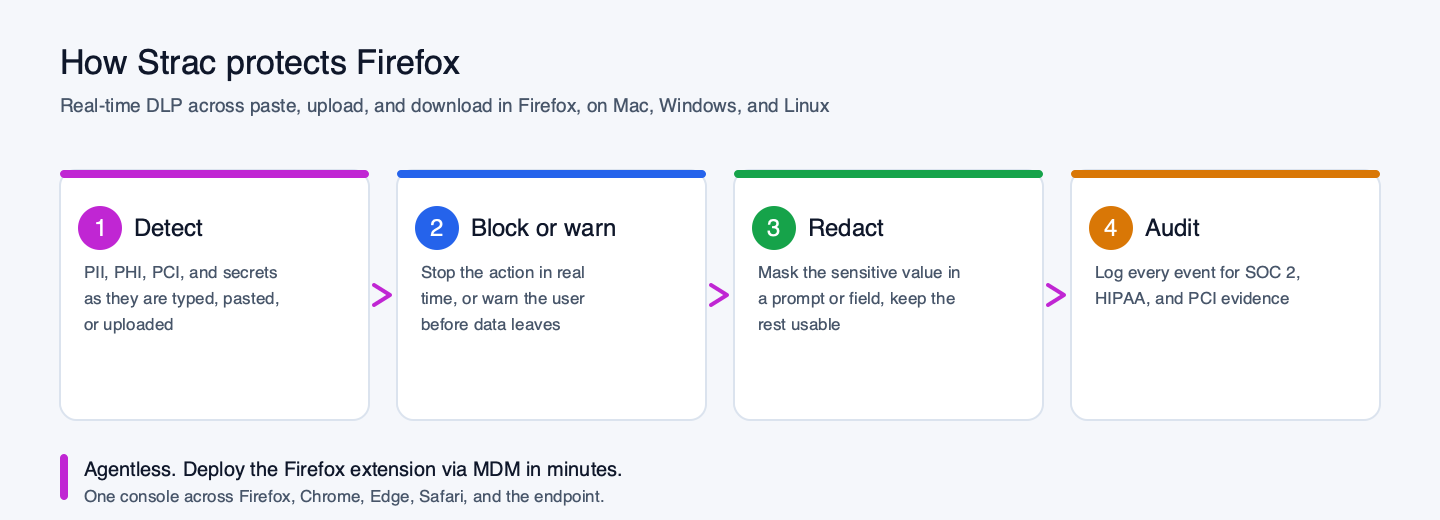
- Detect PII, PHI, PCI, secrets, and source code as they are typed, pasted, uploaded, or downloaded. Strac ships hundreds of prebuilt detectors, and you can add your own; see the full catalog of sensitive data elements and custom data elements.
- Decide per data type and destination: a card number headed to ChatGPT is not the same as an internal email in an internal tool.
- Act in real time: block, warn, redact the value in place, or allow with a logged exception.
- Audit every event with the who, what, where, and which data classes, ready for SOC 2, HIPAA, and PCI evidence.
✨ GenAI DLP: stop leaks into ChatGPT, Claude, Gemini, and Copilot
The biggest reason to deploy Firefox DLP in 2026 is generative AI. Employees paste customer data, source code, and PHI into ChatGPT, Claude, Gemini, and Copilot dozens of times a day, and none of it is covered by traditional DLP. Strac's Firefox extension recognizes these AI destinations and inspects the prompt and any attached file before it is sent, then blocks or redacts the sensitive parts while letting the rest of the prompt through. See AI DLP and our guide to blocking sensitive data in ChatGPT.
Deploying Strac on Firefox at scale
👉 Get the extension: install Strac Browser (Gen AI) DLP from the Firefox Add-ons store, then roll it out across your fleet below.
Strac installs as a managed Firefox extension. Push it across your fleet with your MDM or Firefox enterprise policies (policies.json), including Firefox ESR for regulated environments, on Mac, Windows, and Linux. Choose which data elements to detect and the action per type, and roll out in monitor mode first to tune policies before you start blocking. Most teams go from install to first enforced policy the same day.
Native Firefox controls vs Strac
Firefox's built-in privacy and security features protect the user from the web. They do nothing to stop the user from sending sensitive company data out through the browser. That is a different job:
| Capability | Native Firefox controls | Strac Firefox DLP |
|---|---|---|
| Detect PII, PHI, PCI, secrets | No | Yes, hundreds of prebuilt detectors + custom |
| Inspect file uploads (CSV, PDF, images/OCR) | No | Yes |
| Block a sensitive paste or upload in real time | No | Yes |
| Redact the value instead of blocking the whole action | No | Yes |
| User-justified exception workflow | No | Yes |
| Detect sensitive data going into ChatGPT / Claude / Gemini | No | Yes |
| Audit log mapped to SOC 2 / HIPAA / PCI / GDPR | No | Yes |
Compliance
Browser activity is in scope for every major framework, and auditors increasingly ask specifically about AI tools. Strac maps to SOC 2 CC6 (logical access and confidential data), HIPAA (preventing PHI from leaving through the browser), PCI DSS 4.0 (keeping card data out of scope), and GDPR (preventing personal-data transfers), and produces the per-event audit trail that turns a control into evidence.
Firefox, every browser, and the endpoint from one console
Firefox is one surface. Strac covers Chrome, Edge, and Safari from the same console, and pairs with endpoint DLP to cover downloads, USB, printing, and other exit channels beyond the browser. One policy, every path.
🌶️ Spicy FAQs on Firefox DLP
Does Firefox have built-in DLP?
No. Firefox has strong privacy features that protect the user from the web, but nothing that classifies content or stops a user from pasting or uploading sensitive company data out through the browser. That requires a dedicated tool like Strac.
Can Strac block a file upload in Firefox, or only detect it?
It can do both, and you choose. Strac opens and inspects the file (including CSVs, PDFs, and images via OCR) and can block the upload, warn the user, redact the sensitive parts, or allow it with a logged justification, set per data type.
Does it work on Firefox ESR and on Linux?
Yes. Strac supports Firefox including ESR, and runs on Mac, Windows, and Linux, which is why it is a fit for the developer and regulated environments where Firefox is common.
Will it stop engineers pasting secrets into ChatGPT?
Yes. Strac detects API keys, tokens, passwords, and source code in a prompt headed to ChatGPT, Claude, Gemini, or Copilot and blocks or redacts them before the prompt is sent.
How do I deploy it across my fleet?
As a managed extension via your MDM or Firefox enterprise policies. Start in monitor mode to tune policies, then switch on enforcement. Most teams are live the same day.
Does the user get a say, or is it always a hard block?
Your call. Policies can hard-block, warn and allow, or block with a user-justified exception that is logged, so you keep control without creating a help-desk bottleneck.


.avif)


