Microsoft Teams MCP Server: Secure Setup for AI Agents (2026)
The Microsoft Teams MCP server lets Claude, Copilot, and AI agents read and post across Teams chats and channels. Here's the official setup, the real risks of agent access to private chats, and how to govern it with redaction at the MCP layer.
The Microsoft Teams MCP server lets AI agents (Microsoft Copilot, Claude, Cursor, custom agents) read and act across Teams chats and channels through the Model Context Protocol — listing chats, reading and posting messages, and managing channels.
Microsoft's official server — the Work IQ Teams MCP server, part of Microsoft Agent 365 and currently in preview — is read/write with full CRUD and no read-only mode; you constrain it by scoping Entra permissions, not by a flag. It exposes ~24 tools across chats, channels, and messages.
The exposure is private: listChats reaches 1:1 and group DMs full of PII, credentials, and HR/legal discussion; channel message tools can harvest entire channels; and add meeting-transcript Graph scopes and verbatim confidential content comes too.
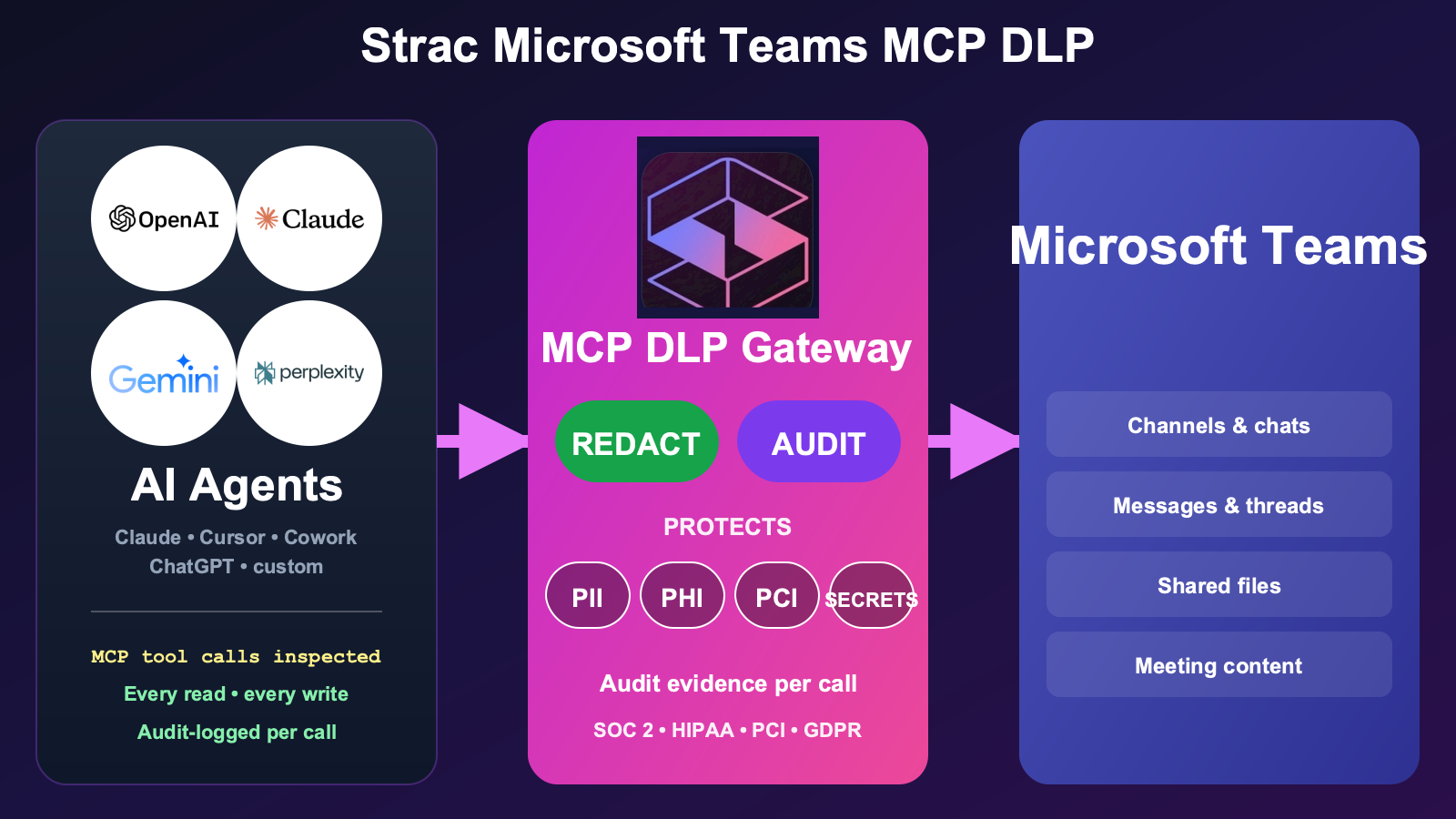
Strac Microsoft Teams MCP DLP is the governance layer for AI-agent access to Teams. Strac sees every call, controls which chats and channels an agent can reach and whether it can post, protects message and file content with redaction, masking, and custom regex, and proves every call as audit evidence mapped to SOC 2 / HIPAA / PCI / GDPR. Redaction is part of it, not the whole of it.
Setup is agentless and under 10 minutes — no application changes, no tenant migration.
What Is the Microsoft Teams MCP Server?
The Microsoft Teams MCP server is a Model Context Protocol implementation that exposes Teams chats, channels, and messages to AI agents as standardized tools. Once connected, an agent can list a user's chats, read and post messages, and work across the teams and channels that user can access.
There are several things called "Teams MCP," and the distinction is a security decision:
Microsoft's official Work IQ Teams MCP server. Part of Microsoft Agent 365 (requires a Microsoft 365 Copilot license), currently in preview. It exposes about 24 tools spanning chats, chat messages, channels, channel messages, and teams. Notably, it does not natively cover meeting chat, transcripts, recordings, or files — those need other Work IQ servers or raw Graph scopes.
Don't confuse it with the Microsoft MCP Server for Enterprise (Entra identity data, read-only, no Teams content) or the M365 Agents Toolkit (builds Teams apps; doesn't read your Teams data).
Community servers — mcp-teams-server, teams-mcp (which adds a --read-only flag), and broad ms-365-mcp-server builds with 200+ tools — exist with their own defaults.
From the user's seat, the agent suddenly participates in Teams — it reads threads and drafts replies. From the security seat, you've handed an AI client read and write access to private conversations across the tenant scope you granted.
That's the value. It's also exactly where a control layer belongs.
What AI Agents Can Actually Do With Microsoft Teams MCP
Point an agent at the Teams MCP server and it works Teams directly, as the delegated user. In practice it can:
Read 1:1 and group chats — listChats and the chat-message tools surface direct messages and group DMs, including everything sensitive people say there.
Read and search channel messages — list channel messages (with replies expanded), across the teams the user belongs to.
Post and reply — send messages to chats and channels, and reply in threads, as the user.
Manage chats and membership — create chats, update them, and add or remove members.
Reach meeting content — only if meeting-transcript Graph scopes are added on top, but then verbatim transcripts and recordings are in range.
Every one of those runs as the delegated user and within the Entra permissions you granted — which is what makes it useful, and exactly why the regulated data those messages contain needs an inspection layer in the tool-call path.
The Real Security Risks of the Microsoft Teams MCP Server
Teams is where the organization talks candidly — which is the risk. Five categories every security team should price in:
1. Private chats are the most sensitive corpus you have. 1:1 and group DMs carry PII, shared credentials, screenshots, HR conversations, legal discussion, and deal terms. listChats plus Chat.ReadWrite puts all of it in an agent's reach — content no one ever intended a model to read.
2. There is no read-only mode — only scope-limiting. The official server is read/write with full CRUD and no read-only flag. Your only brake is scoping Entra permissions correctly. Get a scope too broad and the agent can post as the user or modify chats, with nothing in the server itself to stop it.
3. Channel harvesting is one call away. Listing channel messages with replies expanded lets an agent vacuum entire channels of history into the model context — far more than any person would scroll.
4. Write actions have a real blast radius. Because writes are on, a prompt-injected agent can post messages as the user or add an outsider to a private channel — actions with social and security consequences, not just data exposure.
5. Files and transcripts widen it further. Teams files live in SharePoint/OneDrive, and added meeting-transcript scopes bring verbatim confidential discussion into range. The surface grows quietly as scopes accumulate.
Microsoft's own guidance leans on least-privilege Graph permissions, Entra Agent ID, and Conditional Access — all about access, none about the content an allowed agent pulls back. The DLP a company already runs doesn't sit between an agent and the Teams Graph. That reach is precisely why each agent's access to Teams must be governed: controlled (which chats and channels it can touch, and whether it can post), the sensitive data it returns protected, and every call audited. That is where Strac Microsoft Teams MCP DLP lives.
✨ Strac Microsoft Teams MCP DLP — Production-Ready Agent Governance
Strac's Teams MCP DLP is the governance layer that sits between AI agents and the Teams MCP server. Strac governs every call: it sees exactly what each agent reads and posts, controls what it can reach and do, protects the sensitive content it touches, and logs every call as audit evidence. In-policy, non-sensitive calls flow through untouched.
The Strac Teams MCP DLP gateway sits between any AI agent (Copilot, Claude, Cursor, custom) and the Teams MCP server. It scopes which chats and channels the agent can reach, blocks posting as the user, and redacts regulated content before any message reaches the model.
Beyond redacting or blocking, Strac can also pseudonymize or de-identify the data on a Microsoft Teams MCP tool call — swapping PII, PHI, and PCI for realistic, format-preserving fakes — so a team can keep using the data in an AI model, analytics, or a test environment while the real records never leave your control. See Data Pseudonymization.
What this looks like in practice, mapped to See / Control / Protect / Prove:
See — Strac surfaces every call an agent makes: which AI client, which user, which chats and channels it touched, how many messages came back, and which data classes were present.
Control — Strac scopes access at the chat and channel level and gates writes. You let an agent read a project channel but never the leadership DM, and block it from posting as the user — supplying the read-only control the official server lacks.
Protect — and here is what the security teams evaluating a scrubbing gateway ask for first: enforcement you define per field. Redact a phone number, mask a card to its last four, or match your own regex for an internal identifier — run by Strac's managed classifier rather than a Microsoft Presidio or AWS Bedrock pipeline you operate yourself. The same scrubbing covers the custom MCP tools you build on Teams data for staff and customers, not just the off-the-shelf connector.
Prove — every call is logged with the data classes detected and the controls applied — SOC 2 / HIPAA / PCI / GDPR audit evidence, produced automatically, alongside Microsoft's own Graph activity logs.
The same Strac MCP DLP layer covers your other Microsoft surfaces and SaaS — SharePoint MCP, Microsoft 365 MCP, and Slack MCP — one control plane across every place AI agents reach your regulated data. See the MCP DLP pillar and the broader MCP data security discipline for the full model.
✨ Strac Data Discovery — Know Where Sensitive Data Lives
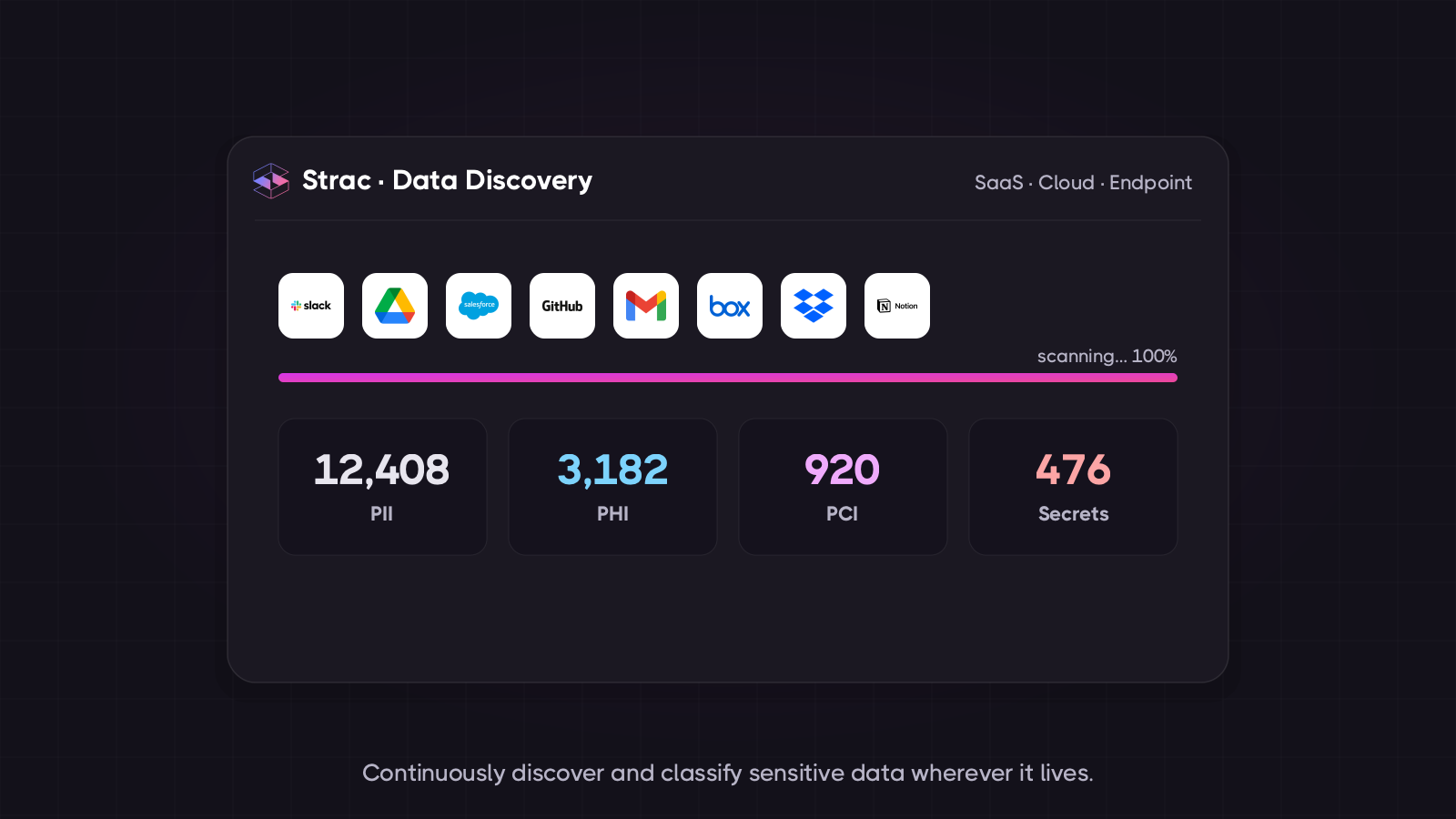
Strac's data discovery maps where regulated data sits across your collaboration and SaaS estate — so you know what an agent could expose through Teams before you ever connect one.
MCP DLP governs the AI-agent surface. Strac's data discovery governs the data itself — continuously finding and classifying PII, PHI, PCI, and secrets across your environment, so policy targets the right content. Most teams run both: discovery to map and label the sensitive data, MCP DLP to govern how agents reach it.
What Strac's discovery includes:
Continuous classification of PII, PHI, PCI, financial data, and credentials across connected SaaS and collaboration surfaces
Content-level inspection — Strac reads message and document contents, not just titles, so a shared secret or a pasted SSN is caught
A live data map that feeds directly into the MCP DLP redaction policy
Audit-ready findings mapped to SOC 2 CC6, HIPAA Security Rule, PCI Req. 3/7/10, and GDPR
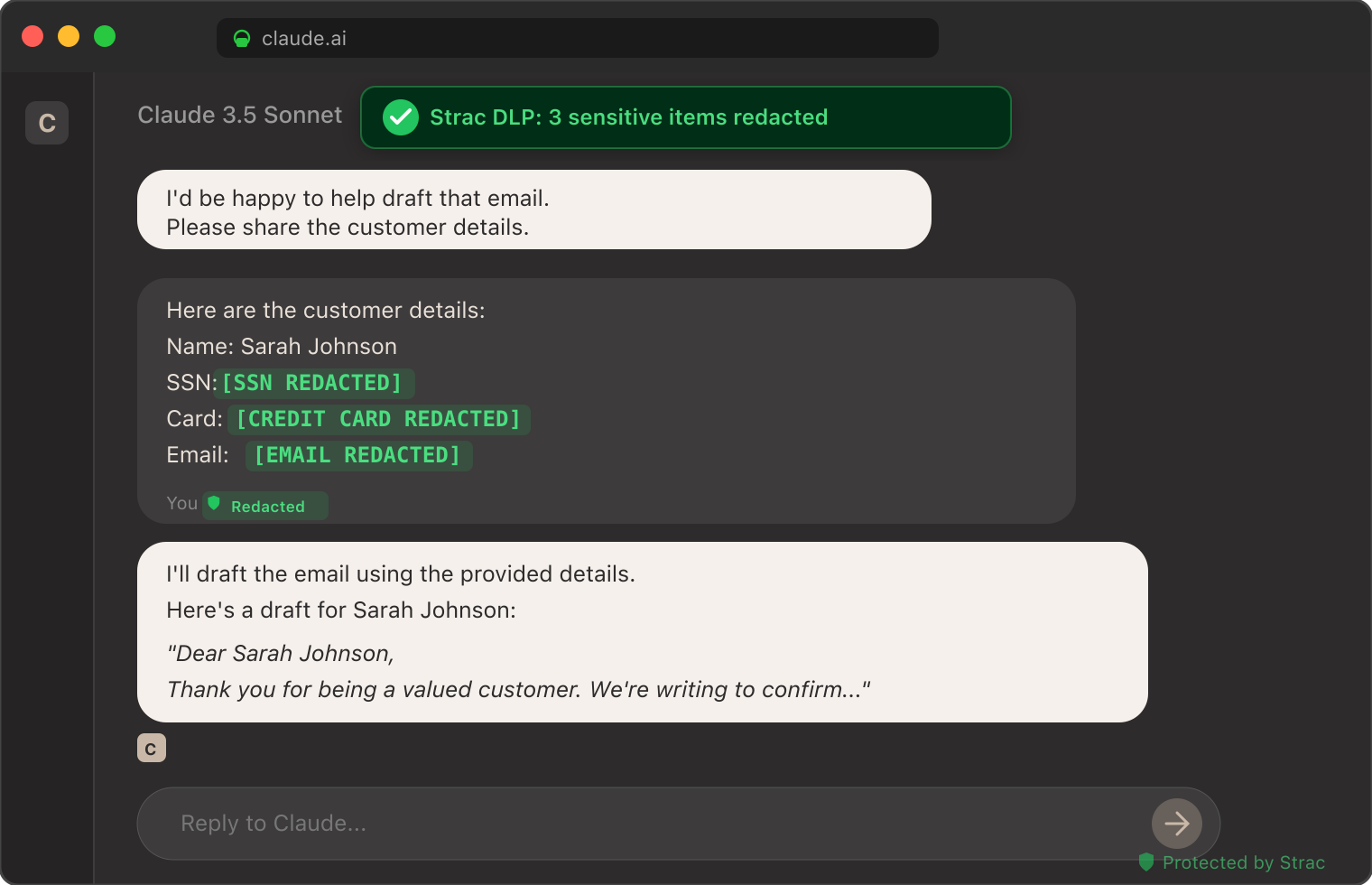
The screenshot below shows Strac's MCP DLP redacting sensitive data from a real Claude session — customer emails, identifiers, and credit card numbers tokenized inline before the model received them. The same inspection pattern runs on every Teams MCP call routed through Strac, applied to the messages and files returned.
Strac DLP at work inside a Claude conversation: sensitive elements tokenized inline before the model sees them. The same pattern runs at the MCP layer for every Teams message returned.
How to Set Up Strac Microsoft Teams MCP DLP
Setup is agentless and takes under 10 minutes.
Connect Strac to Teams. Strac uses a dedicated, least-privilege Entra app registration with minimal Graph scopes — never broad tenant-wide permissions — consistent with Microsoft's least-privilege guidance.
Point your AI client at the Strac MCP endpoint. Strac issues an MCP server endpoint that drops into your AI client's configuration and proxies to the Teams MCP server behind it. For Claude Desktop:
json
   "mcpServers": {
     "teams": {
       "url": "https://mcp.strac.io/teams",
       "auth": { "type": "bearer", "token": "<your-strac-token>" }
     }
   }
For Copilot, Cursor, and custom agents — same endpoint, same auth.
Pick your policy. Out-of-the-box templates for SOC 2, HIPAA, PCI, and GDPR. Custom policies — chat/channel allow/deny, content redaction, post-blocking, custom regex — take minutes to configure.
Done. Every call between your agent and Teams now flows through the Strac gateway. The audit log starts populating immediately.
Compliance Coverage Out of the Box
The same Strac Microsoft Teams MCP DLP control produces evidence mapped to every major compliance framework.
Framework
What Strac Teams MCP DLP Satisfies
SOC 2
CC6.1 (logical access to data), CC6.6 (unauthorized data exposure), CC6.7 (restricted transmission of data to external systems), CC7.2 (monitoring for anomalies including AI activity)
Req. 3.3 (PAN masking), Req. 3.4 (render PAN unreadable), Req. 7 (least privilege), Req. 10 (log every access to cardholder data)
GDPR
Art. 5 (data minimization & purpose limitation), Art. 25 (data protection by design), Art. 30 (records of processing), Art. 32 (security of processing)
For the broader AI-data-governance program this sits inside, see AI DLP.
🌶️ Spicy FAQs for Microsoft Teams MCP Server
Is there an official Microsoft Teams MCP server?
Yes — the Work IQ Teams MCP server, part of Microsoft Agent 365, currently in preview and requiring a Microsoft 365 Copilot license. It exposes around 24 tools across chats, channels, and messages. Don't confuse it with the Microsoft MCP Server for Enterprise (Entra identity data, read-only, no Teams content) or the M365 Agents Toolkit (for building Teams apps). Because it's preview and read/write, treat it as something to govern carefully, not point at production unguarded.
Is the Microsoft Teams MCP server read-only?
No. The official server is read/write with full CRUD and no documented read-only mode — you constrain it by scoping Entra/Graph permissions, not by a flag. That's a meaningfully weaker posture than a true read-only switch: one over-broad scope and the agent can post as the user or modify chats. Some community servers add a --read-only flag; the official one relies entirely on permission scoping, which is why a control layer that can enforce read-only and redact content matters.
Is the Microsoft Teams MCP connector the same as the Teams MCP server?
Yes — the same thing. The MCP specification says server; Copilot and Claude surface it as the Teams connector. Both let an agent read and post in Teams, and Strac's Teams MCP connector redacts regulated content at the tool-call boundary regardless of the label.
Is the Microsoft Teams MCP server safe to use with sensitive data?
Not by itself. It reaches private 1:1 and group chats, can harvest whole channels, has no read-only mode, and (with added scopes) meeting transcripts. For production use against regulated data you need an MCP-layer control like Strac Teams MCP DLP that scopes chat and channel access, blocks posting, and redacts PII, PHI, PCI, and secrets before any message reaches the model.
Can Strac stop an AI agent from posting in Teams as me?
Yes. Strac inspects the call before it executes. Write actions — posting messages, replying, creating chats, adding members — can be blocked outright, allowed only in specific channels, or routed for human approval. That gives you the read-only enforcement the official server doesn't provide.
What sensitive data types does Strac detect in Teams messages and files?
PII (SSN, driver's license, passport, address, phone, email), PHI (clinical notes, MRN co-occurrence, ICD-10 codes adjacent to identifiers), PCI (full and partial card numbers via Luhn check), credentials (API keys, AWS / GCP / Azure access keys, OAuth tokens, JWTs — 48+ patterns), and custom detectors — including your own regex — trained on your internal classifications. Detection runs on message text and on files surfaced from SharePoint/OneDrive.
How long does Strac Teams MCP DLP take to deploy?
Under 10 minutes. Connect Strac with a least-privilege Entra app, paste the Strac MCP endpoint into your AI client's config, pick a policy template, done. No application changes, no tenant migration.
Strac ties every Microsoft Teams tool call to the individual user, so Microsoft Teams enforces its team and channel membership exactly as it would in the UI — and Strac inspects the tool results for injected instructions before the model ever acts on them. All of it runs from one agentless platform plus a lightweight endpoint agent, so the same controls cover Microsoft Teams on the agent path and the human path alike.
The Bottom Line
The Microsoft Teams MCP server is fast becoming the way AI agents read and post across the place your organization talks most candidly. The official server is in preview, read/write with no read-only mode, and reaches private chats — and with a few extra scopes, meeting transcripts. Running Teams MCP in 2026 without an MCP-layer governance control isn't a question of if a private conversation reaches a model it shouldn't; it's when.
Strac Microsoft Teams MCP DLP gives you the control plane — see every call, scope every agent, block posting, protect every regulated message, prove every call — so your team can use Teams with Copilot, Claude, and any future AI client without making each one a separate security exception.
If you are running — or about to run — Teams MCP in production, book a 30-minute demo. We'll walk through the architecture, the read-only-vs-scope decision, the redaction policy, and a deployment plan for your tenant and AI clients.
Yes — the Work IQ Teams MCP server, part of Microsoft Agent 365, currently in preview and requiring a Microsoft 365 Copilot license. It exposes around 24 tools across chats, channels, and messages. Don't confuse it with the Microsoft MCP Server for Enterprise (Entra identity data, read-only, no Teams content) or the M365 Agents Toolkit (for building Teams apps). Because it's preview and read/write, treat it as something to govern carefully, not point at production unguarded.
Is the Microsoft Teams MCP server read-only?
No. The official server is read/write with full CRUD and no documented read-only mode — you constrain it by scoping Entra/Graph permissions, not by a flag. That's a meaningfully weaker posture than a true read-only switch: one over-broad scope and the agent can post as the user or modify chats. Some community servers add a --read-only flag; the official one relies entirely on permission scoping, which is why a control layer that can enforce read-only and redact content matters.
Is the Microsoft Teams MCP connector the same as the Teams MCP server?
Yes — the same thing. The MCP specification says server; Copilot and Claude surface it as the Teams connector. Both let an agent read and post in Teams, and Strac's Teams MCP connector redacts regulated content at the tool-call boundary regardless of the label.
Is the Microsoft Teams MCP server safe to use with sensitive data?
Not by itself. It reaches private 1:1 and group chats, can harvest whole channels, has no read-only mode, and (with added scopes) meeting transcripts. For production use against regulated data you need an MCP-layer control like Strac Teams MCP DLP that scopes chat and channel access, blocks posting, and redacts PII, PHI, PCI, and secrets before any message reaches the model.
Can Strac stop an AI agent from posting in Teams as me?
Yes. Strac inspects the call before it executes. Write actions — posting messages, replying, creating chats, adding members — can be blocked outright, allowed only in specific channels, or routed for human approval. That gives you the read-only enforcement the official server doesn't provide.
Discover & Protect Data on SaaS, AI, MCP, Endpoints & Cloud
Strac provides end-to-end data loss prevention for all SaaS and Cloud apps. Integrate in under 10 minutes and experience the benefits of live DLP scanning, live redaction, and a fortified SaaS environment.


.webp)






.avif)



.gif)
