Best Browser DLP Solutions (2026): Extension vs Enterprise Browser
Which DLP solution is best for the browser? Compare extension-based browser DLP, enterprise browsers, and inline proxies — and see how Strac redacts, warns, and blocks sensitive data in GenAI prompts and SaaS uploads before they leave the tab.
The browser is where sensitive data actually leaks now: pasted into ChatGPT and Claude, uploaded to personal Drive accounts, typed into SaaS forms. Browser DLP inspects and controls that data inside the tab, before it leaves — the last point where you can still see plaintext.
Three architectures compete for the job: extension-based browser DLP (deploys to your existing Chrome/Edge in minutes), enterprise browsers (replace the browser entirely — powerful but a heavy rollout), and inline proxies/SSE (network-level, increasingly blind to GenAI flows and encrypted paths).
The best browser DLP for most teams in 2026 is extension-based with real remediation: detect PII, PHI, PCI, and secrets as they're typed or uploaded, then redact, warn the user, or block the submission — not just log it. That's Strac's model, and it works on the browsers employees already use.
This guide compares the approaches, the leading vendors, and what to demand in a browser DLP evaluation.
Last updated: July 2026
Browser DLP (browser data loss prevention) stops sensitive data — PII, PHI, PCI, secrets, source code — from leaving through the browser: pasted into a website, uploaded to a file-sharing app, or typed into an AI tool like ChatGPT or Claude. Strac enforces it inline via its browser DLP extension, redacting, warning, or blocking before the data is sent.
What it protects: anything regulated an employee types or uploads into a web app or GenAI tool.
Three ways to do it: a browser extension, a dedicated enterprise browser, or network-proxy inspection — compared below.
Strac's approach: a lightweight extension on the browsers employees already use, with redact-and-continue so work is never blocked.
Why the Browser Became the DLP Battleground
How Do You Stop Employees From Pasting Sensitive Data Into AI Tools?
To stop employees pasting sensitive data into AI tools, you need a browser-level control that inspects text before it is submitted — network and endpoint DLP cannot see inside the prompt. Strac's browser extension detects PII, PHI, PCI, and secrets as they are typed or pasted into ChatGPT, Claude, Copilot, and any website, and redacts, warns, or blocks inline — employees keep working, the sensitive data never leaves.
✨ Browser DLP Architectures Compared
Every browser DLP tool takes one of three approaches. The right one balances control against how much you disrupt the way people already work.
Strac browser DLP protecting data across the browsers and apps employees already use.
Architecture
How it works
Trade-off
Browser extension
Adds DLP to the Chrome, Edge, and Firefox employees already use
Fast to deploy, no workflow change — Strac's approach
Enterprise browser
Employees switch to a separate managed browser
Full control, but forces a new browser on everyone
Network / proxy DLP
Inspects traffic at the network layer
Blind to in-page context and encrypted sessions; misses what happens inside the browser
Ten years ago, sensitive data left through email attachments and USB drives. Today it leaves through a browser tab: a support rep pasting a customer record into ChatGPT, a developer dropping an API key into a web form, an analyst uploading a spreadsheet to a personal cloud account. Network DLP can't reliably see inside these flows — GenAI traffic is encrypted, sessions are pinned, and much of it happens off-VPN — and endpoint DLP watches files, not form fields.
Browser DLP moves the control point to where the data is still visible: the DOM itself. Before the prompt is submitted, before the file finishes uploading, the content can be inspected in plaintext and acted on. That timing is what makes the browser the highest-leverage DLP surface of 2026 — and the only realistic one for GenAI data protection.
The Three Browser DLP Architectures
1. Extension-based browser DLP (deploy to the browser you have). A managed extension for Chrome, Edge, Firefox, and Safari inspects page content, prompts, and uploads in real time. Deploys via your existing browser management in minutes, no workflow change for users. This is Strac's approach — and the category's momentum.
2. Enterprise browsers (replace the browser). Island and similar products embed security into a custom Chromium build. Deep control (watermarking, copy/paste governance), but you're asking every employee to switch browsers — a heavy change-management lift, priced accordingly.
3. Inline proxy / SSE browser controls (inspect the traffic). SASE vendors apply DLP to browser traffic at the network edge. Broad but shallow for this use case: encrypted GenAI flows, unmanaged devices, and prompt-level context are largely out of reach — the same structural gaps covered in our DLP for SASE guide.
✨ The Best Browser DLP Solutions in 2026
1. Strac — best browser DLP for GenAI and SaaS data protection. Strac's extension detects PII, PHI, PCI, secrets, and source code as employees type prompts or upload files — in ChatGPT, Claude, Gemini, Copilot, Perplexity, and any SaaS app — and remediates in real time: redact the sensitive field, warn the user before submission, or block it outright, with every event logged as compliance evidence. It's the same classifier Strac runs across SaaS, endpoint, and MCP connectors, so browser findings share one policy and one audit trail.
Warn or block before submission — the moment that matters in browser DLP.
2. Island — best enterprise browser (full replacement). The deepest in-browser control available, if you can drive a company-wide browser migration and the budget that comes with it.
3. LayerX — browser extension focused on SaaS access governance and risky extensions. Strong on browser-surface visibility; lighter on content-level remediation like inline redaction.
4. Zscaler / Netskope browser controls — best if you want browser DLP bundled into an existing SSE stack. Reasonable inline coverage for managed-device web traffic, with the GenAI and remediation-depth caveats above.
5. Push Security — browser extension centered on identity and SaaS attack surface. A complement rather than a competitor to content-level DLP: it watches accounts and logins, not the sensitive data inside prompts and uploads.
🎥 What Real Browser Remediation Looks Like
The test that separates browser DLP products: what happens in the two seconds after an employee pastes a customer's SSN into a GenAI prompt? Logging it for tomorrow's SOC review is monitoring, not prevention. Strac's answer, live in the tab:
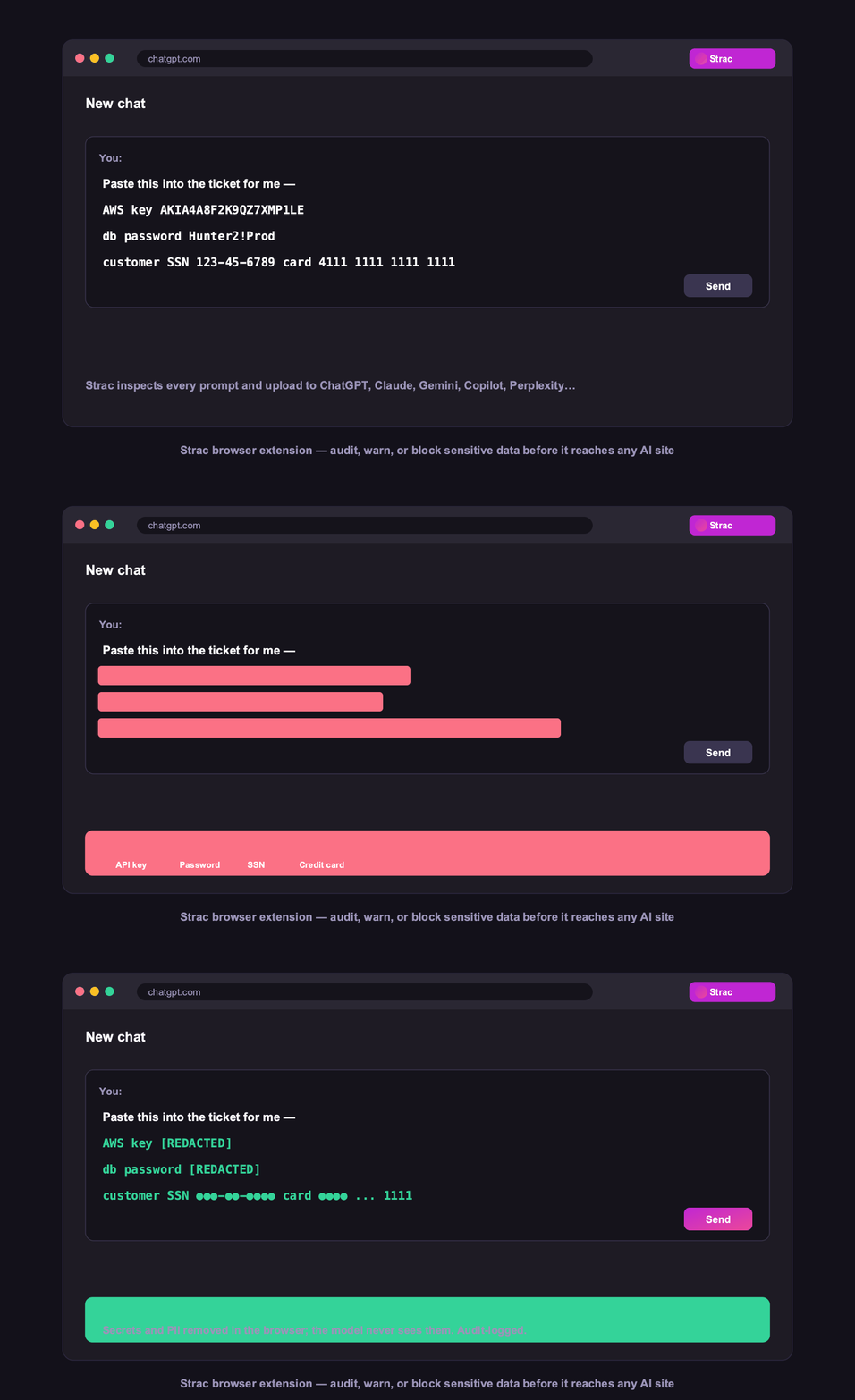
Inline redaction inside the prompt — the sensitive value never reaches the model.
Redact — the SSN is replaced inline; the prompt still works, the data never leaves.
Warn — the employee sees exactly what was detected and chooses, creating awareness without breaking workflows.
Block — for the data classes you never allow (PHI to consumer AI, secrets anywhere), the submission stops cold.
Prove — every detection, action, and user decision lands in an audit log mapped to SOC 2, HIPAA, and PCI.
That block-warn-redact spectrum matters because blanket blocking fails in practice: employees route around it on personal devices. Redact-and-continue keeps the tool usable while removing the risk — the philosophy Strac applies from the browser all the way to AI-agent tool calls.
🎥 Strac Browser DLP Solution: Redact and Block in Real Time
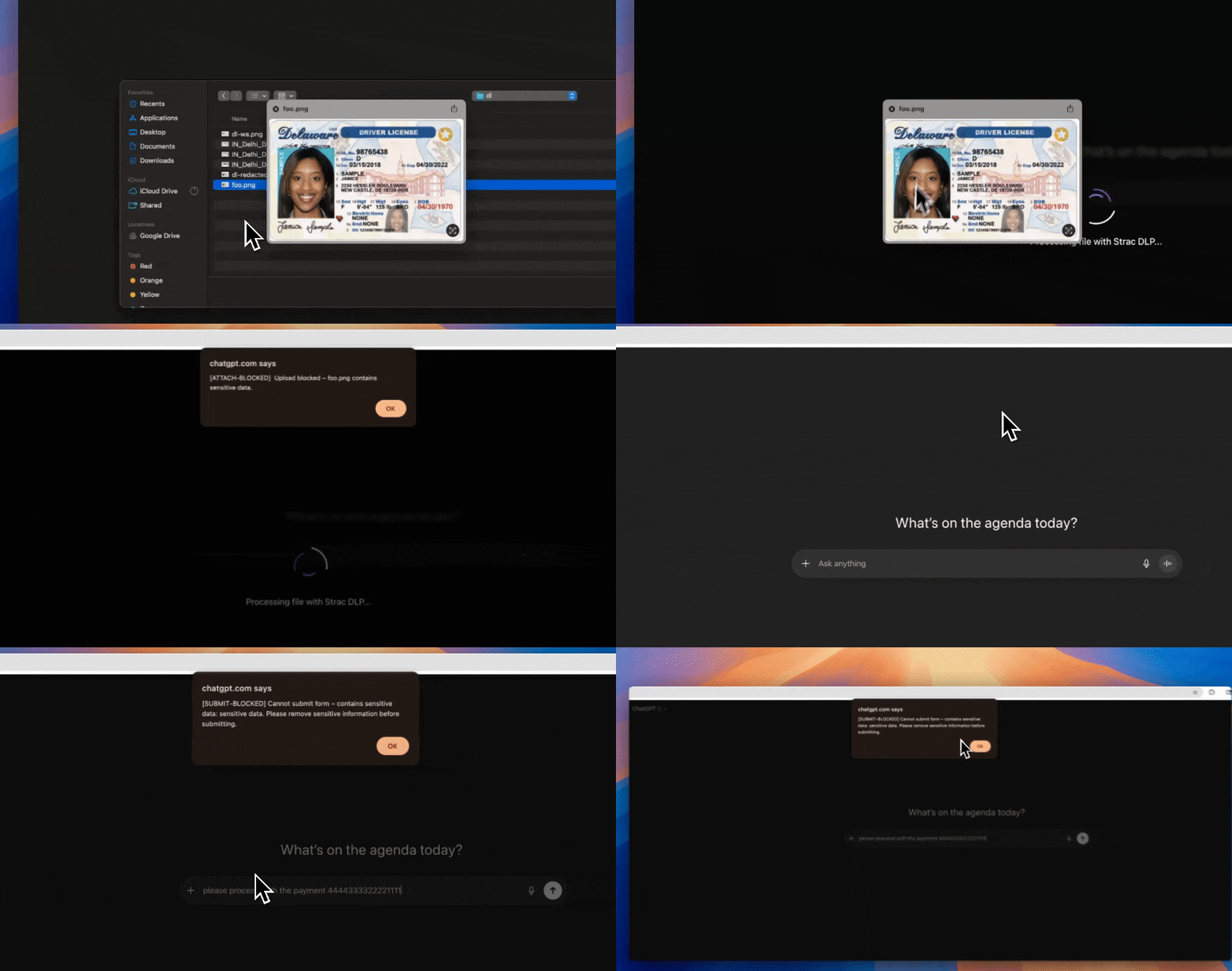
Among browser DLP solutions, Strac is a lightweight extension (no full enterprise-browser swap) that inspects content the moment it is typed, pasted, or uploaded — and redacts or blocks PII, PHI, PCI, and secrets before they leave the page. It works across ChatGPT, Claude, Gemini, Copilot, and any web app.
Strac browser DLP detecting and redacting sensitive data in a GenAI prompt in real time.
Strac redacts sensitive data in a GenAI prompt in real time — the core of a modern browser DLP solution.
Block mode: Strac stops sensitive data from leaving the browser entirely, with an in-context warning.
✨ Browser DLP for Shadow AI
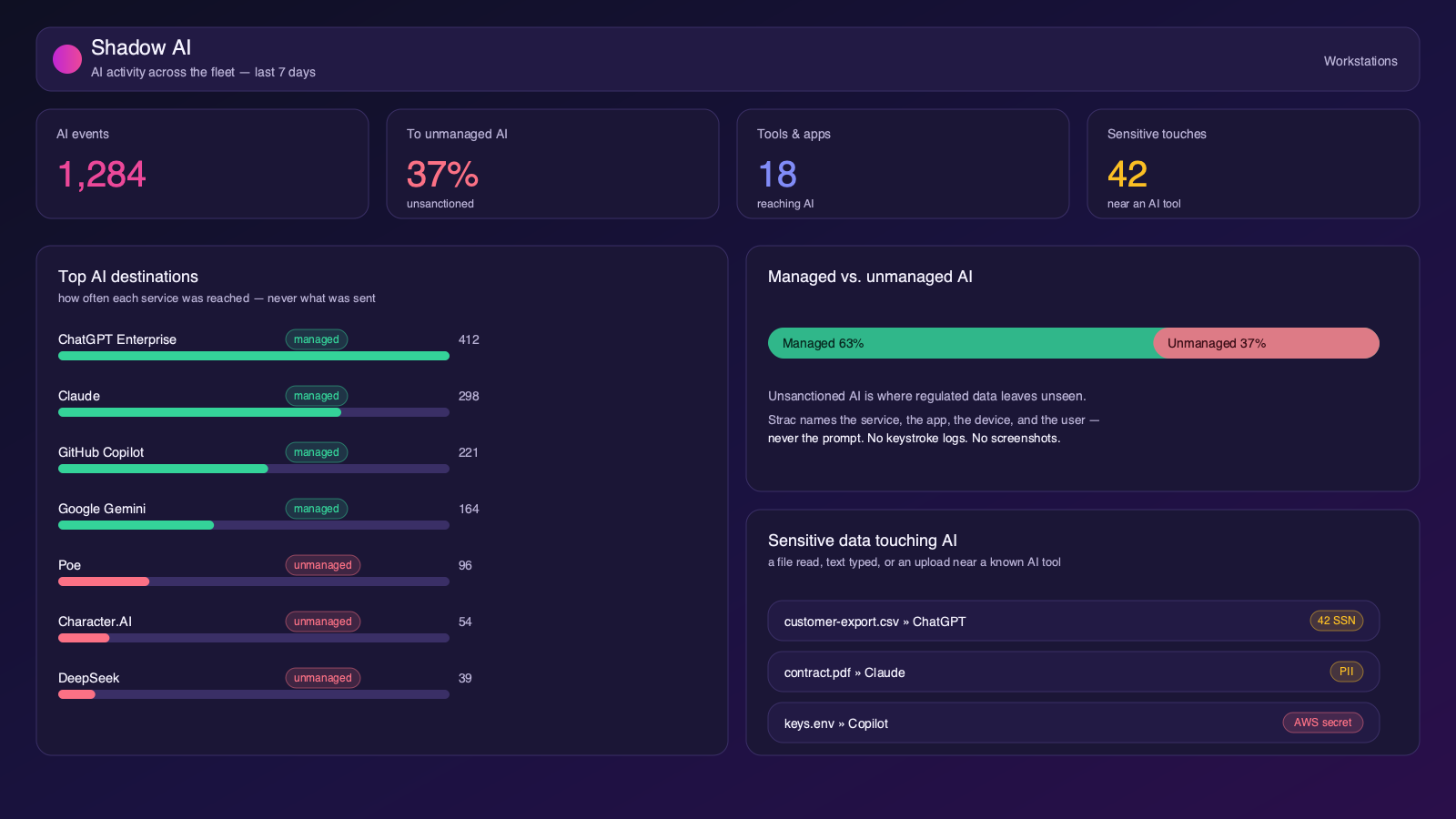
The browser is where Shadow AI happens — employees reach for unsanctioned ChatGPT, Claude, and Gemini. A browser DLP solution is the control point: Strac discovers which AI tools are in use, scores the data risk, and blocks or redacts risky prompts, privacy-first (no keystroke logging or screenshots). See Shadow AI.
Strac surfaces Shadow AI usage from the browser — every AI tool in use and the data at risk.
What to Demand in a Browser DLP Evaluation
Pre-submission interception — detection must fire before the prompt or upload leaves the tab, not from logs afterward.
Real remediation verbs — redact, warn, and block; if the only outputs are alerts, it's visibility, not DLP.
GenAI coverage by name — test it live against ChatGPT, Claude, Gemini, and Copilot, including file uploads and images (OCR).
Detection quality — Luhn-validated cards, contextual SSNs, 48+ secret patterns, custom regex for your identifiers — bare regex drowns you in false positives.
Deployment reality — an extension your fleet gets tomorrow beats a browser migration next quarter.
One policy across surfaces — browser findings should share policy and audit evidence with SaaS, endpoint, and MCP, or you're building parallel DLP programs.
✨ Beyond the browser: the endpoint channels that back it up
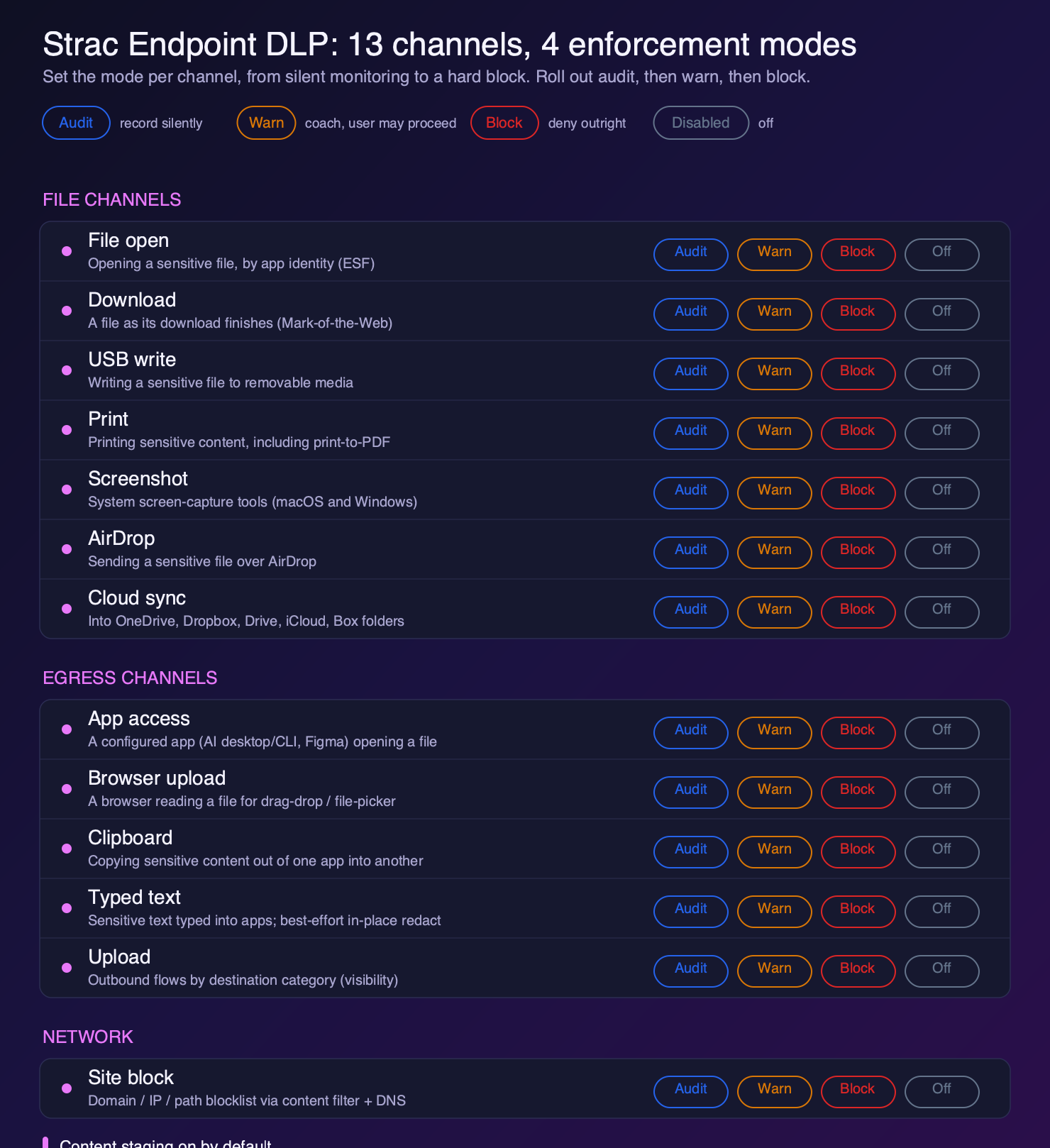
Browser DLP covers what happens in the tab. A complete program also covers what happens the moment data leaves the browser or the app around it. Strac pairs its browser controls with endpoint channels that close the adjacent gaps: browser upload (a browser reading a sensitive file for a drag-drop or file-picker upload), clipboard (copying out of one app and pasting into a browser), typed text (sensitive text typed into web and desktop apps), and site block (a domain, IP, and path blocklist via content filter and DNS).
Each runs in audit, warn, or block, so the browser and the endpoint enforce one consistent policy rather than leaving a seam between them.
Browser DLP backed by endpoint channels: browser upload, clipboard, typed text, and site block
🌶️ Spicy FAQs for Best Browser DLP
What DLP solution is best for the browser?
For most organizations, an extension-based browser DLP with inline remediation — Strac being the leading example — because it deploys to the Chrome, Edge, Firefox, or Safari fleet you already run and can redact, warn, or block sensitive data before it's submitted, including in GenAI tools. Enterprise browsers like Island offer deeper control if you can absorb a full browser migration; SSE-based inspection suits teams that only need coarse, network-level coverage.
What is browser DLP?
Browser DLP is data loss prevention enforced inside the browser itself — inspecting what users type, paste, and upload in web apps and AI tools, then redacting, warning, or blocking sensitive data before it leaves the page. It closes the gap network and endpoint DLP can't reach: encrypted GenAI flows, SaaS form fields, and file uploads happening entirely inside the tab.
Do I need browser DLP if I already have endpoint DLP or SASE?
Usually yes. Endpoint DLP governs files and devices but doesn't see inside a ChatGPT prompt; SASE inspects network traffic but is increasingly blind to encrypted GenAI flows and off-network devices. Browser DLP is the only layer that sees the plaintext at the moment of submission. Most 2026 architectures run browser DLP alongside those layers with one shared policy.
Can browser DLP stop employees from pasting sensitive data into ChatGPT?
Yes — that's its defining use case. Strac's extension detects PII, PHI, PCI, and secrets in prompts as they're written and either redacts the sensitive value inline, warns the employee before they hit send, or blocks the submission based on policy. The AI tool stays usable; the regulated data never reaches it.
Does browser DLP work with Claude, Gemini, and Copilot — or just ChatGPT?
A serious browser DLP covers every GenAI surface. Strac protects ChatGPT, Claude, Gemini, Copilot, Perplexity, and other AI tools with the same policies, and extends past the browser to Claude Desktop and MCP-connector traffic — so switching AI tools doesn't create a new gap.
The browser is where your sensitive data and your employees' AI tools meet — and where DLP either happens before submission or doesn't meaningfully happen at all. Enterprise browsers are powerful but heavy; network inspection is broad but shallow. For most teams, the best browser DLP in 2026 is an extension that ships this week and remediates for real: redact, warn, block, and prove.
Book a 30-minute demo to see Strac's browser DLP live against your own AI tools and SaaS apps.
Strac's extension is publicly listed on the Chrome Web Store, Firefox Add-ons, and Edge Add-ons — with Safari supported as well, so coverage doesn't depend on standardizing the whole company on one browser.
What DLP solution is best for the browser?
For most organizations, an extension-based browser DLP with inline remediation — Strac being the leading example — because it deploys to the Chrome/Edge fleet you already run and can redact, warn, or block sensitive data before it's submitted, including in GenAI tools. Enterprise browsers like Island offer deeper control if you can absorb a full browser migration; SSE-based inspection suits teams that only need coarse, network-level coverage.
What is browser DLP?
Browser DLP is data loss prevention enforced inside the browser itself — inspecting what users type, paste, and upload in web apps and AI tools, then redacting, warning, or blocking sensitive data before it leaves the page. It closes the gap network and endpoint DLP can't reach: encrypted GenAI flows, SaaS form fields, and file uploads happening entirely inside the tab.
Do I need browser DLP if I already have endpoint DLP or SASE?
Usually yes. Endpoint DLP governs files and devices but doesn't see inside a ChatGPT prompt; SASE inspects network traffic but is increasingly blind to encrypted GenAI flows and off-network devices. Browser DLP is the only layer that sees the plaintext at the moment of submission. Most 2026 architectures run browser DLP alongside those layers with one shared policy.
Can browser DLP stop employees from pasting sensitive data into ChatGPT?
Yes — that's its defining use case. Strac's extension detects PII, PHI, PCI, and secrets in prompts as they're written and either redacts the sensitive value inline, warns the employee before they hit send, or blocks the submission based on policy. The AI tool stays usable; the regulated data never reaches it.
Does browser DLP work with Claude, Gemini, and Copilot — or just ChatGPT?
A serious browser DLP covers every GenAI surface. Strac protects ChatGPT, Claude, Gemini, Copilot, Perplexity, and other AI tools with the same policies, and extends past the browser to Claude Desktop and MCP-connector traffic — so switching AI tools doesn't create a new gap.
Discover & Protect Data on SaaS, AI, MCP, Endpoints & Cloud
Strac provides end-to-end data loss prevention for all SaaS and Cloud apps. Integrate in under 10 minutes and experience the benefits of live DLP scanning, live redaction, and a fortified SaaS environment.


.webp)







.avif)



.gif)
