DLP Agent: What It Is, What It Covers & AI Support (2026)
A DLP agent explained: what it inspects on Windows, macOS, and Linux endpoints, why content-aware and AI-tool coverage are now table stakes, and how it differs from agentless DLP.
A DLP agent is lightweight data-loss-prevention software installed on an endpoint — a laptop or desktop — that inspects how sensitive data is used and enforces policy directly on the device. Unlike network DLP, which only sees traffic crossing the perimeter, a DLP agent acts where data is created and used: it can stop a file copied to USB, a document synced to personal cloud, or a customer record pasted into an AI tool, even when the device is off the corporate network.
The Strac DLP agent runs on Windows, macOS, and Linux from a single console, is content-aware (it reads what is inside a file, with OCR for scans and images), and remediates rather than only alerting.
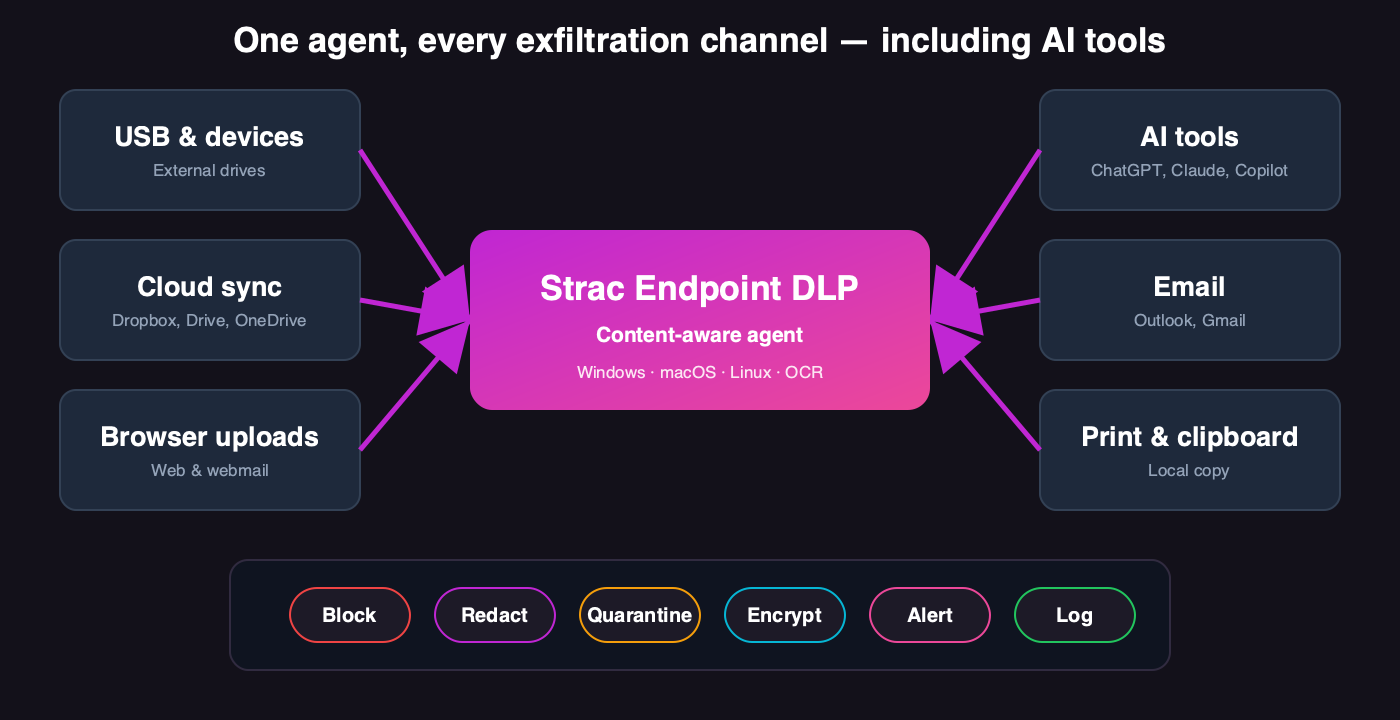
One DLP agent across every channel data leaves through — devices, cloud sync, browser, email, print, and AI tools.
✨ What a DLP Agent Covers
Capability
Industry expectation
Strac DLP agent
Windows / macOS / Linux
Cross-platform from one console
Yes
Content inspection + OCR
Read file content, not just names
Yes
USB & device control
Content-aware, not blanket block
Yes
Cloud-sync & upload control
Dropbox, Drive, OneDrive, web
Yes
AI-tool coverage
Prompts/uploads to GenAI
Yes — ChatGPT, Claude, Gemini, Copilot
Remediation
Beyond block-only
Block, redact, quarantine, encrypt, warn
Offline enforcement
Works off the network
Yes
Low overhead
Minimal CPU/memory
Yes
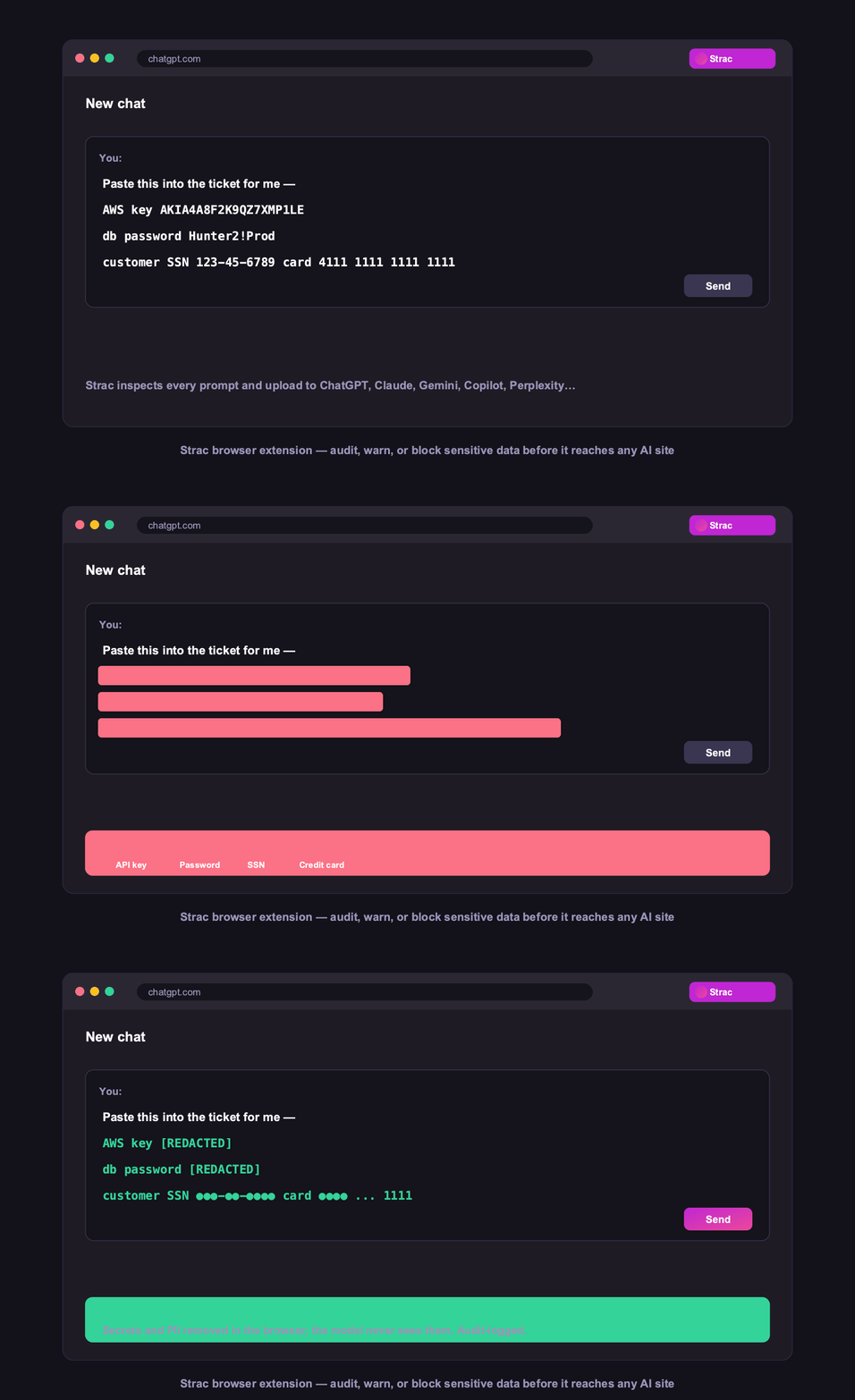
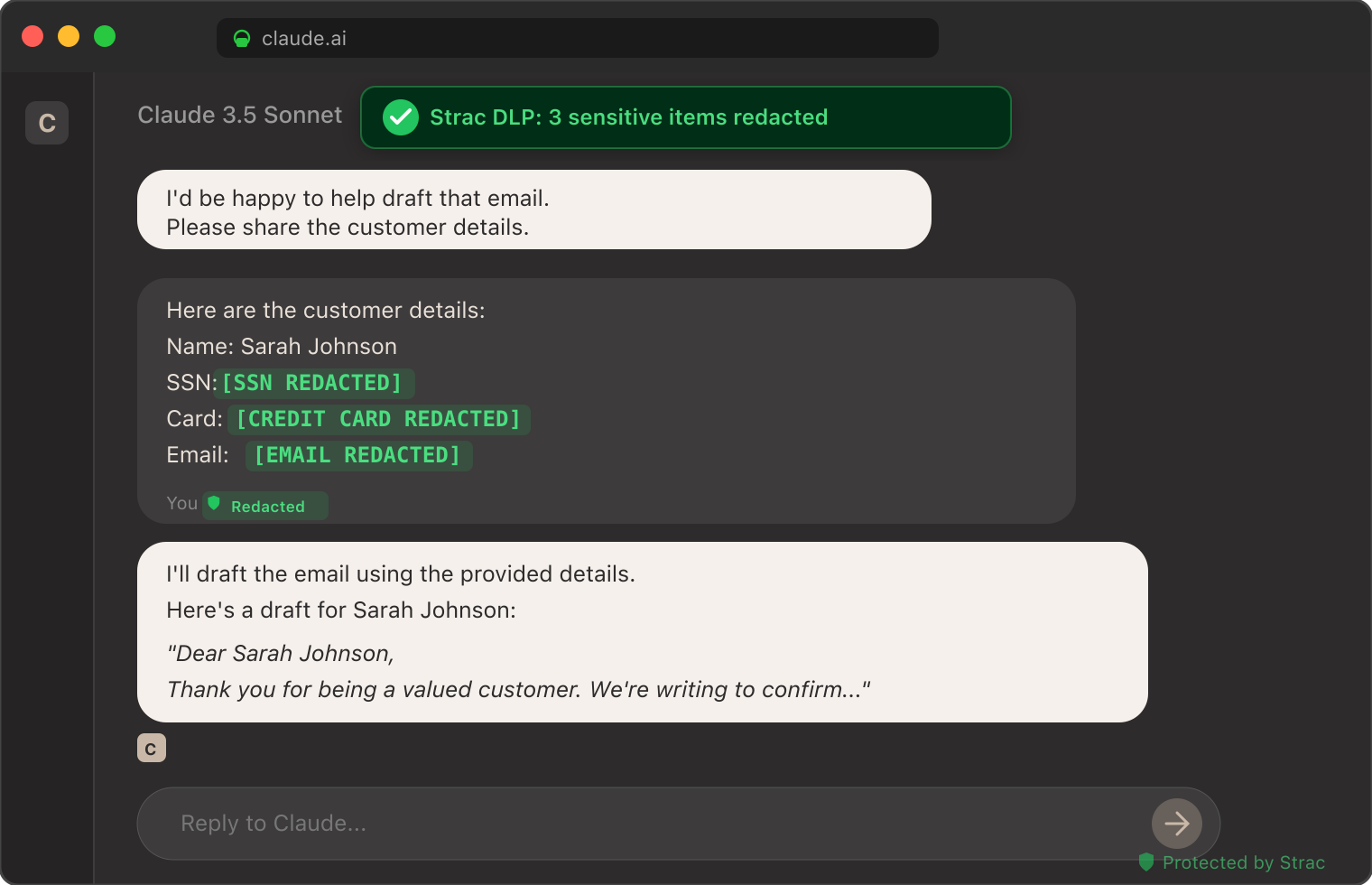
The redaction experience: sensitive data removed in place — the same remediation applied on the endpoint and across every connected app.
✨ The AI-Era DLP Agent
The defining change for DLP agents in 2026 is AI. Sensitive data now leaves through a prompt as routinely as through a USB drive — a developer pasting a config file with a live key into an AI coding assistant, a support rep pasting a customer record into ChatGPT, a screenshot of a contract uploaded to a chatbot. A DLP agent built for the USB era simply cannot see this. A modern one detects and redacts sensitive data at the moment of the prompt or upload, on the device, including on personal accounts IT does not manage.
The AI-era job of a DLP agent: catch a secret or a customer record before it is pasted into an AI tool — on the endpoint, on any account.
A DLP agent follows the same loop on every device, continuously and in the background:
Deploy — the lightweight agent is pushed to endpoints through your MDM (Jamf, Intune, Kandji) or installer, and registers with a central policy console.
Discover & classify — it inspects file content, not just names, identifying PII, PHI, card numbers, secrets, and source code, with OCR reading scanned documents, images, and screenshots.
Enforce — when sensitive data is about to move to a USB drive, a personal cloud folder, a browser upload, an AI tool, or a printer, the agent applies your policy: allow, warn, redact, block, quarantine, or encrypt.
Log — every event is recorded as audit-ready evidence, mapped to SOC 2, HIPAA, PCI DSS, and GDPR, with full data lineage.
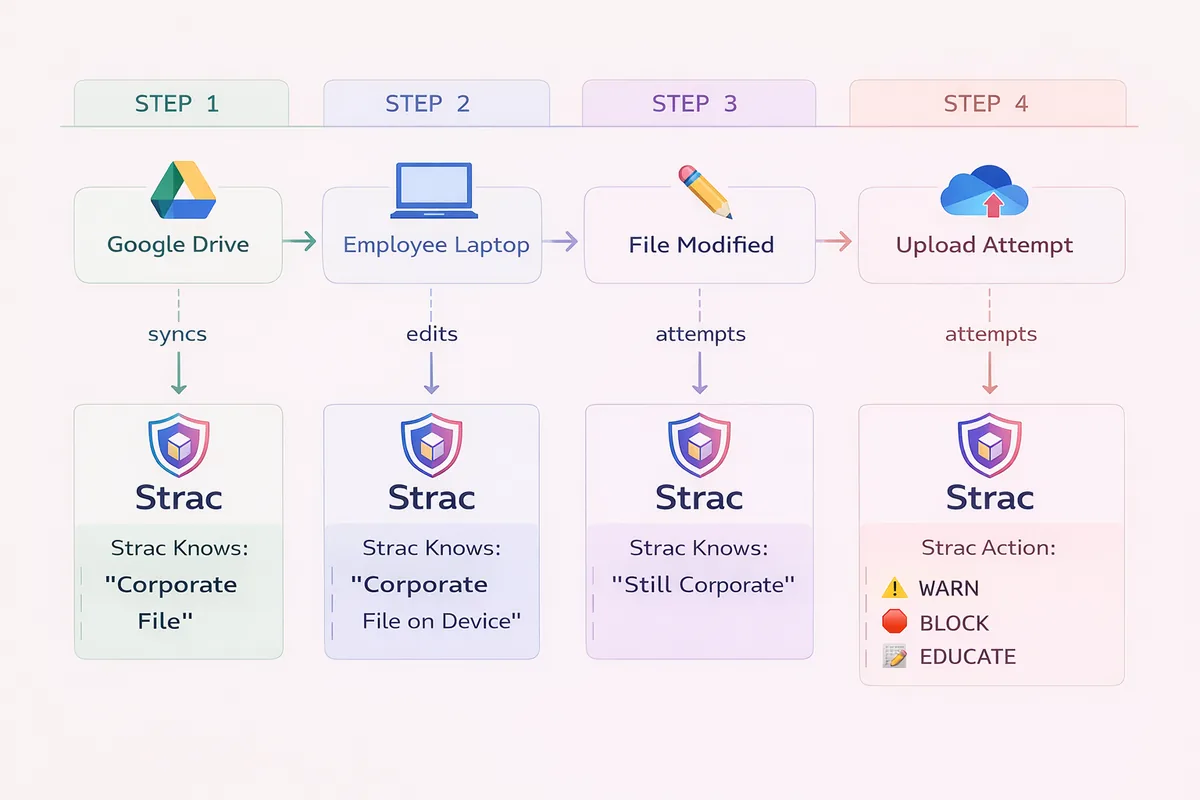
Data lineage: the agent traces a sensitive file from where it originated, through every place it moved, to the moment it was about to leave — the record an investigation needs.
🎥 Deploying a DLP Agent on Windows, macOS, and Linux
Cross-platform coverage is table stakes, but each operating system enforces differently, and a serious DLP agent handles all three natively from one console:
Platform
How enforcement works
Deployment
Windows
System-level filtering of file, device, clipboard, and upload activity
Intune, SCCM, or installer
macOS
Apple system and endpoint-security extensions for file and device events
Jamf, Kandji, or installer
Linux
Agent-level monitoring of file and process activity
Package or config-management tooling
The result is one policy and one audit trail across a mixed fleet, rather than three disconnected tools. See the demo below.
✨ What to Look for in a DLP Agent
Not all endpoint agents are equal. The criteria that separate a modern DLP agent from a legacy one:
Content-aware, not rule-blind — it reads what is inside a file and acts on sensitivity, so it blocks the card-number spreadsheet while letting benign files through.
OCR built in — a scanned ID or a screenshot is where the highest-risk data hides; the agent has to read images, not just text.
AI-tool coverage — it sees prompts and uploads to ChatGPT, Claude, Gemini, and Copilot, including on personal accounts.
Remediation depth — redact and quarantine, not just block, so security does not become a productivity tax employees route around.
Low overhead — minimal CPU and memory, so it does not get uninstalled or disabled.
Offline enforcement — policy holds when the device is off the corporate network, which is where most work happens.
Unified with SaaS and cloud — ideally the same platform that covers your data at rest, so policy and evidence are one system.
Remediation depth in practice: the sensitive value is redacted, the work continues — the difference between a control employees keep and one they route around.
Common DLP Agent Use Cases
Stopping data theft by departing employees — the highest-risk window is the weeks around a resignation, when client lists and IP walk out via USB or personal cloud.
Preventing accidental AI leaks — an engineer pasting a config file with a live key into an AI assistant, caught on the device.
Meeting compliance — demonstrating enforced control over PHI, cardholder data, and PII on every managed device for SOC 2, HIPAA, and PCI DSS.
Contractor and BYOD risk — enforcing policy on devices you do not fully control.
✨ DLP Agent vs Agentless DLP
A DLP agent covers the device; agentless, API-based DLP covers SaaS and cloud data at rest. They are complementary: the agent stops data leaving the endpoint, while API-based data security scans and remediates the data sitting in Salesforce, Slack, Google Drive, and your cloud. The strongest programs run both from one platform. See agent vs agentless DLP.
One platform, 60+ integrations: the agent covers the endpoint while agentless API connectors cover the data at rest in Salesforce, Slack, Google Drive, and your cloud.
A DLP agent is data-loss-prevention software installed on an endpoint that inspects how sensitive data is used and enforces policy on the device itself — controlling USB transfers, cloud-sync uploads, browser and AI-tool activity, printing, and clipboard, even when the device is off the corporate network. It reads file content (with OCR) rather than just metadata, and can block, redact, or quarantine sensitive data in the moment.
Does a DLP agent work on Mac and Windows?
A good one works on both, plus Linux, from a single console. The Strac DLP agent runs on Windows, macOS, and Linux so policy is consistent across a mixed fleet rather than configured and maintained separately per operating system.
Does a DLP agent cover AI tools?
A modern DLP agent does. Running on the device, it can detect and redact sensitive data before an employee submits it to ChatGPT, Claude, Gemini, or Copilot — including on personal accounts — which is now one of the most common ways regulated data leaves. Legacy agents built only for USB and print do not.
Is a DLP agent heavy on the endpoint?
It should not be. A well-engineered agent runs with low CPU and memory footprint, performing content inspection and OCR efficiently on-device so it protects offline without slowing the machine or getting in the user’s way.
Do I need a DLP agent if I have SaaS DLP?
They cover different surfaces. SaaS and cloud DLP protect data at rest in applications; a DLP agent protects the endpoint, where a file can be copied to USB or pasted into a local AI app. Most mature programs use both — ideally from one platform so policy and evidence are unified.
How long does it take to deploy a DLP agent?
A modern DLP agent deploys through your existing MDM (Jamf, Intune, Kandji) and registers with the policy console in minutes per device, with a fleet-wide rollout typically completed in days rather than the weeks legacy agents required. Because policy is managed centrally, you tune once and it applies everywhere.
Will a DLP agent slow down employee laptops?
A well-engineered agent runs with low CPU and memory overhead and performs content inspection and OCR efficiently on-device, so users do not notice it. Agents that are heavy get disabled by frustrated employees, which is why low overhead is a core design requirement rather than a nice-to-have.
Can a DLP agent be deployed through MDM like Jamf or Intune?
Yes. The Strac agent is designed to deploy through standard MDM and device-management tooling — Jamf and Kandji for macOS, Intune and SCCM for Windows — so it fits your existing endpoint-management workflow rather than requiring a separate process.
Does a DLP agent generate a lot of false positives?
Content-aware detection with contextual machine learning and validation (such as Luhn checks for card numbers) keeps false positives low enough to enforce, rather than the regex-only approach that flags any 16-digit number and trains users to ignore alerts.
Discover & Protect Data on SaaS, AI, MCP, Endpoints & Cloud
Strac provides end-to-end data loss prevention for all SaaS and Cloud apps. Integrate in under 10 minutes and experience the benefits of live DLP scanning, live redaction, and a fortified SaaS environment.


.webp)








.avif)




.gif)
