Docusign MCP Server: Secure Setup for Claude & AI Agents (2026)
The Docusign MCP server lets Claude, Cursor, and AI agents read signed agreements and send envelopes through the Model Context Protocol. Here's the setup, the real risks of exposing executed contracts, and how to govern it with redaction at the MCP layer.
The Docusign MCP server lets AI agents (Claude, Cursor, ChatGPT, custom agents) read agreements, retrieve signed documents, and send envelopes through the Model Context Protocol — across Docusign's eSignature, Navigator, and Maestro products.
Docusign's official server is in Open Beta at a hosted endpoint and is read/write capable — it can create and send envelopes (Navigator data is read-only). Read vs write is governed by the OAuth scopes you consent to, not a flag.
The data is uniquely sensitive: executed agreements — NDAs, employment offers, financial contracts — densely packed with SSNs, addresses, signatures, and bank details. Navigator can surface structured terms across your entire agreement repository in one query, and much of that PII belongs to counterparties who never consented to AI processing.
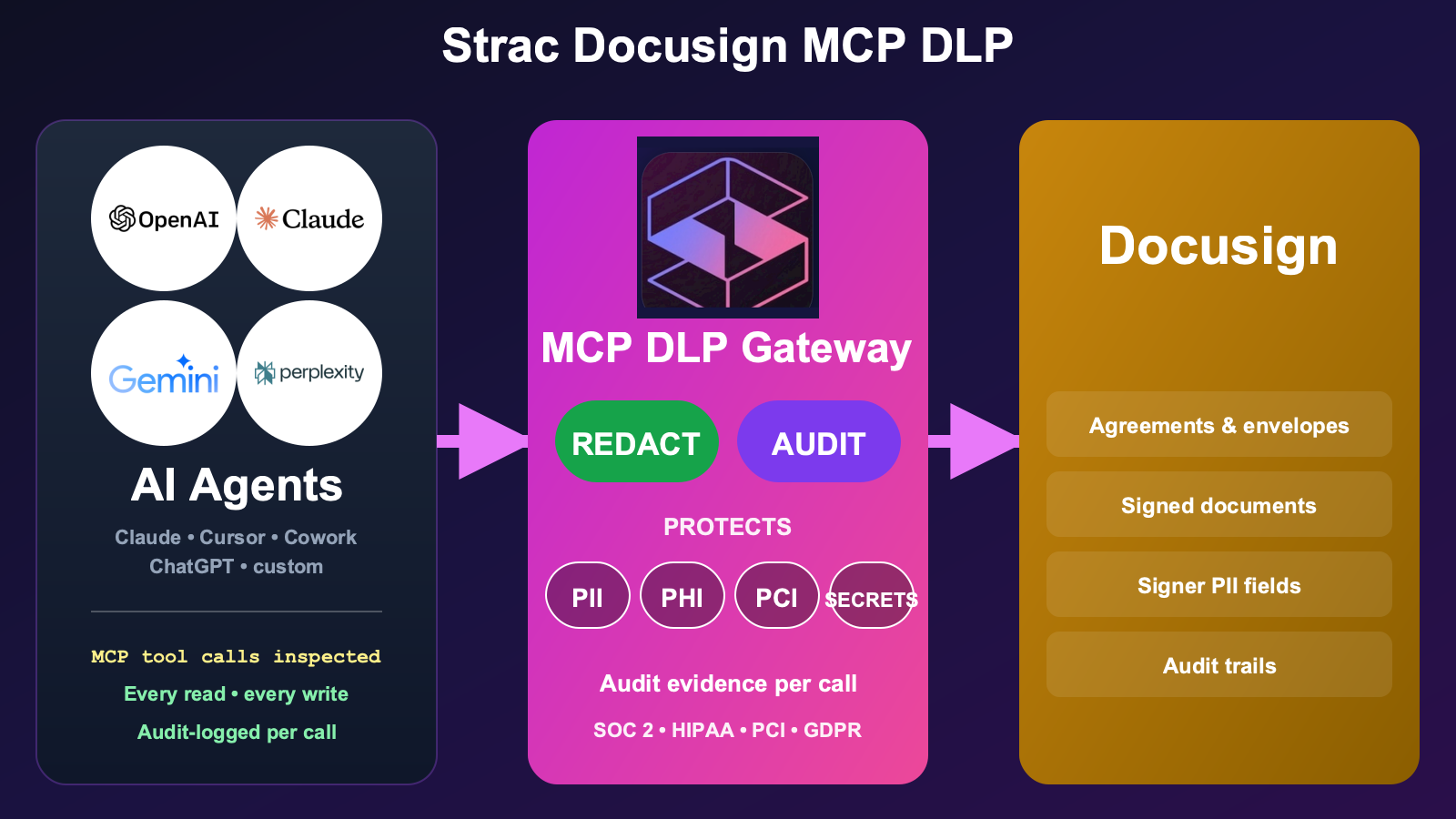
Strac Docusign MCP DLP is the governance layer for AI-agent access to Docusign. Strac sees every call, controls which agreements an agent can reach and whether it can send envelopes, protects document and term content with redaction, masking, and custom regex, and proves every call as audit evidence mapped to SOC 2 / HIPAA / PCI / GDPR. Redaction is part of it, not the whole of it.
Setup is agentless and under 10 minutes — no application changes.
What Is the Docusign MCP Server?
The Docusign MCP server is a Model Context Protocol implementation that exposes Docusign's agreement platform to AI agents as standardized tools — reading envelope status and recipients, retrieving signed documents, searching agreement terms, and creating and sending envelopes.
There's an official server and several community ones, and the difference is a security decision:
Docusign's official MCP server. In Open Beta at a hosted endpoint, it spans the IAM platform: eSignature (envelopes), Navigator (agreement intelligence), and Maestro (workflows). It's read/write — it can create and send envelopes from templates and trigger workflows — while Navigator's agreement data is read-only.
Community servers (clearly labeled, don't conflate): mcp-server-docusign (eSignature, explicitly downloads signed PDFs), docusign-navigator-mcp (read-only Navigator), and CData's read-only server.
From the user's seat, the agent suddenly understands the agreement book — it answers "which contracts renew next quarter?" and drafts envelopes. From the security seat, you've handed an AI client access to executed contracts and the ability to send legally binding documents.
That's the value. It's also exactly where a control layer belongs.
(Docusign's official docs are dynamically rendered, so exact tool names below are described by capability rather than quoted verbatim — verify the current tool list against Docusign's developer docs before building.)
What AI Agents Can Actually Do With Docusign MCP
Point an agent at the Docusign MCP server and it works the agreement platform directly, within the OAuth scopes you consented to. In practice it can:
Read envelope status and recipients — who signed, who's pending, declined, or voided, with dates and recipient details.
Retrieve signed document content — pull the executed PDF itself, the community eSignature server does this explicitly.
Search agreements with Navigator — query parties, dates, financial terms, and extracted clauses across the whole agreement repository.
Create and send envelopes — generate envelopes from templates and route them for signature.
Every one of those runs within your existing Docusign permissions — which is what makes it useful, and exactly why the contracts and PII those calls return need an inspection layer in the tool-call path.
The Real Security Risks of the Docusign MCP Server
Docusign holds the most legally and personally sensitive documents a company has. Five categories every security team should price in:
1. Executed contracts are dense PII. A single signed NDA, offer letter, or financial agreement carries names, SSNs, addresses, signatures, and bank details. Retrieving the PDF pulls all of it into the model context at once.
2. Navigator can exfiltrate the whole agreement book. Because Navigator extracts structured terms across the entire repository, one query can surface financial terms, parties, and renewal dates for every contract you have — a concentration of sensitive business data far beyond a single document.
3. Counterparty PII never consented to AI processing. Much of the personal data in agreements belongs to third parties — signers, counterparties, their representatives — who agreed to sign a document, not to have it processed by an AI model. That's a consent and privacy exposure distinct from your own employees' data.
4. Write scope means legally binding actions. Because the server can create and send envelopes, a prompt-injected or mistaken agent can route a document for signature or misdeliver a sensitive contract — an action with legal weight, not just data exposure.
5. Read vs write is scope-governed, not a switch. If you grant write scopes, the agent can send; if you grant read-only, it can't. There's no separate enforcement layer — the consent screen is the control, and consent screens get over-granted.
Docusign's guidance is principle-level: existing permission, access, and audit policies stay enforced, read-only scopes prevent sending, and "an agent that only needs to check signing status should not have envelope creation permissions." All of that is about access — none of it redacts the PII inside the documents an allowed agent reads. The DLP a company already runs doesn't sit between an agent and Docusign. That reach is precisely why each agent's access must be governed: controlled (which agreements it can reach, and whether it can send), the sensitive content it returns protected, and every call audited. That is where Strac Docusign MCP DLP lives.
Strac's Docusign MCP DLP is the governance layer that sits between AI agents and the Docusign MCP server. Strac governs every call: it sees exactly what each agent reads and sends, controls what it can reach and do, protects the document and term content it touches, and logs every call as audit evidence. In-policy, non-sensitive calls flow through untouched.
The Strac Docusign MCP DLP gateway sits between any AI agent (Claude, Cursor, ChatGPT, custom) and the Docusign MCP server. It scopes which agreements the agent can reach, blocks legally binding envelope sends, and redacts regulated content before any signed document reaches the model.
Beyond redacting or blocking, Strac can also pseudonymize or de-identify the data on a DocuSign MCP tool call — swapping PII, PHI, and PCI for realistic, format-preserving fakes — so a team can keep using the data in an AI model, analytics, or a test environment while the real records never leave your control. See Data Pseudonymization.
What this looks like in practice, mapped to See / Control / Protect / Prove:
See — Strac surfaces every call an agent makes: which AI client, which user, which agreements it touched, and which data classes — SSNs, financial terms, counterparty PII — were present.
Control — Strac scopes access by agreement and gates writes. You let an agent check signing status but never retrieve full executed PDFs, and block envelope creation and sending outright — so a misread prompt can't route a legally binding document.
Protect — the scrubbing gateway capability security teams ask about first: enforcement you define per field. Redact SSNs and bank details from a signed PDF, mask a counterparty's contact data, or match your own regex for an internal contract identifier — run by Strac's managed classifier rather than a Microsoft Presidio or AWS Bedrock pipeline you operate. The same scrubbing covers the custom MCP tools your team builds on agreement data for staff and customers.
Prove — every call is logged with the data classes detected and the controls applied — SOC 2 / HIPAA / PCI / GDPR audit evidence, produced automatically.
The same Strac MCP DLP layer covers your other document and SaaS surfaces — SharePoint MCP, Google Drive MCP, and Box MCP — one control plane across every place AI agents reach your regulated data. See the MCP DLP pillar and the broader MCP data security discipline for the full model.
✨ Strac Data Discovery — Know Where Sensitive Agreements Live
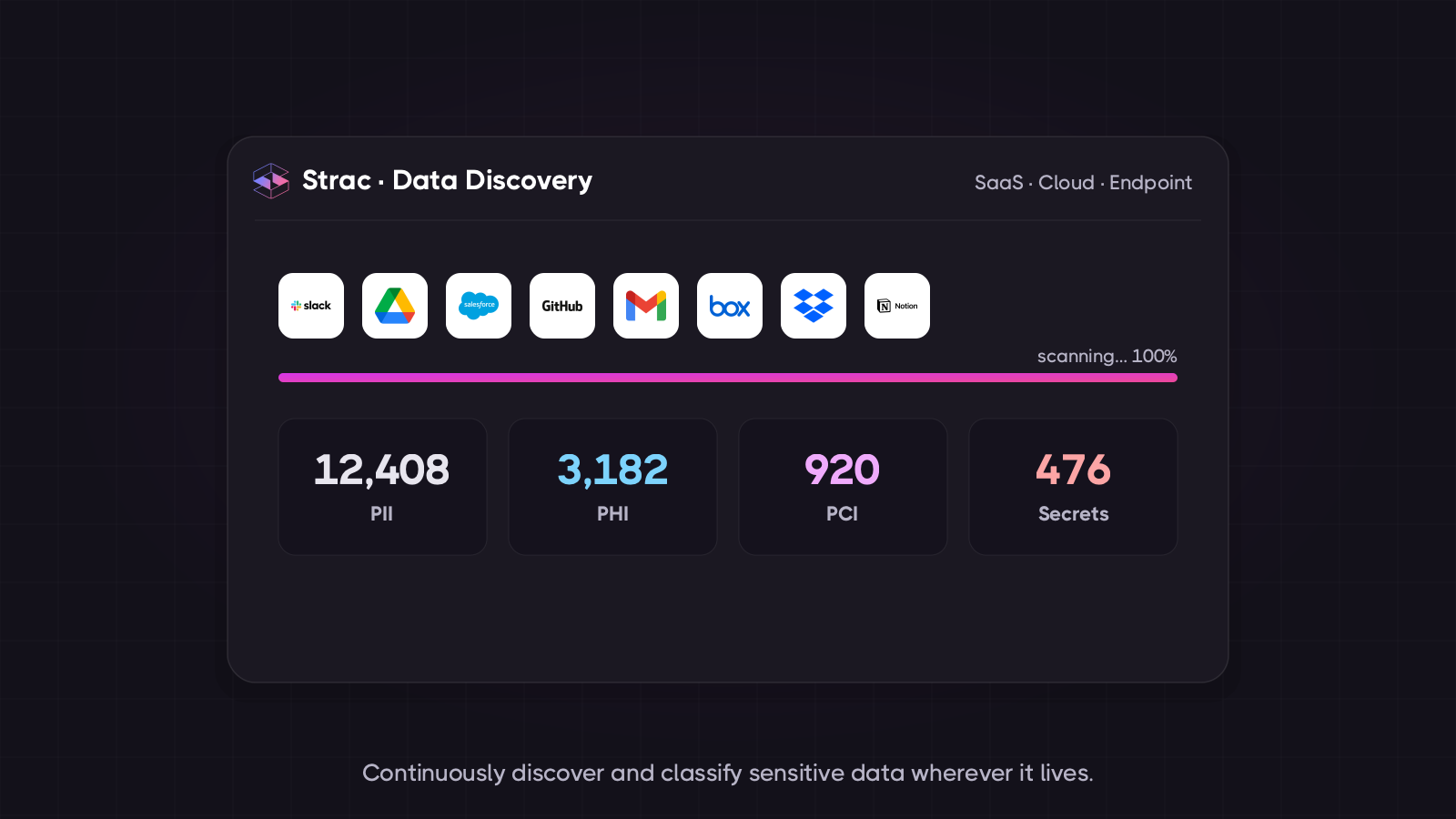
Strac's data discovery maps where regulated agreements and PII sit across your document and SaaS estate — so you know what an agent could expose through Docusign before you ever connect one.
MCP DLP governs the AI-agent surface. Strac's data discovery governs the data itself — continuously finding and classifying PII, PCI, and financial data across your environment, so policy targets the right content. Most teams run both: discovery to map and label, MCP DLP to govern how agents reach it.
What Strac's discovery includes:
Continuous classification of PII, PCI, financial data, and credentials across connected document and SaaS surfaces
Content-level inspection — Strac reads document contents, not just titles, so an SSN inside a signed PDF is caught
A live data map that feeds directly into the MCP DLP redaction policy
Audit-ready findings mapped to SOC 2 CC6, HIPAA Security Rule, PCI Req. 3/7/10, and GDPR
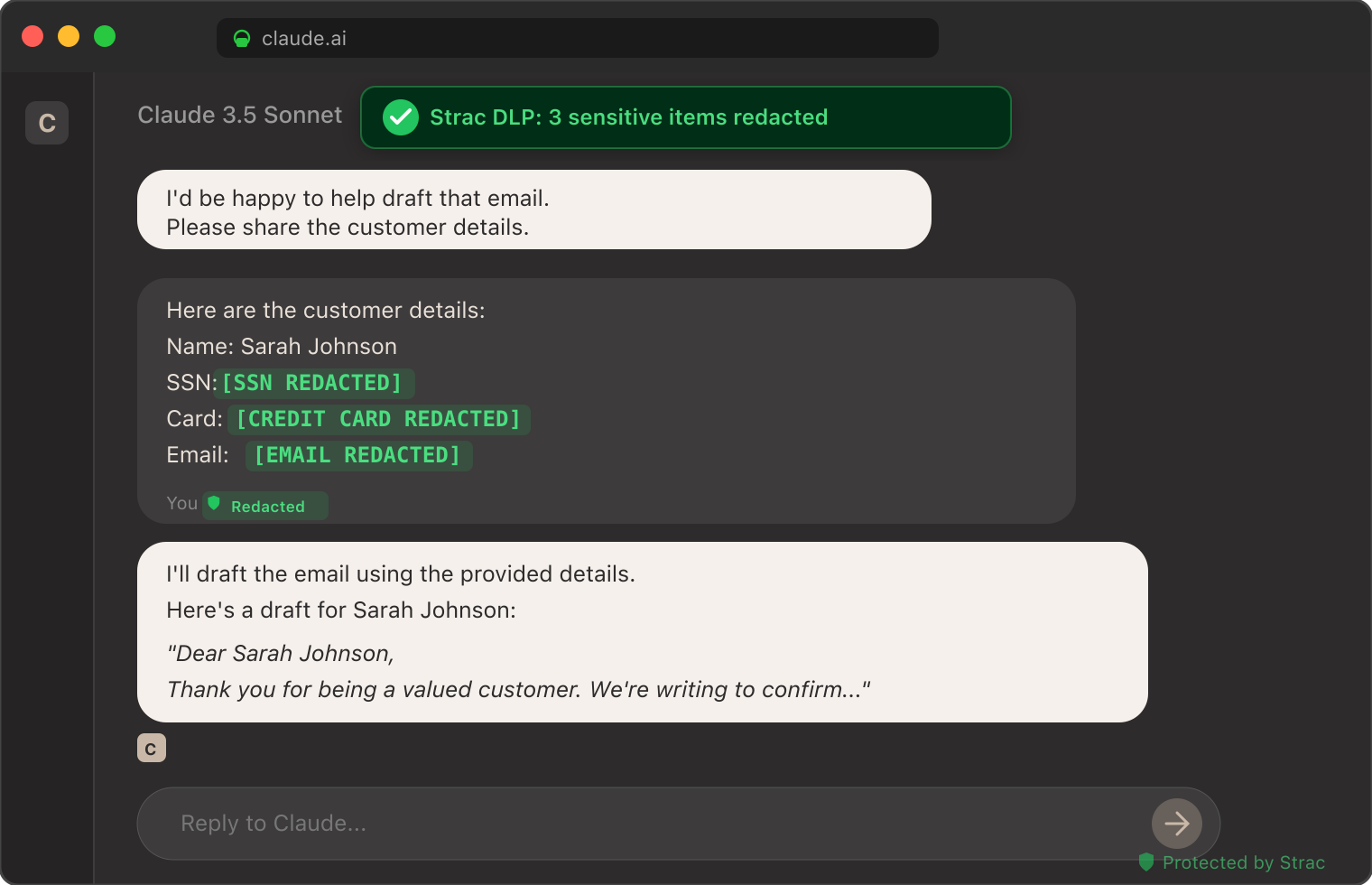
The screenshot below shows Strac's MCP DLP redacting sensitive data from a real Claude session — customer emails, identifiers, and credit card numbers tokenized inline before the model received them. The same inspection pattern runs on every Docusign MCP call routed through Strac, applied to the agreements and terms returned.
Strac DLP at work inside a Claude conversation: sensitive elements tokenized inline before the model sees them. The same pattern runs at the MCP layer for every Docusign document returned.
How to Set Up Strac Docusign MCP DLP
Setup is agentless and takes under 10 minutes.
Connect Strac to Docusign. Strac uses dedicated, least-privilege OAuth scopes — read-only where an agent only needs status, never blanket envelope-creation scopes — consistent with Docusign's least-privilege guidance.
Point your AI client at the Strac MCP endpoint. Strac issues an MCP server endpoint that drops into your AI client's configuration and proxies to the Docusign MCP server behind it. For Claude Desktop:
json
   "mcpServers": {
     "docusign": {
       "url": "https://mcp.strac.io/docusign",
       "auth": { "type": "bearer", "token": "<your-strac-token>" }
     }
   }
For Cursor, OpenAI Agents, and custom agents — same endpoint, same auth.
Pick your policy. Out-of-the-box templates for SOC 2, HIPAA, PCI, and GDPR. Custom policies — agreement allow/deny, document redaction, envelope-send blocking, custom regex — take minutes to configure.
Done. Every call between your agent and Docusign now flows through the Strac gateway. The audit log starts populating immediately.
Compliance Coverage Out of the Box
The same Strac Docusign MCP DLP control produces evidence mapped to every major compliance framework.
Framework
What Strac Docusign MCP DLP Satisfies
SOC 2
CC6.1 (logical access to data), CC6.6 (unauthorized data exposure), CC6.7 (restricted transmission of data to external systems), CC7.2 (monitoring for anomalies including AI activity)
Req. 3.3 (PAN masking), Req. 3.4 (render PAN unreadable), Req. 7 (least privilege), Req. 10 (log every access to cardholder data)
GDPR
Art. 5 (data minimization & purpose limitation), Art. 25 (data protection by design), Art. 30 (records of processing), Art. 32 (security of processing)
For the broader AI-data-governance program this sits inside, see AI DLP.
🌶️ Spicy FAQs for Docusign MCP Server
Is there an official Docusign MCP server?
Yes — Docusign offers an official MCP server in Open Beta at a hosted endpoint, spanning eSignature, Navigator, and Maestro. It's read/write (it can create and send envelopes), while Navigator's agreement data is read-only. There are also clearly-labeled community servers — one for eSignature that downloads signed PDFs, and read-only Navigator servers — that you should not confuse with the official one.
Is the Docusign MCP server read-only?
It depends on the OAuth scopes you grant. The official server is read/write capable — with write scopes it can create and send envelopes; with read-only scopes it cannot. Navigator data is read-only. There's no separate read-only enforcement layer beyond scope consent, so a control that can enforce read-only and redact document content matters for production use.
Is the Docusign MCP connector the same as the Docusign MCP server?
Yes — the same thing. The MCP specification says server; Claude and Cursor surface it as the Docusign connector. Both let an agent read agreements and send envelopes, and Strac's Docusign MCP connector redacts regulated content at the tool-call boundary regardless of the label.
What's the biggest risk of connecting an AI agent to Docusign?
The documents themselves. Executed agreements are dense with SSNs, financial terms, and signatures, much of it belonging to counterparties who never consented to AI processing — and Navigator can surface terms across your entire agreement book in one query. On top of that, write scopes let an agent send legally binding envelopes. The fix is a layer that redacts the PII before the model sees it and blocks envelope sending unless explicitly approved.
Can Strac stop an AI agent from sending a Docusign envelope?
Yes. Strac inspects the call before it executes. Envelope creation, sending, and Maestro workflow triggers can be blocked outright, allowed only from specific templates, or routed for human approval — so a misread prompt can't route a legally binding document for signature.
What sensitive data types does Strac detect in Docusign agreements?
PII (SSN, driver's license, passport, address, phone, email, signatures), PCI (full and partial card numbers via Luhn check), financial data (account and routing numbers, contract values), and custom detectors — including your own regex — trained on your internal classifications. Detection runs on the document content and on Navigator's extracted terms.
How long does Strac Docusign MCP DLP take to deploy?
Under 10 minutes. Connect Strac with least-privilege OAuth scopes, paste the Strac MCP endpoint into your AI client's config, pick a policy template, done. No application changes.
Rather than a single broad service account, Strac carries each user's identity into DocuSign, so account and envelope permissions still gate what an agent can pull — while its endpoint agent inventories any DocuSign MCP server an employee wires up outside review. All of it runs from one agentless platform plus a lightweight endpoint agent, so the same controls cover DocuSign on the agent path and the human path alike.
The Bottom Line
The Docusign MCP server is fast becoming the way AI agents read agreements and send envelopes. The data is among the most sensitive a company holds — executed contracts full of PII and financial terms, much of it belonging to counterparties who never consented to AI — and the server can take legally binding actions. Running Docusign MCP in 2026 without an MCP-layer governance control isn't a question of if a signed contract reaches a model it shouldn't; it's when.
Strac Docusign MCP DLP gives you the control plane — see every call, scope every agent, block envelope sending, protect every regulated term, prove every call — so your team can use Docusign with Claude, Cursor, ChatGPT, and any future AI client without making each one a separate security exception.
If you are running — or about to run — Docusign MCP in production, book a 30-minute demo. We'll walk through the architecture, the read-only-vs-send decision, the redaction policy, and a deployment plan for your account and AI clients.
Yes — Docusign offers an official MCP server in Open Beta at a hosted endpoint, spanning eSignature, Navigator, and Maestro. It's read/write (it can create and send envelopes), while Navigator's agreement data is read-only. There are also clearly-labeled community servers — one for eSignature that downloads signed PDFs, and read-only Navigator servers — that you should not confuse with the official one.
Is the Docusign MCP server read-only?
It depends on the OAuth scopes you grant. The official server is read/write capable — with write scopes it can create and send envelopes; with read-only scopes it cannot. Navigator data is read-only. There's no separate read-only enforcement layer beyond scope consent, so a control that can enforce read-only and redact document content matters for production use.
Is the Docusign MCP connector the same as the Docusign MCP server?
Yes — the same thing. The MCP specification says server; Claude and Cursor surface it as the Docusign connector. Both let an agent read agreements and send envelopes, and Strac's Docusign MCP connector redacts regulated content at the tool-call boundary regardless of the label.
What's the biggest risk of connecting an AI agent to Docusign?
The documents themselves. Executed agreements are dense with SSNs, financial terms, and signatures, much of it belonging to counterparties who never consented to AI processing — and Navigator can surface terms across your entire agreement book in one query. On top of that, write scopes let an agent send legally binding envelopes. The fix is a layer that redacts the PII before the model sees it and blocks envelope sending unless explicitly approved.
Can Strac stop an AI agent from sending a Docusign envelope?
Yes. Strac inspects the call before it executes. Envelope creation, sending, and Maestro workflow triggers can be blocked outright, allowed only from specific templates, or routed for human approval — so a misread prompt can't route a legally binding document for signature.
Discover & Protect Data on SaaS, AI, MCP, Endpoints & Cloud
Strac provides end-to-end data loss prevention for all SaaS and Cloud apps. Integrate in under 10 minutes and experience the benefits of live DLP scanning, live redaction, and a fortified SaaS environment.


.webp)






.avif)



.gif)
