Salesforce

Is Salesforce secure? Salesforce security best practices + how Strac DSPM/DLP remediates data

Comprehensive Guide to Salesforce Policies for Data Security and Management

Short answer: Salesforce is secure when configured correctly, but it holds your most sensitive customer and revenue data, and its risks come from overly broad profiles and permission sets, public links and report exports, stale third-party integrations, and no built-in scanning of the actual data inside records and attachments. The policies below harden the configuration; pairing them with DSPM and DLP (like Strac) finds and remediates sensitive data in Salesforce automatically.
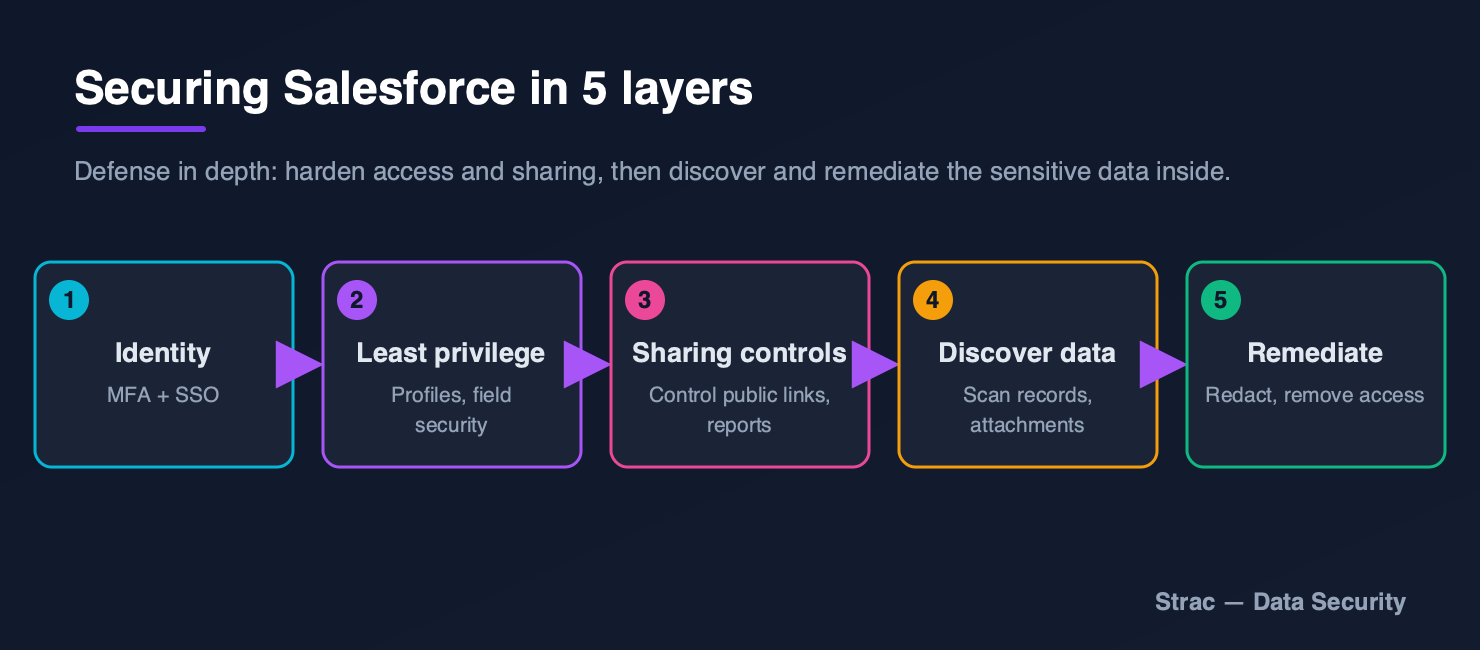
Diagram: securing Salesforce in five layers, identity and MFA, least privilege, sharing controls, sensitive-data discovery, and remediation
Securing Salesforce: harden access and sharing, then discover and remediate the sensitive data inside.

Salesforce is a cornerstone for businesses, powering everything from sales and marketing to customer support. While its capabilities are vast, managing and securing the data within Salesforce is crucial to mitigate risks, maintain compliance, and optimize operational efficiency. This guide outlines essential policies for Salesforce, focusing on actionable strategies to enhance your organization’s SaaS security posture (SSPM) and data security posture (DSPM).

Policies Covered

SSPM Policies

  1. Access Management
    • Least Privilege Access Enforcement
    • Guest and Third-Party Access Monitoring
    • Multi-Factor Authentication (MFA) Enforcement
  2. Misconfiguration Management
    • Permission Set and Role Misconfigurations
    • Object and Field-Level Security Audit
    • Sharing Rule and Public Link Management
  3. Compliance and Risk Management
    • Dormant User Accounts
    • Third-Party Integration Monitoring
    • Configuration Compliance Audits

DSPM Policies

  1. Data Discovery and Classification
    • Sensitive Data Inventory
    • Unstructured Data Analysis
  2. Access and Sharing Monitoring
    • Sensitive Data Sharing Violations
    • Reports and Dashboard Security
  3. Threat Detection
    • Data Exfiltration Alerts
    • Insider Threat Detection

Detailed Breakdown of Policies

1. Access Management

Least Privilege Access Enforcement

  • Example: A marketing analyst may only need access to lead and campaign data. Roles such as “System Administrator” or “Manage Users” should only be granted to essential personnel. Regular audits ensure employees do not retain privileges beyond their scope of work.

Guest and Third-Party Access Monitoring

  • Example: Third-party integrations, vendors, and external users often gain access to Salesforce for specific functions. Over time, unused integrations or stale guest accounts can become a security risk. Monitoring these connections and ensuring inactive accounts are deactivated can prevent unauthorized data access.

Multi-Factor Authentication (MFA) Enforcement

  • Example: Salesforce supports MFA to add an extra layer of security. Enforcing MFA ensures that even if an attacker gains access to login credentials, the second authentication factor protects the account. Organizations should monitor compliance and enforce MFA for all users.

2. Misconfiguration Management

Permission Set and Role Misconfigurations

  • Example: Over-privileged roles are a common misconfiguration. A support agent should not have the “Modify All Data” permission. Regular audits can identify and resolve such discrepancies, ensuring that roles and permissions align with job requirements.

Object and Field-Level Security Audit

  • Example: Sensitive fields like Social Security Numbers or financial data should have restricted access. Enabling field-level encryption and limiting access to such fields ensures compliance with regulations like GDPR and HIPAA.

Sharing Rule and Public Link Management

  • Example: Sharing rules that grant “Public Read” or “Public Read/Write” access can lead to inadvertent exposure of sensitive data. Customer lists shared publicly through “Anyone with the link” settings can lead to a data breach. Regularly reviewing and restricting these settings is essential.

3. Compliance and Risk Management

Dormant User Accounts

  • Example: Inactive accounts are a common attack vector. If a salesperson leaves the company, their account should be deactivated promptly. Automating the deactivation of accounts inactive for 90 days can mitigate risks.

Third-Party Integration Monitoring

  • Example: Third-party apps connected to Salesforce can have excessive permissions. An unused marketing app might still have access to customer data. Regular reviews of connected applications and their scopes can help revoke unnecessary access.

Configuration Compliance Audits

  • Example: Salesforce configurations should align with regulatory standards. Encryption at rest should be enabled for sensitive objects, and audit logs should be retained for compliance.

4. Data Discovery and Classification

Sensitive Data Inventory

  • Example: Sensitive data such as PII, PCI, or PHI can exist across custom fields and objects. Custom objects holding contract details might inadvertently store payment card numbers. Identifying and classifying such data ensures proactive security measures.

Unstructured Data Analysis

  • Example: Files attached to cases or uploaded to Salesforce Chatter may contain sensitive data. A customer’s identity document uploaded as an attachment should be flagged and protected.

5. Access and Sharing Monitoring

Sensitive Data Sharing Violations

  • Example: If a financial report containing customer credit card details is shared externally, it poses a serious compliance risk. Monitoring external sharing and automatically revoking unauthorized access are critical.

Reports and Dashboard Security

  • Example: Dashboards or reports often aggregate sensitive data. An executive dashboard containing customer lifetime value (CLV) metrics must have restricted viewing permissions to prevent leaks.

6. Threat Detection

Data Exfiltration Alerts

  • Example: Unusual export activity, such as a user downloading thousands of records, can indicate a data exfiltration attempt. Alerts triggered by such activity allow for immediate investigation.

Insider Threat Detection

  • Example: An employee accessing sensitive customer data outside of business hours or without a legitimate reason may signal an insider threat. Monitoring and flagging such activity enables early intervention.

Conclusion

Implementing these Salesforce policies ensures a robust security posture while aligning with compliance standards. Regular audits, automated monitoring, and proactive threat detection safeguard your organization’s most valuable data assets.

Would you like to learn more about how these policies can be customized for your Salesforce environment? Let’s connect and secure your Salesforce instance today!

‍

✨ How Strac secures Salesforce across every surface

Salesforce security best practices close the configuration gaps. Strac closes the data gap: it discovers the sensitive data inside Salesforce, remediates exposure automatically, and extends the same protection to every other place that data flows, AI agents, browsers, and endpoints. One agentless platform across SaaS, cloud, GenAI, MCP, browser, and endpoint.
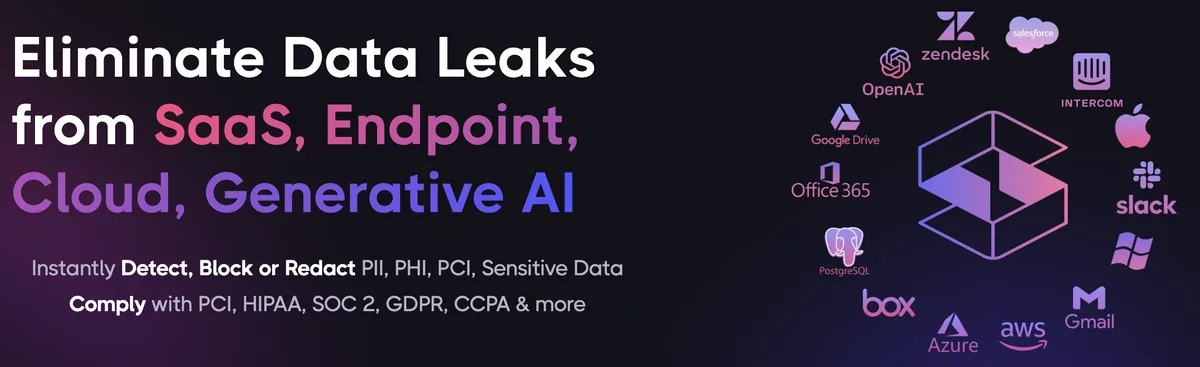
Strac unified data security platform protecting Salesforce across SaaS, cloud, browser, endpoint, GenAI, and MCP
One platform protecting Salesforce data everywhere it lives and moves.

1. Discover and classify sensitive data in Salesforce (DSPM)

Strac's DSPM continuously scans Salesforce for PII, PHI, PCI, and secrets using ML and OCR across 100+ data types, so you know exactly where your regulated data lives and which items are overshared, public, or out of policy. This is the layer native Salesforce controls skip: they can enforce a setting, but they cannot tell you where all your sensitive data actually sits.

Strac DSPM discovering and classifying sensitive data (PII, PHI, PCI) inside Salesforce
Strac discovers and classifies every sensitive file in Salesforce, automatically.

2. Redact and remediate exposure automatically (SaaS DLP)

Finding exposed data is table stakes. Strac's Salesforce DLP acts on it, under your policy: redact or mask sensitive values in place, revoke public "anyone with the link" sharing, remove external members from files and sites, quarantine or delete items that should not exist, and label and classify, with a full audit trail mapped to HIPAA, PCI DSS, SOC 2, ISO 27001, and GDPR. Most alternatives stop at an alert; Strac fixes the exposure.
Strac automatically remediating sensitive data exposure in Salesforce: redact, revoke public links, remove external members
Strac remediates Salesforce exposure in place, revoke public links, remove external members, redact, quarantine.

3. Govern what AI agents pull from Salesforce (MCP DLP)

AI agents now read directly from Salesforce over the Model Context Protocol. Strac's MCP DLP sits in that path as a reverse proxy and redacts sensitive values in tool responses before the model ever sees them, and governs exactly which agents can reach which Salesforce data. Connect the Salesforce MCP connector once and every agent tool call is inspected.
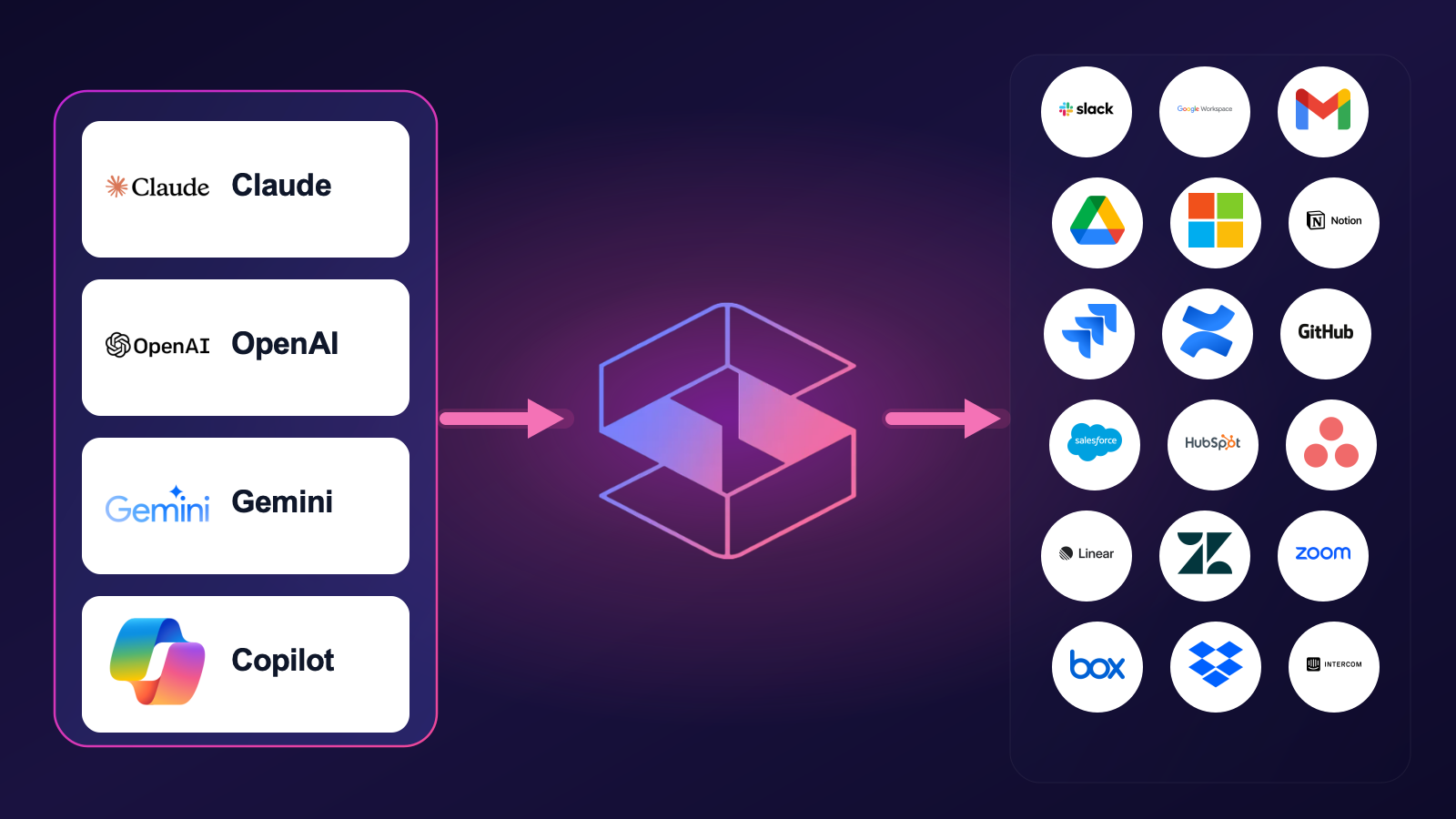
Strac MCP DLP governing AI agent access to Salesforce data, redacting sensitive values at the boundary
Strac governs the MCP boundary so AI agents can use Salesforce without exfiltrating sensitive data.

4. Stop Salesforce data leaks in the browser

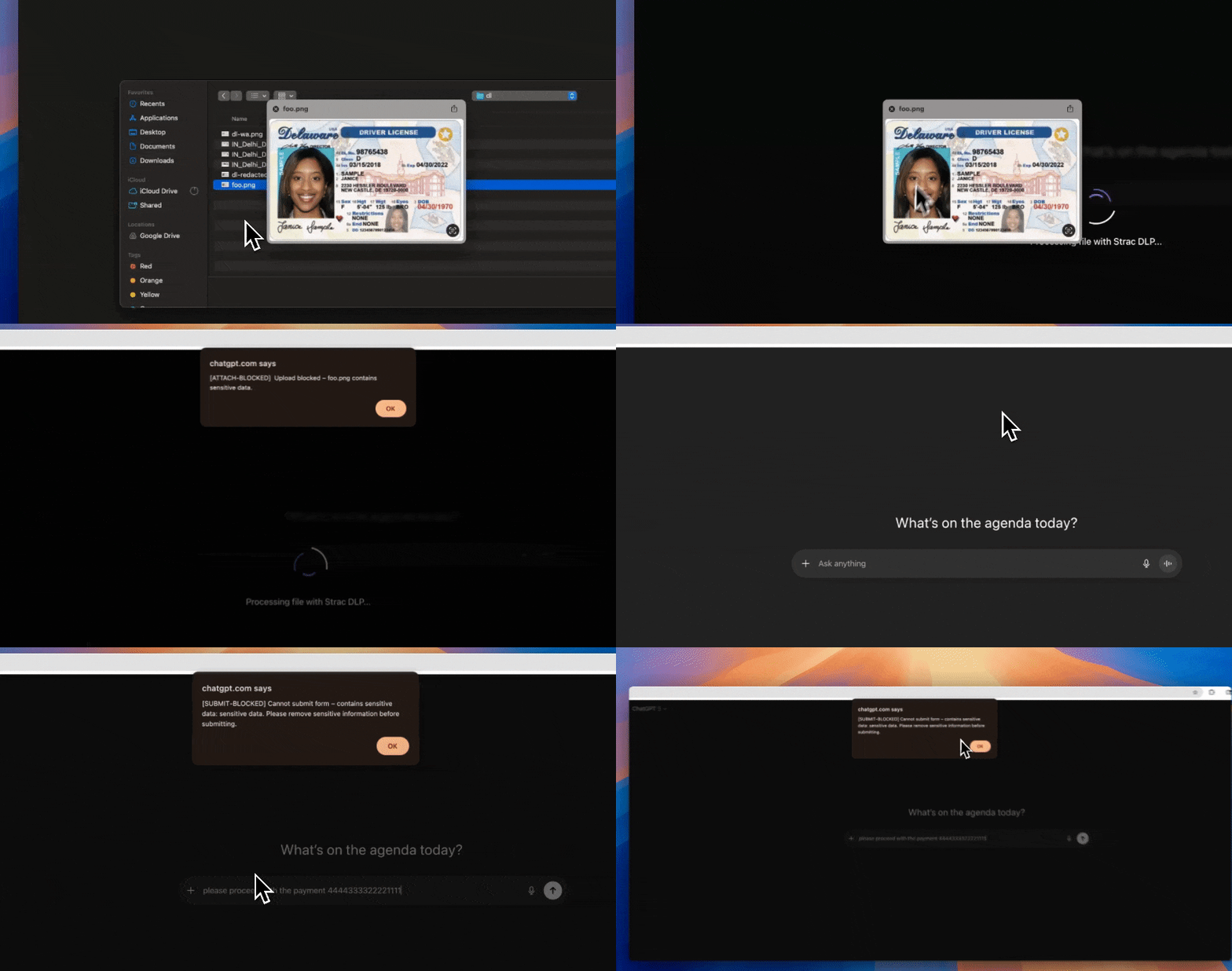
Strac's browser DLP extension for Chrome, Edge, Firefox, and Safari blocks or redacts sensitive uploads, downloads, and pastes to and from Salesforce in real time, including data a user tries to move from Salesforce into an AI tool in another tab.
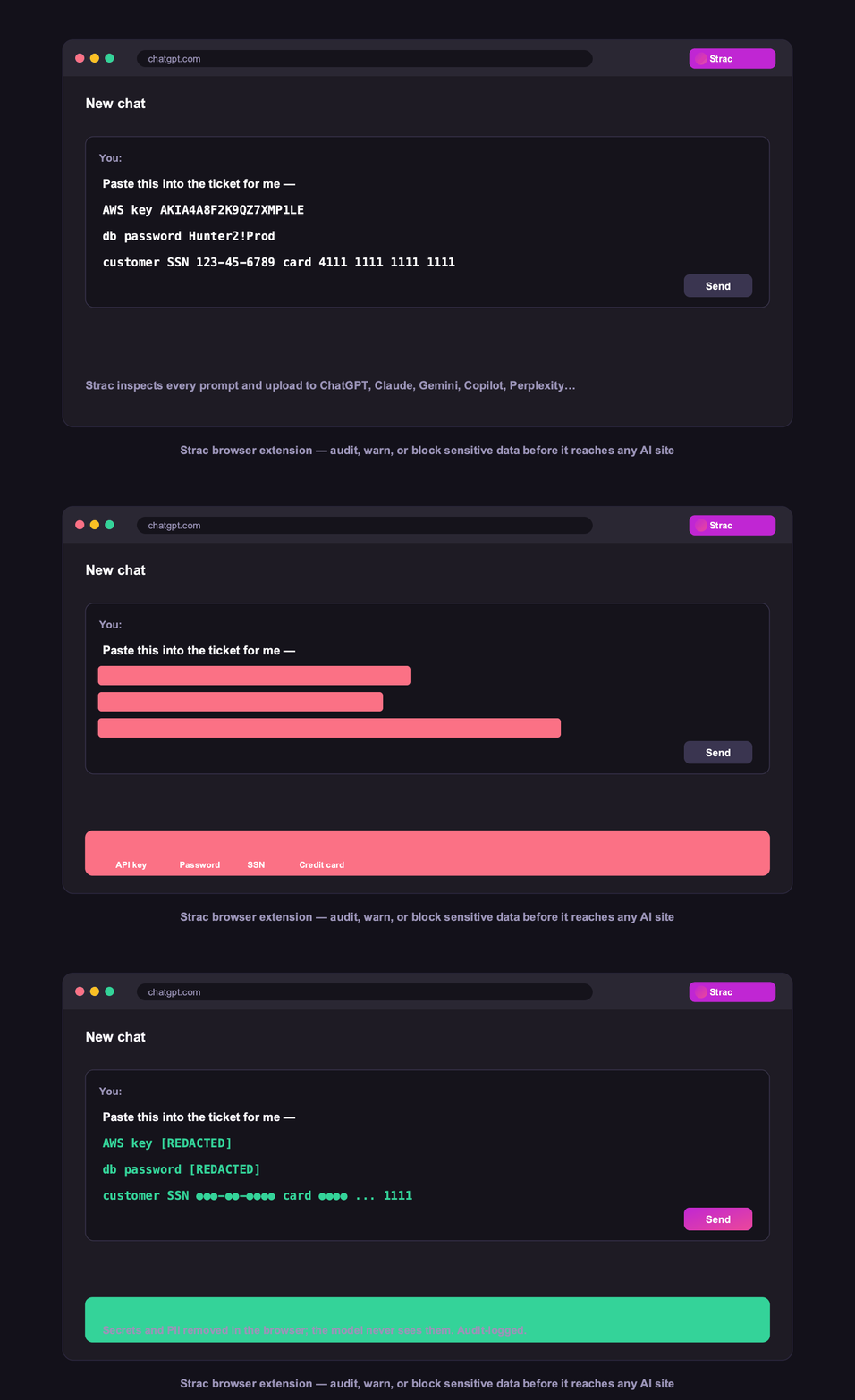
Strac browser DLP blocking a sensitive Salesforce upload in real time
Browser DLP blocks or redacts sensitive Salesforce data in the browser, live.

5. Control Salesforce data on endpoints (Mac and Windows)

Strac's endpoint DLP agent controls Salesforce data as it lands on laptops, with four modes: block, warn, allow, and audit across file downloads, copies, and screenshots on both Mac and Windows.
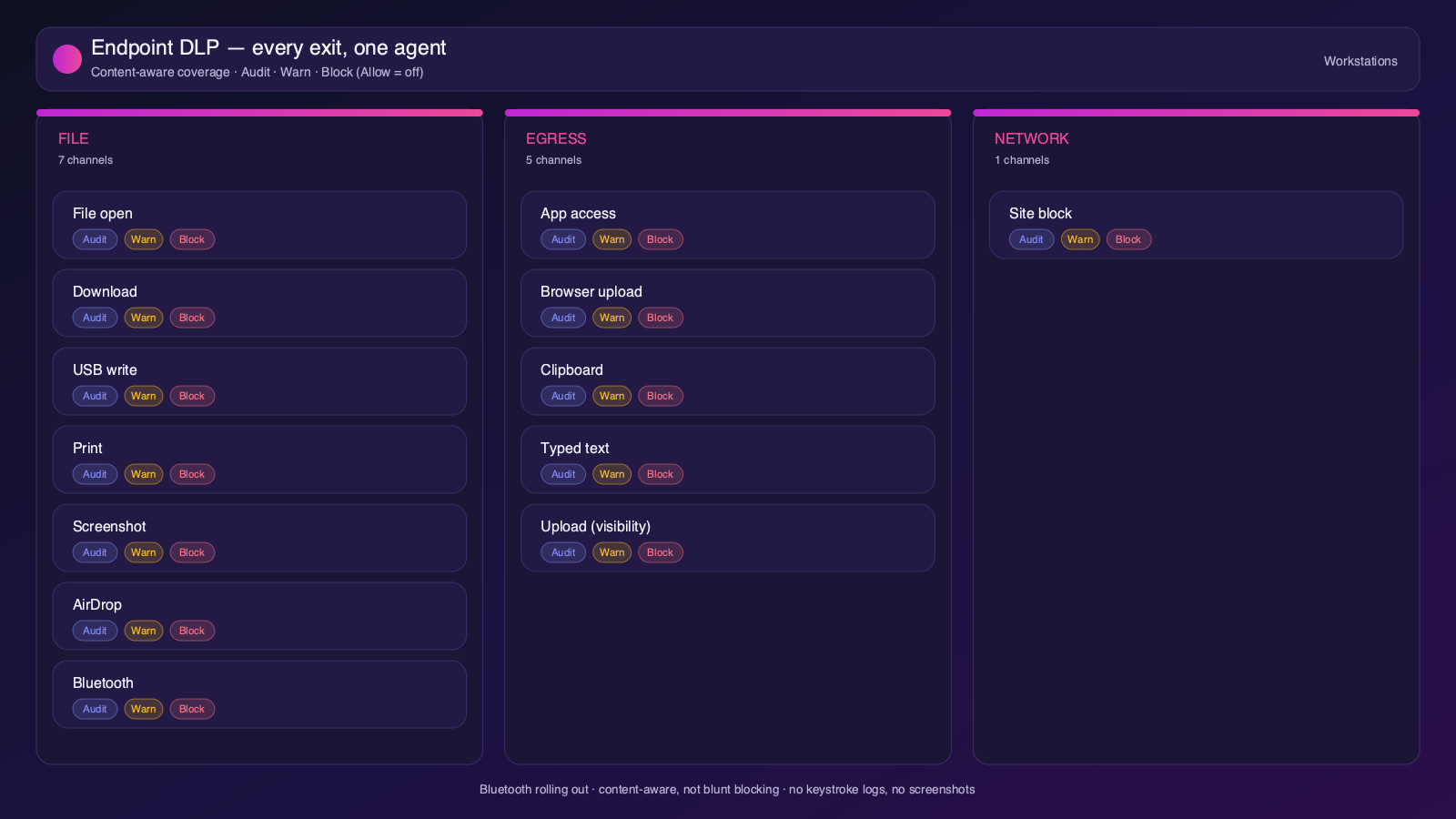
Strac endpoint DLP controlling Salesforce data on Mac and Windows with block, warn, allow, and audit modes
Content-aware endpoint DLP: block, warn, allow, or audit on Mac and Windows.

6. One platform, every surface

Salesforce is one of 50+ places Strac protects. The same engine covers SaaS, cloud, GenAI, MCP, browser, and endpoint, so your Salesforce data stays protected everywhere it flows, not just at rest. That breadth, plus remediation that actually fixes exposure, is why teams consolidate on Strac instead of stacking point tools.

Strac integrations across 50+ SaaS, cloud, endpoint, browser, and AI connectors
50+ integrations across SaaS, cloud, databases, endpoints, browsers, and AI.

🌶️ Frequently asked: Salesforce security

Is Salesforce secure?

Salesforce provides strong platform security, but most Salesforce data risk comes from configuration and oversharing: broad profiles and permission sets, public report/dashboard links, external and guest access, and stale integrations. Salesforce also does not scan the actual sensitive data inside records and attachments. Hardening access plus adding DSPM and DLP (like Strac) to discover and remediate sensitive data closes the gap.

Is Salesforce secure for sensitive customer data?

It can be, with least-privilege profiles, field-level security, tight sharing rules, and continuous data discovery. The risk is PII, PCI, or PHI sitting in records, attachments, or exportable reports that are overshared. Strac continuously scans Salesforce for sensitive data, flags overshared or public items, and automatically redacts, removes external access, or quarantines them.

Does Salesforce have DLP?

Salesforce offers Shield and event monitoring, but not full content-aware DLP with automatic remediation. Strac adds agentless discovery across records and attachments, in-place redaction and masking, removal of public links and external access, and the same protection beyond Salesforce, across browsers, endpoints, and AI agents.

What are Salesforce security best practices?

Enforce least-privilege profiles and permission sets with MFA, audit object and field-level security and sharing rules, control public links and report exports, remove dormant users and stale integrations, continuously discover and classify sensitive data, and remediate exposure automatically. The policies above cover each.

How does Strac secure Salesforce?

Strac connects to Salesforce agentlessly, runs DSPM discovery across records and attachments, and remediates exposure (redact, mask, remove external access, quarantine, label). It extends the same protection to AI agents via MCP DLP, to the browser, and to Mac and Windows endpoints.