Calendar Icon White
August 30, 2026
Clock Icon
5
 min read

Is QuickBooks HIPAA Compliant?

Is QuickBooks HIPAA compliant? No — Intuit does not sign a BAA for QuickBooks, so it is not HIPAA compliant. See BAA status, where PHI ends up, the AI/MCP gap, and how Strac protects it.

Is QuickBooks HIPAA Compliant?
ChatGPT
Perplexity
Grok
Google AI
Claude
Summarize and analyze this article with:

TL;DR

  • Is QuickBooks HIPAA compliant? No — QuickBooks does not sign a BAA, so PHI does not belong in it at all.
  • QuickBooks routinely touches PHI in a healthcare context — the moment a covered entity uses it, patient data is in scope.
  • The newest risk is AI over MCP: QuickBooks now exposes an official MCP server and AI features that can pull that data into an LLM with no BAA behind it.
  • A signed BAA (where one exists) covers the app’s core workflow — not the AI/MCP layer, integrations, or data leaving its boundary.
  • Strac keeps PHI safe either way — detecting and redacting it on the MCP path, in the browser, and on the endpoint, and finding PHI already stored at rest.

✨ Is QuickBooks HIPAA Compliant? The Direct Answer

No. Intuit does not sign a BAA for any QuickBooks product, and its own terms disclaim HIPAA readiness — so QuickBooks cannot be used to store protected health information. Its MCP server and AI agents make an accidental leak worse, not better. HIPAA compliance is never automatic — it depends on a signed Business Associate Agreement with the vendor plus how you configure and use the tool. Below is exactly where QuickBooks stands, where PHI ends up, the AI/MCP gap most teams miss, and how to close it. Verified August 2026.
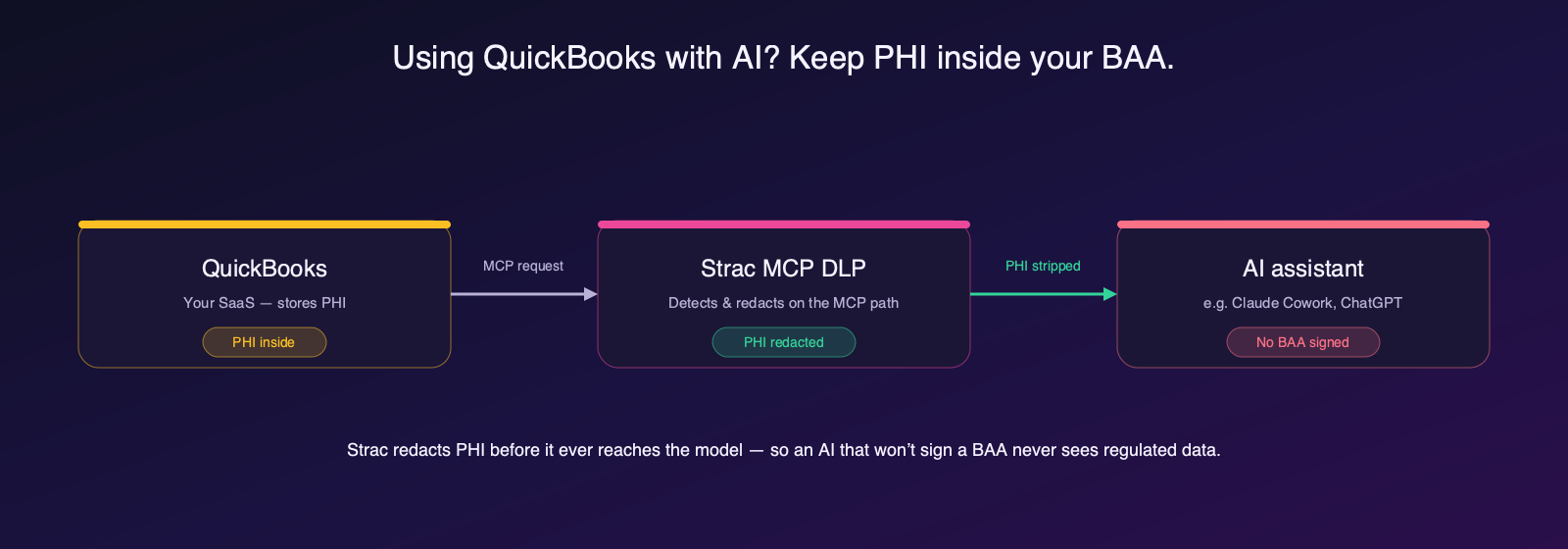
Strac MCP DLP redacts PHI from QuickBooks before it reaches an AI assistant that has not signed a BAA
Connect QuickBooks to an AI assistant over MCP and PHI can leave your BAA. Strac MCP DLP redacts it on the path.

Does QuickBooks Sign a BAA?

Intuit will not sign a BAA with covered entities or business associates on any tier — QuickBooks Online or Desktop. Intuit states that QuickBooks Online “is not compliant with the HIPAA standards for privacy,” and the Desktop EULA disclaims that any of the software is “HIPAA-ready or HIPAA-compliant.” Permitted use is limited to non-health financial data.

Product / surfacePHI status
✅ Non-health financial recordsNames, dates, and payment amounts with no health context
❌ QuickBooks OnlineNot HIPAA compliant; no BAA
❌ QuickBooks DesktopEULA disclaims HIPAA readiness
❌ Any field, memo, or attachmentPHI is an unauthorized disclosure the moment it is entered

Source: HIPAA Journal: QuickBooks. Vendor terms change — reconfirm your plan’s eligibility in writing before sending PHI.

Where PHI Ends Up in QuickBooks

Even teams that never intend to handle PHI accumulate it in QuickBooks. The common places it lands:

  • Patient invoices tying a name to a service rendered (line items like “psychotherapy session” that imply a diagnosis)
  • Superbills, statements, and EOBs carrying patient name, address, and DOB
  • Memo fields and attachments with clinical detail, insurance IDs, or dates of service
  • Customer records mapping an individual to a healthcare provider

✨ The New Risk: QuickBooks + AI Agents via MCP

Intuit ships an official MCP server (intuit/quickbooks-online-mcp-server) that exposes customer lookup, invoice creation, and financial reporting to Claude, Cursor, and any MCP client, and Intuit Assist plus a fleet of agentic AI agents (from late 2025) read and categorize transaction data — pulling any billing PHI into an LLM.

Because Intuit refuses to sign a BAA, a single patient-name-plus-service invoice is already an unauthorized disclosure — and the MCP server and AI agents can pull that billing data into an LLM with no BAA in the chain. This is the leak path traditional HIPAA controls were never designed to see: the data does not breach outward, it is pulled inward by an AI agent on a legitimate, authenticated tool call. Read more on MCP data loss prevention and MCP DLP.
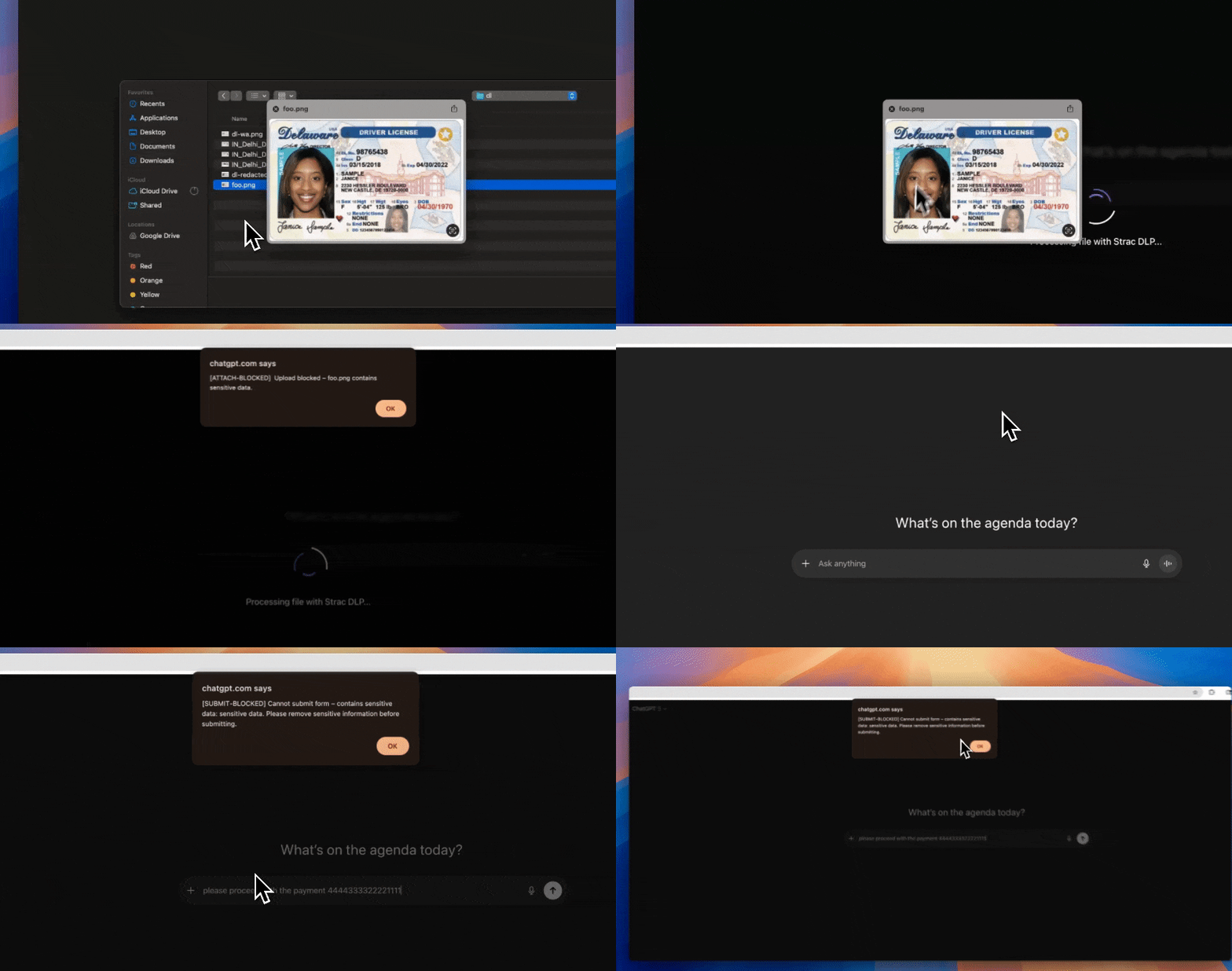
Strac browser and GenAI DLP redacting sensitive data before it reaches an AI model
Strac inspects and redacts sensitive data in real time as it moves toward an AI tool.

🎥 Why a Signed BAA Still Leaves a Gap

A BAA is a contract — it makes the vendor liable for the data it holds. It does not inspect your data, and it does not follow PHI into the AI features, integrations, or exports that sit outside its scope. Whether or not QuickBooks signs one, three gaps remain: PHI a user pastes or uploads where it should not go; PHI an AI agent pulls out over MCP; and PHI already sitting in QuickBooks that no one has found. Closing them needs data-layer DLP, not just paperwork.

Strac detects and redacts PII/PHI in real time across the browser and GenAI tools.

✨ How Strac Protects PHI in QuickBooks

Because PHI should never be in QuickBooks in the first place, Strac works on both ends — stopping PHI from being entered and finding any that is already there:

  • MCP DLP: Strac inspects every MCP tool call to and from QuickBooks and redacts PHI before it reaches Claude, ChatGPT, or any agent — so an AI assistant with no BAA never sees a patient identifier.
  • Browser / GenAI DLP: Strac’s browser extension detects PHI as it is typed, pasted, or uploaded into QuickBooks or a GenAI tool and blocks, warns, or redacts it in real time.
  • Endpoint DLP: When PHI is exported, downloaded, or copied from QuickBooks to a device, Strac’s Mac and Windows agent enforces at the file, USB, print, and upload channels.
  • DSPM: Strac scans QuickBooks and connected stores to find PHI already sitting at rest, classifies it, and flags oversharing so you can remediate it.
Strac automatically redacting sensitive data in real time
Strac redacts sensitive data automatically — the same detection and redaction engine runs across every surface.

✨ Remediation in Action: Redact, Block, Warn, Revoke

Detection alone does not stop a HIPAA violation — remediation does. Strac does not just alert; it acts the moment PHI appears:

  • Redact: strip PHI from the message, ticket, record, or MCP response and vault the original for authorized access.
  • Block: stop a PHI-bearing prompt, upload, or export before it leaves — in the browser and on the endpoint.
  • Warn & coach: tell the employee in the moment why an action was risky, turning policy into training.
  • Revoke access: when PHI is found oversharing in a connected store, Strac removes public and external access so no agent or person can reach it.
Strac warning and blocking a sensitive file upload in real time
Strac warns and blocks sensitive uploads in real time, then coaches the user — content-aware, not a blunt lock.

✨ One Platform Across Every Surface QuickBooks Touches

PHI does not stay inside QuickBooks. It flows into email, chat, cloud storage, GenAI tools, and AI agents — so point fixes leave gaps. Strac is one agentless-plus-endpoint platform covering SaaS, cloud, browser, GenAI, endpoint, and MCP under a single policy and classifier, live in minutes.
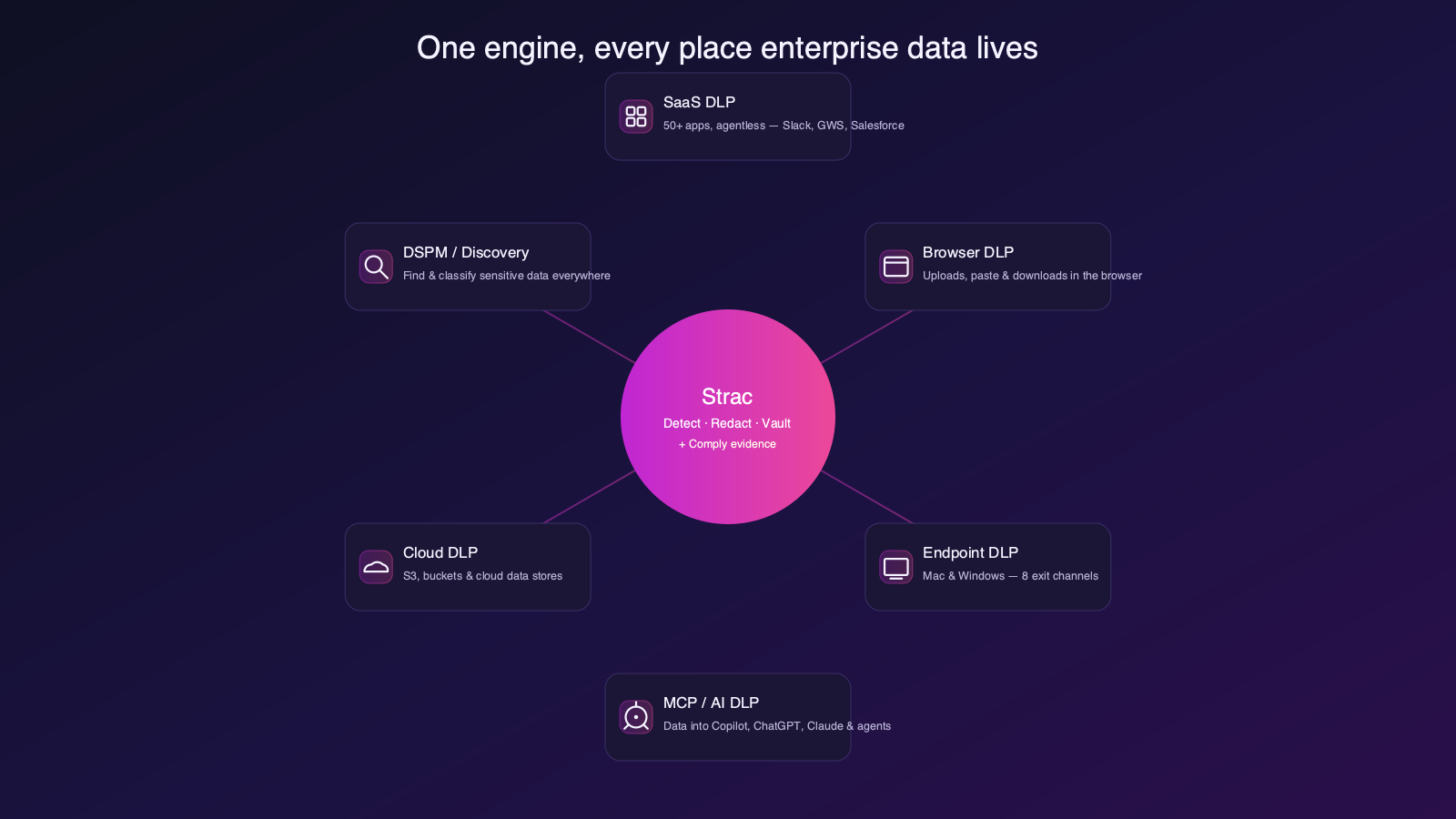
Strac data-security coverage across SaaS, cloud, endpoint, browser, GenAI and MCP
Strac covers SaaS, cloud, browser, endpoint, GenAI, and MCP from one platform — one policy for every place PHI moves.

A Practical QuickBooks HIPAA Deployment Checklist

  1. Contract: Do not enter PHI into QuickBooks — Intuit/Shopify will not sign a BAA. Treat any PHI as an incident.
  2. Scope the AI/MCP layer: inventory whether QuickBooks’s MCP server and AI features are enabled, and confirm they are excluded from — or explicitly added to — your coverage.
  3. Deploy Strac MCP DLP: put redaction in front of every QuickBooks MCP tool call so no agent receives raw PHI.
  4. Deploy Browser + Endpoint DLP: block and redact PHI at entry and export across the web app and devices.
  5. Run DSPM: scan QuickBooks for PHI already stored, classify it, and remediate oversharing.
  6. Prove it: keep the audit log of every detection and remediation as HIPAA evidence.

QuickBooks HIPAA Compliance: Quick Reference

QuestionAnswer
Does QuickBooks sign a BAA?No — no BAA on any plan
Is the AI / MCP layer covered?No — outside the BAA; the main leak path
Can PHI be used safely?Only by keeping PHI out and monitoring for it
What closes the gap?Strac MCP + Browser + Endpoint DLP and DSPM

🌶️ Spicy FAQs for Is QuickBooks HIPAA Compliant

Is QuickBooks HIPAA compliant out of the box?

No tool is. Here it is worse — there is no BAA to sign, so PHI should never be entered.

Does QuickBooks’s BAA cover its AI and MCP features?

No. That is the single most common misread — the AI/MCP layer sits outside the core BAA and is the most likely place PHI leaks to a model.

Can an AI agent pull PHI out of QuickBooks?

Yes. QuickBooks’s official MCP server lets an agent read data on an authenticated tool call. Strac redacts PHI on that path before the agent sees it.

Is a BAA enough for HIPAA?

No. A BAA assigns liability; it does not inspect your data or follow PHI into AI, integrations, or exports. You still need data-layer DLP.

How does Strac help if we already use QuickBooks?

Strac layers on without slowing QuickBooks down — redacting PHI at the MCP layer, blocking it in the browser and on the endpoint, and finding PHI already stored via DSPM.

The Bottom Line

QuickBooks will not sign a BAA, so PHI does not belong in it — but PHI still ends up there, and its MCP server and AI agents can pull it into an LLM. Strac closes the gap on every surface — redacting PHI at the MCP layer, blocking it in the browser and on the endpoint, and finding what is already stored. Book a demo to see it on QuickBooks.

Is QuickBooks HIPAA compliant in 2026?
Can I use QuickBooks with Claude or ChatGPT and stay HIPAA compliant?
Does QuickBooks store PHI?
Discover & Protect Data on SaaS, AI, MCP, Endpoints & Cloud
Strac provides end-to-end data loss prevention for all SaaS and Cloud apps. Integrate in under 10 minutes and experience the benefits of live DLP scanning, live redaction, and a fortified SaaS environment.
Trusted by enterprises
Data Security + Compliance Automation

Latest articles

Browse all

Get Your Datasheet

Thank you! Your submission has been received!
Oops! Something went wrong while submitting the form.
Close Icon