October 1, 2026

5
min read
Is Office 365 HIPAA Compliant?
Learn how Strac DLP shields Office 365 from breaches and leaks
In the healthcare industry, where patient confidentiality and data security are paramount, the Health Insurance Portability and Accountability Act (HIPAA) sets the standard for protecting sensitive patient information.
Office 365 is a suite of cloud-based software, comprising productivity and collaboration services owned by Microsoft. As standard, Office 365 does not meet HIPAA compliance requirements, for the safe handling of Protected Health Information.
 |
Healthcare organizations must ensure that Office 365 settings are correctly configured to meet HIPAA compliance. Microsoft and Office 365 offer various security features designed to protect sensitive data.
To comply with HIPAA, business associates must have a Business Associate Agreement in place with all organizations that are classified as HIPAA-covered entities.
Yes — Microsoft is willing to sign a BAA with healthcare organizations that covers the use of Office 365. This agreement is crucial as it outlines Microsoft's responsibility in managing and protecting PHI, and enables Office 365 to be used in a HIPAA compliant way.
However, simply signing the BAA does not ensure compliance. Healthcare organizations must also ensure their use of Office 365 remains compliant. To remain compliant, healthcare organizations must configure Office 365’s settings, including applying strict access controls and sharing permissions. Employees must also be trained on data security and proper handling of sensitive data to prevent data leaks.
Yes — it’s possible to store Protected Health Information in Office 365, but only when certain requirements are met.
Healthcare organizations using Office 365 to handle and store Protected Health Information must configure their Office 365 settings. This includes enabling security features designed to protect against unauthorized access and accidental data leaks.
Furthermore, healthcare organizations must be on a Office 365 Enterprise plan and hold a signed BAA with Microsoft. Without meeting these requirements and ensuring Office 365 settings are configured correctly, you risk non-compliance with HIPAA.
Improper handling of sensitive data and protected information can open your organization up to significant regulatory and litigation risks.
 |
Considering Office 365’s wide usage and range of cloud-based services, without implementing additional security mechanisms, there will always be a risk of data leaks.
While Office 365 does offer extensive security features to protect against unauthorized access and data breaches, the service has inherent vulnerabilities.
The potential for PHI leakage exists due to various factors, including user error, insufficient access controls, or even malicious insider threats. Your employees play a crucial role in ensuring internal data security when handling sensitive patient data.
The persistent threat of data leaks leads many healthcare organizations to adopt additional security mechanisms that not only ensure compliance, but effectively prevent data leaks.
Strac Office 365 DLP is a comprehensive data leak prevention tool that adds an additional layer of security to Office 365.
 |
Strac DLP ensures your use of Office 365 remains compliant, efficient and secure at all times. Here's how:
To learn how Strac adds an extra layer of security and helps organizations comply with HIPAA regulations, see our guide to HIPAA Compliance.
Book a free 30-minute demo for more.
Related reading:
Office 365 spans mail, files, and Teams across your tenant, which means it routinely holds PHI in email, documents, and chats — PHI covered by your BAA. The newest HIPAA risk isn’t Office 365 itself; it’s what happens when someone connects Office 365 to an AI assistant over the Model Context Protocol (MCP). Many teams now use Claude Cowork, and Anthropic does not sign a BAA for it. The moment an agent queries Office 365 over MCP, that PHI can flow straight to a model sitting outside your BAA — a reportable exposure, even though the underlying app is configured correctly.
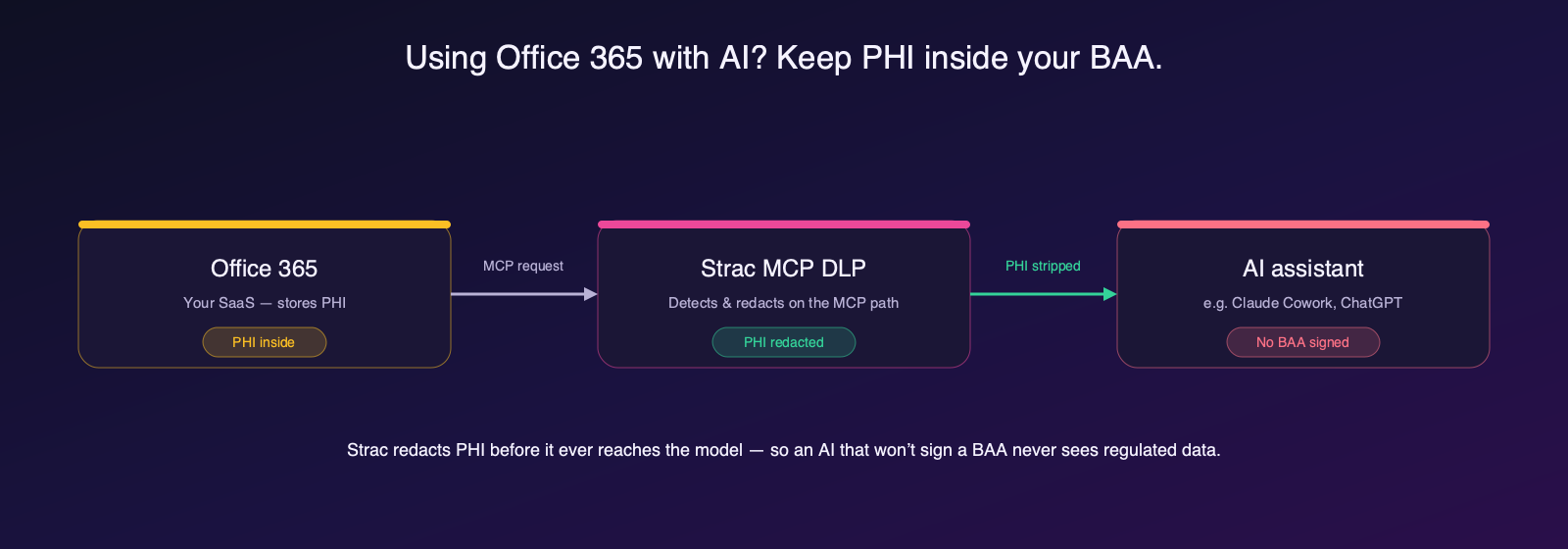
Strac MCP DLP closes that gap. It sits on the MCP path between Office 365 and the AI, detects PHI in every request and response, and redacts, masks, or blocks it before it reaches the assistant — so an AI that won’t sign a BAA never sees regulated data. Every action is audit-logged for HIPAA. See Office 365 MCP server for how the connection works.
“Don’t just alert on problems, fix them.”
Scott Roberts, Chief Information Security Officer, UiPath



.webp)




.avif)


Customers include

.gif)


.webp)