October 1, 2026

7
min read
Email DLP Solutions: A Complete Guide to Preventing Data Loss in Email
Learn what email DLP solutions are, how they work, key features to evaluate, and how modern SaaS teams prevent sensitive data leaks in email.
Email remains the most common; and most frequently underestimated; channel for sensitive data leakage. While organizations have pivoted aggressively toward SaaS platforms, cloud-native infrastructure, and AI-driven workflows, email continues to serve as the primary intake and distribution layer for the world’s sensitive information.
Every customer inquiry, internal request, financial invoice, legal attachment, and troubleshooting screenshot often begins its lifecycle within an email thread. What has changed over the last decade is not the protocol of email itself, but what happens after a message is sent or received. Modern email flows no longer terminate in a static inbox. Messages are automatically forwarded, parsed by LLMs, indexed by search engines, and ingested into support desks, CRMs, ticketing systems, and analytics pipelines.
In this hyper-connected environment, traditional perimeter security is insufficient. This guide provides a comprehensive, modern exploration of email Data Loss Prevention (DLP), covering technical architectures, the shift from "alerts" to "remediation," and how to protect data as it moves from the inbox into the broader SaaS ecosystem.
Email Data Loss Prevention (DLP) refers to a suite of technologies and processes designed to identify, monitor, and automatically protect sensitive information as it is transmitted via email.
Historically, email security focused on inbound threats—stopping hackers from getting in (phishing, malware, spam). Email DLP focuses on outbound and internal hygiene stopping sensitive data from getting out or being stored inappropriately.
The Modern Scope of Email DLP
In the contemporary enterprise, email DLP is no longer just about the "Send" button. It must encompass:
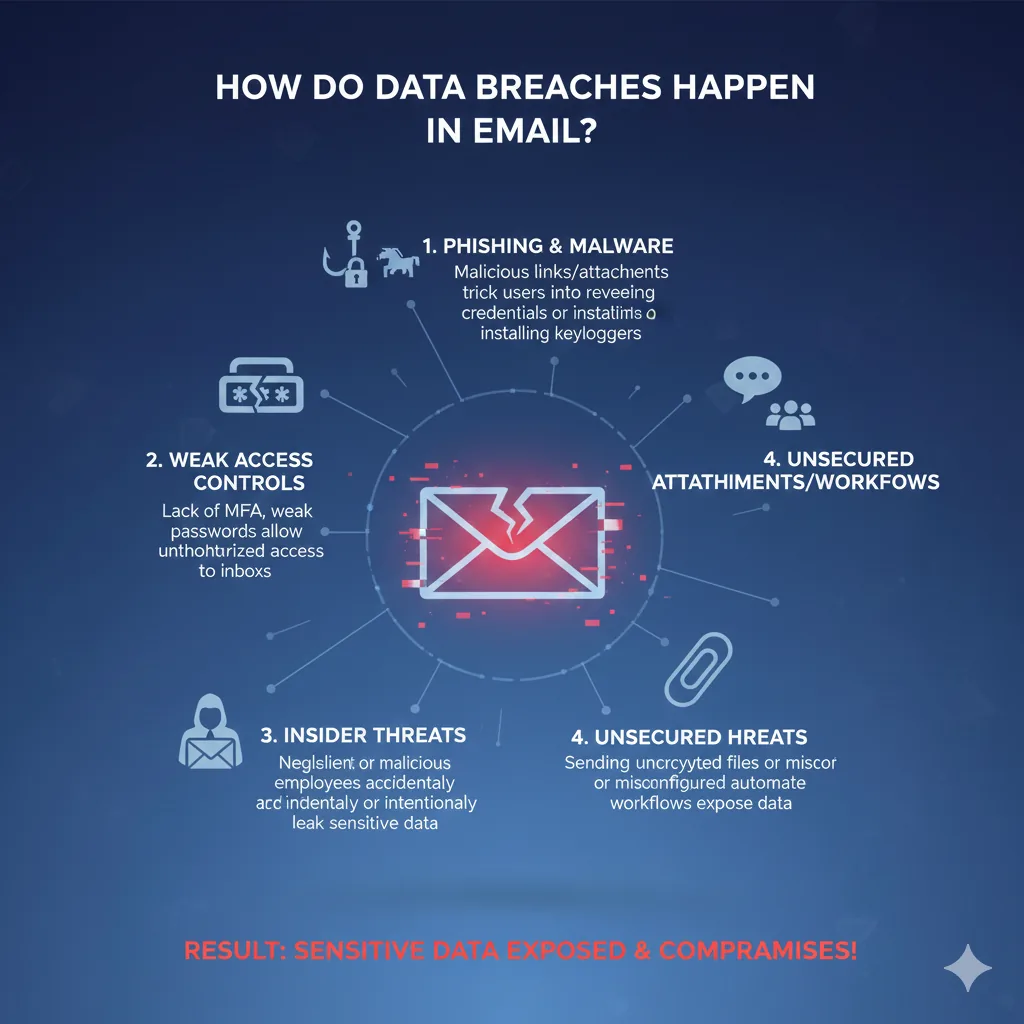
The "human element" is the greatest variable in cybersecurity. Even the most well-intentioned employee can accidentally CC the wrong person or attach a spreadsheet containing 10,000 customer records instead of a project summary.
When sensitive data enters a company via email, it rarely stays there. It becomes persistent data.
Without an email DLP solution, that one piece of PII now exists in four different cloud environments, significantly increasing the organization’s "blast radius" in the event of a breach.
Regulatory bodies have moved past "best efforts." Under frameworks like GDPR, HIPAA, and PCI DSS, an accidental email leak is a reportable breach.
Understanding the mechanics of DLP is essential for choosing a tool that doesn't break your company’s workflow.

The "intelligence" of a DLP tool determines its value.
What happens when a violation is found?
👉 Read our blog on What is Data Loss Prevention for Email
Many legacy tools (often bundled with large security suites) are "checkbox" solutions. They exist to satisfy auditors but fail in practice.
Traditional DLP is notorious for "Alert Fatigue." If a tool flags every internal ID number as a Social Security Number, security teams eventually stop checking the alerts. When a real leak happens, it’s buried under a mountain of noise.
Legacy tools see the email, but they don't see the ecosystem. If a sensitive email is sent to an "Email-to-Salesforce" address, the legacy DLP might scan the email but has no power to redact the data once it reaches Salesforce. This leaves "ghost data" scattered across your SaaS stack.
When evaluating vendors, use this checklist to ensure you are getting a 10/10 value solution:
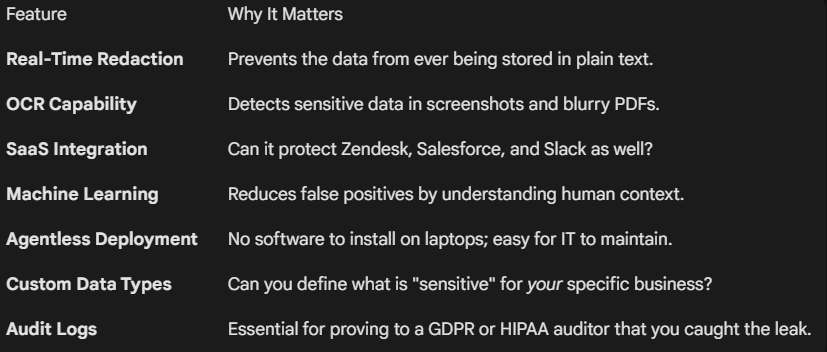
Compliance isn't just about preventing a fine; it’s about maintaining trust. Here is how Email DLP maps to major regulations:
Under GDPR, European citizens have the "Right to Erasure." If sensitive data is buried in 500 different email threads, complying with an erasure request is impossible. DLP prevents that data from proliferating in the first place, making compliance manageable.
👉 Read our blog on GDPR for SaaS
For healthcare and HealthTech, email is the primary way patients send insurance cards or lab results. A modern DLP tool can automatically detect PHI and move it to a secure, encrypted vault, ensuring the organization stays within HIPAA’s "Technical Safeguards."
Credit card numbers should never be stored in plain text in an email inbox or a support ticket. Modern DLP identifies the 16-digit PAN (Primary Account Number) and redacts it instantly, keeping your email system "out of scope" for PCI audits.
The most dangerous data leaks happen where "Email meets Automation."
Consider a fintech company. A customer emails a screenshot of their bank statement to support@fintech.com.
If you only have "Inbox DLP," the data is caught at Step 1, but if the redaction isn't permanent, Step 2-4 still contain the sensitive data. Modern Email DLP must be "Cross-Platform." It needs to redact the data at the source so that every downstream system receives the "cleansed" version.
A successful DLP rollout follows a "Crawl, Walk, Run" approach.
Run your DLP in "Audit Mode" for 30 days. Don't block anything. Just observe.
Define your policies.
Turn on active redaction and blocking. At this stage, your security team should only be dealing with "High-Risk" exceptions, while the software handles the 99% of routine data hygiene automatically.
While legacy players focus on the "Perimeter," Strac focuses on the Data. Strac’s approach is built for the SaaS-heavy environment of 2024 and beyond.
To find the right fit, ask potential vendors these three "Hard Questions":
Email is not going away. It is the "glue" of the modern enterprise. However, as the volume of data grows and the regulatory environment tightens, the old way of "hoping for the best" is a recipe for disaster.
Modern email DLP solutions are no longer about "stopping" people from working. They are about enabling people to work safely. By shifting from a culture of "Security Alerts" to a culture of "Automated Redaction," organizations can embrace the speed of email and SaaS without the paralyzing risk of data loss.
Strac is the best email DLP for Google Workspace teams because it goes beyond Gmail's native rules: contextual detection (Luhn-checked cards, contextual SSNs, 48+ secret patterns), OCR on attachments and images, and remediation that can redact or quarantine rather than only block. It deploys via API in minutes — see the Gmail DLP guide for setup.
Law firms need client-confidentiality enforcement without blocking legitimate privileged correspondence. Strac detects client PII and financial data in outbound mail and attachments, warns the sender pre-send, and logs every event as defensible evidence — the balance between protection and practice reality.
Remote teams send from everywhere, so gateway-only email DLP misses browser-based sending. Strac pairs email scanning with browser-level protection, covering webmail and SaaS sends on any network — see the best browser DLP guide.
Comparing email-first DLP vendors? See Cyberhaven vs Proofpoint.
Encryption is one layer — see also how to encrypt email in Outlook & Office 365 and how to send encrypted email in Gmail.
Sending transactional email? See SendGrid DLP — redact PII/PHI/PCI before it leaves your app.
Sending PHI in transactional email? See Is SendGrid HIPAA Compliant? — the answer is no, and here is the compliant fix.
An email DLP solution is a data loss prevention system designed to detect, control, and actively prevent sensitive data from leaking through email across its full lifecycle; not just at send or receive.
Modern email DLP solutions go beyond basic detection by enabling real enforcement, including:
The real difference is not visibility versus no visibility; it is alerts versus actual risk reduction.
Email security and email DLP address two fundamentally different risk categories, and conflating them often creates blind spots.
Email security is designed to stop external threats such as phishing, malware, and spoofed emails before they reach users. Email DLP, on the other hand, focuses on preventing accidental or inappropriate exposure of sensitive data by trusted users and automated workflows after an email is delivered. In practice, email security protects people; email DLP protects data.
Yes. Modern email DLP solutions integrate directly with Gmail and Microsoft Outlook using APIs, rather than relying on gateways or endpoint agents.
API-based integration allows email DLP to inspect content and enforce policies without disrupting user workflows. More importantly, it enables protection beyond the inbox; such as when email data is ingested into support tools, CRMs, or other SaaS platforms; which is where most real exposure occurs.
In modern workflows, sensitive data is just as likely to appear in an attachment as in the email body itself. Advanced email DLP solutions inspect attachment content directly rather than relying on filenames or metadata.
This typically includes:
Without attachment inspection, email DLP coverage is incomplete by default.
Email DLP is not explicitly mandated by GDPR or HIPAA, but in practice it is often necessary to meet enforcement and audit expectations.
Both regulations emphasize data minimization, access control, and protection of sensitive information. During audits, regulators increasingly expect evidence of real enforcement, such as redaction or blocking, rather than policies or alert logs alone. Email DLP helps operationalize these requirements in one of the most common data entry points: email.
Deployment timelines vary significantly based on architecture. Legacy email DLP solutions that rely on gateways, endpoint agents, or extensive rule tuning can take weeks or months to deploy effectively.
Modern, agentless, API-based email DLP solutions can often be deployed in days. Faster deployment matters because email-based data leaks are continuous; every delay increases the window of exposure.
{"@context": "https://schema.org", "@type": "FAQPage", "mainEntity": [{"@type": "Question", "name": "What is an email DLP solution?", "acceptedAnswer": {"@type": "Answer", "text": "An email DLP solution is a data loss prevention system designed to detect, control, and actively prevent sensitive data from leaking through email across its full lifecycle; not just at send or receive."}}, {"@type": "Question", "name": "How is email DLP different from email security?", "acceptedAnswer": {"@type": "Answer", "text": "Email security and email DLP address two fundamentally different risk categories, and conflating them often creates blind spots."}}, {"@type": "Question", "name": "Can email DLP work with Gmail and Outlook?", "acceptedAnswer": {"@type": "Answer", "text": "Yes. Modern email DLP solutions integrate directly with Gmail and Microsoft Outlook using APIs, rather than relying on gateways or endpoint agents."}}, {"@type": "Question", "name": "Does email DLP cover attachments?", "acceptedAnswer": {"@type": "Answer", "text": "In modern workflows, sensitive data is just as likely to appear in an attachment as in the email body itself. Advanced email DLP solutions inspect attachment content directly rather than relying on filenames or metadata."}}, {"@type": "Question", "name": "Is email DLP required for GDPR or HIPAA compliance?", "acceptedAnswer": {"@type": "Answer", "text": "Email DLP is not explicitly mandated by GDPR or HIPAA, but in practice it is often necessary to meet enforcement and audit expectations."}}, {"@type": "Question", "name": "How long does it take to deploy an email DLP solution?", "acceptedAnswer": {"@type": "Answer", "text": "Deployment timelines vary significantly based on architecture. Legacy email DLP solutions that rely on gateways, endpoint agents, or extensive rule tuning can take weeks or months to deploy effectively."}}]}
.avif)


.gif)


.webp)